Secure Your Cloud Environment with
Azure Active Directory
Notes:
• If you experience audio issues during the webinar, you can dial in through telephone details provided to you in
your registration confirmation email.
• Please feel free to post questions in the questions dialog & we will try to answer as many as we can at the end.
• Recording of this session will be shared in next 24-48 hours.
• You can also write to us at marketing@winwire.com for any clarifications or information.
1. Azure AD Overview
Agenda
2. Azure AD Identity Protection
3. Azure AD Conditional Access
4. Q & A
Azure AD Overview
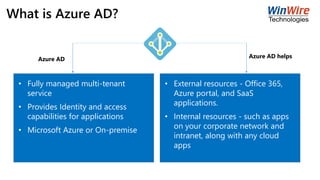
What is Azure AD?
• Fully managed multi-tenant
service
• Provides Identity and access
capabilities for applications
• Microsoft Azure or On-premise
• External resources - Office 365,
Azure portal, and SaaS
applications.
• Internal resources - such as apps
on your corporate network and
intranet, along with any cloud
apps
Azure AD Azure AD helps
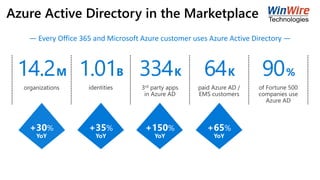
Azure Active Directory in the Marketplace
Access ReviewsConditional
Access
Multi-Factor
Authentication
Addition of
custom cloud
apps
Remote Access
to on-premises
apps
Privileged
Identity
Management
Dynamic Groups
Identity
ProtectionAzure AD DS
Office 365 App
Launcher
Group-Based
Licensing
Access
Panel/MyApps
Azure AD
Connect
Connect Health
Provisioning-
DeprovisioningAzure AD Join
Self-Service
capabilities
MDM-auto
enrollment /
Enterprise State
Roaming
Security
Reporting
Governance
HR App
Integration
B2B
collaboration
Azure AD
B2CSSO to SaaS
Microsoft
Authenticator -
Password-less
Access
334K 90%64K1.01B14.2M
+30%
YoY
+35%
YoY
+65%
YoY
+150%
YoY
— Every Office 365 and Microsoft Azure customer uses Azure Active Directory —
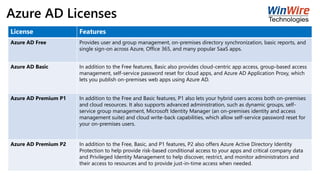
Azure AD Licenses
License Features
Azure AD Free Provides user and group management, on-premises directory synchronization, basic reports, and
single sign-on across Azure, Office 365, and many popular SaaS apps.
Azure AD Basic In addition to the Free features, Basic also provides cloud-centric app access, group-based access
management, self-service password reset for cloud apps, and Azure AD Application Proxy, which
lets you publish on-premises web apps using Azure AD.
Azure AD Premium P1 In addition to the Free and Basic features, P1 also lets your hybrid users access both on-premises
and cloud resources. It also supports advanced administration, such as dynamic groups, self-
service group management, Microsoft Identity Manager (an on-premises identity and access
management suite) and cloud write-back capabilities, which allow self-service password reset for
your on-premises users.
Azure AD Premium P2 In addition to the Free, Basic, and P1 features, P2 also offers Azure Active Directory Identity
Protection to help provide risk-based conditional access to your apps and critical company data
and Privileged Identity Management to help discover, restrict, and monitor administrators and
their access to resources and to provide just-in-time access when needed.
Azure AD Identity Protection
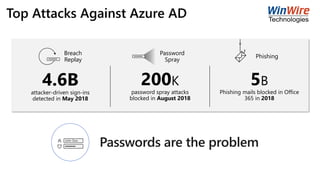
Top Attacks Against Azure AD
lllllllll
lllllllll
Phishing
Password
Spray
Breach
Replay
200K
password spray attacks
blocked in August 2018
5B
Phishing mails blocked in Office
365 in 2018
4.6Battacker-driven sign-ins
detected in May 2018
John Doe
lllllll
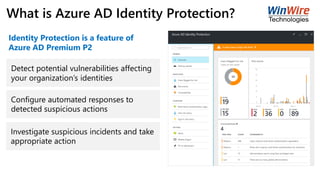
What is Azure AD Identity Protection?
Detect potential vulnerabilities affecting
your organization’s identities
Configure automated responses to
detected suspicious actions
Investigate suspicious incidents and take
appropriate action
Identity Protection is a feature of
Azure AD Premium P2
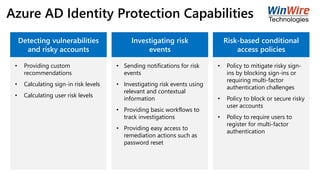
Azure AD Identity Protection Capabilities
Detecting vulnerabilities
and risky accounts
• Providing custom
recommendations
• Calculating sign-in risk levels
• Calculating user risk levels
Investigating risk
events
• Sending notifications for risk
events
• Investigating risk events using
relevant and contextual
information
• Providing basic workflows to
track investigations
• Providing easy access to
remediation actions such as
password reset
Risk-based conditional
access policies
• Policy to mitigate risky sign-
ins by blocking sign-ins or
requiring multi-factor
authentication challenges
• Policy to block or secure risky
user accounts
• Policy to require users to
register for multi-factor
authentication
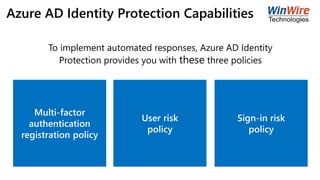
Azure AD Identity Protection Capabilities
Multi-factor
authentication
registration policy
User risk
policy
Sign-in risk
policy
To implement automated responses, Azure AD Identity
Protection provides you with these three policies
Azure AD Identity Protection
Demo
Azure AD Conditional Access
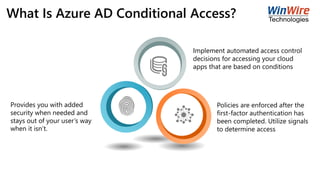
What Is Azure AD Conditional Access?
Implement automated access control
decisions for accessing your cloud
apps that are based on conditions
Policies are enforced after the
first-factor authentication has
been completed. Utilize signals
to determine access
Provides you with added
security when needed and
stays out of your user’s way
when it isn’t.
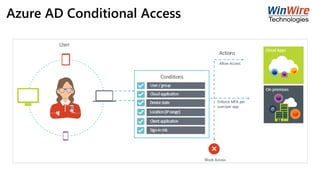
Azure AD Conditional Access
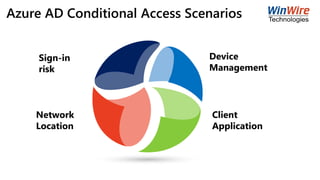
Azure AD Conditional Access Scenarios
Sign-in
risk
Network
Location
Device
Management
Client
Application
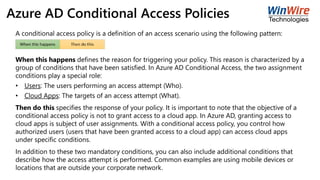
Azure AD Conditional Access Policies
A conditional access policy is a definition of an access scenario using the following pattern:
When this happens defines the reason for triggering your policy. This reason is characterized by a
group of conditions that have been satisfied. In Azure AD Conditional Access, the two assignment
conditions play a special role:
• Users: The users performing an access attempt (Who).
• Cloud Apps: The targets of an access attempt (What).
Then do this specifies the response of your policy. It is important to note that the objective of a
conditional access policy is not to grant access to a cloud app. In Azure AD, granting access to
cloud apps is subject of user assignments. With a conditional access policy, you control how
authorized users (users that have been granted access to a cloud app) can access cloud apps
under specific conditions.
In addition to these two mandatory conditions, you can also include additional conditions that
describe how the access attempt is performed. Common examples are using mobile devices or
locations that are outside your corporate network.
Azure AD Conditional Access
Demo
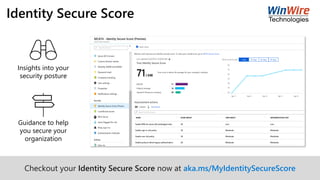
Identity Secure Score
Checkout your Identity Secure Score now at aka.ms/MyIdentitySecureScore
Insights into your
security posture
Guidance to help
you secure your
organization
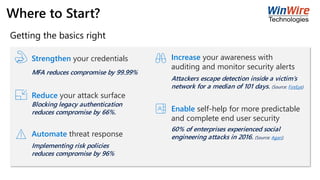
Where to Start?
Enable self-help for more predictable
and complete end user security
Increase your awareness with
auditing and monitor security alerts
Automate threat response
Reduce your attack surface
Strengthen your credentials
Blocking legacy authentication
reduces compromise by 66%.
Implementing risk policies
reduces compromise by 96%
Attackers escape detection inside a victim’s
network for a median of 101 days. (Source: FireEye)
60% of enterprises experienced social
engineering attacks in 2016. (Source: Agari)
MFA reduces compromise by 99.99%
Getting the basics right
About WinWire
WinWire Technologies
WinWire helps clients
gain competitive
advantage through
Innovative Software
Solutions
Four Consecutive Years
RANKED ON CRN FAST GROWTH 150 LIST
More than
100 CUSTOMERS IN ACROSS INDUSTRIES
12+ years
AND 7 GLOBAL OFFICES
450+
CONSULTANTS
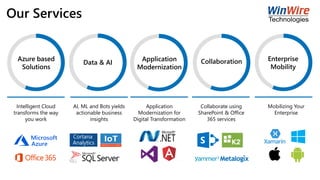
Azure based
Solutions
Data & AI
Application
Modernization
Collaboration Enterprise
Mobility
Intelligent Cloud
transforms the way
you work
AI, ML and Bots yields
actionable business
insights
Application
Modernization for
Digital Transformation
Collaborate using
SharePoint & Office
365 services
Mobilizing Your
Enterprise
Our Services
Q & A
• Website: www.winwire.com
• Email: marketing@winwire.com
• Blog: http://www.winwire.com/blog-winsights/
• Twitter: @winwire

Secure Your Cloud Environment with Azure Active Directory (AD)

  • 1.
    Secure Your CloudEnvironment with Azure Active Directory Notes: • If you experience audio issues during the webinar, you can dial in through telephone details provided to you in your registration confirmation email. • Please feel free to post questions in the questions dialog & we will try to answer as many as we can at the end. • Recording of this session will be shared in next 24-48 hours. • You can also write to us at marketing@winwire.com for any clarifications or information.
  • 2.
    1. Azure ADOverview Agenda 2. Azure AD Identity Protection 3. Azure AD Conditional Access 4. Q & A
  • 3.
  • 4.
    What is AzureAD? • Fully managed multi-tenant service • Provides Identity and access capabilities for applications • Microsoft Azure or On-premise • External resources - Office 365, Azure portal, and SaaS applications. • Internal resources - such as apps on your corporate network and intranet, along with any cloud apps Azure AD Azure AD helps
  • 5.
    Azure Active Directoryin the Marketplace Access ReviewsConditional Access Multi-Factor Authentication Addition of custom cloud apps Remote Access to on-premises apps Privileged Identity Management Dynamic Groups Identity ProtectionAzure AD DS Office 365 App Launcher Group-Based Licensing Access Panel/MyApps Azure AD Connect Connect Health Provisioning- DeprovisioningAzure AD Join Self-Service capabilities MDM-auto enrollment / Enterprise State Roaming Security Reporting Governance HR App Integration B2B collaboration Azure AD B2CSSO to SaaS Microsoft Authenticator - Password-less Access 334K 90%64K1.01B14.2M +30% YoY +35% YoY +65% YoY +150% YoY — Every Office 365 and Microsoft Azure customer uses Azure Active Directory —
  • 6.
    Azure AD Licenses LicenseFeatures Azure AD Free Provides user and group management, on-premises directory synchronization, basic reports, and single sign-on across Azure, Office 365, and many popular SaaS apps. Azure AD Basic In addition to the Free features, Basic also provides cloud-centric app access, group-based access management, self-service password reset for cloud apps, and Azure AD Application Proxy, which lets you publish on-premises web apps using Azure AD. Azure AD Premium P1 In addition to the Free and Basic features, P1 also lets your hybrid users access both on-premises and cloud resources. It also supports advanced administration, such as dynamic groups, self- service group management, Microsoft Identity Manager (an on-premises identity and access management suite) and cloud write-back capabilities, which allow self-service password reset for your on-premises users. Azure AD Premium P2 In addition to the Free, Basic, and P1 features, P2 also offers Azure Active Directory Identity Protection to help provide risk-based conditional access to your apps and critical company data and Privileged Identity Management to help discover, restrict, and monitor administrators and their access to resources and to provide just-in-time access when needed.
  • 7.
  • 8.
    Top Attacks AgainstAzure AD lllllllll lllllllll Phishing Password Spray Breach Replay 200K password spray attacks blocked in August 2018 5B Phishing mails blocked in Office 365 in 2018 4.6Battacker-driven sign-ins detected in May 2018 John Doe lllllll
  • 9.
    What is AzureAD Identity Protection? Detect potential vulnerabilities affecting your organization’s identities Configure automated responses to detected suspicious actions Investigate suspicious incidents and take appropriate action Identity Protection is a feature of Azure AD Premium P2
  • 10.
    Azure AD IdentityProtection Capabilities Detecting vulnerabilities and risky accounts • Providing custom recommendations • Calculating sign-in risk levels • Calculating user risk levels Investigating risk events • Sending notifications for risk events • Investigating risk events using relevant and contextual information • Providing basic workflows to track investigations • Providing easy access to remediation actions such as password reset Risk-based conditional access policies • Policy to mitigate risky sign- ins by blocking sign-ins or requiring multi-factor authentication challenges • Policy to block or secure risky user accounts • Policy to require users to register for multi-factor authentication
  • 11.
    Azure AD IdentityProtection Capabilities Multi-factor authentication registration policy User risk policy Sign-in risk policy To implement automated responses, Azure AD Identity Protection provides you with these three policies
  • 12.
    Azure AD IdentityProtection Demo
  • 13.
  • 14.
    What Is AzureAD Conditional Access? Implement automated access control decisions for accessing your cloud apps that are based on conditions Policies are enforced after the first-factor authentication has been completed. Utilize signals to determine access Provides you with added security when needed and stays out of your user’s way when it isn’t.
  • 15.
  • 16.
    Azure AD ConditionalAccess Scenarios Sign-in risk Network Location Device Management Client Application
  • 17.
    Azure AD ConditionalAccess Policies A conditional access policy is a definition of an access scenario using the following pattern: When this happens defines the reason for triggering your policy. This reason is characterized by a group of conditions that have been satisfied. In Azure AD Conditional Access, the two assignment conditions play a special role: • Users: The users performing an access attempt (Who). • Cloud Apps: The targets of an access attempt (What). Then do this specifies the response of your policy. It is important to note that the objective of a conditional access policy is not to grant access to a cloud app. In Azure AD, granting access to cloud apps is subject of user assignments. With a conditional access policy, you control how authorized users (users that have been granted access to a cloud app) can access cloud apps under specific conditions. In addition to these two mandatory conditions, you can also include additional conditions that describe how the access attempt is performed. Common examples are using mobile devices or locations that are outside your corporate network.
  • 18.
  • 19.
    Identity Secure Score Checkoutyour Identity Secure Score now at aka.ms/MyIdentitySecureScore Insights into your security posture Guidance to help you secure your organization
  • 20.
    Where to Start? Enableself-help for more predictable and complete end user security Increase your awareness with auditing and monitor security alerts Automate threat response Reduce your attack surface Strengthen your credentials Blocking legacy authentication reduces compromise by 66%. Implementing risk policies reduces compromise by 96% Attackers escape detection inside a victim’s network for a median of 101 days. (Source: FireEye) 60% of enterprises experienced social engineering attacks in 2016. (Source: Agari) MFA reduces compromise by 99.99% Getting the basics right
  • 21.
  • 22.
    WinWire Technologies WinWire helpsclients gain competitive advantage through Innovative Software Solutions Four Consecutive Years RANKED ON CRN FAST GROWTH 150 LIST More than 100 CUSTOMERS IN ACROSS INDUSTRIES 12+ years AND 7 GLOBAL OFFICES 450+ CONSULTANTS
  • 23.
    Azure based Solutions Data &AI Application Modernization Collaboration Enterprise Mobility Intelligent Cloud transforms the way you work AI, ML and Bots yields actionable business insights Application Modernization for Digital Transformation Collaborate using SharePoint & Office 365 services Mobilizing Your Enterprise Our Services
  • 24.
    Q & A •Website: www.winwire.com • Email: marketing@winwire.com • Blog: http://www.winwire.com/blog-winsights/ • Twitter: @winwire