Enterprise Search in SharePoint 2010Bob GermanTechnology ArchitectMicrosoft Technology Center | Boston
AgendaSharePoint Search OptionsSharePoint Search EngineFAST for SharePointSocial SearchContent AcquisitionFederation
You Asked, We Listened!Scale – content and query scale becomes a non-issueUser experience –guide users with rich, visual navigationSocial and people search – search unlocks the value of the people and expertiseRelevance –improving our matching and ranking capabilities and language supportPlatform –tools to customize, extend, or build new applications. Management & reliability –reliable crawling, scriptable admin, improved monitoring.Rich Content Processing–extract metadata from my enterprise content
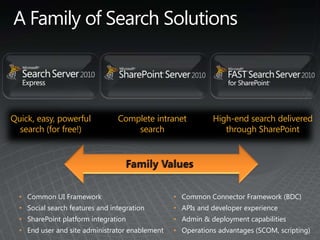
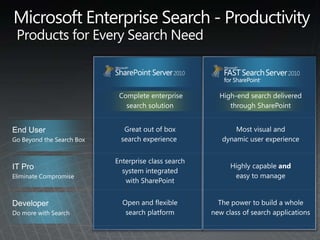
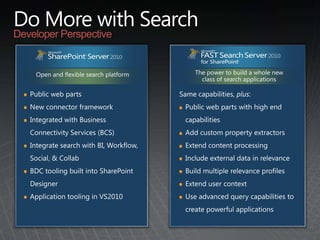
A Family of Search SolutionsQuick, easy, powerful search (for free!)Complete intranet searchHigh-end search delivered through SharePoint Family Values Common UI Framework
Social search features and integration
SharePoint platform integration
End user and site administrator enablement
Common Connector Framework (BDC)
APIs and developer experience
Admin & deployment capabilities
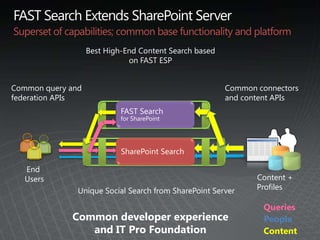
Operations advantages (SCOM, scripting)FAST Search Extends SharePoint ServerSuperset of capabilities; common base functionality and platformBest High-End Content Search based on FAST ESPFAST Search for SharePointCommon connectors and content APIsCommon query and federation APIsEnd UsersContent+ Profiles      Unique Social Search from SharePoint ServerSharePoint SearchQueriesCommon developer experience and IT Pro FoundationPeopleContent
SharePoint Search EngineWhat’s new in 2010?
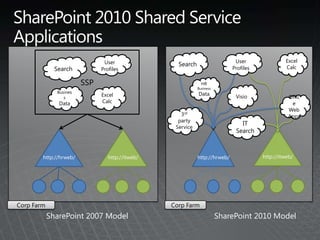
SharePoint 2010 Shared Service ApplicationsSSPSearchUserProfilesExcel CalcUserProfilesSearchHRBusinessDataVisio  Excel CalcBusinessDataOfficeWeb Apps3rd party ServiceIT Searchhttp://itweb/http://hrweb/http://hrweb/http://itweb/Corp FarmCorp FarmSharePoint 2007 ModelSharePoint 2010 Model
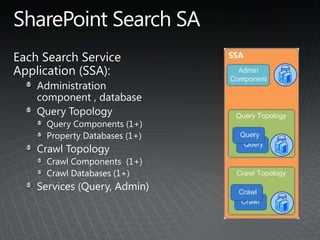
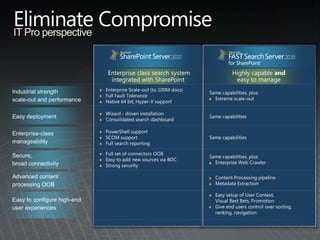
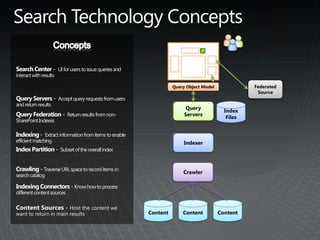
SharePoint Search SAEach Search Service Application (SSA):Administration component , databaseQuery TopologyQuery Components (1+)Property Databases (1+)Crawl TopologyCrawl Components  (1+)Crawl Databases (1+)Services (Query, Admin)
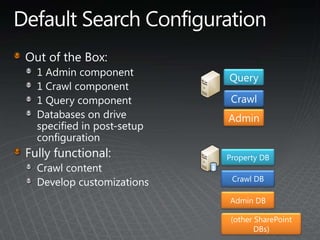
Default Search ConfigurationOut of the Box:1 Admin component1 Crawl component1 Query componentDatabases on drive specified in post-setup configurationFully functional:Crawl contentDevelop customizationsQueryCrawlAdminProperty DBCrawl DBAdmin DB(other SharePoint DBs)
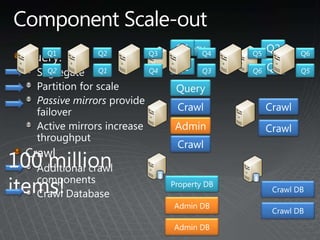
Component Scale-outQueryQ2Q1Q2Q1Q6Q5Q4Q3Query:SegregatePartition for scalePassive mirrors provide failoverActive mirrors increase throughputCrawl Additional crawl componentsCrawl DatabaseQ2Q1Q1Q2Q5Q6Q3Q4QueryCrawlCrawlAdminCrawlCrawl100 million items!Property DBCrawl DBCrawl DBAdmin DBCrawl DBAdmin DB
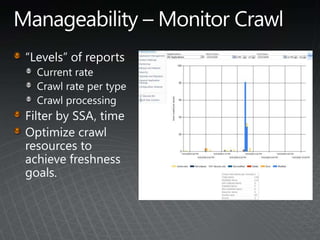
Manageability – Monitor Crawl“Levels” of reportsCurrent rateCrawl rate per typeCrawl processingFilter by SSA, timeOptimize crawl resources to achieve freshness goals.
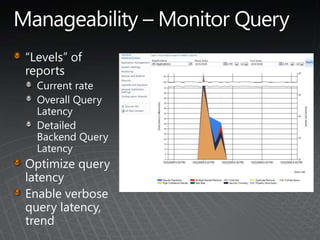
Manageability – Monitor Query“Levels” of reportsCurrent rateOverall Query LatencyDetailed Backend Query LatencyOptimize query latencyEnable verbosequery latency, trend
FAST Search EngineHigh-end Search for SharePoint
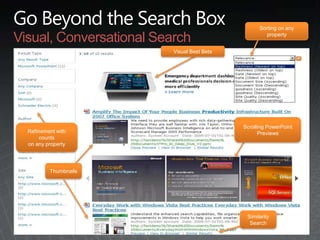
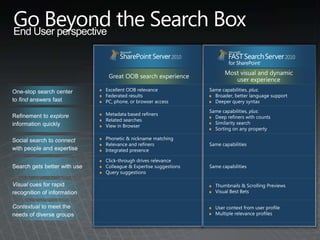
Go Beyond the Search BoxVisual, Conversational SearchSorting on any propertyScrolling PowerPointPreviewsVisual Best BetsThumbnailsRefinement with  countson any propertySimilarity Search
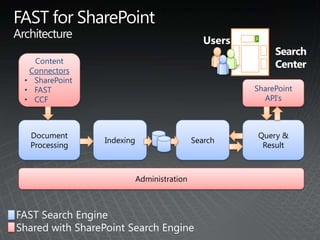
FAST for SharePointArchitectureUsers     SearchCenter ContentConnectorsSharePoint
FAST
CCFSharePointAPI’sDocumentProcessingIndexingSearchQuery &ResultAdministrationFAST Search Engine Shared with SharePoint Search Engine
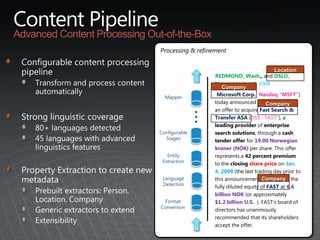
Content PipelineAdvanced Content Processing Out-of-the-BoxProcessing & refinementConfigurable content processing pipelineTransform and process content automaticallyStrong linguistic coverage80+ languages detected45 languages with advanced linguistics featuresProperty Extraction to create new metadataPrebuilt extractors: Person, Location, CompanyGeneric extractors to extendExtensibilityLocationCompanyCompanyCompanyREDMOND, Wash., andOSLO, Norway — Jan. 8, 2008Microsoft Corp. (Nasdaq “MSFT”) today announced that it will make an offer to acquire Fast Search & Transfer ASA (OSE: “FAST”), a leading provider of enterprise search solutions, through a cash tender offer for 19.00 Norwegian kroner (NOK) per share. This offer represents a 42 percent premium to the closing share price on Jan. 4, 2008 (the last trading day prior to this announcement), and values the fully diluted equity of FAST at 6.6 billion NOK (or approximately $1.2 billion U.S.  ). FAST’s board of directors has unanimously recommended that its shareholders accept the offer.Mapper…ConfigurableStagesEntityExtractionLanguageDetectionFormatConversion
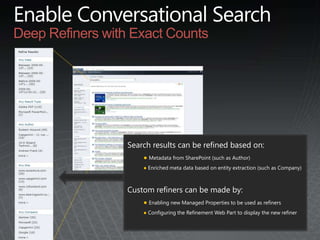
Enable Conversational SearchDeep Refiners with Exact CountsSearch results can be refined based on:Metadata from SharePoint (such as Author)
 Enriched meta data based on entity extraction (such as Company)Custom refiners can be made by:Enabling new Managed Properties to be used as refiners
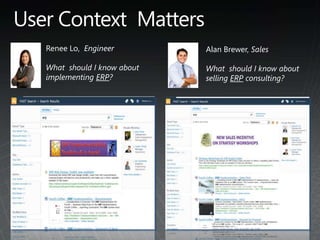
 Configuring the Refinement Web Part to display the new refinerUser Context  MattersRenee Lo,  EngineerWhat  should I know about implementing ERP?Alan Brewer, SalesWhat  should I know about selling ERP consulting?
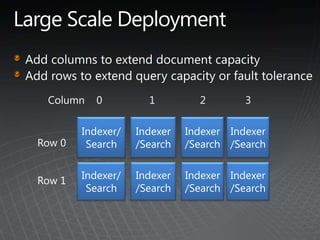
Large Scale DeploymentAdd columns to extend document capacityAdd rows to extend query capacity or fault toleranceColumn    0123Indexer/SearchIndexer/SearchIndexer/SearchIndexer/SearchRow 0Row 1Indexer/SearchIndexer/SearchIndexer/SearchIndexer/Search
Social Search
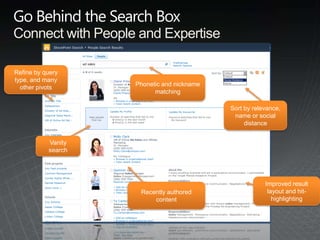
Go Behind the Search BoxConnect with People and ExpertiseVanity searchRecently authored contentPhonetic and nickname matchingImproved result layout and hit-highlightingSort by relevance, name or social distanceRefine by query type, and many other pivots
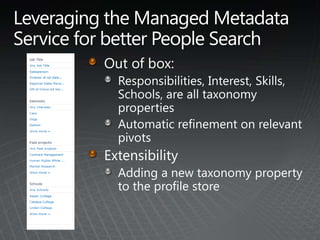
Leveraging the Managed Metadata Service for better People SearchOut of box:Responsibilities, Interest, Skills, Schools, are all taxonomy propertiesAutomatic refinement on relevant pivotsExtensibilityAdding a new taxonomy property to the profile store
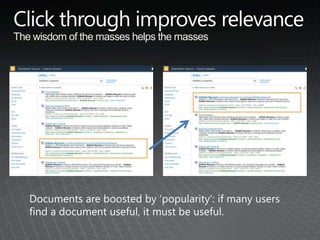
Click through improves relevance	The wisdom of the masses helps the massesDocuments are boosted by ‘popularity’: if many users find a document useful, it must be useful.
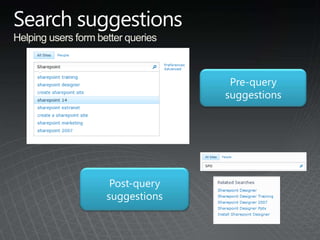
Search suggestionsHelping users form better queriesPre-query suggestionsPost-query suggestions
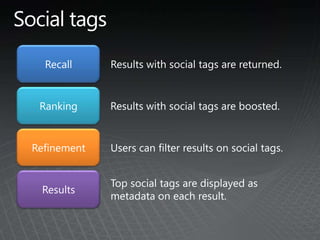
Social tagsRecallResults with social tags are returned.RankingResults with social tags are boosted.RefinementUsers can filter results on social tags.ResultsTop social tags are displayed as metadata on each result.
Content AcquisitionFeeding the Search Engines
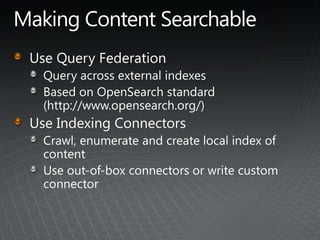
Making Content SearchableUse Query FederationQuery across external indexesBased on OpenSearch standard(http://www.opensearch.org/)Use Indexing ConnectorsCrawl, enumerate and create local index of contentUse out-of-box connectors or write custom connector
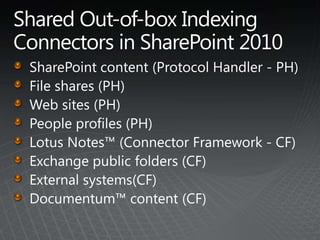
Shared Out-of-box Indexing  Connectors in SharePoint 2010SharePoint content (Protocol Handler - PH)File shares (PH)Web sites (PH)People profiles (PH)Lotus Notes™ (Connector Framework - CF)Exchange public folders (CF)External systems(CF)Documentum™ content (CF)
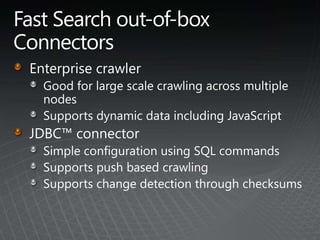
Fast Search out-of-box ConnectorsEnterprise crawlerGood for large scale crawling across multiple nodesSupports dynamic data including JavaScriptJDBC™ connectorSimple configuration using SQL commandsSupports push based crawlingSupports change detection through checksums
SharePoint ConnectorAccesses data through SharePoint web service (using Windows credentials)Supports full crawl through enumeration of content and incremental crawl through change logBuilt-in support for security trimming (Windows and pluggable)
Connector FrameworkEasy to buildWrite managed code instead of PH interfaceBuilt connectors shared across SharePoint Search and FAST search‘No-code’ solution for Databases and Web ServicesEasy to manageUse existing user interfaces for crawl configurationFaster iteration on connectivity using SharePoint Designer (SPD)Shared advantages across SharePointCan use other BCS features such as external lists
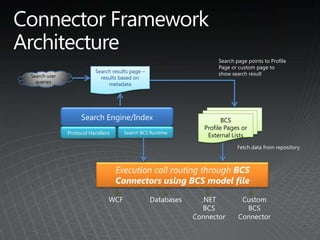
Search page points to Profile Page or custom page to show search resultSearch results page – results based on metadataConnector Framework ArchitectureSearch user queriesSearch Engine/IndexBCSProfile Pages or External ListsSearch BCS RuntimeExecution call routing through BCSConnectors using BCS model fileFetch data from repositoryWCFDatabases.NET BCSConnectorCustom BCSConnectorProtocol Handlers
Enabling ConnectivityEvery indexing connector needsA BDC model file to express connection information and the structure of the backendA BDC Connector for code to execute when accessing the backendOut-of-box BDC ConnectorsDatabaseWCF (Web Services).NET (custom code)
FederationCombining Search Results
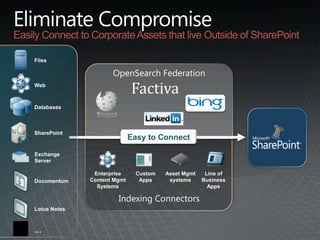
Eliminate CompromiseEasily Connect to Corporate Assets that live Outside of SharePointFilesOpenSearch FederationWebDatabasesSharePointEasy to ConnectEasy to BuildExchange ServerEnterprise Content Mgmt SystemsLine of Business AppsCustom AppsAsset Mgmt systemsDocumentumIndexing ConnectorsLotus Notes…
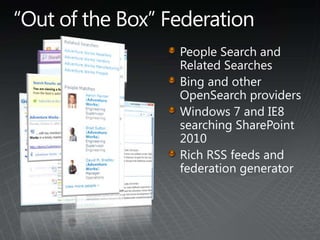
“Out of the Box” FederationPeople Search and Related SearchesBing and other OpenSearch providersWindows 7 and IE8 searching SharePoint 2010Rich RSS feeds and federation generator
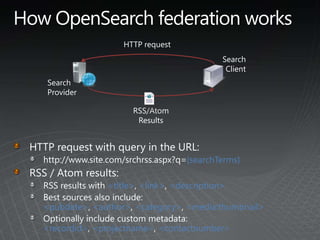
How OpenSearch federation worksHTTP requestSearch ClientSearch ProviderRSS/Atom ResultsHTTP request with query in the URL:http://www.site.com/srchrss.aspx?q={searchTerms}RSS / Atom results:RSS results with <title>, <link>, <description>Best sources also include: <pubdate>, <author>, <category>, <media:thumbnail>Optionally include custom metadata: <recordid>, <projectname>, <contactnumber>
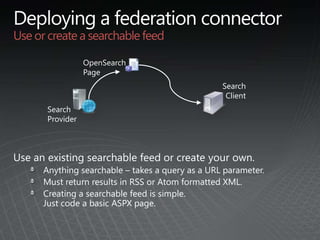
Deploying a federation connectorUse or create a searchable feedSearch ClientOpenSearchPageSearch ProviderUse an existing searchable feed or create your own.Anything searchable– takes a query as a URL parameter.Must return results in RSS or Atom formatted XML.Creating a searchable feed is simple.  Just code a basic ASPX page.
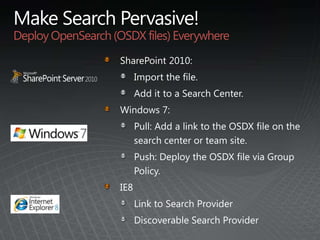
Make Search Pervasive!Deploy OpenSearch (OSDX files) EverywhereSharePoint 2010:Import the file.  Add it to a Search Center.Windows 7:Pull: Add a link to the OSDX file on the search center or team site.Push: Deploy the OSDX file via Group Policy.IE8Link to Search ProviderDiscoverable Search Provider

Enterprise Search in SharePoint 2010

  • 1.
    Enterprise Search inSharePoint 2010Bob GermanTechnology ArchitectMicrosoft Technology Center | Boston
  • 2.
    AgendaSharePoint Search OptionsSharePointSearch EngineFAST for SharePointSocial SearchContent AcquisitionFederation
  • 3.
    You Asked, WeListened!Scale – content and query scale becomes a non-issueUser experience –guide users with rich, visual navigationSocial and people search – search unlocks the value of the people and expertiseRelevance –improving our matching and ranking capabilities and language supportPlatform –tools to customize, extend, or build new applications. Management & reliability –reliable crawling, scriptable admin, improved monitoring.Rich Content Processing–extract metadata from my enterprise content
  • 4.
    A Family ofSearch SolutionsQuick, easy, powerful search (for free!)Complete intranet searchHigh-end search delivered through SharePoint Family Values Common UI Framework
  • 5.
    Social search featuresand integration
  • 6.
  • 7.
    End user andsite administrator enablement
  • 8.
  • 9.
  • 10.
    Admin & deploymentcapabilities
  • 11.
    Operations advantages (SCOM,scripting)FAST Search Extends SharePoint ServerSuperset of capabilities; common base functionality and platformBest High-End Content Search based on FAST ESPFAST Search for SharePointCommon connectors and content APIsCommon query and federation APIsEnd UsersContent+ Profiles Unique Social Search from SharePoint ServerSharePoint SearchQueriesCommon developer experience and IT Pro FoundationPeopleContent
  • 12.
  • 13.
    SharePoint 2010 SharedService ApplicationsSSPSearchUserProfilesExcel CalcUserProfilesSearchHRBusinessDataVisio Excel CalcBusinessDataOfficeWeb Apps3rd party ServiceIT Searchhttp://itweb/http://hrweb/http://hrweb/http://itweb/Corp FarmCorp FarmSharePoint 2007 ModelSharePoint 2010 Model
  • 14.
    SharePoint Search SAEachSearch Service Application (SSA):Administration component , databaseQuery TopologyQuery Components (1+)Property Databases (1+)Crawl TopologyCrawl Components (1+)Crawl Databases (1+)Services (Query, Admin)
  • 15.
    Default Search ConfigurationOutof the Box:1 Admin component1 Crawl component1 Query componentDatabases on drive specified in post-setup configurationFully functional:Crawl contentDevelop customizationsQueryCrawlAdminProperty DBCrawl DBAdmin DB(other SharePoint DBs)
  • 16.
    Component Scale-outQueryQ2Q1Q2Q1Q6Q5Q4Q3Query:SegregatePartition forscalePassive mirrors provide failoverActive mirrors increase throughputCrawl Additional crawl componentsCrawl DatabaseQ2Q1Q1Q2Q5Q6Q3Q4QueryCrawlCrawlAdminCrawlCrawl100 million items!Property DBCrawl DBCrawl DBAdmin DBCrawl DBAdmin DB
  • 17.
    Manageability – MonitorCrawl“Levels” of reportsCurrent rateCrawl rate per typeCrawl processingFilter by SSA, timeOptimize crawl resources to achieve freshness goals.
  • 18.
    Manageability – MonitorQuery“Levels” of reportsCurrent rateOverall Query LatencyDetailed Backend Query LatencyOptimize query latencyEnable verbosequery latency, trend
  • 19.
    FAST Search EngineHigh-endSearch for SharePoint
  • 20.
    Go Beyond theSearch BoxVisual, Conversational SearchSorting on any propertyScrolling PowerPointPreviewsVisual Best BetsThumbnailsRefinement with countson any propertySimilarity Search
  • 21.
    FAST for SharePointArchitectureUsers SearchCenter ContentConnectorsSharePoint
  • 22.
  • 23.
  • 24.
    Content PipelineAdvanced ContentProcessing Out-of-the-BoxProcessing & refinementConfigurable content processing pipelineTransform and process content automaticallyStrong linguistic coverage80+ languages detected45 languages with advanced linguistics featuresProperty Extraction to create new metadataPrebuilt extractors: Person, Location, CompanyGeneric extractors to extendExtensibilityLocationCompanyCompanyCompanyREDMOND, Wash., andOSLO, Norway — Jan. 8, 2008Microsoft Corp. (Nasdaq “MSFT”) today announced that it will make an offer to acquire Fast Search & Transfer ASA (OSE: “FAST”), a leading provider of enterprise search solutions, through a cash tender offer for 19.00 Norwegian kroner (NOK) per share. This offer represents a 42 percent premium to the closing share price on Jan. 4, 2008 (the last trading day prior to this announcement), and values the fully diluted equity of FAST at 6.6 billion NOK (or approximately $1.2 billion U.S. ). FAST’s board of directors has unanimously recommended that its shareholders accept the offer.Mapper…ConfigurableStagesEntityExtractionLanguageDetectionFormatConversion
  • 25.
    Enable Conversational SearchDeepRefiners with Exact CountsSearch results can be refined based on:Metadata from SharePoint (such as Author)
  • 26.
    Enriched metadata based on entity extraction (such as Company)Custom refiners can be made by:Enabling new Managed Properties to be used as refiners
  • 27.
    Configuring theRefinement Web Part to display the new refinerUser Context MattersRenee Lo, EngineerWhat should I know about implementing ERP?Alan Brewer, SalesWhat should I know about selling ERP consulting?
  • 28.
    Large Scale DeploymentAddcolumns to extend document capacityAdd rows to extend query capacity or fault toleranceColumn 0123Indexer/SearchIndexer/SearchIndexer/SearchIndexer/SearchRow 0Row 1Indexer/SearchIndexer/SearchIndexer/SearchIndexer/Search
  • 29.
  • 30.
    Go Behind theSearch BoxConnect with People and ExpertiseVanity searchRecently authored contentPhonetic and nickname matchingImproved result layout and hit-highlightingSort by relevance, name or social distanceRefine by query type, and many other pivots
  • 31.
    Leveraging the ManagedMetadata Service for better People SearchOut of box:Responsibilities, Interest, Skills, Schools, are all taxonomy propertiesAutomatic refinement on relevant pivotsExtensibilityAdding a new taxonomy property to the profile store
  • 32.
    Click through improvesrelevance The wisdom of the masses helps the massesDocuments are boosted by ‘popularity’: if many users find a document useful, it must be useful.
  • 33.
    Search suggestionsHelping usersform better queriesPre-query suggestionsPost-query suggestions
  • 34.
    Social tagsRecallResults withsocial tags are returned.RankingResults with social tags are boosted.RefinementUsers can filter results on social tags.ResultsTop social tags are displayed as metadata on each result.
  • 35.
  • 36.
    Making Content SearchableUseQuery FederationQuery across external indexesBased on OpenSearch standard(http://www.opensearch.org/)Use Indexing ConnectorsCrawl, enumerate and create local index of contentUse out-of-box connectors or write custom connector
  • 37.
    Shared Out-of-box Indexing Connectors in SharePoint 2010SharePoint content (Protocol Handler - PH)File shares (PH)Web sites (PH)People profiles (PH)Lotus Notes™ (Connector Framework - CF)Exchange public folders (CF)External systems(CF)Documentum™ content (CF)
  • 38.
    Fast Search out-of-boxConnectorsEnterprise crawlerGood for large scale crawling across multiple nodesSupports dynamic data including JavaScriptJDBC™ connectorSimple configuration using SQL commandsSupports push based crawlingSupports change detection through checksums
  • 39.
    SharePoint ConnectorAccesses datathrough SharePoint web service (using Windows credentials)Supports full crawl through enumeration of content and incremental crawl through change logBuilt-in support for security trimming (Windows and pluggable)
  • 40.
    Connector FrameworkEasy tobuildWrite managed code instead of PH interfaceBuilt connectors shared across SharePoint Search and FAST search‘No-code’ solution for Databases and Web ServicesEasy to manageUse existing user interfaces for crawl configurationFaster iteration on connectivity using SharePoint Designer (SPD)Shared advantages across SharePointCan use other BCS features such as external lists
  • 41.
    Search page pointsto Profile Page or custom page to show search resultSearch results page – results based on metadataConnector Framework ArchitectureSearch user queriesSearch Engine/IndexBCSProfile Pages or External ListsSearch BCS RuntimeExecution call routing through BCSConnectors using BCS model fileFetch data from repositoryWCFDatabases.NET BCSConnectorCustom BCSConnectorProtocol Handlers
  • 42.
    Enabling ConnectivityEvery indexingconnector needsA BDC model file to express connection information and the structure of the backendA BDC Connector for code to execute when accessing the backendOut-of-box BDC ConnectorsDatabaseWCF (Web Services).NET (custom code)
  • 43.
  • 44.
    Eliminate CompromiseEasily Connectto Corporate Assets that live Outside of SharePointFilesOpenSearch FederationWebDatabasesSharePointEasy to ConnectEasy to BuildExchange ServerEnterprise Content Mgmt SystemsLine of Business AppsCustom AppsAsset Mgmt systemsDocumentumIndexing ConnectorsLotus Notes…
  • 45.
    “Out of theBox” FederationPeople Search and Related SearchesBing and other OpenSearch providersWindows 7 and IE8 searching SharePoint 2010Rich RSS feeds and federation generator
  • 46.
    How OpenSearch federationworksHTTP requestSearch ClientSearch ProviderRSS/Atom ResultsHTTP request with query in the URL:http://www.site.com/srchrss.aspx?q={searchTerms}RSS / Atom results:RSS results with <title>, <link>, <description>Best sources also include: <pubdate>, <author>, <category>, <media:thumbnail>Optionally include custom metadata: <recordid>, <projectname>, <contactnumber>
  • 47.
    Deploying a federationconnectorUse or create a searchable feedSearch ClientOpenSearchPageSearch ProviderUse an existing searchable feed or create your own.Anything searchable– takes a query as a URL parameter.Must return results in RSS or Atom formatted XML.Creating a searchable feed is simple. Just code a basic ASPX page.
  • 48.
    Make Search Pervasive!DeployOpenSearch (OSDX files) EverywhereSharePoint 2010:Import the file. Add it to a Search Center.Windows 7:Pull: Add a link to the OSDX file on the search center or team site.Push: Deploy the OSDX file via Group Policy.IE8Link to Search ProviderDiscoverable Search Provider

Editor's Notes

  • #8 This diagram illustrates the differences between how the service models work in SharePoint 2007 and SharePoint 2010. As was described in previous slides, in SharePoint 2007 you essentially consumed all or nothing from a Shared Service Provider (SSP). That’s what is displayed in the diagram on the left.In the diagram on the right, we see multiple Service Applications. They are not bound together by an SSP, so they can be consumed independently of any Service Applications. In this example, HRWEB is consuming multiple Service Applications, but not all of them. ITWEB is only consuming a few Service Applications. There are a couple of Service Applications, USER PROFILES and WAC, that are being consumed by both web applications.