Digital Communication30th September & 1st October 2009
Aims and Objectives Aims To promote methods of research using ICT and the internetTo introduce Blogs and web tools for learning, research and evidenceLearners to set up their own ‘blog’ and publish a post   Objectives Learners to discuses area they need to research in follow brief Learners will be able to identity different  ICT tools available for assessmentLearners will be able to know what a Blog is and its uses. Learners will be able identify a Blog though an exampleLearners to create a blog account at blogger.com  22
The word blog (an abridgment of the term web log)"Blog" can also be used as a verb, meaning to maintain or add content to a blog. A Blog is a website where entries are commonly displayed in reverse chronological order. The ability for readers to leave comments in an interactive format is an important part of many blogs.
A typical blog combines Textimages, links to other blogs, web pages, and other media related to its topic.
Most blogs are primarily textual, although some focus on art (artlog), photographs (photoblog), sketchblog, videos (vlog), music (MP3 blog), audio (podcasting) are part of a wider network of social media.
Blogs can be hosted by dedicated blog hosting services, or they can be run using blog software, such as WordPress,Movable Type, Blogger LiveJournal, or on regular web hosting services.
https://www.blogger.com/starthttp://www.livejournal.com/http://www.movabletype.org/http://wordpress.org/
Summary / Q+AQ- What is the word “blog” refer to? Q- Name three things a Blog can do? Q- Name two blog websites?88
How to set up your blogWe want you to make your own blog You need to create a gmail or Google mail email account. This will be your username and password to log into your blogger.com account. Use your FULL NAME when making your log in email for your blog  So if you name is Joe Blogs then please can you useJoe.blogs@gmail.comWe also want your blog address to be something like this as well, http://joeblogs.blogspot.comThe . characters are not allowed 99
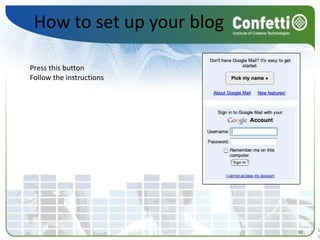
How to set up your blogPress this buttonFollow the instructions 1010
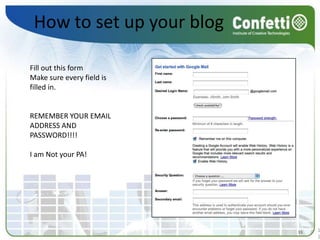
How to set up your blogFill out this formMake sure every field is filled in. REMEMBER YOUR EMAIL ADDRESS AND PASSWORD!!!! I am Not your PA! 1111
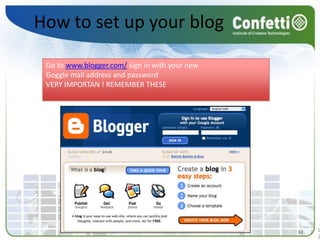
How to set up your blogGo to www.blogger.com/ sign in with your new Goggle mail address and passwordVERY IMPORTAN ! REMEMBER THESE1212
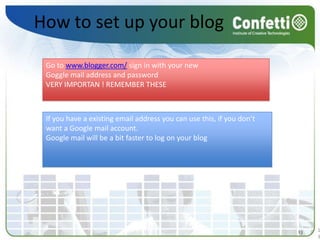
How to set up your blogGo to www.blogger.com/ sign in with your new Goggle mail address and passwordVERY IMPORTAN ! REMEMBER THESEIf you have a existing email address you can use this, if you don’t want a Google mail account.Google mail will be a bit faster to log on your blog 1313
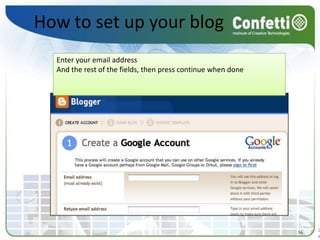
How to set up your blogEnter your email address And the rest of the fields, then press continue when done 1414
How to set up your blogGive your blog a title (this can be changed)Give your blog a unique address [YOUR NAME] Check if this is available, press the availability button, press continue1515
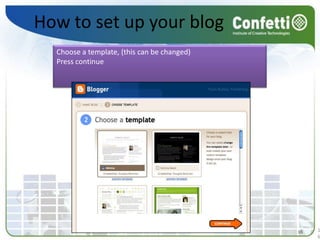
How to set up your blogChoose a template, (this can be changed)Press continue1616
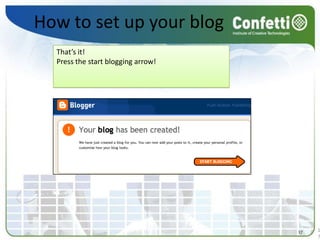
How to set up your blogThat’s it!Press the start blogging arrow! 1717
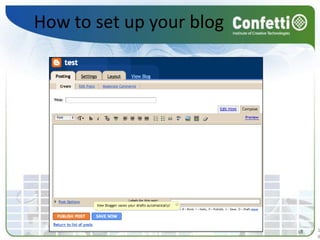
How to set up your blog1818
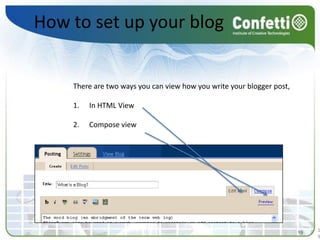
How to set up your blogThere are two ways you can view how you write your blogger post, In HTML ViewCompose view1919
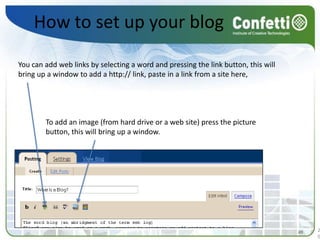
How to set up your blogYou can add web links by selecting a word and pressing the link button, this will bring up a window to add a http:// link, paste in a link from a site here, To add an image (from hard drive or a web site) press the picture button, this will bring up a window. 2020
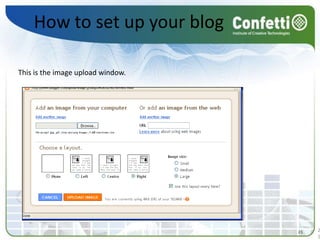
How to set up your blogThis is the image upload window. 2121
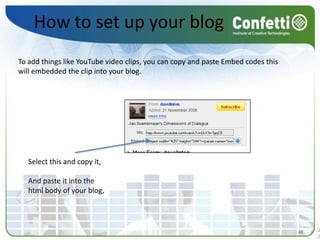
How to set up your blogTo add things like YouTube video clips, you can copy and paste Embed codes this will embedded the clip into your blog. Select this and copy it, And paste it into the html body of your blog, 2222
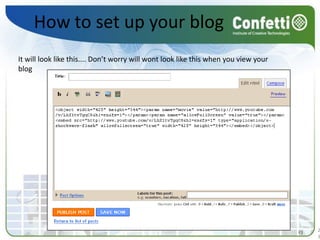
How to set up your blogIt will look like this.... Don’t worry will wont look like this when you view your blog 2323
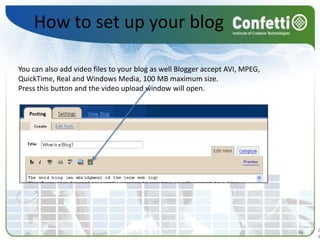
How to set up your blogYou can also add video files to your blog as well Blogger accept AVI, MPEG, QuickTime, Real and Windows Media, 100 MB maximum size.Press this button and the video upload window will open.2424
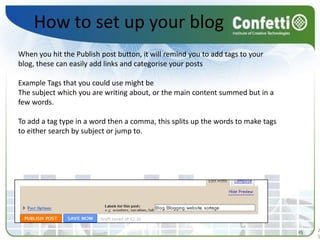
How to set up your blogWhen you hit the Publish post button, it will remind you to add tags to your blog, these can easily add links and categorise your postsExample Tags that you could use might be The subject which you are writing about, or the main content summed but in a few words. To add a tag type in a word then a comma, this splits up the words to make tags to either search by subject or jump to. 2525
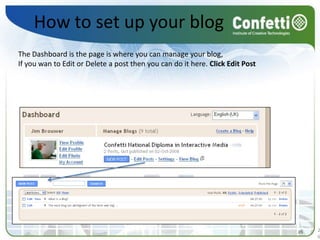
How to set up your blogThe Dashboard is the page is where you can manage your blog, If you wan to Edit or Delete a post then you can do it here. Click Edit Post 2626
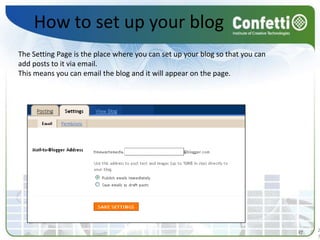
How to set up your blogThe Setting Page is the place where you can set up your blog so that you can add posts to it via email. This means you can email the blog and it will appear on the page. 2727
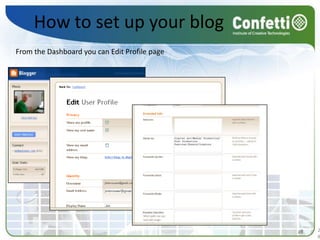
How to set up your blogFrom the Dashboard you can Edit Profile page 2828

Setting Up Your Blog

  • 1.
  • 2.
    Aims and ObjectivesAims To promote methods of research using ICT and the internetTo introduce Blogs and web tools for learning, research and evidenceLearners to set up their own ‘blog’ and publish a post Objectives Learners to discuses area they need to research in follow brief Learners will be able to identity different ICT tools available for assessmentLearners will be able to know what a Blog is and its uses. Learners will be able identify a Blog though an exampleLearners to create a blog account at blogger.com 22
  • 3.
    The word blog(an abridgment of the term web log)"Blog" can also be used as a verb, meaning to maintain or add content to a blog. A Blog is a website where entries are commonly displayed in reverse chronological order. The ability for readers to leave comments in an interactive format is an important part of many blogs.
  • 4.
    A typical blogcombines Textimages, links to other blogs, web pages, and other media related to its topic.
  • 5.
    Most blogs areprimarily textual, although some focus on art (artlog), photographs (photoblog), sketchblog, videos (vlog), music (MP3 blog), audio (podcasting) are part of a wider network of social media.
  • 6.
    Blogs can behosted by dedicated blog hosting services, or they can be run using blog software, such as WordPress,Movable Type, Blogger LiveJournal, or on regular web hosting services.
  • 7.
  • 8.
    Summary / Q+AQ-What is the word “blog” refer to? Q- Name three things a Blog can do? Q- Name two blog websites?88
  • 9.
    How to setup your blogWe want you to make your own blog You need to create a gmail or Google mail email account. This will be your username and password to log into your blogger.com account. Use your FULL NAME when making your log in email for your blog So if you name is Joe Blogs then please can you useJoe.blogs@gmail.comWe also want your blog address to be something like this as well, http://joeblogs.blogspot.comThe . characters are not allowed 99
  • 10.
    How to setup your blogPress this buttonFollow the instructions 1010
  • 11.
    How to setup your blogFill out this formMake sure every field is filled in. REMEMBER YOUR EMAIL ADDRESS AND PASSWORD!!!! I am Not your PA! 1111
  • 12.
    How to setup your blogGo to www.blogger.com/ sign in with your new Goggle mail address and passwordVERY IMPORTAN ! REMEMBER THESE1212
  • 13.
    How to setup your blogGo to www.blogger.com/ sign in with your new Goggle mail address and passwordVERY IMPORTAN ! REMEMBER THESEIf you have a existing email address you can use this, if you don’t want a Google mail account.Google mail will be a bit faster to log on your blog 1313
  • 14.
    How to setup your blogEnter your email address And the rest of the fields, then press continue when done 1414
  • 15.
    How to setup your blogGive your blog a title (this can be changed)Give your blog a unique address [YOUR NAME] Check if this is available, press the availability button, press continue1515
  • 16.
    How to setup your blogChoose a template, (this can be changed)Press continue1616
  • 17.
    How to setup your blogThat’s it!Press the start blogging arrow! 1717
  • 18.
    How to setup your blog1818
  • 19.
    How to setup your blogThere are two ways you can view how you write your blogger post, In HTML ViewCompose view1919
  • 20.
    How to setup your blogYou can add web links by selecting a word and pressing the link button, this will bring up a window to add a http:// link, paste in a link from a site here, To add an image (from hard drive or a web site) press the picture button, this will bring up a window. 2020
  • 21.
    How to setup your blogThis is the image upload window. 2121
  • 22.
    How to setup your blogTo add things like YouTube video clips, you can copy and paste Embed codes this will embedded the clip into your blog. Select this and copy it, And paste it into the html body of your blog, 2222
  • 23.
    How to setup your blogIt will look like this.... Don’t worry will wont look like this when you view your blog 2323
  • 24.
    How to setup your blogYou can also add video files to your blog as well Blogger accept AVI, MPEG, QuickTime, Real and Windows Media, 100 MB maximum size.Press this button and the video upload window will open.2424
  • 25.
    How to setup your blogWhen you hit the Publish post button, it will remind you to add tags to your blog, these can easily add links and categorise your postsExample Tags that you could use might be The subject which you are writing about, or the main content summed but in a few words. To add a tag type in a word then a comma, this splits up the words to make tags to either search by subject or jump to. 2525
  • 26.
    How to setup your blogThe Dashboard is the page is where you can manage your blog, If you wan to Edit or Delete a post then you can do it here. Click Edit Post 2626
  • 27.
    How to setup your blogThe Setting Page is the place where you can set up your blog so that you can add posts to it via email. This means you can email the blog and it will appear on the page. 2727
  • 28.
    How to setup your blogFrom the Dashboard you can Edit Profile page 2828