Blogs, Blogging, Blogosphere A new way to  communicate & collaborate Soji Adewumi [email_address]
What is a Blog? Blog is short for Web Log. Think of it as a journal of fact based opinions. People can read your posted writing and comment on it.
Do’s of Blogging Treat your blog as a classroom space.  It is not a place for personal and private issues that are not related to school topics. Blogs are about ideas. Agree or disagree with idea, not the person. Make specific suggestions and back up your opinions with facts.
Don’ts of Blogging Do not post or give out your family name, password, home address, phone number, or any personal information that would give information that would help someone directly locate you or contact you in person.  Use these same guidelines when referring to class members. Do not post anything you would not want your family, teachers, or friends to read.  Use correct English and be aware that everything you post is a reflection of you.  Don’t always believe everything you read online. You need to make a judgment about whether it can be trusted.
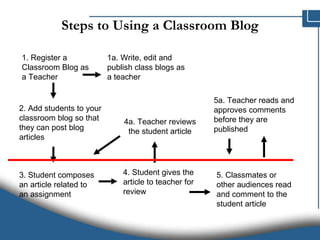
Steps to Using a Classroom Blog 1. Register a Classroom Blog as a Teacher 1a. Write, edit and publish class blogs as a teacher 2. Add students to your classroom blog so that they can post blog articles 3. Student composes an article related to an assignment 4. Student gives the article to teacher for review 4a. Teacher reviews the student article 5. Classmates or other audiences read and comment to the student article 5a. Teacher reads and approves comments before they are published
Terminology: Blogosphere Blogosphere  is the collective term encompassing all blogs as a community or social network.  Many weblogs are densely inter-connected;  Bloggers read  others' blogs  link to them,  reference them in their own writing, and  post comments on each others' blogs.  See  http://technorati.com )
Blogs: Educational Uses Generally  Standard Class Webpage(s): Address recurring questions/issues Interesting developments that relate to the theme of the course (via instructor) Current events, Web sites mentioned, etc. Organization of in-class discussion  Blogging has distinct advantages over more common threaded discussion in its support of style, ownership and identity Group Blogs: students create (and present?) a group project using a blog
Primary Beneficial Outcomes Students learn course material both individually and collaboratively Learning from peers is enhanced through blog visits Students improve writing skills Students write for a “public” audience Students learn the potential uses of blogs and how to manage them
Secondary Beneficial Outcomes More teacher-student contact through e-mail Teacher learns from the students Forum for peer social interaction Students express their individuality and values Affords shy students the opportunity to find their ‘voice’
How to write your blog How to find topics to write about   Ideas from the work you are doing Books you are reading Tools you are using Problems you are facing Interesting news and information you have found on other blogs or other web sites
How to write your blog You can write longer articles using a dedicated blogging text editor ( Windows Live Writer  –  http://explore.live.com/windows-live-writer ) which displays them as they will appear in the blog.  You can start writing more important articles in longhand, then edit and change them until you are satisfied, and paste them in Windows Live Writer, for the final layout touches.
How to write your blog You can edit your blog posts using  Style Writer  (available from Editor Software:  http://www.editorsoftware.com ), a program that helps tighten your writing.
Starting your own blog Starting a blog When you arrive at blogger  Create an account,  Name your blog, and  Choose a template.
How to start your own blog Domains You should get your own domain for your blog. Your blog address will end up in the  http://sojiadewumi.blogspot.com  format.
How to start your own blog Free blogging platforms Blogger and WordPress.  Blogger (owned by Google) is free.  WordPress also is free, but you may have to pay for some features.  Other blogging platforms available are TypePad Micro, etc. Blogger: https://www.blogger.com/start  WordPress: http://wordpress.com  TypePad Micro:  http://www.typepad.com/micro/features
How to start your own blog Creating an account Blogger Go to  https://www.blogger.com/start Sign in using your Google Account login Click on Create a Blog WordPress Go to  http://wordpress.com Click on Sign up now
How to start your own blog Selecting a template Blogger Once you have created your blog, you have access to a dashboard for all your blogs. Select Layout Select the Template link, and browse from the available templates
How to personalize your blog Reader comments   Decide how to handle comments  Allow them or not Moderate them or not Moderate only those that are older than a certain number of days.  Beware of blog spam (comments left on blog posts with the only purpose to attract visitors to some Web site or other page).
How to personalize your blog Tabs and info about your blog   If your blogging platform features them, use tabs or separate pages. You can have one page for your posts, and other pages for more permanent information (about links to your articles, and so on).
How to personalize your blog Statistics   Some blogging platform tells you  how many hits you got,  but also which pages attracted the most visitors,  where your reader came from, and  technical information such as the operating system and browser used by your visitors.  Some blogging platforms offer tools to track statistics. In Blogger you can use Blogger’s own, or you can add them yourself. http://www.google.com/analytics/ http://sitemeter.com/ http://www.bravenet.com/webtools/counter/index.php
How to personalize your blog There are others ways in which you can personalize your blog Many gadgets are available to help making your blog more attractive:  Blogroll (a list of links to other blogs) Buttons that show your blog ratings Links to your archive (the list of your older posts) Categories or tags to help users find your posts on a specific subject Search box to allow readers to find specific topics Slideshows Polls etc.
How to personalize your blog All blogging platforms offer many templates you can choose from.  You can add an RSS / Atom feed  to your blog (so people may subscribe to it and follow it with readers such as Google Reader)  Reader comments  Tabs and info about your blog Statistics Other things
An account will only require  A working email,  A unique user name, and  A unique blog address.
Next, you need to choose the title of your blog. In order to make sure that you are in fact a human blogger, (rather than an automated system which is phishing) you will need to verify the wacky words in green.
Blogger tells you what its progress is and should reward you with a start posting arrow.
The first thing you will see it a rich text editor, also known as a WYSIWYG editor. This should emulate your experience with Ms Word.  The rich text editor allows you to blog and link and italicize.  When you finish  with your post,  click Publish Post.
You will be rewarded with a Publishing in Progress bar…
And when you are done, you can click on the View Blog button and… And that is it.  You have just created a blog and published your first blog post.

Complex Genome Analysis

  • 1.
    Blogs, Blogging, BlogosphereA new way to communicate & collaborate Soji Adewumi [email_address]
  • 2.
    What is aBlog? Blog is short for Web Log. Think of it as a journal of fact based opinions. People can read your posted writing and comment on it.
  • 3.
    Do’s of BloggingTreat your blog as a classroom space. It is not a place for personal and private issues that are not related to school topics. Blogs are about ideas. Agree or disagree with idea, not the person. Make specific suggestions and back up your opinions with facts.
  • 4.
    Don’ts of BloggingDo not post or give out your family name, password, home address, phone number, or any personal information that would give information that would help someone directly locate you or contact you in person. Use these same guidelines when referring to class members. Do not post anything you would not want your family, teachers, or friends to read. Use correct English and be aware that everything you post is a reflection of you. Don’t always believe everything you read online. You need to make a judgment about whether it can be trusted.
  • 5.
    Steps to Usinga Classroom Blog 1. Register a Classroom Blog as a Teacher 1a. Write, edit and publish class blogs as a teacher 2. Add students to your classroom blog so that they can post blog articles 3. Student composes an article related to an assignment 4. Student gives the article to teacher for review 4a. Teacher reviews the student article 5. Classmates or other audiences read and comment to the student article 5a. Teacher reads and approves comments before they are published
  • 6.
    Terminology: Blogosphere Blogosphere is the collective term encompassing all blogs as a community or social network. Many weblogs are densely inter-connected; Bloggers read others' blogs link to them, reference them in their own writing, and post comments on each others' blogs. See http://technorati.com )
  • 7.
    Blogs: Educational UsesGenerally Standard Class Webpage(s): Address recurring questions/issues Interesting developments that relate to the theme of the course (via instructor) Current events, Web sites mentioned, etc. Organization of in-class discussion Blogging has distinct advantages over more common threaded discussion in its support of style, ownership and identity Group Blogs: students create (and present?) a group project using a blog
  • 8.
    Primary Beneficial OutcomesStudents learn course material both individually and collaboratively Learning from peers is enhanced through blog visits Students improve writing skills Students write for a “public” audience Students learn the potential uses of blogs and how to manage them
  • 9.
    Secondary Beneficial OutcomesMore teacher-student contact through e-mail Teacher learns from the students Forum for peer social interaction Students express their individuality and values Affords shy students the opportunity to find their ‘voice’
  • 10.
    How to writeyour blog How to find topics to write about Ideas from the work you are doing Books you are reading Tools you are using Problems you are facing Interesting news and information you have found on other blogs or other web sites
  • 11.
    How to writeyour blog You can write longer articles using a dedicated blogging text editor ( Windows Live Writer – http://explore.live.com/windows-live-writer ) which displays them as they will appear in the blog. You can start writing more important articles in longhand, then edit and change them until you are satisfied, and paste them in Windows Live Writer, for the final layout touches.
  • 12.
    How to writeyour blog You can edit your blog posts using Style Writer (available from Editor Software: http://www.editorsoftware.com ), a program that helps tighten your writing.
  • 13.
    Starting your ownblog Starting a blog When you arrive at blogger Create an account, Name your blog, and Choose a template.
  • 14.
    How to startyour own blog Domains You should get your own domain for your blog. Your blog address will end up in the http://sojiadewumi.blogspot.com format.
  • 15.
    How to startyour own blog Free blogging platforms Blogger and WordPress. Blogger (owned by Google) is free. WordPress also is free, but you may have to pay for some features. Other blogging platforms available are TypePad Micro, etc. Blogger: https://www.blogger.com/start WordPress: http://wordpress.com TypePad Micro: http://www.typepad.com/micro/features
  • 16.
    How to startyour own blog Creating an account Blogger Go to https://www.blogger.com/start Sign in using your Google Account login Click on Create a Blog WordPress Go to http://wordpress.com Click on Sign up now
  • 17.
    How to startyour own blog Selecting a template Blogger Once you have created your blog, you have access to a dashboard for all your blogs. Select Layout Select the Template link, and browse from the available templates
  • 18.
    How to personalizeyour blog Reader comments Decide how to handle comments Allow them or not Moderate them or not Moderate only those that are older than a certain number of days. Beware of blog spam (comments left on blog posts with the only purpose to attract visitors to some Web site or other page).
  • 19.
    How to personalizeyour blog Tabs and info about your blog If your blogging platform features them, use tabs or separate pages. You can have one page for your posts, and other pages for more permanent information (about links to your articles, and so on).
  • 20.
    How to personalizeyour blog Statistics Some blogging platform tells you how many hits you got, but also which pages attracted the most visitors, where your reader came from, and technical information such as the operating system and browser used by your visitors. Some blogging platforms offer tools to track statistics. In Blogger you can use Blogger’s own, or you can add them yourself. http://www.google.com/analytics/ http://sitemeter.com/ http://www.bravenet.com/webtools/counter/index.php
  • 21.
    How to personalizeyour blog There are others ways in which you can personalize your blog Many gadgets are available to help making your blog more attractive: Blogroll (a list of links to other blogs) Buttons that show your blog ratings Links to your archive (the list of your older posts) Categories or tags to help users find your posts on a specific subject Search box to allow readers to find specific topics Slideshows Polls etc.
  • 22.
    How to personalizeyour blog All blogging platforms offer many templates you can choose from. You can add an RSS / Atom feed to your blog (so people may subscribe to it and follow it with readers such as Google Reader) Reader comments Tabs and info about your blog Statistics Other things
  • 23.
    An account willonly require A working email, A unique user name, and A unique blog address.
  • 24.
    Next, you needto choose the title of your blog. In order to make sure that you are in fact a human blogger, (rather than an automated system which is phishing) you will need to verify the wacky words in green.
  • 25.
    Blogger tells youwhat its progress is and should reward you with a start posting arrow.
  • 26.
    The first thingyou will see it a rich text editor, also known as a WYSIWYG editor. This should emulate your experience with Ms Word. The rich text editor allows you to blog and link and italicize. When you finish with your post, click Publish Post.
  • 27.
    You will berewarded with a Publishing in Progress bar…
  • 28.
    And when youare done, you can click on the View Blog button and… And that is it. You have just created a blog and published your first blog post.