GANAPATI INSTITUTE OF ENGG. AND 
TECHNOLOGY(POLYTECHNIC) 
A 
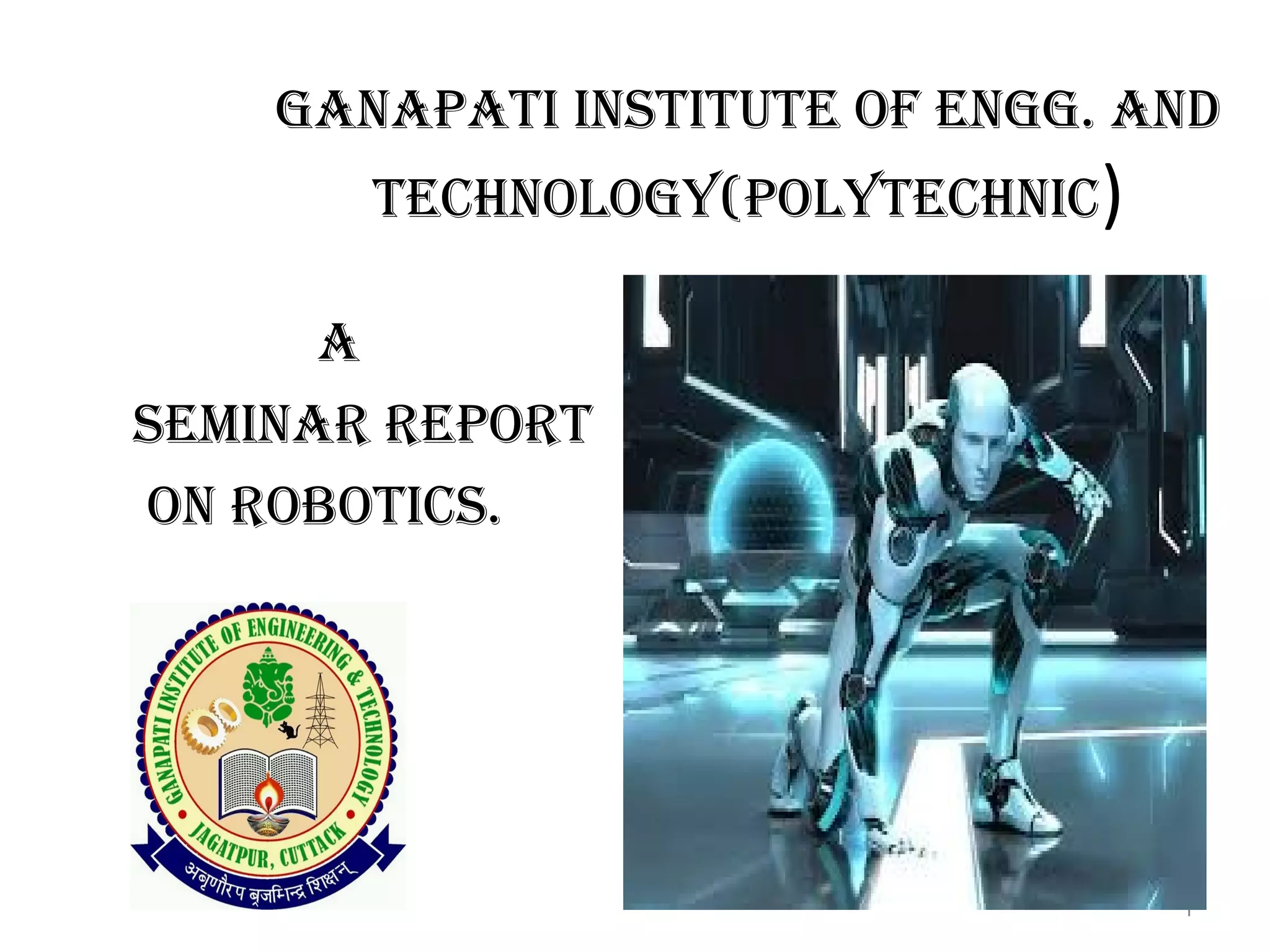
SEMINAR REPORT 
ON ROBOTICS. 
1
ROBOTICS INTRODUCTION 
 What is a Robot ? 
Deffination of Robot ? 
Apllications of Robots ? 
What do we need the Robot ? 
Different parts of Robot ? 
2
3 
 What is a Robot? 
A robot is a device that is 
built to independently 
perform actions and 
interact with its 
surroundings.
DEFFINATION OF ROBOT 
• The word Robot comes from the “Czech” 
word “ROBOTA”. Which means “Forced 
labour.” 
• It is a Electromechanical device. 
• It perform various task. 
• It may be human controlled or automated. 
• It finds its uses in all assepts of our life . 
4
APPLICATIONS OF ROBOTS 
Industry. 
Medical. 
Millitary. 
Space Exploration. 
Research & Development. 
5
INDUSTRY 
Robots are used in 
assembling of Auto 
vehicle. 
Robots are used in 
to feed the metal 
pieces into the blast 
furnance . 
6
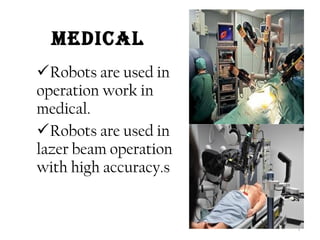
MEDICAL 
Robots are used in 
operation work in 
medical. 
Robots are used in 
lazer beam operation 
with high accuracy.s 
7
Millitary 
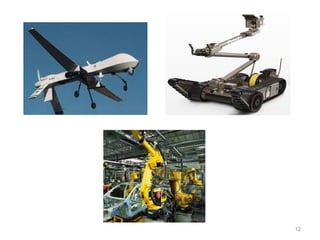
Drone planes being 
used in U.S army to 
keep a watch on key 
enemy installation 
&enemy movement 
using thermal image 
processing. 
8
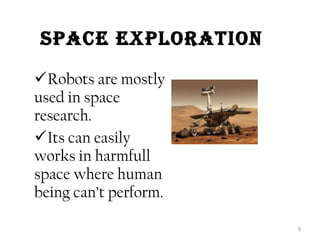
SPaCE EXPlOratiON 
Robots are mostly 
used in space 
research. 
Its can easily 
works in harmfull 
space where human 
being can’t perform. 
9
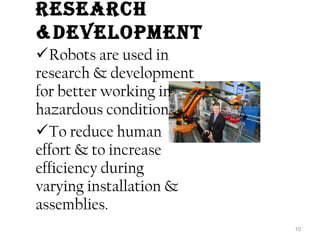
rESEarCh 
&DEvElOPMENt 
Robots are used in 
research & development 
for better working in 
hazardous condition . 
To reduce human 
effort & to increase 
efficiency during 
varying installation & 
assemblies. 
10
Why DO WE NEED thE rObOt ? 
Sensing: The robot must be able to perceive its 
environment through sensors locate obstacles to 
avoid, and objects of interest that we want it to 
interact with. 
Plan/Act: The robot must be able to make 
decisions using its processor based on it’s sensors 
and feed them to it’s actuators to be able to move. 
Moving: The robot must be able to control 
some set of actuators to move how and when we 
want it to. We must be able to reliably place the 
robot anywhere we want. 
11
12
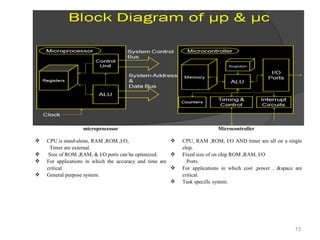
microprocessor Microcontroller 
 CPU is stand-alone, RAM ,ROM ,I/O, 
Timer are external. 
 Size of ROM ,RAM, & I/O ports can be optimized. 
 For applications in which the accuracy and time are 
critical. 
 General purpose system. 
 CPU, RAM ,ROM, I/O AND timer are all on a single 
chip. 
 Fixed size of on chip ROM ,RAM, I/O 
Ports. 
 For applications in which cost ,power , &space are 
critical. 
 Task specific system. 
13
14 
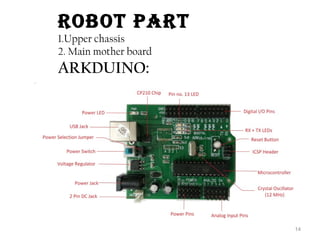
rObOt Part 
1.Upper chassis 
2. Main mother board 
ARKDUINO:
15 
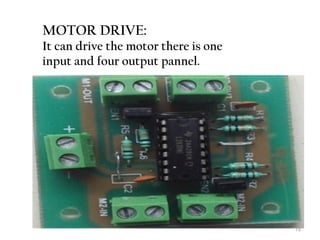
MOTOR DRIVE: 
It can drive the motor there is one 
input and four output pannel.
16 
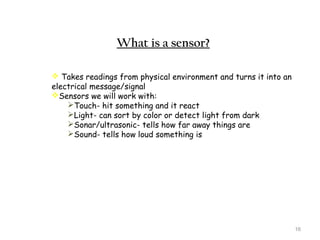
What is a sensor? 
 Takes readings from physical environment and turns it into an 
electrical message/signal 
Sensors we will work with: 
Touch- hit something and it react 
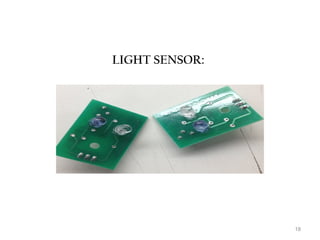
Light- can sort by color or detect light from dark 
Sonar/ultrasonic- tells how far away things are 
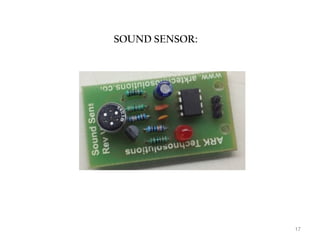
Sound- tells how loud something is
17 
SOUND SENSOR:
18 
LIGHT SENSOR:
19 
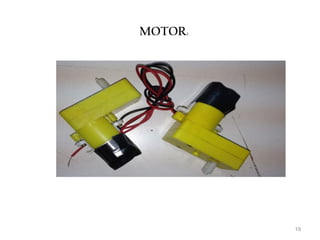
MOTOR:
20 
Movement 
 Define Types of movement: 
Locomotion – The ability to move from 
place to place (move from place to place) 
Localization – To perform functions in a 
specific area (turn head) 
Manipulation – To touch or move by 
mechanical means (move other things around) 
Cooperation - To work together 
(two motors working together for movement)
21 
What is a processor? 
A computer needs to be able to…: 
Each of the previous three things is 
programmed by the user using a 
programming language. 
Takes readings from physical 
environment and turns it into an 
electrical message/signal Touch- hit 
something and it react
What is an actuator? 
Takes electrical message and turns it 
into a physical action. For example: 
Electric motors receive electricity 
which makes their axles turn. These can 
be connected to wheels, which can make 
the robot move 
Pumps receive electricity which makes 
them compress liquid through tubes 
which can make a robotic arm move 
around. This arm can push, pull, and lift 
things in the world. 
22
23 
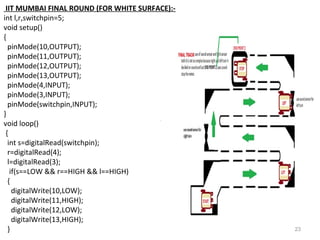
IIT MUMBAI FINAL ROUND (FOR WHITE SURFACE):- 
int l,r,switchpin=5; 
void setup() 
{ 
pinMode(10,OUTPUT); 
pinMode(11,OUTPUT); 
pinMode(12,OUTPUT); 
pinMode(13,OUTPUT); 
pinMode(4,INPUT); 
pinMode(3,INPUT); 
pinMode(switchpin,INPUT); 
} 
void loop() 
{ 
int s=digitalRead(switchpin); 
r=digitalRead(4); 
l=digitalRead(3); 
if(s==LOW && r==HIGH && l==HIGH) 
{ 
digitalWrite(10,LOW); 
digitalWrite(11,HIGH); 
digitalWrite(12,LOW); 
digitalWrite(13,HIGH); 
}
24 
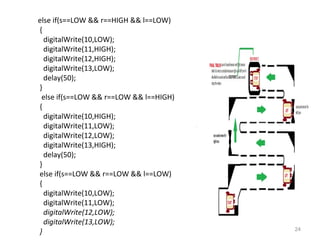
else if(s==LOW && r==HIGH && l==LOW) 
{ 
digitalWrite(10,LOW); 
digitalWrite(11,HIGH); 
digitalWrite(12,HIGH); 
digitalWrite(13,LOW); 
delay(50); 
} 
else if(s==LOW && r==LOW && l==HIGH) 
{ 
digitalWrite(10,HIGH); 
digitalWrite(11,LOW); 
digitalWrite(12,LOW); 
digitalWrite(13,HIGH); 
delay(50); 
} 
else if(s==LOW && r==LOW && l==LOW) 
{ 
digitalWrite(10,LOW); 
digitalWrite(11,LOW); 
digitalWrite(12,LOW); 
digitalWrite(13,LOW); 
}
25 
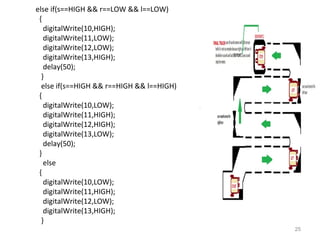
else if(s==HIGH && r==LOW && l==LOW) 
{ 
digitalWrite(10,HIGH); 
digitalWrite(11,LOW); 
digitalWrite(12,LOW); 
digitalWrite(13,HIGH); 
delay(50); 
} 
else if(s==HIGH && r==HIGH && l==HIGH) 
{ 
digitalWrite(10,LOW); 
digitalWrite(11,HIGH); 
digitalWrite(12,HIGH); 
digitalWrite(13,LOW); 
delay(50); 
} 
else 
{ 
digitalWrite(10,LOW); 
digitalWrite(11,HIGH); 
digitalWrite(12,LOW); 
digitalWrite(13,HIGH); 
}
26 
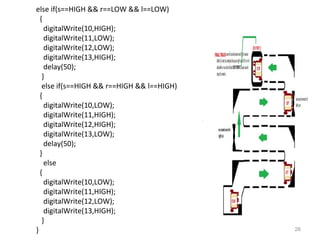
else if(s==HIGH && r==LOW && l==LOW) 
{ 
digitalWrite(10,HIGH); 
digitalWrite(11,LOW); 
digitalWrite(12,LOW); 
digitalWrite(13,HIGH); 
delay(50); 
} 
else if(s==HIGH && r==HIGH && l==HIGH) 
{ 
digitalWrite(10,LOW); 
digitalWrite(11,HIGH); 
digitalWrite(12,HIGH); 
digitalWrite(13,LOW); 
delay(50); 
} 
else 
{ 
digitalWrite(10,LOW); 
digitalWrite(11,HIGH); 
digitalWrite(12,LOW); 
digitalWrite(13,HIGH); 
} 
}
THANK YOU. 
27

Seminar report on robotics (line follower) ppt

  • 1.
    GANAPATI INSTITUTE OFENGG. AND TECHNOLOGY(POLYTECHNIC) A SEMINAR REPORT ON ROBOTICS. 1
  • 2.
    ROBOTICS INTRODUCTION What is a Robot ? Deffination of Robot ? Apllications of Robots ? What do we need the Robot ? Different parts of Robot ? 2
  • 3.
    3  Whatis a Robot? A robot is a device that is built to independently perform actions and interact with its surroundings.
  • 4.
    DEFFINATION OF ROBOT • The word Robot comes from the “Czech” word “ROBOTA”. Which means “Forced labour.” • It is a Electromechanical device. • It perform various task. • It may be human controlled or automated. • It finds its uses in all assepts of our life . 4
  • 5.
    APPLICATIONS OF ROBOTS Industry. Medical. Millitary. Space Exploration. Research & Development. 5
  • 6.
    INDUSTRY Robots areused in assembling of Auto vehicle. Robots are used in to feed the metal pieces into the blast furnance . 6
  • 7.
    MEDICAL Robots areused in operation work in medical. Robots are used in lazer beam operation with high accuracy.s 7
  • 8.
    Millitary Drone planesbeing used in U.S army to keep a watch on key enemy installation &enemy movement using thermal image processing. 8
  • 9.
    SPaCE EXPlOratiON Robotsare mostly used in space research. Its can easily works in harmfull space where human being can’t perform. 9
  • 10.
    rESEarCh &DEvElOPMENt Robotsare used in research & development for better working in hazardous condition . To reduce human effort & to increase efficiency during varying installation & assemblies. 10
  • 11.
    Why DO WENEED thE rObOt ? Sensing: The robot must be able to perceive its environment through sensors locate obstacles to avoid, and objects of interest that we want it to interact with. Plan/Act: The robot must be able to make decisions using its processor based on it’s sensors and feed them to it’s actuators to be able to move. Moving: The robot must be able to control some set of actuators to move how and when we want it to. We must be able to reliably place the robot anywhere we want. 11
  • 12.
  • 13.
    microprocessor Microcontroller CPU is stand-alone, RAM ,ROM ,I/O, Timer are external.  Size of ROM ,RAM, & I/O ports can be optimized.  For applications in which the accuracy and time are critical.  General purpose system.  CPU, RAM ,ROM, I/O AND timer are all on a single chip.  Fixed size of on chip ROM ,RAM, I/O Ports.  For applications in which cost ,power , &space are critical.  Task specific system. 13
  • 14.
    14 rObOt Part 1.Upper chassis 2. Main mother board ARKDUINO:
  • 15.
    15 MOTOR DRIVE: It can drive the motor there is one input and four output pannel.
  • 16.
    16 What isa sensor?  Takes readings from physical environment and turns it into an electrical message/signal Sensors we will work with: Touch- hit something and it react Light- can sort by color or detect light from dark Sonar/ultrasonic- tells how far away things are Sound- tells how loud something is
  • 17.
  • 18.
  • 19.
  • 20.
    20 Movement Define Types of movement: Locomotion – The ability to move from place to place (move from place to place) Localization – To perform functions in a specific area (turn head) Manipulation – To touch or move by mechanical means (move other things around) Cooperation - To work together (two motors working together for movement)
  • 21.
    21 What isa processor? A computer needs to be able to…: Each of the previous three things is programmed by the user using a programming language. Takes readings from physical environment and turns it into an electrical message/signal Touch- hit something and it react
  • 22.
    What is anactuator? Takes electrical message and turns it into a physical action. For example: Electric motors receive electricity which makes their axles turn. These can be connected to wheels, which can make the robot move Pumps receive electricity which makes them compress liquid through tubes which can make a robotic arm move around. This arm can push, pull, and lift things in the world. 22
  • 23.
    23 IIT MUMBAIFINAL ROUND (FOR WHITE SURFACE):- int l,r,switchpin=5; void setup() { pinMode(10,OUTPUT); pinMode(11,OUTPUT); pinMode(12,OUTPUT); pinMode(13,OUTPUT); pinMode(4,INPUT); pinMode(3,INPUT); pinMode(switchpin,INPUT); } void loop() { int s=digitalRead(switchpin); r=digitalRead(4); l=digitalRead(3); if(s==LOW && r==HIGH && l==HIGH) { digitalWrite(10,LOW); digitalWrite(11,HIGH); digitalWrite(12,LOW); digitalWrite(13,HIGH); }
  • 24.
    24 else if(s==LOW&& r==HIGH && l==LOW) { digitalWrite(10,LOW); digitalWrite(11,HIGH); digitalWrite(12,HIGH); digitalWrite(13,LOW); delay(50); } else if(s==LOW && r==LOW && l==HIGH) { digitalWrite(10,HIGH); digitalWrite(11,LOW); digitalWrite(12,LOW); digitalWrite(13,HIGH); delay(50); } else if(s==LOW && r==LOW && l==LOW) { digitalWrite(10,LOW); digitalWrite(11,LOW); digitalWrite(12,LOW); digitalWrite(13,LOW); }
  • 25.
    25 else if(s==HIGH&& r==LOW && l==LOW) { digitalWrite(10,HIGH); digitalWrite(11,LOW); digitalWrite(12,LOW); digitalWrite(13,HIGH); delay(50); } else if(s==HIGH && r==HIGH && l==HIGH) { digitalWrite(10,LOW); digitalWrite(11,HIGH); digitalWrite(12,HIGH); digitalWrite(13,LOW); delay(50); } else { digitalWrite(10,LOW); digitalWrite(11,HIGH); digitalWrite(12,LOW); digitalWrite(13,HIGH); }
  • 26.
    26 else if(s==HIGH&& r==LOW && l==LOW) { digitalWrite(10,HIGH); digitalWrite(11,LOW); digitalWrite(12,LOW); digitalWrite(13,HIGH); delay(50); } else if(s==HIGH && r==HIGH && l==HIGH) { digitalWrite(10,LOW); digitalWrite(11,HIGH); digitalWrite(12,HIGH); digitalWrite(13,LOW); delay(50); } else { digitalWrite(10,LOW); digitalWrite(11,HIGH); digitalWrite(12,LOW); digitalWrite(13,HIGH); } }
  • 27.