The Many Facets of Apache Solr
          Yonik Seeley, Lucid Imagination
     yonik@lucidimagination.com, Oct 20 2011
What I Will Cover

§    What is Faceted Search
§    Solr’s Faceted Search
§    Tips & Tricks
§    Performance & Algorithms


                           3
My Background
§  Creator of Solr
§  Co-founder of Lucid Imagination
§  Expertise: Distributed Search systems and
    performance
§  Lucene/Solr committer, a member of the
    Lucene PMC,
    member of the Apache Software
    Foundation
§  Work: CNET Networks, BEA, Telcordia,
    among others
§  M.S. in Computer Science, Stanford
What is Faceted Search


           5
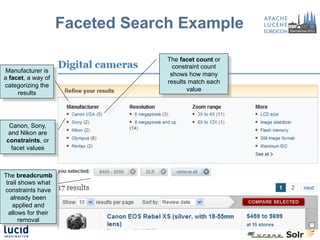
Faceted Search Example

                                  The facet count or
                                    constraint count
 Manufacturer is
                                   shows how many
a facet, a way of
                                  results match each
categorizing the
                                         value
     results


 Canon, Sony,
 and Nikon are
constraints, or
  facet values


The breadcrumb
 trail shows what
constraints have
   already been
    applied and
  allows for their
       removal
Key Elements of Faceted Search
§  No hierarchy of options is enforced
   •  Users can apply facet constraints in any order
   •  Users can remove facet constraints in any order
§  No surprises
   •  The user is only given facets and constraints
      that make sense in the context of the items they
      are looking at
   •  The user always knows what to expect before
      they apply a constraint
§  Also known as guided navigation, faceted
    navigation, faceted browsing, parametric search

                            7
Solr’s Faceted Search


          8
Field Faceting
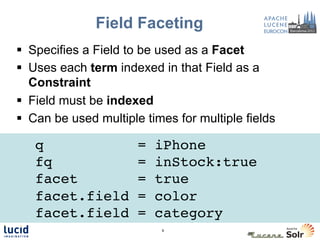
§  Specifies a Field to be used as a Facet
§  Uses each term indexed in that Field as a
    Constraint
§  Field must be indexed
§  Can be used multiple times for multiple fields

  q
  !                    =   iPhone!
    !
 !fq                   =   inStock:true!
 !facet                =   true!
 !facet.field          =   color!
 !facet.field          =   category!
                            9
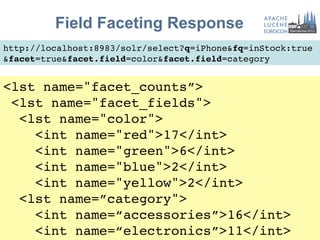
Field Faceting Response
http://localhost:8983/solr/select?q=iPhone&fq=inStock:true!
&facet=true&facet.field=color&facet.field=category!


<lst name="facet_counts”>!
 <lst name="facet_fields">!
  <lst name="color">!
    <int name="red">17</int>!
    <int name="green">6</int>!
    <int name="blue">2</int>!
    <int name="yellow">2</int>!
  <lst name=”category">!
    <int name=“accessories”>16</int>!
    <int name=“electronics”>11</int>!
                             10
Or if you prefer JSON…
http://localhost:8983/solr/select?q=iPhone&fq=inStock:true!
&facet=true&facet.field=color&facet.field=category&wt=json!


"facet_counts":{!
  "facet_fields":{!
    "color":[!
      "red",17,!
      "green",6,!
      "blue",2,      !
      "yellow",2]!
    "category":[!
      "accessories",16,!
      "electronics",11]!     11
Applying Constraints
  Assume the user clicked on “red”…
                                         Simply add another filter
                                           query to apply that
                                                constraint

http://localhost:8983/solr/select?
q=iPhone&fq=inStock:true&fq=color:red&facet=true&
facet.field=color&facet.field=category!


   Remove redundant facet.field
   (assuming single valued field)

                                    12
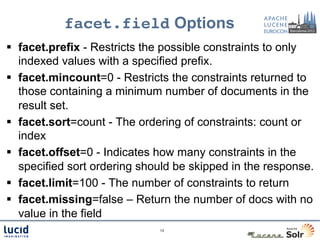
facet.field Options
§  facet.prefix - Restricts the possible constraints to only
    indexed values with a specified prefix.
§  facet.mincount=0 - Restricts the constraints returned to
    those containing a minimum number of documents in the
    result set.
§  facet.sort=count - The ordering of constraints: count or
    index
§  facet.offset=0 - Indicates how many constraints in the
    specified sort ordering should be skipped in the response.
§  facet.limit=100 - The number of constraints to return
§  facet.missing=false – Return the number of docs with no
    value in the field
                              13
facet.query
                        !
§  Specifies a query string to be used as a Facet
    Constraint
§  Typically used multiple times to get multiple
    (discrete) sets
§  Any type of query supported


!facet.query = rank:[* TO 20]!
!facet.query = rank:[21 TO *]!


                          14
facet.query Results

<result numFound="27" ... />!
...!
<lst name="facet_counts">!
 <lst name="facet_queries">!
  <int name="rank:[* TO 20]">2</int>!
  <int name="rank:[21 TO *]">15</int>!
 </lst>!
 ...!
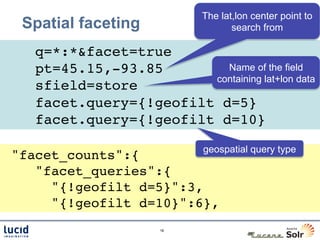
The lat,lon center point to
 Spatial faceting                  search from

  !q=*:*&facet=true!
 !pt=45.15,-93.85!       Name of the field
                       containing lat+lon data
 !sfield=store!
 !facet.query={!geofilt d=5}!
 !facet.query={!geofilt d=10}!

                            geospatial query type
"facet_counts":{!
   "facet_queries":{!
     "{!geofilt d=5}":3,!
     "{!geofilt d=10}":6},!
                     16
Range Faceting
                              "facet_counts":{
§  Simpler than a sequence     "facet_ranges":{
    of facet.query params         "price":{
                                   "counts”:[
                                     "0.0”,5,
http://...&facet=true                "50.0”,2,
&facet.range=price                   "100.0”,0,
                                     "150.0”,2,
&facet.range.start=0                 "200.0”,0,
&facet.range.end=500                 "250.0”,1,
                                     "300.0”,2,
&facet.range.gap=50                  "350.0”,2,
                                     "400.0”,0,
                                     "450.0”,1],
                                   "gap":50.0,
                                   "start":0.0,
                                   "end":500.0}}}}
Date Faceting
l  facet.date  is deprecated, use facet.range on a date field now
l  Creates Constraints based on evenly sized date ranges using
    the Gregorian Calendar
l  Ranges are specified using "Date Math" so they DWIM in spite
    of variable length months and leap years


  facet.range                    =   pubdate!
  facet.range.start              =   NOW/YEAR-1YEAR!
  facet.range.end                =   NOW/MONTH+1MONTH!
  facet.range.gap                =   +1MONTH!
Date Faceting Results
 "facet_counts":{!
   "facet_ranges":{!
      ”pubdate":{!
        "counts":[!
          "2010-01-01T00:00:00Z",4,!
          "2010-02-01T00:00:00Z",6,!
          "2010-03-01T00:00:00Z",0,!
          "2010-04-01T00:00:00Z",13,!
[…]!
          "2011-09-01T00:00:00Z",5,!
          "2011-10-01T00:00:00Z",2],!
        "gap":"+1MONTH",!
        "start":"2010-01-01T00:00:00Z",!
        "end":"2011-11-01T00:00:00Z”}}}!
Range Faceting Options
l  facet.range.hardend=false     - Determines what effective
    end value is used when the specified "start" and "end"
    don't divide into even "gap" sized buckets; false means
    the last Constraint range may be shorter then the others
l  facet.range.other=none - Allows you to specify what
    other Constraints you are interested in besides the
    generated ranges: before, after, between, none, all
l  facet.range.include=lower – Specifies what bounds are
    inclusive vs exclusive: lower, upper, edge, outer, all
Pivot Faceting (trunk)
l  Computes   a Matrix of Constraint Counts across multiple
    Facet Fields
l  Syntax: facet.pivot=field1,field2,field3,…


facet.pivot=cat,inStock
                      #docs #docs w/         #docs w/
                            inStock:true     instock:false
cat:electronics       14     10              4
cat:memory            3      3               0
cat:connector         2      0               2
cat:graphics card     2      0               2
cat:hard drive        2      2               0
Pivot Faceting
   http://...&facet=true&facet.pivot=cat,popularity
            "facet_counts":{                    (continued)
               "facet_pivot":{
                 "cat,popularity":[{           {
                   "field":"cat",                "field":"popularity",
14 docs w/         "value":"electronics",        "value”:1,
cat==electronics   "count":14,                   "count":2}]},
                   "pivot":[{               {
5 docs w/             "field":"popularity", "field":"cat",
cat==electronics      "value":6,              "value":"memory",
&& popularity==6      "count":5},             "count":3,
                    {                         "pivot":[]},
                      "field":"popularity",
                      "value":7,                […]
                      "count":4},
Tips & Tricks


      23
term QParser
l  Default Query Parser does special things with whitespace
    and punctuation
l  Problematic when "filtering" on Facet Field Constraints
    that contain whitespace, punctuation, or other reserved
    characters.
l  Use the term parser to filter on an exact Term


 fq = {!term f=category}Books & Magazines
                         OR
 fq = {!term f=category v=$t}
  t = Books & Magazines
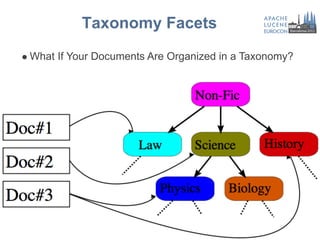
Taxonomy Facets
l  What   If Your Documents Are Organized in a Taxonomy?
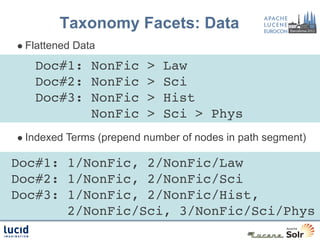
Taxonomy Facets: Data
l  Flattened   Data
  !Doc#1: NonFic > Law!
  !Doc#2: NonFic > Sci!
  !Doc#3: NonFic > Hist!
          NonFic > Sci > Phys!
l  Indexed   Terms (prepend number of nodes in path segment)

Doc#1: 1/NonFic, 2/NonFic/Law!
Doc#2: 1/NonFic, 2/NonFic/Sci!
Doc#3: 1/NonFic, 2/NonFic/Hist, !
       2/NonFic/Sci, 3/NonFic/Sci/Phys!
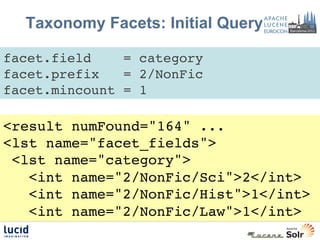
Taxonomy Facets: Initial Query

facet.field    = category!
facet.prefix   = 2/NonFic!
facet.mincount = 1!

<result numFound="164" ...!
<lst name="facet_fields">!
 <lst name="category">!
   <int name="2/NonFic/Sci">2</int>!
   <int name="2/NonFic/Hist">1</int>!
   <int name="2/NonFic/Law">1</int>!
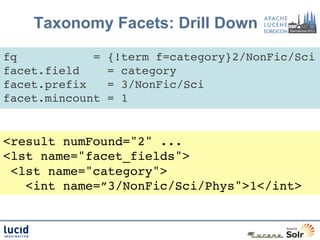
Taxonomy Facets: Drill Down

fq           =   {!term f=category}2/NonFic/Sci!
facet.field      = category!
facet.prefix     = 3/NonFic/Sci!
facet.mincount   = 1!


<result numFound="2" ...!
<lst name="facet_fields">!
 <lst name="category">!
   <int name=”3/NonFic/Sci/Phys">1</int>!
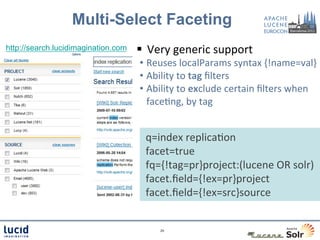
Multi-Select Faceting
http://search.lucidimagination.com   §  Very	
  generic	
  support	
  
                                     •  Reuses	
  localParams	
  syntax	
  {!name=val}	
  
                                     •  Ability	
  to	
  tag	
  filters	
  
                                     •  Ability	
  to	
  exclude	
  certain	
  filters	
  when	
  
                                        faceCng,	
  by	
  tag	


  q=index	
  replicaCon	
  
                                      	
  facet=true	
  
                                      	
  fq={!tag=pr}project:(lucene	
  OR	
  solr)	
  
                                      	
  facet.field={!ex=pr}project	
  
                                      	
  facet.field={!ex=src}source	


                                              29	
  
Same Facet, Different Exclusions
  §  A key can be specified for a facet to change the
      name used to identify it in the response.
          q   =   Hot Rod!
         fq   =   {!df=colors tag=cx}purple green!
facet.field   =   {!key=all_colors ex=cx}colors!
facet.field   =   {!key=overlap_colors}colors!

"facet_counts":{!                 ”overlap_colors":[!
  "facet_fields":{!                   "red",7,!
    ”all_colors":[!                   "green",6,!
      "red",19,!                      "blue”,1]!
      "green",6,!                 }!
      "blue",2],!            }!
                            30
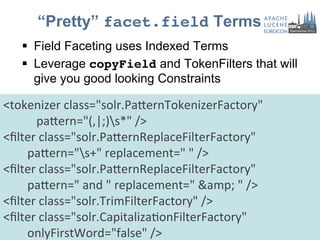
“Pretty” facet.field Terms
      §  Field Faceting uses Indexed Terms
      §  Leverage copyField and TokenFilters that will
          give you good looking Constraints

<tokenizer	
  class="solr.PaPernTokenizerFactory"	


  paPern="(,|;)s*"	
  />	
  
<filter	
  class="solr.PaPernReplaceFilterFactory"	


  paPern="s+"	
  replacement="	
  "	
  />	
  
<filter	
  class="solr.PaPernReplaceFilterFactory"	


  paPern="	
  and	
  "	
  replacement="	
  &amp;	
  "	
  />	
  
<filter	
  class="solr.TrimFilterFactory"	
  />	
  
<filter	
  class="solr.CapitalizaConFilterFactory"	


  onlyFirstWord="false"	
  />	
  
                                                      31
“Pretty” facet.field Results
{“id” : “MyExampleDoc”,!
 "category” : ” books !
 and magazines; !
computers, “!
}!
   copyField
  in schema    <copyField “source”=“category” “dest”=“category_pretty”/>

"facet_counts":{!
  "facet_fields":{!
    "category_pretty":[!
      "Books & Magazines",1,!
      "Computers",1]!
                                 32
facet.field Labels
  §  facet.query params are echoed verbatim when
      returning the constraint counts
  §  Optionally, one can declare a facet.query in
      solrconfig.xml and include a "label" that the
      presentation layer can parse out for display. “label” has no
                                                                                    meaning to solr
facet.query = {!label=‘Hot!’	
  }!
              +pop:[1 TO *] !
              +pub_date:[NOW/DAY-1DAY TO *]!

"facet_queries"	
  :	
  {	


  "	
  {!label=‘Hot!’	
  }	
  pop:[1	
  TO	
  *]	
  ...	
  "	
  :	
  15	
  
}	
  
                                                        33
Performance


     34
facet.method
                                    !
name     facet.method description                 memory               CPU


enum     enum            Iterates over terms,     filter-per-term in   ~O(nTerms)
                         calculating set          the filterCache
                         intersections

field    fc (single-     Iterates over documents, Lucene               O(nDocs)
cache    valued field)   counting terms           FieldCache
                                                  Entry… int
                                                  [maxDoc]+terms
UnInvert fc (multi-      Iterates over documents, O(maxDoc * num       ~O(nDocs)
edField valued field)    counting terms           terms per doc)

Per-    fcs              Like field-cache, just   Lucene               O(nDocs)
segment                  better for NRT since     FieldCache           +O(nTerms)
field                    FieldCacheEntry is at    Entries… int
cache                    segment level.           [maxDoc]+terms

                                          35
facet.method=fc                                  Mem=int[maxDoc]

CPU=O(nDocs in
                      (single-valued field)                              +unique_values

   base set)
                             Documents
                             matching the
                             base query            Lucene FieldCache Entry
                              Juggernaut           (StringIndex) for the hero
 q=Juggernaut                                      field
                                 0                order: for each
 &facet=true                     2     lookup     doc, an index into   lookup: the
 &facet.field=hero                                the lookup array
                                                                       string values
                                 7
                                                         5                (null)
                                                         3              batman
                              accumulator
                                                         5                flash
                                 0
                                                         1             spiderman
                                 1
                                                         4             superman
            Priority queue       0    increment
               flash, 5
                                                         5             wolverine
                                 0
             Batman, 3                                   2
                                 0
                                                         1
                                 2
facet.method=fcs (trunk)

          (per-segment single-valued)
                  Segment1             Segment2           Segment3               Segment4
                  FieldCache           FieldCache         FieldCache             FieldCache
                     Entry                Entry              Entry                  Entry

                        accumulator1      accumulator2           accumulator3      accumulator4
                  inc
         lookup         0                 0                   1                       0
                        3                 2                   3                       1
         0
Base                    5                 1                   0                       0
DocSet   2
                        0                 0                   4
         7                                                                         thread4
                        1              thread2            thread3
                        2
                    thread1                                                     Priority queue
                                              FieldCache +
                                                                                   flash, 5
                                              accumulator                        Batman, 3
                                              merger
                                              (Priority queue)
facet.method=fcs!
l  Controllable
           multi-threading
   facet.method=fcs!
   facet.field={!threads=4}myfield!
   	
  
l  Disadvantages
   l     Larger memory use (FieldCaches + accumulators)
   l     Slower (extra FieldCache merge step needed) – O(nTerms)
l  Advantages
   l     Rebuilds FieldCache entries only for new segments (NRT friendly)
   l     Multi-threaded
Per-segment faceting performance
                 comparison
Test index: 10M documents, 18 segments, single valued field

    Base DocSet=100 docs, facet.field on a field with 100,000 unique terms
A   Time for request*           facet.method=fc        facet.method=fcs
    static index                3 ms                   244 ms
    quickly changing index      1388 ms                267 ms


    Base DocSet=1,000,000 docs, facet.field on a field with 100 unique terms

B   Time for request*          facet.method=fc          facet.method=fcs
    static index               26 ms                    34 ms
    quickly changing index     741 ms                   94 ms

                   *complete request time, measured externally
facet.method=fc 

                (multi-valued field)
§  UnInvertedField - like single-valued FieldCache algorithm, but
    with multi-valued FieldCache
§  Good for many unique terms, relatively few values per doc
   •  Best case: 50x faster, 5x smaller than “enum” (100K unique values,
      1-5 per doc)
   •  O(n_docs), but optimization to count the inverse when n>maxDoc/2
§  Memory efficient
   •  Terms in a document are delta coded variable width ords (vints)
   •  Ord list for document packed in an int or in a shared byte[]
   •  Hybrid approach: “big terms” that match >5% of index use
      filterCache instead
   •  Only 1/128th of string values in memory
facet.method=fc
              fieldValueCache
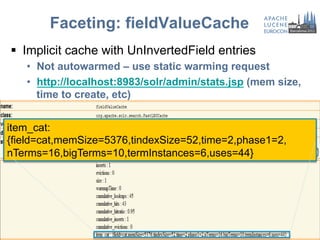
§  Implicit cache with UnInvertedField entries
   •  Not autowarmed – use static warming request
   •  http://localhost:8983/solr/admin/stats.jsp (mem size,
      time to create, etc)
Faceting: fieldValueCache
§  Implicit cache with UnInvertedField entries
   •  Not autowarmed – use static warming request
   •  http://localhost:8983/solr/admin/stats.jsp (mem size,
      time to create, etc)


item_cat:
{field=cat,memSize=5376,tindexSize=52,time=2,phase1=2,
nTerms=16,bigTerms=10,termInstances=6,uses=44}
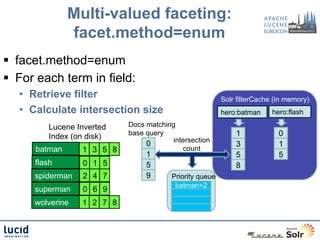
Multi-valued faceting:
               facet.method=enum
§  facet.method=enum
§  For each term in field:
   •  Retrieve filter                                     Solr filterCache (in memory)
   •  Calculate intersection size                         hero:batman     hero:flash

         Lucene Inverted    Docs matching
         Index (on disk)    base query                        1             0
                                         intersection
                                 0                            3             1
      batman      1 3 5 8                   count
                                 1                            5             5
      flash       0 1 5          5                            8
      spiderman   2 4 7          9       Priority queue
                                          batman=2
      superman    0 6 9
      wolverine   1 2 7 8
facet.method=enum
                              !

§    O(n_terms_in_field)
§    Short circuits based on term.df
§    filterCache entries int[ndocs] or BitSet(maxDoc)
§    Size filterCache appropriately
      •  Either autowarm filterCache, or use static warming
         queries (via newSearcher event) in solrconfig.xml
§  facet.enum.cache.minDf - prevent filterCache use
    for small terms
      •  Also useful for huge index w/ no time constraints
Q&A


 45

The Many Facets of Apache Solr - Yonik Seeley

  • 1.
    The Many Facetsof Apache Solr Yonik Seeley, Lucid Imagination yonik@lucidimagination.com, Oct 20 2011
  • 2.
    What I WillCover §  What is Faceted Search §  Solr’s Faceted Search §  Tips & Tricks §  Performance & Algorithms 3
  • 3.
    My Background §  Creatorof Solr §  Co-founder of Lucid Imagination §  Expertise: Distributed Search systems and performance §  Lucene/Solr committer, a member of the Lucene PMC, member of the Apache Software Foundation §  Work: CNET Networks, BEA, Telcordia, among others §  M.S. in Computer Science, Stanford
  • 4.
  • 5.
    Faceted Search Example The facet count or constraint count Manufacturer is shows how many a facet, a way of results match each categorizing the value results Canon, Sony, and Nikon are constraints, or facet values The breadcrumb trail shows what constraints have already been applied and allows for their removal
  • 6.
    Key Elements ofFaceted Search §  No hierarchy of options is enforced •  Users can apply facet constraints in any order •  Users can remove facet constraints in any order §  No surprises •  The user is only given facets and constraints that make sense in the context of the items they are looking at •  The user always knows what to expect before they apply a constraint §  Also known as guided navigation, faceted navigation, faceted browsing, parametric search 7
  • 7.
  • 8.
    Field Faceting §  Specifiesa Field to be used as a Facet §  Uses each term indexed in that Field as a Constraint §  Field must be indexed §  Can be used multiple times for multiple fields q ! = iPhone! ! !fq = inStock:true! !facet = true! !facet.field = color! !facet.field = category! 9
  • 9.
    Field Faceting Response http://localhost:8983/solr/select?q=iPhone&fq=inStock:true! &facet=true&facet.field=color&facet.field=category! <lstname="facet_counts”>! <lst name="facet_fields">! <lst name="color">! <int name="red">17</int>! <int name="green">6</int>! <int name="blue">2</int>! <int name="yellow">2</int>! <lst name=”category">! <int name=“accessories”>16</int>! <int name=“electronics”>11</int>! 10
  • 10.
    Or if youprefer JSON… http://localhost:8983/solr/select?q=iPhone&fq=inStock:true! &facet=true&facet.field=color&facet.field=category&wt=json! "facet_counts":{! "facet_fields":{! "color":[! "red",17,! "green",6,! "blue",2, ! "yellow",2]! "category":[! "accessories",16,! "electronics",11]! 11
  • 11.
    Applying Constraints Assume the user clicked on “red”… Simply add another filter query to apply that constraint http://localhost:8983/solr/select? q=iPhone&fq=inStock:true&fq=color:red&facet=true& facet.field=color&facet.field=category! Remove redundant facet.field (assuming single valued field) 12
  • 12.
    facet.field Options §  facet.prefix- Restricts the possible constraints to only indexed values with a specified prefix. §  facet.mincount=0 - Restricts the constraints returned to those containing a minimum number of documents in the result set. §  facet.sort=count - The ordering of constraints: count or index §  facet.offset=0 - Indicates how many constraints in the specified sort ordering should be skipped in the response. §  facet.limit=100 - The number of constraints to return §  facet.missing=false – Return the number of docs with no value in the field 13
  • 13.
    facet.query ! §  Specifies a query string to be used as a Facet Constraint §  Typically used multiple times to get multiple (discrete) sets §  Any type of query supported !facet.query = rank:[* TO 20]! !facet.query = rank:[21 TO *]! 14
  • 14.
    facet.query Results <result numFound="27"... />! ...! <lst name="facet_counts">! <lst name="facet_queries">! <int name="rank:[* TO 20]">2</int>! <int name="rank:[21 TO *]">15</int>! </lst>! ...!
  • 15.
    The lat,lon centerpoint to Spatial faceting search from !q=*:*&facet=true! !pt=45.15,-93.85! Name of the field containing lat+lon data !sfield=store! !facet.query={!geofilt d=5}! !facet.query={!geofilt d=10}! geospatial query type "facet_counts":{! "facet_queries":{! "{!geofilt d=5}":3,! "{!geofilt d=10}":6},! 16
  • 16.
    Range Faceting "facet_counts":{ §  Simpler than a sequence "facet_ranges":{ of facet.query params "price":{ "counts”:[ "0.0”,5, http://...&facet=true "50.0”,2, &facet.range=price "100.0”,0, "150.0”,2, &facet.range.start=0 "200.0”,0, &facet.range.end=500 "250.0”,1, "300.0”,2, &facet.range.gap=50 "350.0”,2, "400.0”,0, "450.0”,1], "gap":50.0, "start":0.0, "end":500.0}}}}
  • 17.
    Date Faceting l  facet.date is deprecated, use facet.range on a date field now l  Creates Constraints based on evenly sized date ranges using the Gregorian Calendar l  Ranges are specified using "Date Math" so they DWIM in spite of variable length months and leap years facet.range = pubdate! facet.range.start = NOW/YEAR-1YEAR! facet.range.end = NOW/MONTH+1MONTH! facet.range.gap = +1MONTH!
  • 18.
    Date Faceting Results "facet_counts":{! "facet_ranges":{! ”pubdate":{! "counts":[! "2010-01-01T00:00:00Z",4,! "2010-02-01T00:00:00Z",6,! "2010-03-01T00:00:00Z",0,! "2010-04-01T00:00:00Z",13,! […]! "2011-09-01T00:00:00Z",5,! "2011-10-01T00:00:00Z",2],! "gap":"+1MONTH",! "start":"2010-01-01T00:00:00Z",! "end":"2011-11-01T00:00:00Z”}}}!
  • 19.
    Range Faceting Options l facet.range.hardend=false - Determines what effective end value is used when the specified "start" and "end" don't divide into even "gap" sized buckets; false means the last Constraint range may be shorter then the others l  facet.range.other=none - Allows you to specify what other Constraints you are interested in besides the generated ranges: before, after, between, none, all l  facet.range.include=lower – Specifies what bounds are inclusive vs exclusive: lower, upper, edge, outer, all
  • 20.
    Pivot Faceting (trunk) l Computes a Matrix of Constraint Counts across multiple Facet Fields l  Syntax: facet.pivot=field1,field2,field3,… facet.pivot=cat,inStock #docs #docs w/ #docs w/ inStock:true instock:false cat:electronics 14 10 4 cat:memory 3 3 0 cat:connector 2 0 2 cat:graphics card 2 0 2 cat:hard drive 2 2 0
  • 21.
    Pivot Faceting http://...&facet=true&facet.pivot=cat,popularity "facet_counts":{ (continued) "facet_pivot":{ "cat,popularity":[{ { "field":"cat", "field":"popularity", 14 docs w/ "value":"electronics", "value”:1, cat==electronics "count":14, "count":2}]}, "pivot":[{ { 5 docs w/ "field":"popularity", "field":"cat", cat==electronics "value":6, "value":"memory", && popularity==6 "count":5}, "count":3, { "pivot":[]}, "field":"popularity", "value":7, […] "count":4},
  • 22.
  • 23.
    term QParser l  DefaultQuery Parser does special things with whitespace and punctuation l  Problematic when "filtering" on Facet Field Constraints that contain whitespace, punctuation, or other reserved characters. l  Use the term parser to filter on an exact Term fq = {!term f=category}Books & Magazines OR fq = {!term f=category v=$t} t = Books & Magazines
  • 24.
    Taxonomy Facets l  What If Your Documents Are Organized in a Taxonomy?
  • 25.
    Taxonomy Facets: Data l Flattened Data !Doc#1: NonFic > Law! !Doc#2: NonFic > Sci! !Doc#3: NonFic > Hist! NonFic > Sci > Phys! l  Indexed Terms (prepend number of nodes in path segment) Doc#1: 1/NonFic, 2/NonFic/Law! Doc#2: 1/NonFic, 2/NonFic/Sci! Doc#3: 1/NonFic, 2/NonFic/Hist, ! 2/NonFic/Sci, 3/NonFic/Sci/Phys!
  • 26.
    Taxonomy Facets: InitialQuery facet.field = category! facet.prefix = 2/NonFic! facet.mincount = 1! <result numFound="164" ...! <lst name="facet_fields">! <lst name="category">! <int name="2/NonFic/Sci">2</int>! <int name="2/NonFic/Hist">1</int>! <int name="2/NonFic/Law">1</int>!
  • 27.
    Taxonomy Facets: DrillDown fq = {!term f=category}2/NonFic/Sci! facet.field = category! facet.prefix = 3/NonFic/Sci! facet.mincount = 1! <result numFound="2" ...! <lst name="facet_fields">! <lst name="category">! <int name=”3/NonFic/Sci/Phys">1</int>!
  • 28.
    Multi-Select Faceting http://search.lucidimagination.com §  Very  generic  support   •  Reuses  localParams  syntax  {!name=val}   •  Ability  to  tag  filters   •  Ability  to  exclude  certain  filters  when   faceCng,  by  tag      q=index  replicaCon    facet=true    fq={!tag=pr}project:(lucene  OR  solr)    facet.field={!ex=pr}project    facet.field={!ex=src}source   29  
  • 29.
    Same Facet, DifferentExclusions §  A key can be specified for a facet to change the name used to identify it in the response. q = Hot Rod! fq = {!df=colors tag=cx}purple green! facet.field = {!key=all_colors ex=cx}colors! facet.field = {!key=overlap_colors}colors! "facet_counts":{! ”overlap_colors":[! "facet_fields":{! "red",7,! ”all_colors":[! "green",6,! "red",19,! "blue”,1]! "green",6,! }! "blue",2],! }! 30
  • 30.
    “Pretty” facet.field Terms §  Field Faceting uses Indexed Terms §  Leverage copyField and TokenFilters that will give you good looking Constraints <tokenizer  class="solr.PaPernTokenizerFactory"                          paPern="(,|;)s*"  />   <filter  class="solr.PaPernReplaceFilterFactory"                    paPern="s+"  replacement="  "  />   <filter  class="solr.PaPernReplaceFilterFactory"                    paPern="  and  "  replacement="  &amp;  "  />   <filter  class="solr.TrimFilterFactory"  />   <filter  class="solr.CapitalizaConFilterFactory"                    onlyFirstWord="false"  />   31
  • 31.
    “Pretty” facet.field Results {“id”: “MyExampleDoc”,! "category” : ” books ! and magazines; ! computers, “! }! copyField in schema <copyField “source”=“category” “dest”=“category_pretty”/> "facet_counts":{! "facet_fields":{! "category_pretty":[! "Books & Magazines",1,! "Computers",1]! 32
  • 32.
    facet.field Labels §  facet.query params are echoed verbatim when returning the constraint counts §  Optionally, one can declare a facet.query in solrconfig.xml and include a "label" that the presentation layer can parse out for display. “label” has no meaning to solr facet.query = {!label=‘Hot!’  }! +pop:[1 TO *] ! +pub_date:[NOW/DAY-1DAY TO *]! "facet_queries"  :  {      "  {!label=‘Hot!’  }  pop:[1  TO  *]  ...  "  :  15   }   33
  • 33.
  • 34.
    facet.method ! name facet.method description memory CPU enum enum Iterates over terms, filter-per-term in ~O(nTerms) calculating set the filterCache intersections field fc (single- Iterates over documents, Lucene O(nDocs) cache valued field) counting terms FieldCache Entry… int [maxDoc]+terms UnInvert fc (multi- Iterates over documents, O(maxDoc * num ~O(nDocs) edField valued field) counting terms terms per doc) Per- fcs Like field-cache, just Lucene O(nDocs) segment better for NRT since FieldCache +O(nTerms) field FieldCacheEntry is at Entries… int cache segment level. [maxDoc]+terms 35
  • 35.
    facet.method=fc Mem=int[maxDoc] CPU=O(nDocs in (single-valued field) +unique_values base set) Documents matching the base query Lucene FieldCache Entry Juggernaut (StringIndex) for the hero q=Juggernaut field 0 order: for each &facet=true 2 lookup doc, an index into lookup: the &facet.field=hero the lookup array string values 7 5 (null) 3 batman accumulator 5 flash 0 1 spiderman 1 4 superman Priority queue 0 increment flash, 5 5 wolverine 0 Batman, 3 2 0 1 2
  • 36.
    facet.method=fcs (trunk)
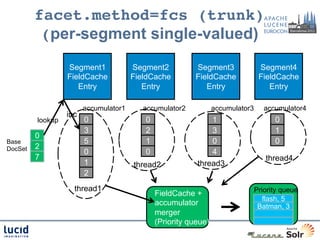
 (per-segment single-valued) Segment1 Segment2 Segment3 Segment4 FieldCache FieldCache FieldCache FieldCache Entry Entry Entry Entry accumulator1 accumulator2 accumulator3 accumulator4 inc lookup 0 0 1 0 3 2 3 1 0 Base 5 1 0 0 DocSet 2 0 0 4 7 thread4 1 thread2 thread3 2 thread1 Priority queue FieldCache + flash, 5 accumulator Batman, 3 merger (Priority queue)
  • 37.
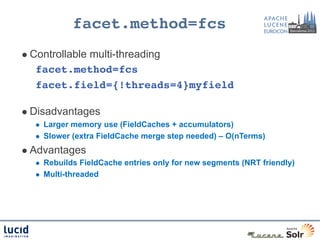
    facet.method=fcs! l  Controllable multi-threading facet.method=fcs! facet.field={!threads=4}myfield!   l  Disadvantages l  Larger memory use (FieldCaches + accumulators) l  Slower (extra FieldCache merge step needed) – O(nTerms) l  Advantages l  Rebuilds FieldCache entries only for new segments (NRT friendly) l  Multi-threaded
  • 38.
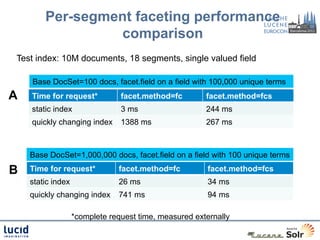
    Per-segment faceting performance comparison Test index: 10M documents, 18 segments, single valued field Base DocSet=100 docs, facet.field on a field with 100,000 unique terms A Time for request* facet.method=fc facet.method=fcs static index 3 ms 244 ms quickly changing index 1388 ms 267 ms Base DocSet=1,000,000 docs, facet.field on a field with 100 unique terms B Time for request* facet.method=fc facet.method=fcs static index 26 ms 34 ms quickly changing index 741 ms 94 ms *complete request time, measured externally
  • 39.
    facet.method=fc 
 (multi-valued field) §  UnInvertedField - like single-valued FieldCache algorithm, but with multi-valued FieldCache §  Good for many unique terms, relatively few values per doc •  Best case: 50x faster, 5x smaller than “enum” (100K unique values, 1-5 per doc) •  O(n_docs), but optimization to count the inverse when n>maxDoc/2 §  Memory efficient •  Terms in a document are delta coded variable width ords (vints) •  Ord list for document packed in an int or in a shared byte[] •  Hybrid approach: “big terms” that match >5% of index use filterCache instead •  Only 1/128th of string values in memory
  • 40.
    facet.method=fc fieldValueCache §  Implicit cache with UnInvertedField entries •  Not autowarmed – use static warming request •  http://localhost:8983/solr/admin/stats.jsp (mem size, time to create, etc)
  • 41.
    Faceting: fieldValueCache §  Implicitcache with UnInvertedField entries •  Not autowarmed – use static warming request •  http://localhost:8983/solr/admin/stats.jsp (mem size, time to create, etc) item_cat: {field=cat,memSize=5376,tindexSize=52,time=2,phase1=2, nTerms=16,bigTerms=10,termInstances=6,uses=44}
  • 42.
    Multi-valued faceting: facet.method=enum §  facet.method=enum §  For each term in field: •  Retrieve filter Solr filterCache (in memory) •  Calculate intersection size hero:batman hero:flash Lucene Inverted Docs matching Index (on disk) base query 1 0 intersection 0 3 1 batman 1 3 5 8 count 1 5 5 flash 0 1 5 5 8 spiderman 2 4 7 9 Priority queue batman=2 superman 0 6 9 wolverine 1 2 7 8
  • 43.
    facet.method=enum ! §  O(n_terms_in_field) §  Short circuits based on term.df §  filterCache entries int[ndocs] or BitSet(maxDoc) §  Size filterCache appropriately •  Either autowarm filterCache, or use static warming queries (via newSearcher event) in solrconfig.xml §  facet.enum.cache.minDf - prevent filterCache use for small terms •  Also useful for huge index w/ no time constraints
  • 44.