Encores? - Going beyond
matching and ranking of
search results
Berlin Buzzwords 2021
Eric Pugh, René Kriegler
Who we are
@renekrie @dep4b
Combined 30 years of
experience in search
Open Source enthusiasts
ASF member, Committers on:
Solr, Querqy, SMUI, Quepid,
https://mices.co
Search - beyond matching and ranking
We tend to focus on matching and ranking. Other search features are almost
treated like an afterthought, like ‘encores’ that follow the main performance:
● Facets
● Query auto-completion
● Spelling correction
● Query relaxation
=> BUT: These are essential features that help the user formulate the query,
understand and narrow down the results
Our main act today (not encores!)
● Facets
● Query auto-completion
● Spelling correction
● Query relaxation
Learn about solutions that come out of the box (in Solr)
Typical challenges and how to overcome them
Advanced solutions: understand the concepts, create your own
The Art of Facets
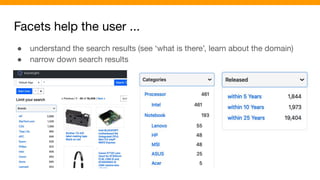
Facets help the user ...
● understand the search results (see ‘what is there’, learn about the domain)
● narrow down search results
Chorus Electronics Project: https://github.com/querqy/chorus
Try the Demo Ecommerce Shop: http://chorus.dev.o19s.com:4000/
Facets help the user ...
● understand the search results (see ‘what is there’, learn about the domain)
● narrow down search results
Challenges
Getting the counts right in e-commerce search
Showing the best facets in the best order
Selecting the facet values to show
“Qui numerare incipit errare incipit”
Facet Counts
Facets and filters
A trivial example:
query=t-shirts
filter=color:black
Challenge: We still need to count all colours in the facets, even if the search result
contains only black t-shirts
Solution: Tagging and exclusion of filters
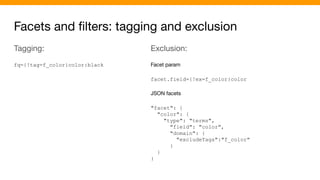
Facets and filters: tagging and exclusion
Tagging:
fq={!tag=f_color}color:black
Exclusion:
Facet param
facet.field={!ex=f_color}color
JSON facets
"facet": {
"color": {
"type": "terms",
"field": "color",
"domain": {
"excludeTags":"f_color"
}
}
}
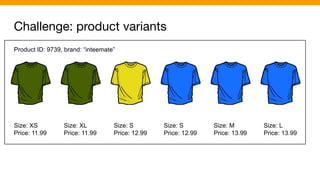
Challenge: product variants
Product ID: 9739, brand: “inteemate”
Size: XS
Price: 11.99
Size: XL
Price: 11.99
Size: S
Price: 12.99
Size: S
Price: 12.99
Size: M
Price: 13.99
Size: L
Price: 13.99
Challenge: product variants
Product ID: 9739, brand: “inteemate”
Size: XS
Price: 11.99
Size: XL
Price: 11.99
Size: S
Price: 12.99
Size: S
Price: 12.99
Size: M
Price: 13.99
Size: L
Price: 13.99
color: [green, yellow, blue]
size: [XS, S, M, L, XL]
price: [11.99, 12.99, 13.99]
Merge into single document??
Facets would work great but
false matches for filter color:green AND size:M
Challenge: product variants
Best solution (in our opinion):
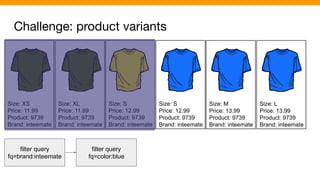
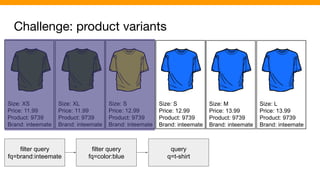
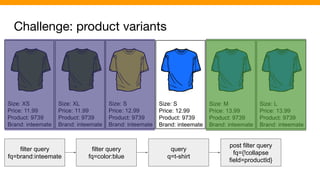
● Index one document for each variant
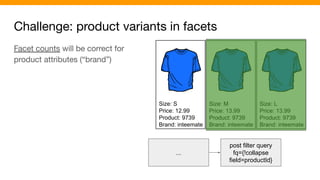
● Group variants at query time using the collapse query parser:
fq={!collapse field=productId}
=> Boolean filters work as expected
=> Great flexibility for counting facets
=> Fast enough
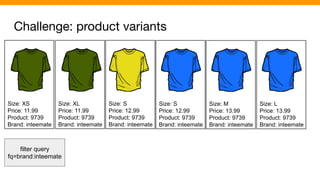
Challenge: product variants
Size: XS
Price: 11.99
Product: 9739
Brand: inteemate
Size: XL
Price: 11.99
Product: 9739
Brand: inteemate
Size: S
Price: 12.99
Product: 9739
Brand: inteemate
Size: S
Price: 12.99
Product: 9739
Brand: inteemate
Size: M
Price: 13.99
Product: 9739
Brand: inteemate
Size: L
Price: 13.99
Product: 9739
Brand: inteemate
filter query
fq=brand:inteemate
Challenge: product variants
Size: XS
Price: 11.99
Product: 9739
Brand: inteemate
Size: XL
Price: 11.99
Product: 9739
Brand: inteemate
Size: S
Price: 12.99
Product: 9739
Brand: inteemate
Size: S
Price: 12.99
Product: 9739
Brand: inteemate
Size: M
Price: 13.99
Product: 9739
Brand: inteemate
Size: L
Price: 13.99
Product: 9739
Brand: inteemate
filter query
fq=brand:inteemate
filter query
fq=color:blue
Challenge: product variants
Size: XS
Price: 11.99
Product: 9739
Brand: inteemate
Size: XL
Price: 11.99
Product: 9739
Brand: inteemate
Size: S
Price: 12.99
Product: 9739
Brand: inteemate
Size: S
Price: 12.99
Product: 9739
Brand: inteemate
Size: M
Price: 13.99
Product: 9739
Brand: inteemate
Size: L
Price: 13.99
Product: 9739
Brand: inteemate
filter query
fq=brand:inteemate
filter query
fq=color:blue
query
q=t-shirt
Challenge: product variants
Size: XS
Price: 11.99
Product: 9739
Brand: inteemate
Size: XL
Price: 11.99
Product: 9739
Brand: inteemate
Size: S
Price: 12.99
Product: 9739
Brand: inteemate
Size: S
Price: 12.99
Product: 9739
Brand: inteemate
Size: M
Price: 13.99
Product: 9739
Brand: inteemate
Size: L
Price: 13.99
Product: 9739
Brand: inteemate
filter query
fq=brand:inteemate
filter query
fq=color:blue
query
q=t-shirt
post filter query
fq={!collapse
field=productId}
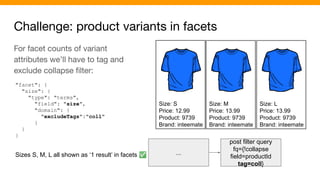
Challenge: product variants in facets
Size: S
Price: 12.99
Product: 9739
Brand: inteemate
Size: M
Price: 13.99
Product: 9739
Brand: inteemate
Size: L
Price: 13.99
Product: 9739
Brand: inteemate
...
post filter query
fq={!collapse
field=productId}
Facet counts will be correct for
product attributes (“brand”)
Challenge: product variants in facets
Size: S
Price: 12.99
Product: 9739
Brand: inteemate
Size: M
Price: 13.99
Product: 9739
Brand: inteemate
Size: L
Price: 13.99
Product: 9739
Brand: inteemate
...
post filter query
fq={!collapse
field=productId
tag=coll}
For facet counts of variant
attributes we’ll have to tag and
exclude collapse filter:
"facet": {
"size": {
"type": "terms",
"field": "size",
"domain": {
"excludeTags":"coll"
}
}
}
Sizes S, M, L all shown as ‘1 result’ in facets ✅
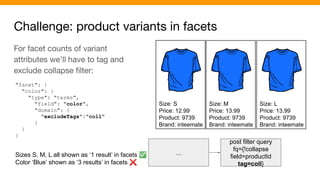
Challenge: product variants in facets
Size: S
Price: 12.99
Product: 9739
Brand: inteemate
Size: M
Price: 13.99
Product: 9739
Brand: inteemate
Size: L
Price: 13.99
Product: 9739
Brand: inteemate
...
post filter query
fq={!collapse
field=productId
tag=coll}
For facet counts of variant
attributes we’ll have to tag and
exclude collapse filter:
"facet": {
"color": {
"type": "terms",
"field": "color",
"domain": {
"excludeTags":"coll"
}
}
}
Sizes S, M, L all shown as ‘1 result’ in facets ✅
Color ‘Blue’ shown as ‘3 results’ in facets ❌
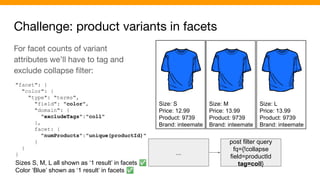
Challenge: product variants in facets
Size: S
Price: 12.99
Product: 9739
Brand: inteemate
Size: M
Price: 13.99
Product: 9739
Brand: inteemate
Size: L
Price: 13.99
Product: 9739
Brand: inteemate
...
post filter query
fq={!collapse
field=productId
tag=coll}
For facet counts of variant
attributes we’ll have to tag and
exclude collapse filter:
"facet": {
"color": {
"type": "terms",
"field": "color",
"domain": {
"excludeTags":"coll"
},
facet: {
"numProducts":"unique(productId)"
}
}
}
Sizes S, M, L all shown as ‘1 result’ in facets ✅
Color ‘Blue’ shown as ‘1 result’ in facets ✅
Collapse query parser - notes on implementation
● Beware of high cardinality of product IDs.
○ If you have 10M different product IDs in your index, the collapse query parser will allocate
heap space for 2 arrays (float/int) x 10M elements (ca. 80 MB) per request!
○ Solution:
■ Many products have just 1 variant. It’s better to leave the productId empty in this case.
■ Combine with nullPolicy=expand, which avoids reserving array space for products
without a productId:
fq={!collapse field=productId nullPolicy=expand}
● All variants of a product must be indexed to the same shard
Facet Selection
Which facets should we show?
Some domains are rich in attributes. For example, electronics could use 10k
different attributes.
Even if we reduced the number of attributes to be used in facets at index time, we
could be left with several hundreds of candidates for facetting.
Building a request for hundreds of facets is not feasible. We’ll show a simple
solution, that will just use the search engine to select facets.
At the other end of the spectrum, you could train a model, that predicts which
facets to show for a given query.
Which facets should we show? - Solution
Index a field multivalued field that holds the names of the facettable fields...
Doc1:
screenSize: 17, ....
facettableFields: [
“screenSize”, “ramGB”, “height”, “width”, ...
]
Doc2:
...
facettableFields: [
“screenSize”, “numHDMIPorts”, “height”, “width”, ...
]
Which facets should we show? - Solution
... and execute an additional, prior facet request on this field. Add the facet values
returned by this request as facet parameters to the main request:
"facet": {
"facettable_fields": {
"type": "terms",
"field": "facettable_fields"
}
}
(query/filter queries are the same like in
the ‘main request’)
"facets":{
"facettable_fields":{
"buckets":[{
"val":"screenSize",
"count":12},
{
"val":"ramGB",
"count":4},
{
"val":"height",
"count":3},
]
}
}
Which facets should we show? - Solution
Index additional information together with the names of facettable fields
facettableFields: [
"00010;screenSize;Screen size ",
"00100;ramGB;Memory (GB) ",
"00005;height;Height ",
"00005;width;Width ",
...]
Importance
(padding makes
values sortable!)
Field name Label
Facet Value Selection
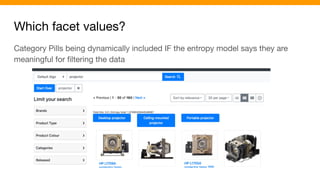
Which facet values?
Category Pills being dynamically included IF the entropy model says they are
meaningful for filtering the data
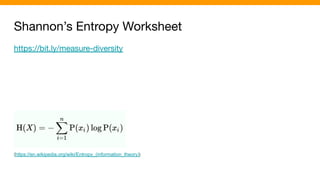
Shannon’s Entropy Worksheet
https://bit.ly/measure-diversity
(https://en.wikipedia.org/wiki/Entropy_(information_theory))
Auto-completion & spelling correction
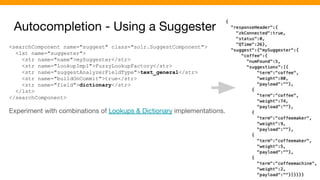
Autocompletion - Using a Suggester
<searchComponent name="suggest" class="solr.SuggestComponent">
<lst name="suggester">
<str name="name">mySuggester</str>
<str name="lookupImpl">FuzzyLookupFactory</str>
<str name="suggestAnalyzerFieldType">text_general</str>
<str name="buildOnCommit">true</str>
<str name="field">dictionary</str>
</lst>
</searchComponent>
Experiment with combinations of Lookups & Dictionary implementations.
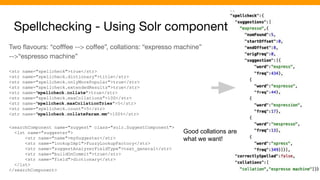
Spellchecking - Using Solr component
Two flavours: “cofffee --> coffee”, collations: “expresso machine”
-->“espresso machine”
<str name="spellcheck">true</str>
<str name="spellcheck.dictionary">title</str>
<str name="spellcheck.onlyMorePopular">true</str>
<str name="spellcheck.extendedResults">true</str>
<str name="spellcheck.collate">true</str>
<str name="spellcheck.maxCollations">100</str>
<str name="spellcheck.maxCollationTries">5</str>
<str name="spellcheck.count">5</str>
<str name="spellcheck.collateParam.mm">100%</str>
<searchComponent name="suggest" class="solr.SuggestComponent">
<lst name="suggester">
<str name="name">mySuggester</str>
<str name="lookupImpl">FuzzyLookupFactory</str>
<str name="suggestAnalyzerFieldType">text_general</str>
<str name="buildOnCommit">true</str>
<str name="field">dictionary</str>
</lst>
</searchComponent>
Good collations are
what we want!
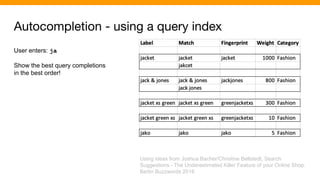
Autocompletion - using a query index
User enters: ja
Show the best query completions
in the best order!
Using ideas from Joshua Bacher/Christine Bellstedt, Search
Suggestions - The Underestimated Killer Feature of your Online Shop.
Berlin Buzzwords 2018
Autocompletion - using a query index
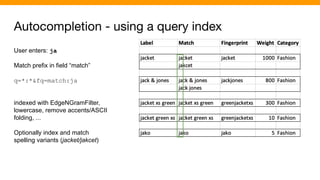
User enters: ja
Match prefix in field “match”
q=*:*&fq=match:ja
indexed with EdgeNGramFilter,
lowercase, remove accents/ASCII
folding, ...
Optionally index and match
spelling variants (jacket/jakcet)
Autocompletion - using a query index
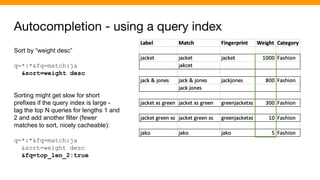
Sort by “weight desc”
q=*:*&fq=match:ja
&sort=weight desc
Sorting might get slow for short
prefixes if the query index is large -
tag the top N queries for lengths 1 and
2 and add another filter (fewer
matches to sort, nicely cacheable):
q=*:*&fq=match:ja
&sort=weight desc
&fq=top_len_2:true
Autocompletion - using a query index
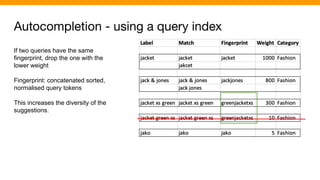
If two queries have the same
fingerprint, drop the one with the
lower weight
Fingerprint: concatenated sorted,
normalised query tokens
This increases the diversity of the
suggestions.
Autocompletion - using a query index
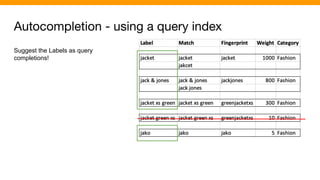
Suggest the Labels as query
completions!
Autocompletion - using a query index
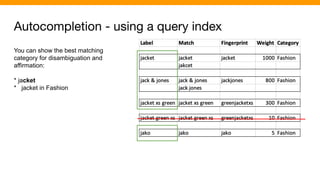
You can show the best matching
category for disambiguation and
affirmation:
* jacket
* jacket in Fashion
Spelling correction - using a query index
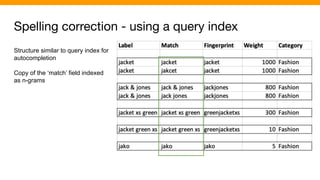
Structure similar to query index for
autocompletion
Copy of the ‘match’ field indexed
as n-grams
Spelling correction - using a query index
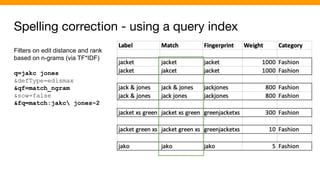
Filters on edit distance and rank
based on n-grams (via TF*IDF)
q=jakc jones
&defType=edismax
&qf=match_ngram
&sow=false
&fq=match:jakc jones~2
Spelling correction - using a query index
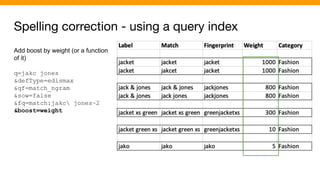
Add boost by weight (or a function
of it)
q=jakc jones
&defType=edismax
&qf=match_ngram
&sow=false
&fq=match:jakc jones~2
&boost=weight
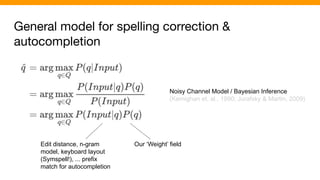
General model for spelling correction &
autocompletion
Noisy Channel Model / Bayesian Inference
(Kernighan et. al., 1990; Jurafsky & Martin, 2009)
Our ‘Weight’ field
Edit distance, n-gram
model, keyboard layout
(Symspell!), ... prefix
match for autocompletion
Query relaxation
Query relaxation
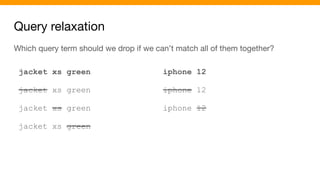
Which query term should we drop if we can’t match all of them together?
jacket xs green
jacket xs green
jacket xs green
jacket xs green
iphone 12
iphone 12
iphone 12
Query relaxation - ‘mm’ anti-pattern
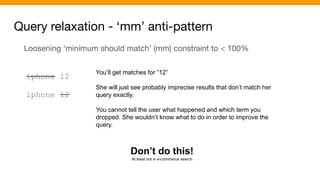
Loosening ‘minimum should match’ (mm) constraint to < 100%
iphone 12
iphone 12
You’ll get matches for “12”
She will just see probably imprecise results that don’t match her
query exactly.
You cannot tell the user what happened and which term you
dropped. She wouldn’t know what to do in order to improve the
query.
Don’t do this!
At least not in e-commerce search
Query relaxation - Solutions
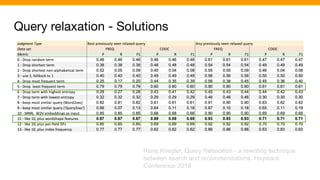
René.Kriegler, Query Relaxation - a rewriting technique
between search and recommendations. Haystack
Conference 2019
Query relaxation - Solutions
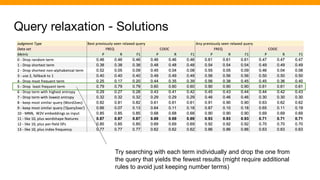
Try searching with each term individually and drop the one from
the query that yields the fewest results (might require additional
rules to avoid just keeping number terms)
Query relaxation - Solutions
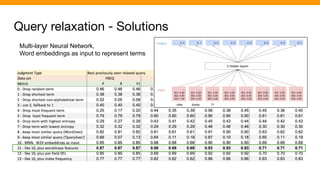
Multi-layer Neural Network,
Word embeddings as input to represent terms
Encores?
Facets, autocompletion, spelling correction, query relaxation are important
features of a search application.
We’ve shown simple out-of-the-box solutions and a path to implement more
advanced approaches.
Thank you!

Encores

  • 1.
    Encores? - Goingbeyond matching and ranking of search results Berlin Buzzwords 2021 Eric Pugh, René Kriegler
  • 2.
    Who we are @renekrie@dep4b Combined 30 years of experience in search Open Source enthusiasts ASF member, Committers on: Solr, Querqy, SMUI, Quepid,
  • 3.
  • 4.
    Search - beyondmatching and ranking We tend to focus on matching and ranking. Other search features are almost treated like an afterthought, like ‘encores’ that follow the main performance: ● Facets ● Query auto-completion ● Spelling correction ● Query relaxation => BUT: These are essential features that help the user formulate the query, understand and narrow down the results
  • 5.
    Our main acttoday (not encores!) ● Facets ● Query auto-completion ● Spelling correction ● Query relaxation Learn about solutions that come out of the box (in Solr) Typical challenges and how to overcome them Advanced solutions: understand the concepts, create your own
  • 6.
    The Art ofFacets
  • 7.
    Facets help theuser ... ● understand the search results (see ‘what is there’, learn about the domain) ● narrow down search results Chorus Electronics Project: https://github.com/querqy/chorus Try the Demo Ecommerce Shop: http://chorus.dev.o19s.com:4000/
  • 8.
    Facets help theuser ... ● understand the search results (see ‘what is there’, learn about the domain) ● narrow down search results
  • 9.
    Challenges Getting the countsright in e-commerce search Showing the best facets in the best order Selecting the facet values to show
  • 10.
    “Qui numerare incipiterrare incipit” Facet Counts
  • 11.
    Facets and filters Atrivial example: query=t-shirts filter=color:black Challenge: We still need to count all colours in the facets, even if the search result contains only black t-shirts Solution: Tagging and exclusion of filters
  • 12.
    Facets and filters:tagging and exclusion Tagging: fq={!tag=f_color}color:black Exclusion: Facet param facet.field={!ex=f_color}color JSON facets "facet": { "color": { "type": "terms", "field": "color", "domain": { "excludeTags":"f_color" } } }
  • 13.
    Challenge: product variants ProductID: 9739, brand: “inteemate” Size: XS Price: 11.99 Size: XL Price: 11.99 Size: S Price: 12.99 Size: S Price: 12.99 Size: M Price: 13.99 Size: L Price: 13.99
  • 14.
    Challenge: product variants ProductID: 9739, brand: “inteemate” Size: XS Price: 11.99 Size: XL Price: 11.99 Size: S Price: 12.99 Size: S Price: 12.99 Size: M Price: 13.99 Size: L Price: 13.99 color: [green, yellow, blue] size: [XS, S, M, L, XL] price: [11.99, 12.99, 13.99] Merge into single document?? Facets would work great but false matches for filter color:green AND size:M
  • 15.
    Challenge: product variants Bestsolution (in our opinion): ● Index one document for each variant ● Group variants at query time using the collapse query parser: fq={!collapse field=productId} => Boolean filters work as expected => Great flexibility for counting facets => Fast enough
  • 16.
    Challenge: product variants Size:XS Price: 11.99 Product: 9739 Brand: inteemate Size: XL Price: 11.99 Product: 9739 Brand: inteemate Size: S Price: 12.99 Product: 9739 Brand: inteemate Size: S Price: 12.99 Product: 9739 Brand: inteemate Size: M Price: 13.99 Product: 9739 Brand: inteemate Size: L Price: 13.99 Product: 9739 Brand: inteemate filter query fq=brand:inteemate
  • 17.
    Challenge: product variants Size:XS Price: 11.99 Product: 9739 Brand: inteemate Size: XL Price: 11.99 Product: 9739 Brand: inteemate Size: S Price: 12.99 Product: 9739 Brand: inteemate Size: S Price: 12.99 Product: 9739 Brand: inteemate Size: M Price: 13.99 Product: 9739 Brand: inteemate Size: L Price: 13.99 Product: 9739 Brand: inteemate filter query fq=brand:inteemate filter query fq=color:blue
  • 18.
    Challenge: product variants Size:XS Price: 11.99 Product: 9739 Brand: inteemate Size: XL Price: 11.99 Product: 9739 Brand: inteemate Size: S Price: 12.99 Product: 9739 Brand: inteemate Size: S Price: 12.99 Product: 9739 Brand: inteemate Size: M Price: 13.99 Product: 9739 Brand: inteemate Size: L Price: 13.99 Product: 9739 Brand: inteemate filter query fq=brand:inteemate filter query fq=color:blue query q=t-shirt
  • 19.
    Challenge: product variants Size:XS Price: 11.99 Product: 9739 Brand: inteemate Size: XL Price: 11.99 Product: 9739 Brand: inteemate Size: S Price: 12.99 Product: 9739 Brand: inteemate Size: S Price: 12.99 Product: 9739 Brand: inteemate Size: M Price: 13.99 Product: 9739 Brand: inteemate Size: L Price: 13.99 Product: 9739 Brand: inteemate filter query fq=brand:inteemate filter query fq=color:blue query q=t-shirt post filter query fq={!collapse field=productId}
  • 20.
    Challenge: product variantsin facets Size: S Price: 12.99 Product: 9739 Brand: inteemate Size: M Price: 13.99 Product: 9739 Brand: inteemate Size: L Price: 13.99 Product: 9739 Brand: inteemate ... post filter query fq={!collapse field=productId} Facet counts will be correct for product attributes (“brand”)
  • 21.
    Challenge: product variantsin facets Size: S Price: 12.99 Product: 9739 Brand: inteemate Size: M Price: 13.99 Product: 9739 Brand: inteemate Size: L Price: 13.99 Product: 9739 Brand: inteemate ... post filter query fq={!collapse field=productId tag=coll} For facet counts of variant attributes we’ll have to tag and exclude collapse filter: "facet": { "size": { "type": "terms", "field": "size", "domain": { "excludeTags":"coll" } } } Sizes S, M, L all shown as ‘1 result’ in facets ✅
  • 22.
    Challenge: product variantsin facets Size: S Price: 12.99 Product: 9739 Brand: inteemate Size: M Price: 13.99 Product: 9739 Brand: inteemate Size: L Price: 13.99 Product: 9739 Brand: inteemate ... post filter query fq={!collapse field=productId tag=coll} For facet counts of variant attributes we’ll have to tag and exclude collapse filter: "facet": { "color": { "type": "terms", "field": "color", "domain": { "excludeTags":"coll" } } } Sizes S, M, L all shown as ‘1 result’ in facets ✅ Color ‘Blue’ shown as ‘3 results’ in facets ❌
  • 23.
    Challenge: product variantsin facets Size: S Price: 12.99 Product: 9739 Brand: inteemate Size: M Price: 13.99 Product: 9739 Brand: inteemate Size: L Price: 13.99 Product: 9739 Brand: inteemate ... post filter query fq={!collapse field=productId tag=coll} For facet counts of variant attributes we’ll have to tag and exclude collapse filter: "facet": { "color": { "type": "terms", "field": "color", "domain": { "excludeTags":"coll" }, facet: { "numProducts":"unique(productId)" } } } Sizes S, M, L all shown as ‘1 result’ in facets ✅ Color ‘Blue’ shown as ‘1 result’ in facets ✅
  • 24.
    Collapse query parser- notes on implementation ● Beware of high cardinality of product IDs. ○ If you have 10M different product IDs in your index, the collapse query parser will allocate heap space for 2 arrays (float/int) x 10M elements (ca. 80 MB) per request! ○ Solution: ■ Many products have just 1 variant. It’s better to leave the productId empty in this case. ■ Combine with nullPolicy=expand, which avoids reserving array space for products without a productId: fq={!collapse field=productId nullPolicy=expand} ● All variants of a product must be indexed to the same shard
  • 25.
  • 26.
    Which facets shouldwe show? Some domains are rich in attributes. For example, electronics could use 10k different attributes. Even if we reduced the number of attributes to be used in facets at index time, we could be left with several hundreds of candidates for facetting. Building a request for hundreds of facets is not feasible. We’ll show a simple solution, that will just use the search engine to select facets. At the other end of the spectrum, you could train a model, that predicts which facets to show for a given query.
  • 27.
    Which facets shouldwe show? - Solution Index a field multivalued field that holds the names of the facettable fields... Doc1: screenSize: 17, .... facettableFields: [ “screenSize”, “ramGB”, “height”, “width”, ... ] Doc2: ... facettableFields: [ “screenSize”, “numHDMIPorts”, “height”, “width”, ... ]
  • 28.
    Which facets shouldwe show? - Solution ... and execute an additional, prior facet request on this field. Add the facet values returned by this request as facet parameters to the main request: "facet": { "facettable_fields": { "type": "terms", "field": "facettable_fields" } } (query/filter queries are the same like in the ‘main request’) "facets":{ "facettable_fields":{ "buckets":[{ "val":"screenSize", "count":12}, { "val":"ramGB", "count":4}, { "val":"height", "count":3}, ] } }
  • 29.
    Which facets shouldwe show? - Solution Index additional information together with the names of facettable fields facettableFields: [ "00010;screenSize;Screen size ", "00100;ramGB;Memory (GB) ", "00005;height;Height ", "00005;width;Width ", ...] Importance (padding makes values sortable!) Field name Label
  • 30.
  • 31.
    Which facet values? CategoryPills being dynamically included IF the entropy model says they are meaningful for filtering the data
  • 32.
  • 33.
  • 34.
    Autocompletion - Usinga Suggester <searchComponent name="suggest" class="solr.SuggestComponent"> <lst name="suggester"> <str name="name">mySuggester</str> <str name="lookupImpl">FuzzyLookupFactory</str> <str name="suggestAnalyzerFieldType">text_general</str> <str name="buildOnCommit">true</str> <str name="field">dictionary</str> </lst> </searchComponent> Experiment with combinations of Lookups & Dictionary implementations.
  • 35.
    Spellchecking - UsingSolr component Two flavours: “cofffee --> coffee”, collations: “expresso machine” -->“espresso machine” <str name="spellcheck">true</str> <str name="spellcheck.dictionary">title</str> <str name="spellcheck.onlyMorePopular">true</str> <str name="spellcheck.extendedResults">true</str> <str name="spellcheck.collate">true</str> <str name="spellcheck.maxCollations">100</str> <str name="spellcheck.maxCollationTries">5</str> <str name="spellcheck.count">5</str> <str name="spellcheck.collateParam.mm">100%</str> <searchComponent name="suggest" class="solr.SuggestComponent"> <lst name="suggester"> <str name="name">mySuggester</str> <str name="lookupImpl">FuzzyLookupFactory</str> <str name="suggestAnalyzerFieldType">text_general</str> <str name="buildOnCommit">true</str> <str name="field">dictionary</str> </lst> </searchComponent> Good collations are what we want!
  • 36.
    Autocompletion - usinga query index User enters: ja Show the best query completions in the best order! Using ideas from Joshua Bacher/Christine Bellstedt, Search Suggestions - The Underestimated Killer Feature of your Online Shop. Berlin Buzzwords 2018
  • 37.
    Autocompletion - usinga query index User enters: ja Match prefix in field “match” q=*:*&fq=match:ja indexed with EdgeNGramFilter, lowercase, remove accents/ASCII folding, ... Optionally index and match spelling variants (jacket/jakcet)
  • 38.
    Autocompletion - usinga query index Sort by “weight desc” q=*:*&fq=match:ja &sort=weight desc Sorting might get slow for short prefixes if the query index is large - tag the top N queries for lengths 1 and 2 and add another filter (fewer matches to sort, nicely cacheable): q=*:*&fq=match:ja &sort=weight desc &fq=top_len_2:true
  • 39.
    Autocompletion - usinga query index If two queries have the same fingerprint, drop the one with the lower weight Fingerprint: concatenated sorted, normalised query tokens This increases the diversity of the suggestions.
  • 40.
    Autocompletion - usinga query index Suggest the Labels as query completions!
  • 41.
    Autocompletion - usinga query index You can show the best matching category for disambiguation and affirmation: * jacket * jacket in Fashion
  • 42.
    Spelling correction -using a query index Structure similar to query index for autocompletion Copy of the ‘match’ field indexed as n-grams
  • 43.
    Spelling correction -using a query index Filters on edit distance and rank based on n-grams (via TF*IDF) q=jakc jones &defType=edismax &qf=match_ngram &sow=false &fq=match:jakc jones~2
  • 44.
    Spelling correction -using a query index Add boost by weight (or a function of it) q=jakc jones &defType=edismax &qf=match_ngram &sow=false &fq=match:jakc jones~2 &boost=weight
  • 45.
    General model forspelling correction & autocompletion Noisy Channel Model / Bayesian Inference (Kernighan et. al., 1990; Jurafsky & Martin, 2009) Our ‘Weight’ field Edit distance, n-gram model, keyboard layout (Symspell!), ... prefix match for autocompletion
  • 46.
  • 47.
    Query relaxation Which queryterm should we drop if we can’t match all of them together? jacket xs green jacket xs green jacket xs green jacket xs green iphone 12 iphone 12 iphone 12
  • 48.
    Query relaxation -‘mm’ anti-pattern Loosening ‘minimum should match’ (mm) constraint to < 100% iphone 12 iphone 12 You’ll get matches for “12” She will just see probably imprecise results that don’t match her query exactly. You cannot tell the user what happened and which term you dropped. She wouldn’t know what to do in order to improve the query. Don’t do this! At least not in e-commerce search
  • 49.
    Query relaxation -Solutions René.Kriegler, Query Relaxation - a rewriting technique between search and recommendations. Haystack Conference 2019
  • 50.
    Query relaxation -Solutions Try searching with each term individually and drop the one from the query that yields the fewest results (might require additional rules to avoid just keeping number terms)
  • 51.
    Query relaxation -Solutions Multi-layer Neural Network, Word embeddings as input to represent terms
  • 52.
    Encores? Facets, autocompletion, spellingcorrection, query relaxation are important features of a search application. We’ve shown simple out-of-the-box solutions and a path to implement more advanced approaches.
  • 53.