
www.edureka.co/apache-solr 
Introduction to APACHE SOLR 
View Apache Solr course details at www.edureka.co/apache-solr 
For Queries during the session and class recording: 
Post on Twitter @edurekaIN: #askEdureka 
Post on Facebook /edurekaIN 
For more details please contact us: 
US : 1800 275 9730 (toll free) 
INDIA : +91 88808 62004 
Email Us : sales@edureka.co
Slide 2 
LIVE Online Class 
Class Recording in LMS 
24/7 Post Class Support 
Module Wise Quiz 
Project Work 
Verifiable Certificate 
www.edureka.co/apache-solr 
How it Works?
Objectives 
At the end of this module, you will be able to: 
Understand the need for search engine for enterprise grade applications 
Understand the objectives & challenges of search engine 
What is Indexing & Searching & Why do you need them ? 
What is Lucene & its overview? 
How is Indexing & Searching Handled in Lucene 
What is Solr & its features? 
What is Solr schema & its structure? 
Understand how to achieve Bigdata/NoSQL needs using SolrCloud 
 Explore job opportunity for Solr Developers 
Slide 3 www.edureka.co/apache-solr
Introduction Apache Lucene 
Slide 4 www.edureka.co/apache-solr
What is Lucene ? 
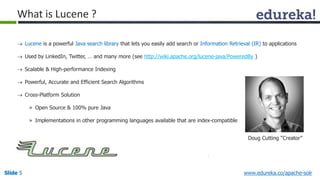
 Lucene is a powerful Java search library that lets you easily add search or Information Retrieval (IR) to applications 
 Used by LinkedIn, Twitter, … and many more (see http://wiki.apache.org/lucene-java/PoweredBy ) 
 Scalable & High-performance Indexing 
 Powerful, Accurate and Efficient Search Algorithms 
 Cross-Platform Solution 
» Open Source & 100% pure Java 
» Implementations in other programming languages available that are index-compatible 
Doug Cutting “Creator” 
Slide 5 www.edureka.co/apache-solr
Why Indexing ? 
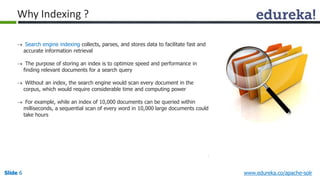
 Search engine indexing collects, parses, and stores data to facilitate fast and 
accurate information retrieval 
 The purpose of storing an index is to optimize speed and performance in 
finding relevant documents for a search query 
 Without an index, the search engine would scan every document in the 
corpus, which would require considerable time and computing power 
 For example, while an index of 10,000 documents can be queried within 
milliseconds, a sequential scan of every word in 10,000 large documents could 
take hours 
Slide 6 www.edureka.co/apache-solr
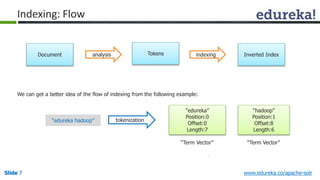
Indexing: Flow 
Tokens Inverted Index 
Document analysis indexing 
We can get a better idea of the flow of indexing from the following example: 
“edureka” 
Position:0 
Offset:0 
Length:7 
“hadoop” 
Position:1 
Offset:8 
Length:6 
“edureka hadoop” tokenization 
“Term Vector” “Term Vector” 
Slide 7 www.edureka.co/apache-solr
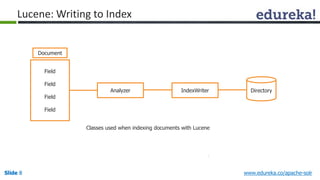
Lucene: Writing to Index 
Document 
Field 
Field 
Field 
Field 
Analyzer IndexWriter Directory 
Classes used when indexing documents with Lucene 
Slide 8 www.edureka.co/apache-solr
Lucene: Searching In Index 
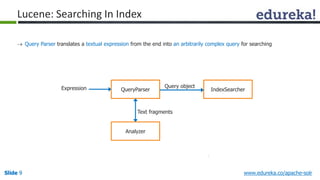
 Query Parser translates a textual expression from the end into an arbitrarily complex query for searching 
Expression Query object 
QueryParser 
IndexSearcher Text fragments 
Analyzer 
Slide 9 www.edureka.co/apache-solr
Lucene: Inverted Indexing Technique 
1 1 1 
3 
1 1 1 
3 
1 1 1 
3 
1 1 1 
3 
1 1 
9 
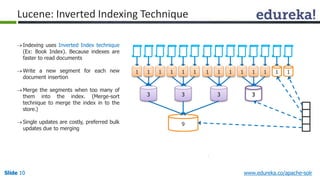
 Indexing uses Inverted Index technique 
(Ex: Book Index). Because indexes are 
faster to read documents 
Write a new segment for each new 
document insertion 
 Merge the segments when too many of 
them into the index. (Merge-sort 
technique to merge the index in to the 
store.) 
 Single updates are costly, preferred bulk 
updates due to merging 
Slide 10 www.edureka.co/apache-solr
Lucene: Storage Schema 
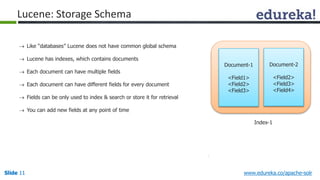
 Like “databases” Lucene does not have common global schema 
 Lucene has indexes, which contains documents 
 Each document can have multiple fields 
 Each document can have different fields for every document 
 Fields can be only used to index & search or store it for retrieval 
 You can add new fields at any point of time 
Document-1 
<Field1> 
<Field2> 
<Field3> 
Document-2 
<Field2> 
<Field3> 
<Field4> 
Index-1 
Slide 11 www.edureka.co/apache-solr
Analyzers 
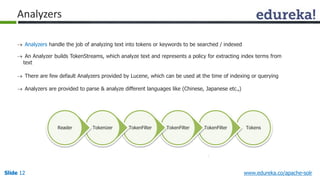
 Analyzers handle the job of analyzing text into tokens or keywords to be searched / indexed 
 An Analyzer builds TokenStreams, which analyze text and represents a policy for extracting index terms from 
text 
 There are few default Analyzers provided by Lucene, which can be used at the time of indexing or querying 
 Analyzers are provided to parse & analyze different languages like (Chinese, Japanese etc.,) 
Reader Tokenizer TokenFilter TokenFilter TokenFilter Tokens 
Slide 12 www.edureka.co/apache-solr
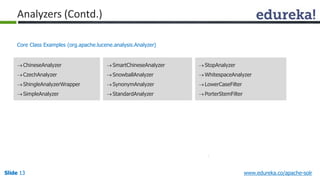
Analyzers (Contd.) 
Core Class Examples (org.apache.lucene.analysis.Analyzer) 
 SmartChineseAnalyzer 
 SnowballAnalyzer 
 SynonymAnalyzer 
 StandardAnalyzer 
 StopAnalyzer 
 WhitespaceAnalyzer 
LowerCaseFilter 
 PorterStemFilter 
 ChineseAnalyzer 
 CzechAnalyzer 
 ShingleAnalyzerWrapper 
 SimpleAnalyzer 
Slide 13 www.edureka.co/apache-solr
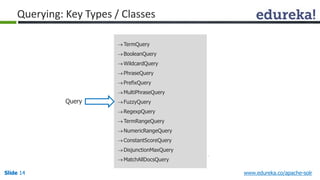
Querying: Key Types / Classes 
TermQuery 
 BooleanQuery 
 WildcardQuery 
 PhraseQuery 
 PrefixQuery 
 MultiPhraseQuery 
 FuzzyQuery 
RegexpQuery 
TermRangeQuery 
NumericRangeQuery 
 ConstantScoreQuery 
 DisjunctionMaxQuery 
MatchAllDocsQuery 
Query 
Slide 14 www.edureka.co/apache-solr
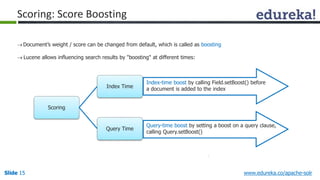
Scoring: Score Boosting 
 Document’s weight / score can be changed from default, which is called as boosting 
 Lucene allows influencing search results by "boosting" at different times: 
Scoring 
Index Time 
Query Time 
Index-time boost by calling Field.setBoost() before 
a document is added to the index 
Query-time boost by setting a boost on a query clause, 
calling Query.setBoost() 
Slide 15 www.edureka.co/apache-solr
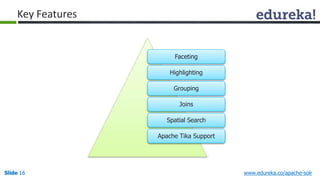
Key Features 
Faceting 
Highlighting 
Grouping 
Joins 
Spatial Search 
Apache Tika Support 
Slide 16 www.edureka.co/apache-solr
Introduction Apache Solr 
Slide 17 www.edureka.co/apache-solr
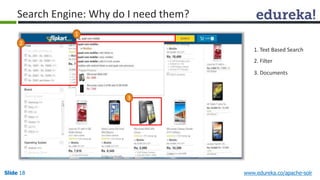
Search Engine: Why do I need them? 
1. Text Based Search 
2. Filter 
3. Documents 
1 
2 
3 
Slide 18 www.edureka.co/apache-solr
Solr: Introduction 
 Solr is an open source enterprise search server / web application 
 Solr Uses the Lucene Search Library and extends it 
 Solr exposes lucene Java API’s as REST-Full services 
You put documents in it (called "indexing") via XML, JSON, CSV or binary over HTTP 
You query it via HTTP GET and receive XML, JSON, CSV or binary results 
Slide 19 www.edureka.co/apache-solr
Solr: History 
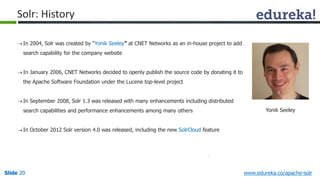
 In 2004, Solr was created by “Yonik Seeley” at CNET Networks as an in-house project to add 
search capability for the company website 
 In January 2006, CNET Networks decided to openly publish the source code by donating it to 
the Apache Software Foundation under the Lucene top-level project 
 In September 2008, Solr 1.3 was released with many enhancements including distributed 
search capabilities and performance enhancements among many others 
 In October 2012 Solr version 4.0 was released, including the new SolrCloud feature 
Yonik Seeley 
Slide 20 www.edureka.co/apache-solr
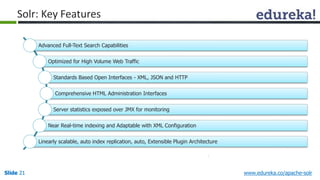
Solr: Key Features 
Advanced Full-Text Search Capabilities 
Optimized for High Volume Web Traffic 
Standards Based Open Interfaces - XML, JSON and HTTP 
Comprehensive HTML Administration Interfaces 
Server statistics exposed over JMX for monitoring 
Near Real-time indexing and Adaptable with XML Configuration 
Linearly scalable, auto index replication, auto, Extensible Plugin Architecture 
Slide 21 www.edureka.co/apache-solr
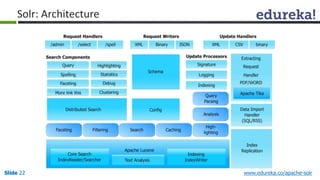
Solr: Architecture 
Slide 22 www.edureka.co/apache-solr
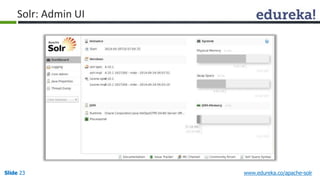
Solr: Admin UI 
Slide 23 www.edureka.co/apache-solr
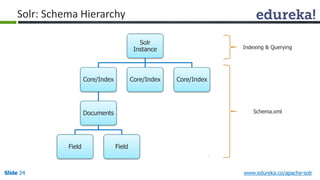
Solr 
Instance 
Solr: Schema Hierarchy 
Core/Index 
Documents 
Field Field 
Core/Index Core/Index 
Indexing & Querying 
Schema.xml 
Slide 24 www.edureka.co/apache-solr
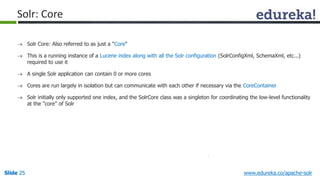
Solr: Core 
 Solr Core: Also referred to as just a "Core" 
 This is a running instance of a Lucene index along with all the Solr configuration (SolrConfigXml, SchemaXml, etc...) 
required to use it 
 A single Solr application can contain 0 or more cores 
 Cores are run largely in isolation but can communicate with each other if necessary via the CoreContainer 
 Solr initially only supported one index, and the SolrCore class was a singleton for coordinating the low-level functionality 
at the "core" of Solr 
Slide 25 www.edureka.co/apache-solr
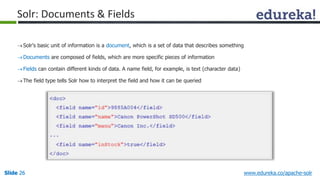
Solr: Documents & Fields 
 Solr's basic unit of information is a document, which is a set of data that describes something 
Documents are composed of fields, which are more specific pieces of information 
 Fields can contain different kinds of data. A name field, for example, is text (character data) 
The field type tells Solr how to interpret the field and how it can be queried 
Slide 26 www.edureka.co/apache-solr
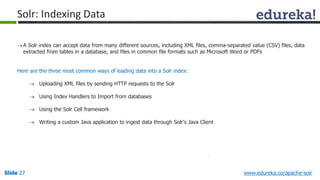
Solr: Indexing Data 
 A Solr index can accept data from many different sources, including XML files, comma-separated value (CSV) files, data 
extracted from tables in a database, and files in common file formats such as Microsoft Word or PDFs 
Here are the three most common ways of loading data into a Solr index: 
 Uploading XML files by sending HTTP requests to the Solr 
 Using Index Handlers to Import from databases 
 Using the Solr Cell framework 
 Writing a custom Java application to ingest data through Solr's Java Client 
Slide 27 www.edureka.co/apache-solr
Analysis 
Analyzers 
Tokenizers 
Filters 
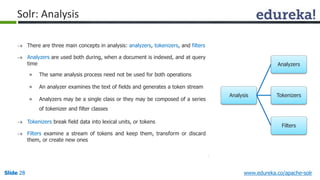
Solr: Analysis 
 There are three main concepts in analysis: analyzers, tokenizers, and filters 
 Analyzers are used both during, when a document is indexed, and at query 
time 
» The same analysis process need not be used for both operations 
» An analyzer examines the text of fields and generates a token stream 
» Analyzers may be a single class or they may be composed of a series 
of tokenizer and filter classes 
 Tokenizers break field data into lexical units, or tokens 
 Filters examine a stream of tokens and keep them, transform or discard 
them, or create new ones 
Slide 28 www.edureka.co/apache-solr
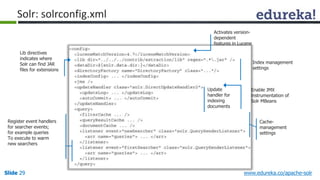
Solr: solrconfig.xml 
Lib directives 
indicates where 
Solr can find JAR 
files for extensions 
Register event handlers 
for searcher events; 
for example queries 
To execute to warm 
new searchers 
Activates version-dependent 
features in Lucene 
Index management 
settings 
Enable JMX 
instrumentation of 
Solr MBeans 
Update 
handler for 
indexing 
documents 
Cache-management 
settings 
Slide 29 www.edureka.co/apache-solr
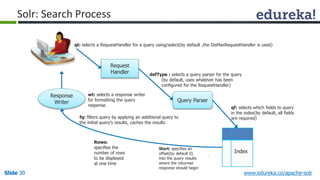
Solr: Search Process 
qt: selects a RequestHandler for a query using/select(by default ,the DisMaxRequestHandler is used) 
Request 
Handler 
defType : selects a query parser for the query 
(by default, uses whatever has been 
configured for the RequestHandler) 
Query Parser 
Response 
Writer 
qf: selects which fields to query 
in the index(by default, all fields 
are required) 
Index 
wt: selects a response writer 
for formatting the query 
response 
fq: filters query by applying an additional query to 
the initial query’s results, caches the results 
Rows: 
specifies the 
number of rows 
to be displayed 
at one time 
Start: specifies an 
offset(by default 0) 
into the query results 
where the returned 
response should begin 
Slide 30 www.edureka.co/apache-solr
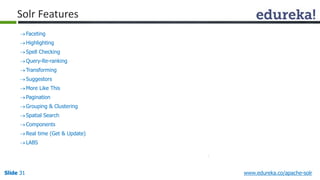
Solr Features 
 Faceting 
Highlighting 
 Spell Checking 
Query-Re-ranking 
Transforming 
 Suggestors 
More Like This 
 Pagination 
Grouping & Clustering 
 Spatial Search 
 Components 
Real time (Get & Update) 
 LABS 
Slide 31 www.edureka.co/apache-solr
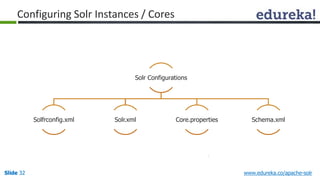
Configuring Solr Instances / Cores 
Solr Configurations 
Solfrconfig.xml Solr.xml Core.properties Schema.xml 
Slide 32 www.edureka.co/apache-solr
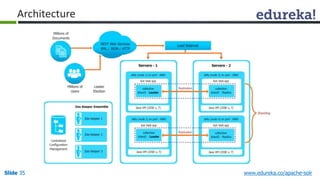
SolrCloud Introduction 
 Apache Solr includes the ability to set up a cluster of Solr servers that combines fault tolerance and high availability 
called SolrCloud 
 SolrCloud is flexible distributed search and indexing, without a master node to allocate nodes, shards and replicas 
 Solr uses ZooKeeper to manage these locations, depending on configuration files and schemas 
 Documents can be sent to any server and ZooKeeper will figure it out 
Slide 33 www.edureka.co/apache-solr
Features 
 Horizontal Scaling (For Sharding & Replication) 
 Elastic Scaling 
 High Availability 
 Distributed Indexing 
 Distribution Searching 
 Central Configuration For Entire Cluster 
 Automatic Load Balancing 
 Automatic Failover For Queries 
 Zookeeper Integration For Coordination & Configurations 
Slide 34 www.edureka.co/apache-solr
Architecture 
Slide 35 www.edureka.co/apache-solr
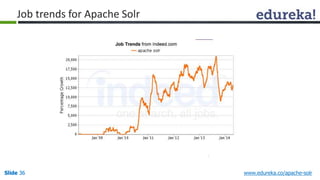
Job trends for Apache Solr 
Slide 36 www.edureka.co/apache-solr
Demo 
Slide 37 www.edureka.co/apache-solr
Disclaimer 
Criteria and guidelines mentioned in this presentation may change. Please visit our website for 
latest and additional information on Apache Solr 
Slide 38 www.edureka.co/apache-solr
Course Topics 
 Module 5 
» Solr Searching 
 Module 6 
» Solr Extended Features 
 Module 7 
» Solr Cloud & Administration 
 Module 8 
» Final Project 
 Module 1 
» Introduction to Apache Lucene 
 Module 2 
» Exploring Lucene 
 Module 3 
» Introduction to Apache Solr 
 Module 4 
» Solr Indexing 
Slide 39 www.edureka.co/apache-solr
References 
 http://www.indeed.com/jobtrends 
 Office.com Clip Art/ 
Slide 40 www.edureka.co/apache-solr
Apache Solr-Webinar

Apache Solr-Webinar

  • 1.
    www.edureka.co/apache-solr Introduction toAPACHE SOLR View Apache Solr course details at www.edureka.co/apache-solr For Queries during the session and class recording: Post on Twitter @edurekaIN: #askEdureka Post on Facebook /edurekaIN For more details please contact us: US : 1800 275 9730 (toll free) INDIA : +91 88808 62004 Email Us : sales@edureka.co
  • 2.
    Slide 2 LIVEOnline Class Class Recording in LMS 24/7 Post Class Support Module Wise Quiz Project Work Verifiable Certificate www.edureka.co/apache-solr How it Works?
  • 3.
    Objectives At theend of this module, you will be able to: Understand the need for search engine for enterprise grade applications Understand the objectives & challenges of search engine What is Indexing & Searching & Why do you need them ? What is Lucene & its overview? How is Indexing & Searching Handled in Lucene What is Solr & its features? What is Solr schema & its structure? Understand how to achieve Bigdata/NoSQL needs using SolrCloud  Explore job opportunity for Solr Developers Slide 3 www.edureka.co/apache-solr
  • 4.
    Introduction Apache Lucene Slide 4 www.edureka.co/apache-solr
  • 5.
    What is Lucene?  Lucene is a powerful Java search library that lets you easily add search or Information Retrieval (IR) to applications  Used by LinkedIn, Twitter, … and many more (see http://wiki.apache.org/lucene-java/PoweredBy )  Scalable & High-performance Indexing  Powerful, Accurate and Efficient Search Algorithms  Cross-Platform Solution » Open Source & 100% pure Java » Implementations in other programming languages available that are index-compatible Doug Cutting “Creator” Slide 5 www.edureka.co/apache-solr
  • 6.
    Why Indexing ?  Search engine indexing collects, parses, and stores data to facilitate fast and accurate information retrieval  The purpose of storing an index is to optimize speed and performance in finding relevant documents for a search query  Without an index, the search engine would scan every document in the corpus, which would require considerable time and computing power  For example, while an index of 10,000 documents can be queried within milliseconds, a sequential scan of every word in 10,000 large documents could take hours Slide 6 www.edureka.co/apache-solr
  • 7.
    Indexing: Flow TokensInverted Index Document analysis indexing We can get a better idea of the flow of indexing from the following example: “edureka” Position:0 Offset:0 Length:7 “hadoop” Position:1 Offset:8 Length:6 “edureka hadoop” tokenization “Term Vector” “Term Vector” Slide 7 www.edureka.co/apache-solr
  • 8.
    Lucene: Writing toIndex Document Field Field Field Field Analyzer IndexWriter Directory Classes used when indexing documents with Lucene Slide 8 www.edureka.co/apache-solr
  • 9.
    Lucene: Searching InIndex  Query Parser translates a textual expression from the end into an arbitrarily complex query for searching Expression Query object QueryParser IndexSearcher Text fragments Analyzer Slide 9 www.edureka.co/apache-solr
  • 10.
    Lucene: Inverted IndexingTechnique 1 1 1 3 1 1 1 3 1 1 1 3 1 1 1 3 1 1 9  Indexing uses Inverted Index technique (Ex: Book Index). Because indexes are faster to read documents Write a new segment for each new document insertion  Merge the segments when too many of them into the index. (Merge-sort technique to merge the index in to the store.)  Single updates are costly, preferred bulk updates due to merging Slide 10 www.edureka.co/apache-solr
  • 11.
    Lucene: Storage Schema  Like “databases” Lucene does not have common global schema  Lucene has indexes, which contains documents  Each document can have multiple fields  Each document can have different fields for every document  Fields can be only used to index & search or store it for retrieval  You can add new fields at any point of time Document-1 <Field1> <Field2> <Field3> Document-2 <Field2> <Field3> <Field4> Index-1 Slide 11 www.edureka.co/apache-solr
  • 12.
    Analyzers  Analyzershandle the job of analyzing text into tokens or keywords to be searched / indexed  An Analyzer builds TokenStreams, which analyze text and represents a policy for extracting index terms from text  There are few default Analyzers provided by Lucene, which can be used at the time of indexing or querying  Analyzers are provided to parse & analyze different languages like (Chinese, Japanese etc.,) Reader Tokenizer TokenFilter TokenFilter TokenFilter Tokens Slide 12 www.edureka.co/apache-solr
  • 13.
    Analyzers (Contd.) CoreClass Examples (org.apache.lucene.analysis.Analyzer)  SmartChineseAnalyzer  SnowballAnalyzer  SynonymAnalyzer  StandardAnalyzer  StopAnalyzer  WhitespaceAnalyzer LowerCaseFilter  PorterStemFilter  ChineseAnalyzer  CzechAnalyzer  ShingleAnalyzerWrapper  SimpleAnalyzer Slide 13 www.edureka.co/apache-solr
  • 14.
    Querying: Key Types/ Classes TermQuery  BooleanQuery  WildcardQuery  PhraseQuery  PrefixQuery  MultiPhraseQuery  FuzzyQuery RegexpQuery TermRangeQuery NumericRangeQuery  ConstantScoreQuery  DisjunctionMaxQuery MatchAllDocsQuery Query Slide 14 www.edureka.co/apache-solr
  • 15.
    Scoring: Score Boosting  Document’s weight / score can be changed from default, which is called as boosting  Lucene allows influencing search results by "boosting" at different times: Scoring Index Time Query Time Index-time boost by calling Field.setBoost() before a document is added to the index Query-time boost by setting a boost on a query clause, calling Query.setBoost() Slide 15 www.edureka.co/apache-solr
  • 16.
    Key Features Faceting Highlighting Grouping Joins Spatial Search Apache Tika Support Slide 16 www.edureka.co/apache-solr
  • 17.
    Introduction Apache Solr Slide 17 www.edureka.co/apache-solr
  • 18.
    Search Engine: Whydo I need them? 1. Text Based Search 2. Filter 3. Documents 1 2 3 Slide 18 www.edureka.co/apache-solr
  • 19.
    Solr: Introduction Solr is an open source enterprise search server / web application  Solr Uses the Lucene Search Library and extends it  Solr exposes lucene Java API’s as REST-Full services You put documents in it (called "indexing") via XML, JSON, CSV or binary over HTTP You query it via HTTP GET and receive XML, JSON, CSV or binary results Slide 19 www.edureka.co/apache-solr
  • 20.
    Solr: History In 2004, Solr was created by “Yonik Seeley” at CNET Networks as an in-house project to add search capability for the company website  In January 2006, CNET Networks decided to openly publish the source code by donating it to the Apache Software Foundation under the Lucene top-level project  In September 2008, Solr 1.3 was released with many enhancements including distributed search capabilities and performance enhancements among many others  In October 2012 Solr version 4.0 was released, including the new SolrCloud feature Yonik Seeley Slide 20 www.edureka.co/apache-solr
  • 21.
    Solr: Key Features Advanced Full-Text Search Capabilities Optimized for High Volume Web Traffic Standards Based Open Interfaces - XML, JSON and HTTP Comprehensive HTML Administration Interfaces Server statistics exposed over JMX for monitoring Near Real-time indexing and Adaptable with XML Configuration Linearly scalable, auto index replication, auto, Extensible Plugin Architecture Slide 21 www.edureka.co/apache-solr
  • 22.
    Solr: Architecture Slide22 www.edureka.co/apache-solr
  • 23.
    Solr: Admin UI Slide 23 www.edureka.co/apache-solr
  • 24.
    Solr Instance Solr:Schema Hierarchy Core/Index Documents Field Field Core/Index Core/Index Indexing & Querying Schema.xml Slide 24 www.edureka.co/apache-solr
  • 25.
    Solr: Core Solr Core: Also referred to as just a "Core"  This is a running instance of a Lucene index along with all the Solr configuration (SolrConfigXml, SchemaXml, etc...) required to use it  A single Solr application can contain 0 or more cores  Cores are run largely in isolation but can communicate with each other if necessary via the CoreContainer  Solr initially only supported one index, and the SolrCore class was a singleton for coordinating the low-level functionality at the "core" of Solr Slide 25 www.edureka.co/apache-solr
  • 26.
    Solr: Documents &Fields  Solr's basic unit of information is a document, which is a set of data that describes something Documents are composed of fields, which are more specific pieces of information  Fields can contain different kinds of data. A name field, for example, is text (character data) The field type tells Solr how to interpret the field and how it can be queried Slide 26 www.edureka.co/apache-solr
  • 27.
    Solr: Indexing Data  A Solr index can accept data from many different sources, including XML files, comma-separated value (CSV) files, data extracted from tables in a database, and files in common file formats such as Microsoft Word or PDFs Here are the three most common ways of loading data into a Solr index:  Uploading XML files by sending HTTP requests to the Solr  Using Index Handlers to Import from databases  Using the Solr Cell framework  Writing a custom Java application to ingest data through Solr's Java Client Slide 27 www.edureka.co/apache-solr
  • 28.
    Analysis Analyzers Tokenizers Filters Solr: Analysis  There are three main concepts in analysis: analyzers, tokenizers, and filters  Analyzers are used both during, when a document is indexed, and at query time » The same analysis process need not be used for both operations » An analyzer examines the text of fields and generates a token stream » Analyzers may be a single class or they may be composed of a series of tokenizer and filter classes  Tokenizers break field data into lexical units, or tokens  Filters examine a stream of tokens and keep them, transform or discard them, or create new ones Slide 28 www.edureka.co/apache-solr
  • 29.
    Solr: solrconfig.xml Libdirectives indicates where Solr can find JAR files for extensions Register event handlers for searcher events; for example queries To execute to warm new searchers Activates version-dependent features in Lucene Index management settings Enable JMX instrumentation of Solr MBeans Update handler for indexing documents Cache-management settings Slide 29 www.edureka.co/apache-solr
  • 30.
    Solr: Search Process qt: selects a RequestHandler for a query using/select(by default ,the DisMaxRequestHandler is used) Request Handler defType : selects a query parser for the query (by default, uses whatever has been configured for the RequestHandler) Query Parser Response Writer qf: selects which fields to query in the index(by default, all fields are required) Index wt: selects a response writer for formatting the query response fq: filters query by applying an additional query to the initial query’s results, caches the results Rows: specifies the number of rows to be displayed at one time Start: specifies an offset(by default 0) into the query results where the returned response should begin Slide 30 www.edureka.co/apache-solr
  • 31.
    Solr Features Faceting Highlighting  Spell Checking Query-Re-ranking Transforming  Suggestors More Like This  Pagination Grouping & Clustering  Spatial Search  Components Real time (Get & Update)  LABS Slide 31 www.edureka.co/apache-solr
  • 32.
    Configuring Solr Instances/ Cores Solr Configurations Solfrconfig.xml Solr.xml Core.properties Schema.xml Slide 32 www.edureka.co/apache-solr
  • 33.
    SolrCloud Introduction Apache Solr includes the ability to set up a cluster of Solr servers that combines fault tolerance and high availability called SolrCloud  SolrCloud is flexible distributed search and indexing, without a master node to allocate nodes, shards and replicas  Solr uses ZooKeeper to manage these locations, depending on configuration files and schemas  Documents can be sent to any server and ZooKeeper will figure it out Slide 33 www.edureka.co/apache-solr
  • 34.
    Features  HorizontalScaling (For Sharding & Replication)  Elastic Scaling  High Availability  Distributed Indexing  Distribution Searching  Central Configuration For Entire Cluster  Automatic Load Balancing  Automatic Failover For Queries  Zookeeper Integration For Coordination & Configurations Slide 34 www.edureka.co/apache-solr
  • 35.
    Architecture Slide 35www.edureka.co/apache-solr
  • 36.
    Job trends forApache Solr Slide 36 www.edureka.co/apache-solr
  • 37.
    Demo Slide 37www.edureka.co/apache-solr
  • 38.
    Disclaimer Criteria andguidelines mentioned in this presentation may change. Please visit our website for latest and additional information on Apache Solr Slide 38 www.edureka.co/apache-solr
  • 39.
    Course Topics Module 5 » Solr Searching  Module 6 » Solr Extended Features  Module 7 » Solr Cloud & Administration  Module 8 » Final Project  Module 1 » Introduction to Apache Lucene  Module 2 » Exploring Lucene  Module 3 » Introduction to Apache Solr  Module 4 » Solr Indexing Slide 39 www.edureka.co/apache-solr
  • 40.
    References  http://www.indeed.com/jobtrends  Office.com Clip Art/ Slide 40 www.edureka.co/apache-solr