Security
Procedures
Ten
Commandments
 of Computer
     ethics
10 Commandments of
 computer ethics


1. Thou shall not use a computer
   to harm other people
2. Thou shall not interfere with
   other people's computer work.
3. Thou shall not snoop around in
   other people's computer files.
4. Thou shall not use a computer
   to steal.
5. Thou shall not use a computer
   to bear false witness.
10 Commandments of
   computer ethics

6. Thou shall not copy or use proprietary
     software for which you have not paid.
7. Thou shall not use other people's
     computer resources without
     authorization or proper compensation.
8. Thou shall not appropriate other people's
     intellectual output.
9. Thou shall think about the social
     consequences of the program you are
     writing or the system you are designing.
10. Thou shall always use a computer in ways
     that ensure consideration and respect
     for your fellow humans.
The information used
  by an organization
usually originates in one
    of three ways. It
        includes;
1. Produced from data
   collected by the
   organization.
2. Produced from data
   collected by an outside
   source.
3. Purchased in a pre-
   processed format from
   an outside source.
Security
Procedure
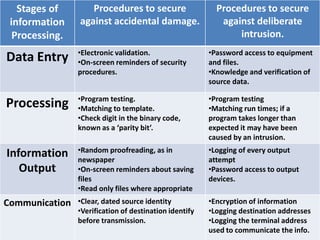
Stages of       Procedures to secure                   Procedures to secure
 information    against accidental damage.                 against deliberate
  Processing.                                                  intrusion.
                •Electronic validation.                 •Password access to equipment
Data Entry      •On-screen reminders of security        and files.
                procedures.                             •Knowledge and verification of
                                                        source data.

                •Program testing.                       •Program testing
Processing      •Matching to template.                  •Matching run times; if a
                •Check digit in the binary code,        program takes longer than
                known as a ‘parity bit’.                expected it may have been
                                                        caused by an intrusion.
                •Random proofreading, as in             •Logging of every output
Information     newspaper                               attempt
   Output       •On-screen reminders about saving       •Password access to output
                files                                   devices.
                •Read only files where appropriate
Communication   •Clear, dated source identity           •Encryption of information
                •Verification of destination identify   •Logging destination addresses
                before transmission.                    •Logging the terminal address
                                                        used to communicate the info.
Protecting
    the
integrity of
    data
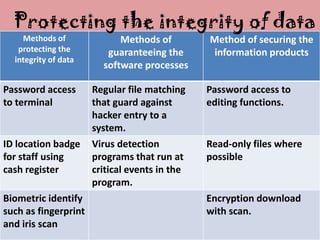
Protecting the integrity of data
    Methods of              Methods of         Method of securing the
   protecting the        guaranteeing the       information products
  integrity of data
                        software processes

Password access       Regular file matching    Password access to
to terminal           that guard against       editing functions.
                      hacker entry to a
                      system.
ID location badge     Virus detection          Read-only files where
for staff using       programs that run at     possible
cash register         critical events in the
                      program.
Biometric identify                             Encryption download
such as fingerprint                            with scan.
and iris scan
Security for
information
  received
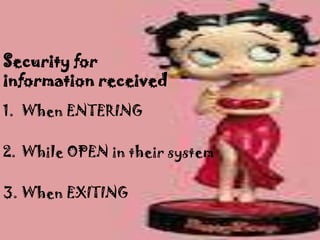
Security for
information received
1. When ENTERING

2. While OPEN in their system

3. When EXITING
Security for
information
 produced.
Security for
information
 produced.
•Regular Back-ups
•File Access Restriction
Regular Back-Ups


 In organizations where staff
  are using computers at the
 desktop for a range of tasks
  during the day, autosave is
   only one part of back-up
  procedures used to secure
         information.
Additional Back-up
procedures includes;

1. screen messages instructing
   operators to back-up work on
   a floppy disk when a tasks is
   completed.

2. automatic log-out and save
   after 10 minutes of inactivity.
Additional Back-up
procedures includes;

3. saving and printing controlled
copies of files required for
proofing or by a reference group.

4. saving all files and folders on
the network to a tape, disk,
cartridge, etc. which is then
dated and locked in a secure
fireproof cupboard.
File Access
Restrictions
File Access
Restrictions

  Passwords are playing
    important role in
controlling the security of
information produced by
      organization.
File Access
  Restrictions

Features include:

• structure of hierarchy
• allocation
• duration
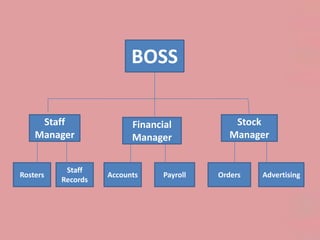
BOSS

     Staff                Financial            Stock
    Manager               Manager             Manager


           Staff
Rosters             Accounts     Payroll   Orders   Advertising
          Records
Security for
      information
     communicated
Information produced electronically by
an organization can be communicated via
range of media that includes;

               Cable
           Disk/CD-ROM
          Internet/e-mail
              Graphics
             microwave
Procedures to
protect information
communicated by an
   organization
• newspapers need classified
advertisements with correct
phone and price details.

• libraries need an up-to-date list
of all titles available to borrowers.
Thank You!

Security Procedures

  • 1.
  • 2.
  • 3.
    10 Commandments of computer ethics 1. Thou shall not use a computer to harm other people 2. Thou shall not interfere with other people's computer work. 3. Thou shall not snoop around in other people's computer files. 4. Thou shall not use a computer to steal. 5. Thou shall not use a computer to bear false witness.
  • 4.
    10 Commandments of computer ethics 6. Thou shall not copy or use proprietary software for which you have not paid. 7. Thou shall not use other people's computer resources without authorization or proper compensation. 8. Thou shall not appropriate other people's intellectual output. 9. Thou shall think about the social consequences of the program you are writing or the system you are designing. 10. Thou shall always use a computer in ways that ensure consideration and respect for your fellow humans.
  • 5.
    The information used by an organization usually originates in one of three ways. It includes;
  • 6.
    1. Produced fromdata collected by the organization. 2. Produced from data collected by an outside source. 3. Purchased in a pre- processed format from an outside source.
  • 7.
  • 8.
    Stages of Procedures to secure Procedures to secure information against accidental damage. against deliberate Processing. intrusion. •Electronic validation. •Password access to equipment Data Entry •On-screen reminders of security and files. procedures. •Knowledge and verification of source data. •Program testing. •Program testing Processing •Matching to template. •Matching run times; if a •Check digit in the binary code, program takes longer than known as a ‘parity bit’. expected it may have been caused by an intrusion. •Random proofreading, as in •Logging of every output Information newspaper attempt Output •On-screen reminders about saving •Password access to output files devices. •Read only files where appropriate Communication •Clear, dated source identity •Encryption of information •Verification of destination identify •Logging destination addresses before transmission. •Logging the terminal address used to communicate the info.
  • 9.
    Protecting the integrity of data
  • 10.
    Protecting the integrityof data Methods of Methods of Method of securing the protecting the guaranteeing the information products integrity of data software processes Password access Regular file matching Password access to to terminal that guard against editing functions. hacker entry to a system. ID location badge Virus detection Read-only files where for staff using programs that run at possible cash register critical events in the program. Biometric identify Encryption download such as fingerprint with scan. and iris scan
  • 11.
  • 12.
    Security for information received 1.When ENTERING 2. While OPEN in their system 3. When EXITING
  • 13.
  • 14.
    Security for information produced. •RegularBack-ups •File Access Restriction
  • 15.
    Regular Back-Ups Inorganizations where staff are using computers at the desktop for a range of tasks during the day, autosave is only one part of back-up procedures used to secure information.
  • 16.
    Additional Back-up procedures includes; 1.screen messages instructing operators to back-up work on a floppy disk when a tasks is completed. 2. automatic log-out and save after 10 minutes of inactivity.
  • 17.
    Additional Back-up procedures includes; 3.saving and printing controlled copies of files required for proofing or by a reference group. 4. saving all files and folders on the network to a tape, disk, cartridge, etc. which is then dated and locked in a secure fireproof cupboard.
  • 18.
  • 19.
    File Access Restrictions Passwords are playing important role in controlling the security of information produced by organization.
  • 20.
    File Access Restrictions Features include: • structure of hierarchy • allocation • duration
  • 21.
    BOSS Staff Financial Stock Manager Manager Manager Staff Rosters Accounts Payroll Orders Advertising Records
  • 22.
    Security for information communicated Information produced electronically by an organization can be communicated via range of media that includes; Cable Disk/CD-ROM Internet/e-mail Graphics microwave
  • 23.
    Procedures to protect information communicatedby an organization • newspapers need classified advertisements with correct phone and price details. • libraries need an up-to-date list of all titles available to borrowers.
  • 24.