   This application was developed for a intranet
    project, and would be usefull for any small to
    medium sized organisation who use a Windows
    NT Server, or even just a Networked Windows
    95 solution running the personal web server,
    and who want an e-mail system, but don't
    want the associated costs.
   This system could also be used for a
    community based website, as to allow
    members only to send email to other
    members.
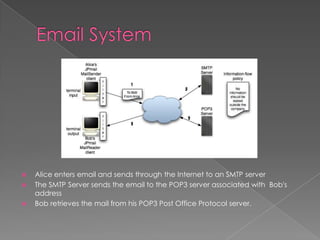
   Alice enters email and sends through the Internet to an SMTP server
   The SMTP Server sends the email to the POP3 server associated with Bob's
    address
   Bob retrieves the mail from his POP3 Post Office Protocol server.
   Speed

   Reach and Penetration

   Ease and Efficiency

   Low Cost

   Targeted
   Email (or e-mail) is electronic mail that
    "works"    quite     like   conventional
    correspondence.

   There is a sender and a recipient and the
    contents are called the message of the
    email.
   In addition to textual content, email
    allows you to send photographs, video
    or sound clips in digital form or files.
   When you create an email account, you
    get an email address to which people
    "write" to you.


   Each    email     address   is   unique   which
    means no two people in the world can have
    the same email address.
   Just like your postal address, which is one
    of its kind, your email address belongs
    only to you - unless of course you share it
    with people.
   Typically, you access your email account
    with a username (also called a login
    name) and a password.
   In    order    to       keep    your   email
    communication secure from others, you
    have to make sure that your login details
    and    known     only    to    you   and   the
    password is complex enough to make it
    difficult for people to guess it.
   Having   a   good    strong   convoluted
    password is the first step in making your
    account secure.


   The password to your email account is
    akin to the key to the door of your postal
    address (your house?).
   The easiest way to create your email
    account    and   get   your   first   email
    address is to use a free online service.
    The only thing you need is a web
    browser.
   Gmail (run by Google),

   Windows Live Hotmail (owned by
    Microsoft),

   AOL and

   Yahoo!Mail.
   Everyone, except those living under
    rocks for the past decade, know about
    Google and their free web based email
    called Gmail. The service was launched
    with great fanfare and was 100% free
    from the start but one could only create
    a Gmail account through special invites.
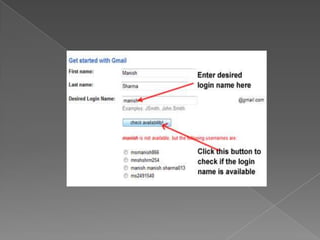
   To create your Gmail account you only
    need a web browser.
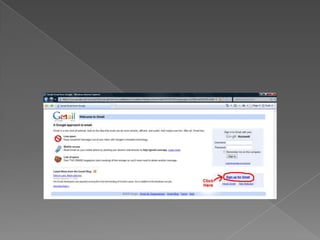
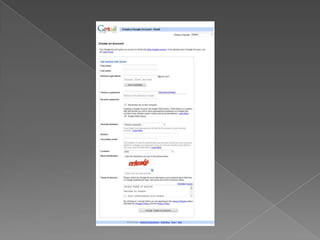
   Once you click on the signup link, you
    shall   be   shown   the   Create   an
    Account form with several fields that
    need your inputs
   Choosing a login name is part art and
    part common sense. And because it
    determines what your email address will
    be,
   Since, email addresses need to be
    unique which means no two people in
    the world can have the same address.
   Your login name needs to be catchy and
    at the same time describe you so people
    are able to recall it without much difficulty
    and associate it with you. For instance, if
    you are a docile accountant from a small
    town, choosing "hells-angels" as the login
    name would be unwise.
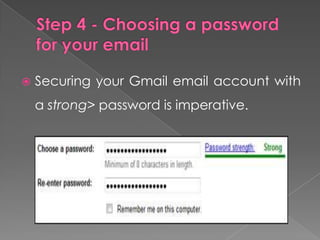
   Securing your Gmail email account with
    a strong> password is imperative.
   Now that everything is set, you can go
    through the Terms of Service and click on
    the "I accept. Create my account."
    button which will create your very own
    free   Gmail   account!    Hurrah   and
    congratulations.
   Capacity
        Google’s Gmail online, storage clocks
    in at seven gigabytes of space.

   Available Anywhere
       available on literally any computer
    that has an internet connection.
   Password Recovery
      The only thing you need to enter into
    your Gmail account and retrieve your
    online files is a password.

   Internet-Based
   Online email account provider
   Yahoo is one of the Web's most reliable
    and long-standing email providers. This
    service is free and it's fast and easy to set
    up your own email account at Yahoo.
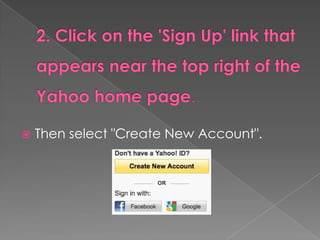
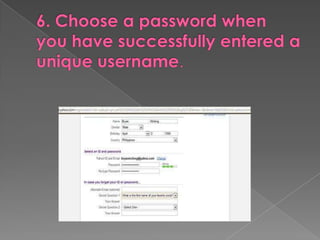
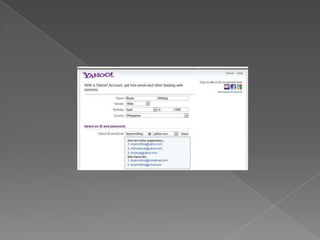
   Then select "Create New Account".
   Remember that you can use numbers
    and letters and even a single dot.
 Accessibility
 Access other email accounts
 Multiple yahoo addresses
 Choose your ‘from’ address
 Folders
 Attach Large Files
 Unlimited storage
 All your favorite apps
 Email tabs
 Yahoo Mail Plus
   Online email account provider
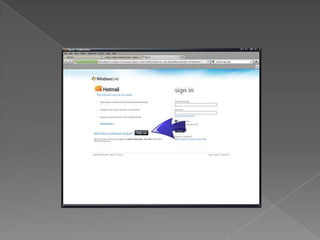
   The sign-up option is on the left of the
    page next to "Don't have a Windows Live
    ID?"
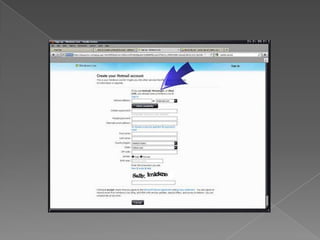
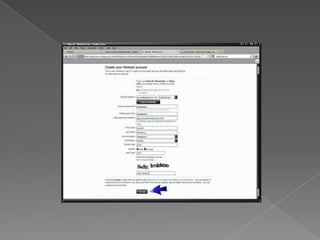
   This is where you'll decide what your
    email address will be, as well as entering
    personal and security information.
   You can use hotmail.com or live.com.
   At the bottom of the page, there are
    two blue links to Microsoft's terms of
    service and privacy policy documents.
    You don't have to read these to set up
    an account, but you do have to agree
    to them. Click "I agree" at the bottom of
    the page to complete the process.
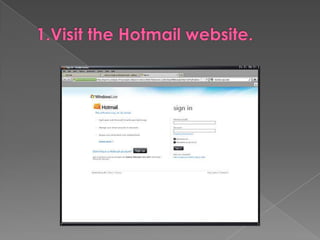
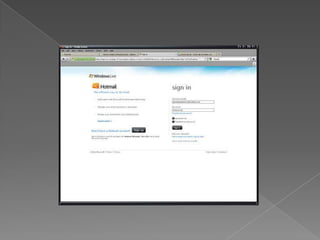
   . Visit the Hotmail website again to log
    into the email account you just created.
 Like most email services, the biggest
  advantage of using Hotmail is having
  instant communication access
 friends
 Family
 Business across the globe
 Own address book
 Lots of storage space
 Connect you account to your Microsoft
  Outlook email
   Few and it is highly-rated service.
There are various email providers across
the web and each person has the
favorite.   Before   signing   up   to   your
account, take the time to research
providers and decide which one suits
you best.
You have the choice to pick one you like.

Email (3)

  • 2.
    This application was developed for a intranet project, and would be usefull for any small to medium sized organisation who use a Windows NT Server, or even just a Networked Windows 95 solution running the personal web server, and who want an e-mail system, but don't want the associated costs.
  • 3.
    This system could also be used for a community based website, as to allow members only to send email to other members.
  • 4.
    Alice enters email and sends through the Internet to an SMTP server  The SMTP Server sends the email to the POP3 server associated with Bob's address  Bob retrieves the mail from his POP3 Post Office Protocol server.
  • 5.
    Speed  Reach and Penetration  Ease and Efficiency  Low Cost  Targeted
  • 6.
    Email (or e-mail) is electronic mail that "works" quite like conventional correspondence.  There is a sender and a recipient and the contents are called the message of the email.
  • 7.
    In addition to textual content, email allows you to send photographs, video or sound clips in digital form or files.
  • 8.
    When you create an email account, you get an email address to which people "write" to you.  Each email address is unique which means no two people in the world can have the same email address.
  • 9.
    Just like your postal address, which is one of its kind, your email address belongs only to you - unless of course you share it with people.
  • 10.
    Typically, you access your email account with a username (also called a login name) and a password.
  • 11.
    In order to keep your email communication secure from others, you have to make sure that your login details and known only to you and the password is complex enough to make it difficult for people to guess it.
  • 12.
    Having a good strong convoluted password is the first step in making your account secure.  The password to your email account is akin to the key to the door of your postal address (your house?).
  • 13.
    The easiest way to create your email account and get your first email address is to use a free online service. The only thing you need is a web browser.
  • 14.
    Gmail (run by Google),  Windows Live Hotmail (owned by Microsoft),  AOL and  Yahoo!Mail.
  • 15.
    Everyone, except those living under rocks for the past decade, know about Google and their free web based email called Gmail. The service was launched with great fanfare and was 100% free from the start but one could only create a Gmail account through special invites.
  • 18.
    To create your Gmail account you only need a web browser.
  • 20.
    Once you click on the signup link, you shall be shown the Create an Account form with several fields that need your inputs
  • 22.
    Choosing a login name is part art and part common sense. And because it determines what your email address will be,
  • 23.
    Since, email addresses need to be unique which means no two people in the world can have the same address.
  • 24.
    Your login name needs to be catchy and at the same time describe you so people are able to recall it without much difficulty and associate it with you. For instance, if you are a docile accountant from a small town, choosing "hells-angels" as the login name would be unwise.
  • 26.
    Securing your Gmail email account with a strong> password is imperative.
  • 28.
    Now that everything is set, you can go through the Terms of Service and click on the "I accept. Create my account." button which will create your very own free Gmail account! Hurrah and congratulations.
  • 29.
    Capacity Google’s Gmail online, storage clocks in at seven gigabytes of space.  Available Anywhere available on literally any computer that has an internet connection.
  • 30.
    Password Recovery The only thing you need to enter into your Gmail account and retrieve your online files is a password.  Internet-Based
  • 31.
    Online email account provider
  • 32.
    Yahoo is one of the Web's most reliable and long-standing email providers. This service is free and it's fast and easy to set up your own email account at Yahoo.
  • 35.
    Then select "Create New Account".
  • 37.
    Remember that you can use numbers and letters and even a single dot.
  • 43.
     Accessibility  Accessother email accounts  Multiple yahoo addresses  Choose your ‘from’ address  Folders  Attach Large Files  Unlimited storage
  • 44.
     All yourfavorite apps  Email tabs  Yahoo Mail Plus
  • 45.
    Online email account provider
  • 47.
    The sign-up option is on the left of the page next to "Don't have a Windows Live ID?"
  • 49.
    This is where you'll decide what your email address will be, as well as entering personal and security information.
  • 50.
    You can use hotmail.com or live.com.
  • 53.
    At the bottom of the page, there are two blue links to Microsoft's terms of service and privacy policy documents. You don't have to read these to set up an account, but you do have to agree to them. Click "I agree" at the bottom of the page to complete the process.
  • 55.
    . Visit the Hotmail website again to log into the email account you just created.
  • 57.
     Like mostemail services, the biggest advantage of using Hotmail is having instant communication access  friends  Family  Business across the globe
  • 58.
     Own addressbook  Lots of storage space  Connect you account to your Microsoft Outlook email
  • 59.
    Few and it is highly-rated service.
  • 60.
    There are variousemail providers across the web and each person has the favorite. Before signing up to your account, take the time to research providers and decide which one suits you best.
  • 61.
    You have thechoice to pick one you like.