OpenSCAP
Jooho Lee
Senior Consultant
PaaS & DevOps Practices Team
Agenda
What is SCAP?
What is OpenSCAP?
Give a try - Demo
What is atomic command?
OpenSCAP in Red Hat Products (TBD)
- Satellite 6.x
- CloudForms 4.x
Goal
This presentation is for who look for a good asset that do security scanning.
Especially, OpenShift Container Platform engineer have being asked about docker
image security. Here, I would like to focus on explaining how to use OpenSCAP.
The security components such as XCCDF, OVAL are not the main topics so it
doesn’t give a detailed account.
What is SCAP?
Security Content Automation Protocol
The Security Content Automation Protocol (SCAP) is a method for using specific standards to enable the automated vulnerability
management, measurement, and policy compliance evaluation of systems deployed in an organization, including e.g., FISMA
compliance. The National Vulnerability Database (NVD) is the U.S. government content repository for SCAP.
- en.wikipedia.org -
Nice video : http://goo.gl/GBaiIW
SCAP components
● XCCDF: The Extensible Configuration Checklist Description Format
● OVAL®: Open Vulnerability and Assessment Language
● Asset Identification
● ARF: Asset Reporting Format
● CCE™: Common Configuration Enumeration
● CPE™: Common Platform Enumeration
● CVE®: Common Vulnerabilities and Exposures
● CVSS: Common Vulnerability Scoring System
What is OpenSCAP?
Open Source Security Compliance Solution.
The oscap program is a command line tool that allows users to load, scan, validate, edit, and export SCAP documents.
● Homepage of the project: www.open-scap.org
● Manual: Oscap User Manual
● For new contributors: How to contribute
OpenSCAP is implementation to use SCAP components
Why OpenSCAP is needed?
Security compliance
In the ever-changing world of computer security where new vulnerabilities are being discovered and
patched every day, enforcing security compliance must be a continuous process. The OpenSCAP
ecosystem provides tools and customizable policies for a quick, cost-effective and flexible
implementation
Vulnerability assessment
A timely inspection of software inventory that identifies such vulnerabilities is a must for any
organization in the 21st century, and the OpenSCAP project provides tools for automated vulnerability
checking, allowing you to take steps to prevent attacks before they happen.
Why OpenSCAP is a good choice?
OpenSCAP has received a NIST certification for its support of SCAP 1.2.
Red Hat sponsor OpenSCAP
Red Hat support OpenSCAP with RHEL Subscription
Red Hat Enterprise Linux operating system 7 contains OpenSCAP packages
OpenSCAP start to support docker image/container*
Red Hat integrated OpenSCAP with Red Hat Products ( Satellite 6.2 / CloudForms 4.1 )**
* it can scan only RHEL based docker images/containers
** it is officially supported from Satellite 6.2 / CloudForms 4.1
OpenSCAP umbrella projects
OpenSCAP Base
- provide oscap command
OpenSCAP Daemon
- evaluate by schedule
SCAP Workbench
- graphical utility
SCAPTimony
- compliance of your infrastructure.
OSCAP Anaconda Add-on
- an add-on for installer used by Fedora and Red Hat Enterprise Linux 7.
SCAP Security Guide
- OpenSCAP content primarily for Red Hat Enterprise Linux
Give a try - Demo
Image / Conatiner
SCAP component / CVE
Give a try - Demo - image xccdf
# sudo yum install openscap -y
# docker pull docker.io/rhel7
## Evaluate image with xccdf
# oscap-docker image docker.io/rhel7 xccdf eval --report result.html --profile standard
/usr/share/xml/scap/ssg/content/ssg-rhel7-xccdf.xml
Result report is created but some error messages..
[root@localhost]/home/jooho/test# oscap-docker image docker.io/rhel7 xccdf eval --report result.html
--profile standard /usr/share/xml/scap/ssg/content/ssg-rhel7-xccdf.xml
WARNING: Skipping http://www.redhat.com/security/data/oval/Red_Hat_Enterprise_Linux_7.xml file
which is referenced from XCCDF content
Command: oscap xccdf eval --report result.html --profile standard
/usr/share/xml/scap/ssg/content/ssg-rhel7-xccdf.xml failed!
Error was:
Command '['oscap', 'xccdf', 'eval', '--report', 'result.html', '--profile', 'standard',
'/usr/share/xml/scap/ssg/content/ssg-rhel7-xccdf.xml']' returned non-zero exit status 2
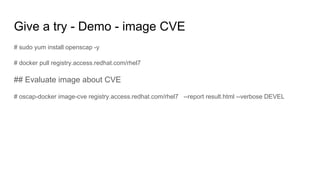
Give a try - Demo - image CVE
# sudo yum install openscap -y
# docker pull registry.access.redhat.com/rhel7
## Evaluate image about CVE
# oscap-docker image-cve registry.access.redhat.com/rhel7 --report result.html --verbose DEVEL
Result report is generated successfully
[root@localhost]/home/jooho/test# oscap-docker image-cve docker.io/rhel7
--report result.html
Definition oval:com.redhat.rhsa:def:20161633: false
Definition oval:com.redhat.rhsa:def:20161632: false
…..
Definition oval:com.redhat.rhsa:def:20140675: false
Evaluation done.
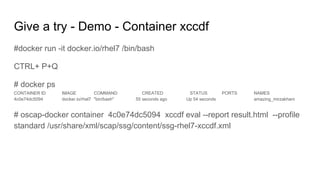
Give a try - Demo - Container xccdf
#docker run -it docker.io/rhel7 /bin/bash
CTRL+ P+Q
# docker ps
CONTAINER ID IMAGE COMMAND CREATED STATUS PORTS NAMES
4c0e74dc5094 docker.io/rhel7 "bin/bash" 55 seconds ago Up 54 seconds amazing_mirzakhani
# oscap-docker container 4c0e74dc5094 xccdf eval --report result.html --profile
standard /usr/share/xml/scap/ssg/content/ssg-rhel7-xccdf.xml
Result report is created but some error messages..
[root@localhost]/home/jooho/test# oscap-docker container 4c0 xccdf eval --report result.html --profile
standard /usr/share/xml/scap/ssg/content/ssg-rhel7-xccdf.xml
WARNING: Skipping http://www.redhat.com/security/data/oval/Red_Hat_Enterprise_Linux_7.xml file
which is referenced from XCCDF content
Command: oscap xccdf eval --report result.html --profile standard
/usr/share/xml/scap/ssg/content/ssg-rhel7-xccdf.xml failed!
Error was:
Command '['oscap', 'xccdf', 'eval', '--report', 'result.html', '--profile', 'standard',
'/usr/share/xml/scap/ssg/content/ssg-rhel7-xccdf.xml']' returned non-zero exit status 2
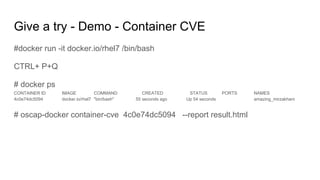
Give a try - Demo - Container CVE
#docker run -it docker.io/rhel7 /bin/bash
CTRL+ P+Q
# docker ps
CONTAINER ID IMAGE COMMAND CREATED STATUS PORTS NAMES
4c0e74dc5094 docker.io/rhel7 "bin/bash" 55 seconds ago Up 54 seconds amazing_mirzakhani
# oscap-docker container-cve 4c0e74dc5094 --report result.html
Result report is generated successfully
[root@localhost]/home/jooho/test# oscap-docker container-cve 4c0e74dc5094
--report result.html
Definition oval:com.redhat.rhsa:def:20161633: false
Definition oval:com.redhat.rhsa:def:20161632: false
…
Definition oval:com.redhat.rhsa:def:20140675: false
Evaluation done.
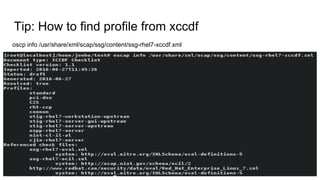
Tip: How to find profile from xccdf
oscp info /usr/share/xml/scap/ssg/content/ssg-rhel7-xccdf.xml
Tip: Important path
Security Content: /usr/share/xml/scap/ssg/content
What is atomic command?
The goal of Atomic is to provide a high level, coherent entrypoint to the system,
and fill in gaps in Linux container implementations.
There are several command : atomic run/install/uninstall/scan
Here, we will use atomic scan to scan security for docker
images/containers.
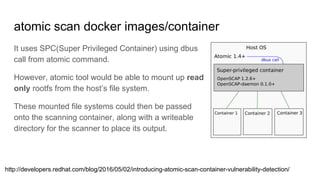
atomic scan docker images/container
It uses SPC(Super Privileged Container) using dbus
call from atomic command.
However, atomic tool would be able to mount up read
only rootfs from the host’s file system.
These mounted file systems could then be passed
onto the scanning container, along with a writeable
directory for the scanner to place its output.
http://developers.redhat.com/blog/2016/05/02/introducing-atomic-scan-container-vulnerability-detection/
Give a try - Demo (atomic scan image)
# yum install atomic
# docker pull registry.access.redhat.com/rhel7/openscap
# atomic install registry.access.redhat.com/rhel7/openscap
# atomic scan docker.io/rhel7
Generated result json file on host successfully.
[root@localhost]/home/jooho/test# atomic scan docker.io/rhel7
docker run -it --rm -v /etc/localtime:/etc/localtime -v /run/atomic/2016-08-24-15-18-26-150045:/scanin -v
/var/lib/atomic/openscap/2016-08-24-15-18-26-150045:/scanout:rw,Z -v /etc/oscapd:/etc/oscapd:ro rhel7/openscap
oscapd-evaluate scan --no-standard-compliance --targets chroots-in-dir:///scanin --output /scanout
Usage of loopback devices is strongly discouraged for production use. Either use `--storage-opt dm.thinpooldev` or use
`--storage-opt dm.no_warn_on_loop_devices=true` to suppress this warning.
docker.io/rhel7 (6f7a31562d1ec72)
docker.io/rhel7 passed the scan
Files associated with this scan are in /var/lib/atomic/openscap/2016-08-24-15-18-26-150045.
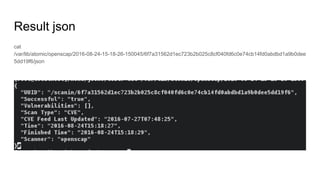
Result json
cat
/var/lib/atomic/openscap/2016-08-24-15-18-26-150045/6f7a31562d1ec723b2b025c8cf040fd6c0e74cb14fd0abdbd1a9b0dee
5dd19f6/json
OpenSCAP in Red Hat Products (need more test)
Satellite 6.2
- Evaluate host
CloudForms 4.2
- Evaluate images
Pros and cons
● Pros
○ OpenSCAP has received a NIST certification for its support of SCAP 1.2.
○ Red Hat sponsor OpenSCAP
○ Red Hat support OpenSCAP with RHEL Subscription
● Cons
○ Can evaluate RHEL based image only
Third Party Application
Blackduck(https://www.blackducksoftware.com)
Twistlock(https://twistlock.com/)
END

OpenSCAP Overview(security scanning for docker image and container)

  • 1.
  • 2.
    Agenda What is SCAP? Whatis OpenSCAP? Give a try - Demo What is atomic command? OpenSCAP in Red Hat Products (TBD) - Satellite 6.x - CloudForms 4.x
  • 3.
    Goal This presentation isfor who look for a good asset that do security scanning. Especially, OpenShift Container Platform engineer have being asked about docker image security. Here, I would like to focus on explaining how to use OpenSCAP. The security components such as XCCDF, OVAL are not the main topics so it doesn’t give a detailed account.
  • 4.
    What is SCAP? SecurityContent Automation Protocol The Security Content Automation Protocol (SCAP) is a method for using specific standards to enable the automated vulnerability management, measurement, and policy compliance evaluation of systems deployed in an organization, including e.g., FISMA compliance. The National Vulnerability Database (NVD) is the U.S. government content repository for SCAP. - en.wikipedia.org - Nice video : http://goo.gl/GBaiIW
  • 5.
    SCAP components ● XCCDF:The Extensible Configuration Checklist Description Format ● OVAL®: Open Vulnerability and Assessment Language ● Asset Identification ● ARF: Asset Reporting Format ● CCE™: Common Configuration Enumeration ● CPE™: Common Platform Enumeration ● CVE®: Common Vulnerabilities and Exposures ● CVSS: Common Vulnerability Scoring System
  • 6.
    What is OpenSCAP? OpenSource Security Compliance Solution. The oscap program is a command line tool that allows users to load, scan, validate, edit, and export SCAP documents. ● Homepage of the project: www.open-scap.org ● Manual: Oscap User Manual ● For new contributors: How to contribute OpenSCAP is implementation to use SCAP components
  • 7.
    Why OpenSCAP isneeded? Security compliance In the ever-changing world of computer security where new vulnerabilities are being discovered and patched every day, enforcing security compliance must be a continuous process. The OpenSCAP ecosystem provides tools and customizable policies for a quick, cost-effective and flexible implementation Vulnerability assessment A timely inspection of software inventory that identifies such vulnerabilities is a must for any organization in the 21st century, and the OpenSCAP project provides tools for automated vulnerability checking, allowing you to take steps to prevent attacks before they happen.
  • 8.
    Why OpenSCAP isa good choice? OpenSCAP has received a NIST certification for its support of SCAP 1.2. Red Hat sponsor OpenSCAP Red Hat support OpenSCAP with RHEL Subscription Red Hat Enterprise Linux operating system 7 contains OpenSCAP packages OpenSCAP start to support docker image/container* Red Hat integrated OpenSCAP with Red Hat Products ( Satellite 6.2 / CloudForms 4.1 )** * it can scan only RHEL based docker images/containers ** it is officially supported from Satellite 6.2 / CloudForms 4.1
  • 9.
    OpenSCAP umbrella projects OpenSCAPBase - provide oscap command OpenSCAP Daemon - evaluate by schedule SCAP Workbench - graphical utility SCAPTimony - compliance of your infrastructure. OSCAP Anaconda Add-on - an add-on for installer used by Fedora and Red Hat Enterprise Linux 7. SCAP Security Guide - OpenSCAP content primarily for Red Hat Enterprise Linux
  • 10.
    Give a try- Demo Image / Conatiner SCAP component / CVE
  • 11.
    Give a try- Demo - image xccdf # sudo yum install openscap -y # docker pull docker.io/rhel7 ## Evaluate image with xccdf # oscap-docker image docker.io/rhel7 xccdf eval --report result.html --profile standard /usr/share/xml/scap/ssg/content/ssg-rhel7-xccdf.xml
  • 12.
    Result report iscreated but some error messages.. [root@localhost]/home/jooho/test# oscap-docker image docker.io/rhel7 xccdf eval --report result.html --profile standard /usr/share/xml/scap/ssg/content/ssg-rhel7-xccdf.xml WARNING: Skipping http://www.redhat.com/security/data/oval/Red_Hat_Enterprise_Linux_7.xml file which is referenced from XCCDF content Command: oscap xccdf eval --report result.html --profile standard /usr/share/xml/scap/ssg/content/ssg-rhel7-xccdf.xml failed! Error was: Command '['oscap', 'xccdf', 'eval', '--report', 'result.html', '--profile', 'standard', '/usr/share/xml/scap/ssg/content/ssg-rhel7-xccdf.xml']' returned non-zero exit status 2
  • 13.
    Give a try- Demo - image CVE # sudo yum install openscap -y # docker pull registry.access.redhat.com/rhel7 ## Evaluate image about CVE # oscap-docker image-cve registry.access.redhat.com/rhel7 --report result.html --verbose DEVEL
  • 14.
    Result report isgenerated successfully [root@localhost]/home/jooho/test# oscap-docker image-cve docker.io/rhel7 --report result.html Definition oval:com.redhat.rhsa:def:20161633: false Definition oval:com.redhat.rhsa:def:20161632: false ….. Definition oval:com.redhat.rhsa:def:20140675: false Evaluation done.
  • 15.
    Give a try- Demo - Container xccdf #docker run -it docker.io/rhel7 /bin/bash CTRL+ P+Q # docker ps CONTAINER ID IMAGE COMMAND CREATED STATUS PORTS NAMES 4c0e74dc5094 docker.io/rhel7 "bin/bash" 55 seconds ago Up 54 seconds amazing_mirzakhani # oscap-docker container 4c0e74dc5094 xccdf eval --report result.html --profile standard /usr/share/xml/scap/ssg/content/ssg-rhel7-xccdf.xml
  • 16.
    Result report iscreated but some error messages.. [root@localhost]/home/jooho/test# oscap-docker container 4c0 xccdf eval --report result.html --profile standard /usr/share/xml/scap/ssg/content/ssg-rhel7-xccdf.xml WARNING: Skipping http://www.redhat.com/security/data/oval/Red_Hat_Enterprise_Linux_7.xml file which is referenced from XCCDF content Command: oscap xccdf eval --report result.html --profile standard /usr/share/xml/scap/ssg/content/ssg-rhel7-xccdf.xml failed! Error was: Command '['oscap', 'xccdf', 'eval', '--report', 'result.html', '--profile', 'standard', '/usr/share/xml/scap/ssg/content/ssg-rhel7-xccdf.xml']' returned non-zero exit status 2
  • 17.
    Give a try- Demo - Container CVE #docker run -it docker.io/rhel7 /bin/bash CTRL+ P+Q # docker ps CONTAINER ID IMAGE COMMAND CREATED STATUS PORTS NAMES 4c0e74dc5094 docker.io/rhel7 "bin/bash" 55 seconds ago Up 54 seconds amazing_mirzakhani # oscap-docker container-cve 4c0e74dc5094 --report result.html
  • 18.
    Result report isgenerated successfully [root@localhost]/home/jooho/test# oscap-docker container-cve 4c0e74dc5094 --report result.html Definition oval:com.redhat.rhsa:def:20161633: false Definition oval:com.redhat.rhsa:def:20161632: false … Definition oval:com.redhat.rhsa:def:20140675: false Evaluation done.
  • 19.
    Tip: How tofind profile from xccdf oscp info /usr/share/xml/scap/ssg/content/ssg-rhel7-xccdf.xml
  • 20.
    Tip: Important path SecurityContent: /usr/share/xml/scap/ssg/content
  • 21.
    What is atomiccommand? The goal of Atomic is to provide a high level, coherent entrypoint to the system, and fill in gaps in Linux container implementations. There are several command : atomic run/install/uninstall/scan Here, we will use atomic scan to scan security for docker images/containers.
  • 22.
    atomic scan dockerimages/container It uses SPC(Super Privileged Container) using dbus call from atomic command. However, atomic tool would be able to mount up read only rootfs from the host’s file system. These mounted file systems could then be passed onto the scanning container, along with a writeable directory for the scanner to place its output. http://developers.redhat.com/blog/2016/05/02/introducing-atomic-scan-container-vulnerability-detection/
  • 23.
    Give a try- Demo (atomic scan image) # yum install atomic # docker pull registry.access.redhat.com/rhel7/openscap # atomic install registry.access.redhat.com/rhel7/openscap # atomic scan docker.io/rhel7
  • 24.
    Generated result jsonfile on host successfully. [root@localhost]/home/jooho/test# atomic scan docker.io/rhel7 docker run -it --rm -v /etc/localtime:/etc/localtime -v /run/atomic/2016-08-24-15-18-26-150045:/scanin -v /var/lib/atomic/openscap/2016-08-24-15-18-26-150045:/scanout:rw,Z -v /etc/oscapd:/etc/oscapd:ro rhel7/openscap oscapd-evaluate scan --no-standard-compliance --targets chroots-in-dir:///scanin --output /scanout Usage of loopback devices is strongly discouraged for production use. Either use `--storage-opt dm.thinpooldev` or use `--storage-opt dm.no_warn_on_loop_devices=true` to suppress this warning. docker.io/rhel7 (6f7a31562d1ec72) docker.io/rhel7 passed the scan Files associated with this scan are in /var/lib/atomic/openscap/2016-08-24-15-18-26-150045.
  • 25.
  • 26.
    OpenSCAP in RedHat Products (need more test) Satellite 6.2 - Evaluate host CloudForms 4.2 - Evaluate images
  • 27.
    Pros and cons ●Pros ○ OpenSCAP has received a NIST certification for its support of SCAP 1.2. ○ Red Hat sponsor OpenSCAP ○ Red Hat support OpenSCAP with RHEL Subscription ● Cons ○ Can evaluate RHEL based image only
  • 28.
  • 29.