Security As A Service
Tech Stuff
WE DRIVE BUSINESS EVOLUTION FORWARD
Olav Tvedt
Senior Principal Architect
Lumagate A/S
Cloud and Datacenter Management
Windows and Devices for IT
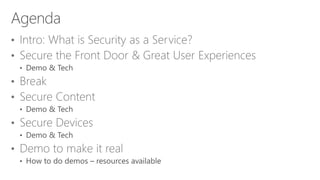
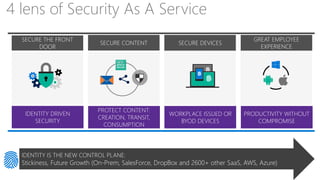
4 lens of Security As A Service
SECURE CONTENT
PROTECT CONTENT:
CREATION, TRANSIT,
CONSUMPTION
SECURE DEVICES
WORKPLACE ISSUED OR
BYOD DEVICES
GREAT EMPLOYEE
EXPERIENCE
PRODUCTIVITY WITHOUT
COMPROMISE
SECURE THE FRONT
DOOR
IDENTITY DRIVEN
SECURITY
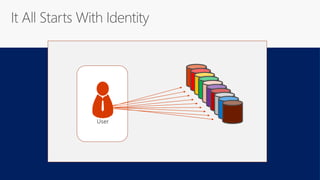
IDENTITY IS THE NEW CONTROL PLANE:
Stickiness, Future Growth (On-Prem, SalesForce, DropBox and 2600+ other SaaS, AWS, Azure)
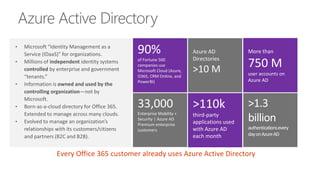
33,000
Enterprise Mobility +
Security | Azure AD
Premium enterprise
customers
>110k
third-party
applications used
with Azure AD
each month
>1.3
billion
authenticationsevery
dayonAzureAD
More than
750 M
user accounts on
Azure AD
Azure AD
Directories
>10 M
90%
of Fortune 500
companies use
Microsoft Cloud (Azure,
O365, CRM Online, and
PowerBI)
Every Office 365 customer already uses Azure Active Directory
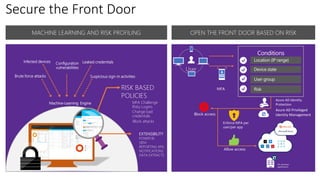
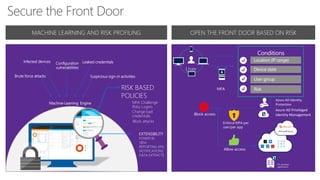
Secure the Front Door
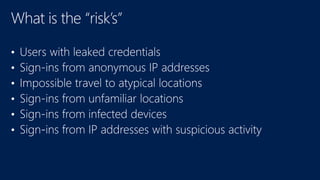
Leaked
credentials
Infected
devices
Configuration
vulnerabilities
Risk-based
policies
MFA Challenge
Risky Logins
Block attacks
Change bad credentials
Suspicious sign-in
activities
MACHINE LEARNING AND RISK PROFILING OPEN THE FRONT DOOR BASED ON RISK
Shadow IT
Risk
Assessment
User
MFA
Conditions
Location (IP range)
Device state
User group
Risk
Block access
Enforce MFA per
user/per app
Allow access
Leaked credentialsInfected devices Configuration
vulnerabilities
RISK BASED
POLICIES
MFA Challenge
Risky Logins
Block attacks
Change bad
credentials
Machine-Learning Engine
Brute force attacks Suspicious sign-in activities
EXTENSIBILITY
POWER BI,
SIEM
REPORTING APIs
NOTIFICATIONS
DATA EXTRACTS
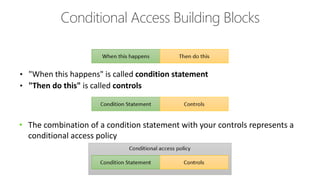
Conditional Access Building Blocks
• "When this happens" is called condition statement
• "Then do this" is called controls
• The combination of a condition statement with your controls represents a
conditional access policy
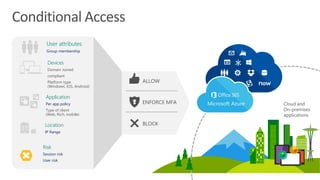
Conditional Access
Application
Per app policy
Type of client
(Web, Rich, mobile)
Cloud and
On-premises
applications
User attributes
Group membership
Devices
Domain Joined
compliant
Platform type
(Windows, iOS, Android)
Location
IP Range
ENFORCE MFA
ALLOW
BLOCK
Risk
Session risk
User risk
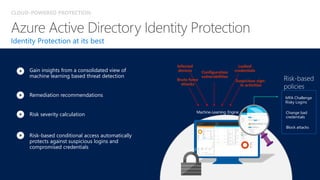
CLOUD-POWERED PROTECTION
Identity Protection at its best
Risk severity calculation
Remediation recommendations
Risk-based conditional access automatically
protects against suspicious logins and
compromised credentials
Gain insights from a consolidated view of
machine learning based threat detection
Leaked
credentials
Infected
devices Configuration
vulnerabilities
Risk-based
policies
MFA Challenge
Risky Logins
Block attacks
Change bad
credentials
Machine-Learning Engine
Brute force
attacks
Suspicious sign-
in activities
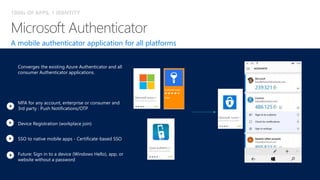
A mobile authenticator application for all platforms
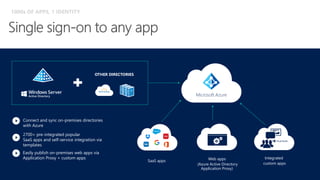
1000s OF APPS, 1 IDENTITY
Converges the existing Azure Authenticator and all
consumer Authenticator applications.
MFA for any account, enterprise or consumer and
3rd party : Push Notifications/OTP
Device Registration (workplace join)
SSO to native mobile apps - Certificate-based SSO
Future: Sign in to a device (Windows Hello), app, or
website without a password
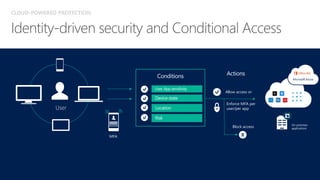
Conditions
Allow access or
Block access
Actions
Enforce MFA per
user/per app
User, App sensitivity
Device state
LocationUser
MFA
Risk
CLOUD-POWERED PROTECTION
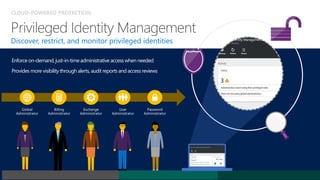
Discover, restrict, and monitor privileged identities
Enforce on-demand,just-in-timeadministrativeaccess when needed
Provides more visibilitythrough alerts, auditreports and access reviews
Global
Administrator
Billing
Administrator
Exchange
Administrator
User
Administrator
Password
Administrator
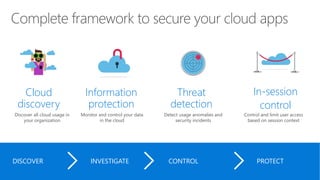
Cloud
discovery
Discover all cloud usage in
your organization
Information
protection
Monitor and control your data
in the cloud
Threat
detection
Detect usage anomalies and
security incidents
In-session
control
Control and limit user access
based on session context
DISCOVER INVESTIGATE CONTROL PROTECT
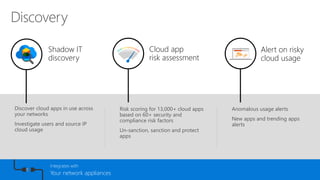
Anomalous usage alerts
New apps and trending apps
alerts
Alert on risky
cloud usage
Discover cloud apps in use across
your networks
Investigate users and source IP
cloud usage
Shadow IT
discovery
Cloud app
risk assessment
Risk scoring for 13,000+ cloud apps
based on 60+ security and
compliance risk factors
Un-sanction, sanction and protect
apps
Integrates with
Your network appliances
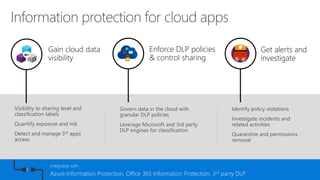
Identify policy violations
Investigate incidents and
related activities
Quarantine and permissions
removal
Get alerts and
investigate
Visibility to sharing level and
classification labels
Quantify exposure and risk
Detect and manage 3rd apps
access
Gain cloud data
visibility
Enforce DLP policies
& control sharing
Govern data in the cloud with
granular DLP policies
Leverage Microsoft and 3rd party
DLP engines for classification
Integrates with
Azure Information Protection, Office 365 Information Protection, 3rd party DLP
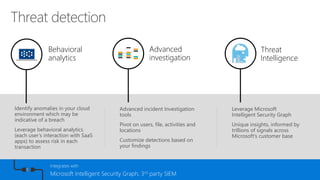
Leverage Microsoft
Intelligent Security Graph
Unique insights, informed by
trillions of signals across
Microsoft’s customer base
Threat
Intelligence
Identify anomalies in your cloud
environment which may be
indicative of a breach
Leverage behavioral analytics
(each user’s interaction with SaaS
apps) to assess risk in each
transaction
Behavioral
analytics
Advanced
investigation
Advanced incident Investigation
tools
Pivot on users, file, activities and
locations
Customize detections based on
your findings
Integrates with
Microsoft Intelligent Security Graph, 3rd party SIEM
Discovery
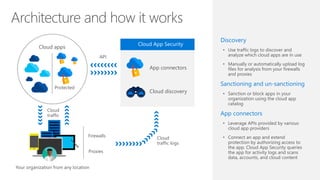
• Use traffic logs to discover and
analyze which cloud apps are in use
• Manually or automatically upload log
files for analysis from your firewalls
and proxies
Sanctioning and un-sanctioning
• Sanction or block apps in your
organization using the cloud app
catalog
App connectors
• Leverage APIs provided by various
cloud app providers
• Connect an app and extend
protection by authorizing access to
the app. Cloud App Security queries
the app for activity logs and scans
data, accounts, and cloud content
App connectors
Cloud discovery
Protected
Cloud apps
Cloud
traffic
Cloud
traffic logs
Firewalls
Proxies
Your organization from any location
API
Cloud App Security
Secure the Front Door
Leaked
credentials
Infected
devices
Configuration
vulnerabilities
Risk-based
policies
MFA Challenge
Risky Logins
Block attacks
Change bad credentials
Suspicious sign-in
activities
MACHINE LEARNING AND RISK PROFILING OPEN THE FRONT DOOR BASED ON RISK
Shadow IT
Risk
Assessment
User
MFA
Conditions
Location (IP range)
Device state
User group
Risk
Block access
Enforce MFA per
user/per app
Allow access
Leaked credentialsInfected devices Configuration
vulnerabilities
RISK BASED
POLICIES
MFA Challenge
Risky Logins
Block attacks
Change bad
credentials
Machine-Learning Engine
Brute force attacks Suspicious sign-in activities
EXTENSIBILITY
POWER BI,
SIEM
REPORTING APIs
NOTIFICATIONS
DATA EXTRACTS
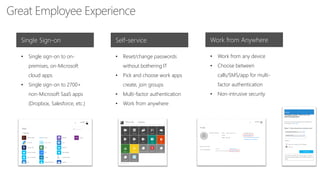
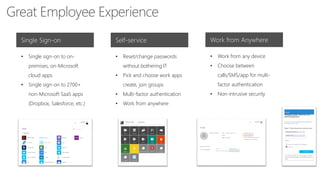
Great Employee Experience
Single Sign-on Self-service Work from Anywhere
• Single sign-on to on-
premises, on-Microsoft
cloud apps
• Single sign-on to 2700+
non-Microsoft SaaS apps
(Dropbox, Salesforce, etc.)
• Reset/change passwords
without bothering IT
• Pick and choose work apps
create, join groups
• Multi-factor authentication
• Work from anywhere
• Work from any device
• Choose between
calls/SMS/app for multi-
factor authentication
• Non-intrusive security
Web apps
(Azure Active Directory
Application Proxy)
Integrated
custom apps
SaaS apps
OTHER DIRECTORIES
2700+ pre-integrated popular
SaaS apps and self-service integration via
templates
Connect and sync on-premises directories
with Azure
Easily publish on-premises web apps via
Application Proxy + custom apps
Microsoft Azure
1000s OF APPS, 1 IDENTITY
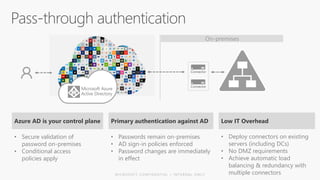
Microsoft Azure
Active Directory
Connector
Connector
Primary authentication against AD
• Passwords remain on-premises
• AD sign-in policies enforced
• Password changes are immediately
in effect
Low IT Overhead
• Deploy connectors on existing
servers (including DCs)
• No DMZ requirements
• Achieve automatic load
balancing & redundancy with
multiple connectors
Azure AD is your control plane
• Secure validation of
password on-premises
• Conditional access
policies apply
On-premises
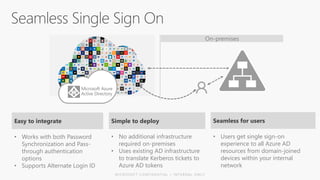
Microsoft Azure
Active Directory
Seamless for users
• Users get single sign-on
experience to all Azure AD
resources from domain-joined
devices within your internal
network
Simple to deploy
• No additional infrastructure
required on-premises
• Uses existing AD infrastructure
to translate Kerberos tickets to
Azure AD tokens
Easy to integrate
• Works with both Password
Synchronization and Pass-
through authentication
options
• Supports Alternate Login ID
On-premises
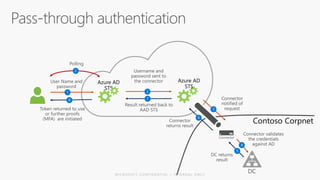
Contoso Corpnet
Azure AD
STS
1 2
3
4
5
6
78
Connector
2
Azure AD
STS
Corporate
network
Microsoft Azure
Active Directory
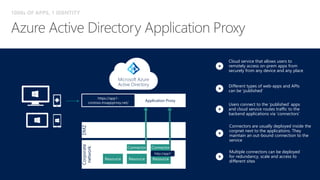
Connectors are usually deployed inside the
corpnet next to the applications. They
maintain an out-bound connection to the
service
Multiple connectors can be deployed
for redundancy, scale and access to
different sites
Users connect to the ‘published’ apps
and cloud service routes traffic to the
backend applications via ‘connectors’
1000s OF APPS, 1 IDENTITY
DMZ
https://app1-
contoso.msappproxy.net/
Application Proxy
http://app1
Cloud service that allows users to
remotely access on-prem apps from
securely from any device and any place
Different types of web-apps and APIs
can be ‘published’
Single Sign-on Self-service Work from Anywhere
• Single sign-on to on-
premises, on-Microsoft
cloud apps
• Single sign-on to 2700+
non-Microsoft SaaS apps
(Dropbox, Salesforce, etc.)
• Reset/change passwords
without bothering IT
• Pick and choose work apps
create, join groups
• Multi-factor authentication
• Work from anywhere
• Work from any device
• Choose between
calls/SMS/app for multi-
factor authentication
• Non-intrusive security
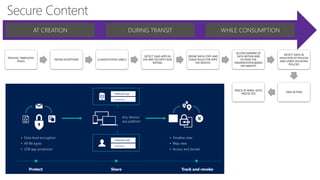
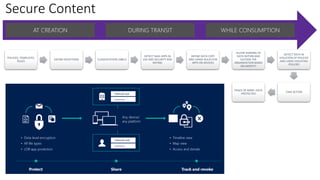
Secure Content
AT CREATION DURING TRANSIT WHILE CONSUMPTION
POLICIES, TEMPLATES,
RULES
DEFINE EXCEPTIONS CLASSIFICATION LABELS
DETECT SAAS APPS IN
USE AND SECURITY RISK
RATING
DEFINE DATA COPY AND
USAGE RULES FOR APPS
ON DEVICES
ALLOW SHARING OF
DATA WITHIN AND
OUTSIDE THE
ORGANIZATION BASED
ON IDENTITY
DETECT DATA IN
VIOLATION OF POLICIES
AND USERS VIOLATING
POLICIES
TAKE ACTION
PEACE OF MIND: DATA
PROTECTED
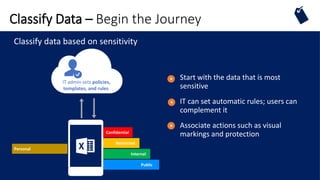
Classify Data – Begin the Journey
Confidential
Restricted
Internal
Public
IT admin sets policies,
templates, and rules
Personal
Classify data based on sensitivity
Start with the data that is most
sensitive
IT can set automatic rules; users can
complement it
Associate actions such as visual
markings and protection
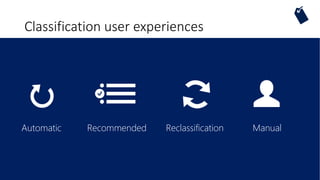
Classification user experiences
ReclassificationAutomatic Recommended Manual
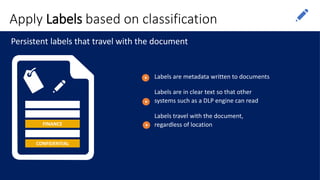
Apply Labels based on classification
FINANCE
CONFIDENTIAL
Persistent labels that travel with the document
Labels are metadata written to documents
Labels are in clear text so that other
systems such as a DLP engine can read
Labels travel with the document,
regardless of location
VIEW EDIT COPY PASTE
Email
attachment
FILE
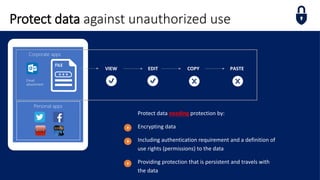
Protect data needing protection by:
Encrypting data
Including authentication requirement and a definition of
use rights (permissions) to the data
Providing protection that is persistent and travels with
the data
Protect data against unauthorized use
Personal apps
Corporate apps
aEZQAR]ibr{qU@M]
BXNoHp9nMDAtnBfr
fC;jx+Tg@XL2,Jzu
()&(*7812(*:
Use rights +
Secret cola formula
Water
Sugar
Brown #16
PROTECT
Usage rights and symmetric
key stored in file as “license”
Each file is protected by
a unique AES symmetric
License protected
by customer-owned RSA
key
Water
Sugar
Brown #16
UNPROTECT
How Protection Works
Use rights
+
Azure RMS never sees
the file content, only
the license
How Protection Works
Apps protected with
RMS enforce rights
SDK
Apps use the SDK to
communicate with the
RMS service/servers
File content is never sent to
the RMS server/service
aEZQAR]ibr{qU@M]B
XNoHp9nMDAtnBfrfC
;jx+Tg@XL2,Jzu
()&(*7812(*:
Use rights
+
LOCAL PROCESSING ON PCS/DEVICES
Monitor and Respond
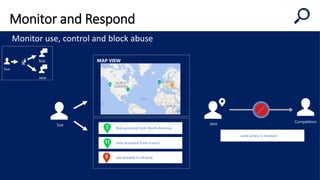
Monitor use, control and block abuse
Sue
Joe blocked in Ukraine
Jane accessed from France
Bob accessed from North America
MAP VIEW
Jane
Competitors
Jane access is revoked
Sue
Bob
Jane
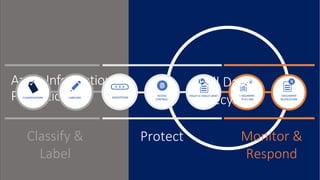
Azure Information
Protection DOCUMENT
TRACKING
DOCUMENT
REVOCATION
Monitor &
Respond
LABELINGCLASSIFICATION
Classify &
Label
ENCRYPTION
Protect
ACCESS
CONTROL
POLICY ENFORCEMENT
Full Data
Lifecycle
Demo
MAM
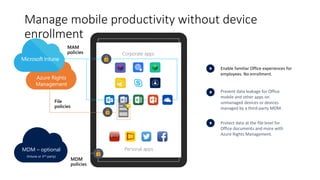
Manage mobile productivity without device
enrollment
Prevent data leakage for Office
mobile and other apps on
unmanaged devices or devices
managed by a third-party MDM.
Protect data at the file level for
Office documents and more with
Azure Rights Management.
Enable familiar Office experiences for
employees. No enrollment.
Personal apps
Corporate apps
Azure Rights
Management
MDM
policies
MAM
policies
File
policies
MDM – optional
(Intune or 3rd-party)
Secure Content
AT CREATION DURING TRANSIT WHILE CONSUMPTION
POLICIES, TEMPLATES,
RULES
DEFINE EXCEPTIONS CLASSIFICATION LABELS
DETECT SAAS APPS IN
USE AND SECURITY RISK
RATING
DEFINE DATA COPY
AND USAGE RULES FOR
APPS ON DEVICES
ALLOW SHARING OF
DATA WITHIN AND
OUTSIDE THE
ORGANIZATION BASED
ON IDENTITY
DETECT DATA IN
VIOLATION OF POLICIES
AND USERS VIOLATING
POLICIES
TAKE ACTION
PEACE OF MIND: DATA
PROTECTED
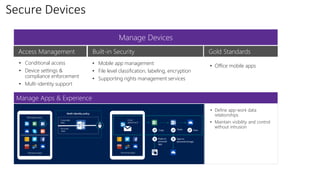
Secure Devices
Manage Devices
Manage Apps & Experience
Access Management Built-in Security Gold Standards
• Conditional access
• Device settings &
compliance enforcement
• Multi-identity support
• Mobile app management
• File level classification, labeling, encryption
• Supporting rights management services
• Office mobile apps
• Define app-work data
relationships
• Maintain visibility and control
without intrusion
https://docs.microsoft.com/en-us/intune-azure/introduction/ui-changes-in-microsoft-intune
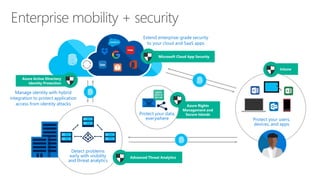
Intune
Azure Rights
Management and
Secure Islands
Protect your users,
devices, and apps
Detect problems
early with visibility
and threat analytics
Protect your data,
everywhere
Extend enterprise-grade security
to your cloud and SaaS apps
Manage identity with hybrid
integration to protect application
access from identity attacks
Advanced Threat Analytics
Microsoft Cloud App Security
Azure Active Directory
Identity Protection
This Photo by Unknown Author is licensed under CC BY-NC-
SA
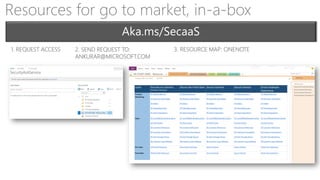
Resources for go to market, in-a-box
1. REQUEST ACCESS 2. SEND REQUEST TO:
ANKURAR@MICROSOFT.COM
3. RESOURCE MAP: ONENOTE

Security As A Service

  • 1.
    Security As AService Tech Stuff
  • 4.
    WE DRIVE BUSINESSEVOLUTION FORWARD
  • 5.
    WE DRIVE BUSINESSEVOLUTION FORWARD
  • 6.
    WE DRIVE BUSINESSEVOLUTION FORWARD
  • 9.
    Olav Tvedt Senior PrincipalArchitect Lumagate A/S Cloud and Datacenter Management Windows and Devices for IT
  • 11.
    4 lens ofSecurity As A Service SECURE CONTENT PROTECT CONTENT: CREATION, TRANSIT, CONSUMPTION SECURE DEVICES WORKPLACE ISSUED OR BYOD DEVICES GREAT EMPLOYEE EXPERIENCE PRODUCTIVITY WITHOUT COMPROMISE SECURE THE FRONT DOOR IDENTITY DRIVEN SECURITY IDENTITY IS THE NEW CONTROL PLANE: Stickiness, Future Growth (On-Prem, SalesForce, DropBox and 2600+ other SaaS, AWS, Azure)
  • 13.
    33,000 Enterprise Mobility + Security| Azure AD Premium enterprise customers >110k third-party applications used with Azure AD each month >1.3 billion authenticationsevery dayonAzureAD More than 750 M user accounts on Azure AD Azure AD Directories >10 M 90% of Fortune 500 companies use Microsoft Cloud (Azure, O365, CRM Online, and PowerBI) Every Office 365 customer already uses Azure Active Directory
  • 14.
    Secure the FrontDoor Leaked credentials Infected devices Configuration vulnerabilities Risk-based policies MFA Challenge Risky Logins Block attacks Change bad credentials Suspicious sign-in activities MACHINE LEARNING AND RISK PROFILING OPEN THE FRONT DOOR BASED ON RISK Shadow IT Risk Assessment User MFA Conditions Location (IP range) Device state User group Risk Block access Enforce MFA per user/per app Allow access Leaked credentialsInfected devices Configuration vulnerabilities RISK BASED POLICIES MFA Challenge Risky Logins Block attacks Change bad credentials Machine-Learning Engine Brute force attacks Suspicious sign-in activities EXTENSIBILITY POWER BI, SIEM REPORTING APIs NOTIFICATIONS DATA EXTRACTS
  • 16.
    Conditional Access BuildingBlocks • "When this happens" is called condition statement • "Then do this" is called controls • The combination of a condition statement with your controls represents a conditional access policy
  • 17.
    Conditional Access Application Per apppolicy Type of client (Web, Rich, mobile) Cloud and On-premises applications User attributes Group membership Devices Domain Joined compliant Platform type (Windows, iOS, Android) Location IP Range ENFORCE MFA ALLOW BLOCK Risk Session risk User risk
  • 18.
    CLOUD-POWERED PROTECTION Identity Protectionat its best Risk severity calculation Remediation recommendations Risk-based conditional access automatically protects against suspicious logins and compromised credentials Gain insights from a consolidated view of machine learning based threat detection Leaked credentials Infected devices Configuration vulnerabilities Risk-based policies MFA Challenge Risky Logins Block attacks Change bad credentials Machine-Learning Engine Brute force attacks Suspicious sign- in activities
  • 21.
    A mobile authenticatorapplication for all platforms 1000s OF APPS, 1 IDENTITY Converges the existing Azure Authenticator and all consumer Authenticator applications. MFA for any account, enterprise or consumer and 3rd party : Push Notifications/OTP Device Registration (workplace join) SSO to native mobile apps - Certificate-based SSO Future: Sign in to a device (Windows Hello), app, or website without a password
  • 22.
    Conditions Allow access or Blockaccess Actions Enforce MFA per user/per app User, App sensitivity Device state LocationUser MFA Risk CLOUD-POWERED PROTECTION
  • 24.
    CLOUD-POWERED PROTECTION Discover, restrict,and monitor privileged identities Enforce on-demand,just-in-timeadministrativeaccess when needed Provides more visibilitythrough alerts, auditreports and access reviews Global Administrator Billing Administrator Exchange Administrator User Administrator Password Administrator
  • 26.
    Cloud discovery Discover all cloudusage in your organization Information protection Monitor and control your data in the cloud Threat detection Detect usage anomalies and security incidents In-session control Control and limit user access based on session context DISCOVER INVESTIGATE CONTROL PROTECT
  • 27.
    Anomalous usage alerts Newapps and trending apps alerts Alert on risky cloud usage Discover cloud apps in use across your networks Investigate users and source IP cloud usage Shadow IT discovery Cloud app risk assessment Risk scoring for 13,000+ cloud apps based on 60+ security and compliance risk factors Un-sanction, sanction and protect apps Integrates with Your network appliances
  • 28.
    Identify policy violations Investigateincidents and related activities Quarantine and permissions removal Get alerts and investigate Visibility to sharing level and classification labels Quantify exposure and risk Detect and manage 3rd apps access Gain cloud data visibility Enforce DLP policies & control sharing Govern data in the cloud with granular DLP policies Leverage Microsoft and 3rd party DLP engines for classification Integrates with Azure Information Protection, Office 365 Information Protection, 3rd party DLP
  • 29.
    Leverage Microsoft Intelligent SecurityGraph Unique insights, informed by trillions of signals across Microsoft’s customer base Threat Intelligence Identify anomalies in your cloud environment which may be indicative of a breach Leverage behavioral analytics (each user’s interaction with SaaS apps) to assess risk in each transaction Behavioral analytics Advanced investigation Advanced incident Investigation tools Pivot on users, file, activities and locations Customize detections based on your findings Integrates with Microsoft Intelligent Security Graph, 3rd party SIEM
  • 31.
    Discovery • Use trafficlogs to discover and analyze which cloud apps are in use • Manually or automatically upload log files for analysis from your firewalls and proxies Sanctioning and un-sanctioning • Sanction or block apps in your organization using the cloud app catalog App connectors • Leverage APIs provided by various cloud app providers • Connect an app and extend protection by authorizing access to the app. Cloud App Security queries the app for activity logs and scans data, accounts, and cloud content App connectors Cloud discovery Protected Cloud apps Cloud traffic Cloud traffic logs Firewalls Proxies Your organization from any location API Cloud App Security
  • 32.
    Secure the FrontDoor Leaked credentials Infected devices Configuration vulnerabilities Risk-based policies MFA Challenge Risky Logins Block attacks Change bad credentials Suspicious sign-in activities MACHINE LEARNING AND RISK PROFILING OPEN THE FRONT DOOR BASED ON RISK Shadow IT Risk Assessment User MFA Conditions Location (IP range) Device state User group Risk Block access Enforce MFA per user/per app Allow access Leaked credentialsInfected devices Configuration vulnerabilities RISK BASED POLICIES MFA Challenge Risky Logins Block attacks Change bad credentials Machine-Learning Engine Brute force attacks Suspicious sign-in activities EXTENSIBILITY POWER BI, SIEM REPORTING APIs NOTIFICATIONS DATA EXTRACTS
  • 33.
    Great Employee Experience SingleSign-on Self-service Work from Anywhere • Single sign-on to on- premises, on-Microsoft cloud apps • Single sign-on to 2700+ non-Microsoft SaaS apps (Dropbox, Salesforce, etc.) • Reset/change passwords without bothering IT • Pick and choose work apps create, join groups • Multi-factor authentication • Work from anywhere • Work from any device • Choose between calls/SMS/app for multi- factor authentication • Non-intrusive security
  • 35.
    Web apps (Azure ActiveDirectory Application Proxy) Integrated custom apps SaaS apps OTHER DIRECTORIES 2700+ pre-integrated popular SaaS apps and self-service integration via templates Connect and sync on-premises directories with Azure Easily publish on-premises web apps via Application Proxy + custom apps Microsoft Azure 1000s OF APPS, 1 IDENTITY
  • 36.
    Microsoft Azure Active Directory Connector Connector Primaryauthentication against AD • Passwords remain on-premises • AD sign-in policies enforced • Password changes are immediately in effect Low IT Overhead • Deploy connectors on existing servers (including DCs) • No DMZ requirements • Achieve automatic load balancing & redundancy with multiple connectors Azure AD is your control plane • Secure validation of password on-premises • Conditional access policies apply On-premises
  • 37.
    Microsoft Azure Active Directory Seamlessfor users • Users get single sign-on experience to all Azure AD resources from domain-joined devices within your internal network Simple to deploy • No additional infrastructure required on-premises • Uses existing AD infrastructure to translate Kerberos tickets to Azure AD tokens Easy to integrate • Works with both Password Synchronization and Pass- through authentication options • Supports Alternate Login ID On-premises
  • 38.
    Contoso Corpnet Azure AD STS 12 3 4 5 6 78 Connector 2 Azure AD STS
  • 39.
    Corporate network Microsoft Azure Active Directory Connectorsare usually deployed inside the corpnet next to the applications. They maintain an out-bound connection to the service Multiple connectors can be deployed for redundancy, scale and access to different sites Users connect to the ‘published’ apps and cloud service routes traffic to the backend applications via ‘connectors’ 1000s OF APPS, 1 IDENTITY DMZ https://app1- contoso.msappproxy.net/ Application Proxy http://app1 Cloud service that allows users to remotely access on-prem apps from securely from any device and any place Different types of web-apps and APIs can be ‘published’
  • 41.
    Single Sign-on Self-serviceWork from Anywhere • Single sign-on to on- premises, on-Microsoft cloud apps • Single sign-on to 2700+ non-Microsoft SaaS apps (Dropbox, Salesforce, etc.) • Reset/change passwords without bothering IT • Pick and choose work apps create, join groups • Multi-factor authentication • Work from anywhere • Work from any device • Choose between calls/SMS/app for multi- factor authentication • Non-intrusive security
  • 42.
    Secure Content AT CREATIONDURING TRANSIT WHILE CONSUMPTION POLICIES, TEMPLATES, RULES DEFINE EXCEPTIONS CLASSIFICATION LABELS DETECT SAAS APPS IN USE AND SECURITY RISK RATING DEFINE DATA COPY AND USAGE RULES FOR APPS ON DEVICES ALLOW SHARING OF DATA WITHIN AND OUTSIDE THE ORGANIZATION BASED ON IDENTITY DETECT DATA IN VIOLATION OF POLICIES AND USERS VIOLATING POLICIES TAKE ACTION PEACE OF MIND: DATA PROTECTED
  • 44.
    Classify Data –Begin the Journey Confidential Restricted Internal Public IT admin sets policies, templates, and rules Personal Classify data based on sensitivity Start with the data that is most sensitive IT can set automatic rules; users can complement it Associate actions such as visual markings and protection
  • 45.
  • 46.
    Apply Labels basedon classification FINANCE CONFIDENTIAL Persistent labels that travel with the document Labels are metadata written to documents Labels are in clear text so that other systems such as a DLP engine can read Labels travel with the document, regardless of location
  • 47.
    VIEW EDIT COPYPASTE Email attachment FILE Protect data needing protection by: Encrypting data Including authentication requirement and a definition of use rights (permissions) to the data Providing protection that is persistent and travels with the data Protect data against unauthorized use Personal apps Corporate apps
  • 48.
    aEZQAR]ibr{qU@M] BXNoHp9nMDAtnBfr fC;jx+Tg@XL2,Jzu ()&(*7812(*: Use rights + Secretcola formula Water Sugar Brown #16 PROTECT Usage rights and symmetric key stored in file as “license” Each file is protected by a unique AES symmetric License protected by customer-owned RSA key Water Sugar Brown #16 UNPROTECT How Protection Works
  • 49.
    Use rights + Azure RMSnever sees the file content, only the license How Protection Works Apps protected with RMS enforce rights SDK Apps use the SDK to communicate with the RMS service/servers File content is never sent to the RMS server/service aEZQAR]ibr{qU@M]B XNoHp9nMDAtnBfrfC ;jx+Tg@XL2,Jzu ()&(*7812(*: Use rights + LOCAL PROCESSING ON PCS/DEVICES
  • 50.
    Monitor and Respond Monitoruse, control and block abuse Sue Joe blocked in Ukraine Jane accessed from France Bob accessed from North America MAP VIEW Jane Competitors Jane access is revoked Sue Bob Jane
  • 52.
    Azure Information Protection DOCUMENT TRACKING DOCUMENT REVOCATION Monitor& Respond LABELINGCLASSIFICATION Classify & Label ENCRYPTION Protect ACCESS CONTROL POLICY ENFORCEMENT Full Data Lifecycle
  • 53.
  • 54.
    Manage mobile productivitywithout device enrollment Prevent data leakage for Office mobile and other apps on unmanaged devices or devices managed by a third-party MDM. Protect data at the file level for Office documents and more with Azure Rights Management. Enable familiar Office experiences for employees. No enrollment. Personal apps Corporate apps Azure Rights Management MDM policies MAM policies File policies MDM – optional (Intune or 3rd-party)
  • 56.
    Secure Content AT CREATIONDURING TRANSIT WHILE CONSUMPTION POLICIES, TEMPLATES, RULES DEFINE EXCEPTIONS CLASSIFICATION LABELS DETECT SAAS APPS IN USE AND SECURITY RISK RATING DEFINE DATA COPY AND USAGE RULES FOR APPS ON DEVICES ALLOW SHARING OF DATA WITHIN AND OUTSIDE THE ORGANIZATION BASED ON IDENTITY DETECT DATA IN VIOLATION OF POLICIES AND USERS VIOLATING POLICIES TAKE ACTION PEACE OF MIND: DATA PROTECTED
  • 57.
    Secure Devices Manage Devices ManageApps & Experience Access Management Built-in Security Gold Standards • Conditional access • Device settings & compliance enforcement • Multi-identity support • Mobile app management • File level classification, labeling, encryption • Supporting rights management services • Office mobile apps • Define app-work data relationships • Maintain visibility and control without intrusion
  • 58.
  • 59.
    Intune Azure Rights Management and SecureIslands Protect your users, devices, and apps Detect problems early with visibility and threat analytics Protect your data, everywhere Extend enterprise-grade security to your cloud and SaaS apps Manage identity with hybrid integration to protect application access from identity attacks Advanced Threat Analytics Microsoft Cloud App Security Azure Active Directory Identity Protection
  • 61.
    This Photo byUnknown Author is licensed under CC BY-NC- SA
  • 71.
    Resources for goto market, in-a-box 1. REQUEST ACCESS 2. SEND REQUEST TO: ANKURAR@MICROSOFT.COM 3. RESOURCE MAP: ONENOTE