1
The Web Client Model
2
THE FOLLOWING SUN CERTIFIED WEB
COMPONENT DEVELOPER FOR J2EE
PLATFORM EXAM OBJECTIVES
COVERED IN THIS CHAPTER:
• 1.1 For each of the HTTP methods,GET,POST, and PUT, identify
the corresponding method in the HttpServlet class.
• 1.2 For each of the HTTP methods,GET ,POST, and HEAD,
identify triggers that might cause a browser to use the method,
and identify benefits or functionality of the method.
3
Agenda
• Introduce the Java Enterprise (J2EE) model
• Present the Hypertext Markup Language (HTML) tags
• Present the Hypertext Transmission Protocol (HTTP)
• Define an HTTP client request, server response, and
HTTP request methods
4
Introduction to the J2EE Model
• “Write once,run anywhere” was the first phrase Java
developers grew accustomed to hearing.
• “Write once, implement anywhere.” This phrase is the
foundation behind the Java 2 Enterprise Edition (J2EE)
architecture .
• Java took vendor dependence out of the equation.
5
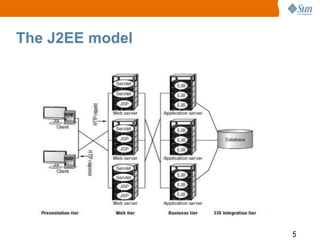
The J2EE model
6
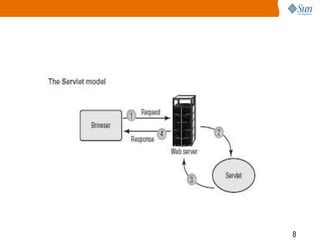
• Servlets are platform-independent web components
elements that bridge the gap between the Presentation
tier and the Business Logic, or EIS Integration tier.
• They are Java classes that implement specific interfaces
allowing the container to manage their life cycle and
communicate their data to a browser.
• A web server is an application written by a vendor that
meets the J2EE specification.
• Within the server exists a container : piece of the server
that manages the life cycle and communicates the data of
a servlet or JSP to the browser.
7
• Specifically, servlets are designed to optimize
business logic executed on the server side.
• Java Server Pages are also Java objects used
to communicate between the client and server.
• They, too, execute business logic; however,
processing Java code is not their specialty.
Unlike servlets, JSPs are optimized for the
layout.
8
9
HTML
• The Hypertext Markup Language (HTML) is the
intermediary language between the browser/client and all
other technologies, such as Java or networking protocols.
10
HTML Tags
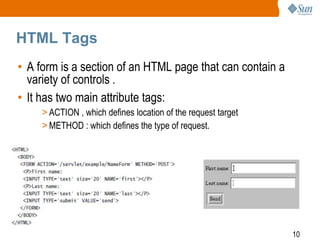
• A form is a section of an HTML page that can contain a
variety of controls .
• It has two main attribute tags:
> ACTION , which defines location of the request target
> METHOD : which defines the type of request.
11
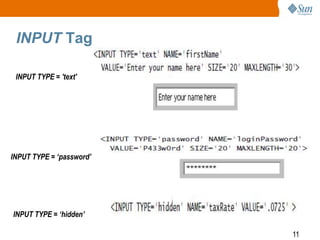
INPUT Tag
INPUT TYPE = 'text'
INPUT TYPE = ‘password’
INPUT TYPE = ‘hidden’
12
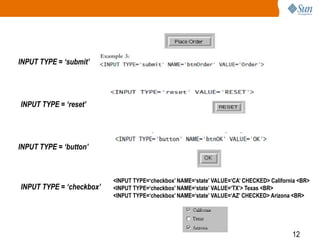
INPUT TYPE = ‘submit’
INPUT TYPE = ‘reset’
INPUT TYPE = ‘button’
INPUT TYPE = ‘checkbox’
<INPUT TYPE=‘checkbox’ NAME=‘state’ VALUE=‘CA’ CHECKED> California <BR>
<INPUT TYPE=‘checkbox’ NAME=‘state’ VALUE=‘TX’> Texas <BR>
<INPUT TYPE=‘checkbox’ NAME=‘state’ VALUE=‘AZ’ CHECKED> Arizona <BR>
13
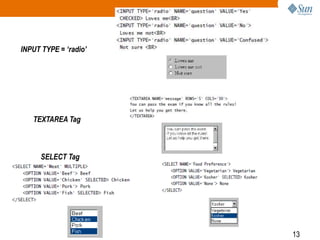
SELECT Tag
INPUT TYPE = ‘radio’
TEXTAREA Tag
14
Query String
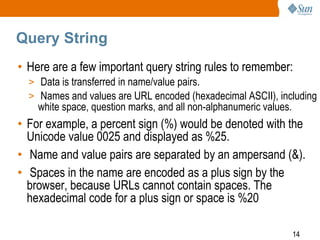
• Here are a few important query string rules to remember:
> Data is transferred in name/value pairs.
> Names and values are URL encoded (hexadecimal ASCII), including
white space, question marks, and all non-alphanumeric values.
• For example, a percent sign (%) would be denoted with the
Unicode value 0025 and displayed as %25.
• Name and value pairs are separated by an ampersand (&).
• Spaces in the name are encoded as a plus sign by the
browser, because URLs cannot contain spaces. The
hexadecimal code for a plus sign or space is %20
15
URL
• A Uniform Resource Locator (URL) defines the information the
client needs to make a connection to the server.
• http://book.com:8080/servlet/Registration?
name=Ariela&address=1234+Happy+Street
• The full signature consists of the following:
• <protocol>://<servername>[:port]/<url-path> [?query-string]
• Request address: http://java.sun.com/products/servlet/index.html?id=‘09’
• URL: http://java.sun.com/products/servlet/index.html?id=‘09’
• URI: /products/servlet/index.html
16
HTTP
• The success behind client-server architecture is the ability
of both parties to communicate and transfer data over a
network.
• HTTP is a stateless protocol meaning its data is not
retained from one request to the next.
• After a request is made, the connection is closed.
Because clients are not holding open connections to a
server, the server can have more clients connect over a
long period of time.
17
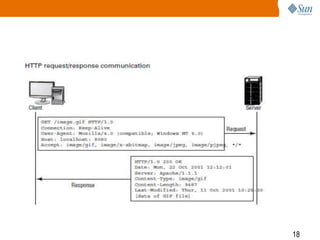
• The process to transmit the request is as follows:
1. An HTTP client or web browser makes a connection to a server.
2. The client initiates a request.
3. The server answers and sends a response to the client.
4. The connection is closed.
18
19
20
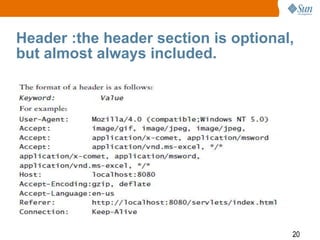
Header :the header section is optional,
but almost always included.
21
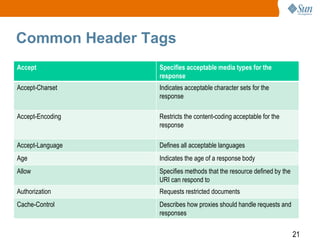
Common Header Tags
Accept Specifies acceptable media types for the
response
Accept-Charset Indicates acceptable character sets for the
response
Accept-Encoding Restricts the content-coding acceptable for the
response
Accept-Language Defines all acceptable languages
Age Indicates the age of a response body
Allow Specifies methods that the resource defined by the
URI can respond to
Authorization Requests restricted documents
Cache-Control Describes how proxies should handle requests and
responses
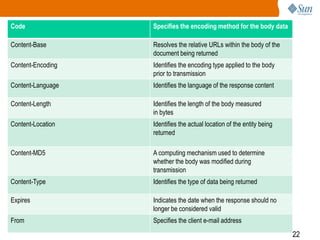
22
Code Specifies the encoding method for the body data
Content-Base Resolves the relative URLs within the body of the
document being returned
Content-Encoding Identifies the encoding type applied to the body
prior to transmission
Content-Language Identifies the language of the response content
Content-Length Identifies the length of the body measured
in bytes
Content-Location Identifies the actual location of the entity being
returned
Content-MD5 A computing mechanism used to determine
whether the body was modified during
transmission
Content-Type Identifies the type of data being returned
Expires Indicates the date when the response should no
longer be considered valid
From Specifies the client e-mail address
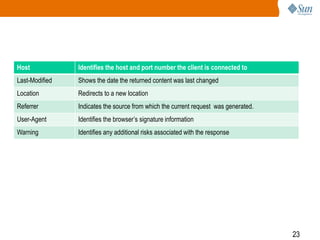
23
Host Identifies the host and port number the client is connected to
Last-Modified Shows the date the returned content was last changed
Location Redirects to a new location
Referrer Indicates the source from which the current request was generated.
User-Agent Identifies the browser’s signature information
Warning Identifies any additional risks associated with the response
24
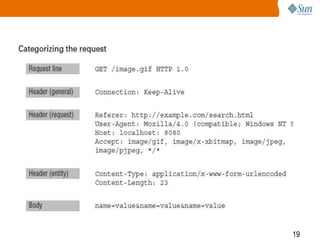
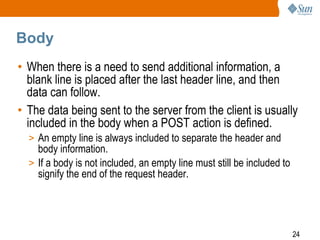
Body
• When there is a need to send additional information, a
blank line is placed after the last header line, and then
data can follow.
• The data being sent to the server from the client is usually
included in the body when a POST action is defined.
> An empty line is always included to separate the header and
body information.
> If a body is not included, an empty line must still be included to
signify the end of the request header.
25
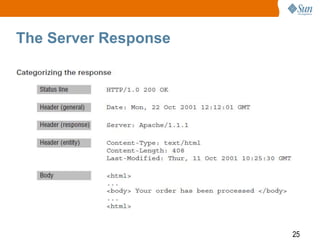
The Server Response
26
Status Line
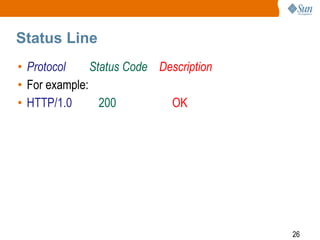
• Protocol Status Code Description
• For example:
• HTTP/1.0 200 OK
27
Header
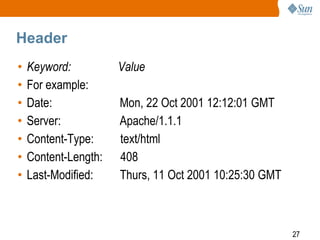
• Keyword: Value
• For example:
• Date: Mon, 22 Oct 2001 12:12:01 GMT
• Server: Apache/1.1.1
• Content-Type: text/html
• Content-Length: 408
• Last-Modified: Thurs, 11 Oct 2001 10:25:30 GMT
28
Body
• If the Content-Type is defined as text/html, then an
HTML document will be sent in return.
• If the Content-Type is image/jpeg, then an image
will be returned.
• The server returns one response for each request. If
a request comes in for an HTML page with an
image, two responses will be sent in parallel.
• The browsers usually join the two to make it appear
as if only one response was sent.
29
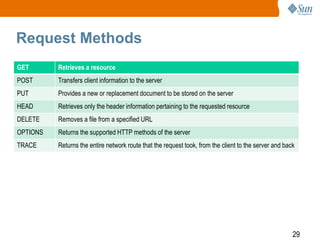
Request Methods
GET Retrieves a resource
POST Transfers client information to the server
PUT Provides a new or replacement document to be stored on the server
HEAD Retrieves only the header information pertaining to the requested resource
DELETE Removes a file from a specified URL
OPTIONS Returns the supported HTTP methods of the server
TRACE Returns the entire network route that the request took, from the client to the server and back
30
GET Method
• A GET method is a request designed to retrieve static
resources such as an HTML document or an image from a
specific location on the server.
• When a client defines a GET action, they are most likely
asking the server to return the body of a document identified in
the request URI.
• When sending the request, the client might send additional
information to the server to help process the request.
• The information will be transmitted in a query string attached
to the URL.
31
advantages
• the page can be bookmarked or e-mailed. Also, the data
does not need to be sent from a form, thus removing one
step from the process of retrieving the data.
32
1. The client cannot send a large URL because most
servers limit the URL string to about 240 characters.
2. because a GET request can be bookmarked, it is
considered idempotent, which means the request can
be safely repeated without necessarily consulting the
user
• Consequently, GET requests should not be used to
cause a change on the server for which the client would
be held responsible.
33
• A file or image
• Output from another language running on the server.
• Results from a compilation Information from another
hardware device for example, a database query or video
footage accessible by the server.
34
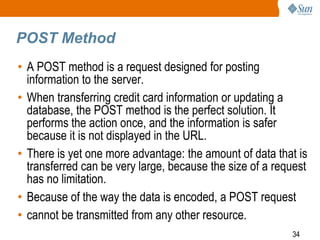
POST Method
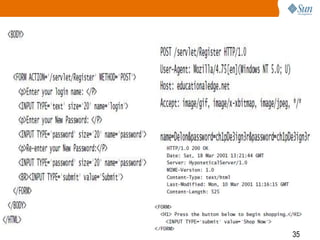
• A POST method is a request designed for posting
information to the server.
• When transferring credit card information or updating a
database, the POST method is the perfect solution. It
performs the action once, and the information is safer
because it is not displayed in the URL.
• There is yet one more advantage: the amount of data that is
transferred can be very large, because the size of a request
has no limitation.
• Because of the way the data is encoded, a POST request
• cannot be transmitted from any other resource.
35
36
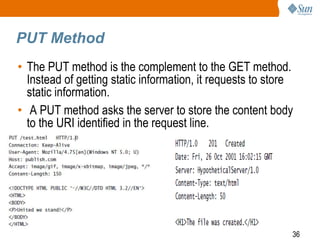
PUT Method
• The PUT method is the complement to the GET method.
Instead of getting static information, it requests to store
static information.
• A PUT method asks the server to store the content body
to the URI identified in the request line.
37
HEAD Method
• A HEAD method is a request that is almost exactly like a GET.
• The only difference is that a HEAD request does not return the
entity body. It returns the response line and headers only.
• Usually this type of request is used to verify a document’s
existence or properties.
> HEAD will be much smaller than that of a GET and consequently save you
network bandwidth
• The other reason to use HEAD is to learn about the properties
of a particular resource.
38
Here are some examples of common
uses for HEAD requests:
• By identifying the modification time, you can determine
whether there is a need to update a cached version of the
resource.
• The document size can let you deal with layout issues
before retrieving the actual document. In fact, if it’s very
large, it gives you a chance to determine an alternate plan
instead of waiting for it to be returned and then trying to
figure out what to do about the data.
• The type of document can be essential if you are looking
to support or view only certain kinds.
• The type of server can notify the client of special query
features that might be available to produce a more
precise request.
39
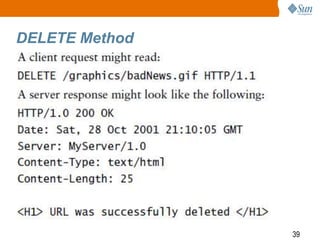
DELETE Method
• The complement to the PUT method is the DELETE
method.
• Whereas PUT enables you to place a file at a particular
URL, the DELETE method enables you to remove a file
from a particular URL.
40
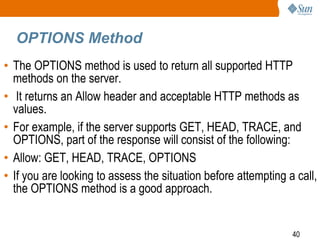
OPTIONS Method
• The OPTIONS method is used to return all supported HTTP
methods on the server.
• It returns an Allow header and acceptable HTTP methods as
values.
• For example, if the server supports GET, HEAD, TRACE, and
OPTIONS, part of the response will consist of the following:
• Allow: GET, HEAD, TRACE, OPTIONS
• If you are looking to assess the situation before attempting a call,
the OPTIONS method is a good approach.
41
TRACE Method
• When a request is sent, it passes through a series of proxy
servers.
• During that journey, there is a chance that some of the headers
have been changed.
• The TRACE method returns the request header values to the
client to determine whether any changes took place. It is mainly
used to help debug and perform an action similar to a traceroute.
42
Summary
• An overview of the J2EE model
> HTML form tags
> HTTP requests/responses
> HTTP methods: GET, POST, PUT, HEAD,
DELETE, OPTIONS, and TRACE
43
Exam Essentials
• The default request of an HTML form is a GET request. It
is often triggered with a submit button (other controls can
trigger requests if customized by using JavaScript).
• It retrieves information but does not make modifications
on the server side.
• A POST, on the other hand, is also triggered by similar
controls, but it can make changes or process critical
information on the server.
44
Review Questions
45
1. Which HTTP method is used to store a resource on
the server?
A. GET
B. POST
C. PUT
D. STORE
E. HEAD
46
1. C. A PUT method request is used to replace or store
files on the server. The request URI identifies the
location for the server to store the resource.
47
2. Given the following code, which request method will
get invoked?
<HTML>
<BODY>
<FORM ACTION=‘/servlet/test’>
<p>Enter the file you would like to Post:</P>
<INPUT TYPE=‘text’ size=‘40’ name=‘fileName’>
<INPUT TYPE=‘submit’ value=‘Done’> </p>
</FORM>
</BODY>
</HTML>
A. PUT,B. POST,C. GET,D. HEAD
48
• 2. C. If a method is not specified in a form, the
browser will assign the GET method to the request by
default.
49
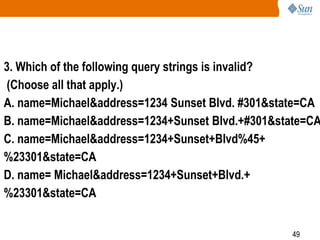
3. Which of the following query strings is invalid?
(Choose all that apply.)
A. name=Michael&address=1234 Sunset Blvd. #301&state=CA
B. name=Michael&address=1234+Sunset Blvd.+#301&state=CA
C. name=Michael&address=1234+Sunset+Blvd%45+
%23301&state=CA
D. name= Michael&address=1234+Sunset+Blvd.+
%23301&state=CA
50
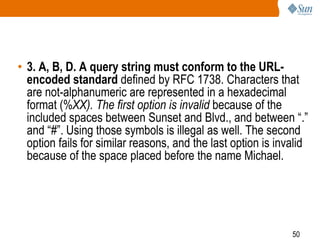
• 3. A, B, D. A query string must conform to the URL-
encoded standard defined by RFC 1738. Characters that
are not-alphanumeric are represented in a hexadecimal
format (%XX). The first option is invalid because of the
included spaces between Sunset and Blvd., and between “.”
and “#”. Using those symbols is illegal as well. The second
option fails for similar reasons, and the last option is invalid
because of the space placed before the name Michael.
51
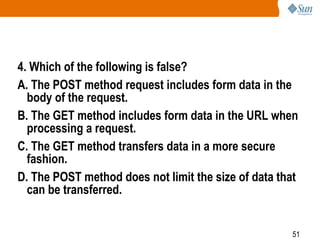
4. Which of the following is false?
A. The POST method request includes form data in the
body of the request.
B. The GET method includes form data in the URL when
processing a request.
C. The GET method transfers data in a more secure
fashion.
D. The POST method does not limit the size of data that
can be transferred.
52
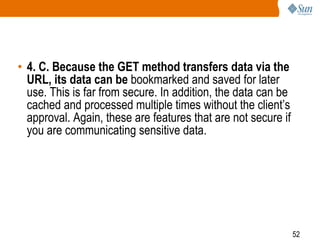
• 4. C. Because the GET method transfers data via the
URL, its data can be bookmarked and saved for later
use. This is far from secure. In addition, the data can be
cached and processed multiple times without the client’s
approval. Again, these are features that are not secure if
you are communicating sensitive data.
53
5. Which of the following tags is used to create a drop-
down list?
A. <SELECT NAME=‘Choice’ MULTIPLE></SELECT>
B. <INPUT TYPE=‘select’ NAME=‘choice’>
C. <SELECT NAME=‘select’>
D. <SELECT NAME=‘Choice’></SELECT>
54
5. D. The SELECT tag is used to create a control that
enables the user to select an option from a drop-down
list. If you include the MULTIPLE attribute, the control will
look like a list, not a drop-down. Single selection is the
default. Finally, the SELECT tag requires a closing tag,
leaving the last option as the only correct response.
55
6. What character is used to separate the URI and query
string in a GET request?
A. &
B. ?
C. +
D. =
56
• 6. B. The ampersand (&) is used to separate
name/value pairs from one another. The plus sign (+) is
used to fill blank space. The equal sign (=) is used to
separate the name and value. This leaves the correct
answer of a question mark (?). It is used to identify the
beginning of the query string.
57
7. Which of the following terms contains a method of
intent, header information, and a body?
A. HTTP request
B. HTTP response
C. HTTP protocol
D. None of the above
58
• 7. A. An HTTP request begins with a request line,
which defines the action that is being desired by the
server. It can then contain a header and body.
59
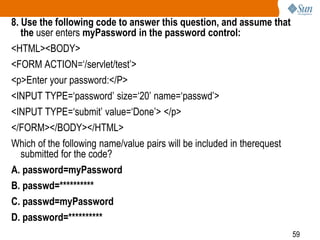
8. Use the following code to answer this question, and assume that
the user enters myPassword in the password control:
<HTML><BODY>
<FORM ACTION=‘/servlet/test’>
<p>Enter your password:</P>
<INPUT TYPE=‘password’ size=‘20’ name=‘passwd’>
<INPUT TYPE=‘submit’ value=‘Done’> </p>
</FORM></BODY></HTML>
Which of the following name/value pairs will be included in therequest
submitted for the code?
A. password=myPassword
B. passwd=**********
C. passwd=myPassword
D. password=**********
60
• 8. C. Visually, the password control alters the
characters so they are not comprehensible. When they
are sent, however, they appear in their normal text format.
61
9. Which of the following tasks should not be
performed by using a GET request?
(Choose all that apply.)
A. Updating a database
B. Retrieving an image
C. Accessing a website
D. Sending credit card information
62
• 9. A, D. The GET method should not be used to make any
modifications to the server (such as updating a database) or
to send sensitive information (such as a credit card number).
Because the information is present in the URL, this is
extremely unsafe. In addition, the URL can be bookmarked
and the request can be triggered multiple times without the
knowledge of the client. Consequently, a GET request should
not be used to perform transactions that would have negative
effects if executed multiple times.
63
10. Which of the following HTML controls causes a
request to be spawned when activated?
A. Input type=‘submit’
B. Input type=‘text’
C. Input type=‘radio’
D. Input type=‘password’
64
• 10. A. A submit button generates a request from an
HTML form. The other controls provide name/value data
pairs to accompany the request.
65
11. Which of the following request header tags is
inaccurate?
A. User-Agent: Mozilla/4.0 (compatible; Windows NT 5.0)
Accept: image/gif, image/jpeg, image/jpeg,
Accept: application/x-comet, application/msword
Accept: application/vnd.ms-excel, */*
Host: localhost:8080
B. User-Agent: Mozilla/4.0 (compatible; Windows NT 5.0)
Accept: image/gif, image/jpeg, image/jpeg,
Host: localhost:8080
C. User-Agent: Mozilla/4.0 (compatible; Windows NT 5.0)
Accept: image/gif, image/jpeg, image/jpeg,
application/vnd.ms-excel, */*
Content-Type: text/html
Host: localhost:8080
D. None of the above
66
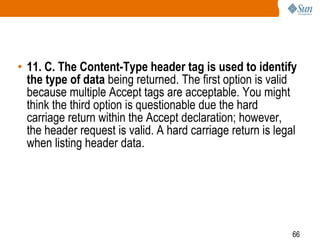
• 11. C. The Content-Type header tag is used to identify
the type of data being returned. The first option is valid
because multiple Accept tags are acceptable. You might
think the third option is questionable due the hard
carriage return within the Accept declaration; however,
the header request is valid. A hard carriage return is legal
when listing header data.
67
12. Which of the following is not a valid option for a
GET request?
A. To get a file or image
B. To get results from a compilation
C. To get information from another hardware device
D. To get output from another program running on the
server
E. None of the above
68
• 12. E. A GET request is used to get information from
the server. All four options are valid types of data for a
client to request via a call to GET.
69
13. How can you include a literal percent sign (%) within
a query string?
A. %
B. 0025
C. %25
D. +
70
13. C. Literal symbols within a query string are denoted by
using its Unicode value. The value is displayed by using the
following notation: %XX. The final answer is invalid because a
plus sign is used to represent a blank space.
71
14. Which of the following elements is not included in a
URL?
A. Protocol
B. Servername
C. Query string
D. Client IP
72
• 14. D. A URL contains all resources necessary to
locate and communicate with its target source. The
protocol defines the rules used to transmit information,
while the servername is the domain name used for the
server. Finally, the query string is the data transferred
from the client to the server. A port can also be defined if
the default 80 is not being used.
73
15. Which of the following is a valid input type?
A. SRC
B. hidden
C. SIZE
D. FORM
74
15. B. The element SRC is an input attribute used to
specify the location of the image control type. The SIZE
element is also an input attribute.
Its purpose is to identify the initial width of the control. The
last option, FORM, is a tag used encompass a variety of
controls. The correct input type is hidden. These are
controls that are not rendered, but whose values can be
transmitted back to the server.

SCWCD : The web client model : CHAP : 1

  • 1.
  • 2.
    2 THE FOLLOWING SUNCERTIFIED WEB COMPONENT DEVELOPER FOR J2EE PLATFORM EXAM OBJECTIVES COVERED IN THIS CHAPTER: • 1.1 For each of the HTTP methods,GET,POST, and PUT, identify the corresponding method in the HttpServlet class. • 1.2 For each of the HTTP methods,GET ,POST, and HEAD, identify triggers that might cause a browser to use the method, and identify benefits or functionality of the method.
  • 3.
    3 Agenda • Introduce theJava Enterprise (J2EE) model • Present the Hypertext Markup Language (HTML) tags • Present the Hypertext Transmission Protocol (HTTP) • Define an HTTP client request, server response, and HTTP request methods
  • 4.
    4 Introduction to theJ2EE Model • “Write once,run anywhere” was the first phrase Java developers grew accustomed to hearing. • “Write once, implement anywhere.” This phrase is the foundation behind the Java 2 Enterprise Edition (J2EE) architecture . • Java took vendor dependence out of the equation.
  • 5.
  • 6.
    6 • Servlets areplatform-independent web components elements that bridge the gap between the Presentation tier and the Business Logic, or EIS Integration tier. • They are Java classes that implement specific interfaces allowing the container to manage their life cycle and communicate their data to a browser. • A web server is an application written by a vendor that meets the J2EE specification. • Within the server exists a container : piece of the server that manages the life cycle and communicates the data of a servlet or JSP to the browser.
  • 7.
    7 • Specifically, servletsare designed to optimize business logic executed on the server side. • Java Server Pages are also Java objects used to communicate between the client and server. • They, too, execute business logic; however, processing Java code is not their specialty. Unlike servlets, JSPs are optimized for the layout.
  • 8.
  • 9.
    9 HTML • The HypertextMarkup Language (HTML) is the intermediary language between the browser/client and all other technologies, such as Java or networking protocols.
  • 10.
    10 HTML Tags • Aform is a section of an HTML page that can contain a variety of controls . • It has two main attribute tags: > ACTION , which defines location of the request target > METHOD : which defines the type of request.
  • 11.
    11 INPUT Tag INPUT TYPE= 'text' INPUT TYPE = ‘password’ INPUT TYPE = ‘hidden’
  • 12.
    12 INPUT TYPE =‘submit’ INPUT TYPE = ‘reset’ INPUT TYPE = ‘button’ INPUT TYPE = ‘checkbox’ <INPUT TYPE=‘checkbox’ NAME=‘state’ VALUE=‘CA’ CHECKED> California <BR> <INPUT TYPE=‘checkbox’ NAME=‘state’ VALUE=‘TX’> Texas <BR> <INPUT TYPE=‘checkbox’ NAME=‘state’ VALUE=‘AZ’ CHECKED> Arizona <BR>
  • 13.
    13 SELECT Tag INPUT TYPE= ‘radio’ TEXTAREA Tag
  • 14.
    14 Query String • Hereare a few important query string rules to remember: > Data is transferred in name/value pairs. > Names and values are URL encoded (hexadecimal ASCII), including white space, question marks, and all non-alphanumeric values. • For example, a percent sign (%) would be denoted with the Unicode value 0025 and displayed as %25. • Name and value pairs are separated by an ampersand (&). • Spaces in the name are encoded as a plus sign by the browser, because URLs cannot contain spaces. The hexadecimal code for a plus sign or space is %20
  • 15.
    15 URL • A UniformResource Locator (URL) defines the information the client needs to make a connection to the server. • http://book.com:8080/servlet/Registration? name=Ariela&address=1234+Happy+Street • The full signature consists of the following: • <protocol>://<servername>[:port]/<url-path> [?query-string] • Request address: http://java.sun.com/products/servlet/index.html?id=‘09’ • URL: http://java.sun.com/products/servlet/index.html?id=‘09’ • URI: /products/servlet/index.html
  • 16.
    16 HTTP • The successbehind client-server architecture is the ability of both parties to communicate and transfer data over a network. • HTTP is a stateless protocol meaning its data is not retained from one request to the next. • After a request is made, the connection is closed. Because clients are not holding open connections to a server, the server can have more clients connect over a long period of time.
  • 17.
    17 • The processto transmit the request is as follows: 1. An HTTP client or web browser makes a connection to a server. 2. The client initiates a request. 3. The server answers and sends a response to the client. 4. The connection is closed.
  • 18.
  • 19.
  • 20.
    20 Header :the headersection is optional, but almost always included.
  • 21.
    21 Common Header Tags AcceptSpecifies acceptable media types for the response Accept-Charset Indicates acceptable character sets for the response Accept-Encoding Restricts the content-coding acceptable for the response Accept-Language Defines all acceptable languages Age Indicates the age of a response body Allow Specifies methods that the resource defined by the URI can respond to Authorization Requests restricted documents Cache-Control Describes how proxies should handle requests and responses
  • 22.
    22 Code Specifies theencoding method for the body data Content-Base Resolves the relative URLs within the body of the document being returned Content-Encoding Identifies the encoding type applied to the body prior to transmission Content-Language Identifies the language of the response content Content-Length Identifies the length of the body measured in bytes Content-Location Identifies the actual location of the entity being returned Content-MD5 A computing mechanism used to determine whether the body was modified during transmission Content-Type Identifies the type of data being returned Expires Indicates the date when the response should no longer be considered valid From Specifies the client e-mail address
  • 23.
    23 Host Identifies thehost and port number the client is connected to Last-Modified Shows the date the returned content was last changed Location Redirects to a new location Referrer Indicates the source from which the current request was generated. User-Agent Identifies the browser’s signature information Warning Identifies any additional risks associated with the response
  • 24.
    24 Body • When thereis a need to send additional information, a blank line is placed after the last header line, and then data can follow. • The data being sent to the server from the client is usually included in the body when a POST action is defined. > An empty line is always included to separate the header and body information. > If a body is not included, an empty line must still be included to signify the end of the request header.
  • 25.
  • 26.
    26 Status Line • ProtocolStatus Code Description • For example: • HTTP/1.0 200 OK
  • 27.
    27 Header • Keyword: Value •For example: • Date: Mon, 22 Oct 2001 12:12:01 GMT • Server: Apache/1.1.1 • Content-Type: text/html • Content-Length: 408 • Last-Modified: Thurs, 11 Oct 2001 10:25:30 GMT
  • 28.
    28 Body • If theContent-Type is defined as text/html, then an HTML document will be sent in return. • If the Content-Type is image/jpeg, then an image will be returned. • The server returns one response for each request. If a request comes in for an HTML page with an image, two responses will be sent in parallel. • The browsers usually join the two to make it appear as if only one response was sent.
  • 29.
    29 Request Methods GET Retrievesa resource POST Transfers client information to the server PUT Provides a new or replacement document to be stored on the server HEAD Retrieves only the header information pertaining to the requested resource DELETE Removes a file from a specified URL OPTIONS Returns the supported HTTP methods of the server TRACE Returns the entire network route that the request took, from the client to the server and back
  • 30.
    30 GET Method • AGET method is a request designed to retrieve static resources such as an HTML document or an image from a specific location on the server. • When a client defines a GET action, they are most likely asking the server to return the body of a document identified in the request URI. • When sending the request, the client might send additional information to the server to help process the request. • The information will be transmitted in a query string attached to the URL.
  • 31.
    31 advantages • the pagecan be bookmarked or e-mailed. Also, the data does not need to be sent from a form, thus removing one step from the process of retrieving the data.
  • 32.
    32 1. The clientcannot send a large URL because most servers limit the URL string to about 240 characters. 2. because a GET request can be bookmarked, it is considered idempotent, which means the request can be safely repeated without necessarily consulting the user • Consequently, GET requests should not be used to cause a change on the server for which the client would be held responsible.
  • 33.
    33 • A fileor image • Output from another language running on the server. • Results from a compilation Information from another hardware device for example, a database query or video footage accessible by the server.
  • 34.
    34 POST Method • APOST method is a request designed for posting information to the server. • When transferring credit card information or updating a database, the POST method is the perfect solution. It performs the action once, and the information is safer because it is not displayed in the URL. • There is yet one more advantage: the amount of data that is transferred can be very large, because the size of a request has no limitation. • Because of the way the data is encoded, a POST request • cannot be transmitted from any other resource.
  • 35.
  • 36.
    36 PUT Method • ThePUT method is the complement to the GET method. Instead of getting static information, it requests to store static information. • A PUT method asks the server to store the content body to the URI identified in the request line.
  • 37.
    37 HEAD Method • AHEAD method is a request that is almost exactly like a GET. • The only difference is that a HEAD request does not return the entity body. It returns the response line and headers only. • Usually this type of request is used to verify a document’s existence or properties. > HEAD will be much smaller than that of a GET and consequently save you network bandwidth • The other reason to use HEAD is to learn about the properties of a particular resource.
  • 38.
    38 Here are someexamples of common uses for HEAD requests: • By identifying the modification time, you can determine whether there is a need to update a cached version of the resource. • The document size can let you deal with layout issues before retrieving the actual document. In fact, if it’s very large, it gives you a chance to determine an alternate plan instead of waiting for it to be returned and then trying to figure out what to do about the data. • The type of document can be essential if you are looking to support or view only certain kinds. • The type of server can notify the client of special query features that might be available to produce a more precise request.
  • 39.
    39 DELETE Method • Thecomplement to the PUT method is the DELETE method. • Whereas PUT enables you to place a file at a particular URL, the DELETE method enables you to remove a file from a particular URL.
  • 40.
    40 OPTIONS Method • TheOPTIONS method is used to return all supported HTTP methods on the server. • It returns an Allow header and acceptable HTTP methods as values. • For example, if the server supports GET, HEAD, TRACE, and OPTIONS, part of the response will consist of the following: • Allow: GET, HEAD, TRACE, OPTIONS • If you are looking to assess the situation before attempting a call, the OPTIONS method is a good approach.
  • 41.
    41 TRACE Method • Whena request is sent, it passes through a series of proxy servers. • During that journey, there is a chance that some of the headers have been changed. • The TRACE method returns the request header values to the client to determine whether any changes took place. It is mainly used to help debug and perform an action similar to a traceroute.
  • 42.
    42 Summary • An overviewof the J2EE model > HTML form tags > HTTP requests/responses > HTTP methods: GET, POST, PUT, HEAD, DELETE, OPTIONS, and TRACE
  • 43.
    43 Exam Essentials • Thedefault request of an HTML form is a GET request. It is often triggered with a submit button (other controls can trigger requests if customized by using JavaScript). • It retrieves information but does not make modifications on the server side. • A POST, on the other hand, is also triggered by similar controls, but it can make changes or process critical information on the server.
  • 44.
  • 45.
    45 1. Which HTTPmethod is used to store a resource on the server? A. GET B. POST C. PUT D. STORE E. HEAD
  • 46.
    46 1. C. APUT method request is used to replace or store files on the server. The request URI identifies the location for the server to store the resource.
  • 47.
    47 2. Given thefollowing code, which request method will get invoked? <HTML> <BODY> <FORM ACTION=‘/servlet/test’> <p>Enter the file you would like to Post:</P> <INPUT TYPE=‘text’ size=‘40’ name=‘fileName’> <INPUT TYPE=‘submit’ value=‘Done’> </p> </FORM> </BODY> </HTML> A. PUT,B. POST,C. GET,D. HEAD
  • 48.
    48 • 2. C.If a method is not specified in a form, the browser will assign the GET method to the request by default.
  • 49.
    49 3. Which ofthe following query strings is invalid? (Choose all that apply.) A. name=Michael&address=1234 Sunset Blvd. #301&state=CA B. name=Michael&address=1234+Sunset Blvd.+#301&state=CA C. name=Michael&address=1234+Sunset+Blvd%45+ %23301&state=CA D. name= Michael&address=1234+Sunset+Blvd.+ %23301&state=CA
  • 50.
    50 • 3. A,B, D. A query string must conform to the URL- encoded standard defined by RFC 1738. Characters that are not-alphanumeric are represented in a hexadecimal format (%XX). The first option is invalid because of the included spaces between Sunset and Blvd., and between “.” and “#”. Using those symbols is illegal as well. The second option fails for similar reasons, and the last option is invalid because of the space placed before the name Michael.
  • 51.
    51 4. Which ofthe following is false? A. The POST method request includes form data in the body of the request. B. The GET method includes form data in the URL when processing a request. C. The GET method transfers data in a more secure fashion. D. The POST method does not limit the size of data that can be transferred.
  • 52.
    52 • 4. C.Because the GET method transfers data via the URL, its data can be bookmarked and saved for later use. This is far from secure. In addition, the data can be cached and processed multiple times without the client’s approval. Again, these are features that are not secure if you are communicating sensitive data.
  • 53.
    53 5. Which ofthe following tags is used to create a drop- down list? A. <SELECT NAME=‘Choice’ MULTIPLE></SELECT> B. <INPUT TYPE=‘select’ NAME=‘choice’> C. <SELECT NAME=‘select’> D. <SELECT NAME=‘Choice’></SELECT>
  • 54.
    54 5. D. TheSELECT tag is used to create a control that enables the user to select an option from a drop-down list. If you include the MULTIPLE attribute, the control will look like a list, not a drop-down. Single selection is the default. Finally, the SELECT tag requires a closing tag, leaving the last option as the only correct response.
  • 55.
    55 6. What characteris used to separate the URI and query string in a GET request? A. & B. ? C. + D. =
  • 56.
    56 • 6. B.The ampersand (&) is used to separate name/value pairs from one another. The plus sign (+) is used to fill blank space. The equal sign (=) is used to separate the name and value. This leaves the correct answer of a question mark (?). It is used to identify the beginning of the query string.
  • 57.
    57 7. Which ofthe following terms contains a method of intent, header information, and a body? A. HTTP request B. HTTP response C. HTTP protocol D. None of the above
  • 58.
    58 • 7. A.An HTTP request begins with a request line, which defines the action that is being desired by the server. It can then contain a header and body.
  • 59.
    59 8. Use thefollowing code to answer this question, and assume that the user enters myPassword in the password control: <HTML><BODY> <FORM ACTION=‘/servlet/test’> <p>Enter your password:</P> <INPUT TYPE=‘password’ size=‘20’ name=‘passwd’> <INPUT TYPE=‘submit’ value=‘Done’> </p> </FORM></BODY></HTML> Which of the following name/value pairs will be included in therequest submitted for the code? A. password=myPassword B. passwd=********** C. passwd=myPassword D. password=**********
  • 60.
    60 • 8. C.Visually, the password control alters the characters so they are not comprehensible. When they are sent, however, they appear in their normal text format.
  • 61.
    61 9. Which ofthe following tasks should not be performed by using a GET request? (Choose all that apply.) A. Updating a database B. Retrieving an image C. Accessing a website D. Sending credit card information
  • 62.
    62 • 9. A,D. The GET method should not be used to make any modifications to the server (such as updating a database) or to send sensitive information (such as a credit card number). Because the information is present in the URL, this is extremely unsafe. In addition, the URL can be bookmarked and the request can be triggered multiple times without the knowledge of the client. Consequently, a GET request should not be used to perform transactions that would have negative effects if executed multiple times.
  • 63.
    63 10. Which ofthe following HTML controls causes a request to be spawned when activated? A. Input type=‘submit’ B. Input type=‘text’ C. Input type=‘radio’ D. Input type=‘password’
  • 64.
    64 • 10. A.A submit button generates a request from an HTML form. The other controls provide name/value data pairs to accompany the request.
  • 65.
    65 11. Which ofthe following request header tags is inaccurate? A. User-Agent: Mozilla/4.0 (compatible; Windows NT 5.0) Accept: image/gif, image/jpeg, image/jpeg, Accept: application/x-comet, application/msword Accept: application/vnd.ms-excel, */* Host: localhost:8080 B. User-Agent: Mozilla/4.0 (compatible; Windows NT 5.0) Accept: image/gif, image/jpeg, image/jpeg, Host: localhost:8080 C. User-Agent: Mozilla/4.0 (compatible; Windows NT 5.0) Accept: image/gif, image/jpeg, image/jpeg, application/vnd.ms-excel, */* Content-Type: text/html Host: localhost:8080 D. None of the above
  • 66.
    66 • 11. C.The Content-Type header tag is used to identify the type of data being returned. The first option is valid because multiple Accept tags are acceptable. You might think the third option is questionable due the hard carriage return within the Accept declaration; however, the header request is valid. A hard carriage return is legal when listing header data.
  • 67.
    67 12. Which ofthe following is not a valid option for a GET request? A. To get a file or image B. To get results from a compilation C. To get information from another hardware device D. To get output from another program running on the server E. None of the above
  • 68.
    68 • 12. E.A GET request is used to get information from the server. All four options are valid types of data for a client to request via a call to GET.
  • 69.
    69 13. How canyou include a literal percent sign (%) within a query string? A. % B. 0025 C. %25 D. +
  • 70.
    70 13. C. Literalsymbols within a query string are denoted by using its Unicode value. The value is displayed by using the following notation: %XX. The final answer is invalid because a plus sign is used to represent a blank space.
  • 71.
    71 14. Which ofthe following elements is not included in a URL? A. Protocol B. Servername C. Query string D. Client IP
  • 72.
    72 • 14. D.A URL contains all resources necessary to locate and communicate with its target source. The protocol defines the rules used to transmit information, while the servername is the domain name used for the server. Finally, the query string is the data transferred from the client to the server. A port can also be defined if the default 80 is not being used.
  • 73.
    73 15. Which ofthe following is a valid input type? A. SRC B. hidden C. SIZE D. FORM
  • 74.
    74 15. B. Theelement SRC is an input attribute used to specify the location of the image control type. The SIZE element is also an input attribute. Its purpose is to identify the initial width of the control. The last option, FORM, is a tag used encompass a variety of controls. The correct input type is hidden. These are controls that are not rendered, but whose values can be transmitted back to the server.