

Titleof the presentation
AnjaliG
anjalig2009@gmail.com
www.facebook.com/AnjaliGeetha
twitter.com/username
in.linkedin.com/in/AnjaliG
9497879952
METHODS GET AND POST
INTRODUCTION
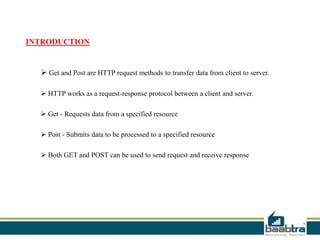
 Get and Post are HTTP request methods to transfer data from client to server.
 HTTP works as a request-response protocol between a client and server.
 Get - Requests data from a specified resource
 Post - Submits data to be processed to a specified resource
 Both GET and POST can be used to send request and receive response
GET METHOD
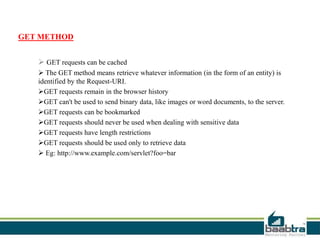
 GET requests can be cached
 The GET method means retrieve whatever information (in the form of an entity) is
identified by the Request-URI.
GET requests remain in the browser history
GET can't be used to send binary data, like images or word documents, to the server.
GET requests can be bookmarked
GET requests should never be used when dealing with sensitive data
GET requests have length restrictions
GET requests should be used only to retrieve data
 Eg: http://www.example.com/servlet?foo=bar
POST METHOD
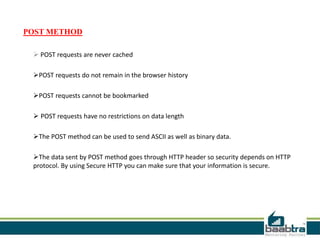
 POST requests are never cached
POST requests do not remain in the browser history
POST requests cannot be bookmarked
 POST requests have no restrictions on data length
The POST method can be used to send ASCII as well as binary data.
The data sent by POST method goes through HTTP header so security depends on HTTP
protocol. By using Secure HTTP you can make sure that your information is secure.
COMPARE GET VS POST
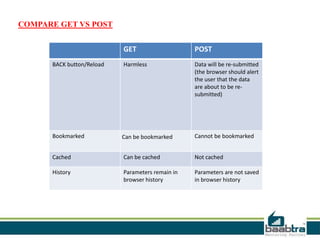
GET POST
BACK button/Reload Harmless Data will be re-submitted
(the browser should alert
the user that the data
are about to be re-
submitted)
Bookmarked Can be bookmarked Cannot be bookmarked
Cached Can be cached Not cached
History Parameters remain in
browser history
Parameters are not saved
in browser history
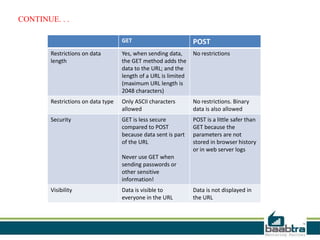
GET POST
Restrictions on data
length
Yes, when sending data,
the GET method adds the
data to the URL; and the
length of a URL is limited
(maximum URL length is
2048 characters)
No restrictions
Restrictions on data type Only ASCII characters
allowed
No restrictions. Binary
data is also allowed
Security GET is less secure
compared to POST
because data sent is part
of the URL
Never use GET when
sending passwords or
other sensitive
information!
POST is a little safer than
GET because the
parameters are not
stored in browser history
or in web server logs
Visibility Data is visible to
everyone in the URL
Data is not displayed in
the URL
CONTINUE. . .
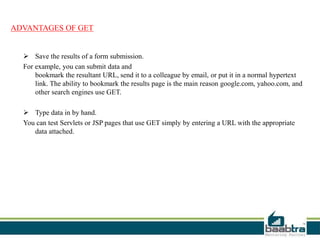
ADVANTAGES OF GET
 Save the results of a form submission.
For example, you can submit data and
bookmark the resultant URL, send it to a colleague by email, or put it in a normal hypertext
link. The ability to bookmark the results page is the main reason google.com, yahoo.com, and
other search engines use GET.
 Type data in by hand.
You can test Servlets or JSP pages that use GET simply by entering a URL with the appropriate
data attached.
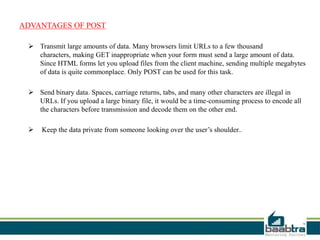
ADVANTAGES OF POST
 Transmit large amounts of data. Many browsers limit URLs to a few thousand
characters, making GET inappropriate when your form must send a large amount of data.
Since HTML forms let you upload files from the client machine, sending multiple megabytes
of data is quite commonplace. Only POST can be used for this task.
 Send binary data. Spaces, carriage returns, tabs, and many other characters are illegal in
URLs. If you upload a large binary file, it would be a time-consuming process to encode all
the characters before transmission and decode them on the other end.
 Keep the data private from someone looking over the user’s shoulder..
THANK YOU
If this presentation helped you, please visit our
page facebook.com/baabtra and like it.
Thanks in advance.
www.baabtra.com | www.massbaab.com |www.baabte.com
Contact Us
Emarald Mall (Big Bazar Building)
Mavoor Road, Kozhikode,
Kerala, India.
Ph: + 91 – 495 40 25 550
NC Complex, Near Bus Stand
Mukkam, Kozhikode,
Kerala, India.
Ph: + 91 – 495 40 25 550
Start up Village
Eranakulam,
Kerala, India.
Email: info@baabtra.com

Get and post methods

  • 2.
  • 3.
  • 4.
    INTRODUCTION  Get andPost are HTTP request methods to transfer data from client to server.  HTTP works as a request-response protocol between a client and server.  Get - Requests data from a specified resource  Post - Submits data to be processed to a specified resource  Both GET and POST can be used to send request and receive response
  • 5.
    GET METHOD  GETrequests can be cached  The GET method means retrieve whatever information (in the form of an entity) is identified by the Request-URI. GET requests remain in the browser history GET can't be used to send binary data, like images or word documents, to the server. GET requests can be bookmarked GET requests should never be used when dealing with sensitive data GET requests have length restrictions GET requests should be used only to retrieve data  Eg: http://www.example.com/servlet?foo=bar
  • 6.
    POST METHOD  POSTrequests are never cached POST requests do not remain in the browser history POST requests cannot be bookmarked  POST requests have no restrictions on data length The POST method can be used to send ASCII as well as binary data. The data sent by POST method goes through HTTP header so security depends on HTTP protocol. By using Secure HTTP you can make sure that your information is secure.
  • 7.
    COMPARE GET VSPOST GET POST BACK button/Reload Harmless Data will be re-submitted (the browser should alert the user that the data are about to be re- submitted) Bookmarked Can be bookmarked Cannot be bookmarked Cached Can be cached Not cached History Parameters remain in browser history Parameters are not saved in browser history
  • 8.
    GET POST Restrictions ondata length Yes, when sending data, the GET method adds the data to the URL; and the length of a URL is limited (maximum URL length is 2048 characters) No restrictions Restrictions on data type Only ASCII characters allowed No restrictions. Binary data is also allowed Security GET is less secure compared to POST because data sent is part of the URL Never use GET when sending passwords or other sensitive information! POST is a little safer than GET because the parameters are not stored in browser history or in web server logs Visibility Data is visible to everyone in the URL Data is not displayed in the URL CONTINUE. . .
  • 9.
    ADVANTAGES OF GET Save the results of a form submission. For example, you can submit data and bookmark the resultant URL, send it to a colleague by email, or put it in a normal hypertext link. The ability to bookmark the results page is the main reason google.com, yahoo.com, and other search engines use GET.  Type data in by hand. You can test Servlets or JSP pages that use GET simply by entering a URL with the appropriate data attached.
  • 10.
    ADVANTAGES OF POST Transmit large amounts of data. Many browsers limit URLs to a few thousand characters, making GET inappropriate when your form must send a large amount of data. Since HTML forms let you upload files from the client machine, sending multiple megabytes of data is quite commonplace. Only POST can be used for this task.  Send binary data. Spaces, carriage returns, tabs, and many other characters are illegal in URLs. If you upload a large binary file, it would be a time-consuming process to encode all the characters before transmission and decode them on the other end.  Keep the data private from someone looking over the user’s shoulder..
  • 11.
  • 12.
    If this presentationhelped you, please visit our page facebook.com/baabtra and like it. Thanks in advance. www.baabtra.com | www.massbaab.com |www.baabte.com
  • 13.
    Contact Us Emarald Mall(Big Bazar Building) Mavoor Road, Kozhikode, Kerala, India. Ph: + 91 – 495 40 25 550 NC Complex, Near Bus Stand Mukkam, Kozhikode, Kerala, India. Ph: + 91 – 495 40 25 550 Start up Village Eranakulam, Kerala, India. Email: info@baabtra.com

Editor's Notes

  • #6 Uri-identifies the resource upon which to apply the request.