Web Services
What are web Services? A web service is a program that calls a method which is on another computer on the network.  A ' Web service'  (also  Web Service ) is defined by the  W3C  as "a software system designed to support  interoperable   Machine to Machine  interaction over a  network " [1] . Web services are frequently just  Web   APIs  that can be accessed over a network, such as the  Internet , and executed on a remote system hosting the requested services.  (Wikipedia, accessed July 2008, http://en.wikipedia.org/wiki/Web_service)
Web Services are Made Up of Two pieces of information; Method Info: what method is being called. Scoping Info: what arguments are needed. This information is packaged into an envelope and transported across the network.
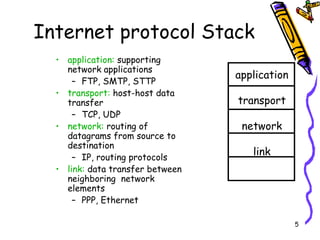
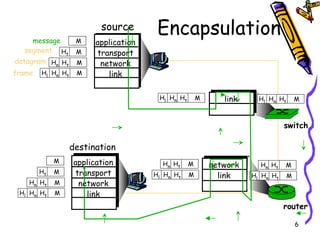
Network Layers Each task is represented in a layer. The current layer systems is called the  Internet Protocol Stack. Each layer has a set of protocols that set the rules for how each layer behaves. The protocols are to break the information down into datagrams or packets so they can travel over the network to their destination. Then the same protocols are used at the destination to put the datagrams / packets back to their original format.
Internet protocol Stack application:  supporting network applications FTP, SMTP, STTP transport:  host-host data transfer TCP, UDP network:  routing of datagrams from source to destination IP, routing protocols link:  data transfer between neighboring  network elements PPP, Ethernet application transport network link
Encapsulation message segment datagram frame source application transport network link destination application transport network link router switch H t H n H l M H t H n M H t M M H t H n H l M H t H n M H t M M network link link H t H n H l M H t H n M H t H n H l M H t H n M H t H n H l M H t H n H l M
Technologies used over the web. HTTP:  Hypertext Transfer Protocol (HTTP). RPC:  Remote Procedure call. XML-RPC:  Remote Procedure call encoded in xml. SOAP:  Simple Object Access Protocol. WSDL:  Web Service Description Language.
Client-side Scripting Scripting is a technology that uses a set of instructions to perform a task. Client-side Scripting is a web page saved as a htm or html extension. These web pages can run on any computer that has a web browser. These web pages are often referred to  as  Static pages
Server-side Scripting Scripting is a technology that uses a set of instructions to perform a task. Server-side scripting is a technology that creates web pages that will only operate when accessed from a web server. Server-side scripting is also known as  Dynamic web pages.
Dynamic Web Pages One of the changes that evolved was the first-generation Internet/intranet application. It was an extension to Web servers and was called  Common Gateway Interface (CGI). CGI allowed Web sites to dynamically create Web pages from a program typically written in C or a scripting language such as Perl.
Dynamic Web Pages cont. CGI added functionality to the Web CGI programs often exhausted memory space on Windows computers These shortcomings eventually led to Active Server Pages, or commonly called  ASP.
Dynamic Web Pages/ASP Active Server Pages (ASP) is a technology that allows for the generation of HTML pages that are responding to a set of instructions (dynamic) prior to being delivered to the browser. ASP is not a language ASP is  browser independent Other technologies are; ASP.Net. PHP JSP Coldfusion
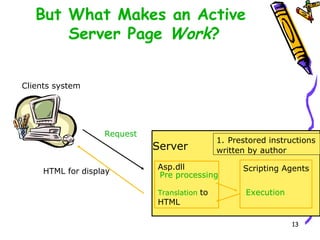
But What Makes an Active  Server Page  Work ? Clients system Server Asp.dll Pre processing Translation   to HTML Scripting Agents Execution Request HTML for   display 1.   Prestored instructions written by author
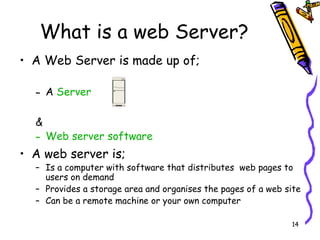
What is a web Server? A Web Server is made up of; A  Server & Web server software A web server is; Is a computer with software that distributes  web pages to users on demand  Provides a storage area and organises the pages of a web site Can be a remote machine or your own computer
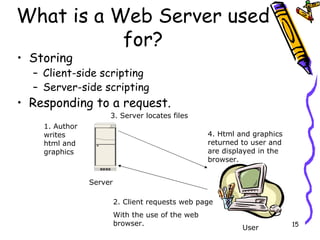
What is a Web Server used for? Storing  Client-side scripting Server-side scripting Responding to a request. Server User 2. Client requests web page With the use of the web browser. 3. Server locates files 4. Html and graphics returned to user and are displayed in the browser. 1. Author writes html and graphics
Web Protocols uses. TCP Transport Control Protocol HTTP Hypertext Transfer Protocol
TCP What is TCP ? TCP is the protocol used by the browser to parcel up the information, (including the http request), that is required when the browser is to fetch another web page. The TCP is a transport protocol, which provides a reliable transmission format for the information to be transmitted. The following are the services that TCP provides; connection-oriented:  setup required between client and server processes reliable transport  between sending and receiving process flow control:  sender won’t overwhelm receiver  congestion control:  throttle sender when network overloaded does not provide:  timing, minimum bandwidth guarantees
What is HTTP? HTTP: hypertext transfer protocol Http is the protocol used by the web (www) which creates two types of messages, that are transmitted over the web using TCP ; Request : This message contain information about the page the user has requests. It is sent from the user/client to the web server. Response : This message contains information that allows the user/client to view the web page they requested. The web page is contained in this message. The versions of HTTP HTTP 1.0: RFC 1945 HTTP 1.1: RFC 2068
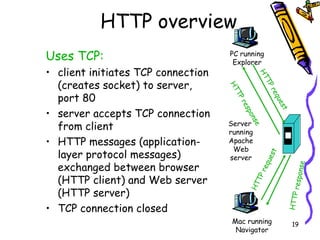
HTTP overview Uses TCP: client initiates TCP connection (creates socket) to server, port 80 server accepts TCP connection from client HTTP messages (application-layer protocol messages) exchanged between browser (HTTP client) and Web server (HTTP server) TCP connection closed PC running Explorer Server  running Apache Web server Mac running Navigator HTTP request HTTP request HTTP response HTTP response
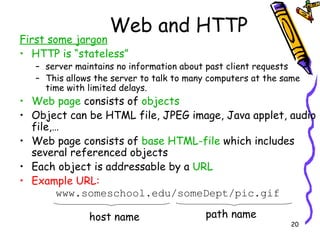
Web and HTTP First some jargon HTTP is “stateless” server maintains no information about past client requests This allows the server to talk to many computers at the same time with limited delays. Web page  consists of  objects Object can be HTML file, JPEG image, Java applet, audio file,… Web page consists of  base HTML-file  which includes several referenced objects Each object is addressable by a  URL Example URL: www.someschool.edu/someDept/pic.gif host name path name
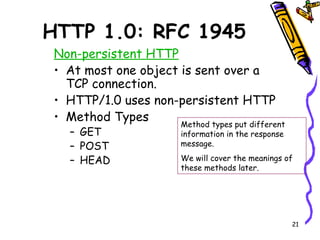
HTTP 1.0: RFC 1945 Non-persistent HTTP At most one object is sent over a TCP connection. HTTP/1.0 uses non-persistent HTTP Method Types GET  POST HEAD Method types put different information in the response message.  We will cover the meanings of these methods later.
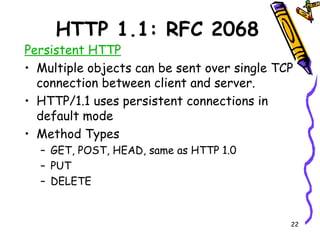
HTTP 1.1: RFC 2068 Persistent HTTP Multiple objects can be sent over single TCP connection between client and server. HTTP/1.1 uses persistent connections in default mode Method Types GET, POST, HEAD, same as HTTP 1.0 PUT DELETE
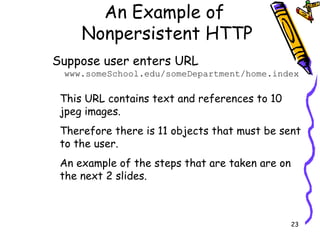
An Example of  Nonpersistent HTTP Suppose user enters URL  www.someSchool.edu/someDepartment/home.index This URL contains text and references to 10 jpeg images. Therefore there is 11 objects that must be sent to the user. An example of the steps that are taken are on the next 2 slides.
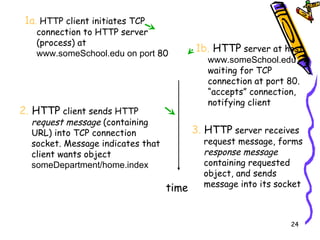
1a .  HTTP client initiates TCP connection to HTTP server (process) at  www.someSchool.edu on port  80 2.  HTTP  client sends HTTP  request message  (containing URL) into TCP connection socket. Message indicates that client wants object  someDepartment/home.index 3.  HTTP  server receives request message, forms  response message  containing requested object, and sends message into its socket time 1b.  HTTP  server at host  www.someSchool.edu  waiting for TCP connection at port 80.  “accepts” connection, notifying client
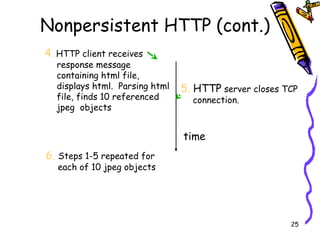
Nonpersistent HTTP (cont.) 4 .  HTTP client receives response message containing html file, displays html.  Parsing html file, finds 10 referenced jpeg  objects 6.   Steps 1-5 repeated for each of 10 jpeg objects 5.  HTTP  server closes TCP connection.  time
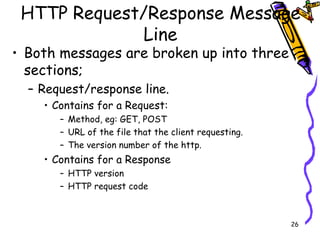
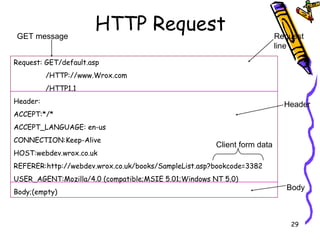
HTTP Request/Response Message Line Both messages are broken up into three sections; Request/response line. Contains for a Request: Method, eg: GET, POST URL of the file that the client requesting. The version number of the http. Contains for a Response HTTP version HTTP request code
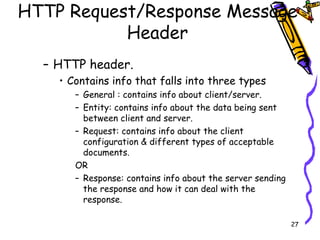
HTTP Request/Response Message Header HTTP header. Contains info that falls into three types General : contains info about client/server. Entity: contains info about the data being sent between client and server. Request: contains info about the client configuration & different types of acceptable documents. OR Response: contains info about the server sending the response and how it can deal with the response.
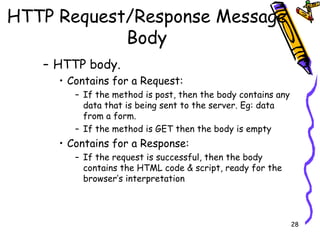
HTTP Request/Response Message Body HTTP body. Contains for a Request: If the method is post, then the body contains any data that is being sent to the server. Eg: data from a form. If the method is GET then the body is empty Contains for a Response: If the request is successful, then the body contains the HTML code & script, ready for the browser’s interpretation
HTTP Request Request: GET/default.asp /HTTP://www.Wrox.com /HTTP1.1 Header: ACCEPT:*/* ACCEPT_LANGUAGE: en-us CONNECTION:Keep-Alive HOST:webdev.wrox.co.uk REFERER:http://webdev.wrox.co.uk/books/SampleList.asp?bookcode=3382 USER_AGENT:Mozilla/4.0 (compatible;MSIE 5.01;Windows NT 5.0) Body;(empty) Request line Header Body GET message Client form data
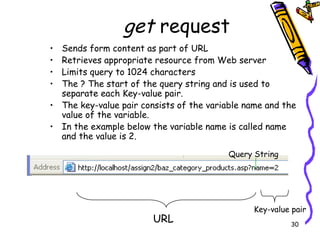
get  request  Sends form content as part of URL Retrieves appropriate resource from Web server Limits query to 1024 characters The ? The start of the query string and is used to separate each Key-value pair. The key-value pair consists of the variable name and the value of the variable. In the example below the variable name is called name and the value is 2. URL Query String Key-value pair
post  request Updates contents of Web server (posting new messages to forum) Unlike the get has no limit for length of query Not part of URL and cannot be seen by user
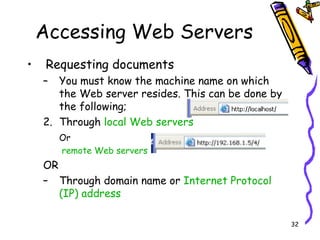
Accessing Web Servers Requesting documents You must know the machine name on which the Web server resides. This can be done by the following; Through  local Web servers  Or remote Web servers OR Through domain name or  Internet Protocol (IP) address
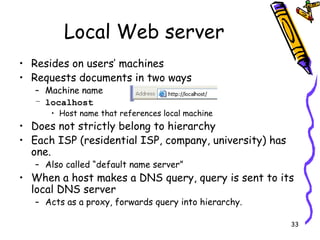
Local Web server Resides on users’ machines Requests documents in two ways Machine name localhost Host name that references local machine Does not strictly belong to hierarchy Each ISP (residential ISP, company, university) has one. Also called “default name server” When a host makes a DNS query, query is sent to its local DNS server Acts as a proxy, forwards query into hierarchy.
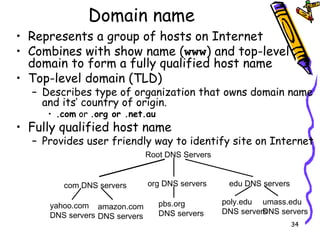
Domain name  Represents a group of hosts on Internet Combines with show name ( www ) and top-level domain to form a fully qualified host name Top-level domain (TLD) Describes type of organization that owns domain name and its’ country of origin. .com  or  .org or .net.au  Fully qualified host name Provides user friendly way to identify site on Internet  Root DNS Servers com DNS servers org DNS servers edu DNS servers poly.edu DNS servers umass.edu DNS servers yahoo.com DNS servers amazon.com DNS servers pbs.org DNS servers
SOAP
What is SOAP? SOAP provides the envelope for sending Web Services messages over the Internet/Internet.   SOAP at one time stood for Simple Object Access Protocol. Starting with SOAP Version 1.2, the letters in the acronym have no particular meaning.  SOAP commonly uses HTTP, but other protocols such as Simple Mail Transfer Protocol (SMTP) may by used.  SOAP can be used to exchange complete documents or to call a remote procedure.
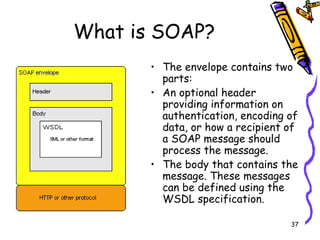
What is SOAP? The envelope contains two parts:  An optional header providing information on authentication, encoding of data, or how a recipient of a SOAP message should process the message.  The body that contains the message. These messages can be defined using the WSDL specification.
What is SOAP? A SOAP envelope can contain any XML data, just as an HTTP envelope can contain any data in its entity-body. In every existing SOAP envelope contains a description of an RPC call in a format similar to that of XML-RPC.
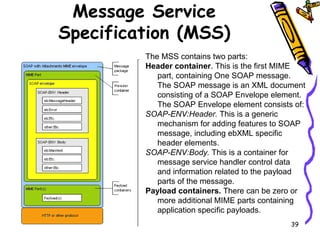
Message Service Specification (MSS) The MSS contains two parts:  Header container . This is the first MIME part, containing One SOAP message. The SOAP message is an XML document consisting of a SOAP Envelope element. The SOAP Envelope element consists of:  SOAP-ENV:Header.  This is a generic mechanism for adding features to SOAP message, including ebXML specific header elements. SOAP-ENV:Body.  This is a container for message service handler control data and information related to the payload parts of the message.  Payload containers.  There can be zero or more additional MIME parts containing application specific payloads.
Advantages of SOAP Using SOAP over HTTP allows for easier communication behind  proxies  and firewalls than previous remote execution technology. SOAP is versatile enough to allow for the use of different transport protocols. The standard stacks use HTTP as a transport protocol, but other protocols are also usable (TCP, SNMP).
Disadvantages of SOAP Because of the verbose XML format, SOAP can be considerably slower than competing  middleware  technologies such as  CORBA . This may not be an issue when only small messages are sent.  On the other side, SOAP has  Message Transmission Optimization Mechanism . When relying on  HTTP  as a transport protocol and not using  WS-Addressing  or an  ESB , the roles of the interacting parties are fixed. Only one party (the client) can use the services of the other. So developers must use  polling  instead of notification in these common cases.
Some Resources http://en.wikipedia.org/wiki/Http http://www.cs.cf.ac.uk/Dave/node33.html http://www.15seconds.com/issue/031209.htm http://www.w3schools.com/Schema/default.asp

Web Services 2009

  • 1.
  • 2.
    What are webServices? A web service is a program that calls a method which is on another computer on the network. A ' Web service' (also Web Service ) is defined by the W3C as "a software system designed to support interoperable Machine to Machine interaction over a network " [1] . Web services are frequently just Web APIs that can be accessed over a network, such as the Internet , and executed on a remote system hosting the requested services. (Wikipedia, accessed July 2008, http://en.wikipedia.org/wiki/Web_service)
  • 3.
    Web Services areMade Up of Two pieces of information; Method Info: what method is being called. Scoping Info: what arguments are needed. This information is packaged into an envelope and transported across the network.
  • 4.
    Network Layers Eachtask is represented in a layer. The current layer systems is called the Internet Protocol Stack. Each layer has a set of protocols that set the rules for how each layer behaves. The protocols are to break the information down into datagrams or packets so they can travel over the network to their destination. Then the same protocols are used at the destination to put the datagrams / packets back to their original format.
  • 5.
    Internet protocol Stackapplication: supporting network applications FTP, SMTP, STTP transport: host-host data transfer TCP, UDP network: routing of datagrams from source to destination IP, routing protocols link: data transfer between neighboring network elements PPP, Ethernet application transport network link
  • 6.
    Encapsulation message segmentdatagram frame source application transport network link destination application transport network link router switch H t H n H l M H t H n M H t M M H t H n H l M H t H n M H t M M network link link H t H n H l M H t H n M H t H n H l M H t H n M H t H n H l M H t H n H l M
  • 7.
    Technologies used overthe web. HTTP: Hypertext Transfer Protocol (HTTP). RPC: Remote Procedure call. XML-RPC: Remote Procedure call encoded in xml. SOAP: Simple Object Access Protocol. WSDL: Web Service Description Language.
  • 8.
    Client-side Scripting Scriptingis a technology that uses a set of instructions to perform a task. Client-side Scripting is a web page saved as a htm or html extension. These web pages can run on any computer that has a web browser. These web pages are often referred to as Static pages
  • 9.
    Server-side Scripting Scriptingis a technology that uses a set of instructions to perform a task. Server-side scripting is a technology that creates web pages that will only operate when accessed from a web server. Server-side scripting is also known as Dynamic web pages.
  • 10.
    Dynamic Web PagesOne of the changes that evolved was the first-generation Internet/intranet application. It was an extension to Web servers and was called Common Gateway Interface (CGI). CGI allowed Web sites to dynamically create Web pages from a program typically written in C or a scripting language such as Perl.
  • 11.
    Dynamic Web Pagescont. CGI added functionality to the Web CGI programs often exhausted memory space on Windows computers These shortcomings eventually led to Active Server Pages, or commonly called ASP.
  • 12.
    Dynamic Web Pages/ASPActive Server Pages (ASP) is a technology that allows for the generation of HTML pages that are responding to a set of instructions (dynamic) prior to being delivered to the browser. ASP is not a language ASP is browser independent Other technologies are; ASP.Net. PHP JSP Coldfusion
  • 13.
    But What Makesan Active Server Page Work ? Clients system Server Asp.dll Pre processing Translation to HTML Scripting Agents Execution Request HTML for display 1. Prestored instructions written by author
  • 14.
    What is aweb Server? A Web Server is made up of; A Server & Web server software A web server is; Is a computer with software that distributes web pages to users on demand Provides a storage area and organises the pages of a web site Can be a remote machine or your own computer
  • 15.
    What is aWeb Server used for? Storing Client-side scripting Server-side scripting Responding to a request. Server User 2. Client requests web page With the use of the web browser. 3. Server locates files 4. Html and graphics returned to user and are displayed in the browser. 1. Author writes html and graphics
  • 16.
    Web Protocols uses.TCP Transport Control Protocol HTTP Hypertext Transfer Protocol
  • 17.
    TCP What isTCP ? TCP is the protocol used by the browser to parcel up the information, (including the http request), that is required when the browser is to fetch another web page. The TCP is a transport protocol, which provides a reliable transmission format for the information to be transmitted. The following are the services that TCP provides; connection-oriented: setup required between client and server processes reliable transport between sending and receiving process flow control: sender won’t overwhelm receiver congestion control: throttle sender when network overloaded does not provide: timing, minimum bandwidth guarantees
  • 18.
    What is HTTP?HTTP: hypertext transfer protocol Http is the protocol used by the web (www) which creates two types of messages, that are transmitted over the web using TCP ; Request : This message contain information about the page the user has requests. It is sent from the user/client to the web server. Response : This message contains information that allows the user/client to view the web page they requested. The web page is contained in this message. The versions of HTTP HTTP 1.0: RFC 1945 HTTP 1.1: RFC 2068
  • 19.
    HTTP overview UsesTCP: client initiates TCP connection (creates socket) to server, port 80 server accepts TCP connection from client HTTP messages (application-layer protocol messages) exchanged between browser (HTTP client) and Web server (HTTP server) TCP connection closed PC running Explorer Server running Apache Web server Mac running Navigator HTTP request HTTP request HTTP response HTTP response
  • 20.
    Web and HTTPFirst some jargon HTTP is “stateless” server maintains no information about past client requests This allows the server to talk to many computers at the same time with limited delays. Web page consists of objects Object can be HTML file, JPEG image, Java applet, audio file,… Web page consists of base HTML-file which includes several referenced objects Each object is addressable by a URL Example URL: www.someschool.edu/someDept/pic.gif host name path name
  • 21.
    HTTP 1.0: RFC1945 Non-persistent HTTP At most one object is sent over a TCP connection. HTTP/1.0 uses non-persistent HTTP Method Types GET POST HEAD Method types put different information in the response message. We will cover the meanings of these methods later.
  • 22.
    HTTP 1.1: RFC2068 Persistent HTTP Multiple objects can be sent over single TCP connection between client and server. HTTP/1.1 uses persistent connections in default mode Method Types GET, POST, HEAD, same as HTTP 1.0 PUT DELETE
  • 23.
    An Example of Nonpersistent HTTP Suppose user enters URL www.someSchool.edu/someDepartment/home.index This URL contains text and references to 10 jpeg images. Therefore there is 11 objects that must be sent to the user. An example of the steps that are taken are on the next 2 slides.
  • 24.
    1a . HTTP client initiates TCP connection to HTTP server (process) at www.someSchool.edu on port 80 2. HTTP client sends HTTP request message (containing URL) into TCP connection socket. Message indicates that client wants object someDepartment/home.index 3. HTTP server receives request message, forms response message containing requested object, and sends message into its socket time 1b. HTTP server at host www.someSchool.edu waiting for TCP connection at port 80. “accepts” connection, notifying client
  • 25.
    Nonpersistent HTTP (cont.)4 . HTTP client receives response message containing html file, displays html. Parsing html file, finds 10 referenced jpeg objects 6. Steps 1-5 repeated for each of 10 jpeg objects 5. HTTP server closes TCP connection. time
  • 26.
    HTTP Request/Response MessageLine Both messages are broken up into three sections; Request/response line. Contains for a Request: Method, eg: GET, POST URL of the file that the client requesting. The version number of the http. Contains for a Response HTTP version HTTP request code
  • 27.
    HTTP Request/Response MessageHeader HTTP header. Contains info that falls into three types General : contains info about client/server. Entity: contains info about the data being sent between client and server. Request: contains info about the client configuration & different types of acceptable documents. OR Response: contains info about the server sending the response and how it can deal with the response.
  • 28.
    HTTP Request/Response MessageBody HTTP body. Contains for a Request: If the method is post, then the body contains any data that is being sent to the server. Eg: data from a form. If the method is GET then the body is empty Contains for a Response: If the request is successful, then the body contains the HTML code & script, ready for the browser’s interpretation
  • 29.
    HTTP Request Request:GET/default.asp /HTTP://www.Wrox.com /HTTP1.1 Header: ACCEPT:*/* ACCEPT_LANGUAGE: en-us CONNECTION:Keep-Alive HOST:webdev.wrox.co.uk REFERER:http://webdev.wrox.co.uk/books/SampleList.asp?bookcode=3382 USER_AGENT:Mozilla/4.0 (compatible;MSIE 5.01;Windows NT 5.0) Body;(empty) Request line Header Body GET message Client form data
  • 30.
    get request Sends form content as part of URL Retrieves appropriate resource from Web server Limits query to 1024 characters The ? The start of the query string and is used to separate each Key-value pair. The key-value pair consists of the variable name and the value of the variable. In the example below the variable name is called name and the value is 2. URL Query String Key-value pair
  • 31.
    post requestUpdates contents of Web server (posting new messages to forum) Unlike the get has no limit for length of query Not part of URL and cannot be seen by user
  • 32.
    Accessing Web ServersRequesting documents You must know the machine name on which the Web server resides. This can be done by the following; Through local Web servers Or remote Web servers OR Through domain name or Internet Protocol (IP) address
  • 33.
    Local Web serverResides on users’ machines Requests documents in two ways Machine name localhost Host name that references local machine Does not strictly belong to hierarchy Each ISP (residential ISP, company, university) has one. Also called “default name server” When a host makes a DNS query, query is sent to its local DNS server Acts as a proxy, forwards query into hierarchy.
  • 34.
    Domain name Represents a group of hosts on Internet Combines with show name ( www ) and top-level domain to form a fully qualified host name Top-level domain (TLD) Describes type of organization that owns domain name and its’ country of origin. .com or .org or .net.au Fully qualified host name Provides user friendly way to identify site on Internet Root DNS Servers com DNS servers org DNS servers edu DNS servers poly.edu DNS servers umass.edu DNS servers yahoo.com DNS servers amazon.com DNS servers pbs.org DNS servers
  • 35.
  • 36.
    What is SOAP?SOAP provides the envelope for sending Web Services messages over the Internet/Internet.  SOAP at one time stood for Simple Object Access Protocol. Starting with SOAP Version 1.2, the letters in the acronym have no particular meaning. SOAP commonly uses HTTP, but other protocols such as Simple Mail Transfer Protocol (SMTP) may by used. SOAP can be used to exchange complete documents or to call a remote procedure.
  • 37.
    What is SOAP?The envelope contains two parts: An optional header providing information on authentication, encoding of data, or how a recipient of a SOAP message should process the message. The body that contains the message. These messages can be defined using the WSDL specification.
  • 38.
    What is SOAP?A SOAP envelope can contain any XML data, just as an HTTP envelope can contain any data in its entity-body. In every existing SOAP envelope contains a description of an RPC call in a format similar to that of XML-RPC.
  • 39.
    Message Service Specification(MSS) The MSS contains two parts: Header container . This is the first MIME part, containing One SOAP message. The SOAP message is an XML document consisting of a SOAP Envelope element. The SOAP Envelope element consists of: SOAP-ENV:Header. This is a generic mechanism for adding features to SOAP message, including ebXML specific header elements. SOAP-ENV:Body. This is a container for message service handler control data and information related to the payload parts of the message.  Payload containers. There can be zero or more additional MIME parts containing application specific payloads.
  • 40.
    Advantages of SOAPUsing SOAP over HTTP allows for easier communication behind proxies and firewalls than previous remote execution technology. SOAP is versatile enough to allow for the use of different transport protocols. The standard stacks use HTTP as a transport protocol, but other protocols are also usable (TCP, SNMP).
  • 41.
    Disadvantages of SOAPBecause of the verbose XML format, SOAP can be considerably slower than competing middleware technologies such as CORBA . This may not be an issue when only small messages are sent. On the other side, SOAP has Message Transmission Optimization Mechanism . When relying on HTTP as a transport protocol and not using WS-Addressing or an ESB , the roles of the interacting parties are fixed. Only one party (the client) can use the services of the other. So developers must use polling instead of notification in these common cases.
  • 42.
    Some Resources http://en.wikipedia.org/wiki/Httphttp://www.cs.cf.ac.uk/Dave/node33.html http://www.15seconds.com/issue/031209.htm http://www.w3schools.com/Schema/default.asp