


1
Thread-Safe Servlets
Helmi ben abdallah @rchitect JEE
2
THE FOLLOWING SUN CERTIFIED WEB COMPONENT DEVELOPER
FOR J2EE PLATFORM EXAM OBJECTIVES COVERED IN THIS
CHAPTER:
7.1 Identify which attribute scopes are thread-safe:
Local variables
Instance variables
Class variables
Request attributes
Session attributes
Context attributes
7.2 Identify correct statements about differences between the
multithreaded and single-threaded servlet models.
7.3 Identify the interface used to declare that a servlet must use the
single thread model.
3
• Threads seem to be a topic that most developers wish to
avoid but can’t.
• In a single-threaded environment, ensuring the integrity
of a Java class is as easy as making all instance variables
private and providing public accessor or mutator methods.
• In a multithreaded environment, achieving a “thread-
safe” application is a bit more complex.
• Servlets are intrinsically multithreaded : a single
instance can be accessed by more than one thread.
Because servlets, by their nature, are designed for
multiple users, creating a thread-safe environment is a
vital key to the success of the application
4
Attributes
• Local variables : Short-term values that are often used as loop
iterators.
• Instance variables : Data that persists for the life of the servlet,
shared by all concurrent users.
• Class variables :Data that exists for the life of the application,
shared by all concurrent users—including instances with different
initialization parameters
• Request attributes : Data passed to other servlets invoked by
the RequestDispatcher
• Session attributes : Data that persists through all future requests
for the current user
• Context attributes : Data shared by all servlets that persists for
the life of the application
5
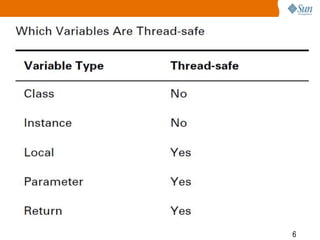
• In general, concern for thread-safety should be applied only
to instance and class variables.
• Here are the reasons why: All threads share the same
heap,and the heap is where instance variables are stored.
• When multiple threads are accessing the same variable,
there is potential for data corruption, because more than one
thread can access the same instance variable.
• Class variables have a similar problem; they are stored
within the same JVM method area.
• Local variables, method parameters, and return values are
quite different.These variables reside on the Java stack
6
7
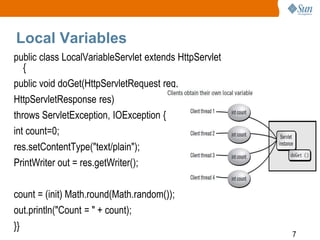
Local Variables
public class LocalVariableServlet extends HttpServlet
{
public void doGet(HttpServletRequest req,
HttpServletResponse res)
throws ServletException, IOException {
int count=0;
res.setContentType("text/plain");
PrintWriter out = res.getWriter();
count = (init) Math.round(Math.random());
out.println("Count = " + count);
}}
8
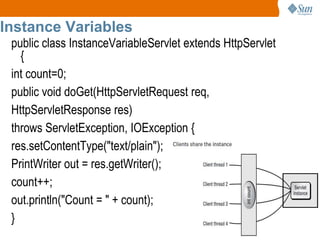
Instance Variables
public class InstanceVariableServlet extends HttpServlet
{
int count=0;
public void doGet(HttpServletRequest req,
HttpServletResponse res)
throws ServletException, IOException {
res.setContentType("text/plain");
PrintWriter out = res.getWriter();
count++;
out.println("Count = " + count);
}
9
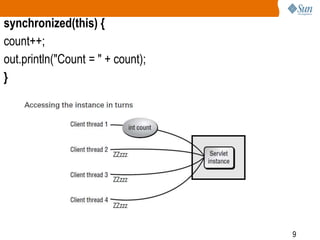
synchronized(this) {
count++;
out.println("Count = " + count);
}
10
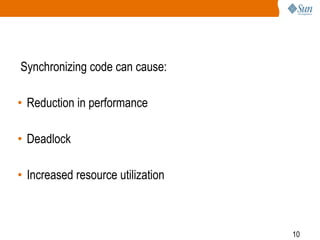
Synchronizing code can cause:
• Reduction in performance
• Deadlock
• Increased resource utilization
11
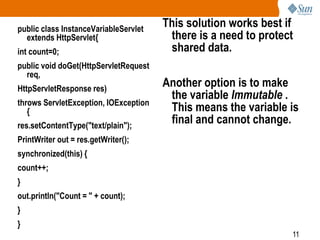
public class InstanceVariableServlet
extends HttpServlet{
int count=0;
public void doGet(HttpServletRequest
req,
HttpServletResponse res)
throws ServletException, IOException
{
res.setContentType("text/plain");
PrintWriter out = res.getWriter();
synchronized(this) {
count++;
}
out.println("Count = " + count);
}
}
This solution works best if
there is a need to protect
shared data.
Another option is to make
the variable Immutable .
This means the variable is
final and cannot change.
12
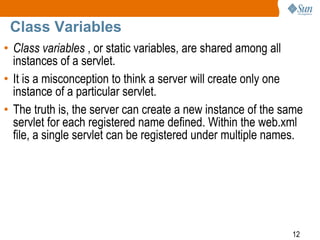
Class Variables
• Class variables , or static variables, are shared among all
instances of a servlet.
• It is a misconception to think a server will create only one
instance of a particular servlet.
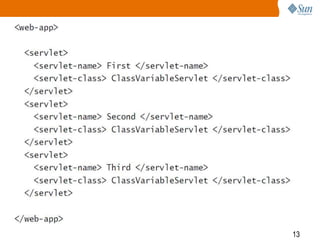
• The truth is, the server can create a new instance of the same
servlet for each registered name defined. Within the web.xml
file, a single servlet can be registered under multiple names.
13
14
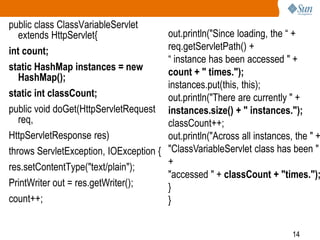
public class ClassVariableServlet
extends HttpServlet{
int count;
static HashMap instances = new
HashMap();
static int classCount;
public void doGet(HttpServletRequest
req,
HttpServletResponse res)
throws ServletException, IOException {
res.setContentType("text/plain");
PrintWriter out = res.getWriter();
count++;
out.println("Since loading, the “ +
req.getServletPath() +
“ instance has been accessed " +
count + " times.");
instances.put(this, this);
out.println("There are currently " +
instances.size() + " instances.");
classCount++;
out.println("Across all instances, the " +
"ClassVariableServlet class has been "
+
"accessed " + classCount + "times.");
}
}
15
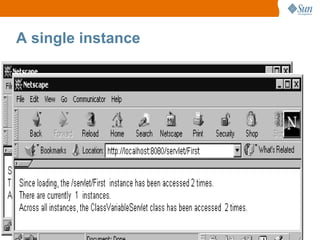
A single instance
16
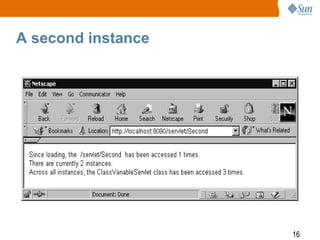
A second instance
17
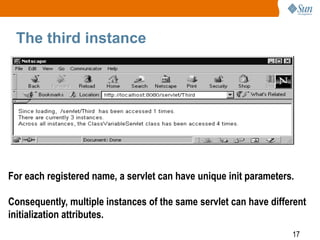
The third instance
For each registered name, a servlet can have unique init parameters.
Consequently, multiple instances of the same servlet can have different
initialization attributes.
18
Request Attributes
• When a servlet attempts to use another servlet to process part
or all of a response, a RequestDispatcher is used.
• Manually handling servlet-to-servlet communication would be a
difficult task to manage, especially in a multithreaded
environment.
• The RequestDispatcher object is designed to streamline the
process and ensure that concurrency problems do not occur.
19
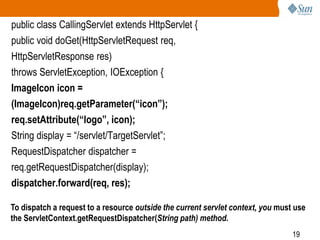
public class CallingServlet extends HttpServlet {
public void doGet(HttpServletRequest req,
HttpServletResponse res)
throws ServletException, IOException {
ImageIcon icon =
(ImageIcon)req.getParameter(“icon”);
req.setAttribute(“logo”, icon);
String display = “/servlet/TargetServlet”;
RequestDispatcher dispatcher =
req.getRequestDispatcher(display);
dispatcher.forward(req, res);
To dispatch a request to a resource outside the current servlet context, you must use
the ServletContext.getRequestDispatcher(String path) method.
20
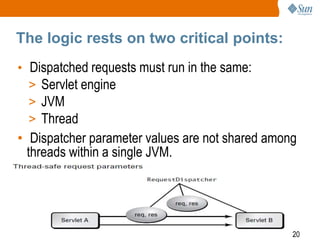
The logic rests on two critical points:
• Dispatched requests must run in the same:
> Servlet engine
> JVM
> Thread
• Dispatcher parameter values are not shared among
threads within a single JVM.
21
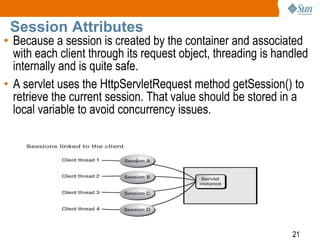
Session Attributes
• Because a session is created by the container and associated
with each client through its request object, threading is handled
internally and is quite safe.
• A servlet uses the HttpServletRequest method getSession() to
retrieve the current session. That value should be stored in a
local variable to avoid concurrency issues.
22
Context Attributes
• the ServletContext is an object that provides global data
to an entire application. This global data is referred to as
context attributes.
• If a servlet needs to acquire the port number used to
access the main database, it would invoke the
getServletContext() method to first get a handle to the
application’s context
23
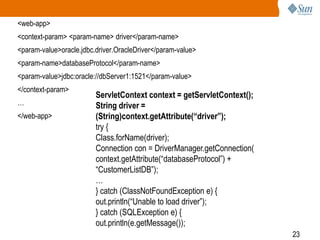
<web-app>
<context-param> <param-name> driver</param-name>
<param-value>oracle.jdbc.driver.OracleDriver</param-value>
<param-name>databaseProtocol</param-name>
<param-value>jdbc:oracle://dbServer1:1521</param-value>
</context-param>
…
</web-app>
ServletContext context = getServletContext();
String driver =
(String)context.getAttribute(“driver”);
try {
Class.forName(driver);
Connection con = DriverManager.getConnection(
context.getAttribute(“databaseProtocol”) +
“CustomerListDB”);
…
} catch (ClassNotFoundException e) {
out.println(“Unable to load driver”);
} catch (SQLException e) {
out.println(e.getMessage());
24
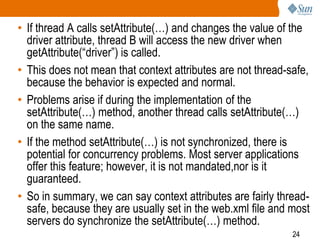
• If thread A calls setAttribute(…) and changes the value of the
driver attribute, thread B will access the new driver when
getAttribute(“driver”) is called.
• This does not mean that context attributes are not thread-safe,
because the behavior is expected and normal.
• Problems arise if during the implementation of the
setAttribute(…) method, another thread calls setAttribute(…)
on the same name.
• If the method setAttribute(…) is not synchronized, there is
potential for concurrency problems. Most server applications
offer this feature; however, it is not mandated,nor is it
guaranteed.
• So in summary, we can say context attributes are fairly thread-
safe, because they are usually set in the web.xml file and most
servers do synchronize the setAttribute(…) method.
25
Single-Threaded Servlets
• One solution to preventing threading problems within
servlets is to limit the number of threads that can access a
single servlet to one.
• This can bedone by having the servlet implement the
SingleThreadModel interface.
• There are no methods that must be implemented. Instead,
the interface is used as a flag to notify the container how to
handle the servlet life cycle.
• As per the API specifications, a servlet that implements the
SingleThreadModel is “guaranteed” to allow only one thread
access to the service() method at a time.
26
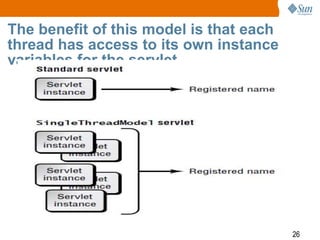
The benefit of this model is that each
thread has access to its own instance
variables for the servlet.
27
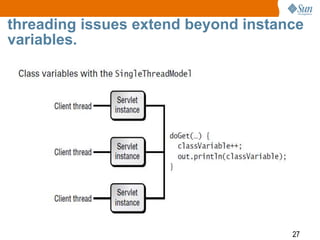
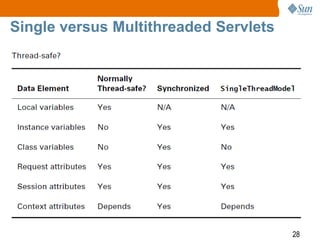
threading issues extend beyond instance
variables.
28
Single versus Multithreaded Servlets

SCWCD : Thread safe servlets : CHAP : 8

  • 1.
    1 Thread-Safe Servlets Helmi benabdallah @rchitect JEE
  • 2.
    2 THE FOLLOWING SUNCERTIFIED WEB COMPONENT DEVELOPER FOR J2EE PLATFORM EXAM OBJECTIVES COVERED IN THIS CHAPTER: 7.1 Identify which attribute scopes are thread-safe: Local variables Instance variables Class variables Request attributes Session attributes Context attributes 7.2 Identify correct statements about differences between the multithreaded and single-threaded servlet models. 7.3 Identify the interface used to declare that a servlet must use the single thread model.
  • 3.
    3 • Threads seemto be a topic that most developers wish to avoid but can’t. • In a single-threaded environment, ensuring the integrity of a Java class is as easy as making all instance variables private and providing public accessor or mutator methods. • In a multithreaded environment, achieving a “thread- safe” application is a bit more complex. • Servlets are intrinsically multithreaded : a single instance can be accessed by more than one thread. Because servlets, by their nature, are designed for multiple users, creating a thread-safe environment is a vital key to the success of the application
  • 4.
    4 Attributes • Local variables: Short-term values that are often used as loop iterators. • Instance variables : Data that persists for the life of the servlet, shared by all concurrent users. • Class variables :Data that exists for the life of the application, shared by all concurrent users—including instances with different initialization parameters • Request attributes : Data passed to other servlets invoked by the RequestDispatcher • Session attributes : Data that persists through all future requests for the current user • Context attributes : Data shared by all servlets that persists for the life of the application
  • 5.
    5 • In general,concern for thread-safety should be applied only to instance and class variables. • Here are the reasons why: All threads share the same heap,and the heap is where instance variables are stored. • When multiple threads are accessing the same variable, there is potential for data corruption, because more than one thread can access the same instance variable. • Class variables have a similar problem; they are stored within the same JVM method area. • Local variables, method parameters, and return values are quite different.These variables reside on the Java stack
  • 6.
  • 7.
    7 Local Variables public classLocalVariableServlet extends HttpServlet { public void doGet(HttpServletRequest req, HttpServletResponse res) throws ServletException, IOException { int count=0; res.setContentType("text/plain"); PrintWriter out = res.getWriter(); count = (init) Math.round(Math.random()); out.println("Count = " + count); }}
  • 8.
    8 Instance Variables public classInstanceVariableServlet extends HttpServlet { int count=0; public void doGet(HttpServletRequest req, HttpServletResponse res) throws ServletException, IOException { res.setContentType("text/plain"); PrintWriter out = res.getWriter(); count++; out.println("Count = " + count); }
  • 9.
  • 10.
    10 Synchronizing code cancause: • Reduction in performance • Deadlock • Increased resource utilization
  • 11.
    11 public class InstanceVariableServlet extendsHttpServlet{ int count=0; public void doGet(HttpServletRequest req, HttpServletResponse res) throws ServletException, IOException { res.setContentType("text/plain"); PrintWriter out = res.getWriter(); synchronized(this) { count++; } out.println("Count = " + count); } } This solution works best if there is a need to protect shared data. Another option is to make the variable Immutable . This means the variable is final and cannot change.
  • 12.
    12 Class Variables • Classvariables , or static variables, are shared among all instances of a servlet. • It is a misconception to think a server will create only one instance of a particular servlet. • The truth is, the server can create a new instance of the same servlet for each registered name defined. Within the web.xml file, a single servlet can be registered under multiple names.
  • 13.
  • 14.
    14 public class ClassVariableServlet extendsHttpServlet{ int count; static HashMap instances = new HashMap(); static int classCount; public void doGet(HttpServletRequest req, HttpServletResponse res) throws ServletException, IOException { res.setContentType("text/plain"); PrintWriter out = res.getWriter(); count++; out.println("Since loading, the “ + req.getServletPath() + “ instance has been accessed " + count + " times."); instances.put(this, this); out.println("There are currently " + instances.size() + " instances."); classCount++; out.println("Across all instances, the " + "ClassVariableServlet class has been " + "accessed " + classCount + "times."); } }
  • 15.
  • 16.
  • 17.
    17 The third instance Foreach registered name, a servlet can have unique init parameters. Consequently, multiple instances of the same servlet can have different initialization attributes.
  • 18.
    18 Request Attributes • Whena servlet attempts to use another servlet to process part or all of a response, a RequestDispatcher is used. • Manually handling servlet-to-servlet communication would be a difficult task to manage, especially in a multithreaded environment. • The RequestDispatcher object is designed to streamline the process and ensure that concurrency problems do not occur.
  • 19.
    19 public class CallingServletextends HttpServlet { public void doGet(HttpServletRequest req, HttpServletResponse res) throws ServletException, IOException { ImageIcon icon = (ImageIcon)req.getParameter(“icon”); req.setAttribute(“logo”, icon); String display = “/servlet/TargetServlet”; RequestDispatcher dispatcher = req.getRequestDispatcher(display); dispatcher.forward(req, res); To dispatch a request to a resource outside the current servlet context, you must use the ServletContext.getRequestDispatcher(String path) method.
  • 20.
    20 The logic restson two critical points: • Dispatched requests must run in the same: > Servlet engine > JVM > Thread • Dispatcher parameter values are not shared among threads within a single JVM.
  • 21.
    21 Session Attributes • Becausea session is created by the container and associated with each client through its request object, threading is handled internally and is quite safe. • A servlet uses the HttpServletRequest method getSession() to retrieve the current session. That value should be stored in a local variable to avoid concurrency issues.
  • 22.
    22 Context Attributes • theServletContext is an object that provides global data to an entire application. This global data is referred to as context attributes. • If a servlet needs to acquire the port number used to access the main database, it would invoke the getServletContext() method to first get a handle to the application’s context
  • 23.
    23 <web-app> <context-param> <param-name> driver</param-name> <param-value>oracle.jdbc.driver.OracleDriver</param-value> <param-name>databaseProtocol</param-name> <param-value>jdbc:oracle://dbServer1:1521</param-value> </context-param> … </web-app> ServletContextcontext = getServletContext(); String driver = (String)context.getAttribute(“driver”); try { Class.forName(driver); Connection con = DriverManager.getConnection( context.getAttribute(“databaseProtocol”) + “CustomerListDB”); … } catch (ClassNotFoundException e) { out.println(“Unable to load driver”); } catch (SQLException e) { out.println(e.getMessage());
  • 24.
    24 • If threadA calls setAttribute(…) and changes the value of the driver attribute, thread B will access the new driver when getAttribute(“driver”) is called. • This does not mean that context attributes are not thread-safe, because the behavior is expected and normal. • Problems arise if during the implementation of the setAttribute(…) method, another thread calls setAttribute(…) on the same name. • If the method setAttribute(…) is not synchronized, there is potential for concurrency problems. Most server applications offer this feature; however, it is not mandated,nor is it guaranteed. • So in summary, we can say context attributes are fairly thread- safe, because they are usually set in the web.xml file and most servers do synchronize the setAttribute(…) method.
  • 25.
    25 Single-Threaded Servlets • Onesolution to preventing threading problems within servlets is to limit the number of threads that can access a single servlet to one. • This can bedone by having the servlet implement the SingleThreadModel interface. • There are no methods that must be implemented. Instead, the interface is used as a flag to notify the container how to handle the servlet life cycle. • As per the API specifications, a servlet that implements the SingleThreadModel is “guaranteed” to allow only one thread access to the service() method at a time.
  • 26.
    26 The benefit ofthis model is that each thread has access to its own instance variables for the servlet.
  • 27.
    27 threading issues extendbeyond instance variables.
  • 28.