Developing Business/IT Solutions
Chapter
12
McGraw-Hill/Irwin Copyright © 2011 by The McGraw-Hill Companies, Inc. All rights reserved.
12-2
• Use the systems development process
outlined in this chapter and the model of IS
components from Chapter 1 as problem-
solving frameworks to help you propose
information systems solutions to simple
business problems
• Describe and give examples to illustrate
how you might use each of the steps of the
information systems development cycle to
develop and implement a business
information system
Learning Objectives
12-3
Learning Objectives
• Explain how prototyping can be used as
an effective technique to improve the
process of systems development for end
users and IS specialists
• Understand the basics of project
management and their importance to a
successful system development effort
• Identify the activities involved in the
implementation of new information
systems
12-4
Learning Objectives
• Compare and contrast the four basic
system conversation strategies
• Describe several evaluation factors that
should be considered in evaluating the
acquisition of hardware, software, and IS
services
12-5
IS Development
• Information Systems Development
– Applying the Systems Approach to IS
Development
– Also called Application Development
12-6
The Systems Approach
• Problem solving technique
• Interrelated activities
– Recognize and define a problem or opportunity
using systems thinking
– Develop and evaluate alternative system solutions
– Select the solution that best meets your
requirements
– Design the selected system solution
– Implement and evaluate the success of the system
12-7
What is Systems Thinking?
• Seeing the forest and the trees in any
situation
– Seeing interrelationships among systems
rather than linear cause-and-effect chains
– Seeing processes of change among systems
rather than discrete snapshots of change
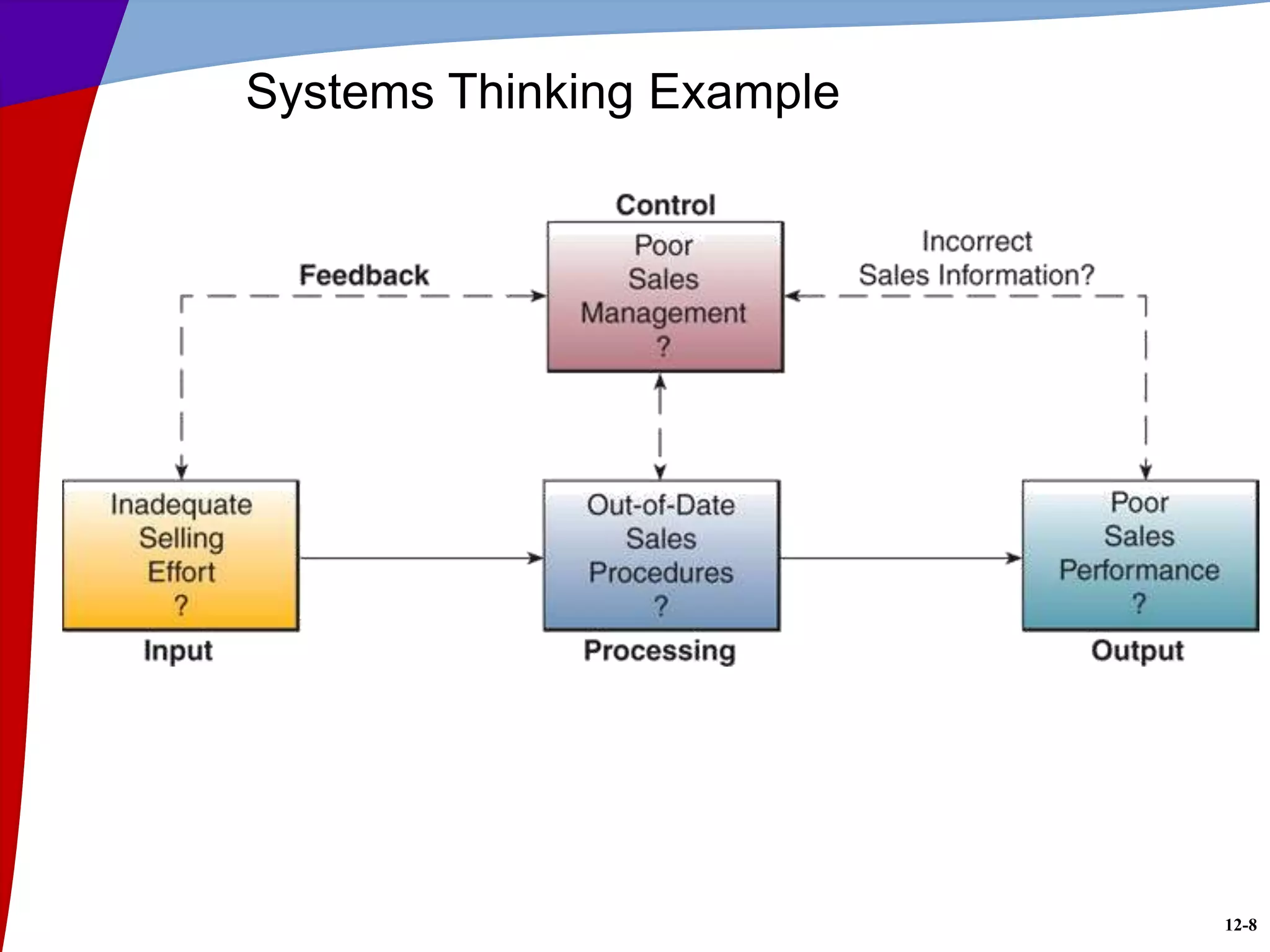
• Seeing the system in any situation
– Find the input, processing, output, feedback
and control components
12-8
Systems Thinking Example
12-9
RWC 1: Virtualization Helps Developers
• First used quietly for development tasks
• Later introduced to IT Executives
• Simplifies development and testing
• Protection from system crashes
– Create system snapshots and imaging
– Restore to last-known good version
• Doesn’t facilitate load testing
– Need physical machine
12-10
Systems Analysis and Design (SA&D)
• Overall process
– Identification of business problems
– Design
– Implementation
• Two most common approaches
– Object-oriented analysis and design
– Life cycle
12-11
Systems Development Lifecycle (SDLC)
12-12
Systems Development Process
• Systems Investigation
– First step
– Consider multiple proposals
– Preliminary feasibility study
• Information needs of prospective users
• Resource requirements
• Costs
• Benefits
• Legal environment
– Feasibility study may be unnecessary
• Government mandate
12-13
Types of Feasibility Studies
• Operational
– Fix the problem, fit the organization
• Economic
– Cost/Benefit Analysis
• Technical
– Components and time available
• Human Factors
– Right people and roles available
• Legal/Political
– Government, patent, or license restrictions
12-14
Systems Analysis
• Produces the functional requirements
• Basis for the design of the new system
• In-depth study
– Information needs
• Company
• End users
• Business stakeholders
– Existing system
• Activities, resources, and products
12-15
Types of Analysis
• Organizational
– Structure, people, activities
• Present System
– Hardware, software, network, input, output,
processing
• Logical
– What the current system does
– Not concerned with how it works
12-16
Functional Requirements
• Goal: what needs to be done, not how
• One of the most difficult steps
• Determine what type of information each
business activity requires
• Determine the information processing
capabilities required for each system activity
12-17
Functional Requirements
12-18
Systems Design
• Focuses on three areas
12-19
Prototyping Life Cycle
12-20
User Interface Design
• Supports interactions between end users and
computer-based applications
– Get help from end-users
– Designers create attractive and efficient forms
– Frequently a prototyping process
– Produces detailed design specifications
12-21
System Specifications
• Components of formal design
– User interface methods and products
– Database structures
– Processing procedures
– Control procedures
• Examples of System Specifications
– User interface specifications
– Database specifications
– Software specifications
– Hardware and network specifications
– Personnel specifications
12-22
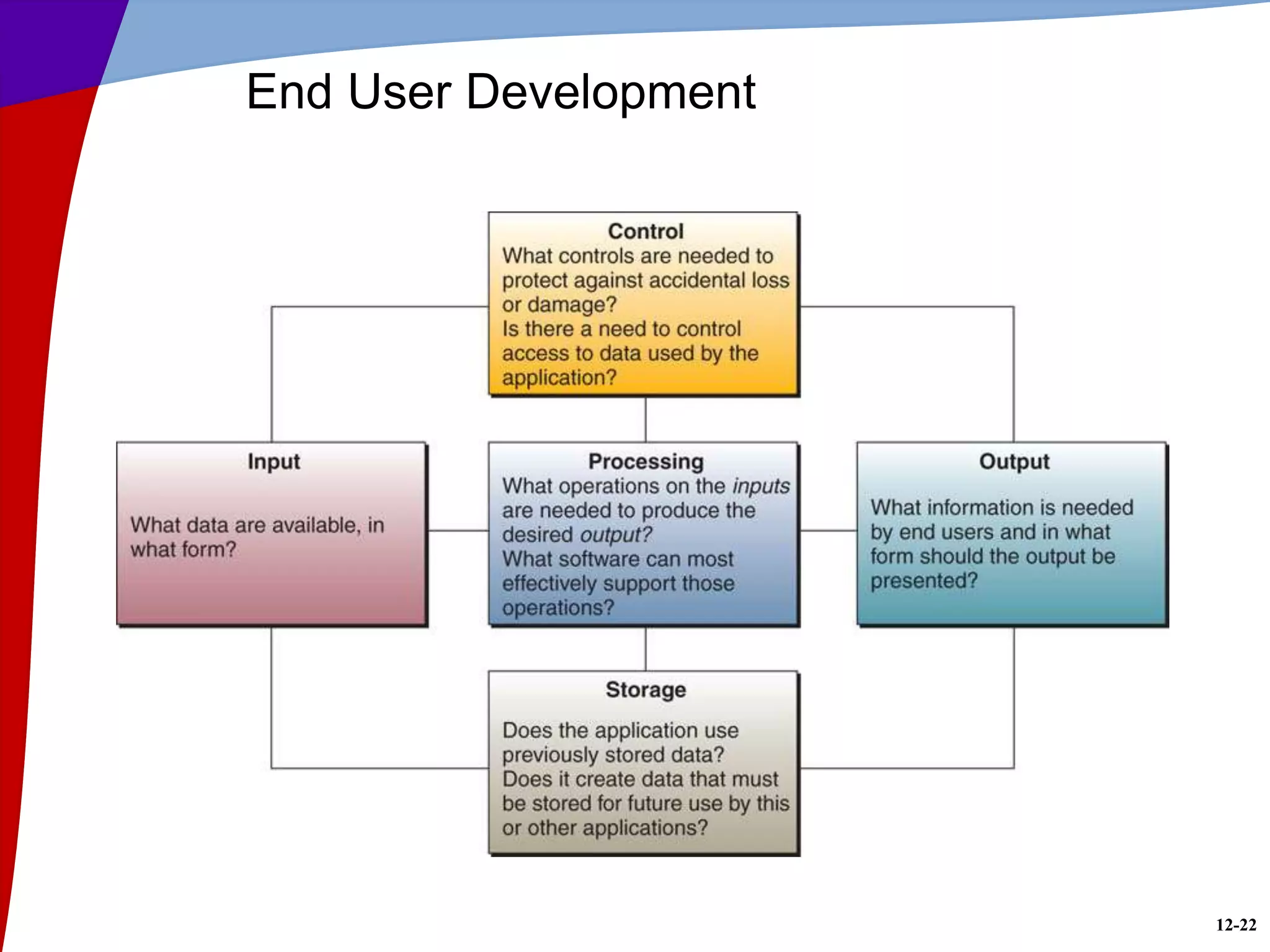
End User Development
12-23
Encouraging End User Web Development
• Look for tools that make sense
• Spur creativity
• Set some limits
• Give managers responsibility
• Make users comfortable
12-24
Object-Oriented Analysis and Design
• Object – anything a programmer needs
manipulated
• Object-Oriented Programming (OOP)
techniques:
– Inheritance
– Modularity
– Polymorphism
– Encapsulation
• Object-Oriented Analysis (OOA)
– Model of object interaction, not solution
• Object-Oriented Design (OOD)
– Solution based on constraints
12-25
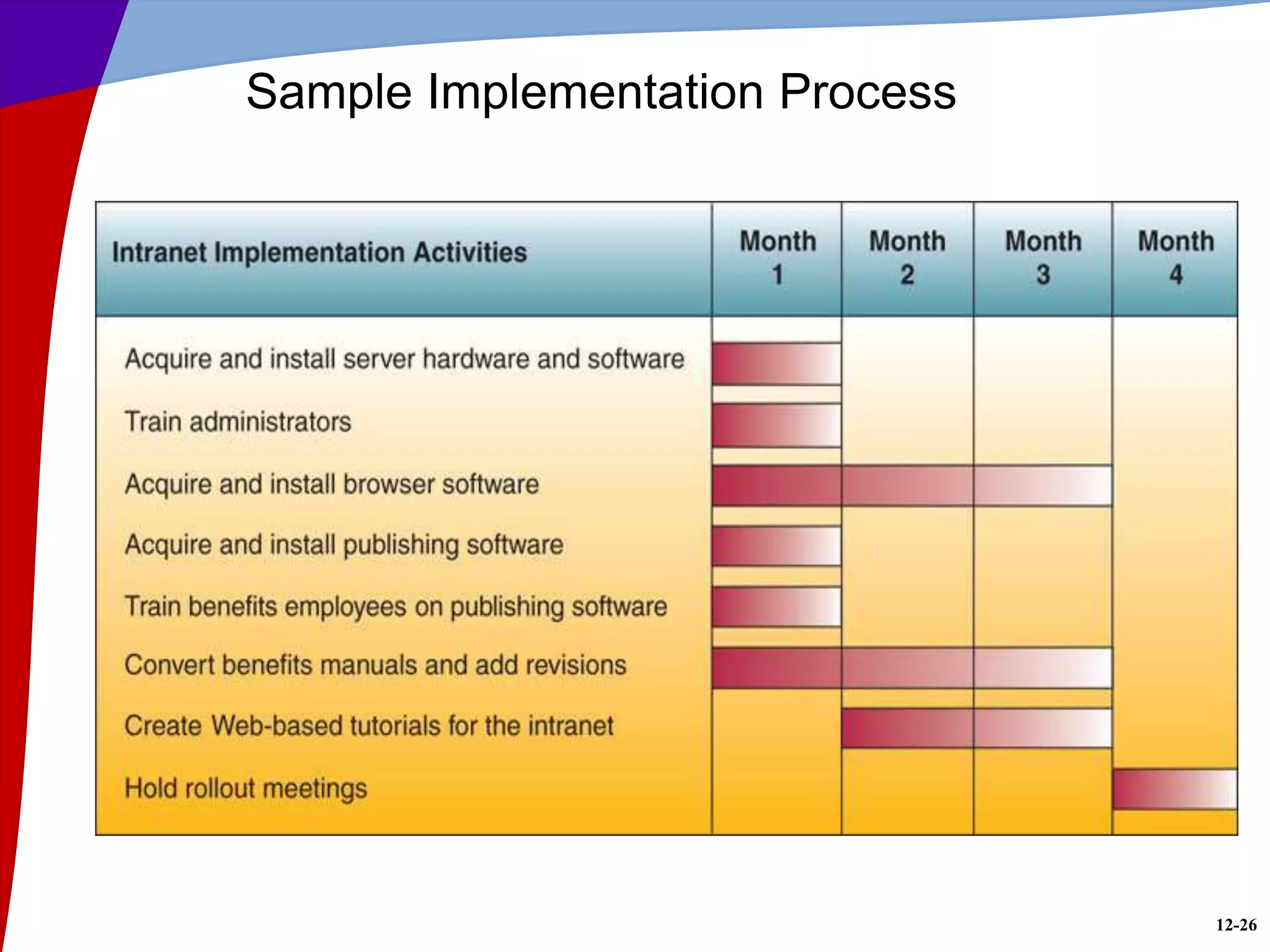
Implementation Process
12-26
Sample Implementation Process
12-27
RWC 2: Difficult Path to Software Upgrades
• System upgrades are daunting
• Failures are costly
– Loss of immediate revenue
– Loss of customer loyalty
– Three to six month recovery
• Contingency plans
– Backup website
– Extra operators in call center
• Packet implementation helps
– Basic install
– Additional features
12-28
Project Management
• The skills and knowledge necessary to be a
good project manager will translate into
virtually any project environment
– Sought after by most organizations
12-29
What is a Project?
• Every project has
– A set of activities with a clear beginning and end
– Goals
– Objectives
– Tasks
– Limitations or constraints
– A series of steps or phases
• Managing a project effectively requires
– Process
– Tools
– Techniques
12-30
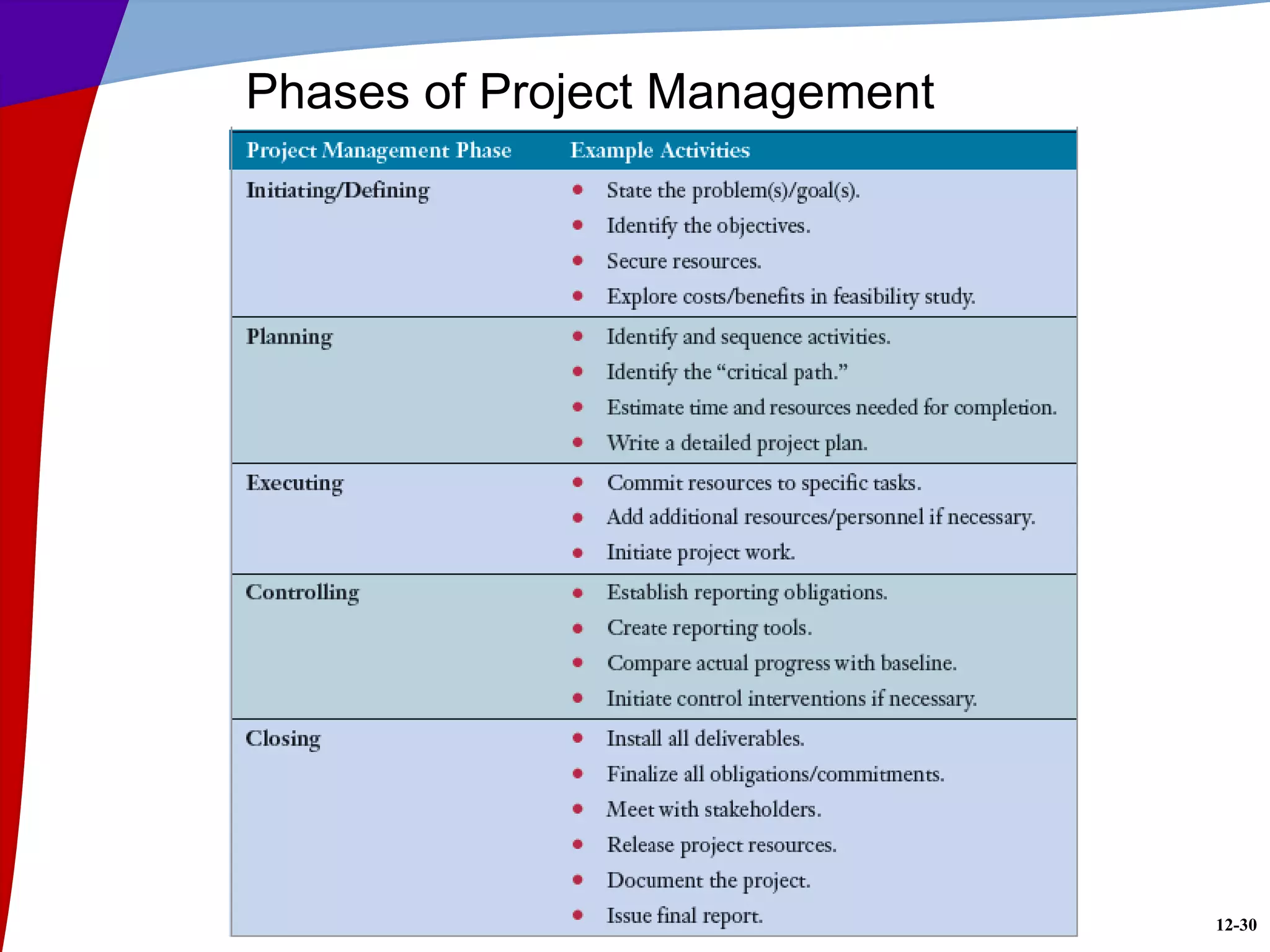
Phases of Project Management
12-31
Evaluating Hardware, Software, Services
• Establish minimum physical and performance
characteristics
– Formalize in an RFP or RFQ
• Send RFQ to appropriate vendors
• Evaluate bids when received
– All claims must be demonstrated
– Obtain recommendations from other users
– Search independent sources for evaluations
– Benchmark test programs and test data
12-32
Hardware Evaluation Factors
• Performance
• Cost
• Reliability
• Compatibility
• Technology
• Ergonomics
• Connectivity
• Scalability
• Software
• Support
12-33
Software Evaluation Factors
• Most Hardware Evaluation Factors Apply
• Quality
• Efficiency
• Flexibility
• Security
• Connectivity
• Maintenance
• Documentation
• Hardware
• Overall Rating
– Software that is slow, hard to use, bug-filled, or poorly
documented is not a good choice at any price
12-34
IS Services
• Examples of IS services
– Developing a company website
– Installation or conversion of hardware/software
– Employee training
– Hardware maintenance
– System design and/or integration
– Contract programming
– Consulting services
12-35
IS Service Evaluation Factors
• IS evaluation factors include
– Performance
– Systems development
– Maintenance
– Conversion
– Training
– Backup facilities and services
– Accessibility to sales and support
• Business position and financial strength
– Hardware selection and compatibility
– Software packages offered
12-36
Other Implementation Activities
• Testing
• Data conversion
• Documentation
• Training
12-37
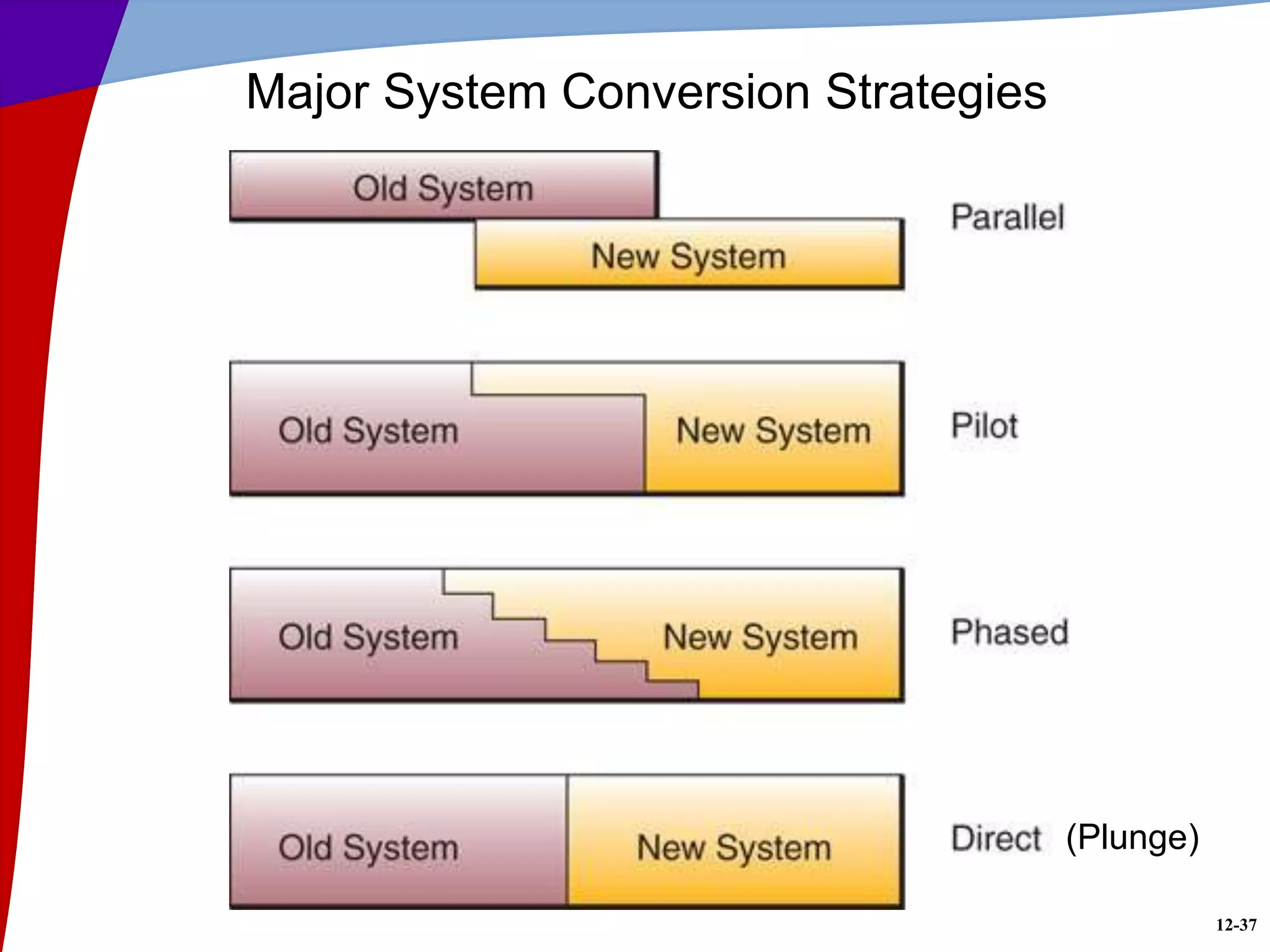
Major System Conversion Strategies
(Plunge)
12-38
Post-Implementation Activities
• System Maintenance
– Corrective: fix bugs and logical errors
– Adaptive: add new functionality
– Perfective: improve performance
– Preventive: reduce chances of failure
• Post Implementation Review
– Correct Errors
– Periodic review/audit
• Single most costly activity
12-39
• How do global companies keep their
consumer sites updated in the local
language or localizing the content without
spending a lot of time and money?
• PayPal redesigned software
– Allow simultaneous refreshes for 15 locales
ranging from France to Poland.
• Result
– Net total payment volume – $14 billion
• 12 percent of U.S. e-commerce
• 8 percent of global e-commerce.
RWC 3: PayPal Going Global
12-40
RWC 4: Project Backlog
• Demand for IT is increasing
• Requests for IT projects are piling up.
• Budget is not increasing.
• Backlog is number-one barrier to
effectiveness,
• Two types of backlog
– Backlog of desire
• Applications that users are yearning for
– Backlog of commitment
• Projects that are approved but not started
• CIOs need to pay attention to both types of
a backlogs.

01. Developing Business _ IT Solutions 2011.ppt

  • 1.
    Developing Business/IT Solutions Chapter 12 McGraw-Hill/IrwinCopyright © 2011 by The McGraw-Hill Companies, Inc. All rights reserved.
  • 2.
    12-2 • Use thesystems development process outlined in this chapter and the model of IS components from Chapter 1 as problem- solving frameworks to help you propose information systems solutions to simple business problems • Describe and give examples to illustrate how you might use each of the steps of the information systems development cycle to develop and implement a business information system Learning Objectives
  • 3.
    12-3 Learning Objectives • Explainhow prototyping can be used as an effective technique to improve the process of systems development for end users and IS specialists • Understand the basics of project management and their importance to a successful system development effort • Identify the activities involved in the implementation of new information systems
  • 4.
    12-4 Learning Objectives • Compareand contrast the four basic system conversation strategies • Describe several evaluation factors that should be considered in evaluating the acquisition of hardware, software, and IS services
  • 5.
    12-5 IS Development • InformationSystems Development – Applying the Systems Approach to IS Development – Also called Application Development
  • 6.
    12-6 The Systems Approach •Problem solving technique • Interrelated activities – Recognize and define a problem or opportunity using systems thinking – Develop and evaluate alternative system solutions – Select the solution that best meets your requirements – Design the selected system solution – Implement and evaluate the success of the system
  • 7.
    12-7 What is SystemsThinking? • Seeing the forest and the trees in any situation – Seeing interrelationships among systems rather than linear cause-and-effect chains – Seeing processes of change among systems rather than discrete snapshots of change • Seeing the system in any situation – Find the input, processing, output, feedback and control components
  • 8.
  • 9.
    12-9 RWC 1: VirtualizationHelps Developers • First used quietly for development tasks • Later introduced to IT Executives • Simplifies development and testing • Protection from system crashes – Create system snapshots and imaging – Restore to last-known good version • Doesn’t facilitate load testing – Need physical machine
  • 10.
    12-10 Systems Analysis andDesign (SA&D) • Overall process – Identification of business problems – Design – Implementation • Two most common approaches – Object-oriented analysis and design – Life cycle
  • 11.
  • 12.
    12-12 Systems Development Process •Systems Investigation – First step – Consider multiple proposals – Preliminary feasibility study • Information needs of prospective users • Resource requirements • Costs • Benefits • Legal environment – Feasibility study may be unnecessary • Government mandate
  • 13.
    12-13 Types of FeasibilityStudies • Operational – Fix the problem, fit the organization • Economic – Cost/Benefit Analysis • Technical – Components and time available • Human Factors – Right people and roles available • Legal/Political – Government, patent, or license restrictions
  • 14.
    12-14 Systems Analysis • Producesthe functional requirements • Basis for the design of the new system • In-depth study – Information needs • Company • End users • Business stakeholders – Existing system • Activities, resources, and products
  • 15.
    12-15 Types of Analysis •Organizational – Structure, people, activities • Present System – Hardware, software, network, input, output, processing • Logical – What the current system does – Not concerned with how it works
  • 16.
    12-16 Functional Requirements • Goal:what needs to be done, not how • One of the most difficult steps • Determine what type of information each business activity requires • Determine the information processing capabilities required for each system activity
  • 17.
  • 18.
  • 19.
  • 20.
    12-20 User Interface Design •Supports interactions between end users and computer-based applications – Get help from end-users – Designers create attractive and efficient forms – Frequently a prototyping process – Produces detailed design specifications
  • 21.
    12-21 System Specifications • Componentsof formal design – User interface methods and products – Database structures – Processing procedures – Control procedures • Examples of System Specifications – User interface specifications – Database specifications – Software specifications – Hardware and network specifications – Personnel specifications
  • 22.
  • 23.
    12-23 Encouraging End UserWeb Development • Look for tools that make sense • Spur creativity • Set some limits • Give managers responsibility • Make users comfortable
  • 24.
    12-24 Object-Oriented Analysis andDesign • Object – anything a programmer needs manipulated • Object-Oriented Programming (OOP) techniques: – Inheritance – Modularity – Polymorphism – Encapsulation • Object-Oriented Analysis (OOA) – Model of object interaction, not solution • Object-Oriented Design (OOD) – Solution based on constraints
  • 25.
  • 26.
  • 27.
    12-27 RWC 2: DifficultPath to Software Upgrades • System upgrades are daunting • Failures are costly – Loss of immediate revenue – Loss of customer loyalty – Three to six month recovery • Contingency plans – Backup website – Extra operators in call center • Packet implementation helps – Basic install – Additional features
  • 28.
    12-28 Project Management • Theskills and knowledge necessary to be a good project manager will translate into virtually any project environment – Sought after by most organizations
  • 29.
    12-29 What is aProject? • Every project has – A set of activities with a clear beginning and end – Goals – Objectives – Tasks – Limitations or constraints – A series of steps or phases • Managing a project effectively requires – Process – Tools – Techniques
  • 30.
  • 31.
    12-31 Evaluating Hardware, Software,Services • Establish minimum physical and performance characteristics – Formalize in an RFP or RFQ • Send RFQ to appropriate vendors • Evaluate bids when received – All claims must be demonstrated – Obtain recommendations from other users – Search independent sources for evaluations – Benchmark test programs and test data
  • 32.
    12-32 Hardware Evaluation Factors •Performance • Cost • Reliability • Compatibility • Technology • Ergonomics • Connectivity • Scalability • Software • Support
  • 33.
    12-33 Software Evaluation Factors •Most Hardware Evaluation Factors Apply • Quality • Efficiency • Flexibility • Security • Connectivity • Maintenance • Documentation • Hardware • Overall Rating – Software that is slow, hard to use, bug-filled, or poorly documented is not a good choice at any price
  • 34.
    12-34 IS Services • Examplesof IS services – Developing a company website – Installation or conversion of hardware/software – Employee training – Hardware maintenance – System design and/or integration – Contract programming – Consulting services
  • 35.
    12-35 IS Service EvaluationFactors • IS evaluation factors include – Performance – Systems development – Maintenance – Conversion – Training – Backup facilities and services – Accessibility to sales and support • Business position and financial strength – Hardware selection and compatibility – Software packages offered
  • 36.
    12-36 Other Implementation Activities •Testing • Data conversion • Documentation • Training
  • 37.
    12-37 Major System ConversionStrategies (Plunge)
  • 38.
    12-38 Post-Implementation Activities • SystemMaintenance – Corrective: fix bugs and logical errors – Adaptive: add new functionality – Perfective: improve performance – Preventive: reduce chances of failure • Post Implementation Review – Correct Errors – Periodic review/audit • Single most costly activity
  • 39.
    12-39 • How doglobal companies keep their consumer sites updated in the local language or localizing the content without spending a lot of time and money? • PayPal redesigned software – Allow simultaneous refreshes for 15 locales ranging from France to Poland. • Result – Net total payment volume – $14 billion • 12 percent of U.S. e-commerce • 8 percent of global e-commerce. RWC 3: PayPal Going Global
  • 40.
    12-40 RWC 4: ProjectBacklog • Demand for IT is increasing • Requests for IT projects are piling up. • Budget is not increasing. • Backlog is number-one barrier to effectiveness, • Two types of backlog – Backlog of desire • Applications that users are yearning for – Backlog of commitment • Projects that are approved but not started • CIOs need to pay attention to both types of a backlogs.

Editor's Notes

  • #6 When the systems approach is applied to the development of an information systems solution to business problems, it is called information systems development or application development
  • #7 A problem solving technique that uses a systems orientation to define problems and opportunities and develop appropriate and feasible solutions Analyzing a problem and formulating a solution involves these interrelated activities: Recognize and define a problem or opportunity using systems thinking Develop and evaluate alternative system solutions Select the solution that best meets your requirements Design the selected system solution Implement and evaluate the success of the system
  • #11 SA&D is the overall process by which information systems are designed and implemented Includes identification of business problems Two most common approaches Object-oriented analysis and design Life cycle
  • #13 Systems Investigation The first step in the systems development process May involve consideration of proposals generated by a business/IT planning process Also includes the preliminary feasibility study of proposed information system solutions
  • #14 Feasibility Studies Operational Feasibility How well the proposed system will Support the business priorities of the organization Solve the identified problem Fit with the existing organizational structure Economic Feasibility An assessment of Cost savings Increased revenue Decreased investment requirements Increased profits Cost/benefit analysis Technical Feasibility Determine the following can meet the needs of a proposed system and can be acquired or developed in the required time Hardware Software Network Human Factors Feasibility Assess the acceptance level of Employees Customers Suppliers Management support Determine the right people for the various new or revised roles Legal/Political Feasibility Assess Possible patent or copyright violations Software licensing for developer side only Governmental restrictions Changes to existing reporting structure  
  • #15 An in-depth study of end user information needs It produces the functional requirements used as the basis for the design of an information system It typically involves a detailed study of the Information needs of a company and end users Activities, resources, and products of one or more of the information systems currently being used Information system capabilities required to meet the information needs of business stakeholders
  • #16 Types of Analysis Organizational Analysis Study of the organization, including… Management structure People Business activities Environmental systems Current information systems Input, processing, output, storage, and control Analysis of the Present System Before designing a new system, it is important to study the system to be improved or replaced Hardware and software Network People resources used to convert data resources into information products System activities of input, processing, output, storage, and control Logical Analysis A logical model is a blueprint of the current system It displays what the current system does, without regard to how it does it It allows an analyst to understand the processes, functions, and data associated with a system without getting bogged down with hardware and software
  • #17 This step of systems analysis is one of the most difficult Determine what type of information each business activity requires Try to determine the information processing capabilities required for each system activity The goal is to identify what should be done, not how to do it
  • #18 This step of systems analysis is one of the most difficult Determine what type of information each business activity requires Try to determine the information processing capabilities required for each system activity The goal is to identify what should be done, not how to do it
  • #20 Prototyping is the rapid development and testing of working models An interactive, iterative process used during the design phase Makes development faster and easier, especially when end user requirements are hard to define Has enlarged the role of business stakeholders
  • #21 Focuses on supporting the interactions between end users and their computer-based applications Designers concentrate on the design of attractive and efficient forms of user input and output Frequently a prototyping process Produces detailed design specifications for information products, such as display screens Checklist for Corporate Websites Remember the customer Aesthetics Broadband content Easy to navigate Searchability Incompatibilities Registration forms Dead links
  • #22  Examples of System Specifications for an e-commerce system User interface specifications - Use personalized screens that welcome repeat Web customers and that make product recommendations Database specifications - Develop databases that use object/relational database management software to organize access to all customer and inventory data and to multimedia product information Software specifications - Acquire an e-commerce software engine to process all e-commerce transactions with fast responses, i.e., retrieve necessary product data and compute all sales amounts in less than one second Hardware and network specifications - Install redundant networked Web servers and sufficient high-bandwidth telecommunications lines to host the company e-commerce website Personnel specifications - Hire an e-commerce manager and specialists and a webmaster and Web designer to plan, develop, and manage e-commerce operations
  • #23 Users do own application development IS professionals play a consulting role to help with analysis, design, and installation Other support Application package training Hardware and software advice Help gaining access to organization databases Should focus on the same fundamental activities as any information system Input, Processing, Output, Storage, Control Application development capabilities built into software packages make it easier for end users to develop their own solutions
  • #24 Look for tools that make sense Some are more powerful or costly than needed Spur creativity Consider a competition among departments Set some limits Limit what parts of a web page or site can be changed and who can do it Give managers responsibility Make them personally responsible for content Make users comfortable Training will make users more confident It can save the IT department the trouble of fixing problems later on It can limit the need for continuous support
  • #25 Once an object is defined by a programmer, its characteristics can be used to allow one object to interact with another object or pass information to another object. The behavior of an object-oriented system entails collaboration between these objects, and the state of the system is the combined state of all the object in it Inheritance. The ability of one object to inherit the characteristics of a higher order object. • Modularity. The extent to which a program is designed as a series of interlinked yet stand-alone modules. For example, all cars have wheels; therefore, an object defined as a sports car and as a special type of the object cars must also have wheels. • Polymorphism. The ability of an object to behave differently depending on the conditions in which its behavior is invoked. For example, two objects that inherit the behavior speak from an object class animal might be a dog object and a cat object. Both have a behavior defined as speak . When the dog object is commanded to speak, it will bark, whereas when the cat object is commanded to speak, it will meow . • Encapsulation. Concealing all of the characteristics associated with a particular object inside the object itself. This paradigm allows objects to inherit characteristics simply by defining a subobject. For example, the object airplane contains all of the characteristics of an airplane: wings, tail, rudder, pilot, speed, altitude, and so forth. Object-Oriented Analysis - an object-oriented analysis model does not take into account implementation constraints, such as concurrency, distribution, persistence, or inheritance, nor how the system will be built. Because object-oriented systems are modular, the model of the system can be divided into multiple domains, each of which are separately analyzed and represent separate business, technological, or conceptual areas of interest. The result of object-oriented analysis is a description of what is to be built, using concepts and relationships between concepts, often expressed as a conceptual model. Object-oriented design (OOD) - takes the conceptual model that results from the object-oriented analysis and adds implementation constraints imposed by the environment, the programming language, and the chosen tools, as well as architectural assumptions chosen as the basis of the design.
  • #26 The systems implementation stage involves Hardware and software acquisition Software development Testing of programs and procedures Conversion of data resources Conversion alternatives Education/training of end users and specialists who will operate the new system
  • #31 Initiating/Defining Phase State the problem(s) and/or goal(s) Identify the objectives Secure resources Explore the costs/benefits in the feasibility study Planning Identify and sequence activities Identify the “critical path” Estimate the time and resources needed for project completion Write a detailed project plan Execution Phase Commit resources to specific tasks Add additional resources and/or personnel if necessary Initiate work on the project Controlling Phase Establish reporting obligations Create reporting tools Compare actual progress with baseline Initiate control interventions, if necessary Closing Phase Install all deliverables Finalize all obligations and commitments Meet with stakeholders Release project resources Document the project Issue a final report
  • #32 Establish minimum physical and performance characteristics for all hardware and software Formalize these requirements in an RFP (request for proposal) or RFQ (request for quotation) Send RFQ to appropriate vendors Evaluate bids when received All claims must be demonstrated Obtain recommendations from other users Search independent sources for evaluations Benchmark test programs and test data
  • #33 Hardware Evaluation Factors Rating Performance What is its speed, capacity, and throughput? Cost What is its lease or purchase price? What will be its cost of operation and maintenance? Reliability What are the risk of malfunction and its maintenance requirements? What are its error control and diagnostic features? Compatibility Is it compatible with existing hardware and software? Is it compatible with hardware and software provided by competing suppliers? Technology In what year of its product life cycle is it? Does it use a new untested technology, or does it run the risk of obsolescence? Ergonomics Has it been “human factors engineered” with the user in mind? Is it user-friendly, designed to be safe, comfortable, and easy to use? Connectivity Can it be easily connected to wide area and local area networks that use different types of network technologies and bandwidth alternatives? Scalability Can it handle the processing demands of a wide range of end users, transactions, queries, and other information processing requirements? Software Are system and application software available that can best use this hardware? Support Are the services required to support and maintain it available? Overall Rating
  • #34 Software Evaluation Factors Rating Quality Is it bug-free, or does it have many errors in its program code? Efficiency Is the software a well-developed system of program code that does not use much CPU time, memory capacity, or disk space? Flexibility Can it handle our business processes easily, without major modification? Security Does it provide control procedures for errors, malfunctions, and improper use? Connectivity Is it Web-enabled so it can easily access the Internet, intranets, and extranets, on its own, or by working with Web browsers or other network software? Maintenance Will new features and bug fixes be easily implemented by our own software developers? Documentation Is the software well documented? Does it include help screens and helpful software agents? Hardware Does existing hardware have the features required to best use this software? Other Factors What are its performance, cost, reliability, availability, compatibility, modularity, technology, ergonomics, scalability, and support characteristics? (Use the hardware evaluation factor questions in Figure 12.22 .) Overall Rating Software that is slow, hard to use, bug-filled, or poorly documented is not a good choice at any price
  • #36 Evaluation Factors for IS Services Rating Performance What has been their past performance in view of their past promises? Systems Development Are Web site and other e-business developers available? What are their quality and cost? Maintenance Is equipment maintenance provided? What are its quality and cost? Conversion What systems development and installation services will they provide during the conversion period? Training Is the necessary training of personnel provided? What are its quality and cost? Backup Are similar computer facilities available nearby for emergency backup purposes? Accessibility Does the vendor provide local or regional sites that offer sales, systems development, and hardware maintenance services? Is a customer support center at the vendor’s Web site available? Is a customer hotline provided? Business Position Is the vendor financially strong, with good industry market prospects? Hardware Do they provide a wide selection of compatible hardware devices and accessories? Software Do they offer a variety of useful e-business software and application packages? Overall Rating
  • #37 The keys to successful implementation of a new business system Testing Data conversion Documentation Training System testing may involve Testing and debugging software Testing website performance Testing new hardware Review of prototypes Data conversion includes Converting data elements from the old database to the new database Correcting data errors Filtering out unwanted data Consolidating data from several databases Organizing data into new data subsets Improperly organized and formatted data is a major cause of implementation failures User Documentation Sample data entry screens, forms, reports System operating instructions Systems Documentation Method of communication among those developing, implementing, and maintaining a computer-based system Detailed record of the system design Extremely important when diagnosing problems and making system changes End users must be trained to operate a new business system or its implementation will fail May involve only activities, such as data entry, or all aspects of system use Managers and end users must understand how the new technology impacts business operations System training should be supplemented with training related to Hardware devices Software packages
  • #38 Parallel Conversion Old and new systems are run simultaneously until everyone is satisfied that The new system functions correctly The old system is no longer needed Conversion to new system can be single cutover or phased cutover Has the lowest risk, but the highest cost Can cost 4 times more than using the old system Best choice where an automated system is replacing a manual one Pilot Conversion Scenarios best suited to a pilot conversion Multiple business locations Geographically diverse locations Advantages of single location conversion Can select a location that best represents the conditions across the organization Less risky in terms of loss of time or delays in processing Can be evaluated and changed before further installations Phased Conversion A phased or gradual conversion Takes advantage of both the direct and parallel approaches Minimizes the risks involved Allows the new system to be brought online as logically ordered functional components Disadvantages Takes the most time Created the most disruption to the organization over time Direct or Plunge conversion The simplest conversion strategy The most disruptive to the organization Sometimes referred to as the slam dunk or cold-turkey strategy May be the only viable solution in cases of emergency implementation or if the old and new system cannot coexist Has the highest risk of failure Involves turning off the old system and turning on the new one
  • #39 The single most costly activity Correcting errors or faults in the system Improving system performance Adapting the system to changes in the operating or business environment Requires more programmers than does application development May exist for years System Maintenance Four basic categories Corrective: fix bugs and logical errors Adaptive: add new functionality Perfective: improve performance Preventive: reduce chances of failure Post Implementation Review Ensures that the newly implemented system meets the established business objectives Errors must be corrected by the maintenance process Periodic review/audit of the system as well as continuous monitoring
  • #40 How do you global companies keep their consumer sites updated in the local language or localizing the content without spending a lot of time and money? PayPal addressed this challenge by redesigning their software to allow simultaneous refreshes for 15 locales ranging from France to Poland. Because of this, PayPal’s net total payment volume for the fourth quarter 2007 was $14 billion, which represent almost 12 percent of U.S. e-commerce, and almost 8 percent of global e-commerce.
  • #41 According to an annual survey by CIO Magazine, the demand for IT is increasing and the requests for IT projects are piling up. The biggest challenge is that the budget to deal with today’s demand is not increasing. For CIOs, managing this application backlog is the number-one barrier to their job effectiveness, regardless of industry or company size. There are two types of backlog – backlog of desire (applications that users are yearning for) – backlog of commitment (projects that are approved but not started). CIOs need to pay attention to both types of a backlogs.