Chapter 8
ហោ សូ ហនឿនWeb Form Security 1
Authorization និង Authentication
ហោ សូ ហនឿនWeb Form Security2
 ASP.NET ផ្តល់ឲ្យអ្នកអ្ភិវឌ្ឍ Websites មានសមត្ថភាពទាំង
ការធ្វើ authentication និង authorization.
 Authentication គឺជាការកាំណត្់អ្ត្តសញ្ញា ណរបស់ users។
 Authorization គឺជាការផ្តល់សិទ្ធិដល់ users។
 Authentication និង authorization ធដើរត្ួនាទ្ីយ៉ាងសាំខាន់
កនុងការងារ security របស់ Website មួយធ្រោះការងាររបស់
ពួកវាគឺការររការឈ្លា នរនពី្បភពអ្នកធ្បើដដលធយើងមិន
ចង់បាន។
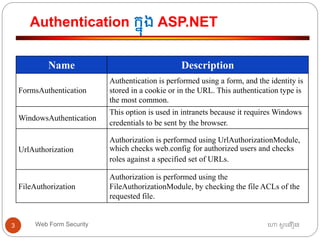
Authentication កនុង ASP.NET
ហោ សូ ហនឿនWeb Form Security3
Name Description
FormsAuthentication
Authentication is performed using a form, and the identity is
stored in a cookie or in the URL. This authentication type is
the most common.
WindowsAuthentication
This option is used in intranets because it requires Windows
credentials to be sent by the browser.
UrlAuthorization
Authorization is performed using UrlAuthorizationModule,
which checks web.config for authorized users and checks
roles against a specified set of URLs.
FileAuthorization
Authorization is performed using the
FileAuthorizationModule, by checking the file ACLs of the
requested file.
Form Authentication
ហោ សូ ហនឿនWeb Form Security4
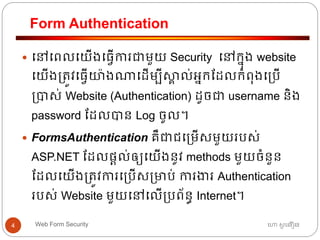
 ធៅធពលធយើងធ្វើការជាមួយ Security ធៅកនុង website
ធយើង្ត្ូវធ្វើយ៉ាងណាធដើមបីស្គា ល់អ្នកដដលកាំពុងធ្បើ
្បាស់ Website (Authentication) ដូចជា username និង
password ដដលបាន Log ចូល។
 FormsAuthentication គឺជាជធ្មើសមួយរបស់
ASP.NET ដដលផ្តល់ឲ្យធយើងនូវ methods មួយចាំនួន
ដដលធយើង្ត្ូវការធ្បើស្មាប់ ការងារ Authentication
របស់ Website មួយធៅធលើ្បព័នធ Internet។
Form Authentication Configuration
ហោ សូ ហនឿនWeb Form Security5
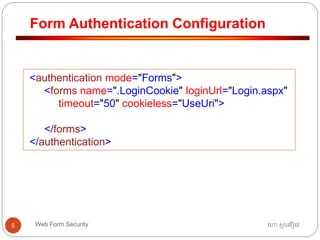
<authentication mode="Forms">
<forms name=".LoginCookie" loginUrl="Login.aspx"
timeout="50" cookieless="UseUri">
</forms>
</authentication>
Form Authentication
ហោ សូ ហនឿនWeb Form Security6
 ធៅធពលធយើងធ្វើការជាមួយ Security ធៅកនុង website
ធយើង្ត្ូវធ្វើយ៉ាងណាធដើមបីស្គា ល់អ្នកដដលកាំពុងធ្បើ
្បាស់ Website (Authentication) ដូចជា username និង
password ដដលបាន Log ចូល។
 FormsAuthentication គឺជាជធ្មើសមួយរបស់
ASP.NET ដដលផ្តល់ឲ្យធយើងនូវ methods មួយចាំនួន
ដដលធយើង្ត្ូវការធ្បើស្មាប់ ការងារ Authentication
របស់ Website មួយធៅធលើ្បព័នធ Internet។
Authorization
ហោ សូ ហនឿនWeb Form Security7
 Authorization គឺជាដាំធណើ រការននការកាំណត្់សិទ្ធិឲ្យអ្នក
ធ្បើ។
 បនាា ប់ Authorization ធ ើយ pages ទាំងឡាយធៅធលើ
Website ដដល្ត្ូវបានកាំណត្់ Security អាច្ត្ូវបាន
ធបើកដ៏រាបណា user បានបញ្ចូ ល username និង
password ្ត្ឹម្ត្ូវ។
 ដូធចនោះរាល់ធពលដដលធគពាយមធបើក pages ដដល្ត្ូវ
បានកាំណត្់ Security ធពលធនាោះ Website នឹងធៅ
ដាំធណើ រការ page “Login.aspx” ធោយសវ័យ្បវត្តិ។
Authorization
ហោ សូ ហនឿនWeb Form Security8
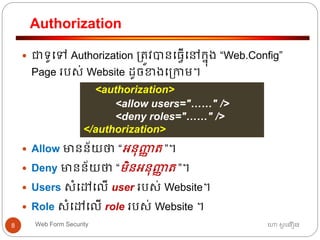
 ជាទ្ូធៅ Authorization ្ត្ូវបានធ្វើធៅកនុង “Web.Config”
Page របស់ Website ដូចខាងធ្កាម។
 Allow មានន័យថា “អ្នុញ្ញា ត្ ”។
 Deny មានន័យថា “មិនអ្នុញ្ញា ត្ ”។
 Users សាំធៅធលើ user របស់ Website។
 Role សាំធៅធលើ role របស់ Website ។
<authorization>
<allow users="……" />
<deny roles="……" />
</authorization>
Authorization
ហោ សូ ហនឿនWeb Form Security9
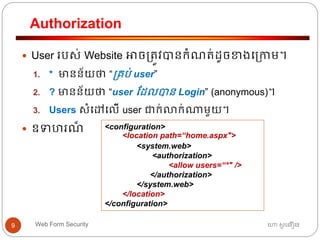
 User របស់ Website អាច្ត្ូវបានកាំណត្់ដូចខាងធ្កាម។
1. * មានន័យថា “្គប់ user”
2. ? មានន័យថា “user ដដលបាន Login” (anonymous)។
3. Users សាំធៅធលើ user ជាក់លាក់ណាមួយ។
 ឧទ រណ៏ <configuration>
<location path=“home.aspx">
<system.web>
<authorization>
<allow users=“*" />
</authorization>
</system.web>
</location>
</configuration>
Credential User Accounts
ហោ សូ ហនឿនWeb Form Security10
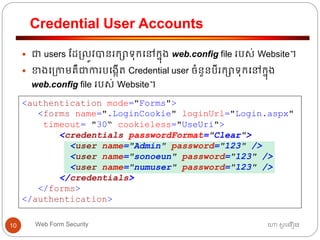
 ជា users ដដ្លូវបានរកាទ្ុកធៅកនុង web.config file របស់ Website។
 ខាងធ្កាមគឺជាការបធងកើត្ Credential user ចាំនួនបីរកាទ្ុកធៅកនុង
web.config file របស់ Website។
<authentication mode="Forms">
<forms name=".LoginCookie" loginUrl="Login.aspx"
timeout= "30“ cookieless="UseUri">
<credentials passwordFormat="Clear">
<user name="Admin" password="123" />
<user name="sonoeun" password="123" />
<user name="numuser" password="123" />
</credentials>
</forms>
</authentication>
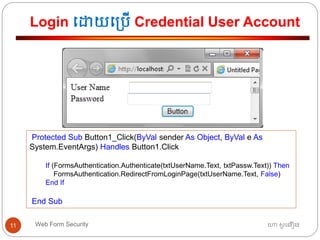
Login ធោយធ្បើ Credential User Account
ហោ សូ ហនឿនWeb Form Security11
Protected Sub Button1_Click(ByVal sender As Object, ByVal e As
System.EventArgs) Handles Button1.Click
If (FormsAuthentication.Authenticate(txtUserName.Text, txtPassw.Text)) Then
FormsAuthentication.RedirectFromLoginPage(txtUserName.Text, False)
End If
End Sub
Membership API
ហោ សូ ហនឿនWeb Form Security12
 The Membership API សាំណុាំ នន programming APIs
ដដល្ត្ូវបានធ្បើ្បាស់ធដើមបី interact ជាមួយ
membership features កនុង ASP.NET application។
 ASP.NET ផ្តល់នូវ SQL Database មួយជាធរសចធៅកនុង
ASP.NET Application ស្មាប់រកាទ្ុក user របស់
Membership API ធឈ្លម ោះ “App_Data”។
ការបធងកើត្ Membership API
ហោ សូ ហនឿនWeb Form Security13
 Web Application Developer អាចបធងកើត្ login account
(user) របស់ membership API ធោយការធ្បើ ASP.Net
Configuration។
 Website មួយអ្នុញ្ញា ត្ឲ្យ users បធងកើត្ login account
(user) របស់ membership API ធោយការធ្បើ
CreateUserWizards Control។
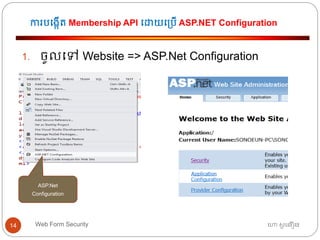
ការបធងកើត្ Membership API ធោយធ្បើ ASP.NET Configuration
ហោ សូ ហនឿនWeb Form Security14
1. ចូលធៅ Website => ASP.Net Configuration
ASP.Net
Configuration
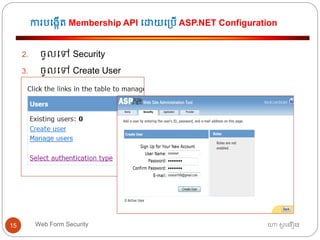
ការបធងកើត្ Membership API ធោយធ្បើ ASP.NET Configuration
ហោ សូ ហនឿនWeb Form Security15
2. ចូលធៅ Security
3. ចូលធៅ Create User
ការបធងកើត្ Membership API ធោយធ្បើ ASP.NET Configuration
ហោ សូ ហនឿនWeb Form Security16
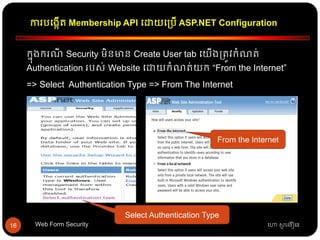
កនុងករណី Security មិនមាន Create User tab ធយើង្ត្ូវកាំណត្់
Authentication របស់ Website ធោយកាំណត្់យក “From the Internet”
=> Select Authentication Type => From The Internet
Select Authentication Type
From the Internet
ការធ្បើ SQL Membership Provider
ហោ សូ ហនឿនWeb Form Security17
 ធយើងអាចធ្បើ Database ផ្ទា ល់ខ្ាួនស្មាប់រកាទ្ុក
Membership APIs បាន។
 Web.Config អ្នុញ្ញា ត្ឲ្យធយើងធ្វើ configuration ធដើមបីរកា
ទ្ុក login accounts, roles, និង profile របស់ users ធៅកនុង
Database ផ្ទា ល់ខ្ាួនបាន។
 ធយើងកាំណត្់យក Database របស់ SQL មករកាទ្ុក login
accounts, roles, និង profile របស់ users។
 Configuration ្ត្ូវបានអ្នុវត្តតាមលាំោប់លាំធោយដូចខាង
ធ្កាម៖
ការធ្វើ Web Configuration ស្មាប់ SQL Membership APIs
ហោ សូ ហនឿនWeb Form Security18
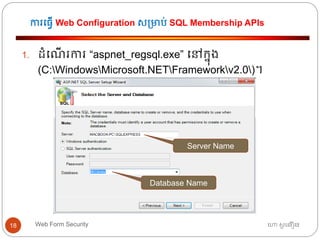
1. ដាំធណើ រការ “aspnet_regsql.exe” ធៅកនុង
(C:WindowsMicrosoft.NETFrameworkv2.0)។
Server Name
Database Name
ការធ្វើ Web Configuration ស្មាប់ SQL Membership APIs
ហោ សូ ហនឿនWeb Form Security19
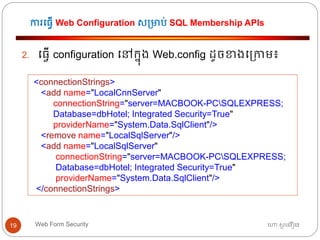
2. ធ្វើ configuration ធៅកនុង Web.config ដូចខាងធ្កាម៖
<connectionStrings>
<add name="LocalCnnServer"
connectionString="server=MACBOOK-PCSQLEXPRESS;
Database=dbHotel; Integrated Security=True"
providerName="System.Data.SqlClient"/>
<remove name="LocalSqlServer"/>
<add name="LocalSqlServer"
connectionString="server=MACBOOK-PCSQLEXPRESS;
Database=dbHotel; Integrated Security=True"
providerName="System.Data.SqlClient"/>
</connectionStrings>
Role Manager
ហោ សូ ហនឿនWeb Form Security20
 ចាំបាច់ណាស់ដដលធយើង្ត្ូវធរៀបចាំ users របស់
Website ធៅតាម្កុមនីមួយ ធដើមបីងាយរសួលស្មាប់
ការារកាំណត្់សិទ្ធិ និង្គប់្គង users។
 Role Manager គឺជាដផ្នកមួយរបស់ WSAT (Webs Site
Administration Tools) ដដលអ្នុញ្ញា ត្ឲ្យ Web
Developers ធរៀបចាំ users ោក់ចូលតាម Role នីមួយៗ
បាន។
ការបធងកើត្ Roles
ហោ សូ ហនឿនWeb Form Security21
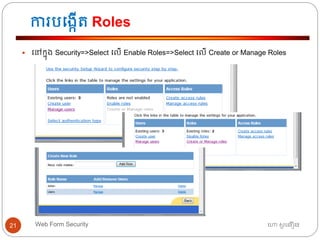
 ធៅកនុង Security=>Select ធលើ Enable Roles=>Select ធលើ Create or Manage Roles
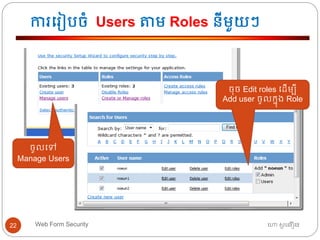
ការធរៀបចាំ Users តាម Roles នីមួយៗ
ហោ សូ ហនឿនWeb Form Security22
ចូលធៅ
Manage Users
ចុច Edit roles ធដើមបី
Add user ចូលកនុង Role
Login Control
ហោ សូ ហនឿនWeb Form Security23
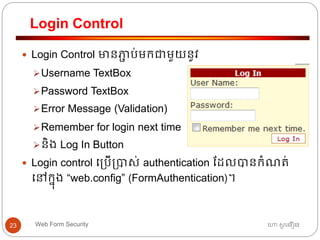
 Login Control មានភាា ប់មកជាមួយនូវ
Username TextBox
Password TextBox
Error Message (Validation)
Remember for login next time
និង Log In Button
 Login control ធ្បើ្បាស់ authentication ដដលបានកាំណត្់
ធៅកនុង “web.config” (FormAuthentication)។
Login Control
ហោ សូ ហនឿនWeb Form Security24
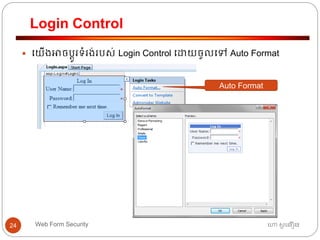
 ធយើងអាចបតូរទ្ាំរង់របស់ Login Control ធោយចូលធៅ Auto Format
Auto Format
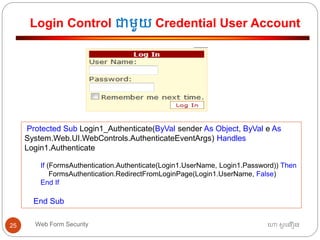
Login Control ជាមួយ Credential User Account
ហោ សូ ហនឿនWeb Form Security25
Protected Sub Login1_Authenticate(ByVal sender As Object, ByVal e As
System.Web.UI.WebControls.AuthenticateEventArgs) Handles
Login1.Authenticate
If (FormsAuthentication.Authenticate(Login1.UserName, Login1.Password)) Then
FormsAuthentication.RedirectFromLoginPage(Login1.UserName, False)
End If
End Sub
LoginName និង LoginStatus Controls
ហោ សូ ហនឿនWeb Form Security26
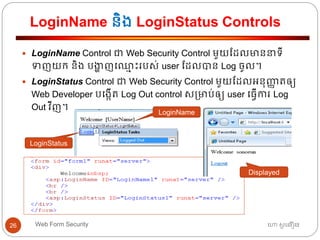
 LoginName Control ជា Web Security Control មួយដដលមាននាទ្ី
ទញយក និង បងាា ញធឈ្លម ោះរបស់ user ដដលបាន Log ចូល។
 LoginStatus Control ជា Web Security Control មួយដដលអ្នុញ្ញា ត្ឲ្យ
Web Developer បធងកើត្ Log Out control ស្មាប់ឲ្យ user ធ្វើការ Log
Out វីញ។
LoginName
LoginStatus
Displayed
CreateUserWizard Control
ហោ សូ ហនឿនWeb Form Security27
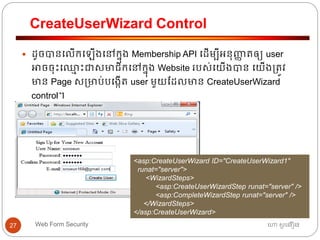
 ដូចបានធលើកធ ើងធៅកនុង Membership API ធដើមបីអ្នុញ្ញា ត្ឲ្យ user
អាចចុោះធឈ្លម ោះជាសមាជិកធៅកនុង Website របស់ធយើងបាន ធយើង្ត្ូវ
មាន Page ស្មាប់បធងកើត្ user មួយដដលមាន CreateUserWizard
control។
<asp:CreateUserWizard ID="CreateUserWizard1"
runat="server">
<WizardSteps>
<asp:CreateUserWizardStep runat="server" />
<asp:CompleteWizardStep runat="server" />
</WizardSteps>
</asp:CreateUserWizard>
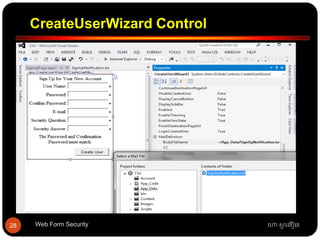
CreateUserWizard Control
ហោ សូ ហនឿនWeb Form Security28
ChangePassword Control
ហោ សូ ហនឿនWeb Form Security29
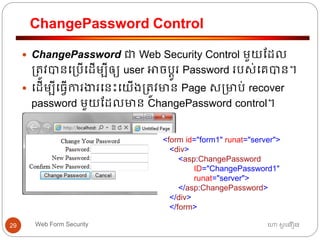
 ChangePassword ជា Web Security Control មួយដដល
្ត្ូវបានធ្បើធដើមបីឲ្យ user អាចបតូរ Password របស់ធគបាន។
 ធដើមបីធ្វើការងារធនោះធយើង្ត្ូវមាន Page ស្មាប់ recover
password មួយដដលមាន ChangePassword control។
<form id="form1" runat="server">
<div>
<asp:ChangePassword
ID="ChangePassword1"
runat="server">
</asp:ChangePassword>
</div>
</form>
RecoveryPassword Control
ហោ សូ ហនឿនWeb Form Security30
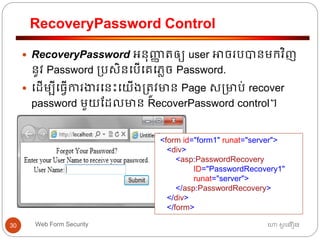
 RecoveryPassword អ្នុញ្ញា ត្ឲ្យ user អាចរបបានមកវិញ
នូវ Password ្បសិនធបើធគធភាច Password.
 ធដើមបីធ្វើការងារធនោះធយើង្ត្ូវមាន Page ស្មាប់ recover
password មួយដដលមាន RecoverPassword control។
<form id="form1" runat="server">
<div>
<asp:PasswordRecovery
ID="PasswordRecovery1"
runat="server">
</asp:PasswordRecovery>
</div>
</form>
Chapter 8
ហោ សូ ហនឿនWeb Form Security 31

Chapter 8 (security)

  • 1.
    Chapter 8 ហោ សូហនឿនWeb Form Security 1
  • 2.
    Authorization និង Authentication ហោសូ ហនឿនWeb Form Security2  ASP.NET ផ្តល់ឲ្យអ្នកអ្ភិវឌ្ឍ Websites មានសមត្ថភាពទាំង ការធ្វើ authentication និង authorization.  Authentication គឺជាការកាំណត្់អ្ត្តសញ្ញា ណរបស់ users។  Authorization គឺជាការផ្តល់សិទ្ធិដល់ users។  Authentication និង authorization ធដើរត្ួនាទ្ីយ៉ាងសាំខាន់ កនុងការងារ security របស់ Website មួយធ្រោះការងាររបស់ ពួកវាគឺការររការឈ្លា នរនពី្បភពអ្នកធ្បើដដលធយើងមិន ចង់បាន។
  • 3.
    Authentication កនុង ASP.NET ហោសូ ហនឿនWeb Form Security3 Name Description FormsAuthentication Authentication is performed using a form, and the identity is stored in a cookie or in the URL. This authentication type is the most common. WindowsAuthentication This option is used in intranets because it requires Windows credentials to be sent by the browser. UrlAuthorization Authorization is performed using UrlAuthorizationModule, which checks web.config for authorized users and checks roles against a specified set of URLs. FileAuthorization Authorization is performed using the FileAuthorizationModule, by checking the file ACLs of the requested file.
  • 4.
    Form Authentication ហោ សូហនឿនWeb Form Security4  ធៅធពលធយើងធ្វើការជាមួយ Security ធៅកនុង website ធយើង្ត្ូវធ្វើយ៉ាងណាធដើមបីស្គា ល់អ្នកដដលកាំពុងធ្បើ ្បាស់ Website (Authentication) ដូចជា username និង password ដដលបាន Log ចូល។  FormsAuthentication គឺជាជធ្មើសមួយរបស់ ASP.NET ដដលផ្តល់ឲ្យធយើងនូវ methods មួយចាំនួន ដដលធយើង្ត្ូវការធ្បើស្មាប់ ការងារ Authentication របស់ Website មួយធៅធលើ្បព័នធ Internet។
  • 5.
    Form Authentication Configuration ហោសូ ហនឿនWeb Form Security5 <authentication mode="Forms"> <forms name=".LoginCookie" loginUrl="Login.aspx" timeout="50" cookieless="UseUri"> </forms> </authentication>
  • 6.
    Form Authentication ហោ សូហនឿនWeb Form Security6  ធៅធពលធយើងធ្វើការជាមួយ Security ធៅកនុង website ធយើង្ត្ូវធ្វើយ៉ាងណាធដើមបីស្គា ល់អ្នកដដលកាំពុងធ្បើ ្បាស់ Website (Authentication) ដូចជា username និង password ដដលបាន Log ចូល។  FormsAuthentication គឺជាជធ្មើសមួយរបស់ ASP.NET ដដលផ្តល់ឲ្យធយើងនូវ methods មួយចាំនួន ដដលធយើង្ត្ូវការធ្បើស្មាប់ ការងារ Authentication របស់ Website មួយធៅធលើ្បព័នធ Internet។
  • 7.
    Authorization ហោ សូ ហនឿនWebForm Security7  Authorization គឺជាដាំធណើ រការននការកាំណត្់សិទ្ធិឲ្យអ្នក ធ្បើ។  បនាា ប់ Authorization ធ ើយ pages ទាំងឡាយធៅធលើ Website ដដល្ត្ូវបានកាំណត្់ Security អាច្ត្ូវបាន ធបើកដ៏រាបណា user បានបញ្ចូ ល username និង password ្ត្ឹម្ត្ូវ។  ដូធចនោះរាល់ធពលដដលធគពាយមធបើក pages ដដល្ត្ូវ បានកាំណត្់ Security ធពលធនាោះ Website នឹងធៅ ដាំធណើ រការ page “Login.aspx” ធោយសវ័យ្បវត្តិ។
  • 8.
    Authorization ហោ សូ ហនឿនWebForm Security8  ជាទ្ូធៅ Authorization ្ត្ូវបានធ្វើធៅកនុង “Web.Config” Page របស់ Website ដូចខាងធ្កាម។  Allow មានន័យថា “អ្នុញ្ញា ត្ ”។  Deny មានន័យថា “មិនអ្នុញ្ញា ត្ ”។  Users សាំធៅធលើ user របស់ Website។  Role សាំធៅធលើ role របស់ Website ។ <authorization> <allow users="……" /> <deny roles="……" /> </authorization>
  • 9.
    Authorization ហោ សូ ហនឿនWebForm Security9  User របស់ Website អាច្ត្ូវបានកាំណត្់ដូចខាងធ្កាម។ 1. * មានន័យថា “្គប់ user” 2. ? មានន័យថា “user ដដលបាន Login” (anonymous)។ 3. Users សាំធៅធលើ user ជាក់លាក់ណាមួយ។  ឧទ រណ៏ <configuration> <location path=“home.aspx"> <system.web> <authorization> <allow users=“*" /> </authorization> </system.web> </location> </configuration>
  • 10.
    Credential User Accounts ហោសូ ហនឿនWeb Form Security10  ជា users ដដ្លូវបានរកាទ្ុកធៅកនុង web.config file របស់ Website។  ខាងធ្កាមគឺជាការបធងកើត្ Credential user ចាំនួនបីរកាទ្ុកធៅកនុង web.config file របស់ Website។ <authentication mode="Forms"> <forms name=".LoginCookie" loginUrl="Login.aspx" timeout= "30“ cookieless="UseUri"> <credentials passwordFormat="Clear"> <user name="Admin" password="123" /> <user name="sonoeun" password="123" /> <user name="numuser" password="123" /> </credentials> </forms> </authentication>
  • 11.
    Login ធោយធ្បើ CredentialUser Account ហោ សូ ហនឿនWeb Form Security11 Protected Sub Button1_Click(ByVal sender As Object, ByVal e As System.EventArgs) Handles Button1.Click If (FormsAuthentication.Authenticate(txtUserName.Text, txtPassw.Text)) Then FormsAuthentication.RedirectFromLoginPage(txtUserName.Text, False) End If End Sub
  • 12.
    Membership API ហោ សូហនឿនWeb Form Security12  The Membership API សាំណុាំ នន programming APIs ដដល្ត្ូវបានធ្បើ្បាស់ធដើមបី interact ជាមួយ membership features កនុង ASP.NET application។  ASP.NET ផ្តល់នូវ SQL Database មួយជាធរសចធៅកនុង ASP.NET Application ស្មាប់រកាទ្ុក user របស់ Membership API ធឈ្លម ោះ “App_Data”។
  • 13.
    ការបធងកើត្ Membership API ហោសូ ហនឿនWeb Form Security13  Web Application Developer អាចបធងកើត្ login account (user) របស់ membership API ធោយការធ្បើ ASP.Net Configuration។  Website មួយអ្នុញ្ញា ត្ឲ្យ users បធងកើត្ login account (user) របស់ membership API ធោយការធ្បើ CreateUserWizards Control។
  • 14.
    ការបធងកើត្ Membership APIធោយធ្បើ ASP.NET Configuration ហោ សូ ហនឿនWeb Form Security14 1. ចូលធៅ Website => ASP.Net Configuration ASP.Net Configuration
  • 15.
    ការបធងកើត្ Membership APIធោយធ្បើ ASP.NET Configuration ហោ សូ ហនឿនWeb Form Security15 2. ចូលធៅ Security 3. ចូលធៅ Create User
  • 16.
    ការបធងកើត្ Membership APIធោយធ្បើ ASP.NET Configuration ហោ សូ ហនឿនWeb Form Security16 កនុងករណី Security មិនមាន Create User tab ធយើង្ត្ូវកាំណត្់ Authentication របស់ Website ធោយកាំណត្់យក “From the Internet” => Select Authentication Type => From The Internet Select Authentication Type From the Internet
  • 17.
    ការធ្បើ SQL MembershipProvider ហោ សូ ហនឿនWeb Form Security17  ធយើងអាចធ្បើ Database ផ្ទា ល់ខ្ាួនស្មាប់រកាទ្ុក Membership APIs បាន។  Web.Config អ្នុញ្ញា ត្ឲ្យធយើងធ្វើ configuration ធដើមបីរកា ទ្ុក login accounts, roles, និង profile របស់ users ធៅកនុង Database ផ្ទា ល់ខ្ាួនបាន។  ធយើងកាំណត្់យក Database របស់ SQL មករកាទ្ុក login accounts, roles, និង profile របស់ users។  Configuration ្ត្ូវបានអ្នុវត្តតាមលាំោប់លាំធោយដូចខាង ធ្កាម៖
  • 18.
    ការធ្វើ Web Configurationស្មាប់ SQL Membership APIs ហោ សូ ហនឿនWeb Form Security18 1. ដាំធណើ រការ “aspnet_regsql.exe” ធៅកនុង (C:WindowsMicrosoft.NETFrameworkv2.0)។ Server Name Database Name
  • 19.
    ការធ្វើ Web Configurationស្មាប់ SQL Membership APIs ហោ សូ ហនឿនWeb Form Security19 2. ធ្វើ configuration ធៅកនុង Web.config ដូចខាងធ្កាម៖ <connectionStrings> <add name="LocalCnnServer" connectionString="server=MACBOOK-PCSQLEXPRESS; Database=dbHotel; Integrated Security=True" providerName="System.Data.SqlClient"/> <remove name="LocalSqlServer"/> <add name="LocalSqlServer" connectionString="server=MACBOOK-PCSQLEXPRESS; Database=dbHotel; Integrated Security=True" providerName="System.Data.SqlClient"/> </connectionStrings>
  • 20.
    Role Manager ហោ សូហនឿនWeb Form Security20  ចាំបាច់ណាស់ដដលធយើង្ត្ូវធរៀបចាំ users របស់ Website ធៅតាម្កុមនីមួយ ធដើមបីងាយរសួលស្មាប់ ការារកាំណត្់សិទ្ធិ និង្គប់្គង users។  Role Manager គឺជាដផ្នកមួយរបស់ WSAT (Webs Site Administration Tools) ដដលអ្នុញ្ញា ត្ឲ្យ Web Developers ធរៀបចាំ users ោក់ចូលតាម Role នីមួយៗ បាន។
  • 21.
    ការបធងកើត្ Roles ហោ សូហនឿនWeb Form Security21  ធៅកនុង Security=>Select ធលើ Enable Roles=>Select ធលើ Create or Manage Roles
  • 22.
    ការធរៀបចាំ Users តាមRoles នីមួយៗ ហោ សូ ហនឿនWeb Form Security22 ចូលធៅ Manage Users ចុច Edit roles ធដើមបី Add user ចូលកនុង Role
  • 23.
    Login Control ហោ សូហនឿនWeb Form Security23  Login Control មានភាា ប់មកជាមួយនូវ Username TextBox Password TextBox Error Message (Validation) Remember for login next time និង Log In Button  Login control ធ្បើ្បាស់ authentication ដដលបានកាំណត្់ ធៅកនុង “web.config” (FormAuthentication)។
  • 24.
    Login Control ហោ សូហនឿនWeb Form Security24  ធយើងអាចបតូរទ្ាំរង់របស់ Login Control ធោយចូលធៅ Auto Format Auto Format
  • 25.
    Login Control ជាមួយCredential User Account ហោ សូ ហនឿនWeb Form Security25 Protected Sub Login1_Authenticate(ByVal sender As Object, ByVal e As System.Web.UI.WebControls.AuthenticateEventArgs) Handles Login1.Authenticate If (FormsAuthentication.Authenticate(Login1.UserName, Login1.Password)) Then FormsAuthentication.RedirectFromLoginPage(Login1.UserName, False) End If End Sub
  • 26.
    LoginName និង LoginStatusControls ហោ សូ ហនឿនWeb Form Security26  LoginName Control ជា Web Security Control មួយដដលមាននាទ្ី ទញយក និង បងាា ញធឈ្លម ោះរបស់ user ដដលបាន Log ចូល។  LoginStatus Control ជា Web Security Control មួយដដលអ្នុញ្ញា ត្ឲ្យ Web Developer បធងកើត្ Log Out control ស្មាប់ឲ្យ user ធ្វើការ Log Out វីញ។ LoginName LoginStatus Displayed
  • 27.
    CreateUserWizard Control ហោ សូហនឿនWeb Form Security27  ដូចបានធលើកធ ើងធៅកនុង Membership API ធដើមបីអ្នុញ្ញា ត្ឲ្យ user អាចចុោះធឈ្លម ោះជាសមាជិកធៅកនុង Website របស់ធយើងបាន ធយើង្ត្ូវ មាន Page ស្មាប់បធងកើត្ user មួយដដលមាន CreateUserWizard control។ <asp:CreateUserWizard ID="CreateUserWizard1" runat="server"> <WizardSteps> <asp:CreateUserWizardStep runat="server" /> <asp:CompleteWizardStep runat="server" /> </WizardSteps> </asp:CreateUserWizard>

  • 28.
    CreateUserWizard Control ហោ សូហនឿនWeb Form Security28
  • 29.
    ChangePassword Control ហោ សូហនឿនWeb Form Security29  ChangePassword ជា Web Security Control មួយដដល ្ត្ូវបានធ្បើធដើមបីឲ្យ user អាចបតូរ Password របស់ធគបាន។  ធដើមបីធ្វើការងារធនោះធយើង្ត្ូវមាន Page ស្មាប់ recover password មួយដដលមាន ChangePassword control។ <form id="form1" runat="server"> <div> <asp:ChangePassword ID="ChangePassword1" runat="server"> </asp:ChangePassword> </div> </form>
  • 30.
    RecoveryPassword Control ហោ សូហនឿនWeb Form Security30  RecoveryPassword អ្នុញ្ញា ត្ឲ្យ user អាចរបបានមកវិញ នូវ Password ្បសិនធបើធគធភាច Password.  ធដើមបីធ្វើការងារធនោះធយើង្ត្ូវមាន Page ស្មាប់ recover password មួយដដលមាន RecoverPassword control។ <form id="form1" runat="server"> <div> <asp:PasswordRecovery ID="PasswordRecovery1" runat="server"> </asp:PasswordRecovery> </div> </form>
  • 31.
    Chapter 8 ហោ សូហនឿនWeb Form Security 31