Neal Harrington | sales@redstampede.com | 704.578.1248 | 6701 Fairview Rd., Charlotte, NC 28210 | www.redstampede.com 
REDSTAMPEDE REDEFINE POSSIBLE 
MARKETING & COMMUNICATIONS 
 OVERVIEW 
 EMAIL RECRUITER 
1. Gmail 
2. Yahoo 
3. Outlook 
4. Email 
 SOCIAL SHARING 
1. LinkedIn 
2. Facebook 
3. Twitter 
4. QR Codes 
 LANDING PAGES AND MICRO-SITES 
1. Mainstreet 
2. WebTV 
3. Petition Campaigns 
4. Endorsement 
5. Volunteer 
 FEEDBACK/COMMENT RESPONDER 
 UNIVERSAL ONLINE INTEGRATION 
1. Olark 
2. Google Apps 
3. MailChimp 
4. SalesForce 
5. Authorize.net 
6. PayPal 
1
Neal Harrington | sales@redstampede.com | 704.578.1248 | 6701 Fairview Rd., Charlotte, NC 28210 | www.redstampede.com 
REDSTAMPEDE REDEFINE POSSIBLE 
OVERVIEW 
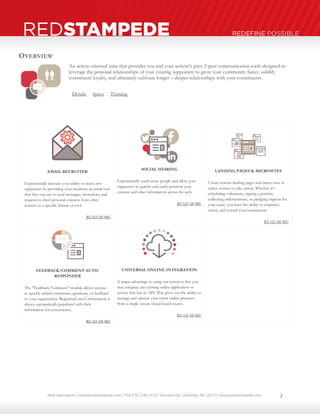
An action-oriented suite that provides you and your activist’s peer-2-peer communication tools designed to 
leverage the personal relationships of your existing supporters to grow your community faster, solidify 
constituent loyalty, and ultimately cultivate longer – deeper relationships with your constituents. 
Details Specs Training 
EMAIL RECRUITER 
Exponentially increase your ability to reach new 
supporters by providing your members an email tool 
that they can use to send messages, invitations, and 
requests to their personal contacts from other 
sources to a specific feature or tool 
READ MORE 
SOCIAL SHARING 
Exponentially reach more people and allow your 
supporters to quickly and easily promote your 
content and other information across the web. 
READ MORE 
LANDING PAGES & MICROSITES 
Create custom landing pages and micro-sites to 
entice visitors to take action. Whether it’s 
scheduling volunteers, signing a petition, 
collecting endorsements, or pledging support for 
your cause, you have the ability to empower, 
entice, and reward your constituents. 
READ MORE 
FEEDBACK/COMMENT AUTO-RESPONDER 
The "Feedback/Comment" module allows anyone 
to quickly submit comments, questions, or feedback 
to your organization. Registered user's information is 
always automatically populated with their 
information for convenience. 
READ MORE 
UNIVERSAL ONLINE INTEGRATION 
A major advantage to using our system is that you 
may integrate any existing online application or 
service that has an API. This gives you the ability to 
manage and operate your entire online presence 
from a single, secure cloud-based source. 
READ MORE 
2
Neal Harrington | sales@redstampede.com | 704.578.1248 | 6701 Fairview Rd., Charlotte, NC 28210 | www.redstampede.com 
REDSTAMPEDE REDEFINE POSSIBLE 
EMAIL RECRUITER 
How to use it and what it's for? 
 Send your contacts a personal email through the platform to invite 
them to view a page, join your network, join your group, RSVP to an 
event, or donate to your Personal Fundraising Page. 
 Any contact that you recruit who joins will automatically become your 
friend in the social network. 
 This feature allows you and your supporters to send a personal message 
through your preferred email service provider with the targeted link and 
description of the item you are sending your contact(s) 
SOCIAL SHARING 
How to use it and what it's for? 
 Our Social Sharing tools will help you exponentially reach more people and allow your supporters to quickly and easily promote your 
content and other information across the web. 
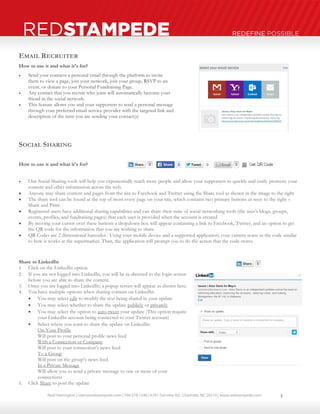
 Anyone may share content and pages from the site to Facebook and Twitter using the Share tool as shown in the image to the right 
 The share tool can be found at the top of most every page on your site, which contains two primary buttons as seen to the right – 
Share and Print. 
 Registered users have additional sharing capabilities and can share their suite of social networking tools (the user’s blogs, groups, 
events, profiles, and fundraising pages) that each user is provided when the account is created 
 By moving your cursor over these buttons a dropdown box will appear containing a link to Facebook, Twitter, and an option to get 
the QR code for the information that you are wishing to share. 
 QR Codes are 2 dimensional barcodes. Using your mobile device and a supported application, your camera scans in the code similar 
to how it works at the supermarket. Then, the application will prompt you to do the action that the code stores. 
Share to LinkedIn 
1. Click on the LinkedIn option 
2. If you are not logged into LinkedIn, you will be re-directed to the login screen 
before you are able to share the content. 
3. Once you are logged into LinkedIn; a popup screen will appear as shown here. 
4. You have multiple options when sharing content on LinkedIn. 
 You may select edit to modify the text being shared in your update 
 You may select whether to share the update publicly or privately 
 You may select the option to auto-tweet your update (This option require 
your LinkedIn account being connected to your Twitter account) 
 Select where you want to share the update on LinkedIn: 
On Your Profile 
Will post to your personal profile news feed 
With a Connection or Company 
Will post to your connection’s news feed 
To a Group 
Will post on the group’s news feed 
In a Private Message 
Will allow you to send a private message to one or more of your 
connections 
5. Click Share to post the update 
3
Neal Harrington | sales@redstampede.com | 704.578.1248 | 6701 Fairview Rd., Charlotte, NC 28210 | www.redstampede.com 
REDSTAMPEDE REDEFINE POSSIBLE 
Share to Facebook 
6. Click on the Facebook option 
7. If you are not logged into Facebook, you will be re-directed to the login screen 
before you are able to share the content. 
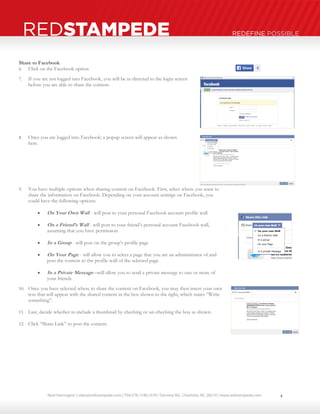
8. Once you are logged into Facebook; a popup screen will appear as shown 
here. 
9. You have multiple options when sharing content on Facebook. First, select where you want to 
share the information on Facebook. Depending on your account settings on Facebook, you 
could have the following options: 
 On Your Own Wall - will post to your personal Facebook account profile wall 
 On a Friend’s Wall - will post to your friend’s personal account Facebook wall, 
assuming that you have permission 
 In a Group - will post on the group’s profile page 
 On Your Page - will allow you to select a page that you are an administrator of and 
post the content to the profile wall of the selected page 
 In a Private Message –will allow you to send a private message to one or more of 
your friends 
10. Once you have selected where to share the content on Facebook, you may then insert your own 
text that will appear with the shared content in the box shown to the right, which states “Write 
something”. 
11. Last, decide whether to include a thumbnail by checking or un-checking the box as shown. 
12. Click “Share Link” to post the content. 
4
Neal Harrington | sales@redstampede.com | 704.578.1248 | 6701 Fairview Rd., Charlotte, NC 28210 | www.redstampede.com 
REDSTAMPEDE REDEFINE POSSIBLE 
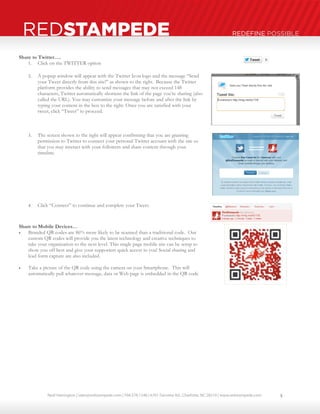
Share to Twitter…. 
1. Click on the TWITTER option 
2. A popup window will appear with the Twitter Icon logo and the message “Send 
your Tweet directly from this site!” as shown to the right. Because the Twitter 
platform provides the ability to send messages that may not exceed 148 
characters, Twitter automatically shortens the link of the page you’re sharing (also 
called the URL). You may customize your message before and after the link by 
typing your content in the box to the right. Once you are satisfied with your 
tweet, click “Tweet” to proceed. 
3. The screen shown to the right will appear confirming that you are granting 
permission to Twitter to connect your personal Twitter account with the site so 
that you may interact with your followers and share content through your 
timeline. 
4. Click “Connect” to continue and complete your Tweet. 
Share to Mobile Devices… 
 Branded QR codes are 86% more likely to be scanned than a traditional code. Our 
custom QR codes will provide you the latest technology and creative techniques to 
take your organization to the next level. This single page mobile site can be setup to 
show you off best and give your supporters quick access to you! Social sharing and 
lead form capture are also included. 
 Take a picture of the QR code using the camera on your Smartphone. This will 
automatically pull whatever message, data or Web page is embedded in the QR code 
5
Neal Harrington | sales@redstampede.com | 704.578.1248 | 6701 Fairview Rd., Charlotte, NC 28210 | www.redstampede.com 
REDSTAMPEDE REDEFINE POSSIBLE 
LANDING PAGES & MICROSITES 
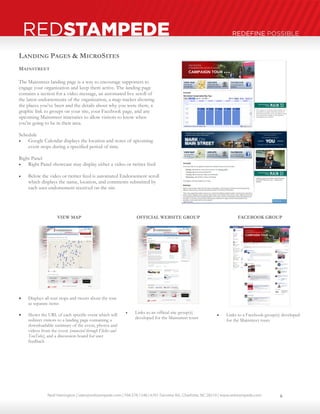
MAINSTREET 
The Mainstreet landing page is a way to encourage supporters to 
engage your organization and keep them active. The landing page 
contains a section for a video message, an automated live scroll of 
the latest endorsements of the organization, a map tracker showing 
the places you’ve been and the details about why you were there, a 
graphic link to groups on your site, your Facebook page, and any 
upcoming Mainstreet itineraries to allow visitors to know when 
you're going to be in their area. 
Schedule 
 Google Calendar displays the location and notes of upcoming 
event stops during a specified period of time 
Right Panel 
 Right Panel showcase may display either a video or twitter feed 
 Below the video or twitter feed is automated Endorsement scroll 
which displays the name, location, and comments submitted by 
each user endorsement received on the site 
VIEW MAP 
 Displays all tour stops and tweets about the tour 
as separate items 
 Shows the URL of each specific event which will 
redirect visitors to a landing page containing a 
downloadable summary of the event, photos and 
videos from the event (connected through Flickr and 
YouTube), and a discussion board for user 
feedback 
OFFICIAL WEBSITE GROUP 
 Links to an official site group(s) 
developed for the Mainstreet tours 
FACEBOOK GROUP 
 Links to a Facebook group(s) developed 
for the Mainstreet tours 
6
Neal Harrington | sales@redstampede.com | 704.578.1248 | 6701 Fairview Rd., Charlotte, NC 28210 | www.redstampede.com 
REDSTAMPEDE REDEFINE POSSIBLE 
WEBTV 
The Videos application automatically reads a 
YouTube page and organizes the videos based on a 
specific tag given to the video in YouTube. 
 For example, the “Red Stampede Account: 
Commercials: 1:2” indicates that the video is for 
the “Red Stampede Account” application, under 
the “Commercials” category, which is the 1st 
category, and this is the 2nd video in that 
category. 
 The TV Module may contain up to 5 categories 
and 50 videos in each category. 
 The Endorsement Module may contain up to 5 
categories and 50 videos in each category 
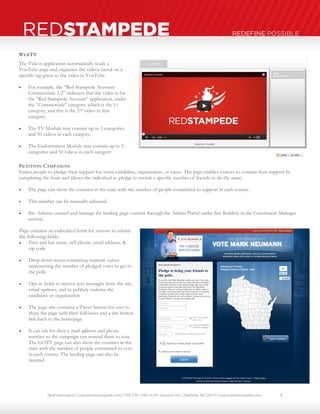
PETITION CAMPAIGNS 
Entice people to pledge their support for some candidate, organization, or cause. The page enables visitors to commit their support by 
completing the form and allows the individual to pledge to recruit a specific number of friends to do the same. 
 The page can show the counties in the state with the number of people committed to support in each county. 
 This number can be manually adjusted. 
 Site Admins control and manage the landing page content through the Admin Portal under Site Builders in the Constituent Manager 
section. 
Page contains an embedded form for visitors to submit 
the following fields: 
 First and last name, cell phone, email address, & 
zip code 
 Drop down menu containing numeric values 
representing the number of pledged votes to get to 
the polls 
 Opt-in fields to receive text messages from the site, 
email updates, and to publicly endorse the 
candidate or organization 
 The page also contains a Tweet button for user to 
share the page with their followers and a site button 
link back to the homepage 
 It can ask for their e-mail address and phone 
number so the campaign can remind them to vote. 
The GOTV page can also show the counties in the 
state with the number of people committed to vote 
in each county. The landing page can also be 
tweeted 
7
Neal Harrington | sales@redstampede.com | 704.578.1248 | 6701 Fairview Rd., Charlotte, NC 28210 | www.redstampede.com 
REDSTAMPEDE REDEFINE POSSIBLE 
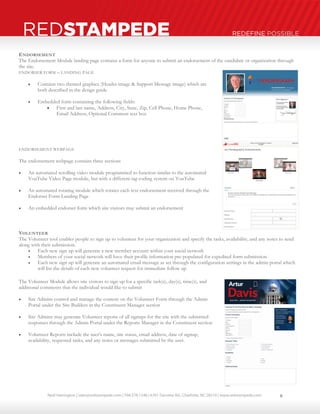
ENDORSEMENT 
The Endorsement Module landing page contains a form for anyone to submit an endorsement of the candidate or organization through 
the site. 
ENDORSER FORM – LANDING PAGE 
 Contains two themed graphics (Header image & Support Message image) which are 
both described in the design guide 
 Embedded form containing the following fields: 
 First and last name, Address, City, State, Zip, Cell Phone, Home Phone, 
Email Address, Optional Comment text box 
ENDORSEMENT WEBPAGE 
The endorsement webpage contains three sections 
 An automated scrolling video module programmed to function similar to the automated 
YouTube Video Page module, but with a different tag coding system on YouTube 
 An automated rotating module which rotates each text endorsement received through the 
Endorser Form Landing Page 
 An embedded endorser form which site visitors may submit an endorsement 
VOLUNTEER 
The Volunteer tool enables people to sign up to volunteer for your organization and specify the tasks, availability, and any notes to send 
along with their submission. 
 Each new sign up will generate a new member account within your social network 
 Members of your social network will have their profile information pre-populated for expedited form submission 
 Each new sign up will generate an automated email message as set through the configuration settings in the admin portal which 
will list the details of each new volunteer request for immediate follow up 
The Volunteer Module allows site visitors to sign up for a specific task(s), day(s), time(s), and 
additional comments that the individual would like to submit 
 Site Admins control and manage the content on the Volunteer Form through the Admin 
Portal under the Site Builders in the Constituent Manager section 
 Site Admins may generate Volunteer reports of all signups for the site with the submitted 
responses through the Admin Portal under the Reports Manager in the Constituent section 
 Volunteer Reports include the user’s name, site status, email address, date of signup, 
availability, requested tasks, and any notes or messages submitted by the user. 
8
Neal Harrington | sales@redstampede.com | 704.578.1248 | 6701 Fairview Rd., Charlotte, NC 28210 | www.redstampede.com 
REDSTAMPEDE REDEFINE POSSIBLE 
COMMENTS & FEEDBACK 
To build and cultivate an online community, it’s imperative to provide certain tools to 
encourage an open and meaningful dialogue with your organization. 
 The "Your Voice" module allows anyone to quickly submit comments, questions, 
or feedback to your organization. 
 The form can be embedded into any webpage. 
 The message is delivered to the email(s) listed in the Configuration Settings in the 
Admin Portal 
 When users are logged into the platform, their name and email address will 
automatically appear in the form. 
UNIVERSAL ONLINE INTEGRATION 
Online Chat 
Servicing your site’s visitors is a great way to have a strong first impression and build 
loyalty. We have integrated Olark’s online chat system into our websites to allow you to 
greet and/or provide assistance to anyone visiting your site. 
Google Apps 
The website can integrate Google Apps, which contains a suite of productivity tools 
including branded organizational email, calendaring, document sharing and instant 
messaging. 
Mailchimp Email Marketing 
MailChimp helps you design email newsletters, share them on social networks, integrate 
with services you already use, and track your results. It's like your own personal 
publishing platform 
Salesforce Database CRM 
Customer relationship management (CRM) software & cloud computing from the leader 
in CRM solutions for businesses large & small. 
Authorize.net Payment Gateway 
Payment gateway enables internet merchants to accept online payments via credit card 
and e-check. 
PayPal 
PayPal is the faster, safer way to send money, make an online payment, receive money, 
or set up a merchant account. 
9

Red Stampede User Guide: Marketing & Communications

  • 1.
    Neal Harrington |sales@redstampede.com | 704.578.1248 | 6701 Fairview Rd., Charlotte, NC 28210 | www.redstampede.com REDSTAMPEDE REDEFINE POSSIBLE MARKETING & COMMUNICATIONS  OVERVIEW  EMAIL RECRUITER 1. Gmail 2. Yahoo 3. Outlook 4. Email  SOCIAL SHARING 1. LinkedIn 2. Facebook 3. Twitter 4. QR Codes  LANDING PAGES AND MICRO-SITES 1. Mainstreet 2. WebTV 3. Petition Campaigns 4. Endorsement 5. Volunteer  FEEDBACK/COMMENT RESPONDER  UNIVERSAL ONLINE INTEGRATION 1. Olark 2. Google Apps 3. MailChimp 4. SalesForce 5. Authorize.net 6. PayPal 1
  • 2.
    Neal Harrington |sales@redstampede.com | 704.578.1248 | 6701 Fairview Rd., Charlotte, NC 28210 | www.redstampede.com REDSTAMPEDE REDEFINE POSSIBLE OVERVIEW An action-oriented suite that provides you and your activist’s peer-2-peer communication tools designed to leverage the personal relationships of your existing supporters to grow your community faster, solidify constituent loyalty, and ultimately cultivate longer – deeper relationships with your constituents. Details Specs Training EMAIL RECRUITER Exponentially increase your ability to reach new supporters by providing your members an email tool that they can use to send messages, invitations, and requests to their personal contacts from other sources to a specific feature or tool READ MORE SOCIAL SHARING Exponentially reach more people and allow your supporters to quickly and easily promote your content and other information across the web. READ MORE LANDING PAGES & MICROSITES Create custom landing pages and micro-sites to entice visitors to take action. Whether it’s scheduling volunteers, signing a petition, collecting endorsements, or pledging support for your cause, you have the ability to empower, entice, and reward your constituents. READ MORE FEEDBACK/COMMENT AUTO-RESPONDER The "Feedback/Comment" module allows anyone to quickly submit comments, questions, or feedback to your organization. Registered user's information is always automatically populated with their information for convenience. READ MORE UNIVERSAL ONLINE INTEGRATION A major advantage to using our system is that you may integrate any existing online application or service that has an API. This gives you the ability to manage and operate your entire online presence from a single, secure cloud-based source. READ MORE 2
  • 3.
    Neal Harrington |sales@redstampede.com | 704.578.1248 | 6701 Fairview Rd., Charlotte, NC 28210 | www.redstampede.com REDSTAMPEDE REDEFINE POSSIBLE EMAIL RECRUITER How to use it and what it's for?  Send your contacts a personal email through the platform to invite them to view a page, join your network, join your group, RSVP to an event, or donate to your Personal Fundraising Page.  Any contact that you recruit who joins will automatically become your friend in the social network.  This feature allows you and your supporters to send a personal message through your preferred email service provider with the targeted link and description of the item you are sending your contact(s) SOCIAL SHARING How to use it and what it's for?  Our Social Sharing tools will help you exponentially reach more people and allow your supporters to quickly and easily promote your content and other information across the web.  Anyone may share content and pages from the site to Facebook and Twitter using the Share tool as shown in the image to the right  The share tool can be found at the top of most every page on your site, which contains two primary buttons as seen to the right – Share and Print.  Registered users have additional sharing capabilities and can share their suite of social networking tools (the user’s blogs, groups, events, profiles, and fundraising pages) that each user is provided when the account is created  By moving your cursor over these buttons a dropdown box will appear containing a link to Facebook, Twitter, and an option to get the QR code for the information that you are wishing to share.  QR Codes are 2 dimensional barcodes. Using your mobile device and a supported application, your camera scans in the code similar to how it works at the supermarket. Then, the application will prompt you to do the action that the code stores. Share to LinkedIn 1. Click on the LinkedIn option 2. If you are not logged into LinkedIn, you will be re-directed to the login screen before you are able to share the content. 3. Once you are logged into LinkedIn; a popup screen will appear as shown here. 4. You have multiple options when sharing content on LinkedIn.  You may select edit to modify the text being shared in your update  You may select whether to share the update publicly or privately  You may select the option to auto-tweet your update (This option require your LinkedIn account being connected to your Twitter account)  Select where you want to share the update on LinkedIn: On Your Profile Will post to your personal profile news feed With a Connection or Company Will post to your connection’s news feed To a Group Will post on the group’s news feed In a Private Message Will allow you to send a private message to one or more of your connections 5. Click Share to post the update 3
  • 4.
    Neal Harrington |sales@redstampede.com | 704.578.1248 | 6701 Fairview Rd., Charlotte, NC 28210 | www.redstampede.com REDSTAMPEDE REDEFINE POSSIBLE Share to Facebook 6. Click on the Facebook option 7. If you are not logged into Facebook, you will be re-directed to the login screen before you are able to share the content. 8. Once you are logged into Facebook; a popup screen will appear as shown here. 9. You have multiple options when sharing content on Facebook. First, select where you want to share the information on Facebook. Depending on your account settings on Facebook, you could have the following options:  On Your Own Wall - will post to your personal Facebook account profile wall  On a Friend’s Wall - will post to your friend’s personal account Facebook wall, assuming that you have permission  In a Group - will post on the group’s profile page  On Your Page - will allow you to select a page that you are an administrator of and post the content to the profile wall of the selected page  In a Private Message –will allow you to send a private message to one or more of your friends 10. Once you have selected where to share the content on Facebook, you may then insert your own text that will appear with the shared content in the box shown to the right, which states “Write something”. 11. Last, decide whether to include a thumbnail by checking or un-checking the box as shown. 12. Click “Share Link” to post the content. 4
  • 5.
    Neal Harrington |sales@redstampede.com | 704.578.1248 | 6701 Fairview Rd., Charlotte, NC 28210 | www.redstampede.com REDSTAMPEDE REDEFINE POSSIBLE Share to Twitter…. 1. Click on the TWITTER option 2. A popup window will appear with the Twitter Icon logo and the message “Send your Tweet directly from this site!” as shown to the right. Because the Twitter platform provides the ability to send messages that may not exceed 148 characters, Twitter automatically shortens the link of the page you’re sharing (also called the URL). You may customize your message before and after the link by typing your content in the box to the right. Once you are satisfied with your tweet, click “Tweet” to proceed. 3. The screen shown to the right will appear confirming that you are granting permission to Twitter to connect your personal Twitter account with the site so that you may interact with your followers and share content through your timeline. 4. Click “Connect” to continue and complete your Tweet. Share to Mobile Devices…  Branded QR codes are 86% more likely to be scanned than a traditional code. Our custom QR codes will provide you the latest technology and creative techniques to take your organization to the next level. This single page mobile site can be setup to show you off best and give your supporters quick access to you! Social sharing and lead form capture are also included.  Take a picture of the QR code using the camera on your Smartphone. This will automatically pull whatever message, data or Web page is embedded in the QR code 5
  • 6.
    Neal Harrington |sales@redstampede.com | 704.578.1248 | 6701 Fairview Rd., Charlotte, NC 28210 | www.redstampede.com REDSTAMPEDE REDEFINE POSSIBLE LANDING PAGES & MICROSITES MAINSTREET The Mainstreet landing page is a way to encourage supporters to engage your organization and keep them active. The landing page contains a section for a video message, an automated live scroll of the latest endorsements of the organization, a map tracker showing the places you’ve been and the details about why you were there, a graphic link to groups on your site, your Facebook page, and any upcoming Mainstreet itineraries to allow visitors to know when you're going to be in their area. Schedule  Google Calendar displays the location and notes of upcoming event stops during a specified period of time Right Panel  Right Panel showcase may display either a video or twitter feed  Below the video or twitter feed is automated Endorsement scroll which displays the name, location, and comments submitted by each user endorsement received on the site VIEW MAP  Displays all tour stops and tweets about the tour as separate items  Shows the URL of each specific event which will redirect visitors to a landing page containing a downloadable summary of the event, photos and videos from the event (connected through Flickr and YouTube), and a discussion board for user feedback OFFICIAL WEBSITE GROUP  Links to an official site group(s) developed for the Mainstreet tours FACEBOOK GROUP  Links to a Facebook group(s) developed for the Mainstreet tours 6
  • 7.
    Neal Harrington |sales@redstampede.com | 704.578.1248 | 6701 Fairview Rd., Charlotte, NC 28210 | www.redstampede.com REDSTAMPEDE REDEFINE POSSIBLE WEBTV The Videos application automatically reads a YouTube page and organizes the videos based on a specific tag given to the video in YouTube.  For example, the “Red Stampede Account: Commercials: 1:2” indicates that the video is for the “Red Stampede Account” application, under the “Commercials” category, which is the 1st category, and this is the 2nd video in that category.  The TV Module may contain up to 5 categories and 50 videos in each category.  The Endorsement Module may contain up to 5 categories and 50 videos in each category PETITION CAMPAIGNS Entice people to pledge their support for some candidate, organization, or cause. The page enables visitors to commit their support by completing the form and allows the individual to pledge to recruit a specific number of friends to do the same.  The page can show the counties in the state with the number of people committed to support in each county.  This number can be manually adjusted.  Site Admins control and manage the landing page content through the Admin Portal under Site Builders in the Constituent Manager section. Page contains an embedded form for visitors to submit the following fields:  First and last name, cell phone, email address, & zip code  Drop down menu containing numeric values representing the number of pledged votes to get to the polls  Opt-in fields to receive text messages from the site, email updates, and to publicly endorse the candidate or organization  The page also contains a Tweet button for user to share the page with their followers and a site button link back to the homepage  It can ask for their e-mail address and phone number so the campaign can remind them to vote. The GOTV page can also show the counties in the state with the number of people committed to vote in each county. The landing page can also be tweeted 7
  • 8.
    Neal Harrington |sales@redstampede.com | 704.578.1248 | 6701 Fairview Rd., Charlotte, NC 28210 | www.redstampede.com REDSTAMPEDE REDEFINE POSSIBLE ENDORSEMENT The Endorsement Module landing page contains a form for anyone to submit an endorsement of the candidate or organization through the site. ENDORSER FORM – LANDING PAGE  Contains two themed graphics (Header image & Support Message image) which are both described in the design guide  Embedded form containing the following fields:  First and last name, Address, City, State, Zip, Cell Phone, Home Phone, Email Address, Optional Comment text box ENDORSEMENT WEBPAGE The endorsement webpage contains three sections  An automated scrolling video module programmed to function similar to the automated YouTube Video Page module, but with a different tag coding system on YouTube  An automated rotating module which rotates each text endorsement received through the Endorser Form Landing Page  An embedded endorser form which site visitors may submit an endorsement VOLUNTEER The Volunteer tool enables people to sign up to volunteer for your organization and specify the tasks, availability, and any notes to send along with their submission.  Each new sign up will generate a new member account within your social network  Members of your social network will have their profile information pre-populated for expedited form submission  Each new sign up will generate an automated email message as set through the configuration settings in the admin portal which will list the details of each new volunteer request for immediate follow up The Volunteer Module allows site visitors to sign up for a specific task(s), day(s), time(s), and additional comments that the individual would like to submit  Site Admins control and manage the content on the Volunteer Form through the Admin Portal under the Site Builders in the Constituent Manager section  Site Admins may generate Volunteer reports of all signups for the site with the submitted responses through the Admin Portal under the Reports Manager in the Constituent section  Volunteer Reports include the user’s name, site status, email address, date of signup, availability, requested tasks, and any notes or messages submitted by the user. 8
  • 9.
    Neal Harrington |sales@redstampede.com | 704.578.1248 | 6701 Fairview Rd., Charlotte, NC 28210 | www.redstampede.com REDSTAMPEDE REDEFINE POSSIBLE COMMENTS & FEEDBACK To build and cultivate an online community, it’s imperative to provide certain tools to encourage an open and meaningful dialogue with your organization.  The "Your Voice" module allows anyone to quickly submit comments, questions, or feedback to your organization.  The form can be embedded into any webpage.  The message is delivered to the email(s) listed in the Configuration Settings in the Admin Portal  When users are logged into the platform, their name and email address will automatically appear in the form. UNIVERSAL ONLINE INTEGRATION Online Chat Servicing your site’s visitors is a great way to have a strong first impression and build loyalty. We have integrated Olark’s online chat system into our websites to allow you to greet and/or provide assistance to anyone visiting your site. Google Apps The website can integrate Google Apps, which contains a suite of productivity tools including branded organizational email, calendaring, document sharing and instant messaging. Mailchimp Email Marketing MailChimp helps you design email newsletters, share them on social networks, integrate with services you already use, and track your results. It's like your own personal publishing platform Salesforce Database CRM Customer relationship management (CRM) software & cloud computing from the leader in CRM solutions for businesses large & small. Authorize.net Payment Gateway Payment gateway enables internet merchants to accept online payments via credit card and e-check. PayPal PayPal is the faster, safer way to send money, make an online payment, receive money, or set up a merchant account. 9