Getting Started With a Facebook PageA guide for creating Official Pages
Facebook: What is It?*A social networking tool to connect users.
It’s a way for you to publicize events, showcase new publications, and promote discussion with your communities.
Facebook is just one of a variety of online communities.Others include MySpace, Orkut, QQ and so on. Do some audience research before choosing a network to ensure you’ll reach the right people.*Facebook is constantly changing.   While we periodically review this guide to reflect these changes to the interface, we can't always guarantee that what you see on your screen will exactly mimic the information in the guide.
Should You Use Facebook?Many units and commands have created official presences on Facebook pages.
Determine if your page will represent your entire unit or an individual section.   Your location and local culture will help determine this.
For a list of sites that have a presence on Facebook, go to our Social Media Registry
Spend some time looking at some of these pages to get ideas.
Before you begin, educate yourself on the cost in staff time and energy in managing a good Facebook page.
Make sure you have buy-in and support from your Commanding Officer before you begin.Why Do You Want a Facebook Page?Don’t create a Facebook page to duplicate your official web site.  Use it to build a community.
Publicize upcoming programs such as webchats, contests, major events, and more.
Post content or ask questions to get public feedback.
Link to topical content that may help your audience or answer questions your audience may have.
Create discussion threads for community discussions on issues that are of mutual interest.
Hold competitions that will spur community involvement, such as a photography competition around a specific topic.Advantages of Pages Over GroupsUnlike groups, pages are visible on the Internet to non-Facebook members. (In order to join discussions, people must be Facebook members.)
Pages provide detailed usage statistics, called Insights. Insights are not available in Facebook Groups.
Pages can have an unlimited number of fans.
Unlike a Facebook group, a page protects the identity of the administrator.
Pages are better for long-term relationships with fans, readers, and customers.
Pages provide the greatest latitude in design and content options.Sign Up and Create a Profile1.  Go to Facebook at http://www.facebook.com2.  Use an email address that is shared with others on your team.  Don’t use your personal email address.  3.  If you have a team .mil email address that you share with your office, you  may use that.4. Click on Sign Up.Click on Sign Up
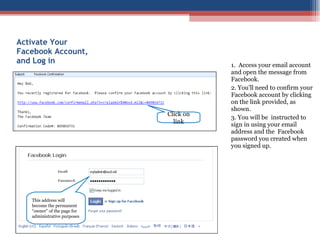
Activate Your Facebook Account, and Log in1.  Access your email account and open the message from Facebook.2. You’ll need to confirm your Facebook account by clicking on the link provided, as shown. 3. You will be  instructed to sign in using your email address and the  Facebook password you created when you signed up.Click on linkThis address will become the permanent “owner” of the page for administrative purposes
Disregard Invitations  from Facebook to Create ConnectionsIn the next four windows, Facebook will ask you to find and add friends, to fill out school or company information, and upload a profile picture.  You must skip all of these steps, by clicking on “Skip this step,” or “Skip,”  in the lower right corner of each window, as shown.We don’t want Dod Pa to have any friends, nor do we want the alias to be affiliated with any networks.  If you want to add a photo in step #4, use your organization’s official photo so fans recognize when you contact them.   Skip step #1Skip step #2Skip step #3Skip step #4 (optional)

Getting Started With Facebook

  • 1.
    Getting Started Witha Facebook PageA guide for creating Official Pages
  • 2.
    Facebook: What isIt?*A social networking tool to connect users.
  • 3.
    It’s a wayfor you to publicize events, showcase new publications, and promote discussion with your communities.
  • 4.
    Facebook is justone of a variety of online communities.Others include MySpace, Orkut, QQ and so on. Do some audience research before choosing a network to ensure you’ll reach the right people.*Facebook is constantly changing.   While we periodically review this guide to reflect these changes to the interface, we can't always guarantee that what you see on your screen will exactly mimic the information in the guide.
  • 5.
    Should You UseFacebook?Many units and commands have created official presences on Facebook pages.
  • 6.
    Determine if yourpage will represent your entire unit or an individual section. Your location and local culture will help determine this.
  • 7.
    For a listof sites that have a presence on Facebook, go to our Social Media Registry
  • 8.
    Spend some timelooking at some of these pages to get ideas.
  • 9.
    Before you begin,educate yourself on the cost in staff time and energy in managing a good Facebook page.
  • 10.
    Make sure youhave buy-in and support from your Commanding Officer before you begin.Why Do You Want a Facebook Page?Don’t create a Facebook page to duplicate your official web site. Use it to build a community.
  • 11.
    Publicize upcoming programssuch as webchats, contests, major events, and more.
  • 12.
    Post content orask questions to get public feedback.
  • 13.
    Link to topicalcontent that may help your audience or answer questions your audience may have.
  • 14.
    Create discussion threadsfor community discussions on issues that are of mutual interest.
  • 15.
    Hold competitions thatwill spur community involvement, such as a photography competition around a specific topic.Advantages of Pages Over GroupsUnlike groups, pages are visible on the Internet to non-Facebook members. (In order to join discussions, people must be Facebook members.)
  • 16.
    Pages provide detailedusage statistics, called Insights. Insights are not available in Facebook Groups.
  • 17.
    Pages can havean unlimited number of fans.
  • 18.
    Unlike a Facebookgroup, a page protects the identity of the administrator.
  • 19.
    Pages are betterfor long-term relationships with fans, readers, and customers.
  • 20.
    Pages provide thegreatest latitude in design and content options.Sign Up and Create a Profile1. Go to Facebook at http://www.facebook.com2. Use an email address that is shared with others on your team. Don’t use your personal email address. 3. If you have a team .mil email address that you share with your office, you may use that.4. Click on Sign Up.Click on Sign Up
  • 21.
    Activate Your FacebookAccount, and Log in1. Access your email account and open the message from Facebook.2. You’ll need to confirm your Facebook account by clicking on the link provided, as shown. 3. You will be instructed to sign in using your email address and the Facebook password you created when you signed up.Click on linkThis address will become the permanent “owner” of the page for administrative purposes
  • 22.
    Disregard Invitations from Facebook to Create ConnectionsIn the next four windows, Facebook will ask you to find and add friends, to fill out school or company information, and upload a profile picture. You must skip all of these steps, by clicking on “Skip this step,” or “Skip,” in the lower right corner of each window, as shown.We don’t want Dod Pa to have any friends, nor do we want the alias to be affiliated with any networks. If you want to add a photo in step #4, use your organization’s official photo so fans recognize when you contact them. Skip step #1Skip step #2Skip step #3Skip step #4 (optional)