Neal Harrington | sales@redstampede.com | 704.578.1248 | 6701 Fairview Rd., Charlotte, NC 28210 | www.redstampede.com 
REDSTAMPEDE REDEFINE POSSIBLE 
CROWDFUNDING/FUNDRAISING/E-COMMERCE 
SUITE 
 OVERVIEW 
 SECURE TRANSACTIONS 
1. Unique Payment Gateway 
 UNLIMITED DONATION/PRODUCT/INVESTMENT PAGES 
1. Standard Pages 
2. Custom Pages 
 PERSONAL FUNDRAISING/REFERRAL PAGES 
Summary 
Setup 
Highlights of the Fundraising Dashboard 
Highlights of the Fundraising Page 
 EVENT SPONSORSHIPS & TICKETING 
Unlimited unique Sponsorships Packages 
Unlimited unique event t icket ing t iers/levels 
Direct donate feature 
1
Neal Harrington | sales@redstampede.com | 704.578.1248 | 6701 Fairview Rd., Charlotte, NC 28210 | www.redstampede.com 
REDSTAMPEDE REDEFINE POSSIBLE 
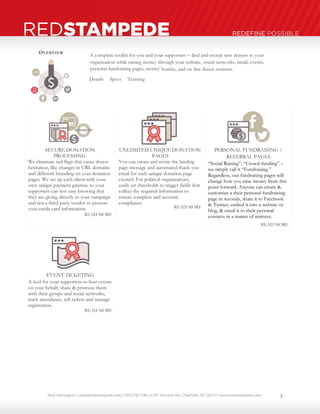
OVERVIEW 
A complete toolkit for you and your supporters – 
find and recruit new donors to your 
organization while raising money through your website, social networks, email, events, 
personal fundraising pages, money 
- 
bombs, and on 
- 
line donor contests. 
Details Specs Training 
SECURE DONATION 
PROCESSING 
We eliminate red flags that cause donor 
hesitation, like changes in URL domains 
and different branding on your donation 
pages. We set up each client with your 
own unique payment gateway so your 
supporters can rest easy knowing that 
they are giving directly to your campaign 
and not a third party vendor to process 
your credit card information. 
READ MORE 
UNLIMITED UNIQUE DONATION 
PAGES 
You can create and revise the landing 
page message and automated thank you 
email for each unique donation page 
created. For political organizations, 
easily set thresholds to trigger fields that 
collect the required information to 
ensure complete and accurate 
compliance. 
READ MORE 
PERSONAL FUNDRAISING / 
REFERRAL PAGES 
“Social-Raising”, “Crowd-funding” – 
we simply call it “Fundraising.” 
Regardless, our fundraising pages will 
change how you raise money from this 
point forward. Anyone can create & 
customize a their personal fundraising 
page in seconds, share it to Facebook 
& Twitter, embed it into a website or 
blog, & email it to their personal 
contacts in a matter of minutes. 
READ MORE 
EVENT TICKETING 
A tool for your supporters to host events 
on your behalf, share & promote them 
with their groups and social networks, 
track attendance, sell tickets and manage 
registration. 
READ MORE 
2
Neal Harrington | sales@redstampede.com | 704.578.1248 | 6701 Fairview Rd., Charlotte, NC 28210 | www.redstampede.com 
REDSTAMPEDE REDEFINE POSSIBLE 
SECURE TRANSACTIONS 
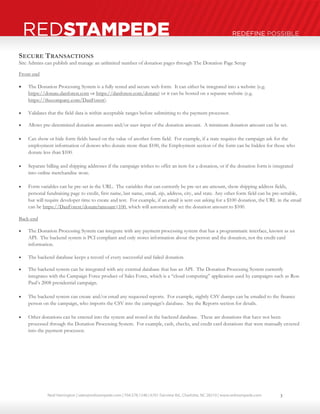
Site Admins can publish and manage an unlimited number of donation pages through The Donation Page Setup 
Front-end 
 The Donation Processing System is a fully tested and secure web form. It can either be integrated into a website (e.g. 
https://donate.danforest.com or https://danforest.com/donate) or it can be hosted on a separate website (e.g. 
https://thecompany.com/DanForest). 
 Validates that the field data is within acceptable ranges before submitting to the payment processor. 
 Allows pre-determined donation amounts and/or user-input of the donation amount. A minimum donation amount can be set. 
 Can show or hide form fields based on the value of another form field. For example, if a state requires the campaign ask for the 
employment information of donors who donate more than $100, the Employment section of the form can be hidden for those who 
donate less than $100. 
 Separate billing and shipping addresses if the campaign wishes to offer an item for a donation, or if the donation form is integrated 
into online merchandise store. 
 Form variables can be pre-set in the URL. The variables that can currently be pre-set are amount, show shipping address fields, 
personal fundraising page to credit, first name, last name, email, zip, address, city, and state. Any other form field can be pre-settable, 
but will require developer time to create and test. For example, if an email is sent out asking for a $100 donation, the URL in the email 
can be https://DanForest/donate?amount=100, which will automatically set the donation amount to $100. 
Back-end 
 The Donation Processing System can integrate with any payment processing system that has a programmatic interface, known as an 
API. The backend system is PCI compliant and only stores information about the person and the donation, not the credit card 
information. 
 The backend database keeps a record of every successful and failed donation. 
 The backend system can be integrated with any external database that has an API. The Donation Processing System currently 
integrates with the Campaign Force product of Sales Force, which is a “cloud computing” application used by campaigns such as Ron 
Paul’s 2008 presidential campaign. 
 The backend system can create and/or email any requested reports. For example, nightly CSV dumps can be emailed to the finance 
person on the campaign, who imports the CSV into the campaign’s database. See the Reports section for details. 
 Other donations can be entered into the system and stored in the backend database. These are donations that have not been 
processed through the Donation Processing System. For example, cash, checks, and credit card donations that were manually entered 
into the payment processor. 
3
Neal Harrington | sales@redstampede.com | 704.578.1248 | 6701 Fairview Rd., Charlotte, NC 28210 | www.redstampede.com 
REDSTAMPEDE REDEFINE POSSIBLE 
DONATION PAGES 
Steps to Building a Donation Page 
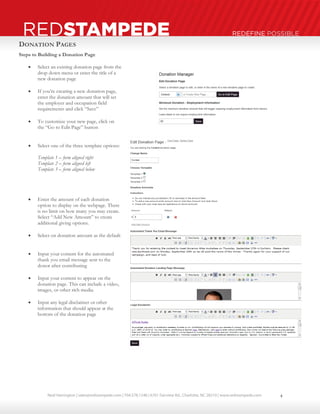
 Select an existing donation page from the 
drop down menu or enter the title of a 
new donation page 
 If you’re creating a new donation page, 
enter the donation amount that will set 
the employer and occupation field 
requirements and click “Save” 
 To customize your new page, click on 
the “Go to Edit Page” button 
 Select one of the three template options: 
Template 1 – form aligned right 
Template 2 – form aligned left 
Template 3 – form aligned below 
 Enter the amount of each donation 
option to display on the webpage. There 
is no limit on how many you may create. 
Select “Add New Amount” to create 
additional giving options. 
 Select on donation amount as the default 
 Input your content for the automated 
thank you email message sent to the 
donor after contributing 
 Input your content to appear on the 
donation page. This can include a video, 
images, or other rich media. 
 Input any legal disclaimer or other 
information that should appear at the 
bottom of the donation page 
4
Neal Harrington | sales@redstampede.com | 704.578.1248 | 6701 Fairview Rd., Charlotte, NC 28210 | www.redstampede.com 
REDSTAMPEDE REDEFINE POSSIBLE 
Standard Donation Page 
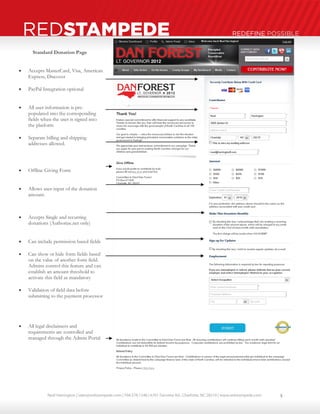
 Accepts MasterCard, Visa, American 
Express, Discover 
 PayPal Integration optional 
 All user information is pre-populated 
into the corresponding 
fields when the user is signed into 
the platform 
 Separate billing and shipping 
addresses allowed. 
 Offline Giving Form 
 Allows user-input of the donation 
amount. 
 Accepts Single and recurring 
donations (Authorize.net only) 
 Can include permission based fields 
 Can show or hide form fields based 
on the value of another form field. 
Admins control this feature and can 
establish an amount threshold to 
activate this field as mandatory 
 Validation of field data before 
submitting to the payment processor 
 All legal disclaimers and 
requirements are controlled and 
managed through the Admin Portal 
5
Neal Harrington | sales@redstampede.com | 704.578.1248 | 6701 Fairview Rd., Charlotte, NC 28210 | www.redstampede.com 
REDSTAMPEDE REDEFINE POSSIBLE 
Custom Donation Pages 
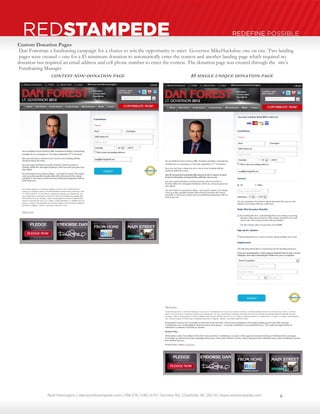
Dan Forest ran a fundraising campaign for a chance to win the opportunity to meet Governor Mike Huckabee one on one. Two landing 
pages were created – 
one for a $5 minimum donation to automatically enter the contest and another landing page which required no 
donation but required an email address and cell phone number to enter the contest. The donation page was created through the site’s 
Fundraising Manager 
. 
CONTEST NON-DONATION PAGE 
$5 
SINGLE UNIQUE DONATION PAGE 
6
Neal Harrington | sales@redstampede.com | 704.578.1248 | 6701 Fairview Rd., Charlotte, NC 28210 | www.redstampede.com 
REDSTAMPEDE REDEFINE POSSIBLE 
PERSONAL FUNDRAISING / REFERRAL PAGES 
“Social-Raising”, “Crowd-funding” – we simply call it “Fundraising.” Regardless, our fundraising pages will change how you raise money 
from this point forward. Anyone can create & customize a their personal fundraising page in seconds, share it to Facebook & Twitter, 
embed it into a website or blog, & email it to their personal contacts in a matter of minutes. 
 Create a Personal Fundraising or Referral page. Each page can be turned into a money bomb 
at anytime which will auto scroll the users most recent donors to give through their page 
 We use this tool to encourage others to make referrals. You can earn money by creating your 
personal referral page with a single click. Try it here. 
 Customize your page or use one of the templates provided. You can change the title, 
description, and the goal amount of each fundraising page created. 
 View your public fundraising or referral page 
 Users can track and monitor their fundraising progress from their personal fundraising 
dashboards and receive automated alerts for each new donation received 
 Share your page to Facebook and Twitter 
 Embed a link into your email program like Outlook or Gmail; embed your personal 
fundraising thermometer and/or a link to your donation page in a website or blog. 
 Users can send emails to their friends on the website, contacts from any online email service, 
and/or contacts on any major social network asking them to make a donation to your 
organization through their fundraising page. Invite your contacts to buy a Red Stampede 
website through your page or embed it in a personal website or blog 
PERSONAL FUNDRAISING PAGE SETUP 
Site Admins manage the defaulted content of the user’s Personal Fundraising or Referral Pages from the Admin Portal under the Site 
Builders in the Fundraising section. 
 Site Admins control the title, description, and fundraising goal amount to appear as the defaults each time a user creates a new PFP. 
 Each site user may use the default template or customize their page with their own title, description, and fundraising goal 
 Learn more about PFP’s and PRP’s in the MY-Advocacy Network Chapter under Fundraising and Referrals. 
Steps to Creating a Personal Fundraising Page 
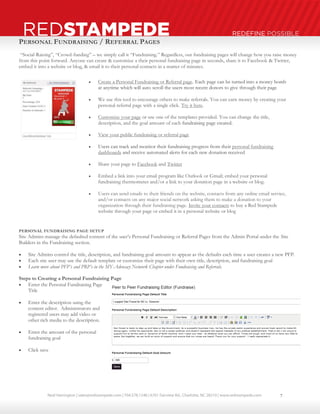
 Enter the Personal Fundraising Page 
Title 
 Enter the description using the 
content editor. Administrators and 
registered users may add video or 
other rich media to the description. 
 Enter the amount of the personal 
fundraising goal 
 Click save 
7
Neal Harrington | sales@redstampede.com | 704.578.1248 | 6701 Fairview Rd., Charlotte, NC 28210 | www.redstampede.com 
REDSTAMPEDE REDEFINE POSSIBLE 
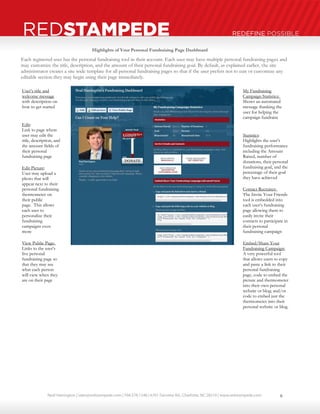
Each registered user has the personal fundraising tool in their account. Each user may have multiple personal fundraising pages and 
may customize the title, description, and the amount of their personal fundraising goal. By default, as explained earlier, the site 
administrator creates a site wide template for all personal fundraising pages so that if the user prefers not to edit or customize any 
editable section they may begin using their page immediately. 
User’s title and 
welcome message 
with description on 
how to get started 
Edit: 
Link to page where 
user may edit the 
title, description, and 
the amount fields of 
their personal 
fundraising page 
Edit Picture: 
User may upload a 
photo that will 
appear next to their 
personal fundraising 
thermometer on 
their public 
page. This allows 
each user to 
personalize their 
fundraising 
campaigns even 
more 
View Public Page: 
Links to the user’s 
live personal 
fundraising page so 
that they may see 
what each person 
will view when they 
are on their page 
My Fundraising 
Campaign Statistics: 
Shows an automated 
message thanking the 
user for helping the 
campaign fundraise 
Statistics: 
Highlights the user’s 
fundraising performance 
including the Amount 
Raised, number of 
donations, their personal 
fundraising goal, and the 
percentage of their goal 
they have achieved 
Contact Recruiter: 
The Invite Your Friends 
tool is embedded into 
each user’s fundraising 
page allowing them to 
easily invite their 
contacts to participate in 
their personal 
fundraising campaign 
Embed/Share Your 
Fundraising Campaign: 
A very powerful tool 
that allows users to copy 
and paste a link to their 
personal fundraising 
page, code to embed the 
picture and thermometer 
into their own personal 
website or blog; and/or 
code to embed just the 
thermometer into their 
personal website or blog. 
Highlights of Your Personal Fundraising Page Dashboard 
8
Neal Harrington | sales@redstampede.com | 704.578.1248 | 6701 Fairview Rd., Charlotte, NC 28210 | www.redstampede.com 
REDSTAMPEDE REDEFINE POSSIBLE 
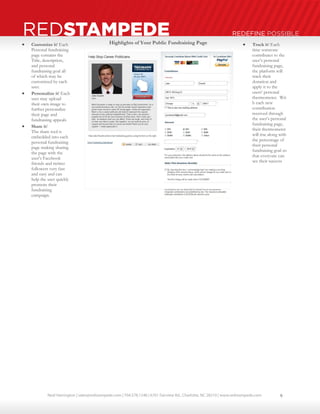
 Customize it! Each 
Personal fundraising 
page contains the 
Title, description, 
and personal 
fundraising goal all 
of which may be 
customized by each 
user. 
 Personalize it! Each 
user may upload 
their own image to 
further personalize 
their page and 
fundraising appeals 
 Share it! 
The share tool is 
embedded into each 
personal fundraising 
page making sharing 
the page with the 
user’s Facebook 
friends and twitter 
followers very fast 
and easy and can 
help the user quickly 
promote their 
fundraising 
campaign. 
 Track it! Each 
time someone 
contributes to the 
user’s personal 
fundraising page, 
the platform will 
track their 
donation and 
apply it to the 
users’ personal 
thermometer. Wit 
h each new 
contribution 
received through 
the user’s personal 
fundraising page, 
their thermometer 
will rise along with 
the percentage of 
their personal 
fundraising goal so 
that everyone can 
see their success 
Highlights of Your Public Fundraising Page 
9
Neal Harrington | sales@redstampede.com | 704.578.1248 | 6701 Fairview Rd., Charlotte, NC 28210 | www.redstampede.com 
REDSTAMPEDE REDEFINE POSSIBLE 
EVENTS 
HOSTING AN EVENT 
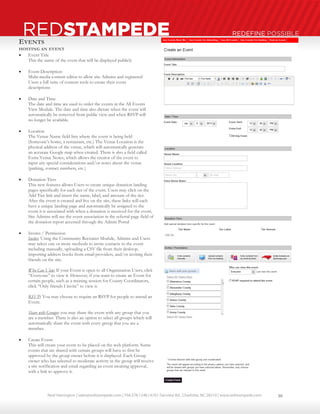
 Event Title 
This the name of the event that will be displayed publicly 
 Event Description 
Multi-media content editor to allow site Admins and registered 
Users a full suite of content tools to create their event 
descriptions 
 Date and Time 
The date and time are used to order the events in the All Events 
View Module. The date and time also dictate when the event will 
automatically be removed from public view and when RSVP will 
no longer be available. 
 Location 
The Venue Name field lists where the event is being held 
(Someone’s home, a restaurant, etc.) The Venue Location is the 
physical address of the venue, which will automatically generate 
an accurate Google map when created. There is also a field called 
Extra Venue Notes, which allows the creator of the event to 
input any special considerations and/or notes about the venue 
(parking, contact numbers, etc.) 
 Donation Tiers 
This new features allows Users to create unique donation landing 
pages specifically for each tier of the event. Users may click on the 
Add Tier link and insert the name, label, and amount of the tier. 
After the event is created and live on the site, these links will each 
have a unique landing page and automatically be assigned to the 
event it is associated with when a donation is received for the event, 
Site Admins will see the event association in the referral page field of 
the donation report accessed through the Admin Portal 
 Invites / Permission 
Invites: Using the Community Recruiter Module, Admins and Users 
may select one or more methods to invite contacts to the event 
including manually, uploading a CSV file from their desktop, 
importing address books from email providers, and/or inviting their 
friends on the site. 
Who Can View: If your Event is open to all Organization Users, click 
“Everyone” to view it. However, if you want to create an Event for 
certain people, such as a training session for County Coordinators, 
click “Only friends I invite” to view it. 
RSVP: You may choose to require an RSVP for people to attend an 
Event. 
Share with Groups: you may share the event with any group that you 
are a member. There is also an option to select all groups which will 
automatically share the event with every group that you are a 
member. 
 Create Event: 
This will create your event to be placed on the web platform. Some 
events that are shared with certain groups will have to first be 
approved by the group owner before it is displayed. Each Group 
owner who has selected to moderate activity in the group will receive 
a site notification and email regarding an event awaiting approval, 
with a link to approve it. 
10
Neal Harrington | sales@redstampede.com | 704.578.1248 | 6701 Fairview Rd., Charlotte, NC 28210 | www.redstampede.com 
REDSTAMPEDE REDEFINE POSSIBLE 
PUBLISHED EVENT 
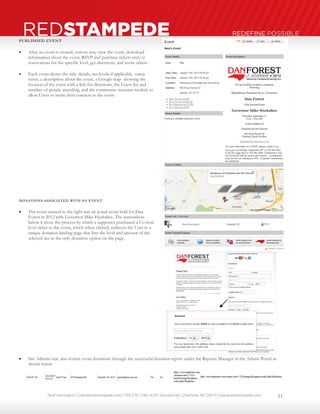
 After an event is created, visitors may view the event, download 
information about the event, RSVP and purchase tickets and/or 
reservations for the specific level, get directions, and invite others 
 Each event shows the title, details, tier levels if applicable, venue 
notes, a description about the event, a Google map showing the 
location of the event with a link for directions, the Guest list and 
number of people attending, and the community recruiter module to 
allow Users to invite their contacts to the event 
DONATIONS ASSOCIATED WITH AN EVENT 
 The event created to the right was an actual event held for Dan 
Forest in 2012 with Governor Mike Huckabee. The screenshots 
below it show the process by which a supporter purchased a Co-host 
level ticket to the event, which when clicked, redirects the User to a 
unique donation landing page that lists the level and amount of the 
selected tier as the only donation option on the page. 
 Site Admins may also review event donations through the successful donation report under the Reports Manager in the Admin Portal as 
shown below 
11

Red Stampede User Guide: Crowdfunding-Fundraising-Ecommerce suite

  • 1.
    Neal Harrington |sales@redstampede.com | 704.578.1248 | 6701 Fairview Rd., Charlotte, NC 28210 | www.redstampede.com REDSTAMPEDE REDEFINE POSSIBLE CROWDFUNDING/FUNDRAISING/E-COMMERCE SUITE  OVERVIEW  SECURE TRANSACTIONS 1. Unique Payment Gateway  UNLIMITED DONATION/PRODUCT/INVESTMENT PAGES 1. Standard Pages 2. Custom Pages  PERSONAL FUNDRAISING/REFERRAL PAGES Summary Setup Highlights of the Fundraising Dashboard Highlights of the Fundraising Page  EVENT SPONSORSHIPS & TICKETING Unlimited unique Sponsorships Packages Unlimited unique event t icket ing t iers/levels Direct donate feature 1
  • 2.
    Neal Harrington |sales@redstampede.com | 704.578.1248 | 6701 Fairview Rd., Charlotte, NC 28210 | www.redstampede.com REDSTAMPEDE REDEFINE POSSIBLE OVERVIEW A complete toolkit for you and your supporters – find and recruit new donors to your organization while raising money through your website, social networks, email, events, personal fundraising pages, money - bombs, and on - line donor contests. Details Specs Training SECURE DONATION PROCESSING We eliminate red flags that cause donor hesitation, like changes in URL domains and different branding on your donation pages. We set up each client with your own unique payment gateway so your supporters can rest easy knowing that they are giving directly to your campaign and not a third party vendor to process your credit card information. READ MORE UNLIMITED UNIQUE DONATION PAGES You can create and revise the landing page message and automated thank you email for each unique donation page created. For political organizations, easily set thresholds to trigger fields that collect the required information to ensure complete and accurate compliance. READ MORE PERSONAL FUNDRAISING / REFERRAL PAGES “Social-Raising”, “Crowd-funding” – we simply call it “Fundraising.” Regardless, our fundraising pages will change how you raise money from this point forward. Anyone can create & customize a their personal fundraising page in seconds, share it to Facebook & Twitter, embed it into a website or blog, & email it to their personal contacts in a matter of minutes. READ MORE EVENT TICKETING A tool for your supporters to host events on your behalf, share & promote them with their groups and social networks, track attendance, sell tickets and manage registration. READ MORE 2
  • 3.
    Neal Harrington |sales@redstampede.com | 704.578.1248 | 6701 Fairview Rd., Charlotte, NC 28210 | www.redstampede.com REDSTAMPEDE REDEFINE POSSIBLE SECURE TRANSACTIONS Site Admins can publish and manage an unlimited number of donation pages through The Donation Page Setup Front-end  The Donation Processing System is a fully tested and secure web form. It can either be integrated into a website (e.g. https://donate.danforest.com or https://danforest.com/donate) or it can be hosted on a separate website (e.g. https://thecompany.com/DanForest).  Validates that the field data is within acceptable ranges before submitting to the payment processor.  Allows pre-determined donation amounts and/or user-input of the donation amount. A minimum donation amount can be set.  Can show or hide form fields based on the value of another form field. For example, if a state requires the campaign ask for the employment information of donors who donate more than $100, the Employment section of the form can be hidden for those who donate less than $100.  Separate billing and shipping addresses if the campaign wishes to offer an item for a donation, or if the donation form is integrated into online merchandise store.  Form variables can be pre-set in the URL. The variables that can currently be pre-set are amount, show shipping address fields, personal fundraising page to credit, first name, last name, email, zip, address, city, and state. Any other form field can be pre-settable, but will require developer time to create and test. For example, if an email is sent out asking for a $100 donation, the URL in the email can be https://DanForest/donate?amount=100, which will automatically set the donation amount to $100. Back-end  The Donation Processing System can integrate with any payment processing system that has a programmatic interface, known as an API. The backend system is PCI compliant and only stores information about the person and the donation, not the credit card information.  The backend database keeps a record of every successful and failed donation.  The backend system can be integrated with any external database that has an API. The Donation Processing System currently integrates with the Campaign Force product of Sales Force, which is a “cloud computing” application used by campaigns such as Ron Paul’s 2008 presidential campaign.  The backend system can create and/or email any requested reports. For example, nightly CSV dumps can be emailed to the finance person on the campaign, who imports the CSV into the campaign’s database. See the Reports section for details.  Other donations can be entered into the system and stored in the backend database. These are donations that have not been processed through the Donation Processing System. For example, cash, checks, and credit card donations that were manually entered into the payment processor. 3
  • 4.
    Neal Harrington |sales@redstampede.com | 704.578.1248 | 6701 Fairview Rd., Charlotte, NC 28210 | www.redstampede.com REDSTAMPEDE REDEFINE POSSIBLE DONATION PAGES Steps to Building a Donation Page  Select an existing donation page from the drop down menu or enter the title of a new donation page  If you’re creating a new donation page, enter the donation amount that will set the employer and occupation field requirements and click “Save”  To customize your new page, click on the “Go to Edit Page” button  Select one of the three template options: Template 1 – form aligned right Template 2 – form aligned left Template 3 – form aligned below  Enter the amount of each donation option to display on the webpage. There is no limit on how many you may create. Select “Add New Amount” to create additional giving options.  Select on donation amount as the default  Input your content for the automated thank you email message sent to the donor after contributing  Input your content to appear on the donation page. This can include a video, images, or other rich media.  Input any legal disclaimer or other information that should appear at the bottom of the donation page 4
  • 5.
    Neal Harrington |sales@redstampede.com | 704.578.1248 | 6701 Fairview Rd., Charlotte, NC 28210 | www.redstampede.com REDSTAMPEDE REDEFINE POSSIBLE Standard Donation Page  Accepts MasterCard, Visa, American Express, Discover  PayPal Integration optional  All user information is pre-populated into the corresponding fields when the user is signed into the platform  Separate billing and shipping addresses allowed.  Offline Giving Form  Allows user-input of the donation amount.  Accepts Single and recurring donations (Authorize.net only)  Can include permission based fields  Can show or hide form fields based on the value of another form field. Admins control this feature and can establish an amount threshold to activate this field as mandatory  Validation of field data before submitting to the payment processor  All legal disclaimers and requirements are controlled and managed through the Admin Portal 5
  • 6.
    Neal Harrington |sales@redstampede.com | 704.578.1248 | 6701 Fairview Rd., Charlotte, NC 28210 | www.redstampede.com REDSTAMPEDE REDEFINE POSSIBLE Custom Donation Pages Dan Forest ran a fundraising campaign for a chance to win the opportunity to meet Governor Mike Huckabee one on one. Two landing pages were created – one for a $5 minimum donation to automatically enter the contest and another landing page which required no donation but required an email address and cell phone number to enter the contest. The donation page was created through the site’s Fundraising Manager . CONTEST NON-DONATION PAGE $5 SINGLE UNIQUE DONATION PAGE 6
  • 7.
    Neal Harrington |sales@redstampede.com | 704.578.1248 | 6701 Fairview Rd., Charlotte, NC 28210 | www.redstampede.com REDSTAMPEDE REDEFINE POSSIBLE PERSONAL FUNDRAISING / REFERRAL PAGES “Social-Raising”, “Crowd-funding” – we simply call it “Fundraising.” Regardless, our fundraising pages will change how you raise money from this point forward. Anyone can create & customize a their personal fundraising page in seconds, share it to Facebook & Twitter, embed it into a website or blog, & email it to their personal contacts in a matter of minutes.  Create a Personal Fundraising or Referral page. Each page can be turned into a money bomb at anytime which will auto scroll the users most recent donors to give through their page  We use this tool to encourage others to make referrals. You can earn money by creating your personal referral page with a single click. Try it here.  Customize your page or use one of the templates provided. You can change the title, description, and the goal amount of each fundraising page created.  View your public fundraising or referral page  Users can track and monitor their fundraising progress from their personal fundraising dashboards and receive automated alerts for each new donation received  Share your page to Facebook and Twitter  Embed a link into your email program like Outlook or Gmail; embed your personal fundraising thermometer and/or a link to your donation page in a website or blog.  Users can send emails to their friends on the website, contacts from any online email service, and/or contacts on any major social network asking them to make a donation to your organization through their fundraising page. Invite your contacts to buy a Red Stampede website through your page or embed it in a personal website or blog PERSONAL FUNDRAISING PAGE SETUP Site Admins manage the defaulted content of the user’s Personal Fundraising or Referral Pages from the Admin Portal under the Site Builders in the Fundraising section.  Site Admins control the title, description, and fundraising goal amount to appear as the defaults each time a user creates a new PFP.  Each site user may use the default template or customize their page with their own title, description, and fundraising goal  Learn more about PFP’s and PRP’s in the MY-Advocacy Network Chapter under Fundraising and Referrals. Steps to Creating a Personal Fundraising Page  Enter the Personal Fundraising Page Title  Enter the description using the content editor. Administrators and registered users may add video or other rich media to the description.  Enter the amount of the personal fundraising goal  Click save 7
  • 8.
    Neal Harrington |sales@redstampede.com | 704.578.1248 | 6701 Fairview Rd., Charlotte, NC 28210 | www.redstampede.com REDSTAMPEDE REDEFINE POSSIBLE Each registered user has the personal fundraising tool in their account. Each user may have multiple personal fundraising pages and may customize the title, description, and the amount of their personal fundraising goal. By default, as explained earlier, the site administrator creates a site wide template for all personal fundraising pages so that if the user prefers not to edit or customize any editable section they may begin using their page immediately. User’s title and welcome message with description on how to get started Edit: Link to page where user may edit the title, description, and the amount fields of their personal fundraising page Edit Picture: User may upload a photo that will appear next to their personal fundraising thermometer on their public page. This allows each user to personalize their fundraising campaigns even more View Public Page: Links to the user’s live personal fundraising page so that they may see what each person will view when they are on their page My Fundraising Campaign Statistics: Shows an automated message thanking the user for helping the campaign fundraise Statistics: Highlights the user’s fundraising performance including the Amount Raised, number of donations, their personal fundraising goal, and the percentage of their goal they have achieved Contact Recruiter: The Invite Your Friends tool is embedded into each user’s fundraising page allowing them to easily invite their contacts to participate in their personal fundraising campaign Embed/Share Your Fundraising Campaign: A very powerful tool that allows users to copy and paste a link to their personal fundraising page, code to embed the picture and thermometer into their own personal website or blog; and/or code to embed just the thermometer into their personal website or blog. Highlights of Your Personal Fundraising Page Dashboard 8
  • 9.
    Neal Harrington |sales@redstampede.com | 704.578.1248 | 6701 Fairview Rd., Charlotte, NC 28210 | www.redstampede.com REDSTAMPEDE REDEFINE POSSIBLE  Customize it! Each Personal fundraising page contains the Title, description, and personal fundraising goal all of which may be customized by each user.  Personalize it! Each user may upload their own image to further personalize their page and fundraising appeals  Share it! The share tool is embedded into each personal fundraising page making sharing the page with the user’s Facebook friends and twitter followers very fast and easy and can help the user quickly promote their fundraising campaign.  Track it! Each time someone contributes to the user’s personal fundraising page, the platform will track their donation and apply it to the users’ personal thermometer. Wit h each new contribution received through the user’s personal fundraising page, their thermometer will rise along with the percentage of their personal fundraising goal so that everyone can see their success Highlights of Your Public Fundraising Page 9
  • 10.
    Neal Harrington |sales@redstampede.com | 704.578.1248 | 6701 Fairview Rd., Charlotte, NC 28210 | www.redstampede.com REDSTAMPEDE REDEFINE POSSIBLE EVENTS HOSTING AN EVENT  Event Title This the name of the event that will be displayed publicly  Event Description Multi-media content editor to allow site Admins and registered Users a full suite of content tools to create their event descriptions  Date and Time The date and time are used to order the events in the All Events View Module. The date and time also dictate when the event will automatically be removed from public view and when RSVP will no longer be available.  Location The Venue Name field lists where the event is being held (Someone’s home, a restaurant, etc.) The Venue Location is the physical address of the venue, which will automatically generate an accurate Google map when created. There is also a field called Extra Venue Notes, which allows the creator of the event to input any special considerations and/or notes about the venue (parking, contact numbers, etc.)  Donation Tiers This new features allows Users to create unique donation landing pages specifically for each tier of the event. Users may click on the Add Tier link and insert the name, label, and amount of the tier. After the event is created and live on the site, these links will each have a unique landing page and automatically be assigned to the event it is associated with when a donation is received for the event, Site Admins will see the event association in the referral page field of the donation report accessed through the Admin Portal  Invites / Permission Invites: Using the Community Recruiter Module, Admins and Users may select one or more methods to invite contacts to the event including manually, uploading a CSV file from their desktop, importing address books from email providers, and/or inviting their friends on the site. Who Can View: If your Event is open to all Organization Users, click “Everyone” to view it. However, if you want to create an Event for certain people, such as a training session for County Coordinators, click “Only friends I invite” to view it. RSVP: You may choose to require an RSVP for people to attend an Event. Share with Groups: you may share the event with any group that you are a member. There is also an option to select all groups which will automatically share the event with every group that you are a member.  Create Event: This will create your event to be placed on the web platform. Some events that are shared with certain groups will have to first be approved by the group owner before it is displayed. Each Group owner who has selected to moderate activity in the group will receive a site notification and email regarding an event awaiting approval, with a link to approve it. 10
  • 11.
    Neal Harrington |sales@redstampede.com | 704.578.1248 | 6701 Fairview Rd., Charlotte, NC 28210 | www.redstampede.com REDSTAMPEDE REDEFINE POSSIBLE PUBLISHED EVENT  After an event is created, visitors may view the event, download information about the event, RSVP and purchase tickets and/or reservations for the specific level, get directions, and invite others  Each event shows the title, details, tier levels if applicable, venue notes, a description about the event, a Google map showing the location of the event with a link for directions, the Guest list and number of people attending, and the community recruiter module to allow Users to invite their contacts to the event DONATIONS ASSOCIATED WITH AN EVENT  The event created to the right was an actual event held for Dan Forest in 2012 with Governor Mike Huckabee. The screenshots below it show the process by which a supporter purchased a Co-host level ticket to the event, which when clicked, redirects the User to a unique donation landing page that lists the level and amount of the selected tier as the only donation option on the page.  Site Admins may also review event donations through the successful donation report under the Reports Manager in the Admin Portal as shown below 11