Why do we need to call the softwareWhy do we need to call the software
as Revit?as Revit?
Whatever changes updating in a view,
the immediate changes will reflect in the
respective view.
Revised Instantly
Salient Features Of RevitSalient Features Of Revit
BIM Software
Beyond 3-Dimension
Bi-directional Associativity
Parametric Modeling
NEXT
BIM
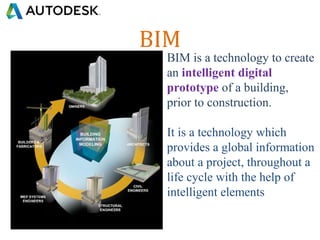
BIM is a technology to create
an intelligent digital
prototype of a building,
prior to construction.
It is a technology which
provides a global information
about a project, throughout a
life cycle with the help of
intelligent elements
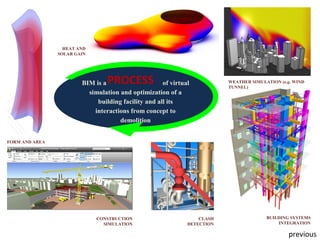
BUILDING SYSTEMS
INTEGRATION
BIM is a of virtual
simulation and optimization of a
building facility and all its
interactions from concept to
demolition
FORM AND AREA
HEAT AND
SOLAR GAIN
CONSTRUCTION
SIMULATION
WEATHER SIMULATION (e.g. WIND
TUNNEL)
CLASH
DETECTION
PROCESS
previous
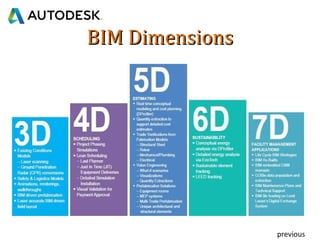
BIM DimensionsBIM Dimensions
previous
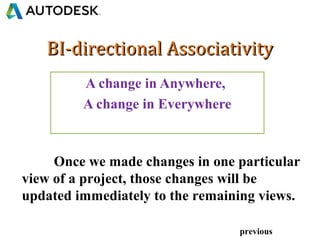
BI-directional AssociativityBI-directional Associativity
Once we made changes in one particular
view of a project, those changes will be
updated immediately to the remaining views.
previous
A change in Anywhere,
A change in Everywhere
Parametric ModelingParametric Modeling
• Constraint/Locking the elements with respect
to the other elements or with dimensional
previous
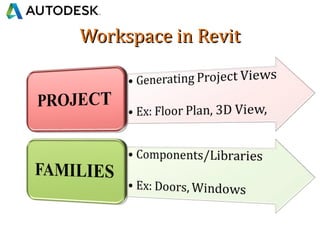
Workspace in RevitWorkspace in Revit
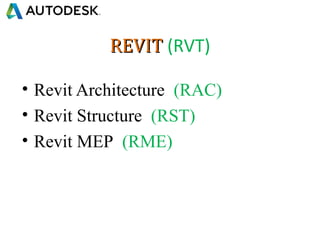
REVITREVIT (RVT)
• Revit Architecture (RAC)
• Revit Structure (RST)
• Revit MEP (RME)
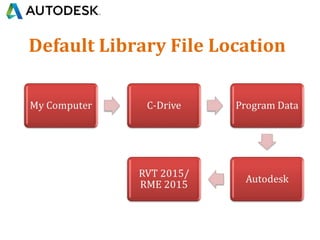
Default Library File Location
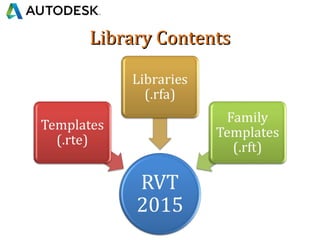
Library ContentsLibrary Contents
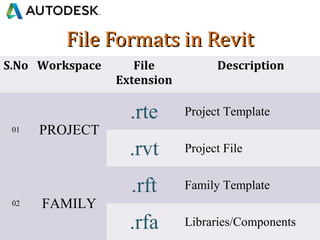
File Formats in RevitFile Formats in Revit
S.No Workspace File
Extension
Description
01 PROJECT
.rte Project Template
.rvt Project File
02 FAMILY
.rft Family Template
.rfa Libraries/Components
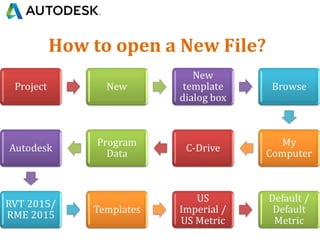
How to open a New File?
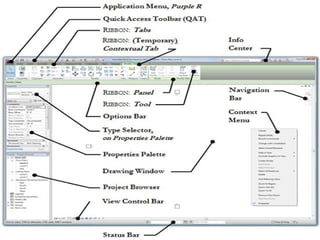
Revit - GUIRevit - GUI
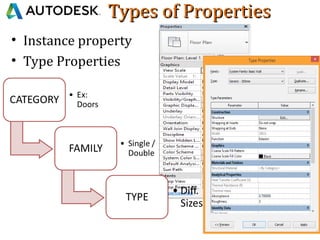
Types of PropertiesTypes of Properties
• Instance property
• Type Properties
User Interface ShortcutsUser Interface Shortcuts
• Rotate – Hold Shift Key + mouse middle button +
move the mouse either left/right
• Pan – Hold mouse middle button
• Zoom in/Out – scroll the mouse forward/back
KEYBOARD KEYS
• Spacebar – to flip the elements
• Tab – to select particular element among the
group of elements
• Deselect – Use Shift key

Revit introduction class

  • 2.
    Why do weneed to call the softwareWhy do we need to call the software as Revit?as Revit? Whatever changes updating in a view, the immediate changes will reflect in the respective view. Revised Instantly
  • 3.
    Salient Features OfRevitSalient Features Of Revit BIM Software Beyond 3-Dimension Bi-directional Associativity Parametric Modeling NEXT
  • 4.
    BIM BIM is atechnology to create an intelligent digital prototype of a building, prior to construction. It is a technology which provides a global information about a project, throughout a life cycle with the help of intelligent elements
  • 5.
    BUILDING SYSTEMS INTEGRATION BIM isa of virtual simulation and optimization of a building facility and all its interactions from concept to demolition FORM AND AREA HEAT AND SOLAR GAIN CONSTRUCTION SIMULATION WEATHER SIMULATION (e.g. WIND TUNNEL) CLASH DETECTION PROCESS previous
  • 6.
  • 7.
    BI-directional AssociativityBI-directional Associativity Oncewe made changes in one particular view of a project, those changes will be updated immediately to the remaining views. previous A change in Anywhere, A change in Everywhere
  • 8.
    Parametric ModelingParametric Modeling •Constraint/Locking the elements with respect to the other elements or with dimensional previous
  • 9.
  • 10.
    REVITREVIT (RVT) • RevitArchitecture (RAC) • Revit Structure (RST) • Revit MEP (RME)
  • 11.
  • 12.
  • 13.
    File Formats inRevitFile Formats in Revit S.No Workspace File Extension Description 01 PROJECT .rte Project Template .rvt Project File 02 FAMILY .rft Family Template .rfa Libraries/Components
  • 14.
    How to opena New File?
  • 15.
  • 16.
    Types of PropertiesTypesof Properties • Instance property • Type Properties
  • 17.
    User Interface ShortcutsUserInterface Shortcuts • Rotate – Hold Shift Key + mouse middle button + move the mouse either left/right • Pan – Hold mouse middle button • Zoom in/Out – scroll the mouse forward/back KEYBOARD KEYS • Spacebar – to flip the elements • Tab – to select particular element among the group of elements • Deselect – Use Shift key

Editor's Notes

  • #7 Building Information Modeling (BIM) is a thriving technology and its approach can be used in the Architecture, Engineering and Construction (AEC) industry of different countries. BIM based architectural software have allowed the automatic updating of views once the change is made in one view by the production of intelligent 3D/4D and 5D models BIM is also meant for modeling the functions and behavior of building systems and components.