
Reverse engineering

By :
Sitanshu Dubey
Security analyst and researcher
Hicube Infosec Pvt. Ltd.
E-mail: sitanshu@hicubes.com
Reverse engineering
    Content
-   Introduction
-   Needs
-   Assembly Language basics
-   Debuggers
Reverse engineering
  Introduction
- Reverse Engineering is a process of redesigning an
  existing product to improve and broaden its
  function, add quality and to increase its useful life.
  Also and important additional goal is to reduce
  manufacturing costs of the new product making it
  competitive in the market place.
Reverse engineering
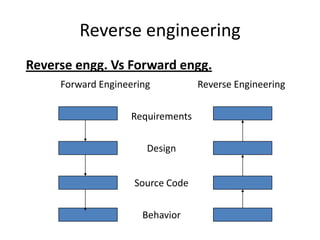
Reverse engg. Vs Forward engg.
     Forward Engineering          Reverse Engineering

                   Requirements


                       Design


                    Source Code


                      Behavior
Reverse engineering
  Needs
- Reverse engineering is used for testing
  purpose.
- It is used for updating and adding new
  features.
- Migration to another hardware/software
  platform.
- Facilitating software reuse.
Reverse engineering
  Assembly Language basics
- Assembly language is the most basic
  programming language available for any
  processor. With assembly language, a
  programmer works with the operations which
  are implemented directly on the physical CPU.
Reverse engineering
  Assembly Language basics
- Every code of a software converts in assembly
  language whether it is written in java or c, or c++
  or in any high level language.
- Assembly language contains mnimonics for
  performing an operation like
  MOV AX, 47104
  MOV DS, AX
  MOV [3998], 36
  INT 32
Reverse Engineering
  Flags
- Flags are single bits which indicate the status of
  something. There are 32 different flags. You will
  mostly need only 3 of them in reversing. The Z-
  Flag, the O-Flag and the C-Flag.
- A flag can only be '0' or '1', meaning ‘ok' or ‘not ok'.
Reverse Engineering
  Segments and offsets
- A segment is a piece in memory where
  instructions (CS), data (DS), stack (SS) or just an
  extra segment (ES) are stored. Every segment is
  divided in 'offsets'. In 32-bits applications
  (Windows 95/98/ME/2000), these offsets are
  numbered from 00000000 to FFFFFFFF.
- A segment is like a page in a book.
- And an offset is like a specific line at that page.
Reverse Engineering
    Registers
-   Generally 32 bit / 64 bit windows supports mailly
    9 registers.
-   EAX : Extended Accumulator Register
-   EBX : Base Register
-   ECX : Counter Register
-   EDX : Data Register
-   ESI : Source Index
-   EDI : Destination Index
Reverse Engineering
  Pointer Registers
- EBP : Base Pointer
- ESP : Stack Pointer
- EIP : Instruction Pointer
Reverse Engineering
  Jumps
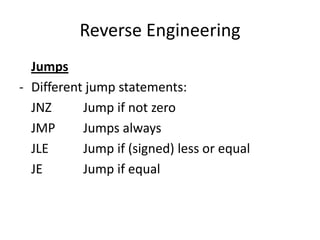
- Different jump statements:
  JNZ      Jump if not zero
  JMP      Jumps always
  JLE      Jump if (signed) less or equal
  JE       Jump if equal
Reverse Engineering
  Debuggers
- A debugger or debugging tool is a computer
  program that is used to test and debug other
  programs .
- Debuggers show the assembly code of the
  program.
Reverse Engineering
  Debuggers
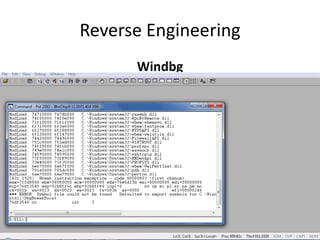
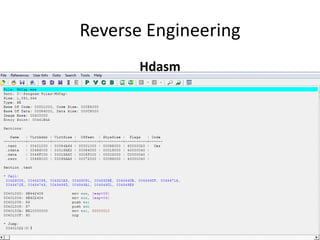
- Widely used Debuggers
  i) Ollydbg
  ii) Windbg
  iii) Hdasm
Reverse Engineering
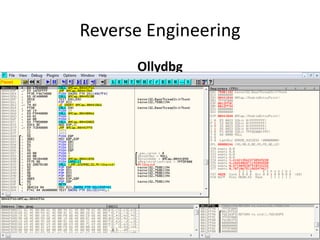
      Ollydbg
Reverse Engineering
      Windbg
Reverse Engineering
       Hdasm
Packing & Unpacking
Packing & Unpacking
    Content
-   Introduction
-   Need
-   Objective Unpacking
-   Useful Tools
-   Conclusion
Packing & Unpacking
  Introduction
  Packing
- Packing is a process of protecting the code
  from the malicious users who use reverse
  engineering for malicious purpose such as
  braking security, braking copyrights etc..
Packing & Unpacking
  Introduction
  Unpacking
- Unpacking is the technique by which one can
  remove packers or protectors.
Packing & Unpacking
  Need
- Packing is very important to protect the codes.
- If a malicious person become successful to
  brake the packer or protector then he can do
  normal reverse engineering to brake the code.
  That’s why its very important to use good
  protectors/packers.
Packing & Unpacking
  Objective Unpacking
- Packers 'pack' or 'compress' a program much
  the same way as compressor, packers then
  attach their own decryption / loading stub
  which 'unpacks' the program before resuming
  execution normally at the programs original
  entry point.
Packing & Unpacking
  Objective Unpacking
- The main objective of unpacking a software is
  to get the OEP (Original Entry Point) of the
  software.
- Basically when a packer compress the
  application, the entry point become change to
  the entry point of packer rather then
  application.
Packing & Unpacking
  Objective Unpacking
- OEP is refer to the entry point of application.
- If one can get the OEP then he can modify the
  code.
Packing & Unpacking
  Useful Tools
- Packers:
  i) Armadillo
  ii) ASPack & ASProtect
  iii) PECompact
  iv) WWPack(32) etc..
Packing & Unpacking
  Useful Tools
- Unpackers
  i) PEid
  ii) ArmKiller
  iii) UnAspack
  iv) UnShrinker etc..
Packing & Unpacking
  Useful Tools
- PEiD detects most common packers, crypters
  and compilers for PE files. It can currently
  detect more than 470 different signatures in
  PE files.
- It is useful to get the packer’s name which
  helps to unpacking because for different
  packer we have to use different techniques.
Packing & Unpacking
  PE files
- The PE ("portable executable") file format is
  the format of executable binaries (DLLs and
  programs) for windows.
- It can also be used for object files and
  libraries.
Reverse Engineering
    Conclusion
-   Reverse Engineering is a new research area
    among software maintenance.
-   RE includes activities of understanding the
    system and recovery info from system.
-   Program understanding is the most important
    subset of Reverse Engineering.
-   Discovery of abstraction is key issue.

Reverse engineering

  • 1.
    Reverse engineering By : SitanshuDubey Security analyst and researcher Hicube Infosec Pvt. Ltd. E-mail: sitanshu@hicubes.com
  • 2.
    Reverse engineering Content - Introduction - Needs - Assembly Language basics - Debuggers
  • 3.
    Reverse engineering Introduction - Reverse Engineering is a process of redesigning an existing product to improve and broaden its function, add quality and to increase its useful life. Also and important additional goal is to reduce manufacturing costs of the new product making it competitive in the market place.
  • 4.
    Reverse engineering Reverse engg.Vs Forward engg. Forward Engineering Reverse Engineering Requirements Design Source Code Behavior
  • 5.
    Reverse engineering Needs - Reverse engineering is used for testing purpose. - It is used for updating and adding new features. - Migration to another hardware/software platform. - Facilitating software reuse.
  • 6.
    Reverse engineering Assembly Language basics - Assembly language is the most basic programming language available for any processor. With assembly language, a programmer works with the operations which are implemented directly on the physical CPU.
  • 7.
    Reverse engineering Assembly Language basics - Every code of a software converts in assembly language whether it is written in java or c, or c++ or in any high level language. - Assembly language contains mnimonics for performing an operation like MOV AX, 47104 MOV DS, AX MOV [3998], 36 INT 32
  • 8.
    Reverse Engineering Flags - Flags are single bits which indicate the status of something. There are 32 different flags. You will mostly need only 3 of them in reversing. The Z- Flag, the O-Flag and the C-Flag. - A flag can only be '0' or '1', meaning ‘ok' or ‘not ok'.
  • 9.
    Reverse Engineering Segments and offsets - A segment is a piece in memory where instructions (CS), data (DS), stack (SS) or just an extra segment (ES) are stored. Every segment is divided in 'offsets'. In 32-bits applications (Windows 95/98/ME/2000), these offsets are numbered from 00000000 to FFFFFFFF. - A segment is like a page in a book. - And an offset is like a specific line at that page.
  • 10.
    Reverse Engineering Registers - Generally 32 bit / 64 bit windows supports mailly 9 registers. - EAX : Extended Accumulator Register - EBX : Base Register - ECX : Counter Register - EDX : Data Register - ESI : Source Index - EDI : Destination Index
  • 11.
    Reverse Engineering Pointer Registers - EBP : Base Pointer - ESP : Stack Pointer - EIP : Instruction Pointer
  • 12.
    Reverse Engineering Jumps - Different jump statements: JNZ Jump if not zero JMP Jumps always JLE Jump if (signed) less or equal JE Jump if equal
  • 13.
    Reverse Engineering Debuggers - A debugger or debugging tool is a computer program that is used to test and debug other programs . - Debuggers show the assembly code of the program.
  • 14.
    Reverse Engineering Debuggers - Widely used Debuggers i) Ollydbg ii) Windbg iii) Hdasm
  • 15.
  • 16.
  • 17.
  • 18.
  • 19.
    Packing & Unpacking Content - Introduction - Need - Objective Unpacking - Useful Tools - Conclusion
  • 20.
    Packing & Unpacking Introduction Packing - Packing is a process of protecting the code from the malicious users who use reverse engineering for malicious purpose such as braking security, braking copyrights etc..
  • 21.
    Packing & Unpacking Introduction Unpacking - Unpacking is the technique by which one can remove packers or protectors.
  • 22.
    Packing & Unpacking Need - Packing is very important to protect the codes. - If a malicious person become successful to brake the packer or protector then he can do normal reverse engineering to brake the code. That’s why its very important to use good protectors/packers.
  • 23.
    Packing & Unpacking Objective Unpacking - Packers 'pack' or 'compress' a program much the same way as compressor, packers then attach their own decryption / loading stub which 'unpacks' the program before resuming execution normally at the programs original entry point.
  • 24.
    Packing & Unpacking Objective Unpacking - The main objective of unpacking a software is to get the OEP (Original Entry Point) of the software. - Basically when a packer compress the application, the entry point become change to the entry point of packer rather then application.
  • 25.
    Packing & Unpacking Objective Unpacking - OEP is refer to the entry point of application. - If one can get the OEP then he can modify the code.
  • 26.
    Packing & Unpacking Useful Tools - Packers: i) Armadillo ii) ASPack & ASProtect iii) PECompact iv) WWPack(32) etc..
  • 27.
    Packing & Unpacking Useful Tools - Unpackers i) PEid ii) ArmKiller iii) UnAspack iv) UnShrinker etc..
  • 28.
    Packing & Unpacking Useful Tools - PEiD detects most common packers, crypters and compilers for PE files. It can currently detect more than 470 different signatures in PE files. - It is useful to get the packer’s name which helps to unpacking because for different packer we have to use different techniques.
  • 29.
    Packing & Unpacking PE files - The PE ("portable executable") file format is the format of executable binaries (DLLs and programs) for windows. - It can also be used for object files and libraries.
  • 30.
    Reverse Engineering Conclusion - Reverse Engineering is a new research area among software maintenance. - RE includes activities of understanding the system and recovery info from system. - Program understanding is the most important subset of Reverse Engineering. - Discovery of abstraction is key issue.