REMOTE PEDAGOGY
EXPLORATORY EXPERIENCE
ResearchPresentationPolicyEngagement
SupportingSchoolsEducatorsPreparation
Dr. Maina WaGioko
Head Professional Development
Center
Aga Khan Academy, Mombasa
PRESENTATION OUTLINE
Digital Literacy Learning Environment Lesson Building Block Resourcing
Interacting with Technology
Media literacy: hardware and software
Information literacy:
Working with technology
in accessing Information
in handling information
in managing and presenting information
in presenting information
to schedule tasks
Creating with Technology
Modelling
Simulation
Coding
System Thinking
Robotics
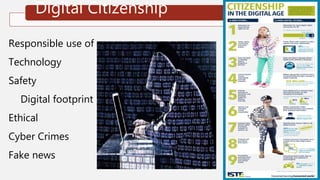
Digital Citizenship
Responsible use of
Technology
Safety
Digital footprint
Ethical
Cyber Crimes
Fake news
Early Years P1-G3
IwT, CwT, DC
Middle School
Intermediate Level
G4-G6
IwT, CwT, DC
Middle School Lower Secondary G7-G9
IwT, CwT, DC
IwT
• Identifying
parts of
digital
devices
• Play games
CwT
• Taking
Photos
• Recording
Audio
• Drawing
DC
• Responsible
use
• Following
Instruction
IwT
• Parts and
their
functions
• Manipulation
• Trouble
Shooting
CwT
• Creating
Illustrations
• Working
Collaboratively
• Static
Presentations
DC
• Netiquette
• Data
protection
IwT
• Use of ICT
for learning
• Use of ICT to
enhance CS
• Handle
Digital
Devices
Safely
CwT
• Create AV for
CS
• Develop
Creative
Writing
• Create
Presentations
Using
application
DC
• Apply Ethical
practices while
using Digital
Devices
• Apply Safety
and Security
Measures
10
Incorrect
Incorrect
CORRECT
WHICH ONE IS NOT A STAGE IN A TEACHER’S DEVELOPMENT ON
DIGITAL LITERACY?
Technology literacy:
enabling learners to use
ICT to learn more
efficiently.
Incorrect
knowledge deepening:
enabling learners to
acquire in-depth
knowledge of subjects
and apply it to complex,
real-world problems
.
Usability:
Using digital
technologies without
understanding
how a tool works, or the
value or purpose for
which it is being used.
Knowledge creation:
enabling learners to
create the new
knowledge required for
more harmonious,
fulfilling and prosperous
societies.
A B C D
LEARNING ENVIRONMENT
REMOTE ACCESS
Modality
• Fully online
• Blended (over
50% online)
• Blended (25–
50% online)
• Web-enabled
F2F
Pacing
• Self-paced (open
entry, open exit)
• Class-paced
• Class-paced with
some self-paced
Student-
Facilitator Ratio
• < 35 to 1
• 36–99 to 1
• 100–999 to 1
• > 1,000 to 1
Pedagogy
• Expository
• Practice
• Exploratory
• Collaborative
Role of Online
Assessments
• Determine if student is
ready for new content
• Tell system how to
support the student
• Provide student or
teacher with information
about learning state
• Input to grade
• Identify students at risk
of failure
Facilitator Role
Online
• Active
instruction
online
• Small presence
online
• None
Student Role Online
• Listen or read
• Complete problems
or answer questions
• Explore simulation
and resources
• Collaborate with
peers
• Online
Communication
Synchrony
• Asynchronous
only
• Synchronous
only
• Some blend of
both
Source of
Feedback
• Automated
• Facilitator
• Peers
REMIND
PARTICIPANTS
THEIR
BACKGROUN
DS ARE
VISIBLE
SET MEETINGS
TO BE
ACCESSIBLE
WITH
PASSWORD
ONLY
MAKE USE OF
WAITING
ROOMS , SO
THAT ONLY
YOU CAN
ADMIT
PEOPLE
PRACTICE
REMOVING
PEOPLE FROM
WEBINARS
BEFORE YOU
FACILITATE
REVOKE
PERMISSION
TO SHARE
SCREENS
Time Activity
10.00
-10.01
Sharing Agenda
10.01-
10.05
Digital Literacy
10.05-
10.10
Learning Environment
10.10-
10.15
Lesson Building Blocks
10.15-
1025
Resourcing Decision Making
DELIVERY FORMAT
Face to Face
Classroom
• Physical
Classroom
• Field Trip
• Lab
Live
Online
• Virtual
• Classroom
• Webinar
Coaching
• Coaching
• Mentoring
Collaboration
&
Community
• Portal
• Blog
• Wiki
• Chat
• IM
• Threaded
Discussion
• VoIP
Multimedia
• Video
Streaming
• Podcast
• Distance
• Learning
• CD-
ROM/DVD
Web-Based
Learning
• Internet/Int
ranet
• Self-Paced
• Tutorials
• Simulation
• Games
Performance
Support
• Knowledge
Management
• Workflow
• Automation
• Performance
Support
• Mobile &
Wireless
Same Time/
Same Place
Instruction
Same Time/
Different Place
Instruction
Different Time/
Same Place
Instruction
Different Time/
Different Place
Instruction
• Live human interaction
• Instant feedback and challenges
• Participants question and ideas
• Live collaboration
• Invite others for live input
• Participants set pace
• Flexibility timing
• Time for reflection before responding
• Participant can self –select
Individualized support
Dependent on tech connection working
Dependent on learner motivation
Participants “bling spots”
FACILITATING
FACILITATING
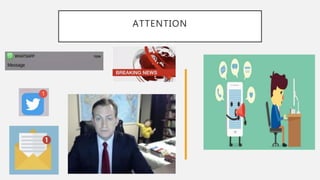
ATTENTION
P
R
E
S
E
N
T
A
T
I
O
N
T
I
P
S
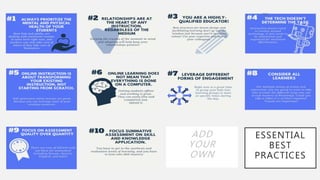
ESSENTIAL
BEST
PRACTICES
ADD
YOUR
OWN
24
Incorrect
Incorrect
CORRECT
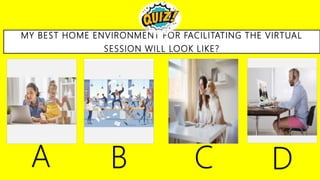
MY BEST HOME ENVIRONMENT FOR FACILITATING THE VIRTUAL
SESSION WILL LOOK LIKE?
Incorrect
.
A B C D
.
LESSON BUILDING BLOCK
Attributes
BUILDING BLOCKS OF A LESSON
Instruction Modeling
Discussion
Research &
Exploration
Online texts &
podcasts
Quizzes & Tests
Reflection &
Metacognition
Collaborative
Group Work
Practice &
Review
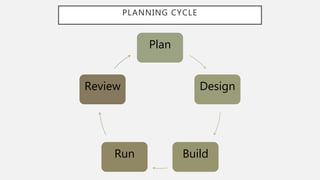
PLANNING CYCLE
Plan
Design
BuildRun
Review
LEARNING OUTCOMES
• Knowledge
• Comprehension
• Application
• Analysis
• Synthesis
• Evaluation
• Affective learning outcomes
• Psychomotor skills
TEACHING LEARNING
ACTIVITIES
READ WATCH
LISTEN
COLLABORATE DISCUSS
INVESTIGATE PRACTICE PRODUCE
INSTRUCTION/
MODELLING
• Record a video
• Self regulated
Learning
• Real Time Video
Conferencing
DISCUSSION, RESEARCH READING
• Text
• Podcast
• Search Engine
FORMATIVE
ASSESSMENT
• Application
• Game
• Inquiry
• Practice
• Quiz
• Test
REFLECTION
• Checking
Understanding
• Metacognition
34
Incorrect
Incorrect
CORRECT
WHAT IS THE NUMBER OF LESSON BUILDING BLOCKS?
3.
Incorrect
6.
9.
12.
Objective Online Tools
Transfer information
Explain concepts
Show students how to:
Navigate tasks
Apply strategies
Use a technology tool
Live Session:
Teams
Video recording tools:
Stream
Tools to engage students around
video content:
PowerPoint With Voice Over
Movie Creator
Instruction and Modelling
Objective Online Tools
Engage higher-order thinking via
conversation about:
Texts
Videos
Podcasts
Topics/Issues
Synchronous discussions
Teams Call
Asynchronous text-based discussions
Classroom OneNote
Asynchronous video-based discussions
Flip Grid
Current events
Conduct informal online research
and crowdsource information with
the group in a shared online space
where students can learn from one
another
Bing Search
Shared online space:
Classroom OneNote
One Drive
-Online PowerPoint
-Online Word
Flip Grid
Discussion and Research and Exploration
Objective Online Tools
Connect students with
practice and review activities
online to reinforce their
understanding of concepts
and help them to refine their
skills
Microsoft Forms
Formative
Kahoot
Task
Foster collaboration and
creativity by asking students
to work on shared tasks
Classroom OneNote
One Drive
-Online
PowerPoint
-Online Word
Flip Grid
Whiteboard
Yammer
Practice and Review and Collaboration
ASSESSMENT,
REFLECTION
AND
METACOGNITION
SKILLS BUILDING
Objective Online Tools
Assess student learning and
mastery of concepts and skills to
guide instruction, scaffolds, and
reteaching
Encourage students to reflect on
their learning
What did they learn?
How did they learn it?
What questions do they have?
Microsoft Forms
Classroom One Note
Sway
PowerPoint
Learning Area
Learning outcomes
Learning Activities Online (synchronous) Offline (asynchronous)
Instruction and Modeling
(Teaching it)
Collaboration and Practice
(Practicing it)
Explore and Discuss
(Reinforcing)
Deliverable
(Assessing it)
Reflection
(Checking for Understanding)
Remote Learning
42
Incorrect
Incorrect
CORRECTIDENTIFY THE PRESENTED ORDER OF THE LESSON PARTS?
1. Instruction and
modeling
2. Collaboration and
Practice
3. Explore and Discuss
4. Deliverables
5. Reflection
.
Incorrect
1. Collaboration and
Practice
2. Deliverables
3. Explore and Discuss
4. Instruction and
modeling
5. Reflection
.
1. Reflection
2. . Deliverables
3. Explore and Discuss
4. Instruction and
modeling
5. Collaboration and
Practice
1. Explore and Discuss
2. Collaboration and
Practice
3. Instruction and
modeling
4. Deliverables
5. Reflection
A B C D
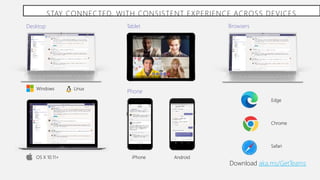
STAY CONNECTED, WITH CONSISTENT EXPERIENCE ACROSS DEVICES
Tablet
iPhone Android
Phone
Desktop
OS X 10.11+
Windows Linux
Browsers
Edge
Chrome
Safari
Download aka.ms/GetTeams
FACILITATOR
CONFIDENCE/COMPETENCY
IN
INFUSING TECHNOLOGY
Survival
Mastery
Impact
Innovation
http://www.agakhanacademies.org/mombasa
mainawagioko@
+254722721656
Mainawagioko
dr.mainawagioko
mainawagioko.blogspot.com
Mainawagioko
Maina WaGioko
innovativelearningfacilitator.wordpress.com
dr.mainawagioko
Gioko_Maina
Maina WaGĩokõ Ph. D.
Vice Principal PD and Outreach
Head Professional Development Center
Aga Khan Academy, Mombasa
Global Facilitator
Examiner and School Evaluator
GAP International Board Member
Microsoft Innovative Educator
FACILITATORS CONTACT
INNOVATIVE LEARNING FACILITATIOR
https://tinyurl.com/remotelearnin
gKE

Remote learning teachers version 25 min

  • 2.
  • 3.
  • 4.
    PRESENTATION OUTLINE Digital LiteracyLearning Environment Lesson Building Block Resourcing
  • 5.
    Interacting with Technology Medialiteracy: hardware and software Information literacy: Working with technology in accessing Information in handling information in managing and presenting information in presenting information to schedule tasks
  • 6.
  • 7.
    Digital Citizenship Responsible useof Technology Safety Digital footprint Ethical Cyber Crimes Fake news
  • 8.
    Early Years P1-G3 IwT,CwT, DC Middle School Intermediate Level G4-G6 IwT, CwT, DC Middle School Lower Secondary G7-G9 IwT, CwT, DC IwT • Identifying parts of digital devices • Play games CwT • Taking Photos • Recording Audio • Drawing DC • Responsible use • Following Instruction IwT • Parts and their functions • Manipulation • Trouble Shooting CwT • Creating Illustrations • Working Collaboratively • Static Presentations DC • Netiquette • Data protection IwT • Use of ICT for learning • Use of ICT to enhance CS • Handle Digital Devices Safely CwT • Create AV for CS • Develop Creative Writing • Create Presentations Using application DC • Apply Ethical practices while using Digital Devices • Apply Safety and Security Measures
  • 10.
    10 Incorrect Incorrect CORRECT WHICH ONE ISNOT A STAGE IN A TEACHER’S DEVELOPMENT ON DIGITAL LITERACY? Technology literacy: enabling learners to use ICT to learn more efficiently. Incorrect knowledge deepening: enabling learners to acquire in-depth knowledge of subjects and apply it to complex, real-world problems . Usability: Using digital technologies without understanding how a tool works, or the value or purpose for which it is being used. Knowledge creation: enabling learners to create the new knowledge required for more harmonious, fulfilling and prosperous societies. A B C D
  • 11.
  • 12.
    REMOTE ACCESS Modality • Fullyonline • Blended (over 50% online) • Blended (25– 50% online) • Web-enabled F2F Pacing • Self-paced (open entry, open exit) • Class-paced • Class-paced with some self-paced Student- Facilitator Ratio • < 35 to 1 • 36–99 to 1 • 100–999 to 1 • > 1,000 to 1 Pedagogy • Expository • Practice • Exploratory • Collaborative Role of Online Assessments • Determine if student is ready for new content • Tell system how to support the student • Provide student or teacher with information about learning state • Input to grade • Identify students at risk of failure Facilitator Role Online • Active instruction online • Small presence online • None Student Role Online • Listen or read • Complete problems or answer questions • Explore simulation and resources • Collaborate with peers • Online Communication Synchrony • Asynchronous only • Synchronous only • Some blend of both Source of Feedback • Automated • Facilitator • Peers
  • 13.
    REMIND PARTICIPANTS THEIR BACKGROUN DS ARE VISIBLE SET MEETINGS TOBE ACCESSIBLE WITH PASSWORD ONLY MAKE USE OF WAITING ROOMS , SO THAT ONLY YOU CAN ADMIT PEOPLE PRACTICE REMOVING PEOPLE FROM WEBINARS BEFORE YOU FACILITATE REVOKE PERMISSION TO SHARE SCREENS
  • 14.
    Time Activity 10.00 -10.01 Sharing Agenda 10.01- 10.05 DigitalLiteracy 10.05- 10.10 Learning Environment 10.10- 10.15 Lesson Building Blocks 10.15- 1025 Resourcing Decision Making
  • 15.
  • 16.
    Face to Face Classroom •Physical Classroom • Field Trip • Lab Live Online • Virtual • Classroom • Webinar Coaching • Coaching • Mentoring Collaboration & Community • Portal • Blog • Wiki • Chat • IM • Threaded Discussion • VoIP Multimedia • Video Streaming • Podcast • Distance • Learning • CD- ROM/DVD Web-Based Learning • Internet/Int ranet • Self-Paced • Tutorials • Simulation • Games Performance Support • Knowledge Management • Workflow • Automation • Performance Support • Mobile & Wireless
  • 17.
    Same Time/ Same Place Instruction SameTime/ Different Place Instruction Different Time/ Same Place Instruction Different Time/ Different Place Instruction
  • 18.
    • Live humaninteraction • Instant feedback and challenges • Participants question and ideas • Live collaboration • Invite others for live input • Participants set pace • Flexibility timing • Time for reflection before responding • Participant can self –select Individualized support Dependent on tech connection working Dependent on learner motivation Participants “bling spots”
  • 19.
  • 20.
  • 21.
  • 22.
  • 23.
  • 24.
    24 Incorrect Incorrect CORRECT MY BEST HOMEENVIRONMENT FOR FACILITATING THE VIRTUAL SESSION WILL LOOK LIKE? Incorrect . A B C D .
  • 25.
  • 26.
    BUILDING BLOCKS OFA LESSON Instruction Modeling Discussion Research & Exploration Online texts & podcasts Quizzes & Tests Reflection & Metacognition Collaborative Group Work Practice & Review
  • 27.
  • 28.
    LEARNING OUTCOMES • Knowledge •Comprehension • Application • Analysis • Synthesis • Evaluation • Affective learning outcomes • Psychomotor skills
  • 29.
  • 30.
    INSTRUCTION/ MODELLING • Record avideo • Self regulated Learning • Real Time Video Conferencing
  • 31.
    DISCUSSION, RESEARCH READING •Text • Podcast • Search Engine
  • 32.
    FORMATIVE ASSESSMENT • Application • Game •Inquiry • Practice • Quiz • Test
  • 33.
  • 34.
    34 Incorrect Incorrect CORRECT WHAT IS THENUMBER OF LESSON BUILDING BLOCKS? 3. Incorrect 6. 9. 12.
  • 36.
    Objective Online Tools Transferinformation Explain concepts Show students how to: Navigate tasks Apply strategies Use a technology tool Live Session: Teams Video recording tools: Stream Tools to engage students around video content: PowerPoint With Voice Over Movie Creator Instruction and Modelling
  • 37.
    Objective Online Tools Engagehigher-order thinking via conversation about: Texts Videos Podcasts Topics/Issues Synchronous discussions Teams Call Asynchronous text-based discussions Classroom OneNote Asynchronous video-based discussions Flip Grid Current events Conduct informal online research and crowdsource information with the group in a shared online space where students can learn from one another Bing Search Shared online space: Classroom OneNote One Drive -Online PowerPoint -Online Word Flip Grid Discussion and Research and Exploration
  • 38.
    Objective Online Tools Connectstudents with practice and review activities online to reinforce their understanding of concepts and help them to refine their skills Microsoft Forms Formative Kahoot Task Foster collaboration and creativity by asking students to work on shared tasks Classroom OneNote One Drive -Online PowerPoint -Online Word Flip Grid Whiteboard Yammer Practice and Review and Collaboration
  • 39.
    ASSESSMENT, REFLECTION AND METACOGNITION SKILLS BUILDING Objective OnlineTools Assess student learning and mastery of concepts and skills to guide instruction, scaffolds, and reteaching Encourage students to reflect on their learning What did they learn? How did they learn it? What questions do they have? Microsoft Forms Classroom One Note Sway PowerPoint
  • 41.
    Learning Area Learning outcomes LearningActivities Online (synchronous) Offline (asynchronous) Instruction and Modeling (Teaching it) Collaboration and Practice (Practicing it) Explore and Discuss (Reinforcing) Deliverable (Assessing it) Reflection (Checking for Understanding) Remote Learning
  • 42.
    42 Incorrect Incorrect CORRECTIDENTIFY THE PRESENTEDORDER OF THE LESSON PARTS? 1. Instruction and modeling 2. Collaboration and Practice 3. Explore and Discuss 4. Deliverables 5. Reflection . Incorrect 1. Collaboration and Practice 2. Deliverables 3. Explore and Discuss 4. Instruction and modeling 5. Reflection . 1. Reflection 2. . Deliverables 3. Explore and Discuss 4. Instruction and modeling 5. Collaboration and Practice 1. Explore and Discuss 2. Collaboration and Practice 3. Instruction and modeling 4. Deliverables 5. Reflection A B C D
  • 43.
    STAY CONNECTED, WITHCONSISTENT EXPERIENCE ACROSS DEVICES Tablet iPhone Android Phone Desktop OS X 10.11+ Windows Linux Browsers Edge Chrome Safari Download aka.ms/GetTeams
  • 45.
  • 46.
    http://www.agakhanacademies.org/mombasa mainawagioko@ +254722721656 Mainawagioko dr.mainawagioko mainawagioko.blogspot.com Mainawagioko Maina WaGioko innovativelearningfacilitator.wordpress.com dr.mainawagioko Gioko_Maina Maina WaGĩokõPh. D. Vice Principal PD and Outreach Head Professional Development Center Aga Khan Academy, Mombasa Global Facilitator Examiner and School Evaluator GAP International Board Member Microsoft Innovative Educator FACILITATORS CONTACT INNOVATIVE LEARNING FACILITATIOR https://tinyurl.com/remotelearnin gKE

Editor's Notes

  • #6 7-9 -Interacting with Technology- Knowing about hardware and software, and working with technology in Accessing , Handling, managing and presenting  information
  • #7 9-14 -Enhancing the Core Competencies -Critical thinking and problem solving, Collaboration and Communication, Creativity and Imagination, Learning to Learn.
  • #8 14-16 -Enhancing the Core Competencies -Critical thinking and problem solving, Collaboration and Communication, Creativity and Imagination, Learning to Learn.
  • #9 16-18 Explain with examples of DL at EY Explain with examples of DL at MS IL Explain with examples of DL at MS LS Explain with examples of DL at SS 65 +5
  • #10 24-25
  • #11 35
  • #13 [22:00, 5/13/2020] Learning Facilitator: Online learning design options (moderating variables) Modality Fully online Blended (over 50% online) Blended (25–50% online) Web-enabled F2F Pacing Self-paced (open entry, open exit) Class-paced Class-paced with some self-paced Student-Instructor Ratio < 35 to 1 36–99 to 1 100–999 to 1 > 1,000 to 1 Pedagogy Expository Practice Exploratory Collaborative Role of Online Assessments Determine if student is ready for new content Tell system how to support the student (adaptive instruction) Provide student or teacher with information about learning state Input to grade Identify students at risk of failure Facilitator Role Online Active instruction online Small presence online None Student Role Online Listen or read Complete problems or answer questions Explore simulation and resources Collaborate with peers Online Communication Synchrony Asynchronous only Synchronous only Some blend of both Source of Feedback Automated Teacher Peers Source: Content adapted from Barbara Means, Marianne Bakia, and Robert Murphy, Learning Online: What Research Tells Us about Whether, When and How (New York: Routledge, 2014).
  • #17 41+8=49
  • #21 Microsoft Teams is a powerful communication platform, but it is not just for chat, calling and online meetings. Teams is the hub for Office 365 apps allowing you to work together in real-time on documents and other Office apps. Teams is also an open platform allowing you to integrate hundreds of apps from the App Store
  • #25 35
  • #27 Even though teaching online may feel like a different animal than teaching face-to-face, there are many similarities in terms of the building blocks of a lesson. The tools teachers use to engage students online are indeed different. It is also true that engaging students in learning activities online will require (at least initially) that teacher's onboard students to those technology tools and support them in learning how to navigate online tasks. However, the activities and tasks teachers use to create their lessons offline can be transferred to the online environment if teachers know what tools to use.
  • #28 30-31 Plan around context: how you teach and your students’ needs. Design a student-centric approach to storyboard a course. Build content and media: rich resources and activities for teaching and learning. Run a course with active teaching and learning. Review and evaluation: ensuring we reflect and iterate based on feedback.
  • #30 35-38
  • #31 Is there instruction or modeling students need to navigate a task or assignment? Would it be better to record a video and allow students to self-pace through the information or engage the group in a real-time video conferencing session?
  • #32 Do students need to engage with texts or podcasts? Can teachers pair those resources with an online discussion prompt to encourage conversation and collaborative meaning-making?
  • #33 Will you collect formative assessment data to assess prior knowledge or check for understanding?
  • #34 Do you want students to reflect on their learning and stretch their metacognitive muscles?
  • #35 35
  • #37 All of these things are possible in an online course! It is just a matter of knowing what tools you can lean on to facilitate these different types of activities online. Below is a document that details each building block, the objective of that activity, and the technology tools teachers can use to engage students in that type of learning activity online.
  • #38 All of these things are possible in an online course! It is just a matter of knowing what tools you can lean on to facilitate these different types of activities online. Below is a document that details each building block, the objective of that activity, and the technology tools teachers can use to engage students in that type of learning activity online.
  • #39 All of these things are possible in an online course! It is just a matter of knowing what tools you can lean on to facilitate these different types of activities online. Below is a document that details each building block, the objective of that activity, and the technology tools teachers can use to engage students in that type of learning activity online.
  • #40 All of these things are possible in an online course! It is just a matter of knowing what tools you can lean on to facilitate these different types of activities online. Below is a document that details each building block, the objective of that activity, and the technology tools teachers can use to engage students in that type of learning activity online.
  • #43 35
  • #44 Finally, Microsoft Teams provides industry leading security and compliance capabilities and rich management capabilities. With Microsoft Teams, customers benefit from the Office 365 hyper-scale, enterprise-grade cloud. [MAIN POINT TO LAND] From Day 1, the requirement has been for Teams to provide you with the same Office 365 capabilities that you’re used to and to build security, privacy and trust directly into the service. You can manage and monitor all features in one centralized portal: Data encryption at all times, at-rest and in-transit. Customer data at rest remains in region Ability to have local data residency for core customer data at rest, plus failover and disaster recovery (see data residency slide in the appendix for details) Human back-up via on-call support engineers standing by 24×7 Customer content is never accessible in logs or telemetry Multi-factor authentication for enhanced identity protection. Secure guest access with AAD managed guest accounts A big privacy topic for all our European customers is of course GDPR – the Global Data Protection Regulation. We will adhere to this ahead of the May 2018 deadline Microsoft Teams supports key standards including SOC 1, SOC 2, EU Model Clauses, HIPPA, and more. Since preview, we’ve added mobile management with Microsoft Intune and new features for compliance and litigation support, including audit log search, eDiscovery and legal hold for channels, chats and files. The Microsoft Teams admin center [coming early 2018] provides you with a single coherent admin experience where you can manage all aspects of Microsoft Teams including users, settings, and analytics. Teams provides enterprise manageability to configure and set policies at a per-user level and manage trusted apps for employees and the organization. PSTN connectivity in Office 365 will give you the option to connect existing on-premises investments in the future. Advanced call management controls include call routing, auto attendant, call queues, and reporting.   While security and compliance are critical, our responsibility goes beyond this. Our mission talks about empowering every person to achieve more. With that in mind, we’re focused on building an inclusive experience, including support for those who use screen readers, high contrast, and keyboard-only navigation, to enable the collective brainpower and potential of everyone.
  • #47 Replace with you contacts