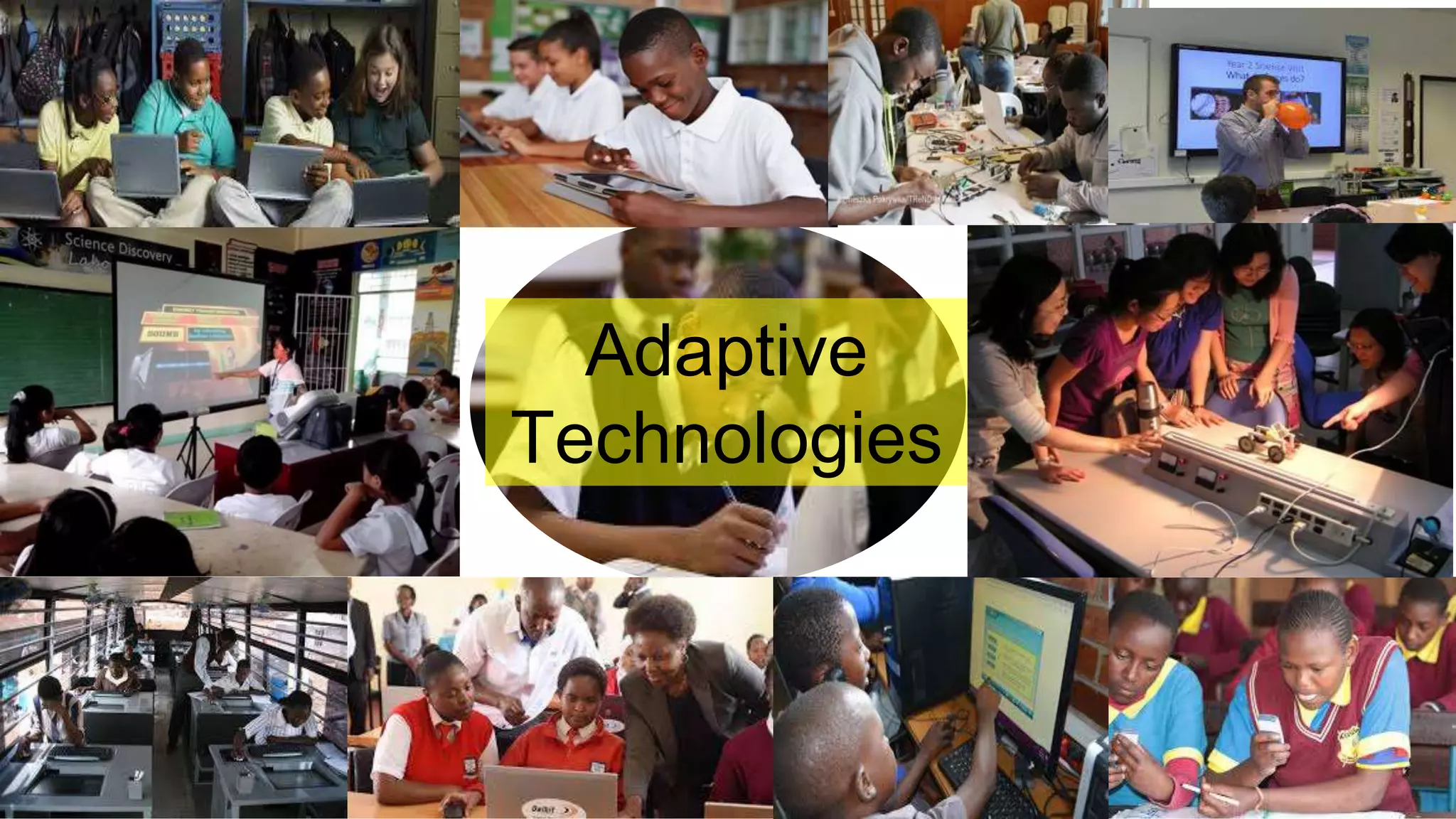


Adaptive
Technologies
Presentation DashBoard
Ifthewayyoufeelrightnow
isanythinginthesky,what
woulditbeandwhy?
WELLNESS
Inquiry Strategies for 21st Century Skills
3
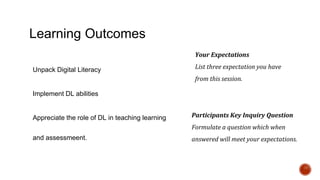
Learning Outcomes
Unpack Digital Literacy
Implement DL abilities
Appreciate the role of DL in teaching learning
and assessmeent.
Your Expectations
List three expectation you have
from this session.
Participants Key Inquiry Question
Formulate a question which when
answered will meet your expectations.
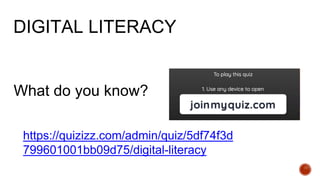
What do you know?
https://quizizz.com/admin/quiz/5df74f3d
799601001bb09d75/digital-literacy
DIGITAL LITERACY
Why should we develop DL?
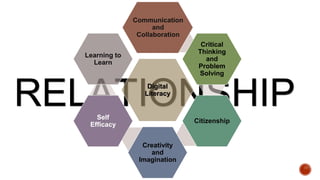
RELATIONSHIP
Digital
Literacy
Communication
and
Collaboration
Critical
Thinking
and
Problem
Solving
Citizenship
Creativity
and
Imagination
Self
Efficacy
Learning to
Learn
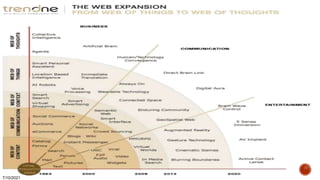
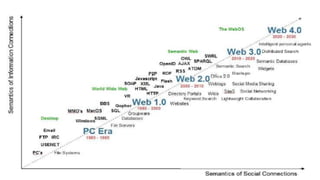
Web 1.0 (1996-2004) Web 2.0 (2004-2016) Web 3.0 (2016-
Meaning Is... Dictated Socially constructed Socially constructed &
contextually reinvented
Access Read only Read and Write Web Executable Web
Used Millions Billions Trillions
Content Static Dynamic Artificial Intelligence and 3D
Interaction One Directional Bi-Directional Multi-User Virtual Environment
Technology is... Confiscated at the
classroom door(digital
refugees)
Cautiously adopted
(digital immigrants)
Everywhere (digital universe)
Teaching is
done...
Teacher to student Teacher to learner &
learner to student
Teacher to student, learner to
student, & learner to teacher
Schools are
located...
In a building In a building or online Everywhere &thoroughly infused
into society
Parents view
schools as...
Daycare Daycare A place for them to learn, too
Teachers are... Licensed
professionals
Licensed professionals Everybody, everywhere
Hardware &
software in
schools..,
Are purchased at
great cost and ignored
Are open source and
available at lower cost
Are available at low cost and are
used purposely
Industry views
graduates as...
Assembly line workers As ill-prepared
assembly line workers
in a knowledge
economy
As co-workers or entrepreneurs
Web 4.0
7/10/2021
Web 4.0: Is the impending state at which all information converges into a great ball of benevolent self-
aware light, and solves every problem from world peace to why Lost stinks this season.
Web 4.0 is about making connections, about serendipity and about the network taking initiative.
Web 4.0 computing tablet can receive information and instructions without the user needing to touch the
tablet, utilize voice input or incorporate any peripheral device whatsoever.
Web 4.0 is about "the ultra-intelligent electronic agent."
.
Web 5.0
7/10/2021
Web 5.0: is the introduction of a new dimension in the web equation: everything having to do with time, and web
services which all revolve around time and bringing time-based services to the user, via whatever new methods
happen to be available.
Web 5.0: the telepathic web brain implants, helmets to read/write directly into your brain will get better and better,
smaller and smaller, cheaper and cheaper. And remember: any electronical device that can read your brain can
be connected to a wireless modem to connect you to the internet ... to connect you to anyone or anything you
like: your wife, your Facebook friends, Wikipedia, your radio- or TV station, your coffee machine...
Web 5.0: the Wise Web, is still in shadow play, but it's coming. Its signature is written large in research labs
across the planet, where everything from human behavior, emotions, decision- making, network science, brain
cognition and automated learning is being funded.
Web 5.0 will scoop up all this new knowledge and the intelligence offered by Webs 2.0, 3.0 and 4.0 and deliver it
in an ethical, self-aware and sentient framework, embedding all biological and artificial life within a global
cooperative intelligence.
7/10/2021
7/10/2021
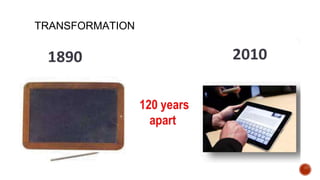
TRANSFORMATION
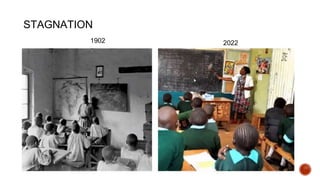
STAGNATION
2022
1902
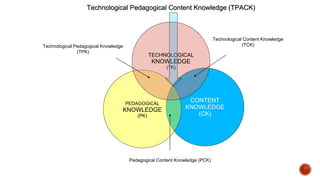
CONTENT
KNOWLEDGE
(CK)
PEDAGOGICAL
KNOWLEDGE
(PK)
TECHNOLOGICAL
KNOWLEDGE
(TK)
Pedagogical Content Knowledge (PCK)
Technological Pedagogical Knowledge
(TPK)
Technological Content Knowledge
(TCK)
Technological Pedagogical Content Knowledge (TPACK)
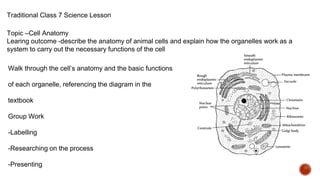
Traditional Class 7 Science Lesson
Topic –Cell Anatomy
Learing outcome -describe the anatomy of animal cells and explain how the organelles work as a
system to carry out the necessary functions of the cell
Walk through the cell’s anatomy and the basic functions
of each organelle, referencing the diagram in the
textbook
Group Work
-Labelling
-Researching on the process
-Presenting
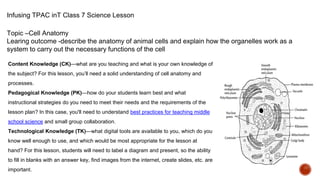
Infusing TPAC inT Class 7 Science Lesson
Topic –Cell Anatomy
Learing outcome -describe the anatomy of animal cells and explain how the organelles work as a
system to carry out the necessary functions of the cell
Content Knowledge (CK)—what are you teaching and what is your own knowledge of
the subject? For this lesson, you’ll need a solid understanding of cell anatomy and
processes.
Pedagogical Knowledge (PK)—how do your students learn best and what
instructional strategies do you need to meet their needs and the requirements of the
lesson plan? In this case, you'll need to understand best practices for teaching middle
school science and small group collaboration.
Technological Knowledge (TK)—what digital tools are available to you, which do you
know well enough to use, and which would be most appropriate for the lesson at
hand? For this lesson, students will need to label a diagram and present, so the ability
to fill in blanks with an answer key, find images from the internet, create slides, etc. are
important.
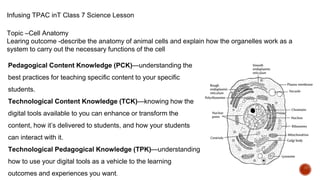
Infusing TPAC inT Class 7 Science Lesson
Topic –Cell Anatomy
Learing outcome -describe the anatomy of animal cells and explain how the organelles work as a
system to carry out the necessary functions of the cell
Pedagogical Content Knowledge (PCK)—understanding the
best practices for teaching specific content to your specific
students.
Technological Content Knowledge (TCK)—knowing how the
digital tools available to you can enhance or transform the
content, how it’s delivered to students, and how your students
can interact with it.
Technological Pedagogical Knowledge (TPK)—understanding
how to use your digital tools as a vehicle to the learning
outcomes and experiences you want.
Infusing TPAC inT Class 7 Science Lesson
Topic –Cell Anatomy
Learing outcome -describe the anatomy of animal cells and explain how the organelles work as a
system to carry out the necessary functions of the cell
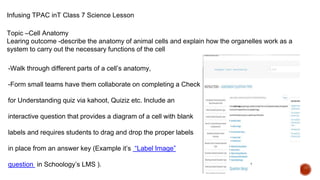
-Walk through different parts of a cell’s anatomy,
-Form small teams have them collaborate on completing a Check
for Understanding quiz via kahoot, Quiziz etc. Include an
interactive question that provides a diagram of a cell with blank
labels and requires students to drag and drop the proper labels
in place from an answer key (Example it’s “Label Image”
question in Schoology’s LMS ).
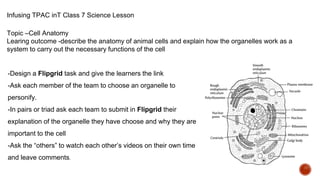
Infusing TPAC inT Class 7 Science Lesson
Topic –Cell Anatomy
Learing outcome -describe the anatomy of animal cells and explain how the organelles work as a
system to carry out the necessary functions of the cell
-Design a Flipgrid task and give the learners the link
-Ask each member of the team to choose an organelle to
personify.
-In pairs or triad ask each team to submit in Flipgrid their
explanation of the organelle they have choose and why they are
important to the cell
-Ask the “others” to watch each other’s videos on their own time
and leave comments.
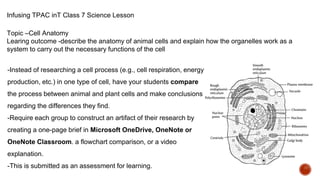
Infusing TPAC inT Class 7 Science Lesson
Topic –Cell Anatomy
Learing outcome -describe the anatomy of animal cells and explain how the organelles work as a
system to carry out the necessary functions of the cell
-Instead of researching a cell process (e.g., cell respiration, energy
production, etc.) in one type of cell, have your students compare
the process between animal and plant cells and make conclusions
regarding the differences they find.
-Require each group to construct an artifact of their research by
creating a one-page brief in Microsoft OneDrive, OneNote or
OneNote Classroom. a flowchart comparison, or a video
explanation.
-This is submitted as an assessment for learning.
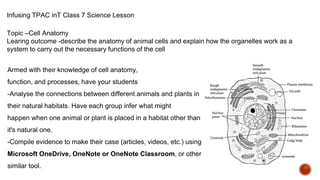
Infusing TPAC inT Class 7 Science Lesson
Topic –Cell Anatomy
Learing outcome -describe the anatomy of animal cells and explain how the organelles work as a
system to carry out the necessary functions of the cell
Armed with their knowledge of cell anatomy,
function, and processes, have your students
-Analyse the connections between different animals and plants in
their natural habitats. Have each group infer what might
happen when one animal or plant is placed in a habitat other than
it's natural one.
-Compile evidence to make their case (articles, videos, etc.) using
Microsoft OneDrive, OneNote or OneNote Classroom, or other
similar tool.
1. What is the affordance i.e. opportunities for learning
2. What is facilitating the affordance or providing the opportunity.
3. What is promoting the degree of affordance?
4. What is the source of information?
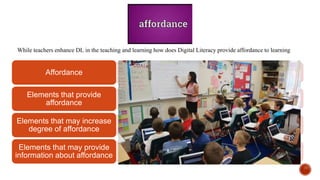
While teachers enhance DL in the teaching and learning how does Digital Literacy provide affordance to learning
Affordance
Elements that provide
affordance
Elements that may increase
degree of affordance
Elements that may provide
information about affordance
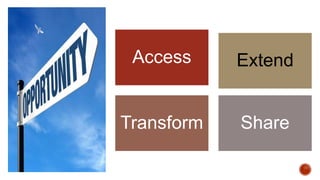
Access Extend
Transform Share
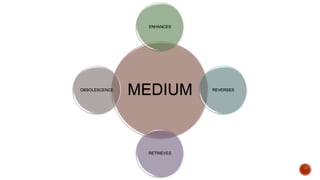
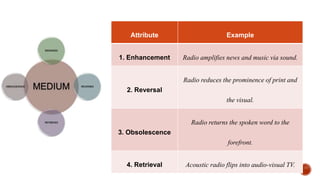
MEDIUM
ENHANCES
REVERSES
RETRIEVES
OBSOLESCENCE
Enhancement REVERSAL
RETRIEVA
L
OBSOLESCENCE
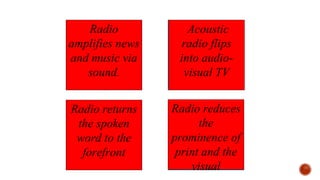
Radio reduces
the
prominence of
print and the
visual
Radio
amplifies news
and music via
sound.
.
Acoustic
radio flips
into audio-
visual TV
Radio returns
the spoken
word to the
forefront
Attribute Example
1. Enhancement Radio amplifies news and music via sound.
2. Reversal
Radio reduces the prominence of print and
the visual.
3. Obsolescence
Radio returns the spoken word to the
forefront.
4. Retrieval Acoustic radio flips into audio-visual TV.
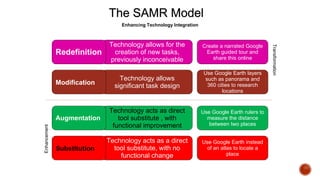
Technology allows for the
creation of new tasks,
previously inconceivable
The SAMR Model
Enhancing Technology Integration
Redefinition
Create a narrated Google
Earth guided tour and
share this online
Technology allows
significant task design
Modification
Use Google Earth layers
such as panorama and
360 cities to research
locations
Technology acts as direct
tool substitute , with
functional improvement
Augmentation
Use Google Earth rulers to
measure the distance
between two places
Technology acts as a direct
tool substitute, with no
functional change
Substitution
Use Google Earth instead
of an atlas to locate a
place
Transformation
Enhancement
Example of PowToon
Designed by Grade 10 Learners
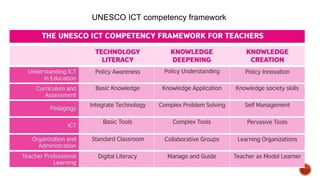
UNESCO ICT competency framework
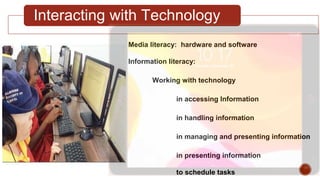
Interacting with Technology
Media literacy: hardware and software
Information literacy:
Working with technology
in accessing Information
in handling information
in managing and presenting information
in presenting information
to schedule tasks
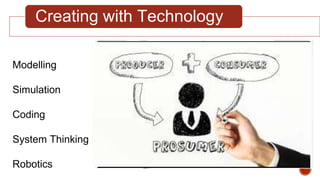
Creating with Technology
Modelling
Simulation
Coding
System Thinking
Robotics
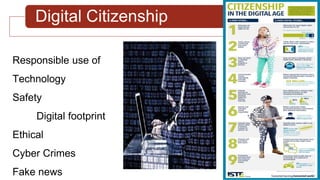
Digital Citizenship
Responsible use of
Technology
Safety
Digital footprint
Ethical
Cyber Crimes
Fake news
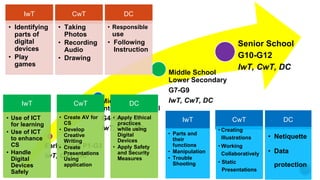
Early Years P1-G3
IwT, CwT, DC
Middle School
Intermediate Level
G4-G6
IwT, CwT, DC
Middle School
Lower Secondary
G7-G9
IwT, CwT, DC
Senior School
G10-G12
IwT, CwT, DC
IwT
• Identifying
parts of
digital
devices
• Play
games
CwT
• Taking
Photos
• Recording
Audio
• Drawing
DC
• Responsible
use
• Following
Instruction
IwT
• Parts and
their
functions
• Manipulation
• Trouble
Shooting
CwT
• Creating
Illustrations
• Working
Collaboratively
• Static
Presentations
DC
• Netiquette
• Data
protection
IwT
• Use of ICT
for learning
• Use of ICT
to enhance
CS
• Handle
Digital
Devices
Safely
CwT
• Create AV for
CS
• Develop
Creative
Writing
• Create
Presentations
Using
application
DC
• Apply Ethical
practices
while using
Digital
Devices
• Apply Safety
and Security
Measures
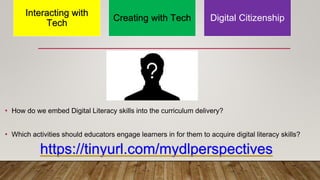
• How do we embed Digital Literacy skills into the curriculum delivery?
• Which activities should educators engage learners in for them to acquire digital literacy skills?
Interacting with
Tech
Creating with Tech Digital Citizenship
https://tinyurl.com/mydlperspectives
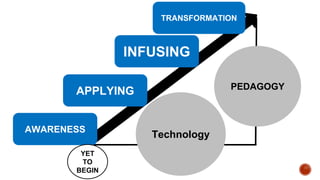
PEDAGOGY
Technology
AWARENESS
APPLYING
INFUSING
TRANSFORMATION
YET
TO
BEGIN
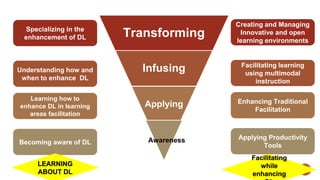
Transforming
Infusing
Applying
Awareness
Creating and Managing
Innovative and open
learning environments
Facilitating learning
using multimodal
instruction
Enhancing Traditional
Facilitation
Applying Productivity
Tools
Specializing in the
enhancement of DL
Understanding how and
when to enhance DL
Learning how to
enhance DL in learning
areas facilitation
Becoming aware of DL
LEARNING
ABOUT DL
Facilitating
while
enhancing
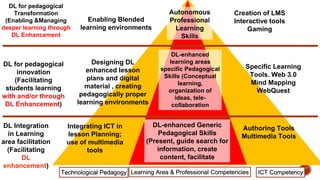
DL-enhanced Generic
Pedagogical Skills
(Present, guide search for
information, create
content, facilitate
DL-enhanced
learning areas
specific Pedagogical
Skills (Conceptual
learning,
organization of
ideas, tele-
collaboration
Autonomous
Professional
Learning
Skills
Integrating ICT in
lesson Planning;
use of multimedia
tools
Designing DL
enhanced lesson
plans and digital
material , creating
pedagogically proper
learning environments
Enabling Blended
learning environments
DL Integration
in Learning
area facilitation
(Facilitating
DL
enhancement)
DL for pedagogical
innovation
(Facilitating
students learning
with and/or through
DL Enhancement)
DL for pedagogical
Transformation
(Enabling &Managing
deeper learning through
DL Enhancement
Authoring Tools
Multimedia Tools
Specific Learning
Tools. Web 3.0
Mind Mapping
WebQuest
Creation of LMS
Interactive tools
Gaming
ICT Competency
Learning Area & Professional Competencies
Technological Pedagogy
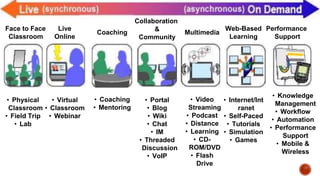
Face to Face
Classroom
• Physical
Classroom
• Field Trip
• Lab
Live
Online
• Virtual
• Classroom
• Webinar
Coaching
• Coaching
• Mentoring
Collaboration
&
Community
• Portal
• Blog
• Wiki
• Chat
• IM
• Threaded
Discussion
• VoIP
Multimedia
• Video
Streaming
• Podcast
• Distance
• Learning
• CD-
ROM/DVD
• Flash
Drive
Web-Based
Learning
• Internet/Int
ranet
• Self-Paced
• Tutorials
• Simulation
• Games
Performance
Support
• Knowledge
Management
• Workflow
• Automation
• Performance
Support
• Mobile &
Wireless
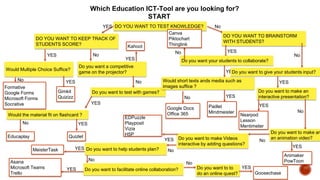
Which Education ICT-Tool are you looking for?
START
DO YOU WANT TO TEST KNOWLEDGE?
YES
DO YOU WANT TO KEEP TRACK OF
STUDENTS SCORE?
YES
Would Multiple Choice Suffice?
YES
Gimkit
Quizizz
No
Formative
Google Forms
Microsoft Forms
Socrative
No
Do you want a competitive
game on the projector?
YES
Kahoot
No
Do you want to test with games?
YES
Would the material fit on flashcard ?
YES
Quizlet
No
Educaplay
No
DO YOU WANT TO BRAINSTORM
WITH STUDENTS?
YES
Do you want your students to collaborate?
YES
Would short texts ands media such as
images suffice ?
YES
Padlet
Mindmeister
No
Google Docs
Office 365
No
Canva
Piktochart
Thinglink
No
Do you want to give your students input?
YES
Do you want to make an
interactive presentation?
YES
Nearpod
Lesson
Mentimeter
No
Do you want to make an
an animation video?
YES
Animaker
PowToon
No
Do you want to make Videos
interactive by adding questions?
YES
EDPuzzle
Playposit
Vizia
H5P
No
Do you want to help students plan?
YES
MeisterTask
No
Do you want to facilitate online collaboration?
YES
Asana
Microsoft Teams
Trello
No
Do you want to to
do an online quest?
YES
Goosechase
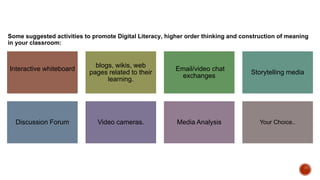
Some suggested activities to promote Digital Literacy, higher order thinking and construction of meaning
in your classroom:
Interactive whiteboard
blogs, wikis, web
pages related to their
learning.
Email/video chat
exchanges
Storytelling media
Discussion Forum Video cameras. Media Analysis Your Choice..
Transformation -Infusion-Integration-Use- Awareness
It’s not about TECHNOLOGY
about TECHKNOWLOGY
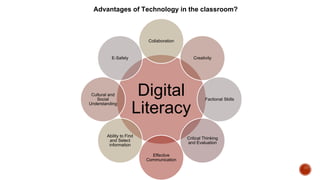
Advantages of Technology in the classroom?
Digital
Literacy
Collaboration
Creativity
Factional Skills
Critical Thinking
and Evaluation
Effective
Communication
Ability to Find
and Select
information
Cultural and
Social
Understanding
E-Safety
Adaptive Technologies
▪ Research
▪ Development
▪ Ascent
▪ Maturity
▪ Decline
▪ Innovators
▪ Early adopters
▪ Early Majority
▪ Late Majority
▪ Laggards
What do I know now?
www.kahoot.it
DIGITAL LITERACY
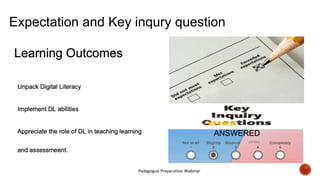
Expectation and Key inqury question
Pedagogue Preparation Webinar
ANSWERED
partialy
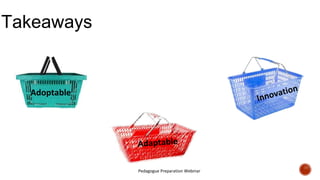
Takeaways
Pedagogue Preparation Webinar
Adoptable
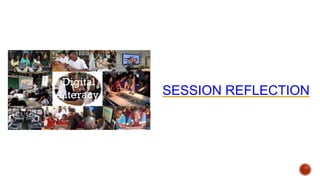
SESSION REFLECTION
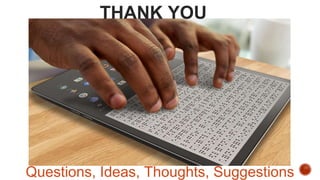
THANK YOU
Questions, Ideas, Thoughts, Suggestions
Facilitators Contacts
http://www.agakhanacademies.org/mombasa
mainawagioko@
+254722721656
Mainawagioko
dr.mainawagioko
mainawagioko.blogspot.com
Mainawagioko
Gathijanga Maina WaGioko
https://innovativelearningfacilitator.wordpress.com
mainawagioko
Maina WaGĩokõ Ph. D.
Head Professional Development Center
Aga Khan Academy, Mombasa
Director LUA
Global Coordinator (KIX)
Global Facilitator
Examiner and School Evaluator
GAP International Board Member
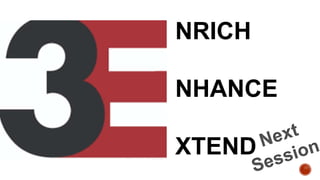
NRICH
NHANCE
XTEND

Adaptive technologies

  • 1.
  • 2.
  • 3.
  • 5.
    Learning Outcomes Unpack DigitalLiteracy Implement DL abilities Appreciate the role of DL in teaching learning and assessmeent. Your Expectations List three expectation you have from this session. Participants Key Inquiry Question Formulate a question which when answered will meet your expectations.
  • 6.
    What do youknow? https://quizizz.com/admin/quiz/5df74f3d 799601001bb09d75/digital-literacy DIGITAL LITERACY
  • 7.
    Why should wedevelop DL?
  • 8.
  • 10.
    Web 1.0 (1996-2004)Web 2.0 (2004-2016) Web 3.0 (2016- Meaning Is... Dictated Socially constructed Socially constructed & contextually reinvented Access Read only Read and Write Web Executable Web Used Millions Billions Trillions Content Static Dynamic Artificial Intelligence and 3D Interaction One Directional Bi-Directional Multi-User Virtual Environment Technology is... Confiscated at the classroom door(digital refugees) Cautiously adopted (digital immigrants) Everywhere (digital universe) Teaching is done... Teacher to student Teacher to learner & learner to student Teacher to student, learner to student, & learner to teacher Schools are located... In a building In a building or online Everywhere &thoroughly infused into society Parents view schools as... Daycare Daycare A place for them to learn, too Teachers are... Licensed professionals Licensed professionals Everybody, everywhere Hardware & software in schools.., Are purchased at great cost and ignored Are open source and available at lower cost Are available at low cost and are used purposely Industry views graduates as... Assembly line workers As ill-prepared assembly line workers in a knowledge economy As co-workers or entrepreneurs
  • 11.
    Web 4.0 7/10/2021 Web 4.0:Is the impending state at which all information converges into a great ball of benevolent self- aware light, and solves every problem from world peace to why Lost stinks this season. Web 4.0 is about making connections, about serendipity and about the network taking initiative. Web 4.0 computing tablet can receive information and instructions without the user needing to touch the tablet, utilize voice input or incorporate any peripheral device whatsoever. Web 4.0 is about "the ultra-intelligent electronic agent." .
  • 12.
    Web 5.0 7/10/2021 Web 5.0:is the introduction of a new dimension in the web equation: everything having to do with time, and web services which all revolve around time and bringing time-based services to the user, via whatever new methods happen to be available. Web 5.0: the telepathic web brain implants, helmets to read/write directly into your brain will get better and better, smaller and smaller, cheaper and cheaper. And remember: any electronical device that can read your brain can be connected to a wireless modem to connect you to the internet ... to connect you to anyone or anything you like: your wife, your Facebook friends, Wikipedia, your radio- or TV station, your coffee machine... Web 5.0: the Wise Web, is still in shadow play, but it's coming. Its signature is written large in research labs across the planet, where everything from human behavior, emotions, decision- making, network science, brain cognition and automated learning is being funded. Web 5.0 will scoop up all this new knowledge and the intelligence offered by Webs 2.0, 3.0 and 4.0 and deliver it in an ethical, self-aware and sentient framework, embedding all biological and artificial life within a global cooperative intelligence.
  • 14.
  • 15.
  • 17.
  • 18.
  • 21.
    CONTENT KNOWLEDGE (CK) PEDAGOGICAL KNOWLEDGE (PK) TECHNOLOGICAL KNOWLEDGE (TK) Pedagogical Content Knowledge(PCK) Technological Pedagogical Knowledge (TPK) Technological Content Knowledge (TCK) Technological Pedagogical Content Knowledge (TPACK)
  • 22.
    Traditional Class 7Science Lesson Topic –Cell Anatomy Learing outcome -describe the anatomy of animal cells and explain how the organelles work as a system to carry out the necessary functions of the cell Walk through the cell’s anatomy and the basic functions of each organelle, referencing the diagram in the textbook Group Work -Labelling -Researching on the process -Presenting
  • 23.
    Infusing TPAC inTClass 7 Science Lesson Topic –Cell Anatomy Learing outcome -describe the anatomy of animal cells and explain how the organelles work as a system to carry out the necessary functions of the cell Content Knowledge (CK)—what are you teaching and what is your own knowledge of the subject? For this lesson, you’ll need a solid understanding of cell anatomy and processes. Pedagogical Knowledge (PK)—how do your students learn best and what instructional strategies do you need to meet their needs and the requirements of the lesson plan? In this case, you'll need to understand best practices for teaching middle school science and small group collaboration. Technological Knowledge (TK)—what digital tools are available to you, which do you know well enough to use, and which would be most appropriate for the lesson at hand? For this lesson, students will need to label a diagram and present, so the ability to fill in blanks with an answer key, find images from the internet, create slides, etc. are important.
  • 24.
    Infusing TPAC inTClass 7 Science Lesson Topic –Cell Anatomy Learing outcome -describe the anatomy of animal cells and explain how the organelles work as a system to carry out the necessary functions of the cell Pedagogical Content Knowledge (PCK)—understanding the best practices for teaching specific content to your specific students. Technological Content Knowledge (TCK)—knowing how the digital tools available to you can enhance or transform the content, how it’s delivered to students, and how your students can interact with it. Technological Pedagogical Knowledge (TPK)—understanding how to use your digital tools as a vehicle to the learning outcomes and experiences you want.
  • 25.
    Infusing TPAC inTClass 7 Science Lesson Topic –Cell Anatomy Learing outcome -describe the anatomy of animal cells and explain how the organelles work as a system to carry out the necessary functions of the cell -Walk through different parts of a cell’s anatomy, -Form small teams have them collaborate on completing a Check for Understanding quiz via kahoot, Quiziz etc. Include an interactive question that provides a diagram of a cell with blank labels and requires students to drag and drop the proper labels in place from an answer key (Example it’s “Label Image” question in Schoology’s LMS ).
  • 26.
    Infusing TPAC inTClass 7 Science Lesson Topic –Cell Anatomy Learing outcome -describe the anatomy of animal cells and explain how the organelles work as a system to carry out the necessary functions of the cell -Design a Flipgrid task and give the learners the link -Ask each member of the team to choose an organelle to personify. -In pairs or triad ask each team to submit in Flipgrid their explanation of the organelle they have choose and why they are important to the cell -Ask the “others” to watch each other’s videos on their own time and leave comments.
  • 27.
    Infusing TPAC inTClass 7 Science Lesson Topic –Cell Anatomy Learing outcome -describe the anatomy of animal cells and explain how the organelles work as a system to carry out the necessary functions of the cell -Instead of researching a cell process (e.g., cell respiration, energy production, etc.) in one type of cell, have your students compare the process between animal and plant cells and make conclusions regarding the differences they find. -Require each group to construct an artifact of their research by creating a one-page brief in Microsoft OneDrive, OneNote or OneNote Classroom. a flowchart comparison, or a video explanation. -This is submitted as an assessment for learning.
  • 28.
    Infusing TPAC inTClass 7 Science Lesson Topic –Cell Anatomy Learing outcome -describe the anatomy of animal cells and explain how the organelles work as a system to carry out the necessary functions of the cell Armed with their knowledge of cell anatomy, function, and processes, have your students -Analyse the connections between different animals and plants in their natural habitats. Have each group infer what might happen when one animal or plant is placed in a habitat other than it's natural one. -Compile evidence to make their case (articles, videos, etc.) using Microsoft OneDrive, OneNote or OneNote Classroom, or other similar tool.
  • 29.
    1. What isthe affordance i.e. opportunities for learning 2. What is facilitating the affordance or providing the opportunity. 3. What is promoting the degree of affordance? 4. What is the source of information?
  • 30.
    While teachers enhanceDL in the teaching and learning how does Digital Literacy provide affordance to learning Affordance Elements that provide affordance Elements that may increase degree of affordance Elements that may provide information about affordance
  • 31.
  • 32.
  • 33.
    Enhancement REVERSAL RETRIEVA L OBSOLESCENCE Radio reduces the prominenceof print and the visual Radio amplifies news and music via sound. . Acoustic radio flips into audio- visual TV Radio returns the spoken word to the forefront
  • 34.
    Attribute Example 1. EnhancementRadio amplifies news and music via sound. 2. Reversal Radio reduces the prominence of print and the visual. 3. Obsolescence Radio returns the spoken word to the forefront. 4. Retrieval Acoustic radio flips into audio-visual TV.
  • 35.
    Technology allows forthe creation of new tasks, previously inconceivable The SAMR Model Enhancing Technology Integration Redefinition Create a narrated Google Earth guided tour and share this online Technology allows significant task design Modification Use Google Earth layers such as panorama and 360 cities to research locations Technology acts as direct tool substitute , with functional improvement Augmentation Use Google Earth rulers to measure the distance between two places Technology acts as a direct tool substitute, with no functional change Substitution Use Google Earth instead of an atlas to locate a place Transformation Enhancement
  • 36.
    Example of PowToon Designedby Grade 10 Learners
  • 38.
  • 41.
    Interacting with Technology Medialiteracy: hardware and software Information literacy: Working with technology in accessing Information in handling information in managing and presenting information in presenting information to schedule tasks
  • 42.
  • 43.
    Digital Citizenship Responsible useof Technology Safety Digital footprint Ethical Cyber Crimes Fake news
  • 44.
    Early Years P1-G3 IwT,CwT, DC Middle School Intermediate Level G4-G6 IwT, CwT, DC Middle School Lower Secondary G7-G9 IwT, CwT, DC Senior School G10-G12 IwT, CwT, DC IwT • Identifying parts of digital devices • Play games CwT • Taking Photos • Recording Audio • Drawing DC • Responsible use • Following Instruction IwT • Parts and their functions • Manipulation • Trouble Shooting CwT • Creating Illustrations • Working Collaboratively • Static Presentations DC • Netiquette • Data protection IwT • Use of ICT for learning • Use of ICT to enhance CS • Handle Digital Devices Safely CwT • Create AV for CS • Develop Creative Writing • Create Presentations Using application DC • Apply Ethical practices while using Digital Devices • Apply Safety and Security Measures
  • 45.
    • How dowe embed Digital Literacy skills into the curriculum delivery? • Which activities should educators engage learners in for them to acquire digital literacy skills? Interacting with Tech Creating with Tech Digital Citizenship https://tinyurl.com/mydlperspectives
  • 46.
  • 47.
    Transforming Infusing Applying Awareness Creating and Managing Innovativeand open learning environments Facilitating learning using multimodal instruction Enhancing Traditional Facilitation Applying Productivity Tools Specializing in the enhancement of DL Understanding how and when to enhance DL Learning how to enhance DL in learning areas facilitation Becoming aware of DL LEARNING ABOUT DL Facilitating while enhancing
  • 48.
    DL-enhanced Generic Pedagogical Skills (Present,guide search for information, create content, facilitate DL-enhanced learning areas specific Pedagogical Skills (Conceptual learning, organization of ideas, tele- collaboration Autonomous Professional Learning Skills Integrating ICT in lesson Planning; use of multimedia tools Designing DL enhanced lesson plans and digital material , creating pedagogically proper learning environments Enabling Blended learning environments DL Integration in Learning area facilitation (Facilitating DL enhancement) DL for pedagogical innovation (Facilitating students learning with and/or through DL Enhancement) DL for pedagogical Transformation (Enabling &Managing deeper learning through DL Enhancement Authoring Tools Multimedia Tools Specific Learning Tools. Web 3.0 Mind Mapping WebQuest Creation of LMS Interactive tools Gaming ICT Competency Learning Area & Professional Competencies Technological Pedagogy
  • 49.
    Face to Face Classroom •Physical Classroom • Field Trip • Lab Live Online • Virtual • Classroom • Webinar Coaching • Coaching • Mentoring Collaboration & Community • Portal • Blog • Wiki • Chat • IM • Threaded Discussion • VoIP Multimedia • Video Streaming • Podcast • Distance • Learning • CD- ROM/DVD • Flash Drive Web-Based Learning • Internet/Int ranet • Self-Paced • Tutorials • Simulation • Games Performance Support • Knowledge Management • Workflow • Automation • Performance Support • Mobile & Wireless
  • 50.
    Which Education ICT-Toolare you looking for? START DO YOU WANT TO TEST KNOWLEDGE? YES DO YOU WANT TO KEEP TRACK OF STUDENTS SCORE? YES Would Multiple Choice Suffice? YES Gimkit Quizizz No Formative Google Forms Microsoft Forms Socrative No Do you want a competitive game on the projector? YES Kahoot No Do you want to test with games? YES Would the material fit on flashcard ? YES Quizlet No Educaplay No DO YOU WANT TO BRAINSTORM WITH STUDENTS? YES Do you want your students to collaborate? YES Would short texts ands media such as images suffice ? YES Padlet Mindmeister No Google Docs Office 365 No Canva Piktochart Thinglink No Do you want to give your students input? YES Do you want to make an interactive presentation? YES Nearpod Lesson Mentimeter No Do you want to make an an animation video? YES Animaker PowToon No Do you want to make Videos interactive by adding questions? YES EDPuzzle Playposit Vizia H5P No Do you want to help students plan? YES MeisterTask No Do you want to facilitate online collaboration? YES Asana Microsoft Teams Trello No Do you want to to do an online quest? YES Goosechase
  • 51.
    Some suggested activitiesto promote Digital Literacy, higher order thinking and construction of meaning in your classroom: Interactive whiteboard blogs, wikis, web pages related to their learning. Email/video chat exchanges Storytelling media Discussion Forum Video cameras. Media Analysis Your Choice..
  • 52.
    Transformation -Infusion-Integration-Use- Awareness It’snot about TECHNOLOGY about TECHKNOWLOGY
  • 53.
    Advantages of Technologyin the classroom? Digital Literacy Collaboration Creativity Factional Skills Critical Thinking and Evaluation Effective Communication Ability to Find and Select information Cultural and Social Understanding E-Safety
  • 54.
    Adaptive Technologies ▪ Research ▪Development ▪ Ascent ▪ Maturity ▪ Decline ▪ Innovators ▪ Early adopters ▪ Early Majority ▪ Late Majority ▪ Laggards
  • 55.
    What do Iknow now? www.kahoot.it DIGITAL LITERACY
  • 56.
    Expectation and Keyinqury question Pedagogue Preparation Webinar ANSWERED partialy
  • 57.
  • 59.
  • 60.
    THANK YOU Questions, Ideas,Thoughts, Suggestions
  • 61.
    Facilitators Contacts http://www.agakhanacademies.org/mombasa mainawagioko@ +254722721656 Mainawagioko dr.mainawagioko mainawagioko.blogspot.com Mainawagioko Gathijanga MainaWaGioko https://innovativelearningfacilitator.wordpress.com mainawagioko Maina WaGĩokõ Ph. D. Head Professional Development Center Aga Khan Academy, Mombasa Director LUA Global Coordinator (KIX) Global Facilitator Examiner and School Evaluator GAP International Board Member
  • 62.