Best Practice Strategies for  Active Learning and Engagement in  Online Teaching By: Jo Ann R. Coe-Regan, PhD [email_address] Nancy K. Brown, PhD [email_address] CSWE-APM Conference 2011 Atlanta, Georgia
PRESENTATION FOCUS Overview of active learning,  engagement and “The Seven Principles of Good Teaching” Examples of online teaching strategies that demonstrate active learning and engagement Advantages, Challenges and Evaluation of Online Teaching Strategies Presentation Link: http://www.slideshare.net/JoAnnRegan/apm-2011-presentation-with-nancy
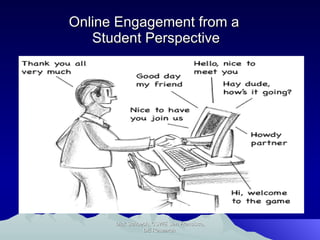
Online Engagement from a  Student Perspective Dick Schoech, CSWE San Francisco, DE Research
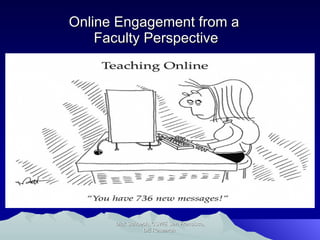
Online Engagement from a  Faculty Perspective Dick Schoech, CSWE San Francisco, DE Research
Active learning involves providing opportunities for students to meaningfully talk and listen, write, read, and reflect on the content, ideas, issues, and concerns of an academic subject Research and anecdotal evidence overwhelmingly support the claim that students learn best when they engage with course material and actively participate in their learning. ACTIVE LEARNING  AND ENGAGEMENT
Tell me,  I forget. Show me, I remember. Involve me, I understand. -Ancient Chinese Proverb
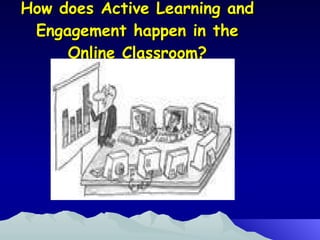
How does Active Learning and Engagement happen in the Online Classroom?
Asynchronous: Lack of interaction Lack of  dynamic face-to-face instruction Difficulty teaching social and cultural skills Decreased levels of student involvement and motivation CHALLENGES IN AN ONLINE CLASSROOM
The "seven principles of good practice in undergraduate education," originally framed by Arthur Chickering and Zelda Gamson in 1986, is a concise summary of decades of educational research findings about the kinds of teaching/learning activities most likely to improve learning outcomes. See:  http://www.tltgroup.org/seven/home.htm  for more information on Seven Principles SEVEN PRINCIPLES FOR GOOD PRACTICE
Good practice encourages contact between students and faculty Good practice develops reciprocity and cooperation among students Good practice uses active learning techniques Good practice gives prompt feedback  7 PRINCIPLES OF  GOOD TEACHING
Good practice emphasizes time on task Good practice communicates high expectations Good practice respects diverse talents and ways of learning 7 PRINCIPLES OF  GOOD TEACHING
Chickering and Gamson (1991) Article gives excellent examples of some of the most cost-effective and appropriate ways to use computers, videos, and telecommunications technologies to advance the seven principles IMPLEMENTING THE SEVEN PRINCIPLES WITH TECHNOLOGY
BEST PRACTICE STRATEGY FOR DESIGN AND DEVELOPMENT Hybrid courses work well rather than just purely online or purely face-to-face instruction Design courses that focus on: Expository learning experiences -content transmitted by a lecture, written material, or other mechanisms Active Learning -student has control of what and how he or she learns Interactive Learning -activity in which the nature of the learning content is emergent as learners interact with one another, instructor, or other knowledge sources
RESEARCH ON BEST PRACTICE STRATEGIES Ragan & Terheggen (2003). Effective Workload Management Strategies for the Online Environment Studies focused on best practice strategies for effective development, design, and delivery of online courses Boettcher (2008).  Teaching Online for the First Time Strategies for teaching online courses with a focus on first-time teaching
TECHNOLOGY CAN’T BE THE DRIVING FORCE Technology cannot drive the teaching and learning but certainly can be used to enhance the lack of in person contact Teaching with technology forces you to be more organized and structured with content and allows you to focus on the process
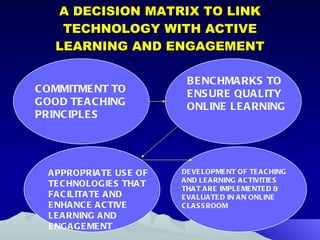
A DECISION MATRIX TO LINK TECHNOLOGY WITH ACTIVE LEARNING AND ENGAGEMENT Perceptions of Innovational Attributes of Television and the Internet BENCHMARKS TO ENSURE QUALITY ONLINE LEARNING COMMITMENT TO GOOD TEACHING PRINCIPLES APPROPRIATE USE OF TECHNOLOGIES THAT FACILITATE AND ENHANCE ACTIVE LEARNING AND ENGAGEMENT DEVELOPMENT OF TEACHING AND LEARNING ACTIVITIES THAT ARE IMPLEMENTED & EVALUATED IN AN ONLINE CLASSROOM
WHERE WE STARTED? Satellite Television and Videoconferencing (both one-way and two-way) Asynchronous Modules (Webcast/Webinar) -one-way Hybrid Practice Courses Engaging Clients in the First Interview  http://breeze.sc.edu/prac/ Tells  them what they need to know to conduct a first interview with a client Demonstrate  (Show)  a first interview via a video demonstration (both a good and a bad one) Practice  a skills demonstration to be shown or practiced in class
WHAT WE ARE DOING NOW? Teaching 100% online Synchronous online meetings using Adobe Connect  Asynchronous modules that support hybrid environments
Example of Active Learning and Engagement in Adobe Connect http://breeze.sc.edu/p24924993/  Breakout Rooms (small group discussions on readings)  beginning is instructions and reports from small groups starts at 50:11 Use of Guest Speakers (author of the textbook)  starts at 3:00 http://breeze.sc.edu/p85458177/ Polling features  http://www.iclicker.com/Products/satellitepollingsystem/ http://breeze.sc.edu/p11882611/ Student presentations 21:50  (photos of Iraq) and 40:11 (presentation from student in Charleston)
Twitter! A University of South Carolina professor (Dr. Lara Lomicka Anderson) was knighted by the French Ministry of Education for her creative use of twitter in the classroom.  Students practiced their foreign language skills through online conversations.  Students reported that it fostered conversation and built community outside of the classroom
Application to Social Work? Addictions Social Justice Policy Practice Tips Child Welfare Statistics ENDLESS possibilities!
Other Innovations iPad? Tools are only as good as their applications permit. Innovators are building apps daily. http://breeze.sc.edu/ipad/  Presentation was developed on an iPad using Keynote. Technology is now ubiquitous – a little bit goes a long way.
Wikis with groups Collaborative work – everyone in the group can edit, add content, and develop the project. Notes on Group Work Students should present a plan of work Evaluation should involve all group members
Other Innovations - Continued Collaborative videos (cell phone, video cameras, Skype). http://breeze.sc.edu/p86199413/ Windows Movie Editor  Julie C. Some faculty choose to limit the way in which students communicate: Twitter, Facebook, email, text, etc.  Following too many at once becomes confusing. “ Pick and Choose” your technologies Students can pick their preferred technology and then everybody uses it as their communication channel.
There is unevenness to how students may respond; every class is going to be different. Some students produce a lot of “Tweets” and others will do very little. Ground rules need to be set on response expectations. Whatever technology you choose, you will need a grading rubric to help clarify expectations.
Google Docs Group and collaborative editing
Faculty Collaboration on  Teaching Tools Faculty need to be familiar with the technology Faculty collaboration Survey faculty on what they know Survey Grad students and TAs Faculty Learning  Cohorts Groups within the department who can get together and share technology skills
Technology is complicated. Learning collaboratively is much more time efficient and effective Avoid “wandering the desert alone!” Faculty cohorts tend to be more constructivist in their approaches to technology and learning. Learning is not linear Learning is expansive Everybody brings something to the table
Ways to Improve Success The biggest boon to success is ensuring that students have a clear understanding of how the technology works: What constitutes a good video? How to use Windows Movie Maker? How to add audio? How to do a picture collage electronically?
You have to show them what the tools are. Show them how to use them. Provide easy to following instruction manuals. These can be created quite easily.  http://breeze.sc.edu/safeassign/
TEACHING PRINCIPLES USED instructor ensures a high degree of interactivity and participation Instructor changes role from “sage on stage” to a “guide on the side” or as an “Architect of Activity”  Recognize that learners have shifted from “broadcast learning” to “interactive learning” in the new technology age in which most children are now “growing up digital
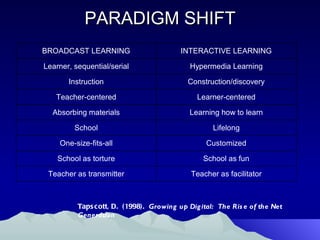
PARADIGM SHIFT Tapscott, D.  (1998).  Growing up Digital:  The Rise of the Net Generation
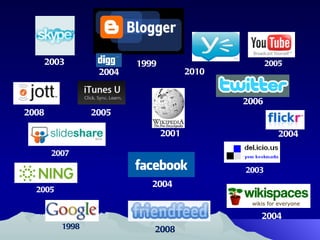
2010 2004 2004 2008 1998 2007 2005 2003 2001 2003 2005 2008 2004 2006 2004 1999 2005
INTELLIGENT USE OF  NEW MEDIA The Twitter Experiment http://www.youtube.com/watch?v=6WPVWDkF7U8 Backchannel in Education-Nine Uses http://derekbruff.com/teachingwithcrs/?p=472 http://derekbruff.com/teachingwithcrs/?p=843 Enrich Your Teaching through Social Media http://chronicle.com/blogs/profhacker/enrich-teaching-social-media/30100
The Good, The Bad, The Evil
ADVANTAGES The technology and format lends itself to active learning and engagement in the online classroom Good learning outcomes and new formats for assignments Positive teaching evaluations Most interactive and collaborative class they have had Students report they never leave computer during live class-don’t want to miss anything 
CHALLENGES/FRUSTRATIONS
CHALLENGES Using new technology and the learning curve Finding resources and support Technical Support Online in an Adobe Connect Community at Penn State http://meeting.psu.edu/ Fostering a personal connection with students in the classroom Evaluating learning outcomes
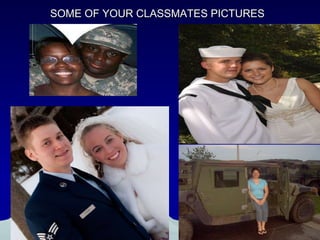
SOME OF YOUR CLASSMATES PICTURES
CONCLUSIONS The use of technology should lead us to rethink ways we can encourage active learning and engagement in teaching Careful thought and planning is needed to bring positive growth and change to online teaching Have fun with technology!
Your Standpoint Comments Feedback Thoughts Future Steps to continue being engaged with this topic
Abel, R.  (2005). Implementing best practices in online learning.  Retrieved March 27,  2009, from  h ttp://connect.educause.edu/Library/EDUCAUSE+Quarterly/ImplementingBestPractices/39928?time=1237869199 . Boettcher, J.V.  (2008).  Teaching online for the first time.  Retrieved March 28, 2009,  from  http://www.designingforlearning.info/services/writing/ecoach/tenbest.html Chickering, A.W. & Ehrmann, S.C.  (1996). Implementing the seven principles:  Technology as lever.  Retrieved on March 27, 2009 from  http://www.tltgroup.org/programs/seven.html .  Chickering, A.W. & Gamson, Z.F.  (1991). Applying the seven principles for good  practice in undergraduate education.  New directions for teaching and learning:  a publication in the Jossey-Bass higher and adult education  series.  San Francisco, CA:  Jossey-Bass. Conrad, R.M., & Donaldson, J.A.  (2004). Engaging the online learner: Activities and  resources for creative instruction.  San Francisco, CA:  Jossey-Bass. Ko, S., & Rossen, S. (2004). Teaching online: A practical guide (2nd ed.). Boston: Houghton Mifflin. Miller, T. W., & King, F. B. (2003). Distance education: Pedagogy and best practices in  the new millennium. International Journal of Leadership in Education, 6, 283–297. Moore, B. (2005a).  Faculty perceptions of the effectiveness of web-based instruction in  social work education: A national study. Journal of Technology in Human Services, 23(1/2), 53-66.  REFERENCES
Moore, B. (2005b).  Key issues in web-based education in the human services: A review  of the literature. Journal of Technology in Human Services, 23(1), 11-28.  Palloff, R. M., & Pratt, K. (2001). Lessons from the cyberspace classroom: The realities of online teaching. San Francisco: Jossey-Bass. Palloff, R. M., & Pratt, K. (2003). The virtual student: A profile and guide to working   with online learners. San Francisco: Jossey-Bass. Palloff, R. M., & Pratt, K. (2007). Building online learning communities: Effective  strategies for the virtual classroom. San Francisco: Jossey-Bass. Ragan, L.R.  (2009a).  An Emerging Set of Operational Performance Guidelines for the  Online Instructor.  Retrieved March 27, 2009, from  http://www.sc.edu/cte/larryragan/performanceguidelines.pdf . Ragan, L.R.  (2009b).  Penn State Quality Assurance e-Learning Design Standards.  Retrieved March 27, 2009, from  http://www.sc.edu/cte/larryragan/designstandards.pdf . Ragan, L.R., & Terheggen, S.L.  (2003).  Effective workload management strategies for the online environment.  Retrieved March 28, 2009, from  http://www.worldcampus.psu.edu/pdf/fac/workload_strat.pdf . Tallent-Runnels, M.K., Thomas, J.A., Lan, W.Y., Cooper, S., Ahern, T.C., Shaw, S.M., et al. (2006). Teaching courses online: A review of the research. Review of Educational Research, 76(1), 93-135.  REFERENCES
The TLT Group  (2009).  “Seven Principles" Collection of Ideas for Teaching and Learning with Technology. Retrieved March 27, 2009, from  http://www.tltgroup.org/Seven/Library_TOC.htm Weiss, R. E., Knowlton, D. S., & Speck, B. W. (Eds.). (2000). Principles of effective teaching in the online classroom. New Directions for Teaching and Learning, 84 (Winter 2000), 1–4. Young, S. (2006). Student views of effective online teaching in higher education. The American Journal of Distance Education, 20(2), 65-77.    REFERENCES
RESOURCE BOOKS USED Lessons from the Cyberspace Classroom: The Realities of Online Teaching    By: Rena M. Palloff, Keith Pratt  The Virtual Student: A Profile and Guide to Working with Online Learners   By: Rena M. Palloff, Keith Pratt  Teaching Online: A Practical Guide ,  2nd Edition (Paperback) by  Susan Ko and Steve Rossen   Engaging the Online Learner : Activities and Resources for Creative Instruction   (Online Teaching and Learning Series (OTL)) (Paperback) by  Rita-Marie Conrad ,  J. Ana Donaldson

Apm 2011 presentation with nancy

  • 1.
    Best Practice Strategiesfor Active Learning and Engagement in Online Teaching By: Jo Ann R. Coe-Regan, PhD [email_address] Nancy K. Brown, PhD [email_address] CSWE-APM Conference 2011 Atlanta, Georgia
  • 2.
    PRESENTATION FOCUS Overviewof active learning, engagement and “The Seven Principles of Good Teaching” Examples of online teaching strategies that demonstrate active learning and engagement Advantages, Challenges and Evaluation of Online Teaching Strategies Presentation Link: http://www.slideshare.net/JoAnnRegan/apm-2011-presentation-with-nancy
  • 3.
    Online Engagement froma Student Perspective Dick Schoech, CSWE San Francisco, DE Research
  • 4.
    Online Engagement froma Faculty Perspective Dick Schoech, CSWE San Francisco, DE Research
  • 5.
    Active learning involvesproviding opportunities for students to meaningfully talk and listen, write, read, and reflect on the content, ideas, issues, and concerns of an academic subject Research and anecdotal evidence overwhelmingly support the claim that students learn best when they engage with course material and actively participate in their learning. ACTIVE LEARNING AND ENGAGEMENT
  • 6.
    Tell me, I forget. Show me, I remember. Involve me, I understand. -Ancient Chinese Proverb
  • 7.
    How does ActiveLearning and Engagement happen in the Online Classroom?
  • 8.
    Asynchronous: Lack ofinteraction Lack of dynamic face-to-face instruction Difficulty teaching social and cultural skills Decreased levels of student involvement and motivation CHALLENGES IN AN ONLINE CLASSROOM
  • 9.
    The "seven principlesof good practice in undergraduate education," originally framed by Arthur Chickering and Zelda Gamson in 1986, is a concise summary of decades of educational research findings about the kinds of teaching/learning activities most likely to improve learning outcomes. See: http://www.tltgroup.org/seven/home.htm for more information on Seven Principles SEVEN PRINCIPLES FOR GOOD PRACTICE
  • 10.
    Good practice encouragescontact between students and faculty Good practice develops reciprocity and cooperation among students Good practice uses active learning techniques Good practice gives prompt feedback 7 PRINCIPLES OF GOOD TEACHING
  • 11.
    Good practice emphasizestime on task Good practice communicates high expectations Good practice respects diverse talents and ways of learning 7 PRINCIPLES OF GOOD TEACHING
  • 12.
    Chickering and Gamson(1991) Article gives excellent examples of some of the most cost-effective and appropriate ways to use computers, videos, and telecommunications technologies to advance the seven principles IMPLEMENTING THE SEVEN PRINCIPLES WITH TECHNOLOGY
  • 13.
    BEST PRACTICE STRATEGYFOR DESIGN AND DEVELOPMENT Hybrid courses work well rather than just purely online or purely face-to-face instruction Design courses that focus on: Expository learning experiences -content transmitted by a lecture, written material, or other mechanisms Active Learning -student has control of what and how he or she learns Interactive Learning -activity in which the nature of the learning content is emergent as learners interact with one another, instructor, or other knowledge sources
  • 14.
    RESEARCH ON BESTPRACTICE STRATEGIES Ragan & Terheggen (2003). Effective Workload Management Strategies for the Online Environment Studies focused on best practice strategies for effective development, design, and delivery of online courses Boettcher (2008). Teaching Online for the First Time Strategies for teaching online courses with a focus on first-time teaching
  • 15.
    TECHNOLOGY CAN’T BETHE DRIVING FORCE Technology cannot drive the teaching and learning but certainly can be used to enhance the lack of in person contact Teaching with technology forces you to be more organized and structured with content and allows you to focus on the process
  • 16.
    A DECISION MATRIXTO LINK TECHNOLOGY WITH ACTIVE LEARNING AND ENGAGEMENT Perceptions of Innovational Attributes of Television and the Internet BENCHMARKS TO ENSURE QUALITY ONLINE LEARNING COMMITMENT TO GOOD TEACHING PRINCIPLES APPROPRIATE USE OF TECHNOLOGIES THAT FACILITATE AND ENHANCE ACTIVE LEARNING AND ENGAGEMENT DEVELOPMENT OF TEACHING AND LEARNING ACTIVITIES THAT ARE IMPLEMENTED & EVALUATED IN AN ONLINE CLASSROOM
  • 17.
    WHERE WE STARTED?Satellite Television and Videoconferencing (both one-way and two-way) Asynchronous Modules (Webcast/Webinar) -one-way Hybrid Practice Courses Engaging Clients in the First Interview http://breeze.sc.edu/prac/ Tells them what they need to know to conduct a first interview with a client Demonstrate (Show) a first interview via a video demonstration (both a good and a bad one) Practice a skills demonstration to be shown or practiced in class
  • 18.
    WHAT WE AREDOING NOW? Teaching 100% online Synchronous online meetings using Adobe Connect Asynchronous modules that support hybrid environments
  • 19.
    Example of ActiveLearning and Engagement in Adobe Connect http://breeze.sc.edu/p24924993/ Breakout Rooms (small group discussions on readings) beginning is instructions and reports from small groups starts at 50:11 Use of Guest Speakers (author of the textbook) starts at 3:00 http://breeze.sc.edu/p85458177/ Polling features http://www.iclicker.com/Products/satellitepollingsystem/ http://breeze.sc.edu/p11882611/ Student presentations 21:50 (photos of Iraq) and 40:11 (presentation from student in Charleston)
  • 20.
    Twitter! A Universityof South Carolina professor (Dr. Lara Lomicka Anderson) was knighted by the French Ministry of Education for her creative use of twitter in the classroom. Students practiced their foreign language skills through online conversations. Students reported that it fostered conversation and built community outside of the classroom
  • 21.
    Application to SocialWork? Addictions Social Justice Policy Practice Tips Child Welfare Statistics ENDLESS possibilities!
  • 22.
    Other Innovations iPad?Tools are only as good as their applications permit. Innovators are building apps daily. http://breeze.sc.edu/ipad/ Presentation was developed on an iPad using Keynote. Technology is now ubiquitous – a little bit goes a long way.
  • 23.
    Wikis with groupsCollaborative work – everyone in the group can edit, add content, and develop the project. Notes on Group Work Students should present a plan of work Evaluation should involve all group members
  • 24.
    Other Innovations -Continued Collaborative videos (cell phone, video cameras, Skype). http://breeze.sc.edu/p86199413/ Windows Movie Editor Julie C. Some faculty choose to limit the way in which students communicate: Twitter, Facebook, email, text, etc. Following too many at once becomes confusing. “ Pick and Choose” your technologies Students can pick their preferred technology and then everybody uses it as their communication channel.
  • 25.
    There is unevennessto how students may respond; every class is going to be different. Some students produce a lot of “Tweets” and others will do very little. Ground rules need to be set on response expectations. Whatever technology you choose, you will need a grading rubric to help clarify expectations.
  • 26.
    Google Docs Groupand collaborative editing
  • 27.
    Faculty Collaboration on Teaching Tools Faculty need to be familiar with the technology Faculty collaboration Survey faculty on what they know Survey Grad students and TAs Faculty Learning Cohorts Groups within the department who can get together and share technology skills
  • 28.
    Technology is complicated.Learning collaboratively is much more time efficient and effective Avoid “wandering the desert alone!” Faculty cohorts tend to be more constructivist in their approaches to technology and learning. Learning is not linear Learning is expansive Everybody brings something to the table
  • 29.
    Ways to ImproveSuccess The biggest boon to success is ensuring that students have a clear understanding of how the technology works: What constitutes a good video? How to use Windows Movie Maker? How to add audio? How to do a picture collage electronically?
  • 30.
    You have toshow them what the tools are. Show them how to use them. Provide easy to following instruction manuals. These can be created quite easily. http://breeze.sc.edu/safeassign/
  • 31.
    TEACHING PRINCIPLES USEDinstructor ensures a high degree of interactivity and participation Instructor changes role from “sage on stage” to a “guide on the side” or as an “Architect of Activity” Recognize that learners have shifted from “broadcast learning” to “interactive learning” in the new technology age in which most children are now “growing up digital
  • 32.
    PARADIGM SHIFT Tapscott,D. (1998). Growing up Digital: The Rise of the Net Generation
  • 33.
    2010 2004 20042008 1998 2007 2005 2003 2001 2003 2005 2008 2004 2006 2004 1999 2005
  • 34.
    INTELLIGENT USE OF NEW MEDIA The Twitter Experiment http://www.youtube.com/watch?v=6WPVWDkF7U8 Backchannel in Education-Nine Uses http://derekbruff.com/teachingwithcrs/?p=472 http://derekbruff.com/teachingwithcrs/?p=843 Enrich Your Teaching through Social Media http://chronicle.com/blogs/profhacker/enrich-teaching-social-media/30100
  • 35.
    The Good, TheBad, The Evil
  • 36.
    ADVANTAGES The technologyand format lends itself to active learning and engagement in the online classroom Good learning outcomes and new formats for assignments Positive teaching evaluations Most interactive and collaborative class they have had Students report they never leave computer during live class-don’t want to miss anything 
  • 37.
  • 38.
    CHALLENGES Using newtechnology and the learning curve Finding resources and support Technical Support Online in an Adobe Connect Community at Penn State http://meeting.psu.edu/ Fostering a personal connection with students in the classroom Evaluating learning outcomes
  • 39.
    SOME OF YOURCLASSMATES PICTURES
  • 40.
    CONCLUSIONS The useof technology should lead us to rethink ways we can encourage active learning and engagement in teaching Careful thought and planning is needed to bring positive growth and change to online teaching Have fun with technology!
  • 41.
    Your Standpoint CommentsFeedback Thoughts Future Steps to continue being engaged with this topic
  • 42.
  • 43.
    Abel, R. (2005). Implementing best practices in online learning. Retrieved March 27, 2009, from h ttp://connect.educause.edu/Library/EDUCAUSE+Quarterly/ImplementingBestPractices/39928?time=1237869199 . Boettcher, J.V. (2008). Teaching online for the first time. Retrieved March 28, 2009, from http://www.designingforlearning.info/services/writing/ecoach/tenbest.html Chickering, A.W. & Ehrmann, S.C. (1996). Implementing the seven principles: Technology as lever. Retrieved on March 27, 2009 from http://www.tltgroup.org/programs/seven.html . Chickering, A.W. & Gamson, Z.F. (1991). Applying the seven principles for good practice in undergraduate education. New directions for teaching and learning: a publication in the Jossey-Bass higher and adult education series. San Francisco, CA: Jossey-Bass. Conrad, R.M., & Donaldson, J.A. (2004). Engaging the online learner: Activities and resources for creative instruction. San Francisco, CA: Jossey-Bass. Ko, S., & Rossen, S. (2004). Teaching online: A practical guide (2nd ed.). Boston: Houghton Mifflin. Miller, T. W., & King, F. B. (2003). Distance education: Pedagogy and best practices in the new millennium. International Journal of Leadership in Education, 6, 283–297. Moore, B. (2005a). Faculty perceptions of the effectiveness of web-based instruction in social work education: A national study. Journal of Technology in Human Services, 23(1/2), 53-66. REFERENCES
  • 44.
    Moore, B. (2005b). Key issues in web-based education in the human services: A review of the literature. Journal of Technology in Human Services, 23(1), 11-28. Palloff, R. M., & Pratt, K. (2001). Lessons from the cyberspace classroom: The realities of online teaching. San Francisco: Jossey-Bass. Palloff, R. M., & Pratt, K. (2003). The virtual student: A profile and guide to working with online learners. San Francisco: Jossey-Bass. Palloff, R. M., & Pratt, K. (2007). Building online learning communities: Effective strategies for the virtual classroom. San Francisco: Jossey-Bass. Ragan, L.R. (2009a). An Emerging Set of Operational Performance Guidelines for the Online Instructor. Retrieved March 27, 2009, from http://www.sc.edu/cte/larryragan/performanceguidelines.pdf . Ragan, L.R. (2009b). Penn State Quality Assurance e-Learning Design Standards. Retrieved March 27, 2009, from http://www.sc.edu/cte/larryragan/designstandards.pdf . Ragan, L.R., & Terheggen, S.L. (2003). Effective workload management strategies for the online environment. Retrieved March 28, 2009, from http://www.worldcampus.psu.edu/pdf/fac/workload_strat.pdf . Tallent-Runnels, M.K., Thomas, J.A., Lan, W.Y., Cooper, S., Ahern, T.C., Shaw, S.M., et al. (2006). Teaching courses online: A review of the research. Review of Educational Research, 76(1), 93-135. REFERENCES
  • 45.
    The TLT Group (2009). “Seven Principles" Collection of Ideas for Teaching and Learning with Technology. Retrieved March 27, 2009, from http://www.tltgroup.org/Seven/Library_TOC.htm Weiss, R. E., Knowlton, D. S., & Speck, B. W. (Eds.). (2000). Principles of effective teaching in the online classroom. New Directions for Teaching and Learning, 84 (Winter 2000), 1–4. Young, S. (2006). Student views of effective online teaching in higher education. The American Journal of Distance Education, 20(2), 65-77.   REFERENCES
  • 46.
    RESOURCE BOOKS USEDLessons from the Cyberspace Classroom: The Realities of Online Teaching By: Rena M. Palloff, Keith Pratt The Virtual Student: A Profile and Guide to Working with Online Learners By: Rena M. Palloff, Keith Pratt Teaching Online: A Practical Guide , 2nd Edition (Paperback) by Susan Ko and Steve Rossen Engaging the Online Learner : Activities and Resources for Creative Instruction (Online Teaching and Learning Series (OTL)) (Paperback) by Rita-Marie Conrad , J. Ana Donaldson

Editor's Notes

  • #3 -focused dissertation on distance education -Faculty development
  • #8 - In a traditional classroom, it’s fairly easy to tell when you are losing your students. Eyelids droop. Heads start to bob. And you have this funny feeling that the click-clacking of keyboards isn’t the result of copious note-taking. In an online classroom, it’s a little more difficult. Not only is it impossible to tell what students are doing on the other end, but the students have access to so many more distractions that it’s sometimes hard to keep them engaged in their learning.
  • #15 Distributed learning, rather than distance education will become the dominant paradigm for higher education The possibilities represented by distributed learning are great as are the challenges it brings. I would like to briefly discuss some of those challenges and then the solutions to overcoming these challenges.
  • #16 Technology should not just enhance our current instructional approaches (ie. lecture on Power Point). Have to look back at our fundamental student learning goals for a specific course and brainstorm ways to use technology to enhance student learning. The technology cannot drive the teaching and learning. “ After all, technique is the differentiating force with all technologies” (Hamilton, 1999) People, institutions, companies and society at large, transform technology, any technology, by appropriating it, modifying it, by experimenting with it” (Castells, 2001)
  • #18 Distributed learning, rather than distance education will become the dominant paradigm for higher education The possibilities represented by distributed learning are great as are the challenges it brings. I would like to briefly discuss some of those challenges and then the solutions to overcoming these challenges.
  • #19 Distributed learning, rather than distance education will become the dominant paradigm for higher education The possibilities represented by distributed learning are great as are the challenges it brings. I would like to briefly discuss some of those challenges and then the solutions to overcoming these challenges.
  • #20 Distributed learning, rather than distance education will become the dominant paradigm for higher education The possibilities represented by distributed learning are great as are the challenges it brings. I would like to briefly discuss some of those challenges and then the solutions to overcoming these challenges.
  • #34 Use this as audience gauging activity.
  • #36 Jobs says technology will amaze, but teachers are still at the epicenter (Newsweek, 2001). Distributed learning is much more than an online substitute for lectures and professors. Distributed learning extends the opportunities for interaction between faculty and student, incorporating simulations and visualizations, as well as collaborative learning. The “any time, anyplace” nature of this new set of electronic educational opportunities may well have its greatest impact on face-to-face education. Since distributed education can occur anywhere and at any time, these conditions can be modified on a number of dimensions. It will involve faculty to determine how these modifications will be made.
  • #41 -In all my courses, I have focused on how to best foster the deep learning ideas and development of student thinking skills and use technology that addresses “bottlenecks.” -Technology enables many pedagogical strategies that were impossible or impractical