Rehumanizing Classes through
Technology
Kelvin Thompson, Ed.D.
John Raible
Center for Distributed Learning
Primitive Audio: http://bit.ly/audio_rehumanizing
[Note: Headphones suggested]
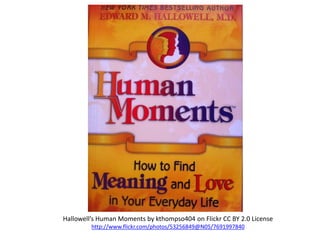
Hallowell’s Human Moments by kthompso404 on Flickr CC BY 2.0 License
http://www.flickr.com/photos/53256849@N05/7691997840
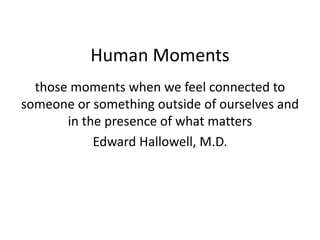
Human Moments
those moments when we feel connected to
someone or something outside of ourselves and
in the presence of what matters
Edward Hallowell, M.D.
“Human Moment” Stories
Read More About It
Reading List: Rehumanizing Through Technologies
http://bit.ly/readinglist_rehumanizing
Annotated List of Technologies
http://bit.ly/technologies_rehumanizing
Technologies
Suggested Technologies
• Free!
• Fairly dependable
• Useful in all modalities
• Mobile-friendly
• Range of uses
Survey of Many
• Most free
• Some single function
– Interaction
– Assessment
– Content
Rehumanizing Through Technologies
1. What we ask for in use of technologies
2. What we offer in use of technologies
WHAT WE ASK FOR
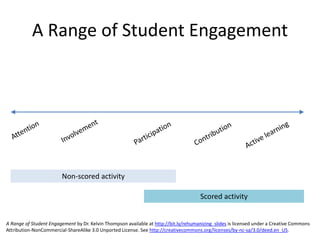
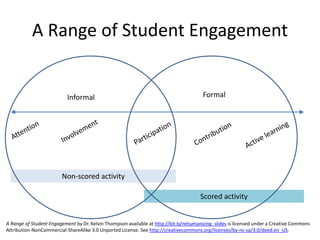
Non-scored activity
Scored activity
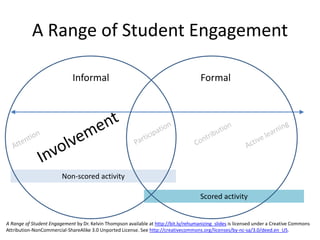
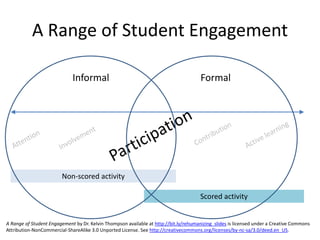
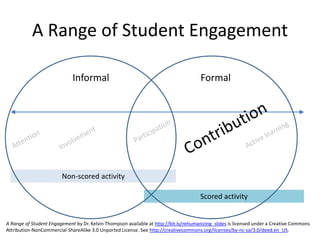
A Range of Student Engagement
A Range of Student Engagement by Dr. Kelvin Thompson available at http://bit.ly/rehumanizing_slides is licensed under a Creative Commons
Attribution-NonCommercial-ShareAlike 3.0 Unported License. See http://creativecommons.org/licenses/by-nc-sa/3.0/deed.en_US.
Non-scored activity
Scored activity
A Range of Student Engagement
Informal Formal
A Range of Student Engagement by Dr. Kelvin Thompson available at http://bit.ly/rehumanizing_slides is licensed under a Creative Commons
Attribution-NonCommercial-ShareAlike 3.0 Unported License. See http://creativecommons.org/licenses/by-nc-sa/3.0/deed.en_US.
Technologies
Suggested Technologies
• Free!
• Fairly dependable
• Useful in all modalities
• Mobile-friendly
• Range of uses
Survey of Many
• Most free
• Some single function
– Interaction
– Assessment
– Content
Non-scored activity
Scored activity
A Range of Student Engagement
Informal Formal
A Range of Student Engagement by Dr. Kelvin Thompson available at http://bit.ly/rehumanizing_slides is licensed under a Creative Commons
Attribution-NonCommercial-ShareAlike 3.0 Unported License. See http://creativecommons.org/licenses/by-nc-sa/3.0/deed.en_US.
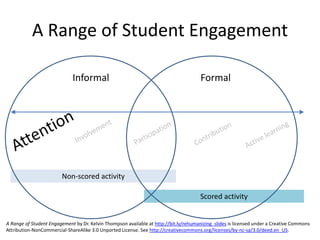
Attention
• Ensure the learners are ready to learn and
participate in activities by presenting a
stimulus (Gagne, 1992)
• Accomplished by presenting content or posing
a question.
• Frequency is key
Suggested Technology
• Finding Content
– Wylio (Creative Commons image search engine)
http://www.wylio.com
– TED Ed (search videos by academic subject)
http://ed.ted.com
• Link in Pages tool of Webcourses@UCF or
project in class.
Suggested Technology
• Interaction
– Remind101
http://Remind101.com
• One-way text messaging from instructors to
students.
– Webcourses@UCF Notifications
http://bit.ly/notifications_guide
• Multimodial notification system. SMS,
Facebook, Twitter, and e-mail.
–Webcourses@UCF Announcements
Non-scored activity
Scored activity
A Range of Student Engagement
Informal Formal
A Range of Student Engagement by Dr. Kelvin Thompson available at http://bit.ly/rehumanizing_slides is licensed under a Creative Commons
Attribution-NonCommercial-ShareAlike 3.0 Unported License. See http://creativecommons.org/licenses/by-nc-sa/3.0/deed.en_US.
Involvement
• Creating an “buy-in” or “attachment” to the
course.
• Guide students to content and communities
Suggested Technology
• Content
– “GoogleJockeying” within class session
• http://bit.ly/googlejockey_description
• Questions/Input
– Clickers
– PollEveryWhere or Socrative
http://polleverywhere.com or http://socrative.com
– Online “One Minute Paper” using Form in Google
Docs
• See http://bit.ly/sample_feedbackform
Non-scored activity
Scored activity
A Range of Student Engagement
Informal Formal
A Range of Student Engagement by Dr. Kelvin Thompson available at http://bit.ly/rehumanizing_slides is licensed under a Creative Commons
Attribution-NonCommercial-ShareAlike 3.0 Unported License. See http://creativecommons.org/licenses/by-nc-sa/3.0/deed.en_US.
Participation
• The number of unsolicited responses
volunteered (Burchfield & Sappington, 1999)
Suggested Technology
• Input/interaction
– Backchannel for class
– See video case study “Twitter Experiment”
http://bit.ly/twitter_casestudy
– Clickers, Polling, Online Questionnaires
– Generate/up vote good questions
• Google Moderator, Quora, etc.
http://moderator.google.com or http://www.quora.com
– Webcourses@UCF Discussion
http://bit.ly/discussions_guide
• Group or whole course discussion forum
Non-scored activity
Scored activity
A Range of Student Engagement
Informal Formal
A Range of Student Engagement by Dr. Kelvin Thompson available at http://bit.ly/rehumanizing_slides is licensed under a Creative Commons
Attribution-NonCommercial-ShareAlike 3.0 Unported License. See http://creativecommons.org/licenses/by-nc-sa/3.0/deed.en_US.
Contribution
• Adding knowledge or ideas to a group
Suggested Technology
• Diigo (social bookmarking site)
http://diigo.com
• Twitter
http://www.twitter.com
– public microblogging site
• HootCourse
http://hootcourse.com
– similar to Twitter however can be restricted only
to your class
Non-scored activity
Scored activity
A Range of Student Engagement
Informal Formal
A Range of Student Engagement by Dr. Kelvin Thompson available at http://bit.ly/rehumanizing_slides is licensed under a Creative Commons
Attribution-NonCommercial-ShareAlike 3.0 Unported License. See http://creativecommons.org/licenses/by-nc-sa/3.0/deed.en_US.
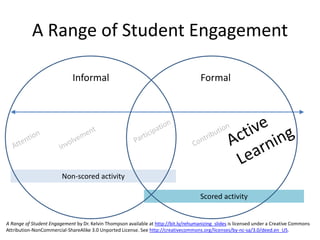
Active Learning
• Instructional methods that focus the
responsibility of learning on students (Bonwell
& Eison, 1991.)
• Accomplished through authentic tasks
– Creation of materials/content
– Drawing own conclusions based on information
Suggested Technology
• Google Docs (collaborative)
http://docs.google.com
• Office 365 (similar to Google Docs)
http://bit.ly/office365_info
• Media Production
– Jing (screen capture)
http://techsmith.comjing
– iMovie/Windows MovieMaker
– Audacity (audio recorder)
• Webcourses@UCF Pages
http://bit.ly/pages_guide
– “wiki” style area where students can all edit the same document online)
• Webcourses@UCF Discussion
http://bit.ly/discussions_guide
– Group or whole course discussion forum
WHAT WE OFFER
Strategies to Consider
1. Start teaching with networked technologies and information
2. Look for ways to make technologies RE-humanizing rather
than de-humanizing
3. Foster active, higher-level learning
4. Model human interactions via technology
5. Design learning activities in which students meaningfully
interact via technologies
6. Become a learner within digital info-abundant environment
7. Learn to surf the (info) wave
8. Learn when to use/re-mix information resources
9. See knowledge/learning as “perpetual beta”
See http://bit.ly/thompson_csu2012
Strategies to Consider
1. Start teaching with networked technologies and information
2. Look for ways to make technologies RE-
humanizing rather than de-humanizing
3. Foster active, higher-level learning
4. Model human interactions via technology
5. Design learning activities in which students meaningfully
interact via technologies
6. Become a learner within digital info-abundant environment
7. Learn to surf the (info) wave
8. Learn when to use/re-mix information resources
9. See knowledge/learning as “perpetual beta”
See http://bit.ly/thompson_csu2012
Look for ways to make technologies RE-
humanizing rather than de-humanizing
• give every student a voice via technology (e.g.,
discussion forum, blog, VoiceThread, BYOT/D)
• give everyone access via technology (practice
Universal Design for Learning; anticipate
accommodations)
• take an assignment and make it social via
technology (e.g., not just an audience of one;
not just locked up in a course management
system)
Considerations
BYOD?
• Some studies indicate that 95% of college
students bring cell phones to class each day
- May, 2012
• Nationwide, 88% of adults have cell phones with
the majority (55%) using for internet access
• 61% of US adults own a laptop computer
- Pew Internet & American Life Project, 2012
http://bit.ly/pew_data http://bit.ly/may_data
Ethical/Legal Issues
• Privacy
• FERPA
• Accessibility
FERPA Recommendations
• Assume conservative FERPA interpretation
• All official communications (including grades)
in CMS
• FERPA/Web2.0 statements in course
documents
• No required personally identifiable information
on public web
http://bit.ly/ferpa_coursedocs
Accessibility Recommendations
• Adopt a “universal design for learning” mindset.
• Assume you will have accommodation needs.
– Select new media/technologies with accessibility in mind.
– Think: “What will I do differently to make old accessible?
• Plan A: Do that now (e.g., script everything).
• Plan B: Be prepared to take action when needed.
• Assume that it is all up to you.
– Educate yourself.
– Take initiative.
– Be grateful when help is available.
http://bit.ly/online_accessibility
Cautions
• Time commitment (beware of diminishing
returns)
• Some students resist “active learning”
• Your results may vary
– Strive for balance
– Keep It Simple Starting (KISS)
Read More About It
Reading List: Rehumanizing Through Technologies
http://bit.ly/readinglist_rehumanizing
Annotated List of Technologies
http://bit.ly/technologies_rehumanizing
A Personal Action Plan
• Reflect upon today’s session
• Identify at least one idea you can put into
action
• Write down how you will apply the idea
• Tell one other person what you plan to do
• Exchange contact info and plan to touch base
Keep the Conversation Going
• What success stories do you have in “connecting” with
students using technologies?
• What new ideas have you encountered?
• What obstacles do you see in implementing particular
technologies in your courses?
• What new technologies/strategies are crossing your path?
HootCourse: Share links/ideas in micropostings:
http://bit.ly/hootcourse_rehumanizing
Editable GoogleDoc: Share insights, notes, or resources as you
wish: http://bit.ly/sharing_rehumanizing
Stay in Touch
Dr. Kelvin Thompson
Associate Director
UCF Center for Distributed Learning
kelvin@ucf.edu
@kthompso on Twitter
407.823.0462
Mr. John Raible
Instructional Designer
UCF Center for Distributed Learning
john.raible@ucf.edu
407.823.1093

Rehumanizing Classes through Technology

  • 1.
    Rehumanizing Classes through Technology KelvinThompson, Ed.D. John Raible Center for Distributed Learning Primitive Audio: http://bit.ly/audio_rehumanizing [Note: Headphones suggested]
  • 3.
    Hallowell’s Human Momentsby kthompso404 on Flickr CC BY 2.0 License http://www.flickr.com/photos/53256849@N05/7691997840
  • 4.
    Human Moments those momentswhen we feel connected to someone or something outside of ourselves and in the presence of what matters Edward Hallowell, M.D.
  • 5.
  • 6.
    Read More AboutIt Reading List: Rehumanizing Through Technologies http://bit.ly/readinglist_rehumanizing Annotated List of Technologies http://bit.ly/technologies_rehumanizing
  • 7.
    Technologies Suggested Technologies • Free! •Fairly dependable • Useful in all modalities • Mobile-friendly • Range of uses Survey of Many • Most free • Some single function – Interaction – Assessment – Content
  • 8.
    Rehumanizing Through Technologies 1.What we ask for in use of technologies 2. What we offer in use of technologies
  • 9.
  • 10.
    Non-scored activity Scored activity ARange of Student Engagement A Range of Student Engagement by Dr. Kelvin Thompson available at http://bit.ly/rehumanizing_slides is licensed under a Creative Commons Attribution-NonCommercial-ShareAlike 3.0 Unported License. See http://creativecommons.org/licenses/by-nc-sa/3.0/deed.en_US.
  • 11.
    Non-scored activity Scored activity ARange of Student Engagement Informal Formal A Range of Student Engagement by Dr. Kelvin Thompson available at http://bit.ly/rehumanizing_slides is licensed under a Creative Commons Attribution-NonCommercial-ShareAlike 3.0 Unported License. See http://creativecommons.org/licenses/by-nc-sa/3.0/deed.en_US.
  • 12.
    Technologies Suggested Technologies • Free! •Fairly dependable • Useful in all modalities • Mobile-friendly • Range of uses Survey of Many • Most free • Some single function – Interaction – Assessment – Content
  • 13.
    Non-scored activity Scored activity ARange of Student Engagement Informal Formal A Range of Student Engagement by Dr. Kelvin Thompson available at http://bit.ly/rehumanizing_slides is licensed under a Creative Commons Attribution-NonCommercial-ShareAlike 3.0 Unported License. See http://creativecommons.org/licenses/by-nc-sa/3.0/deed.en_US.
  • 14.
    Attention • Ensure thelearners are ready to learn and participate in activities by presenting a stimulus (Gagne, 1992) • Accomplished by presenting content or posing a question. • Frequency is key
  • 15.
    Suggested Technology • FindingContent – Wylio (Creative Commons image search engine) http://www.wylio.com – TED Ed (search videos by academic subject) http://ed.ted.com • Link in Pages tool of Webcourses@UCF or project in class.
  • 16.
    Suggested Technology • Interaction –Remind101 http://Remind101.com • One-way text messaging from instructors to students. – Webcourses@UCF Notifications http://bit.ly/notifications_guide • Multimodial notification system. SMS, Facebook, Twitter, and e-mail. –Webcourses@UCF Announcements
  • 17.
    Non-scored activity Scored activity ARange of Student Engagement Informal Formal A Range of Student Engagement by Dr. Kelvin Thompson available at http://bit.ly/rehumanizing_slides is licensed under a Creative Commons Attribution-NonCommercial-ShareAlike 3.0 Unported License. See http://creativecommons.org/licenses/by-nc-sa/3.0/deed.en_US.
  • 18.
    Involvement • Creating an“buy-in” or “attachment” to the course. • Guide students to content and communities
  • 19.
    Suggested Technology • Content –“GoogleJockeying” within class session • http://bit.ly/googlejockey_description • Questions/Input – Clickers – PollEveryWhere or Socrative http://polleverywhere.com or http://socrative.com – Online “One Minute Paper” using Form in Google Docs • See http://bit.ly/sample_feedbackform
  • 20.
    Non-scored activity Scored activity ARange of Student Engagement Informal Formal A Range of Student Engagement by Dr. Kelvin Thompson available at http://bit.ly/rehumanizing_slides is licensed under a Creative Commons Attribution-NonCommercial-ShareAlike 3.0 Unported License. See http://creativecommons.org/licenses/by-nc-sa/3.0/deed.en_US.
  • 21.
    Participation • The numberof unsolicited responses volunteered (Burchfield & Sappington, 1999)
  • 22.
    Suggested Technology • Input/interaction –Backchannel for class – See video case study “Twitter Experiment” http://bit.ly/twitter_casestudy – Clickers, Polling, Online Questionnaires – Generate/up vote good questions • Google Moderator, Quora, etc. http://moderator.google.com or http://www.quora.com – Webcourses@UCF Discussion http://bit.ly/discussions_guide • Group or whole course discussion forum
  • 23.
    Non-scored activity Scored activity ARange of Student Engagement Informal Formal A Range of Student Engagement by Dr. Kelvin Thompson available at http://bit.ly/rehumanizing_slides is licensed under a Creative Commons Attribution-NonCommercial-ShareAlike 3.0 Unported License. See http://creativecommons.org/licenses/by-nc-sa/3.0/deed.en_US.
  • 24.
  • 25.
    Suggested Technology • Diigo(social bookmarking site) http://diigo.com • Twitter http://www.twitter.com – public microblogging site • HootCourse http://hootcourse.com – similar to Twitter however can be restricted only to your class
  • 26.
    Non-scored activity Scored activity ARange of Student Engagement Informal Formal A Range of Student Engagement by Dr. Kelvin Thompson available at http://bit.ly/rehumanizing_slides is licensed under a Creative Commons Attribution-NonCommercial-ShareAlike 3.0 Unported License. See http://creativecommons.org/licenses/by-nc-sa/3.0/deed.en_US.
  • 27.
    Active Learning • Instructionalmethods that focus the responsibility of learning on students (Bonwell & Eison, 1991.) • Accomplished through authentic tasks – Creation of materials/content – Drawing own conclusions based on information
  • 28.
    Suggested Technology • GoogleDocs (collaborative) http://docs.google.com • Office 365 (similar to Google Docs) http://bit.ly/office365_info • Media Production – Jing (screen capture) http://techsmith.comjing – iMovie/Windows MovieMaker – Audacity (audio recorder) • Webcourses@UCF Pages http://bit.ly/pages_guide – “wiki” style area where students can all edit the same document online) • Webcourses@UCF Discussion http://bit.ly/discussions_guide – Group or whole course discussion forum
  • 29.
  • 30.
    Strategies to Consider 1.Start teaching with networked technologies and information 2. Look for ways to make technologies RE-humanizing rather than de-humanizing 3. Foster active, higher-level learning 4. Model human interactions via technology 5. Design learning activities in which students meaningfully interact via technologies 6. Become a learner within digital info-abundant environment 7. Learn to surf the (info) wave 8. Learn when to use/re-mix information resources 9. See knowledge/learning as “perpetual beta” See http://bit.ly/thompson_csu2012
  • 31.
    Strategies to Consider 1.Start teaching with networked technologies and information 2. Look for ways to make technologies RE- humanizing rather than de-humanizing 3. Foster active, higher-level learning 4. Model human interactions via technology 5. Design learning activities in which students meaningfully interact via technologies 6. Become a learner within digital info-abundant environment 7. Learn to surf the (info) wave 8. Learn when to use/re-mix information resources 9. See knowledge/learning as “perpetual beta” See http://bit.ly/thompson_csu2012
  • 32.
    Look for waysto make technologies RE- humanizing rather than de-humanizing • give every student a voice via technology (e.g., discussion forum, blog, VoiceThread, BYOT/D) • give everyone access via technology (practice Universal Design for Learning; anticipate accommodations) • take an assignment and make it social via technology (e.g., not just an audience of one; not just locked up in a course management system)
  • 33.
  • 34.
    BYOD? • Some studiesindicate that 95% of college students bring cell phones to class each day - May, 2012 • Nationwide, 88% of adults have cell phones with the majority (55%) using for internet access • 61% of US adults own a laptop computer - Pew Internet & American Life Project, 2012 http://bit.ly/pew_data http://bit.ly/may_data
  • 35.
    Ethical/Legal Issues • Privacy •FERPA • Accessibility
  • 36.
    FERPA Recommendations • Assumeconservative FERPA interpretation • All official communications (including grades) in CMS • FERPA/Web2.0 statements in course documents • No required personally identifiable information on public web http://bit.ly/ferpa_coursedocs
  • 37.
    Accessibility Recommendations • Adopta “universal design for learning” mindset. • Assume you will have accommodation needs. – Select new media/technologies with accessibility in mind. – Think: “What will I do differently to make old accessible? • Plan A: Do that now (e.g., script everything). • Plan B: Be prepared to take action when needed. • Assume that it is all up to you. – Educate yourself. – Take initiative. – Be grateful when help is available. http://bit.ly/online_accessibility
  • 38.
    Cautions • Time commitment(beware of diminishing returns) • Some students resist “active learning” • Your results may vary – Strive for balance – Keep It Simple Starting (KISS)
  • 39.
    Read More AboutIt Reading List: Rehumanizing Through Technologies http://bit.ly/readinglist_rehumanizing Annotated List of Technologies http://bit.ly/technologies_rehumanizing
  • 40.
    A Personal ActionPlan • Reflect upon today’s session • Identify at least one idea you can put into action • Write down how you will apply the idea • Tell one other person what you plan to do • Exchange contact info and plan to touch base
  • 41.
    Keep the ConversationGoing • What success stories do you have in “connecting” with students using technologies? • What new ideas have you encountered? • What obstacles do you see in implementing particular technologies in your courses? • What new technologies/strategies are crossing your path? HootCourse: Share links/ideas in micropostings: http://bit.ly/hootcourse_rehumanizing Editable GoogleDoc: Share insights, notes, or resources as you wish: http://bit.ly/sharing_rehumanizing
  • 42.
    Stay in Touch Dr.Kelvin Thompson Associate Director UCF Center for Distributed Learning kelvin@ucf.edu @kthompso on Twitter 407.823.0462 Mr. John Raible Instructional Designer UCF Center for Distributed Learning john.raible@ucf.edu 407.823.1093