Scope of
Web 2.0 Tools
About Web 2.0
Advantages of Web 2.0
Difference Between
Web1.0, Web 2.0 & Web 3.0
Web 2.0 Tools in Education
Summary
1 1
2
3
4
5
Presentation by
Nikhil D. S2 B.Ed.
Physical
Science
MTTC
TVPM.
1
2
About Web 2.0
Second Generation Web.
Refers to the collection of websites that are
 Participatory in culture
 Mostly User Generated contents
 Ease to Use
 Allows Sharing & Collaboration
The term was coined by Darcy DiNucci in 1999
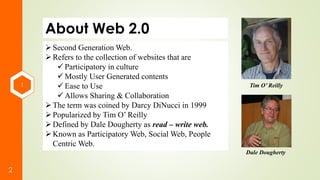
Popularized by Tim O’ Reilly
Defined by Dale Dougherty as read – write web.
Known as Participatory Web, Social Web, People
Centric Web.
Tim O’ Reilly
Dale Dougherty
1
3
About Web 2.0
The Main Features includes
i. Searching
ii. Authoring
iii. Linking
iv. Tagging
v. Extensions
vi. Commenting
vii. Bookmarking
viii.Blogging
ix. Podcasting
x. Signals
2
4
Advantages of Web 2.0
 Dynamic In Nature
 Ease of Use
 Variety of Media
 User Centered.
 User Friendly.
 Everybody can become a content creator
 Social Networking
 Podcasting
 Blogging
 Wide range of Learning Applications
 Platform of Real Time Discussions
 Possibilities of Audio-Video Conferencing
3
5
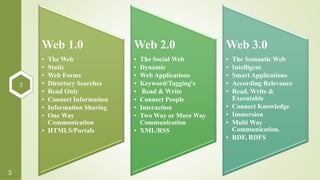
Web 1.0
• The Web
• Static
• Web Forms
• Directory Searches
• Read Only
• Connect Information
• Information Sharing
• One Way
Communication
• HTMLS/Portals
Web 2.0
• The Social Web
• Dynamic
• Web Applications
• Keyword/Tagging's
• Read & Write
• Connect People
• Interaction
• Two Way or More Way
Communication
• XML/RSS
Web 3.0
• The Semantic Web
• Intelligent
• Smart Applications
• According Relevance
• Read, Write &
Executable
• Connect Knowledge
• Immersion
• Multi Way
Communication.
• RDF, RDFS
4
6
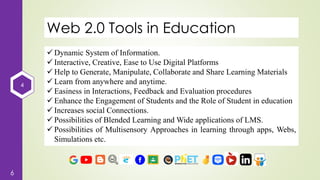
Web 2.0 Tools in Education
 Dynamic System of Information.
 Interactive, Creative, Ease to Use Digital Platforms
 Help to Generate, Manipulate, Collaborate and Share Learning Materials
 Learn from anywhere and anytime.
 Easiness in Interactions, Feedback and Evaluation procedures
 Enhance the Engagement of Students and the Role of Student in education
 Increases social Connections.
 Possibilities of Blended Learning and Wide applications of LMS.
 Possibilities of Multisensory Approaches in learning through apps, Webs,
Simulations etc.
4
7
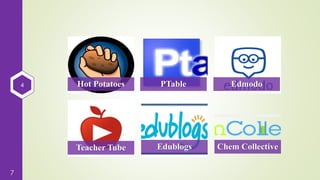
Hot Potatoes PTable Edmodo
Teacher Tube Edublogs Chem Collective
4
8
Hot Potatoes
 Hot Potato suite includes six different web applications helps to create
interactive learning exercises.
 It enables to create Interactive MCQs, Cross words, Gap fill exercises,
Jumbled words etc.
 Created by the Research and Development team at the University of
Victoria Humanities Computing and Media Centre.
 Commercial aspects of the software are handled by Half-Baked Software
Inc.
 Freeware till October 2009.
 was designed to allow teachers to make interactive, Web-based exercises
that can be accessed by students at any Internet-capable computer terminal
with a standard Web browser.
4
9
Hot Potatoes
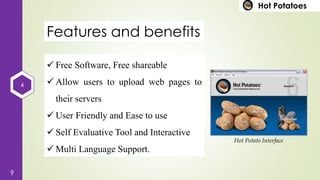
Features and benefits
 Free Software, Free shareable
 Allow users to upload web pages to
their servers
 User Friendly and Ease to use
 Self Evaluative Tool and Interactive
 Multi Language Support.
Hot Potato Interface
4
10
Hot Potatoes
JQuiz
•Helps to Create
MCQs & Quizzes
JCloze
•Help to make Gap
fill exercises
JMatch
•Helps to create
Matching Exercises
•Drag and drop Type
4
11
Hot Potatoes
JCross
• Helps to create Crossword
Puzzles
JMix
• Helps to create jumbled
word excercises
Masher
• Paid Version of Hot potato
• Helps to combine
together to bring a big
quiz
4
12 PTable Link
4
13
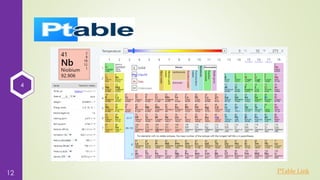
PTable
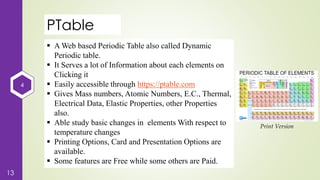
 A Web based Periodic Table also called Dynamic
Periodic table.
 It Serves a lot of Information about each elements on
Clicking it
 Easily accessible through https://ptable.com
 Gives Mass numbers, Atomic Numbers, E.C., Thermal,
Electrical Data, Elastic Properties, other Properties
also.
 Able study basic changes in elements With respect to
temperature changes
 Printing Options, Card and Presentation Options are
available.
 Some features are Free while some others are Paid.
Print Version
4
14
Edmodo
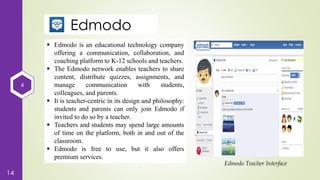
 Edmodo is an educational technology company
offering a communication, collaboration, and
coaching platform to K-12 schools and teachers.
 The Edmodo network enables teachers to share
content, distribute quizzes, assignments, and
manage communication with students,
colleagues, and parents.
 It is teacher-centric in its design and philosophy:
students and parents can only join Edmodo if
invited to do so by a teacher.
 Teachers and students may spend large amounts
of time on the platform, both in and out of the
classroom.
 Edmodo is free to use, but it also offers
premium services.
Edmodo Teacher Interface
4
15
TeacherTube
 Launched in 2007.
 launched on March 6, 2007 by Jason
Smith, a Superintendent from Melissa,
Texas and younger brother Adam Smith.
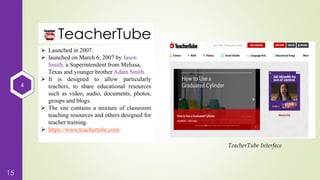
 It is designed to allow particularly
teachers, to share educational resources
such as video, audio, documents, photos,
groups and blogs.
 The site contains a mixture of classroom
teaching resources and others designed for
teacher training.
 https://www.teachertube.com/
TeacherTube Interface
4
16
Edublogs
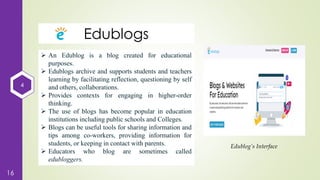
 An Edublog is a blog created for educational
purposes.
 Edublogs archive and supports students and teachers
learning by facilitating reflection, questioning by self
and others, collaborations.
 Provides contexts for engaging in higher-order
thinking.
 The use of blogs has become popular in education
institutions including public schools and Colleges.
 Blogs can be useful tools for sharing information and
tips among co-workers, providing information for
students, or keeping in contact with parents.
 Educators who blog are sometimes called
edubloggers.
Edublog’s Interface
4
17
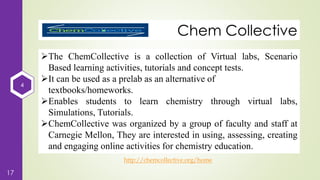
Chem Collective
http://chemcollective.org/home
The ChemCollective is a collection of Virtual labs, Scenario
Based learning activities, tutorials and concept tests.
It can be used as a prelab as an alternative of
textbooks/homeworks.
Enables students to learn chemistry through virtual labs,
Simulations, Tutorials.
ChemCollective was organized by a group of faculty and staff at
Carnegie Mellon, They are interested in using, assessing, creating
and engaging online activities for chemistry education.
4
18
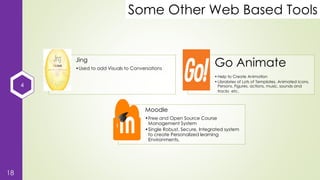
Some Other Web Based Tools
Jing
•Used to add Visuals to Conversations
Go Animate
•Help to Create Animation
•Librabries of Lots of Templates, Animated Icons,
Persons, Figures, actions, music, sounds and
tracks etc.
Moodle
•Free and Open Source Course
Management System
•Single Robust, Secure, Integrated system
to create Personalized learning
Environments.
5
19
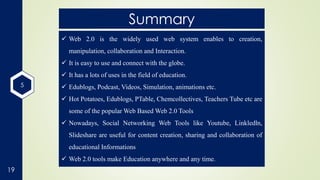
Summary
 Web 2.0 is the widely used web system enables to creation,
manipulation, collaboration and Interaction.
 It is easy to use and connect with the globe.
 It has a lots of uses in the field of education.
 Edublogs, Podcast, Videos, Simulation, animations etc.
 Hot Potatoes, Edublogs, PTable, Chemcollectives, Teachers Tube etc are
some of the popular Web Based Web 2.0 Tools
 Nowadays, Social Networking Web Tools like Youtube, Linkledln,
Slideshare are useful for content creation, sharing and collaboration of
educational Informations
 Web 2.0 tools make Education anywhere and any time.
20

Scope of Web 2.0 Tools

  • 1.
    Scope of Web 2.0Tools About Web 2.0 Advantages of Web 2.0 Difference Between Web1.0, Web 2.0 & Web 3.0 Web 2.0 Tools in Education Summary 1 1 2 3 4 5 Presentation by Nikhil D. S2 B.Ed. Physical Science MTTC TVPM.
  • 2.
    1 2 About Web 2.0 SecondGeneration Web. Refers to the collection of websites that are  Participatory in culture  Mostly User Generated contents  Ease to Use  Allows Sharing & Collaboration The term was coined by Darcy DiNucci in 1999 Popularized by Tim O’ Reilly Defined by Dale Dougherty as read – write web. Known as Participatory Web, Social Web, People Centric Web. Tim O’ Reilly Dale Dougherty
  • 3.
    1 3 About Web 2.0 TheMain Features includes i. Searching ii. Authoring iii. Linking iv. Tagging v. Extensions vi. Commenting vii. Bookmarking viii.Blogging ix. Podcasting x. Signals
  • 4.
    2 4 Advantages of Web2.0  Dynamic In Nature  Ease of Use  Variety of Media  User Centered.  User Friendly.  Everybody can become a content creator  Social Networking  Podcasting  Blogging  Wide range of Learning Applications  Platform of Real Time Discussions  Possibilities of Audio-Video Conferencing
  • 5.
    3 5 Web 1.0 • TheWeb • Static • Web Forms • Directory Searches • Read Only • Connect Information • Information Sharing • One Way Communication • HTMLS/Portals Web 2.0 • The Social Web • Dynamic • Web Applications • Keyword/Tagging's • Read & Write • Connect People • Interaction • Two Way or More Way Communication • XML/RSS Web 3.0 • The Semantic Web • Intelligent • Smart Applications • According Relevance • Read, Write & Executable • Connect Knowledge • Immersion • Multi Way Communication. • RDF, RDFS
  • 6.
    4 6 Web 2.0 Toolsin Education  Dynamic System of Information.  Interactive, Creative, Ease to Use Digital Platforms  Help to Generate, Manipulate, Collaborate and Share Learning Materials  Learn from anywhere and anytime.  Easiness in Interactions, Feedback and Evaluation procedures  Enhance the Engagement of Students and the Role of Student in education  Increases social Connections.  Possibilities of Blended Learning and Wide applications of LMS.  Possibilities of Multisensory Approaches in learning through apps, Webs, Simulations etc.
  • 7.
    4 7 Hot Potatoes PTableEdmodo Teacher Tube Edublogs Chem Collective
  • 8.
    4 8 Hot Potatoes  HotPotato suite includes six different web applications helps to create interactive learning exercises.  It enables to create Interactive MCQs, Cross words, Gap fill exercises, Jumbled words etc.  Created by the Research and Development team at the University of Victoria Humanities Computing and Media Centre.  Commercial aspects of the software are handled by Half-Baked Software Inc.  Freeware till October 2009.  was designed to allow teachers to make interactive, Web-based exercises that can be accessed by students at any Internet-capable computer terminal with a standard Web browser.
  • 9.
    4 9 Hot Potatoes Features andbenefits  Free Software, Free shareable  Allow users to upload web pages to their servers  User Friendly and Ease to use  Self Evaluative Tool and Interactive  Multi Language Support. Hot Potato Interface
  • 10.
    4 10 Hot Potatoes JQuiz •Helps toCreate MCQs & Quizzes JCloze •Help to make Gap fill exercises JMatch •Helps to create Matching Exercises •Drag and drop Type
  • 11.
    4 11 Hot Potatoes JCross • Helpsto create Crossword Puzzles JMix • Helps to create jumbled word excercises Masher • Paid Version of Hot potato • Helps to combine together to bring a big quiz
  • 12.
  • 13.
    4 13 PTable  A Webbased Periodic Table also called Dynamic Periodic table.  It Serves a lot of Information about each elements on Clicking it  Easily accessible through https://ptable.com  Gives Mass numbers, Atomic Numbers, E.C., Thermal, Electrical Data, Elastic Properties, other Properties also.  Able study basic changes in elements With respect to temperature changes  Printing Options, Card and Presentation Options are available.  Some features are Free while some others are Paid. Print Version
  • 14.
    4 14 Edmodo  Edmodo isan educational technology company offering a communication, collaboration, and coaching platform to K-12 schools and teachers.  The Edmodo network enables teachers to share content, distribute quizzes, assignments, and manage communication with students, colleagues, and parents.  It is teacher-centric in its design and philosophy: students and parents can only join Edmodo if invited to do so by a teacher.  Teachers and students may spend large amounts of time on the platform, both in and out of the classroom.  Edmodo is free to use, but it also offers premium services. Edmodo Teacher Interface
  • 15.
    4 15 TeacherTube  Launched in2007.  launched on March 6, 2007 by Jason Smith, a Superintendent from Melissa, Texas and younger brother Adam Smith.  It is designed to allow particularly teachers, to share educational resources such as video, audio, documents, photos, groups and blogs.  The site contains a mixture of classroom teaching resources and others designed for teacher training.  https://www.teachertube.com/ TeacherTube Interface
  • 16.
    4 16 Edublogs  An Edublogis a blog created for educational purposes.  Edublogs archive and supports students and teachers learning by facilitating reflection, questioning by self and others, collaborations.  Provides contexts for engaging in higher-order thinking.  The use of blogs has become popular in education institutions including public schools and Colleges.  Blogs can be useful tools for sharing information and tips among co-workers, providing information for students, or keeping in contact with parents.  Educators who blog are sometimes called edubloggers. Edublog’s Interface
  • 17.
    4 17 Chem Collective http://chemcollective.org/home The ChemCollectiveis a collection of Virtual labs, Scenario Based learning activities, tutorials and concept tests. It can be used as a prelab as an alternative of textbooks/homeworks. Enables students to learn chemistry through virtual labs, Simulations, Tutorials. ChemCollective was organized by a group of faculty and staff at Carnegie Mellon, They are interested in using, assessing, creating and engaging online activities for chemistry education.
  • 18.
    4 18 Some Other WebBased Tools Jing •Used to add Visuals to Conversations Go Animate •Help to Create Animation •Librabries of Lots of Templates, Animated Icons, Persons, Figures, actions, music, sounds and tracks etc. Moodle •Free and Open Source Course Management System •Single Robust, Secure, Integrated system to create Personalized learning Environments.
  • 19.
    5 19 Summary  Web 2.0is the widely used web system enables to creation, manipulation, collaboration and Interaction.  It is easy to use and connect with the globe.  It has a lots of uses in the field of education.  Edublogs, Podcast, Videos, Simulation, animations etc.  Hot Potatoes, Edublogs, PTable, Chemcollectives, Teachers Tube etc are some of the popular Web Based Web 2.0 Tools  Nowadays, Social Networking Web Tools like Youtube, Linkledln, Slideshare are useful for content creation, sharing and collaboration of educational Informations  Web 2.0 tools make Education anywhere and any time.
  • 20.