Fabrizio Farinacci
!!!!i!
i iiiiii i iii iii
i i i i sssss
1
1. What is Redis?
REmote DIctionary Server
2
“ is an in-memory data
structure store, that
can be served as a
database, cache or
message broker
(Pub/Sub).
3
?!?i?
eii!i?!i?ei!
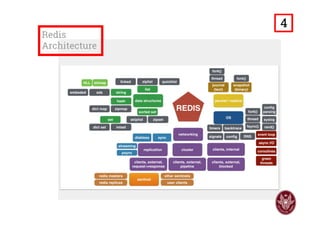
4
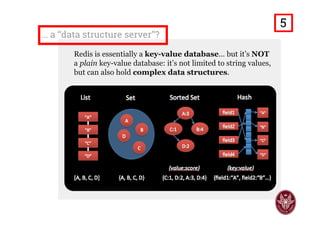
… a ‘‘data structure server’’?
Redis is essentially a key-value database… but it’s NOT
a plain key-value database: it’s not limited to string values,
but can also hold complex data structures.
5
2. Supported Data Types
6
Strings
Command line:
> set mystr foo
OK
> set myint 1
OK
> get mystr
"foo"
> append mystr foo
(integer) 6
> incr myint
(integer) 2
> mget mystr myint
1) "foofoo"
2) "2"
Are key-value pairs, to store strings or integers, with:
□Common operations on strings (APPEND, STRLEN, exc.);
□Atomic increment/decrement (INCR/DECR) on integers;
□Get multiple values at once (MGET).
Python:
>>> import redis
>>> r = redis.StrictRedis(
host='localhost',
port=6379, db=0
)
>>> r.set('mystr', 'foo')
True
>>> r.set('myint', 1)
True
>>> r.get('mystr')
'foo'
>>> r.append('mystr', 'foo')
6L
>>> r.incr('myint')
2
>>> r.mget('mystr', 'myint')
['foofoo', '2']
7
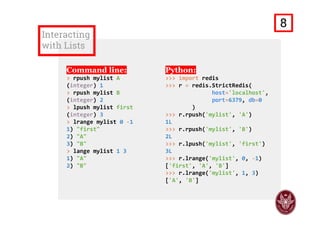
Lists
Are linked-lists of strings:
□Index-based access to the entries;
□Insertion and deletion at head/tail,
in constant-time (push/pop);
□Trim/Range operations available.
8
Interacting
with Lists
Command line:
> rpush mylist A
(integer) 1
> rpush mylist B
(integer) 2
> lpush mylist first
(integer) 3
> lrange mylist 0 ‐1
1) "first"
2) "A"
3) "B"
> lrange mylist 1 3
1) "A"
2) "B"
Python:
>>> import redis
>>> r = redis.StrictRedis(
host='localhost',
port=6379, db=0
)
>>> r.rpush('mylist', 'A')
1L
>>> r.rpush('mylist', 'B')
2L
>>> r.lpush('mylist', 'first')
3L
>>> r.lrange('mylist', 0, ‐1)
['first', 'A', 'B']
>>> r.lrange('mylist', 1, 3)
['A', 'B']
9
Sets
Are sets of strings:
□Unordered collection of non-
repeating elements;
□Intersection/Union/Difference
between multiple sets;
□Membership test available.
10
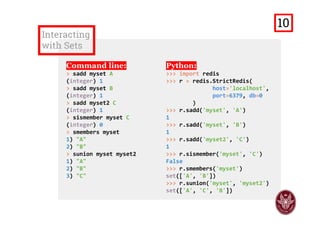
Interacting
with Sets
Command line:
> sadd myset A
(integer) 1
> sadd myset B
(integer) 1
> sadd myset2 C
(integer) 1
> sismember myset C
(integer) 0
> smembers myset
1) "A"
2) "B"
> sunion myset myset2
1) "A"
2) "B"
3) "C"
Python:
>>> import redis
>>> r = redis.StrictRedis(
host='localhost',
port=6379, db=0
)
>>> r.sadd('myset', 'A')
1
>>> r.sadd('myset', 'B')
1
>>> r.sadd('myset2', 'C')
1
>>> r.sismember('myset', 'C')
False
>>> r.smembers('myset')
set(['A', 'B']) 
>>> r.sunion('myset', 'myset2')
set(['A', 'C', 'B'])
11
Sorted Set
(ZSET)
12
Are sorted sets of strings:
□Collection of non-repeating elements
sorted by floating-point numbers
(the score) and lexicographically;
□Range operations on score/lexicon;
□Intersection/Union between sets.
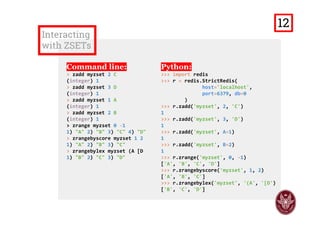
Interacting
with ZSETs
Command line:
> zadd myzset 2 C
(integer) 1
> zadd myzset 3 D
(integer) 1
> zadd myzset 1 A
(integer) 1
> zadd myzset 2 B
(integer) 1
> zrange myzset 0 ‐1
1) "A" 2) "B" 3) "C" 4) "D"
> zrangebyscore myzset 1 2
1) "A" 2) "B" 3) "C"
> zrangebylex myzset (A [D 
1) "B" 2) "C" 3) "D"
Python:
>>> import redis
>>> r = redis.StrictRedis(
host='localhost',
port=6379, db=0
)
>>> r.zadd('myzset', 2, 'C')
1
>>> r.zadd('myzset', 3, 'D') 
1
>>> r.zadd('myzset', A=1) 
1
>>> r.zadd('myzset', B=2) 
1
>>> r.zrange('myzset', 0, ‐1) 
['A', 'B', 'C', 'D']
>>> r.zrangebyscore('myzset', 1, 2) 
['A', 'B', 'C'] 
>>> r.zrangebylex('myzset', '(A', '[D') 
['B', 'C', 'D']
13
Hash
A map of field-value pairs:
□Key-based access, specifying
selected field or fields;
□To implement objects, specifying
the name of the field and its value.
14
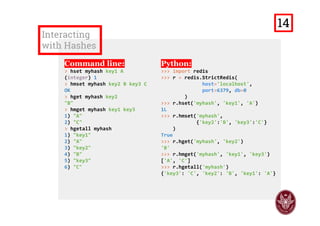
Interacting
with Hashes
Command line:
> hset myhash key1 A
(integer) 1
> hmset myhash key2 B key3 C
OK
> hget myhash key2
"B"
> hmget myhash key1 key3
1) "A"
2) "C"
> hgetall myhash
1) "key1"
2) "A"
3) "key2"
4) "B"
5) "key3"
6) "C"
Python:
>>> import redis
>>> r = redis.StrictRedis(
host='localhost',
port=6379, db=0
)
>>> r.hset('myhash', 'key1', 'A') 
1L
>>> r.hmset('myhash',
{'key2':'B', 'key3':'C'}
) 
True
>>> r.hget('myhash', 'key2')
'B'
>>> r.hmget('myhash', 'key1', 'key3') 
['A', 'C']
>>> r.hgetall('myhash')
{'key3': 'C', 'key2': 'B', 'key1': 'A'}
15
Additional
Data
Structures
Bitmap: A set of
bit-oriented
operations (e.g.
GETBIT/SETBIT)
to manipulate string
values as blobs of
size up to 512 MB.
HyperLogLog: A
probabilistic data
structure structure
to estimate size of
sets (i.e. counting
unique elements)
efficiently and in
constant-space.
Geo: Geospatial
items, stored as
geospatial
indexes (in sorted
indexes). Support
for distance based
operations (eg.
GEODIST) and
radius queries
(GEORADIUS).
Available only in
the BETA testing
version (3.2.0).
16
3. Personal Project
17
Redis
Pub/Sub
18
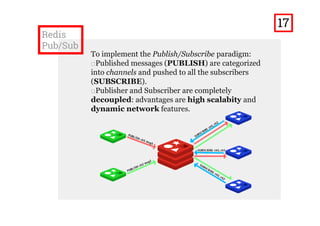
To implement the Publish/Subscribe paradigm:
□Published messages (PUBLISH) are categorized
into channels and pushed to all the subscribers
(SUBSCRIBE).
□Publisher and subscriber are completely
decoupled: advantages are high scalability and
dynamic network features.
Place your screenshot here
□ Redis Pub/Sub channels are exploited as thematic channels
(EG. Sport, Tv Shows, exc.).
□ Users subscribe to the channels they’re interested in.
□ Once the web-chat session is started the user can:
■ Receive messages published on the channels of interest;
■ Publish messages onto selected channels.
Redis SubsChat:
A multi-thematic
web-chat
19
How it has
been done?
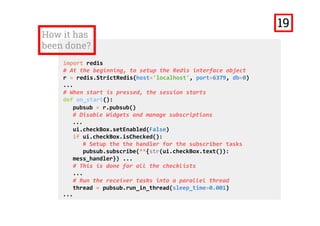
import redis
# At the beginning, to setup the Redis interface object
r = redis.StrictRedis(host='localhost', port=6379, db=0)
...
# When start is pressed, the session starts
def on_start():
pubsub = r.pubsub() 
# Disable Widgets and manage subscriptions
...
ui.checkBox.setEnabled(False)
if ui.checkBox.isChecked():
# Setup the the handler for the subscriber tasks
pubsub.subscribe(**{str(ui.checkBox.text()): 
mess_handler}) ... 
# This is done for all the checklists
...
# Run the receiver tasks into a parallel thread ... 
thread = pubsub.run_in_thread(sleep_time=0.001)
...
20
How it has
been done? (2)
...
# Handler that pushes the received message onto the web‐chat
def mess_handler(message):
QtCore.QMetaObject.invokeMethod(ui.textEdit, 
"append",QtCore.Q_ARG(str, str(message['data'])+'n')) 
... 
# To send a message when send is pressed
def on_send(): 
# Get the info about the message from the UI
msg = str(ui.textEdit_2.toPlainText()) 
if len(msg) > 0:
usrname = str(ui.lineEdit.text())
if len(usrname) == 0:
usrname = '<Anonymous>' 
channel = str(ui.comboBox.currentText())
ui.textEdit_2.clear() 
message = ‘%s [%s]: %s' % (usrname, channel, msg) 
# Publish the message onto the specified channel
r.publish(channel, message)
...
21
How it has
been done? (3)
...
def on_stop(): 
# Re‐enable the disabled widgets
...
ui.checkBox_2.setEnabled(True)
... 
# This is done for all the checklists
...
pubsub.close() 
... 
if __name__ == "__main__": 
# To setup the UI and make the application run
import sys
app = QtGui.QApplication(sys.argv) 
MainWindow = QtGui.QMainWindow() 
ui = Ui_MainWindow() ui.setupUi(MainWindow) 
MainWindow.show() 
sys.exit(app.exec_())
22
Live Demo
Let’s see how it works!!
23
4. Use cases
When should we use it?
24
Performances
and usability
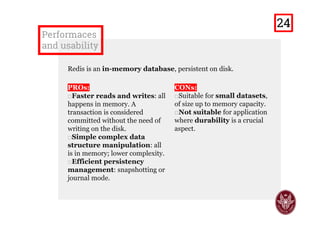
Redis is an in-memory database, persistent on disk.
PROs:
□Faster reads and writes: all
happens in memory. A
transaction is considered
committed without the need of
writing on the disk.
□Simple complex data
structure manipulation: all
is in memory; lower complexity.
□Efficient persistency
management: snapshotting or
journal mode.
CONs:
□Suitable for small datasets,
of size up to memory capacity.
□Not suitable for application
where durability is a crucial
aspect.
25
When it
should be
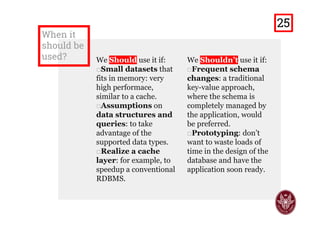
used? We Should use it if:
□Small datasets that
fits in memory: very
high performance,
similar to a cache.
□Assumptions on
data structures and
queries: to take
advantage of the
supported data types.
□Realize a cache
layer: for example, to
speedup a conventional
RDBMS.
We Shouldn’t use it if:
□Frequent schema
changes: a traditional
key-value approach, with
the schema managed by
the application, would be
preferred.
□Prototyping: don’t
want to waste loads of
time in the design of the
database and have the
application soon ready.
□Durability critical
applications: like seat
booking mechanism.
26
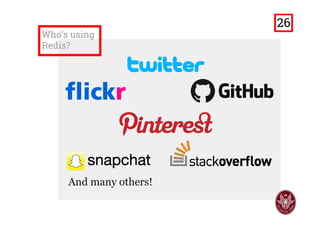
Who’s using
Redis?
And many others!
27
thanks!
Any questions?
You can find me at:
https://it.linkedin.com/in/fabrizio-farinacci-496679116
https://github.com/FabFari/redis-subschat
?
28

Redis - Usability and Use Cases

  • 1.
  • 2.
    !!!!i! i iiiiii iiii iii i i i i sssss 1
  • 3.
    1. What isRedis? REmote DIctionary Server 2
  • 4.
    “ is anin-memory data structure store, that can be served as a database, cache or message broker (Pub/Sub). 3
  • 5.
  • 6.
    … a ‘‘datastructure server’’? Redis is essentially a key-value database… but it’s NOT a plain key-value database: it’s not limited to string values, but can also hold complex data structures. 5
  • 7.
  • 8.
    Strings Command line: > setmystr foo OK > set myint 1 OK > get mystr "foo" > append mystr foo (integer) 6 > incr myint (integer) 2 > mget mystr myint 1) "foofoo" 2) "2" Are key-value pairs, to store strings or integers, with: □Common operations on strings (APPEND, STRLEN, exc.); □Atomic increment/decrement (INCR/DECR) on integers; □Get multiple values at once (MGET). Python: >>> import redis >>> r = redis.StrictRedis( host='localhost', port=6379, db=0 ) >>> r.set('mystr', 'foo') True >>> r.set('myint', 1) True >>> r.get('mystr') 'foo' >>> r.append('mystr', 'foo') 6L >>> r.incr('myint') 2 >>> r.mget('mystr', 'myint') ['foofoo', '2'] 7
  • 9.
    Lists Are linked-lists ofstrings: □Index-based access to the entries; □Insertion and deletion at head/tail, in constant-time (push/pop); □Trim/Range operations available. 8
  • 10.
    Interacting with Lists Command line: >rpush mylist A (integer) 1 > rpush mylist B (integer) 2 > lpush mylist first (integer) 3 > lrange mylist 0 ‐1 1) "first" 2) "A" 3) "B" > lrange mylist 1 3 1) "A" 2) "B" Python: >>> import redis >>> r = redis.StrictRedis( host='localhost', port=6379, db=0 ) >>> r.rpush('mylist', 'A') 1L >>> r.rpush('mylist', 'B') 2L >>> r.lpush('mylist', 'first') 3L >>> r.lrange('mylist', 0, ‐1) ['first', 'A', 'B'] >>> r.lrange('mylist', 1, 3) ['A', 'B'] 9
  • 11.
    Sets Are sets ofstrings: □Unordered collection of non- repeating elements; □Intersection/Union/Difference between multiple sets; □Membership test available. 10
  • 12.
    Interacting with Sets Command line: >sadd myset A (integer) 1 > sadd myset B (integer) 1 > sadd myset2 C (integer) 1 > sismember myset C (integer) 0 > smembers myset 1) "A" 2) "B" > sunion myset myset2 1) "A" 2) "B" 3) "C" Python: >>> import redis >>> r = redis.StrictRedis( host='localhost', port=6379, db=0 ) >>> r.sadd('myset', 'A') 1 >>> r.sadd('myset', 'B') 1 >>> r.sadd('myset2', 'C') 1 >>> r.sismember('myset', 'C') False >>> r.smembers('myset') set(['A', 'B'])  >>> r.sunion('myset', 'myset2') set(['A', 'C', 'B']) 11
  • 13.
    Sorted Set (ZSET) 12 Are sortedsets of strings: □Collection of non-repeating elements sorted by floating-point numbers (the score) and lexicographically; □Range operations on score/lexicon; □Intersection/Union between sets.
  • 14.
    Interacting with ZSETs Command line: >zadd myzset 2 C (integer) 1 > zadd myzset 3 D (integer) 1 > zadd myzset 1 A (integer) 1 > zadd myzset 2 B (integer) 1 > zrange myzset 0 ‐1 1) "A" 2) "B" 3) "C" 4) "D" > zrangebyscore myzset 1 2 1) "A" 2) "B" 3) "C" > zrangebylex myzset (A [D  1) "B" 2) "C" 3) "D" Python: >>> import redis >>> r = redis.StrictRedis( host='localhost', port=6379, db=0 ) >>> r.zadd('myzset', 2, 'C') 1 >>> r.zadd('myzset', 3, 'D')  1 >>> r.zadd('myzset', A=1)  1 >>> r.zadd('myzset', B=2)  1 >>> r.zrange('myzset', 0, ‐1)  ['A', 'B', 'C', 'D'] >>> r.zrangebyscore('myzset', 1, 2)  ['A', 'B', 'C']  >>> r.zrangebylex('myzset', '(A', '[D')  ['B', 'C', 'D'] 13
  • 15.
    Hash A map offield-value pairs: □Key-based access, specifying selected field or fields; □To implement objects, specifying the name of the field and its value. 14
  • 16.
    Interacting with Hashes Command line: >hset myhash key1 A (integer) 1 > hmset myhash key2 B key3 C OK > hget myhash key2 "B" > hmget myhash key1 key3 1) "A" 2) "C" > hgetall myhash 1) "key1" 2) "A" 3) "key2" 4) "B" 5) "key3" 6) "C" Python: >>> import redis >>> r = redis.StrictRedis( host='localhost', port=6379, db=0 ) >>> r.hset('myhash', 'key1', 'A')  1L >>> r.hmset('myhash', {'key2':'B', 'key3':'C'} )  True >>> r.hget('myhash', 'key2') 'B' >>> r.hmget('myhash', 'key1', 'key3')  ['A', 'C'] >>> r.hgetall('myhash') {'key3': 'C', 'key2': 'B', 'key1': 'A'} 15
  • 17.
    Additional Data Structures Bitmap: A setof bit-oriented operations (e.g. GETBIT/SETBIT) to manipulate string values as blobs of size up to 512 MB. HyperLogLog: A probabilistic data structure structure to estimate size of sets (i.e. counting unique elements) efficiently and in constant-space. Geo: Geospatial items, stored as geospatial indexes (in sorted indexes). Support for distance based operations (eg. GEODIST) and radius queries (GEORADIUS). Available only in the BETA testing version (3.2.0). 16
  • 18.
  • 19.
    Redis Pub/Sub 18 To implement thePublish/Subscribe paradigm: □Published messages (PUBLISH) are categorized into channels and pushed to all the subscribers (SUBSCRIBE). □Publisher and subscriber are completely decoupled: advantages are high scalability and dynamic network features.
  • 20.
    Place your screenshothere □ Redis Pub/Sub channels are exploited as thematic channels (EG. Sport, Tv Shows, exc.). □ Users subscribe to the channels they’re interested in. □ Once the web-chat session is started the user can: ■ Receive messages published on the channels of interest; ■ Publish messages onto selected channels. Redis SubsChat: A multi-thematic web-chat 19
  • 21.
    How it has beendone? import redis # At the beginning, to setup the Redis interface object r = redis.StrictRedis(host='localhost', port=6379, db=0) ... # When start is pressed, the session starts def on_start(): pubsub = r.pubsub()  # Disable Widgets and manage subscriptions ... ui.checkBox.setEnabled(False) if ui.checkBox.isChecked(): # Setup the the handler for the subscriber tasks pubsub.subscribe(**{str(ui.checkBox.text()):  mess_handler}) ...  # This is done for all the checklists ... # Run the receiver tasks into a parallel thread ...  thread = pubsub.run_in_thread(sleep_time=0.001) ... 20
  • 22.
    How it has beendone? (2) ... # Handler that pushes the received message onto the web‐chat def mess_handler(message): QtCore.QMetaObject.invokeMethod(ui.textEdit,  "append",QtCore.Q_ARG(str, str(message['data'])+'n'))  ...  # To send a message when send is pressed def on_send():  # Get the info about the message from the UI msg = str(ui.textEdit_2.toPlainText())  if len(msg) > 0: usrname = str(ui.lineEdit.text()) if len(usrname) == 0: usrname = '<Anonymous>'  channel = str(ui.comboBox.currentText()) ui.textEdit_2.clear()  message = ‘%s [%s]: %s' % (usrname, channel, msg)  # Publish the message onto the specified channel r.publish(channel, message) ... 21
  • 23.
    How it has beendone? (3) ... def on_stop():  # Re‐enable the disabled widgets ... ui.checkBox_2.setEnabled(True) ...  # This is done for all the checklists ... pubsub.close()  ...  if __name__ == "__main__":  # To setup the UI and make the application run import sys app = QtGui.QApplication(sys.argv)  MainWindow = QtGui.QMainWindow()  ui = Ui_MainWindow() ui.setupUi(MainWindow)  MainWindow.show()  sys.exit(app.exec_()) 22
  • 24.
    Live Demo Let’s seehow it works!! 23
  • 25.
    4. Use cases Whenshould we use it? 24
  • 26.
    Performances and usability Redis isan in-memory database, persistent on disk. PROs: □Faster reads and writes: all happens in memory. A transaction is considered committed without the need of writing on the disk. □Simple complex data structure manipulation: all is in memory; lower complexity. □Efficient persistency management: snapshotting or journal mode. CONs: □Suitable for small datasets, of size up to memory capacity. □Not suitable for application where durability is a crucial aspect. 25
  • 27.
    When it should be used?We Should use it if: □Small datasets that fits in memory: very high performance, similar to a cache. □Assumptions on data structures and queries: to take advantage of the supported data types. □Realize a cache layer: for example, to speedup a conventional RDBMS. We Shouldn’t use it if: □Frequent schema changes: a traditional key-value approach, with the schema managed by the application, would be preferred. □Prototyping: don’t want to waste loads of time in the design of the database and have the application soon ready. □Durability critical applications: like seat booking mechanism. 26
  • 28.
  • 29.
    thanks! Any questions? You canfind me at: https://it.linkedin.com/in/fabrizio-farinacci-496679116 https://github.com/FabFari/redis-subschat ? 28