InfluxDB
Guamaral Vasili
LinkedIn: https://www.linkedin.com/in/guamaral-vasil-707393a5
GitHub: https://github.com/GuamaralVasili/influxDb
Sapienza University of Rome – DIAG – Pervasive Systems
What is time series data?
Q2
 A time series data is a sequence of observations which are
ordered in time or space.
1-15Guamaral Vasili
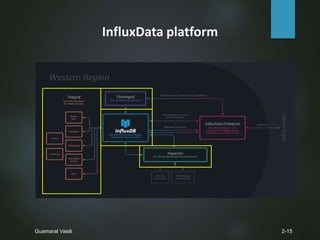
InfluxData platform
Q2
2-15Guamaral Vasili
What is InfluxDB?
Q2
 Open source
 Time series
 Written in Go
 Easy to use
 Automated data retention policy
 Schemaless
 Client libraries available for the development
 Storing large amounts of data and providing rapid query results
 Developing very fast
3-15Guamaral Vasili
How to connect InfluxDB?
Q2
 CLI
 Admin interface
4-15Guamaral Vasili
Data Structure
Q2
 Zero to many points
 Measurement
 Fields
 Tags
 Timestamp
 Line protocol
 Data type
5-15Guamaral Vasili
<measurement>[,<tag-key>=<tag-value>...]
<field-key>=<field-value>[,<field2-key>=<field2-value>...]
[unix-nano-timestamp]
String
Float, Int, Boolean, String
Data Structure
Q2
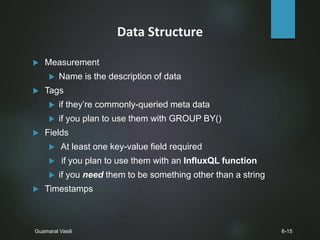
 Measurement
 Name is the description of data
 Tags
 if they’re commonly-queried meta data
 if you plan to use them with GROUP BY()
 Fields
 At least one key-value field required
 if you plan to use them with an InfluxQL function
 if you need them to be something other than a string
 Timestamp
 Primary index is always time
6-15Guamaral Vasili
Query Language
Q2
 SQL-like query language
 HTTP-API for writes & queries
 Continuous queries
 Support some mathematical operators
 Support some functions
 Support some tools
 Automated data retention policy
7-15Guamaral Vasili
Write Data
Q2
 CLI
8-15Guamaral Vasili
Write Data
Q2
 HTTP-API
9-15Guamaral Vasili
Write Data
Q2
 Perform a query using HTTP-API
10-15Guamaral Vasili
Functions
Q2
11-15Guamaral Vasili
Continuous Query
Q2
 Runs automatically and periodically
 Syntax
 Meta syntax
 Query syntax
12-15Guamaral Vasili
CREATE CONTINUOUS QUERY ON
<db_name> [RESAMPLE [EVERY <interval>]
[FOR <interval>]]
BEGIN
SELECT <function>(<stuff>)[,<function>(<stuff>)]
INTO <different_measurement>
FROM <current_measurement> [WHERE <stuff>]
GROUP BY time(<interval>)[,<stuff>]
END
Continuous Query
Q2
13-15Guamaral Vasili
Retention Policy
Q2
 How long InfluxDb keeps the data
 How many independent copies are stored in cluster
14-15Guamaral Vasili
Tools
Q2
15-15Guamaral Vasili
Thank you for your attention!
Do you have any question?
Guamaral Vasili
LinkedIn: https://www.linkedin.com/in/guamaral-vasil-707393a5
GitHub: https://github.com/GuamaralVasili/influxDb
Sapienza University of Rome – DIAG – Pervasive Systems

InfluxDb

  • 1.
    InfluxDB Guamaral Vasili LinkedIn: https://www.linkedin.com/in/guamaral-vasil-707393a5 GitHub:https://github.com/GuamaralVasili/influxDb Sapienza University of Rome – DIAG – Pervasive Systems
  • 2.
    What is timeseries data? Q2  A time series data is a sequence of observations which are ordered in time or space. 1-15Guamaral Vasili
  • 3.
  • 4.
    What is InfluxDB? Q2 Open source  Time series  Written in Go  Easy to use  Automated data retention policy  Schemaless  Client libraries available for the development  Storing large amounts of data and providing rapid query results  Developing very fast 3-15Guamaral Vasili
  • 5.
    How to connectInfluxDB? Q2  CLI  Admin interface 4-15Guamaral Vasili
  • 6.
    Data Structure Q2  Zeroto many points  Measurement  Fields  Tags  Timestamp  Line protocol  Data type 5-15Guamaral Vasili <measurement>[,<tag-key>=<tag-value>...] <field-key>=<field-value>[,<field2-key>=<field2-value>...] [unix-nano-timestamp] String Float, Int, Boolean, String
  • 7.
    Data Structure Q2  Measurement Name is the description of data  Tags  if they’re commonly-queried meta data  if you plan to use them with GROUP BY()  Fields  At least one key-value field required  if you plan to use them with an InfluxQL function  if you need them to be something other than a string  Timestamp  Primary index is always time 6-15Guamaral Vasili
  • 8.
    Query Language Q2  SQL-likequery language  HTTP-API for writes & queries  Continuous queries  Support some mathematical operators  Support some functions  Support some tools  Automated data retention policy 7-15Guamaral Vasili
  • 9.
  • 10.
  • 11.
    Write Data Q2  Performa query using HTTP-API 10-15Guamaral Vasili
  • 12.
  • 13.
    Continuous Query Q2  Runsautomatically and periodically  Syntax  Meta syntax  Query syntax 12-15Guamaral Vasili CREATE CONTINUOUS QUERY ON <db_name> [RESAMPLE [EVERY <interval>] [FOR <interval>]] BEGIN SELECT <function>(<stuff>)[,<function>(<stuff>)] INTO <different_measurement> FROM <current_measurement> [WHERE <stuff>] GROUP BY time(<interval>)[,<stuff>] END
  • 14.
  • 15.
    Retention Policy Q2  Howlong InfluxDb keeps the data  How many independent copies are stored in cluster 14-15Guamaral Vasili
  • 16.
  • 17.
    Thank you foryour attention! Do you have any question? Guamaral Vasili LinkedIn: https://www.linkedin.com/in/guamaral-vasil-707393a5 GitHub: https://github.com/GuamaralVasili/influxDb Sapienza University of Rome – DIAG – Pervasive Systems

Editor's Notes

  • #2 Good morning. My name is Guamaral. I am an exchange student from Mongolia. I will introduce the InfluxDatabase.
  • #3 Before I talk about InfluxDb, I would like to tell you briefly about time series data. A time series data is a sequence of observations which are ordered in time or space. For example: closing amounts of the stock markets, the periodically measured temperatures CPU loads of your computer and measurement of your heart rate…sth like that
  • #4 This is the Influxdata platform. It is end-to-end platform for managing, collecting, storing and visualizing time-series data at scale. There are 4 main components. Those are telegraf, chronograf, influxdb and kapacitor. Telegraf is used by collecting data. Chronograf is used by visualizing data. Kapacitor is a data processing engine for InfluxDB that makes it easy to create alerts, run ETL(extract transform and load) jobs and detect anomalies. InfluxDb is used by storing data. It is the core component of influxdata platform.
  • #5 What is influxDb? It is an open source time-series database. specifically designed for time series data. also designed for high-availibility and I/O speed. Written in Go. It doesn’t require any other software to install and run. It has a retention policy that describes how long it keeps data and how many copies of those data are stored in cluster. Influxdb is schemaless[skimeles] databaase. Because it’s easy to add points. Client libraries are available for the development such as Java C#, Php, python, perl, javascript, ruby… etc Library is very rich. it is mainly focused on quickly storing large amounts of incoming data and providing rapid query results on the datasets.  It is developing very fast. Because when I studied influxdb 4 weeks ago, The last version was 0.10version. But now it is already 0.12version.
  • #6 We can connect to InfluxDB in a 2 ways. The very common way to connect is using command line interface. Just type influx. Then it will automatically connect to the influxdb. When you install influxdb, the influx command should be available via the command line. The second way is to connect using admin user interface.  http://localhost:8083. on port 8083. The interface looks like this.
  • #7 As I said before data in InfluxDB is organized by “time series”. It can have zero to many points. Points consists measurement, field, tag and timestamp. To write a point into influxdb, use a line protocol that is a text based format protocol. This is the format of line protocol. You must specify the measurement and tags are optional if you insert any tag you have to separate it by comma. There must be at least one field. First field is separated by space and other fields are separated by comma each other. Timestamp is optional and is separated by space. For the Datatypes: Measurements, tag keys, tag values, and field keys are always stored as strings in the database. For the field values can be stored as float, int, boolean, or string because a field value is always associated with a timestamp.  All subsequent(daraagiin) field values must match the type of the first point. If you insert boolean data a field at first time, then you have to insert only boolean values in that field not strings, integers or floats.
  • #8 I will talk about detailed description of point members. Measurement is similar to SQL table. The measurement name is the description of the data that are stored in the associated fields. And primary index is always time. Because it is a time series database. Tags and fields are similar to SQL table column. Tags are optional. You don’t need to have tags in your data structure, but it’s generally a good idea to make use of them because, tags are indexed. Tags are ideal for storing commonly-queried metadata. Therefore queries on tags are worked more quickly than those on fields. You have to store your data in tags, if they’re commonly-queried meta data or if you plan to use them with GROUP BY() Fields are a required InfluxDB’s data structure - you cannot have data in InfluxDB without fields. You have to store your data in fields, if you plan to use them with an influxdb functions or if you need them to be something other than a string Timestamp is not required. When no timestamp is provided, the server will insert the point with the local server timestamp. Timestamps must be in Unix time and are assumed to be in nanoseconds.
  • #9 InfluxQL is an SQL-like query language  for interacting with data in InfluxDB. It uses HTTP-API for writing data and querying data. Instead of stored procedure, it uses continuoues queries. InfluxDb supports some mathematical operators. Such as Addition, substraction, multiplication and division. But doesn’t support Inequalities and Miscellaneous(Mislienies and logical operators. It uses some functions and visualization tools And it has automated data retention policy.
  • #10 There are many ways to write data into InfluxDb including command line interface, client libraries and plugins for common data formats. Among them 2 are very common. The first one is CLI. To write points using the command line interface, use the insert command. The CLI will return nothing on success and should give an informative parser error if the point cannot be written. This is the insert query. Then we can select our new point.
  • #11 Second one is write data, Using the HTTP-API. To write points using HTTP, POST to the /write endpoint at port 8086 with curl. The body of the POST is line protocol. Successful writes will return a 204 HTTP Status Code. Invalid syntax will return a 400 code. You can write multiple points by separating each point with a new line. Or you can write points from a file by passing @filename to curl.
  • #12 You can also perform a query using http-api. To perform a query send a GET request to the /query endpoint. You must specify a target database in the db query parameter and specify your query in the q query parameter. InfluxDB returns JSON response. You can also change the timestamp format.
  • #13 There are 3 kinds of function. Using them you can aggregate, select and transform your data.
  • #14 CQ is similar to sql stored procedure. CQs run automatically and periodically within a database and write the query results to another measurement. CQ syntax separated into meta syntax and query syntax. Meta syntax: A CQ belongs to a database. ON <database_name> clause, you have to specify the database where you want the CQ to live with . The optional RESAMPLE clause determines how often InfluxDB runs the CQ.  The RESAMPLE clause must specify either EVERY, or FOR, or both. For example: every 2minutes or during 2 minutes InfluxDb runs your CQ. Without the RESAMPLE clause, InfluxDB runs the CQ at the same interval as the GROUP BY time(). Query syntax: In this section, we can write our query in the select clause. INTO clause determines where do you want save your query results. It is your destination measurement to save your results. FROM clause determines the current measurement that you want to calculate data. Time interval determines, you calculates the 30 minutes of the field. CQ requires a function in the SELECT clause and must include a GROUP BY time() clause You also can create, show, drop continuous query. CQ don’t backfill data.
  • #15 I create a continuous query that calculates median of buffered memory and mean of free memory on database telegraf. CQ calculates 2 minute time mean and median. It runs every 1 minutes. Here is the continuous query already created on the telegraf database. Here the continuous query worked and inserted the query results into mem_copy measurement.
  • #16 Retention policy describes for how long InfluxDb keeps data and how many copies of those data are stored in the cluster. When you create a database, InfluxDB automatically creates an RP called default with an infinite duration. DURATION determines how long InfluxDB keeps the data REPLICATION determines how many independent copies of each point are stored in the cluster, where 1 is the number of data nodes. DEFAULT sets the new retention policy as the default retention policy for the database. One_day RP is active. Because default clause is true. // Very simple example with retention policy and continuous query is For example : server admins have to work on the statistical data. They have to calculate every 15 minutes mean data for everyday. In that case we can solve this problem using retention policy and continuous query. 1. We need a retention policy on the database to be a 1 day policy. InfluxDB automatically deletes the datas that are older than 1 day. 2. Then we need a continuous query that calculates 15 minutes average data. Also there are many examples.
  • #17 Influx db connects many tools such as telegraf, grafana, chronograf…etc. Telegraf is a plugin-driven server agent for collecting & reporting metrics. I used telegraf sample database that collects cpu measurements automatically. Grafana and Chronograf are used for visualizing time series data. The most of the users of Influxdb use Grafana to visualize their data. Chronograf is also visualization tool written in Go, simple as installing. The set of features on the last initial release is small, it’s just the starting point for an application and toolkit for data visualization of time series data from InfluxDB. Recently influxdata team announced officially that chronograf is the official data visualization tool for influxDb. Because they wanted something that could be used by non-programmers to quickly get answers to questions about their time series data. Let’s show some examples on Chronograf. I have 2 databases that are NOAA_water_database and telegraf. First we have to connect database that is telegraf. Then apply. lets visualize average of cpu usage idle process first we have to connect database that is telegraf. There are 2 sections filter by and extract by. In filter by, you have to choose measurement and you can filter by tags in your where clause. Tag is optional. tag key is cpu tag value is cpu-total In the extract by section you can select any of your field key with some function. Example I want to select average of usage_idle field group by 15 minutes. here is our graf you can configure from what time until what time ************************* Also you can create your own dashboard. You can add your old visualization into your new dashboard. It is our new dashboard.