System And Enterprise Security
Project in Malware Analysis: C2C
A.A. 2016-2017
Fabrizio Farinacci
April 5, 2017
Abstract
The goal of this report is to focus on one particular aspect of malware: the Command & Control (aka
C&C or C2C) infrastructure; in other words, the set of servers and other kind technical infrastructure
used to control malware in general and, in particular, botnets. For this purpose, two malicious samples
have been analyzed in this work, by means of state-of-the-art static and dynamic analysis tools, also
described at high level in this report; the achieved goal was to understand their networking behaviour
and to derive the techniques used by those to hide their malicious traffic to unaware users, with the goal
of staying as long as possible in the system and keeping their malicious business going. The report is
structured in 3 sections: in Section 1 it’s given an overview of the tools used to analyze malware in general
and, more specifically, botnets; then, in Section 2 an overview of the most common C2C techniques and
practices it is given; finally, in Section 3 the given samples are analyzed and reported in detail.
1 Tools Used
1.1 Network Sniffers & Packet Analyzer
1.1.1 Wireshark
Wireshark1
is a free, open source and cross-platform packet sniffer and analyzer developed by The Wire-
shark team. It’s capable of sniffing the network traffic, capture the packets and dissect them, to provide an
on-line analysis of the packets in the moment they are captured. As result of the capture process, a PCAP
(Packet Capture) is generated to store the captured network trace. Wireshark is also able to decrypt en-
crypted traffic for specific network protocols (by specifying the keys used) and looking at the cleartext traffic.
Goal: Identify ingoing and outgoing connections used to communicate to the Command & Control servers
and to other infected hosts part of the botnet.
1.1.2 NetworkMiner
NetworkMiner2
is a freemium Network Forensic Analysis Tool available for Windows and developed by
NETRESEC AB. Can be used as a passive network sniffer and packet capturing tool, to detect hosts (with
OS fingerprinting), sessions, hostnames, ports and more, shown to the user by means of a very effective user
interface. It’s capable to extract files, emails and certificates transferred over the network, by parsing PCAP
files or by sniffing traffic from the network, with support for many well known protocols (HTTP, FTP, IMAP,
exc.). It also keeps track of the parameters used and the DNS query and response.
Goal: Identifying in real-time the hosts involved, the sessions created and the files exchanged, and de-
tecting anomalous DNS traffic, suspicious strings sent as parameter of messages between the infected host
the other hosts involved.
1https://www.wireshark.org
2https://www.netresec.com/?page=NetworkMiner
1
1.2 Static Malware Analysis
1.2.1 PEFrame
PEFrame3
it’s an open source and cross platform tool written in Python 2.7.x to perform static analysis
on Portable Executable (PE) malware and generic suspicious files. It helps detecting packers and other
obfuscation techniques like XOR operation and identifying digital signatures, hardcoded mutex names and
usage (typically for coordination and to avoid multiple infections), anti-vm and anti-debug techniques used
to detect sandbox and other dynamic analysis environments, suspicious code sections, library functions im-
ported and much more. It’s also possible to configure it with your VirusTotal API key to directly submit
analysis. Finally, it’s able to print as result a short output analysis, the full output analysis in JSON format
or the strings extracted from the PE file submitted.
Goal: Detecting hardcoded domains, packer used and other obfuscations techniques, suspicious functions
imported and exported by the malware (to possibly replace system functions) and the presence of anti-
vm/anti-debug techniques that may possibly make the dynamic analysis harder to do.
1.2.2 PEstudio
PEstudio4
is a freemium Malware Initial Assessment tool for Windows developed by Winitor. PEstudio
performs a static analysis on the file to spot suspicious patterns, unexpected metadata, artifacts, and anoma-
lies left by the malware in its process to evade early detection through traditional static analysis techniques.
It also produces a set of indicators of different severity to show the alarming aspects of the analyzed sample.
Each detail retrieved from the file is checked against Microsoft specifications and several white/black list
thresholds. It checks imported functions to see if they are blacklisted or commonly used as anti-debug tech-
niques and it’s capable to analyze resources and store them for further analysis. It’s also possible to query
Antiviruses engine hosted by VirusTotal. Also, the strings found are collected and compared against black-
lists of suspicious strings. The results can be analyzed by means of the GUI and then exported as an XML file.
Goal: Identify suspicious strings and resources in the submitted file, check the presence of blacklisted
imported functions and obtain indicators useful to correct the aim for a deeper investigation.
1.2.3 Exeinfo PE
Exeinfo PE5
is a freeware (for non-commercial use) tool for Windows developed by A.S.L. It’s a very useful,
ligthweight, portable, plugin expandable and user customizable tool for extracting very valuable information
out of the suspicious file you want to analyze, such as packer information, compiler used, protectors and so on.
Despite the name, it supports detection for over 300 binary data types from ".jpg" to ".iso", not forgetting
the most common executable files as ".exe" and ".dll". Exeinfo PE does a very good job particularly when
dealing with packed suspicious files, since it’s able do detect, especially when using the Advanced Scan plu-
gin with a custom user database of signatures, the set of possible packers used by the file to obfuscate its code.
Goal: Identify additional informations about the packer used by the malware.
1.3 Dynamic Malware Analysis
1.3.1 Cuckoo Sandbox
Cuckoo Sandbox6
is a free and open source automated malware analysis system developed in Python 2.7.x
and maintained by volunteers. It’s an advanced, extremely modular malware analysis system, capable to an-
alyze different type of malicious files and websites by automatically execute them in Windows, OS X, Linux
and Android virtualized environments, tracing API calls and file behaviour, dumping (in PCAP format)
3https://github.com/guelfoweb/peframe
4https://www.winitor.com/index.html
5http://exeinfo.atwebpages.com/
6https://cuckoosandbox.org/
2
and analyzing network traffic (both in clear and in encrypted form), collecting dropped files and performing
advanced memory analysis with Volatily7
and producing report in JSON and HTML format. It supports a
wide variety of virtualization software from well known VirtualBox and VMware to least known solutions as
KVM and QEMU. It’s possible to customize the execution, the processing and the reporting stages. It also
provides a full-fledged web interface in the form of a Django application that allows to submit files, browse
through the reports and search across all the analysis results.
Goal: Obtain detailed behavioural information, network traffic captures, dropped files and more on the
suspicious sample; then, use this information to decide if the sample requires a deeper analysis to better un-
derstand it’s behaviour or if the results of the automated analysis are sufficient to derive correct conclusions.
1.3.2 FakeNet-NG
FakeNet-NG8
(Next Generation) is an open source next generation dynamic network analysis tool for
Windows (Vista and later) developed in Python 2.7.x by the FLARE (FireEye Labs Advanced Reverse
Engineering) team and based on the FakeNet9
tool. It allows you to intercept and redirect all (as default) or
specific (customizable) network traffic (UDP, TCP or ICMP) to the tool, that is capable to simulate the most
common network services like HTTP, TCP/UDP, DNS and more in order to trick the malware into thinking
it is connected to the Internet. When done right, the malware reveals its network signatures such as C&C
domain names, User-Agent strings, URLs queried, and so on. The tool is highly customizable by means of
configuration files and easily expandable, allowing the development of custom listeners and diverters written
in Python. It’s also possible to include new files to the set of default ones, to be returned as a response to
specific requests by the malware. The tools, also keeps a very nice and structured log of all the diverted and
captured network traffic (also producing a PCAP file), keeping track of protocols used, ports and addresses
interested and process name and identifier.
Goal: Identifying C&C domains/hosts contacted and collecting information such as strings exchanged,
protocols used, files requested, URLs accessed and more, while detecting the infected process responsible.
1.4 Others
1.4.1 INetSim
INetSim10
is an Internet Services Simulation Suite written in Perl and developed for Debian GNU/Linux
7 and 8 by Thomas Hungenberg and Matthias Eckert. It’s capable to emulate the most common Internet
services, especially the ones commonly used by malware such as HTTP, DNS, IRC, FTP and many more,
in order to trick unknown malware samples and reveal their real network behaviour, without having them
to interact with the Internet. It has a set of configuration file that are used to change the its behaviour,
making it easily configurable and highly customizable. For the HTTP/HTTPS protocol it has 2 operating
modes: "fake mode", that delivers fake pre-configured files based on the file extension in the HTTP request
(and also support for checkip.dyndns.org, typically used by malware to identify the IP address of the host),
and "real mode", that delivers existing files placed within a specific INetSim directory.
Goal: Trick the malware into thinking it is connected to the Internet, to observe it’s behaviour in both
automated and manual dynamic analysis environments.
1.4.2 Process Explorer
Process Explorer11
is a Windows utility developed by Mark Russinovich and part of the Windows Sysin-
ternals Suite. It’s able to show the list of currently active processes in the system, along with their names
7https://github.com/volatilityfoundation/volatility
8https://github.com/fireeye/flare-fakenet-ng
9https://practicalmalwareanalysis.com/fakenet/
10http://www.inetsim.org/
11https://technet.microsoft.com/en-us/sysinternals/processexplorer.aspx
3
and their owning accounts and to display very useful additional information such as the command line
instruction that started them (along with the parameters) and an entire view containing the handle the
process has opened (if in handle mode), which is useful to detect files, directory, keys and threads handled
by the processes or the DLLs and memory mapped files the process has loaded (if in DLL mode). It also has
a very powerful search capability to track down which process has a particular handle opened or DLL loaded.
Goal: Identify the processes spawned by the malware and track down it’s behaviour by identifying opened
files and folders, Registry keys referenced, DLLs loaded and parameters feed up to the spawned processes.
1.4.3 Process Monitor
Process Monitor12
is a Windows utility developed by Mark Russinovich and part of the Windows Sysinter-
nals Suite. It’s an advanced monitoring tool able to show real-time file system, Registry and process/thread
activity, combining the features of two legacy Sysinternals utilities, Filemon and Regmon, and adding an
extensive list of enhancements and very effective filtering capabilities. It also provides reliable process in-
formation, full thread stacks with integrated symbol support for each operation, process tree overview, and
much more. Its extensive and verbose logging capabilities makes Process Monitor a core utility for system
troubleshooting and malware detection.
Goal: Identify the processes tree rooted in the original malware process and track down the list of all
the operations performed by each process originated by the malware, focusing on Registry modifications.
1.4.4 RegEdit
RegEdit (The Microsoft Registry Editor) is the Windows Registry Editor shipped with the most Windows
versions. It enables you to view, inspect, modify and search Registry keys in the Windows Registry.
Goal: Analyze the Registry keys read, modified and written by the malware that have been identified
by the other tools (such as Process Monitor).
1.4.5 Pafish
Pafish13
(Paranoid Fish) is a free and open source demonstration tool for Windows written in C and main-
tained by Alberto Ortega (a0rtega). It uses different techniques, checks and tricks employed by malware to
detect sandboxes and analysis environments and avoid detecteion, identifying which check fails and which
ones succeeds in achieving malwares sandbox identification goals.
Goal: Test the setup of sandbox and malware analysis environments, to trick malware into reveal their
true nature and malicious behaviour.
2 Command & Control and botnets: an introductory overview
Command & Control traffic is most likely to be observed in botnets. When talking about botnets, we refer
to a set of compromised machine (due to previous malware infection), controlled by one or more botmasters
through commands submitted by means of specific channels, without the users of those machines being aware
of it. This imply for the bot machine to become part of a large army of zombie hosts, devoted to perform
malicious activities such as DDoS attacks and spam campaigns, as established by the botmasters.
2.1 Architecture
It’s the topology upon the Command and Control infrastructure is based on. C2C architecture evolved over
time to reduce the possibility of enumeration and discovery and to increase its resiliency to shutdown.
12https://technet.microsoft.com/en-us/sysinternals/processmonitor.aspx
13https://github.com/a0rtega/pafish
4
2.1.1 Client-server
The client-server model was used in the first type of botnets that appeared in the wild. It was usually
built on Internet Relay Chat (IRC), using IRC servers to send the command to control the infected hosts or
using Domains and Websites containing the list of all the commands for the botnet to be controlled. In both
cases, infected hosts needed to connect to the IRC server or to the C2C domain to obtain the commands
and perform their malicious tasks. The main drawback, leading to the progressive disappering of the model,
is the fact that servers and domains are single-point-of-failure: most of the botnets have been taken down
in a matter of time and the use of techniques like Dynamic DNS only managed to slow down the ultimately
takedown. This is why hackers moved to P2P solutions to increase botnet resiliency and avoid takedown.
2.1.2 Peer-to-peer
Peer-to-peer architectures are characterized by their topology flexibility and unpredictability, that makes
them more difficult to enumerate and discover, and consequently more difficult to takedown completely.
Newer botnets tend to be more and more based on peer-to-peer, to reduce the risk of being shutdown. C2C
is embedded directly into the botnet hosts, rather than relying to external server that may become a single
point of failure in the botnet functioning. Also, is very common to use public key cryptography to secure
the data relayed in the peer-to-peer network and identify commander hosts that are also part of the peer-to-
peer network along with their zombie counterparts. Each bot knows only a list of peers to which send the
commands that are then relayed to other peers going deeper into the P2P network. The list of peers usually
includes around 256 peers that makes the list small enough to be passed to other peers, to fight against
botnet takedown and allowing online bots to stay in contact. Even though peer-to-peer based botnets are
much harder to disrupt, they are not invulnerable against attacks or disruption. Two common techniques to
face P2P botnets are crawling and sinkholing. With crawling is possible to enumerate all or most of the bots
part of the network; once the bots have been enumerated, sinkholing can be used to achieve distruption. It
relies on the typical peer-list flooding technique used by P2P botnets to achieve full coverage and works by
injecting in the peer-lists of all the bots of the network fake nodes that may be either controlled by defenders
or inexistent, making the bots pointing to a "black hole" and modifying the structure of the network turning
it into a centralized system, that can be easily takedown.
2.2 General communication techniques
Another distinguishing feature of Command and Control it’s the specific communication technique used to
receive commands and to send data. The communication channel plays an important role in the malware
persistance in the system: this is why newer malware often use very "creative" solutions to go pass unnoticed
in the system exploiting covert channels to avoid detection.
2.2.1 Domains (HTTP based solutions)
Using domains as C2C servers was one of the first solutions adopted by botnets. Well crafted domains or
websites, containing all the commands for the zombie hosts, that only has to connect to it to retrieve those
by using simple HTTP requests. The main advantage of this solution is that even big botnets can be easily
maintained and updated by simply update the content of the domain or website. The biggest disadvantage
is that even fault tolerant solutions with replicated servers can be quickly takedown by governments or may
also be easily target of denial-of-service attacks. Another disadvantage is the bandwidth consumption for
the domain, that is high compared to other solutions. This is why pure domain based solutions are no longer
used by malware developers. Instead, it may happen that some phases of the botnet installation and initial
setup may still be based on domain servers, typically using dynamic DNS solutions that allows them to
change IP frequently and avoid being shutdown.
2.2.2 IRC
Another widely adopted solution was using the IRC (Internet Realy Chat) protocol and IRC servers to
serve as C2C servers. Infected clients connected to an infected IRC server to join a IRC channel, created
5
by the botmaster and dedicated to C2C traffic. The botmaster then simply sends IRC messages to the
channel that are broadcasted to all the channel members. The main advantage of IRC based solution is
low bandwidth consumptions because of the IRC protocol as communication protocol. The disadvantages
are their forced simplicity and low shutdown resiliency as in the domain case. It has also been proved that
keyword blocking has been effective in blocking IRC based networks. For this reasons, pure IRC based botnet
solutions are no longer adopted by hackers. Instead, the IRC protocol, for it’s bandwidth consuption and
proved simplicity, may still be used as selected communication protocol in combination with other solutions
such as Tor and .onion domains.
2.2.3 P2P protocols
Along with the spread of peer-to-peer based architecture solutions, botnets started also using existing P2P
overlay protocols as communication channel for their C2C communications. A common example is the
Kad network (based on UDP), a peer-to-peer network implementing the Kademlia P2P overlay protocol
in their overlay network. The first P2P file-sharing programs relied on such network, using client programs
supporting Kad network implementation. Since these were very popular, especially in the the 2010s, malware
developer started to use the Kad network as a C2C covert channel. This is the case of Alureon14
(aka TDSS),
that according to Microsoft was one of the most active botnets in the second quarter of 201015
, that included
encrypted communications and a decentralized C2C relying on the Kad network.
2.2.4 DNS
DNS has been used (and abused) by malware developers due to its potential: it allows them to create and
register a set of static or dynamically generated domains (by using Domain generation algorithms), and
continue changing the IPs this domains resolve to, avoid IP blacklisting and increase dramatically the take-
down effort for governments. From the infected machine side, DNS is also very valuable for another reason:
since DNS queries and responses are rarely blocked by firewalls, DNS protocol offers a very good solution to
transmit and receive information without detection. DNS covert channels started to be increasingly used by
malware developers to transmit payload data and to tunnel other application protocols as SSH, and secure
the DNS payload with encryption. It requires very little investments and no complex infrastructure to work:
you just need a domain name, to be registered to a "real DNS server" (either belonging to a public DNS
operator or a DNS specifically configured for this reason), to host name resolution for the domain name, and
a fake DNS server to communicate with infected hosts over a covert channel using specifically crafted DNS
queries and responses. Those latters, are formatted according to the DNS syntax, typically carrying a text
formatted resource record payload that may also support a chunking mechanism, avoiding the DNS resource
record size limits (255 bytes). This meachanism, has been exploited by the Feederbot malware[3], one of the
first malware using DNS as a covert channel.
2.2.5 Tor
Even if centralized solutions suffered from easy identification and consequent shutdown, in terms of simplicity
and manageability, were the best from the botmaster perspective. This is why during the last years[2] (from
2010 and on), a new trend started to appear in the wild: Tor based botnets. Tor (The Onion Router)
is an anonymous communication network based on the onion routing protocol, in which the information
is sent through a virtual cirtuit of relay nodes (typically 3) part of the Tor network. The communication
is made anonymous and confidential by selecting the relay nodes at random, negotiating a set of sepated
encryption keys with each and transmitting the data by using encrypted channels on each hop but the last
one, where the data is sent in clear to the destination; since each relay sees only one hop in the circuit
there’s no possibility for a malicious relay or external monitoring system to trace the communication from
source to destination. So, Tor offers a way to avoid traffic tracing and guarantee anonymity, but the real
advantage for malware developers is another feature: Hidden Services. An Hidden Service (HS) is a service
published anonymously in the Tor network. While tradidional web services have to publish their presence in
14https://en.wikipedia.org/wiki/Alureon
15http://download.microsoft.com/download/8/1/B/81B3A25C-95A1-4BCD-88A4-2D3D0406CDEF/Microsoft_Security_
Intelligence_Report_volume_9_Battling_Botnets_English.pdf
6
the network to be reachable, an HS selects at random a set of relays asking them to be its introduction points
and so to be reachable. Then it has to create its descriptor, so that clients may access to it: it’s composed
by its public key (used to encrpyt the traffic) and the indication on its introduction points. The descriptor
is then stored, along with an identifier in the form of a .onion address, into a Dynamic Hash Table (DHT)
and using the concept of Hidden Service Directories; in this way, the descriptor can be queried and obtained
by clients using its .onion address. To guarantee anonymity, a random relay is selected by the client to act
as a rendezvous point and a virtual cirtut is estabilished between the two. Then client chooses one of the
introduction points of the HS and informs it about the chosen rendezvous point, to enable the HS to create
a new virtual cirtuit to this latter to close the overall virtual cirtuit and start the connection. So, taking
advantage of the anonymity offered by Tor, malware developers started to exploit HS as more robust and
resilient domains to control their bots, that in addition just needed to include a Tor client to connect to the
HSs. Furthermore, HS can be located at infected machine side, to create distributed solutions even more
resilient to shutdown.
2.2.6 Social networks
Very recently a very promising and threatening solution started to be exploited in the wild: social network
C&C. Malware developers started to be interested in social media as command and control flow for many
reason: the chat-like syntax available (remembering the old times with IRC), access to the social media
through HTTP and HTTPS connection rarely blocked by firewalls and also hardly identified as malicious by
network software monitors, the possibility to use the well-tested and powerful APIs of such sites and most
of all the extreme facility behind fake botmaster account (or multiple accounts) creation. For this reasons,
the use of social networks in Command and Control network is a topic of high interests at the moment and
many studies on the real potentiality of this solution are still under evaluation.
2.3 Goals
Tipically, two are the generic goals in the mind of malware developers: monetization and adversary defeat.
This is also the reason behind the evolution of the generic malware goals: some goals used to be very
profitable/effective once but now are not anymore, this is why are less frequently observed in the wild. Also,
is very typical for a malware to have multiple goals, to increase the attacker gain and improve reusability.
2.3.1 E-mail spam
E-mail spam is a type of spam delivered using e-mails. Sub-goals can be many: advertisments, phishing,
malware spreading through drive-by-download or malicious attachment and more. E-mail spam traffic has
grown enourmously starting from the late 90s till the late 2010s and it was estimated that the 80% of the
overall spam was generated by botnets. From the 2011 and on the trend reversed, due to the efficiency of
spam filters of e-mail clients, capable of correctly identifying and delete most obvious spam e-mails.
2.3.2 Credential sniffing
Another common goal of malware, that is typically a secondary goal, is the credential sniffing. It hap-
pens that malware have bundled techniques to sniff and collect the different credentials of a specific host:
bank accounts, email service, FTP resources and more. This is achieved through specific monitor software
named keyloggers and also by examining the surrounding network. When the malware has collected all the
credentials, it returns them to the botmaster that can either decide to keep them for him or (more typically)
to sold them on the black markets available on the deep web. Since this kind of goal is typically one shot,
it’s typically added as a additional feature to botnets that typically have other kind of main goals.
2.3.3 Denial-of-service attacks
The most common attack to the availability of a resource or a machine is the Denial-of-Service (DoS)
attack. DoS attacks comes in many flavour, targeting the availability of a generic resource. From our point
of view, we are interested in DDoS (so its distributed variant) targeting network resources and services,
7
and obviously the network itself. Botnets, due to their potential very large size, are particularly dangerous
because of the amount of traffic they can generate. To be mentioned, is the case of the Mirai botnet, a Linux
malware targeting Internet of Things devices (typically not well protected) found on the web; once infected,
the device will scan the internet for new device to infect, increasing continuosly the size othe botnet. This
botnet came under the spotlight after two recent DDoS attacks attributed to it: the 20 September 2016
DDoS attack targeting the Krebs on Security website, that has been reported to be the largest DDoS attack
ever seen16
, with 620 Gbps of generated traffic; and the 21 October 2016 DDoS attack targeting the name
servers of the american DNS service provider Dyn, resulting in the distruption of several famous websites
such as GitHub, Twitter, Netflix, and many others17
. This shows the tremendous power botmasters have in
their hand: a weapon capable of saturate the network of entire countries and making unavailable high profile
websites. And clearly, it’s also a matter of money and financial gain for the botherders; indeed, speaking
again about Mirai, it has been recently reported that the botnet is available for rent18
, increasing the number
of security threaths, since whoever has the money (and the motivations) can afford a such kind of attack.
2.3.4 Bitcoin mining
A very popular activity carried out by botnets is Bitcoin mining, that is the process of adding transaction
records to Bitcoin’s public ledger of all past transactions, made up of a long list of blocks, also known as
blockchain. It contains the list of all the past transactions until that moment in time and it’s constantly
updated with new transactions, and it everyone can use it to verify the thruthfullness of a transaction.
This means that the blockchain has to be tamperproof to avoid malicious behaviour; this is where bitcoins
miners come in play. The task of each miner is to generate a new block for a transaction to be added to
the blockchain, while also presenting a proof-of-work to the community stating the validity of the generated
block. Bitcoin mining uses the Hashcash proof-of-work function to validate blocks: the algorithm works
calculating the SHA-256 (a cryptographic collision resistant hash function) hash of the block header, by
iteratively adjusting the input with a nonce and a counter until a valid result is found. To be a valid
proof-of-work, the resulting hash value has to start with a sufficient number of zeroes and so be smaller
than the current target, a 256-bit number that all Bitcoins users share. The target value sets the difficulty
of the operation: the smaller the value, the more it is difficult. Its value is adjusted, based on the block
generation statistics, computed each 2016 newly generated blocks in a way such that the network is capable
of producing one valid block each 10 minutes. Proof-of-work generation is a very important task in the
Bitcoin environment, since it is used to verify transaction; this is why is a rewarded activity. The reward
for each generated block changes after each 210, 000 generated blocksand and at the moment, the value has
dropped to 12.5 bitcoins, approximately 15947, 50$. So it could be a very remunerating activity, mainly
when you have many mining machines under your control; this is where botnets comes in play. Even if to
mine efficiently a special hardware setup is preferred, it’s possible to do it using traditional hardware: CPU
mining (inefficient) and GPU mining. Due to the randomness of the process, an high number of unspecialized
miners may be likely to mine a block first than a single (and expensive) specialized miner.
2.3.5 Click fraud
The e-mail spam activity stopped to be an interesting activity for malware developers not only because of
the increasingly precise spam filters in the e-mail clients, but also because of the rise of a new way to deliver
online advertisments: pay-per-click (PPC) advertisments. PPC is an internet avertising model in which the
advertiser pays a publisher each time the advertisment is clicked and the linked website is visited. This is
advantageous for the advertised but also for the website (or network of websites) owner that has a clear
financial gain. However, the PPC model it is open to the abuse of the websites owners, exploiting the so
called click fraud, that occurs when an automated script or user program imitates a legitimate web browser
user, clicking on the ads only to generate payments for the advertisments clicked. This may clearly become
a very remunerating activity for botherders, that may setup one or more websites, fill them with ads and
develop the malware in a way to simulate clicks on them; financial gains for the malware developer are huge
when the botnets are large.
16https://krebsonsecurity.com/2016/09/krebsonsecurity-hit-with-record-ddos/
17http://www.theregister.co.uk/2016/10/21/dyn_dns_ddos_explained/
18https://www.bleepingcomputer.com/news/security/you-can-now-rent-a-mirai-botnet-of-400-000-bots/
8
3 Samples Analysis
In this section the analysis of the 2 samples is described in detail. Unless otherwise specified, the analysis
has been carried out on a Windows 7 Professional virtualized environment running on VirtualBox and
specifically setup to reduce its detection rate by using nsmfoo’s antivmdetection script19
.
3.1 Sample 1: ZeroAccess
3.1.1 Malware history and overview
The first sample (SHA256 checksum: 2e0f148...fc5db6a) revealed to be the famous ZeroAccess botnet
(aka Sirefef or ZAccess), a P2P botnet that appeared in the wild the first time in 2011. The malware
was being under active study until 2013, when the malware has been estimated to have 1.9 million active
bots (August 2013), making it the largest P2P botnet seen until that day. One of the reasons behind the
interest in the botnet and its success was its ability to improve itself during the years: 2 major and 3 minor
versions have been spotted in the wild. The last and more updated one appeared in 2012, responsible for
the dramatic increase in size of botnet from about 30 thousand bots to the 1.9 millions active bots in the
maximum spreading. The evolution of the botnet is very well documented in the "ZeroAccess Indepth" white
paper[1] by Symantec’s researchers Alan Neville and Ross Gibb. Symantec actively studied the botnet and it’s
responsible for the majority of its sinkholing, as described in the already mentioned white paper. Another very
interesting technical paper is "The ZeroAccess Botnet – Mining and Fraud for Massive Financial Gain"[5] by
James Wyke a Senior Threat Researcher at SophosLabs, showing interesting statistics related to the period
of greatest activity of the botnet and delivering very detailled information about the malware installation
and expansion through the P2P network of bots, that has been used as source of information for this report.
3.1.2 Malware analysis
The first step of the sample analysis was to perform a static analysis with PEFrame (1.2.1), to see if it was
possible to extract interesting strings out of the portable executable file. The analysis reveals that the file
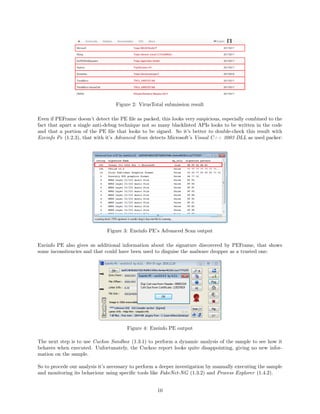
looks indeed suspicious, having 2 out of 4 of its sections identified as suspicious (Fig. 1). The same output
also acknowledges us that the sample is detected as malicious by VirusTotal (55/58) and is by manually
submitting the sample to it that we can also learn that the sample is recognized to be part of the ZeroAccess
malware family by most of antiviruses (Fig. 2).
Figure 1: PEFrame output: suspicious sections
19https://github.com/nsmfoo/antivmdetection
9
Figure 2: VirusTotal submission result
Even if PEFrame doesn’t detect the PE file as packed, this looks very suspicious, especially combined to the
fact that apart a single anti-debug technique not so many blacklisted APIs looks to be written in the code
and that a portion of the PE file that looks to be signed. So it’s better to double-check this result with
Exeinfo Pe (1.2.3), that with it’s Advanced Scan detects Microsoft’s Visual C++ 2003 DLL as used packer:
Figure 3: Exeinfo PE’s Advanced Scan output
Exeinfo PE also gives us additional information about the signature discovered by PEFrame, that shows
some inconsitencies and that could have been used to disguise the malware dropper as a trusted one:
Figure 4: Exeinfo PE output
The next step is to use Cuckoo Sandbox (1.3.1) to perform a dynamic analysis of the sample to see how it
behaves when executed. Unfortunately, the Cuckoo report looks quite disappointing, giving no new infor-
mation on the sample.
So to procede our analysis it’s necessary to perform a deeper investigation by manually executing the sample
and monitoring its behaviour using specific tools like FakeNet-NG (1.3.2) and Process Explorer (1.4.2).
10
Using FakeNet-NG, we can simulate traditional network services and divert all the traffic generated by the
malware while logging the requests performed by the malware and then dumping all the traffic collected
in a pcap file. From the point of view of the network traffic, the first thing the sample does is to query
the Google’s public DNS server (8.8.8.8) asking to resolve a specific domain; this is a smart move for the
malware, since the Google’s public DNS server are very reliable and widely used. Also, another advantage
of using an hard-coded DNS is that it enables the malware to bypass the default DNSs for the infected OS,
that could be monitored or simulated by using software like INetSim (1.4.1).
Figure 5: FakeNet-NG: HTTP request to promos.fling.com/geo/txt/city.php
The requested domain is promos.fling.com, a global adult dating website that is particularly interesting
because it offers an unsecured geolocation service hosted at promos.fling.com/geo/txt/city.php, that is le-
gitimately used by the website to gather the information about the user location and print the city of the
visitors along with dating results in the nearby. This service has been exploited and abused for a long time
by ZeroAccess and other malwares (that now has apparently been moved to a different address) because of
the very useful geolocation information delivered as HTTP cookies in the header as we can see from Fig.
6: this information enable ZeroAccess to find out in which country the infected machine is and to perform
customized actions based on the location.
Figure 6: promos.fling.com/geo/txt/city.php sample response
Then, looking again at the FakeNet-NG log, we can see that the malware managed to patch the Windows
process services.exe and started to send UDP packets to a large number of (IP addresses Fig. 7). The
next move of the malware it’s to delete its dropper, to stay hidden in the system. This approach works
particularly well considering that, how reported by [5] and[1], in some variant of the dropper a legitimate
signed version of the Adobe Flash Player installer embedded within the dropper itself is used to disguise
the drop of the malware as an Adobe Flash Player installation/update started probably from the Download
folder or from the browser and then completely forgotten. Even though, the real meaning is just to act as a
bait for Vista and higher users to click OK in the UAC prompt and escalade user privileges.
We can see from ProcessExplorer (1.4.2) that the malware actually managed to patch services.exe by loading
it’s malicious dropped files and libraries in it (Fig. 8).
11
Figure 7: FakeNet-NG: UDP traffic generated by the patched services.exe
Figure 8: Process Explorer overview of services.exe
Also, how we can see again from Fig. 8, the malware has two main components:
• n, a DLL containing the logic of the malware and implementing the peer-to-peer protocol to deliver
and receive malicious payload;
• @, a list containing the initial 256 peers that the bot will attempt to contact; this list will be updated
when receiving new peers and preserving only the list of the 256 more recent bots.
Those files have been dropped by the dropper in a directory created under "%Windows%Installer" (Fig.
9) with the attributes set to hidden and system (to stay hidden in the system) and a name formatted with
the following syntax: {%08x-%04x-%04x-%02x%02x-%02x%02x%02x%02x%02x%02x}.
This 32 character string is specifically crafted by the malware to look like a CLSID key20
, a globally unique
identifier that identifies a COM class object: the goal of the malware is to remain hidden even if discovered,
by being confused with a Windows COM object. Accordingly to [5], this is achieved by the malware by taking
the MD5 hash of the volume creation time of the “systemroot” volume of the infected machine, by calling
ZwQueryVolumeInformationFile with the FsInformationClass parameter set to FileFsVolumeInformation
and hashing the first 8 bytes of the returned structure (VolumeCreationTime).
Figure 9: Hidden folder dropped in "%Windows%Installer"
20https://msdn.microsoft.com/library/windows/hardware/ff567070(v=vs.85).aspx
12
Evidences can be found by examining the DLL n with PEStudio (1.2.2), a Windows tool that performs a
deep static analysis also on DLL samples, and looking at the imports contained in the malicious library:
Figure 10: PEStudio: imports contained in n
PEStudio is very useful also for its capability to extract strings from the submitted sample; by inspecting
those, we can find other evidences about the hidden folder naming convention (hard-coded in the DLL) and
other interesting information, as we can see from Fig. 11.
Figure 11: PEStudio: strings contained in n
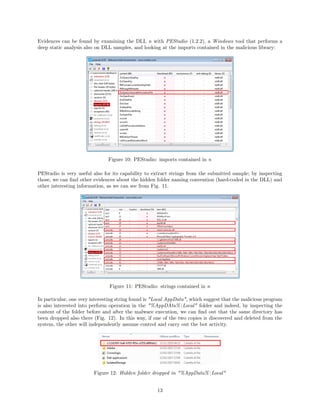
In particular, one very interesting string found is "Local AppData", which suggest that the malicious program
is also interested into perform operation in the "%AppDAta%Local" folder and indeed, by inspecting the
content of the folder before and after the malware execution, we can find out that the same directory has
been dropped also there (Fig. 12). In this way, if one of the two copies is discovered and deleted from the
system, the other will independently assume control and carry out the bot activity.
Figure 12: Hidden folder dropped in "%AppData%Local"
13
The first thing to mention about persistency is that, along with services.exe, it looks like the malware is
capable to patch also explorer.exe and to spawn malicious svchost.exe instances through services.exe. Evi-
dences can be found executing a reboot and observing the hybrid approach employed by the malware, that
consists in loading the "%AppData%Local"’s n copy in explorer.exe and the "%Windows%Installer"’s @
copy in the malign svchost.exe.
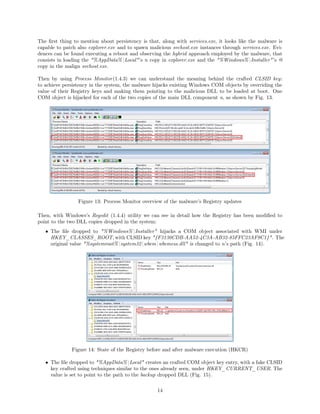
Then by using Process Monitor(1.4.3) we can understand the meaning behind the crafted CLSID key:
to achieve persistency in the system, the malware hijacks existing Windows COM objects by overriding the
value of their Registry keys and making them pointing to the malicious DLL to be loaded at boot. One
COM object is hijacked for each of the two copies of the main DLL component n, as shown by Fig. 13.
Figure 13: Process Monitor overview of the malware’s Registry updates
Then, with Windows’s Regedit (1.4.4) utility we can see in detail how the Registry has been modified to
point to the two DLL copies dropped in the system:
• The file dropped to "%Windows%Installer" hijacks a COM object associated with WMI under
HKEY_CLASSES_ROOT, with CLSID key "{F3130CDB-AA52-4C3A-AB32-85FFC23AF9C1}". The
original value "%systemroot%system32wbemwbemess.dll" is changed to n’s path (Fig. 14).
Figure 14: State of the Registry before and after malware execution (HKCR)
• The file dropped to "%AppData%Local" creates an crafted COM object key entry, with a fake CLSID
key crafted using techniques similar to the ones already seen, under HKEY_CURRENT_USER. The
value is set to point to the path to the backup dropped DLL (Fig. 15).
14
Figure 15: State of the Registry before and after malware execution (HKCU)
Along with n and @, in the hidden directories we can find two initially empty folders (Fig. 16):
• U, used to store the malicious payload plugins, received by the other members of the botnet and used
to carry out the real payload of ZeroAccess;
• L, used as a temporary files storage.
Figure 16: Files dropped in "%Windows%Installer" and "%AppData%Local"
As already anticipated, one of the most interesting feature of the botnet is exactly its peer-to-peer network of
bots, that is very well organized and segmented to offer better resiliency and a very powerful goal separation.
As described in detail by [1], P2P botnets are attractive mainly because of their decentralized architecture
that increase their resiliency to shutdown, and this holds also for ZeroAccess that in addition employs several
peer differentation techniques to overcome issues and increase the resiliency even more:
• To overcome the problems generated by NATed infected machine, that are not publicly accessible
from the outside and consequently other bots cannot initiate a connection with them due to NAT
restrictions, the network is logically divided in two kind of nodes:
– Supernodes, that distribute malicious payloads, share their peer lists and process commands
directly from the botmaster;
– Normal nodes, that can request peer list and updated files to supernodes but cannot distribute
files due to NAT restrictions, so they initiate only outgoing connections.
Since most of the businesses and many home users connect to the Internet through a gateway or a
NAT enabled device, the result is that the majority of ZeroAccess network is made up of normal nodes.
According to [5], in each instance of the botnet, the proportion of supernodes is about 20 − 30%.
• A first division of the network is on the base of the kind of malicious payload distributed by the
supernodes of that network and consequently the specific financial goal of that network. The ZeroAccess
botnets has two primary revenue streams[5]:
– Bitcoin Mining, with an estimated revenue of 10, 557.76$ per day;
– Click Fraud, with an estimated revenue of 91, 200$ per day.
15
From an architectural point of view, this means that we will have two separated network of bots, since
these are kept separated both to increase individual resiliency and to increase the manageability of
the overall network from the point of view of the botmaster. This means that in general, since each
machine is intended to be part of just one of the two networks, we may encounter two different kind of
malware droppers. In our case, the analyzed sample has been identified part of the click fraud botnet,
so the analysis will be focused on that specific network.
• An additional segmentation of the network is on the base of the operating system architecture of
the infected machine; the two revenue networks are furtherly divided into two logical subnetworks,
identified by the UDP port used to send and receive the packets of the botnet. The ports used are[1]:
– Bitcoin mining: 16471 for 32-bit and 16470 for 64-bit;
– Click fraud: 16464 for 32-bit and 16465 for 64-bit.
This also means that the malware dropper contains two versions of the malware: one for 32-bit and one
for 64-bit; the one that is actually dropped depends on the operating system of the machine to infect.
By running the samples in both a 32-bit and a 64-bit environment, it was possible to collect the set of
all the initial supernodes peers the botnet attempts to contact for both the botnetworks. By using a
Python script, it was possible to confirm that the two lists have some overlapping broadcast addresses
(16 out of 256), as we can see looking at Fig. 17. And by the plotting on the map those address, we
can also see that the global spreading of bots for the two networks is almost the same (Fig. 18).
Figure 17: List of collected initial peers IPs for 32-bit and 64-bit bots
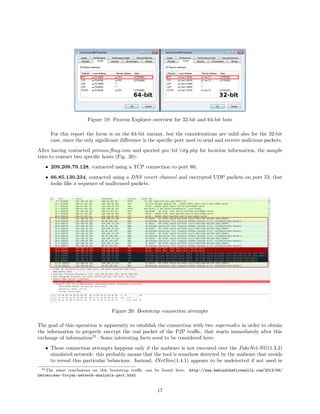
We can have the confirmation about the UDP port division by looking at the Process Explorer overview
of the patched services.exe, when running in both the 32-bit and 64-bit environments (Fig. 19).
Figure 18: Map plot of the collected initial peers IPs for 32-bit and 64-bit bots
16
Figure 19: Process Explorer overview for 32-bit and 64-bit bots
For this report the focus is on the 64-bit variant, but the considerations are valid also for the 32-bit
case, since the only significant difference is the specific port used to send and receive malicious packets.
After having contacted promos.fling.com and queried geo/txt/city.php for location information, the sample
tries to contact two specific hosts (Fig. 20):
• 209.208.79.128, contacted using a TCP connection to port 80;
• 66.85.130.234, contacted using a DNS covert channel and encrypted UDP packets on port 53, that
looks like a sequence of malformed packets.
Figure 20: Bootstrap connection attempts
The goal of this operation is apparently to establish the connection with two supernodes in order to obtain
the information to properly encrypt the real packet of the P2P traffic, that starts immediately after this
exchange of information21
. Some interesting facts need to be considered here:
• These connection attempts happens only if the malware is not executed over the FakeNet-NG(1.3.2)
simulated network: this probably means that the tool is somehow detected by the malware that avoids
to reveal this particular behaviour. Instead, INetSim(1.4.1) appears to be undetected if not used in
21The same conclusions on this bootstrap traffic can be found here: http://www.behindthefirewalls.com/2013/06/
zeroaccess-trojan-network-analysis-part.html
17
combination with other sandbox environment like Cuckoo Sandbox(1.3.1) and have successfully been
used to reveal the malware behaviour without enabling it to connect to its supernodes.
• These hosts are contacted by both the 32-bit and 64-bit bots, suggesting that this bootstrap phase is
likely to be shared by the two botnetwoks.
• The UDP traffic generated under the FakeNet-NG enviroment, takes place bypassing this stage; this
could suggest that this is an optional step, not crucial in the botnet operations.
Then, the bot starts to send UDP packets to the supernode peers in its address list @. The payload of the
packet is a 16 bytes string, that at first sight appears to be completely random but instead only a portion of
it really is (that is renewed at each installation or reboot), since it contains a substring that remains constant
across the whole execution:
Figure 21: Example of getL requests
As explained in detail by [5], this is the first step of the P2P protocol; the repeating hexadecimal portion
28948dabc9c0d199 represents actually an encrypted command followed by its data: 28948dab is the en-
crypted version of 45746567, translated as getL (Lget actually, due to endianess), that is the submitted
command, and c9c0d199 is the encrypted version of 00000000 translated as 0, the length of the data (getL
has no data payload). The rest of the string, that is the one that changes is divided in:
• A BotID, that is a random number generated using the Windows Crypto API’s functions CryptGen-
Random and CryptImpotortKey (imported by the n module, as depicted by Fig. 10); this value acts
as a temporary identifier for the peer and has to be checked against received getL request to avoid
duplicates (it also changes at each reboot).
• A CRC32 checksum for error detection purposes calculated on the overall packet, placed at the begin
of this latter to makes also sure that the initial 4 bytes of the encrypted data are different for each bot.
The whole packet is XOR encrypted 4-bytes at a time using a 4-byte key, left rotated of 1 bit after each XOR.
The getL command is issued by the bot to each of the supernodes currently in its peer list; the goal is
to receive in response a retL message containing:
• The list of peers known by that peer, along with a timestamp specifying the age of that information
(used to keep just the more recent peers);
• The list of malicious payload owned by that peer.
In our case, since the analysis has been performed by using INetSim(1.4.1) the UDP packets are captured
by the simulated environment and no response can be received by the sample that indefinitely attempts to
contact the peers in its list hoping to receive a response, sooner or later. This because the malware that is
installed by the dropper is only meant to provide the infected machine with all the necessary to implement
the peer-to-peer protocol, that is then used to reach peers that actually own malicious plugins, download
them and using them to carry on the real malicious activities. For example, by looking again at Fig. 10, we
can see the name of the 64-bit version of the library ("p2p64.dll") loaded by n to implement the P2P protocol.
18
The following picture, taken from [5], give us an idea of how the peer-to-peer protocol works in a real
(and not simulated) environment:
Figure 22: P2P protocol: getL - retL interaction
So after, issuing a getL, the node:
1. Will wait for a retL packet from the remote node, encrypted in the same manner of the getL containing:
• The number of address in the packet22
;
• The list of address in the form IP-Timestamp pairs;
• The Broadcast Flag, used to trigger the broadcasting of new IP addresses to known peers at
receiver side through newL command;
• The number of files header in the packet;
• The list of file headers in the form Header-Signature pairs.
2. When receive the packet, it willl:
• Update its list of addresses @ by keeping only the 256 more recent peers according to the times-
tamp, that represent the last known interaction with that peer;
• Updating the list of files owned by the remote peer againts the list of files currently owned (using
header and signature for the comparison).
3. Using the file name for downloading the missing files opening a TCP connection with the remote node.
Exist also an additional command, newL, that is used to inject a new peer address into the botnet. This
command is issued either by a peer that has a list of supernodes that wants to inject in the peer list of the
botnet or automatically by a node that has received a retL message with the broadcast flag field set, causing
the node to broadcast the list of all the received address to all of the supernodes in its peer list. The packet
has the same layout of getL, but placing the IP address of the new peer to be injected instead of the BotID.
The receiver node then puts the sender IP and the new peer IP contained in the newL packet into its list of
peers and sends a newL command to the top 16 peers in its list, to carry on the flooding process. Table 1
gives a summary of the commands and the layout of their packets.
Once the infected machine manages to get in touch with some supernodes, it’s able to request the download
of malicious plugins to carry out the real malicious activities the botnet is meant for. The kind of available
plugins depend on which ZeroAccess botnet the bot is connected to:
• Botnets operating on ports 16464 and 16465 will download funtionally equivalent pugins (respectively
for 32-bit and 64-bit machines) to carry out click fraud activity;
• Botnets operating on ports 16470 and 16471 will download funtionally equivalent pugins (respectively
for 32-bit and 64-bit machines) to carry out bitcoin mining activity.
22Even if the number of address to read can be specified, the bot won’t read more than 16 address (i.e. the expected maximum
for the packet layout). This helps increasing resiliency against attempts of distrupting the network using sinkholing techniques.
19
Command Offset Field
getL
0x0 CRC32 of the packet
0x4 Command identifier ("getL")
0x8 Length of data (0)
0xc BotID
retL
0x0 CRC32 of the packet
0x4 Command identifier ("retL")
0x8 Broadcast Flag
0xc Number of IP-Timestamp pairs (Na)
0x10 List of IP-Timestamp pairs
0x10 + (min(16, Na)) Number of File headers-signature pairs
0x14 + (min(16, Na)) File entry header
0x20 + (min(16, Na)) 0x80 byte signature of File entry header
newL
0x0 CRC32 of the packet
0x4 Command identifier ("newL")
0x8 Unused, usually "8"
0xc New peer IP address
Table 1: Table of P2P commands
As already stated, our focus will be on the click fraud botnet. The ZeroAccess botnets that carry out
click fraud activity typically download 3 files[5]:
• 80000000, that is a plugin common to each ZeroAccess botnet used to keep the botmasters updated
on the status of the infected machine by regularly sending back status information in form of encrypted
packets (i.e. again a XOR-like technique), transmitted using NTP port 123 to make the traffic look
legitimate and to avoid the users to suspects something23
. It also monitors the system and attempts
to stop certain security programs and services, of both Windows and third-party vendors.
• 00000001, that is a resource-only DLL that is used by the other plugins in a plugin-dependent way;
in the 800000cb case, it stores the IPs used to gather information on the URL to be clicked with a
specially crafted HTTP GET request (many tries could be needed!).
• 800000cb, that is the plugin that carries the main click fraud functionality; it’s a DLL that once
loaded it periodically (about each 2-3 minutes) creates a svchost.exe process, injects into it the code
to decrypt a CAB file (encrypted with the same rotate left XOR technique used in the peer-to-peer
protocol) that contains a single binary file called noreloc.cod consisting of shell code and an embedded
DLL, which holds the click fraud code and that is loaded by the former one. The activity to carry
on consist of retrieving URL information from a remote server, carrying out the fraudulent click, and
reporting the success to another remote server using the same NTP covert channel used by 80000000.
3.1.3 Conclusions
The ZeroAccess botnet has been an extremely large botnet built upon a custom P2P protocol and instructed
to carry out click fraud and Bitcoin mining activities but capable of carry out many more malicious activities,
due to its expandability and updatability possibilities. Now the Bitcoin mining network seems to have been
deactivated and taken down (also thanks to the big effort put by Symantec in cooperation with ISPs and
CERTs[1]), but not so old are the news about a revival of the network segment devoted to click fraud that
seems somehow still active and capable of being re-activated if the owners of the botnet wishes so24
.
23All Microsoft Windows versions since Windows 2000 include the Windows Time service ("W32Time"), which has the ability
to synchronize the computer clock to an NTP server by means of an NTP client included by the aforementioned service. So,
using port 123 (i.e. the default NTP port), makes the C2C bot status traffic look like legitimate Windows traffic.
24http://www.computerworld.com/article/2877923/the-zeroaccess-botnet-is-back-in-business.html
20
3.2 Sample 2: Skynet
3.2.1 Malware history and overview
The second sample (SHA256 checksum: 9646ebf...e0c40b8) turned out to be the well-know Skynet botnet,
the first Tor-based botnet to appear in the wild, deeply analyzed and reported by Claudio ‘Nex’ Guarnieri
of Rapid7. As Guarnieri says in it’s report[4], Skynet is a Tor-powered trojan with DDoS, Bitcoin mining
and Banking capabilities that has been described for the first time by the Reddit user "throwaway236236",
in the very popular (and now closed) "IAmA" thread. Also, there are statistics25
showing that a good
share of the overall Tor hidden service traffic is generated by the botnet itself, that also has many of its
C&C domains listed among the top 50 most popular hidden services (the ranking is based on the number
of received requests). The malware has been reported to be initially diffused through Usenet: a very old
distributed discussion platform from the 80s that survives still today due to it’s new face of platform for
distributing pirated content. And where there’s pirated content, is very likely that we will also find malware
in it: today, Usenet has become a malware field for the spreading of malware like Skynet.
3.2.2 Malware analysis
The first step of the analysis of the sample was to perform a static analysis with PEFrame (1.2.1), to see
if it was possible to extract interesting strings out of the portable executable file. Through the VirusTotal
API, called by PEFrame, we already know that the file is malicious (46/56 positives); unfortunately, since
the PE is detected to be packed (with Armadillo v2.xx (CopyMem II)), not much interesting information
can be revealed by the static analysis (Fig. 23).
Figure 23: PEFrame output: VirusTotal results and packer informations
Figure 24: PEFrame output: Metadata and anti-vm/debug information
However, some information are: in particular, the fact that the sample employs anti-vm and anti-debug
techniques. Also, it looks like the portable executable has been filled with some metadata: probably to fool
25http://www.dis.uniroma1.it/dasec/DASec_Pustogarov.pdf
21
a potential user into trust the executable and launch it (Fig. 24). In addition, the same results about the
packer are also confirmed by Exeinfo PE (1.2.3):
Figure 25: Exeinfo PE detected packer
The next step of the analysis is to perform an automated dynamic analysis of the sample with Cuckoo
Sandbox (1.3.1). The results of the analysis looks very promising, identifying many of the features described
in [4] and many interesting aspects to analyze more in details. In particular, the dynamic analysis report:
• Confirms us that the malware employs anti-vm techniques to detect if it’s currently executed in a
virtualized environment: in particular it queries for the computer name, it collects information as the
SystemBiosDate to fingerprint the system (and eventually the virtualized enviroment) and the amount
of available storage (if low, it may indicate that the malware it’s executed in a virtualized environment).
Figure 26: Cuckoo signatures: anti-vm queries
• Inform us that the malware achieve persistency in the system by installing itself in autorun locations
to be activated at Windows startup.
• Shows additional evidences about the packed nature of the sample: in particular, once executed, the
PE allocates rwx buffers (read-write-execution) buffers, for the unpacked code of the malware to be
injected in memory. Moreover, one or more of these allocated buffers, are detected to contain other
PE files, that probably consist in additional modules of the malware.
Figure 27: Cuckoo signatures: packer and code injection techniques
• States that the malware is also detected to employ polymorphic techniques to create a slightly
modified version of itself in the system, to go pass unnoticed by signature based antiviruses. This is
also confimed by the files dropped by the malware and collected by Cuckoo, where we can identify a
copy of the malware itself26
: a portable executable (.exe) file with SHA-256 signature different from
the original (Fig. 28). Also, running the analysis different times, it can be observed that the dropped
file looks to have each time a new different signature.
26Confirmed to be a copy by performing on this static and dynamic automated analyses with PEFrame and Cuckoo and
comparing the results to the original one.
22
Figure 28: Sha256 checksum of the original sample and the dropped copy
• Tells us that the malware tries to collect and steal credentials imformation from local email clients
(using POP and IMF messages) and FTP clients. This behaviour can be observed looking at the traffic
for these protocols by using software like Wireshark (1.1.1), as depicted by Fig. 29.
Figure 29: Wireshark overview of the FTP, POP and IMF (SMTP) traffic
• States that among the collected files there’s also an OpenCL client library (Khronos OpenCL ICD),
developed by The Khronos Group Inc. that can be easily be found on the web27
. This probably means
that one of the major goals of the malware is to mine Bitcoins, a thing that confirmed by [4].
• Tells us that the sample attempts to modify the browser security settings by opening, reading and
writing Internet Explorer Registry keys. This leads us back again to [4], where it is stated that one
of the malware goals is to perform a click fraud activity that requires an unsecured browser to lean
on. Also, the Cuckoo’s report suggests us that the sample it’s reported to create one or more Internet
Explorer martian process28
, signaling that it may be used be the malware itself to go pass unnoticed.
Figure 30: Cuckoo signatures: packer and code injection techniques
• Informs us that the PE files embeds a Zeus P2P banking trojan in it, a thing confirmed by [4].
• Drops a self-delete batch script to automatically delete the original binary from the system that is
no longer needed, since its polimorphic copy has been already generated and occulted in the system:
Figure 31: Self-delete batch script
But, since we suspect the sample to be interested in rectruiting the machine in a botnet, the thing that we
are interested most into analyze in detail is networking behaviour of it, with the main goal of identifying its
C2C traffic. Immediately, just by looking at the Cuckoo’s report, we can spot some very alarming facts:
27https://www.khronos.org/registry/OpenCL/
28That are essentially IE processes, without a GUI and spawned as child processes.
23
• The malware sends an HTTP GET request to the Dynamic DNS Domain http: // checkip.
dyndns. org/ , a service well-known and widely used (and abused) by malware and botnets with the
goal of identifying the external IP address of the infected machine, as depicted in Fig. 32. Collecting
the external IP address is a bad behaviour for an application, since it could signify that the application
would like to be reached from the outside, creating a web server or a web service reachable by potential
remote nodes. Suspects that reveal to be well-founded, since from the report we can read that one or
more processes bind to ports starting server listeners waiting for ingoing connections.
Figure 32: Cuckoo report: DNS and HTTP requests to checkip.dyndns.org
• Once installed and started the malware establish encrypted TCP connections with an high number
of hosts. This is clearly a bad sign that could either signify that the malware is trying to saturate the
network resources of the infected machine (so a sort of DoS attack) or that the infected machine has
become part of a botnet. For a deeper understanding of the reason behind this amount of traffic it’s
required a deeper analysis.
Figure 33: Wireshark overview of the TCP connections
The hosts contacted appears to be located mostly in central Europe, with high densities in Germany and
Netherlands, as the maps in Fig. 34 depicts (even though some hosts from other countries are present).
This makes sense since, according to [4], the creator of the malware (the Reddit user throwaway236236)
has probably german origins.
Figure 34: Map showing the locations of the hosts contacted
24
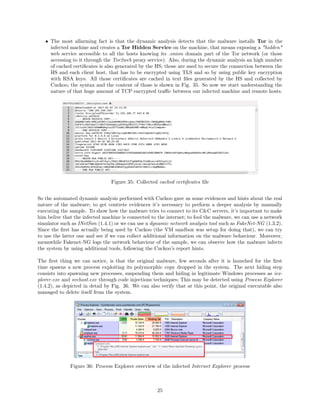
• The most allarming fact is that the dynamic analysis detects that the malware installs Tor in the
infected machine and creates a Tor Hidden Service on the machine, that means exposing a "hidden"
web service accessible to all the hosts knowing its .onion domain part of the Tor network (or those
accessing to it through the Tor2web proxy service). Also, during the dynamic analysis an high number
of cached certificates is also generated by the HS; those are used to secure the connection between the
HS and each client host, that has to be encrypted using TLS and so by using public key encryption
with RSA keys. All those certificates are cached in text files generated by the HS and collected by
Cuckoo; the syntax and the content of those is shown in Fig. 35. So now we start understanding the
nature of that huge amount of TCP encrypted traffic between our infected machine and remote hosts.
Figure 35: Collected cached certificates file
So the automated dynamic analysis performed with Cuckoo gave us some evidences and hints about the real
nature of the malware; to get contrete evidences it’s necessary to perform a deeper analysis by manually
executing the sample. To show how the malware tries to connect to its C&C servers, it’s important to make
him belive that the infected machine is connected to the internet; to fool the malware, we can use a network
simulator such as INetSim (1.4.1) or we can use a dynamic network analysis tool such as FakeNet-NG (1.3.2).
Since the first has actually being used by Cuckoo (the VM sandbox was setup for doing that), we can try
to use the latter one and see if we can collect additional information on the malware behaviour. Moreover,
meanwhile Fakenet-NG logs the network behaviour of the sample, we can observe how the malware infects
the system by using additional tools, following the Cuckoo’s report hints.
The first thing we can notice, is that the original malware, few seconds after it is launched for the first
time spawns a new process exploiting its polymorphic copy dropped in the system. The next hiding step
consists into spawning new processes, suspending them and hiding in legitimate Windows processes as iex-
plorer.exe and svchost.exe through code injections techniques; This may be detected using Process Explorer
(1.4.2), as depicted in detail by Fig. 36. We can also verify that at this point, the original executable also
managed to delete itself from the system.
Figure 36: Process Explorer overview of the infected Internet Explorer process
25
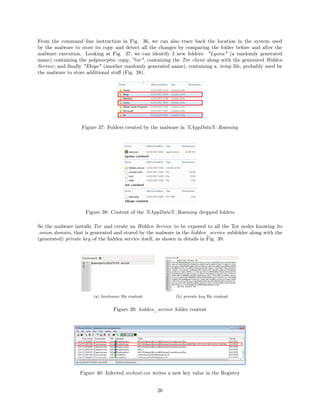
From the command line instruction in Fig. 36, we can also trace back the location in the system used
by the malware to store its copy and detect all the changes by comparing the folder before and after the
malware execution. Looking at Fig. 37, we can identify 3 new folders: "Lyonu" (a randomly generated
name) containing the polymorphic copy; "tor", containing the Tor client along with the generated Hidden
Service; and finally "Ekiqa" (another randomly generated name), containing a .temp file, probably used by
the malware to store additional stuff (Fig. 38).
Figure 37: Folders created by the malware in %AppData%Roaming
Figure 38: Content of the %AppData%Roaming dropped folders
So the malware installs Tor and create an Hidden Service to be exposed to all the Tor nodes knowing its
.onion domain, that is generated and stored by the malware in the hidden_service subfolder along with the
(generated) private key of the hidden service itself, as shown in details in Fig. 39.
(a) hostname file content (b) private key file content
Figure 39: hidden_service folder content
Figure 40: Infected svchost.exe writes a new key value in the Registry
26
At this point, we can already observe that the malware succeded in gaining persistency in the infected
system. Using Process Monitor(1.4.3), we can see that the spawned svchost.exe queries the Registry
and writes a new data value for an already existing and very specific Windows Registry key (Fig. 40):
HKEY_CURRENT_USERSoftwareMicrosoftWindowsCurrentVersionRun, that cause the programs
related to the values added to this key to start when the user logs in. In our case, the command line in-
struction added by the malware is the path to the polymorphic copy of the malware, that has been already
dropped in the %AppData%Roaming folder (Fig. 41).
Figure 41: Registry key value written by the malware to persist in the system
Then, from the command line arguments of its core component, we can see concrete evidences about the
usage of the hidden_service folder: the malware does not only installs Tor to connect to its C&C servers,
but also creates a Tor Hidden Service on the infected system on port 55080 (Fig. 42).
Figure 42: Process Explorer overview of the command line arguments
Through Process Explorer, it’s also possible to see which are the ports the malware processes are listening
to. From Fig. 43 we see that:
• One process is listening to port 42349;
• Another is listening to port 9050.
Surprisingly, no process is listening to port 55080: so even though the Tor Hidden Service is configured to
accept connection on that port, there’s no real process waiting for ingoing requests. According to [4], this is
supposed to happen only when the botherder issues a specific command29
through the C&C channel: if this
29The "!socks" command; more details about issuing commands later on in the report.
27
happens, the malware will open a SOCKS proxy on that port that will then be reachable from the outside
through a the generated .onion domain stored in the hostname file.
(a) Father process (b) Child process
Figure 43: Malware-injected Internet Explorer processes binded ports
Speaking about port 9050, we can immediately see through NetworkMiner (1.1.2), able to identify open
sessions while sniffing the network traffic, that a surprisingly high number of sessions involves that port.
Figure 44: NetworkMiner overview of SOCKS sessions
The reason is soon explained: the port is used along with the SOCKS protocol to create a local proxy server
and to tunnel the traffic over the Tor network, to reach other members of the botnet and the botherder.
Instead, the port 42349 is used for other purposes. As detected by Cuckoo and as stated by [4], one
of the core components of Skynet is a Zeus bot: an extremely common Banking Trojan whose source code
has been reported to be leaked, and probably one of the main source of income of the Skynet infrastructure.
As we can see from NetworkMiner, many sessions are opened towards the port 42349 (Fig. 45).
Figure 45: NetworkMiner overview of port 42349 sessions
28
The goal of this connections to the local proxy server running on port 42349 is to contact the external
C&C server for downloading the updated configuration file. While in traditional Zeus implementations,
configuration updates are fetched from an external public server, in this case those are stored behind specific
Tor .onion pseudo-domains. So the proxy running on port 42349 receives the HTTP GET requests to fetch
the configuration file (Fig. 46), translates them to corresponding requests towards the C&C .onion domain
and tunnels them through the Tor network using the SOCKS proxy listening on port 9050. As reported by
[4], the malicious .onion domain used for hosting the updated configuration is "qdzjxwujdtxrjkrz.onion", so
the requests gets translated to http://qdzjxwujdtxrjkrz.onion:80/z/config.bin when tunneled over Tor.
Figure 46: Wireshark overview of the HTTP GET /z/config.bin requests
Along with Zeus, another source of revenue is given by the Bitcoin mining activity, performed (according to
[4]) by using an embedded CGMiner30
, capable to access the Tor network using the SOCKS proxy listening
on port 9050. Evidences, can be found in the %AppData%LocalTemp, where the OpenCL.dll library
dropped by the polymorphic copy of the malware can be found (Fig. 47).
Figure 47: OpenCL.dll library dropped in %AppData%LocalTemp
The missing piece of the puzzle is the C&C infrastucture used to send commands to the infected machines.
The communication protocol used is IRC: an old fashioned but still valuable solution, if combined with
Tor and .onion domains. Looking at the capture using Wireshark, we can observe some IRC traffic passing
through the SOCKS proxy port 9050:
Figure 48: Wireshark overview of the IRC traffic
30https://github.com/ckolivas/cgminer
29
Furthermore, during the execution of the malware, it was even possible to detect an established connection to
one of its C&C IRC .onion domain servers, using port 16667 as destination port for the IRC command and
control flow, that is tunneled over Tor using a SOCKS connection initiated by the SOCKS proxy listening
on port 9050, as shown in Fig. 49.
Figure 49: NetworkMiner overview of an IRC C&C server connection attempt
Even if the only established IRC C&C connection that is was possible to detect was toward "7wuwk3aybq5z73m7.onion",
this is not the unique .onion domain hard-coded in the malware code. Actually, as we can see from the
FakeNet-NG log, the number of .onion domains attempted to contact is much higher:
Figure 50: Fakenet-NG log
Also, by processing the FakeNet-NG log with a simple Python script, it was possible to identify the list of
all the .onion domains exploited by the malware:
• qdzjxwujdtxrjkrz.onion (The Zeus C&C server)
• 7wuwk3aybq5z73m7.onion (The IRC C&C server contacted)
• ua4ttfm47jt32igm.onion
• 4njzp3wzi6leo772.onion
• niazgxzlrbpevgvq.onion
• gpt2u5hhaqvmnwhr.onion
• owbm3sjqdnndmydf.onion
• 6ceyqong6nxy7hwp.onion
• 4bx2tfgsctov65ch.onion
• x3wyzqg6cfbqrwht.onion
• 6tkpktox73usm5vq.onion
• 742yhnr32ntzhx3f.onion
Even though it was not possible to manually extract the set of IRC commands from the malware, we can
obtain this information from [4]; the list of commands is shown in Table 2. So we can see that the malware has
a very good pool of available functionalities, that can be manipulated through specific commans submitted
through the IRC channels the bot connects to. We can also see that, the malware has a very good support
for DDoS attacks (SYN, UDP, Slowloris and HTTP).
30
Feature Commands
Get information on the infected machine
!info
!version
!harware
!idle
Download and execute files !download
Download a binary and inject it into processes memory !download.mem
Visit a webpage
!visit
!visit.post
SYN and UDP flooding
!syn
!syn.stop
!udp
!udp.stop
Slowloris flooding
!slowloris
!slowloris.stop
HTTP flooding
!http.bwrape
!http.bwrape.stop
Open a SOCKS proxy !socks
Get .onion address of the infected machine’s Hidden Service !ip
Table 2: Table of IRC commands
3.2.3 Conclusions
The Skynet botnet has been the first to show the potentialities of using the Tor network to build an almost
cost-free bulletproof botnet. Obviously, there are also downsizes in the use of Tor in the botnet architecure
design [2]: these botnets are not less subject to the very same kind of attacks applied to standard ones, so
crawling (looking for .onion domains instead of IPs to enumerate the bots) and sinkholing (to injects fake
nodes in the peerlist of the Tor-based bots) techniques work as well as in traditional botnets. So, the use
of Tor is not a silver bullet against takedown effort of security agencies, but it represents a low-cost and
powerful solution to the design of future botnets. In particular, considering the fact that P2P botnets over
Tor are not yet been spotted in the wild and it would be interesting to analyze the impact of Tor on their
resilience and also the impact the huge amount of traffic generated by those may have on the Tor network.
References
[1] R. Gibb A. Neville. ZeroAccess indepth. Ed. by Symantec Security Response. 2013. url: http://www.
symantec.com/content/en/us/enterprise/media/security_response/whitepapers/zeroaccess_
indepth.pdf.
[2] M. Casenove and A. Miraglia. “Botnet over Tor: The illusion of hiding.” In: 2014 6th International
Conference On Cyber Conflict (CyCon 2014). Vrije Universiteit: NATO CCD COE, 2014, pp. 273–282.
url: https://ccdcoe.org/cycon/2014/proceedings/d3r2s3_casenove.pdf.
[3] Christian J. Dietrich et al. “On Botnets That Use DNS for Command and Control”. In: Proceedings of
the 2011 Seventh European Conference on Computer Network Defense. EC2ND ’11. Washington, DC,
USA: IEEE Computer Society, 2011, pp. 9–16. isbn: 978-0-7695-4762-6. doi: 10.1109/EC2ND.2011.16.
url: http://dx.doi.org/10.1109/EC2ND.2011.16.
[4] C. Guarnieri. Skynet, a Tor-powered botnet straight from Reddit. Ed. by Rapid7. 2012. url: https:
//community.rapid7.com/community/infosec/blog/2012/12/06/skynet-a-tor-powered-botnet-
straight-from-reddit.
[5] J. Wyke. The ZeroAccess Botnet – Mining and Fraud for Massive Financial Gain. Ed. by Sophos
Technical Paper. 2012. url: https://www.sophos.com/en- us/medialibrary/PDFs/technical%
20papers/Sophos_ZeroAccess_Botnet.pdf.
31

Project in malware analysis:C2C

  • 1.
    System And EnterpriseSecurity Project in Malware Analysis: C2C A.A. 2016-2017 Fabrizio Farinacci April 5, 2017 Abstract The goal of this report is to focus on one particular aspect of malware: the Command & Control (aka C&C or C2C) infrastructure; in other words, the set of servers and other kind technical infrastructure used to control malware in general and, in particular, botnets. For this purpose, two malicious samples have been analyzed in this work, by means of state-of-the-art static and dynamic analysis tools, also described at high level in this report; the achieved goal was to understand their networking behaviour and to derive the techniques used by those to hide their malicious traffic to unaware users, with the goal of staying as long as possible in the system and keeping their malicious business going. The report is structured in 3 sections: in Section 1 it’s given an overview of the tools used to analyze malware in general and, more specifically, botnets; then, in Section 2 an overview of the most common C2C techniques and practices it is given; finally, in Section 3 the given samples are analyzed and reported in detail. 1 Tools Used 1.1 Network Sniffers & Packet Analyzer 1.1.1 Wireshark Wireshark1 is a free, open source and cross-platform packet sniffer and analyzer developed by The Wire- shark team. It’s capable of sniffing the network traffic, capture the packets and dissect them, to provide an on-line analysis of the packets in the moment they are captured. As result of the capture process, a PCAP (Packet Capture) is generated to store the captured network trace. Wireshark is also able to decrypt en- crypted traffic for specific network protocols (by specifying the keys used) and looking at the cleartext traffic. Goal: Identify ingoing and outgoing connections used to communicate to the Command & Control servers and to other infected hosts part of the botnet. 1.1.2 NetworkMiner NetworkMiner2 is a freemium Network Forensic Analysis Tool available for Windows and developed by NETRESEC AB. Can be used as a passive network sniffer and packet capturing tool, to detect hosts (with OS fingerprinting), sessions, hostnames, ports and more, shown to the user by means of a very effective user interface. It’s capable to extract files, emails and certificates transferred over the network, by parsing PCAP files or by sniffing traffic from the network, with support for many well known protocols (HTTP, FTP, IMAP, exc.). It also keeps track of the parameters used and the DNS query and response. Goal: Identifying in real-time the hosts involved, the sessions created and the files exchanged, and de- tecting anomalous DNS traffic, suspicious strings sent as parameter of messages between the infected host the other hosts involved. 1https://www.wireshark.org 2https://www.netresec.com/?page=NetworkMiner 1
  • 2.
    1.2 Static MalwareAnalysis 1.2.1 PEFrame PEFrame3 it’s an open source and cross platform tool written in Python 2.7.x to perform static analysis on Portable Executable (PE) malware and generic suspicious files. It helps detecting packers and other obfuscation techniques like XOR operation and identifying digital signatures, hardcoded mutex names and usage (typically for coordination and to avoid multiple infections), anti-vm and anti-debug techniques used to detect sandbox and other dynamic analysis environments, suspicious code sections, library functions im- ported and much more. It’s also possible to configure it with your VirusTotal API key to directly submit analysis. Finally, it’s able to print as result a short output analysis, the full output analysis in JSON format or the strings extracted from the PE file submitted. Goal: Detecting hardcoded domains, packer used and other obfuscations techniques, suspicious functions imported and exported by the malware (to possibly replace system functions) and the presence of anti- vm/anti-debug techniques that may possibly make the dynamic analysis harder to do. 1.2.2 PEstudio PEstudio4 is a freemium Malware Initial Assessment tool for Windows developed by Winitor. PEstudio performs a static analysis on the file to spot suspicious patterns, unexpected metadata, artifacts, and anoma- lies left by the malware in its process to evade early detection through traditional static analysis techniques. It also produces a set of indicators of different severity to show the alarming aspects of the analyzed sample. Each detail retrieved from the file is checked against Microsoft specifications and several white/black list thresholds. It checks imported functions to see if they are blacklisted or commonly used as anti-debug tech- niques and it’s capable to analyze resources and store them for further analysis. It’s also possible to query Antiviruses engine hosted by VirusTotal. Also, the strings found are collected and compared against black- lists of suspicious strings. The results can be analyzed by means of the GUI and then exported as an XML file. Goal: Identify suspicious strings and resources in the submitted file, check the presence of blacklisted imported functions and obtain indicators useful to correct the aim for a deeper investigation. 1.2.3 Exeinfo PE Exeinfo PE5 is a freeware (for non-commercial use) tool for Windows developed by A.S.L. It’s a very useful, ligthweight, portable, plugin expandable and user customizable tool for extracting very valuable information out of the suspicious file you want to analyze, such as packer information, compiler used, protectors and so on. Despite the name, it supports detection for over 300 binary data types from ".jpg" to ".iso", not forgetting the most common executable files as ".exe" and ".dll". Exeinfo PE does a very good job particularly when dealing with packed suspicious files, since it’s able do detect, especially when using the Advanced Scan plu- gin with a custom user database of signatures, the set of possible packers used by the file to obfuscate its code. Goal: Identify additional informations about the packer used by the malware. 1.3 Dynamic Malware Analysis 1.3.1 Cuckoo Sandbox Cuckoo Sandbox6 is a free and open source automated malware analysis system developed in Python 2.7.x and maintained by volunteers. It’s an advanced, extremely modular malware analysis system, capable to an- alyze different type of malicious files and websites by automatically execute them in Windows, OS X, Linux and Android virtualized environments, tracing API calls and file behaviour, dumping (in PCAP format) 3https://github.com/guelfoweb/peframe 4https://www.winitor.com/index.html 5http://exeinfo.atwebpages.com/ 6https://cuckoosandbox.org/ 2
  • 3.
    and analyzing networktraffic (both in clear and in encrypted form), collecting dropped files and performing advanced memory analysis with Volatily7 and producing report in JSON and HTML format. It supports a wide variety of virtualization software from well known VirtualBox and VMware to least known solutions as KVM and QEMU. It’s possible to customize the execution, the processing and the reporting stages. It also provides a full-fledged web interface in the form of a Django application that allows to submit files, browse through the reports and search across all the analysis results. Goal: Obtain detailed behavioural information, network traffic captures, dropped files and more on the suspicious sample; then, use this information to decide if the sample requires a deeper analysis to better un- derstand it’s behaviour or if the results of the automated analysis are sufficient to derive correct conclusions. 1.3.2 FakeNet-NG FakeNet-NG8 (Next Generation) is an open source next generation dynamic network analysis tool for Windows (Vista and later) developed in Python 2.7.x by the FLARE (FireEye Labs Advanced Reverse Engineering) team and based on the FakeNet9 tool. It allows you to intercept and redirect all (as default) or specific (customizable) network traffic (UDP, TCP or ICMP) to the tool, that is capable to simulate the most common network services like HTTP, TCP/UDP, DNS and more in order to trick the malware into thinking it is connected to the Internet. When done right, the malware reveals its network signatures such as C&C domain names, User-Agent strings, URLs queried, and so on. The tool is highly customizable by means of configuration files and easily expandable, allowing the development of custom listeners and diverters written in Python. It’s also possible to include new files to the set of default ones, to be returned as a response to specific requests by the malware. The tools, also keeps a very nice and structured log of all the diverted and captured network traffic (also producing a PCAP file), keeping track of protocols used, ports and addresses interested and process name and identifier. Goal: Identifying C&C domains/hosts contacted and collecting information such as strings exchanged, protocols used, files requested, URLs accessed and more, while detecting the infected process responsible. 1.4 Others 1.4.1 INetSim INetSim10 is an Internet Services Simulation Suite written in Perl and developed for Debian GNU/Linux 7 and 8 by Thomas Hungenberg and Matthias Eckert. It’s capable to emulate the most common Internet services, especially the ones commonly used by malware such as HTTP, DNS, IRC, FTP and many more, in order to trick unknown malware samples and reveal their real network behaviour, without having them to interact with the Internet. It has a set of configuration file that are used to change the its behaviour, making it easily configurable and highly customizable. For the HTTP/HTTPS protocol it has 2 operating modes: "fake mode", that delivers fake pre-configured files based on the file extension in the HTTP request (and also support for checkip.dyndns.org, typically used by malware to identify the IP address of the host), and "real mode", that delivers existing files placed within a specific INetSim directory. Goal: Trick the malware into thinking it is connected to the Internet, to observe it’s behaviour in both automated and manual dynamic analysis environments. 1.4.2 Process Explorer Process Explorer11 is a Windows utility developed by Mark Russinovich and part of the Windows Sysin- ternals Suite. It’s able to show the list of currently active processes in the system, along with their names 7https://github.com/volatilityfoundation/volatility 8https://github.com/fireeye/flare-fakenet-ng 9https://practicalmalwareanalysis.com/fakenet/ 10http://www.inetsim.org/ 11https://technet.microsoft.com/en-us/sysinternals/processexplorer.aspx 3
  • 4.
    and their owningaccounts and to display very useful additional information such as the command line instruction that started them (along with the parameters) and an entire view containing the handle the process has opened (if in handle mode), which is useful to detect files, directory, keys and threads handled by the processes or the DLLs and memory mapped files the process has loaded (if in DLL mode). It also has a very powerful search capability to track down which process has a particular handle opened or DLL loaded. Goal: Identify the processes spawned by the malware and track down it’s behaviour by identifying opened files and folders, Registry keys referenced, DLLs loaded and parameters feed up to the spawned processes. 1.4.3 Process Monitor Process Monitor12 is a Windows utility developed by Mark Russinovich and part of the Windows Sysinter- nals Suite. It’s an advanced monitoring tool able to show real-time file system, Registry and process/thread activity, combining the features of two legacy Sysinternals utilities, Filemon and Regmon, and adding an extensive list of enhancements and very effective filtering capabilities. It also provides reliable process in- formation, full thread stacks with integrated symbol support for each operation, process tree overview, and much more. Its extensive and verbose logging capabilities makes Process Monitor a core utility for system troubleshooting and malware detection. Goal: Identify the processes tree rooted in the original malware process and track down the list of all the operations performed by each process originated by the malware, focusing on Registry modifications. 1.4.4 RegEdit RegEdit (The Microsoft Registry Editor) is the Windows Registry Editor shipped with the most Windows versions. It enables you to view, inspect, modify and search Registry keys in the Windows Registry. Goal: Analyze the Registry keys read, modified and written by the malware that have been identified by the other tools (such as Process Monitor). 1.4.5 Pafish Pafish13 (Paranoid Fish) is a free and open source demonstration tool for Windows written in C and main- tained by Alberto Ortega (a0rtega). It uses different techniques, checks and tricks employed by malware to detect sandboxes and analysis environments and avoid detecteion, identifying which check fails and which ones succeeds in achieving malwares sandbox identification goals. Goal: Test the setup of sandbox and malware analysis environments, to trick malware into reveal their true nature and malicious behaviour. 2 Command & Control and botnets: an introductory overview Command & Control traffic is most likely to be observed in botnets. When talking about botnets, we refer to a set of compromised machine (due to previous malware infection), controlled by one or more botmasters through commands submitted by means of specific channels, without the users of those machines being aware of it. This imply for the bot machine to become part of a large army of zombie hosts, devoted to perform malicious activities such as DDoS attacks and spam campaigns, as established by the botmasters. 2.1 Architecture It’s the topology upon the Command and Control infrastructure is based on. C2C architecture evolved over time to reduce the possibility of enumeration and discovery and to increase its resiliency to shutdown. 12https://technet.microsoft.com/en-us/sysinternals/processmonitor.aspx 13https://github.com/a0rtega/pafish 4
  • 5.
    2.1.1 Client-server The client-servermodel was used in the first type of botnets that appeared in the wild. It was usually built on Internet Relay Chat (IRC), using IRC servers to send the command to control the infected hosts or using Domains and Websites containing the list of all the commands for the botnet to be controlled. In both cases, infected hosts needed to connect to the IRC server or to the C2C domain to obtain the commands and perform their malicious tasks. The main drawback, leading to the progressive disappering of the model, is the fact that servers and domains are single-point-of-failure: most of the botnets have been taken down in a matter of time and the use of techniques like Dynamic DNS only managed to slow down the ultimately takedown. This is why hackers moved to P2P solutions to increase botnet resiliency and avoid takedown. 2.1.2 Peer-to-peer Peer-to-peer architectures are characterized by their topology flexibility and unpredictability, that makes them more difficult to enumerate and discover, and consequently more difficult to takedown completely. Newer botnets tend to be more and more based on peer-to-peer, to reduce the risk of being shutdown. C2C is embedded directly into the botnet hosts, rather than relying to external server that may become a single point of failure in the botnet functioning. Also, is very common to use public key cryptography to secure the data relayed in the peer-to-peer network and identify commander hosts that are also part of the peer-to- peer network along with their zombie counterparts. Each bot knows only a list of peers to which send the commands that are then relayed to other peers going deeper into the P2P network. The list of peers usually includes around 256 peers that makes the list small enough to be passed to other peers, to fight against botnet takedown and allowing online bots to stay in contact. Even though peer-to-peer based botnets are much harder to disrupt, they are not invulnerable against attacks or disruption. Two common techniques to face P2P botnets are crawling and sinkholing. With crawling is possible to enumerate all or most of the bots part of the network; once the bots have been enumerated, sinkholing can be used to achieve distruption. It relies on the typical peer-list flooding technique used by P2P botnets to achieve full coverage and works by injecting in the peer-lists of all the bots of the network fake nodes that may be either controlled by defenders or inexistent, making the bots pointing to a "black hole" and modifying the structure of the network turning it into a centralized system, that can be easily takedown. 2.2 General communication techniques Another distinguishing feature of Command and Control it’s the specific communication technique used to receive commands and to send data. The communication channel plays an important role in the malware persistance in the system: this is why newer malware often use very "creative" solutions to go pass unnoticed in the system exploiting covert channels to avoid detection. 2.2.1 Domains (HTTP based solutions) Using domains as C2C servers was one of the first solutions adopted by botnets. Well crafted domains or websites, containing all the commands for the zombie hosts, that only has to connect to it to retrieve those by using simple HTTP requests. The main advantage of this solution is that even big botnets can be easily maintained and updated by simply update the content of the domain or website. The biggest disadvantage is that even fault tolerant solutions with replicated servers can be quickly takedown by governments or may also be easily target of denial-of-service attacks. Another disadvantage is the bandwidth consumption for the domain, that is high compared to other solutions. This is why pure domain based solutions are no longer used by malware developers. Instead, it may happen that some phases of the botnet installation and initial setup may still be based on domain servers, typically using dynamic DNS solutions that allows them to change IP frequently and avoid being shutdown. 2.2.2 IRC Another widely adopted solution was using the IRC (Internet Realy Chat) protocol and IRC servers to serve as C2C servers. Infected clients connected to an infected IRC server to join a IRC channel, created 5
  • 6.
    by the botmasterand dedicated to C2C traffic. The botmaster then simply sends IRC messages to the channel that are broadcasted to all the channel members. The main advantage of IRC based solution is low bandwidth consumptions because of the IRC protocol as communication protocol. The disadvantages are their forced simplicity and low shutdown resiliency as in the domain case. It has also been proved that keyword blocking has been effective in blocking IRC based networks. For this reasons, pure IRC based botnet solutions are no longer adopted by hackers. Instead, the IRC protocol, for it’s bandwidth consuption and proved simplicity, may still be used as selected communication protocol in combination with other solutions such as Tor and .onion domains. 2.2.3 P2P protocols Along with the spread of peer-to-peer based architecture solutions, botnets started also using existing P2P overlay protocols as communication channel for their C2C communications. A common example is the Kad network (based on UDP), a peer-to-peer network implementing the Kademlia P2P overlay protocol in their overlay network. The first P2P file-sharing programs relied on such network, using client programs supporting Kad network implementation. Since these were very popular, especially in the the 2010s, malware developer started to use the Kad network as a C2C covert channel. This is the case of Alureon14 (aka TDSS), that according to Microsoft was one of the most active botnets in the second quarter of 201015 , that included encrypted communications and a decentralized C2C relying on the Kad network. 2.2.4 DNS DNS has been used (and abused) by malware developers due to its potential: it allows them to create and register a set of static or dynamically generated domains (by using Domain generation algorithms), and continue changing the IPs this domains resolve to, avoid IP blacklisting and increase dramatically the take- down effort for governments. From the infected machine side, DNS is also very valuable for another reason: since DNS queries and responses are rarely blocked by firewalls, DNS protocol offers a very good solution to transmit and receive information without detection. DNS covert channels started to be increasingly used by malware developers to transmit payload data and to tunnel other application protocols as SSH, and secure the DNS payload with encryption. It requires very little investments and no complex infrastructure to work: you just need a domain name, to be registered to a "real DNS server" (either belonging to a public DNS operator or a DNS specifically configured for this reason), to host name resolution for the domain name, and a fake DNS server to communicate with infected hosts over a covert channel using specifically crafted DNS queries and responses. Those latters, are formatted according to the DNS syntax, typically carrying a text formatted resource record payload that may also support a chunking mechanism, avoiding the DNS resource record size limits (255 bytes). This meachanism, has been exploited by the Feederbot malware[3], one of the first malware using DNS as a covert channel. 2.2.5 Tor Even if centralized solutions suffered from easy identification and consequent shutdown, in terms of simplicity and manageability, were the best from the botmaster perspective. This is why during the last years[2] (from 2010 and on), a new trend started to appear in the wild: Tor based botnets. Tor (The Onion Router) is an anonymous communication network based on the onion routing protocol, in which the information is sent through a virtual cirtuit of relay nodes (typically 3) part of the Tor network. The communication is made anonymous and confidential by selecting the relay nodes at random, negotiating a set of sepated encryption keys with each and transmitting the data by using encrypted channels on each hop but the last one, where the data is sent in clear to the destination; since each relay sees only one hop in the circuit there’s no possibility for a malicious relay or external monitoring system to trace the communication from source to destination. So, Tor offers a way to avoid traffic tracing and guarantee anonymity, but the real advantage for malware developers is another feature: Hidden Services. An Hidden Service (HS) is a service published anonymously in the Tor network. While tradidional web services have to publish their presence in 14https://en.wikipedia.org/wiki/Alureon 15http://download.microsoft.com/download/8/1/B/81B3A25C-95A1-4BCD-88A4-2D3D0406CDEF/Microsoft_Security_ Intelligence_Report_volume_9_Battling_Botnets_English.pdf 6
  • 7.
    the network tobe reachable, an HS selects at random a set of relays asking them to be its introduction points and so to be reachable. Then it has to create its descriptor, so that clients may access to it: it’s composed by its public key (used to encrpyt the traffic) and the indication on its introduction points. The descriptor is then stored, along with an identifier in the form of a .onion address, into a Dynamic Hash Table (DHT) and using the concept of Hidden Service Directories; in this way, the descriptor can be queried and obtained by clients using its .onion address. To guarantee anonymity, a random relay is selected by the client to act as a rendezvous point and a virtual cirtut is estabilished between the two. Then client chooses one of the introduction points of the HS and informs it about the chosen rendezvous point, to enable the HS to create a new virtual cirtuit to this latter to close the overall virtual cirtuit and start the connection. So, taking advantage of the anonymity offered by Tor, malware developers started to exploit HS as more robust and resilient domains to control their bots, that in addition just needed to include a Tor client to connect to the HSs. Furthermore, HS can be located at infected machine side, to create distributed solutions even more resilient to shutdown. 2.2.6 Social networks Very recently a very promising and threatening solution started to be exploited in the wild: social network C&C. Malware developers started to be interested in social media as command and control flow for many reason: the chat-like syntax available (remembering the old times with IRC), access to the social media through HTTP and HTTPS connection rarely blocked by firewalls and also hardly identified as malicious by network software monitors, the possibility to use the well-tested and powerful APIs of such sites and most of all the extreme facility behind fake botmaster account (or multiple accounts) creation. For this reasons, the use of social networks in Command and Control network is a topic of high interests at the moment and many studies on the real potentiality of this solution are still under evaluation. 2.3 Goals Tipically, two are the generic goals in the mind of malware developers: monetization and adversary defeat. This is also the reason behind the evolution of the generic malware goals: some goals used to be very profitable/effective once but now are not anymore, this is why are less frequently observed in the wild. Also, is very typical for a malware to have multiple goals, to increase the attacker gain and improve reusability. 2.3.1 E-mail spam E-mail spam is a type of spam delivered using e-mails. Sub-goals can be many: advertisments, phishing, malware spreading through drive-by-download or malicious attachment and more. E-mail spam traffic has grown enourmously starting from the late 90s till the late 2010s and it was estimated that the 80% of the overall spam was generated by botnets. From the 2011 and on the trend reversed, due to the efficiency of spam filters of e-mail clients, capable of correctly identifying and delete most obvious spam e-mails. 2.3.2 Credential sniffing Another common goal of malware, that is typically a secondary goal, is the credential sniffing. It hap- pens that malware have bundled techniques to sniff and collect the different credentials of a specific host: bank accounts, email service, FTP resources and more. This is achieved through specific monitor software named keyloggers and also by examining the surrounding network. When the malware has collected all the credentials, it returns them to the botmaster that can either decide to keep them for him or (more typically) to sold them on the black markets available on the deep web. Since this kind of goal is typically one shot, it’s typically added as a additional feature to botnets that typically have other kind of main goals. 2.3.3 Denial-of-service attacks The most common attack to the availability of a resource or a machine is the Denial-of-Service (DoS) attack. DoS attacks comes in many flavour, targeting the availability of a generic resource. From our point of view, we are interested in DDoS (so its distributed variant) targeting network resources and services, 7
  • 8.
    and obviously thenetwork itself. Botnets, due to their potential very large size, are particularly dangerous because of the amount of traffic they can generate. To be mentioned, is the case of the Mirai botnet, a Linux malware targeting Internet of Things devices (typically not well protected) found on the web; once infected, the device will scan the internet for new device to infect, increasing continuosly the size othe botnet. This botnet came under the spotlight after two recent DDoS attacks attributed to it: the 20 September 2016 DDoS attack targeting the Krebs on Security website, that has been reported to be the largest DDoS attack ever seen16 , with 620 Gbps of generated traffic; and the 21 October 2016 DDoS attack targeting the name servers of the american DNS service provider Dyn, resulting in the distruption of several famous websites such as GitHub, Twitter, Netflix, and many others17 . This shows the tremendous power botmasters have in their hand: a weapon capable of saturate the network of entire countries and making unavailable high profile websites. And clearly, it’s also a matter of money and financial gain for the botherders; indeed, speaking again about Mirai, it has been recently reported that the botnet is available for rent18 , increasing the number of security threaths, since whoever has the money (and the motivations) can afford a such kind of attack. 2.3.4 Bitcoin mining A very popular activity carried out by botnets is Bitcoin mining, that is the process of adding transaction records to Bitcoin’s public ledger of all past transactions, made up of a long list of blocks, also known as blockchain. It contains the list of all the past transactions until that moment in time and it’s constantly updated with new transactions, and it everyone can use it to verify the thruthfullness of a transaction. This means that the blockchain has to be tamperproof to avoid malicious behaviour; this is where bitcoins miners come in play. The task of each miner is to generate a new block for a transaction to be added to the blockchain, while also presenting a proof-of-work to the community stating the validity of the generated block. Bitcoin mining uses the Hashcash proof-of-work function to validate blocks: the algorithm works calculating the SHA-256 (a cryptographic collision resistant hash function) hash of the block header, by iteratively adjusting the input with a nonce and a counter until a valid result is found. To be a valid proof-of-work, the resulting hash value has to start with a sufficient number of zeroes and so be smaller than the current target, a 256-bit number that all Bitcoins users share. The target value sets the difficulty of the operation: the smaller the value, the more it is difficult. Its value is adjusted, based on the block generation statistics, computed each 2016 newly generated blocks in a way such that the network is capable of producing one valid block each 10 minutes. Proof-of-work generation is a very important task in the Bitcoin environment, since it is used to verify transaction; this is why is a rewarded activity. The reward for each generated block changes after each 210, 000 generated blocksand and at the moment, the value has dropped to 12.5 bitcoins, approximately 15947, 50$. So it could be a very remunerating activity, mainly when you have many mining machines under your control; this is where botnets comes in play. Even if to mine efficiently a special hardware setup is preferred, it’s possible to do it using traditional hardware: CPU mining (inefficient) and GPU mining. Due to the randomness of the process, an high number of unspecialized miners may be likely to mine a block first than a single (and expensive) specialized miner. 2.3.5 Click fraud The e-mail spam activity stopped to be an interesting activity for malware developers not only because of the increasingly precise spam filters in the e-mail clients, but also because of the rise of a new way to deliver online advertisments: pay-per-click (PPC) advertisments. PPC is an internet avertising model in which the advertiser pays a publisher each time the advertisment is clicked and the linked website is visited. This is advantageous for the advertised but also for the website (or network of websites) owner that has a clear financial gain. However, the PPC model it is open to the abuse of the websites owners, exploiting the so called click fraud, that occurs when an automated script or user program imitates a legitimate web browser user, clicking on the ads only to generate payments for the advertisments clicked. This may clearly become a very remunerating activity for botherders, that may setup one or more websites, fill them with ads and develop the malware in a way to simulate clicks on them; financial gains for the malware developer are huge when the botnets are large. 16https://krebsonsecurity.com/2016/09/krebsonsecurity-hit-with-record-ddos/ 17http://www.theregister.co.uk/2016/10/21/dyn_dns_ddos_explained/ 18https://www.bleepingcomputer.com/news/security/you-can-now-rent-a-mirai-botnet-of-400-000-bots/ 8
  • 9.
    3 Samples Analysis Inthis section the analysis of the 2 samples is described in detail. Unless otherwise specified, the analysis has been carried out on a Windows 7 Professional virtualized environment running on VirtualBox and specifically setup to reduce its detection rate by using nsmfoo’s antivmdetection script19 . 3.1 Sample 1: ZeroAccess 3.1.1 Malware history and overview The first sample (SHA256 checksum: 2e0f148...fc5db6a) revealed to be the famous ZeroAccess botnet (aka Sirefef or ZAccess), a P2P botnet that appeared in the wild the first time in 2011. The malware was being under active study until 2013, when the malware has been estimated to have 1.9 million active bots (August 2013), making it the largest P2P botnet seen until that day. One of the reasons behind the interest in the botnet and its success was its ability to improve itself during the years: 2 major and 3 minor versions have been spotted in the wild. The last and more updated one appeared in 2012, responsible for the dramatic increase in size of botnet from about 30 thousand bots to the 1.9 millions active bots in the maximum spreading. The evolution of the botnet is very well documented in the "ZeroAccess Indepth" white paper[1] by Symantec’s researchers Alan Neville and Ross Gibb. Symantec actively studied the botnet and it’s responsible for the majority of its sinkholing, as described in the already mentioned white paper. Another very interesting technical paper is "The ZeroAccess Botnet – Mining and Fraud for Massive Financial Gain"[5] by James Wyke a Senior Threat Researcher at SophosLabs, showing interesting statistics related to the period of greatest activity of the botnet and delivering very detailled information about the malware installation and expansion through the P2P network of bots, that has been used as source of information for this report. 3.1.2 Malware analysis The first step of the sample analysis was to perform a static analysis with PEFrame (1.2.1), to see if it was possible to extract interesting strings out of the portable executable file. The analysis reveals that the file looks indeed suspicious, having 2 out of 4 of its sections identified as suspicious (Fig. 1). The same output also acknowledges us that the sample is detected as malicious by VirusTotal (55/58) and is by manually submitting the sample to it that we can also learn that the sample is recognized to be part of the ZeroAccess malware family by most of antiviruses (Fig. 2). Figure 1: PEFrame output: suspicious sections 19https://github.com/nsmfoo/antivmdetection 9
  • 10.
    Figure 2: VirusTotalsubmission result Even if PEFrame doesn’t detect the PE file as packed, this looks very suspicious, especially combined to the fact that apart a single anti-debug technique not so many blacklisted APIs looks to be written in the code and that a portion of the PE file that looks to be signed. So it’s better to double-check this result with Exeinfo Pe (1.2.3), that with it’s Advanced Scan detects Microsoft’s Visual C++ 2003 DLL as used packer: Figure 3: Exeinfo PE’s Advanced Scan output Exeinfo PE also gives us additional information about the signature discovered by PEFrame, that shows some inconsitencies and that could have been used to disguise the malware dropper as a trusted one: Figure 4: Exeinfo PE output The next step is to use Cuckoo Sandbox (1.3.1) to perform a dynamic analysis of the sample to see how it behaves when executed. Unfortunately, the Cuckoo report looks quite disappointing, giving no new infor- mation on the sample. So to procede our analysis it’s necessary to perform a deeper investigation by manually executing the sample and monitoring its behaviour using specific tools like FakeNet-NG (1.3.2) and Process Explorer (1.4.2). 10
  • 11.
    Using FakeNet-NG, wecan simulate traditional network services and divert all the traffic generated by the malware while logging the requests performed by the malware and then dumping all the traffic collected in a pcap file. From the point of view of the network traffic, the first thing the sample does is to query the Google’s public DNS server (8.8.8.8) asking to resolve a specific domain; this is a smart move for the malware, since the Google’s public DNS server are very reliable and widely used. Also, another advantage of using an hard-coded DNS is that it enables the malware to bypass the default DNSs for the infected OS, that could be monitored or simulated by using software like INetSim (1.4.1). Figure 5: FakeNet-NG: HTTP request to promos.fling.com/geo/txt/city.php The requested domain is promos.fling.com, a global adult dating website that is particularly interesting because it offers an unsecured geolocation service hosted at promos.fling.com/geo/txt/city.php, that is le- gitimately used by the website to gather the information about the user location and print the city of the visitors along with dating results in the nearby. This service has been exploited and abused for a long time by ZeroAccess and other malwares (that now has apparently been moved to a different address) because of the very useful geolocation information delivered as HTTP cookies in the header as we can see from Fig. 6: this information enable ZeroAccess to find out in which country the infected machine is and to perform customized actions based on the location. Figure 6: promos.fling.com/geo/txt/city.php sample response Then, looking again at the FakeNet-NG log, we can see that the malware managed to patch the Windows process services.exe and started to send UDP packets to a large number of (IP addresses Fig. 7). The next move of the malware it’s to delete its dropper, to stay hidden in the system. This approach works particularly well considering that, how reported by [5] and[1], in some variant of the dropper a legitimate signed version of the Adobe Flash Player installer embedded within the dropper itself is used to disguise the drop of the malware as an Adobe Flash Player installation/update started probably from the Download folder or from the browser and then completely forgotten. Even though, the real meaning is just to act as a bait for Vista and higher users to click OK in the UAC prompt and escalade user privileges. We can see from ProcessExplorer (1.4.2) that the malware actually managed to patch services.exe by loading it’s malicious dropped files and libraries in it (Fig. 8). 11
  • 12.
    Figure 7: FakeNet-NG:UDP traffic generated by the patched services.exe Figure 8: Process Explorer overview of services.exe Also, how we can see again from Fig. 8, the malware has two main components: • n, a DLL containing the logic of the malware and implementing the peer-to-peer protocol to deliver and receive malicious payload; • @, a list containing the initial 256 peers that the bot will attempt to contact; this list will be updated when receiving new peers and preserving only the list of the 256 more recent bots. Those files have been dropped by the dropper in a directory created under "%Windows%Installer" (Fig. 9) with the attributes set to hidden and system (to stay hidden in the system) and a name formatted with the following syntax: {%08x-%04x-%04x-%02x%02x-%02x%02x%02x%02x%02x%02x}. This 32 character string is specifically crafted by the malware to look like a CLSID key20 , a globally unique identifier that identifies a COM class object: the goal of the malware is to remain hidden even if discovered, by being confused with a Windows COM object. Accordingly to [5], this is achieved by the malware by taking the MD5 hash of the volume creation time of the “systemroot” volume of the infected machine, by calling ZwQueryVolumeInformationFile with the FsInformationClass parameter set to FileFsVolumeInformation and hashing the first 8 bytes of the returned structure (VolumeCreationTime). Figure 9: Hidden folder dropped in "%Windows%Installer" 20https://msdn.microsoft.com/library/windows/hardware/ff567070(v=vs.85).aspx 12
  • 13.
    Evidences can befound by examining the DLL n with PEStudio (1.2.2), a Windows tool that performs a deep static analysis also on DLL samples, and looking at the imports contained in the malicious library: Figure 10: PEStudio: imports contained in n PEStudio is very useful also for its capability to extract strings from the submitted sample; by inspecting those, we can find other evidences about the hidden folder naming convention (hard-coded in the DLL) and other interesting information, as we can see from Fig. 11. Figure 11: PEStudio: strings contained in n In particular, one very interesting string found is "Local AppData", which suggest that the malicious program is also interested into perform operation in the "%AppDAta%Local" folder and indeed, by inspecting the content of the folder before and after the malware execution, we can find out that the same directory has been dropped also there (Fig. 12). In this way, if one of the two copies is discovered and deleted from the system, the other will independently assume control and carry out the bot activity. Figure 12: Hidden folder dropped in "%AppData%Local" 13
  • 14.
    The first thingto mention about persistency is that, along with services.exe, it looks like the malware is capable to patch also explorer.exe and to spawn malicious svchost.exe instances through services.exe. Evi- dences can be found executing a reboot and observing the hybrid approach employed by the malware, that consists in loading the "%AppData%Local"’s n copy in explorer.exe and the "%Windows%Installer"’s @ copy in the malign svchost.exe. Then by using Process Monitor(1.4.3) we can understand the meaning behind the crafted CLSID key: to achieve persistency in the system, the malware hijacks existing Windows COM objects by overriding the value of their Registry keys and making them pointing to the malicious DLL to be loaded at boot. One COM object is hijacked for each of the two copies of the main DLL component n, as shown by Fig. 13. Figure 13: Process Monitor overview of the malware’s Registry updates Then, with Windows’s Regedit (1.4.4) utility we can see in detail how the Registry has been modified to point to the two DLL copies dropped in the system: • The file dropped to "%Windows%Installer" hijacks a COM object associated with WMI under HKEY_CLASSES_ROOT, with CLSID key "{F3130CDB-AA52-4C3A-AB32-85FFC23AF9C1}". The original value "%systemroot%system32wbemwbemess.dll" is changed to n’s path (Fig. 14). Figure 14: State of the Registry before and after malware execution (HKCR) • The file dropped to "%AppData%Local" creates an crafted COM object key entry, with a fake CLSID key crafted using techniques similar to the ones already seen, under HKEY_CURRENT_USER. The value is set to point to the path to the backup dropped DLL (Fig. 15). 14
  • 15.
    Figure 15: Stateof the Registry before and after malware execution (HKCU) Along with n and @, in the hidden directories we can find two initially empty folders (Fig. 16): • U, used to store the malicious payload plugins, received by the other members of the botnet and used to carry out the real payload of ZeroAccess; • L, used as a temporary files storage. Figure 16: Files dropped in "%Windows%Installer" and "%AppData%Local" As already anticipated, one of the most interesting feature of the botnet is exactly its peer-to-peer network of bots, that is very well organized and segmented to offer better resiliency and a very powerful goal separation. As described in detail by [1], P2P botnets are attractive mainly because of their decentralized architecture that increase their resiliency to shutdown, and this holds also for ZeroAccess that in addition employs several peer differentation techniques to overcome issues and increase the resiliency even more: • To overcome the problems generated by NATed infected machine, that are not publicly accessible from the outside and consequently other bots cannot initiate a connection with them due to NAT restrictions, the network is logically divided in two kind of nodes: – Supernodes, that distribute malicious payloads, share their peer lists and process commands directly from the botmaster; – Normal nodes, that can request peer list and updated files to supernodes but cannot distribute files due to NAT restrictions, so they initiate only outgoing connections. Since most of the businesses and many home users connect to the Internet through a gateway or a NAT enabled device, the result is that the majority of ZeroAccess network is made up of normal nodes. According to [5], in each instance of the botnet, the proportion of supernodes is about 20 − 30%. • A first division of the network is on the base of the kind of malicious payload distributed by the supernodes of that network and consequently the specific financial goal of that network. The ZeroAccess botnets has two primary revenue streams[5]: – Bitcoin Mining, with an estimated revenue of 10, 557.76$ per day; – Click Fraud, with an estimated revenue of 91, 200$ per day. 15
  • 16.
    From an architecturalpoint of view, this means that we will have two separated network of bots, since these are kept separated both to increase individual resiliency and to increase the manageability of the overall network from the point of view of the botmaster. This means that in general, since each machine is intended to be part of just one of the two networks, we may encounter two different kind of malware droppers. In our case, the analyzed sample has been identified part of the click fraud botnet, so the analysis will be focused on that specific network. • An additional segmentation of the network is on the base of the operating system architecture of the infected machine; the two revenue networks are furtherly divided into two logical subnetworks, identified by the UDP port used to send and receive the packets of the botnet. The ports used are[1]: – Bitcoin mining: 16471 for 32-bit and 16470 for 64-bit; – Click fraud: 16464 for 32-bit and 16465 for 64-bit. This also means that the malware dropper contains two versions of the malware: one for 32-bit and one for 64-bit; the one that is actually dropped depends on the operating system of the machine to infect. By running the samples in both a 32-bit and a 64-bit environment, it was possible to collect the set of all the initial supernodes peers the botnet attempts to contact for both the botnetworks. By using a Python script, it was possible to confirm that the two lists have some overlapping broadcast addresses (16 out of 256), as we can see looking at Fig. 17. And by the plotting on the map those address, we can also see that the global spreading of bots for the two networks is almost the same (Fig. 18). Figure 17: List of collected initial peers IPs for 32-bit and 64-bit bots We can have the confirmation about the UDP port division by looking at the Process Explorer overview of the patched services.exe, when running in both the 32-bit and 64-bit environments (Fig. 19). Figure 18: Map plot of the collected initial peers IPs for 32-bit and 64-bit bots 16
  • 17.
    Figure 19: ProcessExplorer overview for 32-bit and 64-bit bots For this report the focus is on the 64-bit variant, but the considerations are valid also for the 32-bit case, since the only significant difference is the specific port used to send and receive malicious packets. After having contacted promos.fling.com and queried geo/txt/city.php for location information, the sample tries to contact two specific hosts (Fig. 20): • 209.208.79.128, contacted using a TCP connection to port 80; • 66.85.130.234, contacted using a DNS covert channel and encrypted UDP packets on port 53, that looks like a sequence of malformed packets. Figure 20: Bootstrap connection attempts The goal of this operation is apparently to establish the connection with two supernodes in order to obtain the information to properly encrypt the real packet of the P2P traffic, that starts immediately after this exchange of information21 . Some interesting facts need to be considered here: • These connection attempts happens only if the malware is not executed over the FakeNet-NG(1.3.2) simulated network: this probably means that the tool is somehow detected by the malware that avoids to reveal this particular behaviour. Instead, INetSim(1.4.1) appears to be undetected if not used in 21The same conclusions on this bootstrap traffic can be found here: http://www.behindthefirewalls.com/2013/06/ zeroaccess-trojan-network-analysis-part.html 17
  • 18.
    combination with othersandbox environment like Cuckoo Sandbox(1.3.1) and have successfully been used to reveal the malware behaviour without enabling it to connect to its supernodes. • These hosts are contacted by both the 32-bit and 64-bit bots, suggesting that this bootstrap phase is likely to be shared by the two botnetwoks. • The UDP traffic generated under the FakeNet-NG enviroment, takes place bypassing this stage; this could suggest that this is an optional step, not crucial in the botnet operations. Then, the bot starts to send UDP packets to the supernode peers in its address list @. The payload of the packet is a 16 bytes string, that at first sight appears to be completely random but instead only a portion of it really is (that is renewed at each installation or reboot), since it contains a substring that remains constant across the whole execution: Figure 21: Example of getL requests As explained in detail by [5], this is the first step of the P2P protocol; the repeating hexadecimal portion 28948dabc9c0d199 represents actually an encrypted command followed by its data: 28948dab is the en- crypted version of 45746567, translated as getL (Lget actually, due to endianess), that is the submitted command, and c9c0d199 is the encrypted version of 00000000 translated as 0, the length of the data (getL has no data payload). The rest of the string, that is the one that changes is divided in: • A BotID, that is a random number generated using the Windows Crypto API’s functions CryptGen- Random and CryptImpotortKey (imported by the n module, as depicted by Fig. 10); this value acts as a temporary identifier for the peer and has to be checked against received getL request to avoid duplicates (it also changes at each reboot). • A CRC32 checksum for error detection purposes calculated on the overall packet, placed at the begin of this latter to makes also sure that the initial 4 bytes of the encrypted data are different for each bot. The whole packet is XOR encrypted 4-bytes at a time using a 4-byte key, left rotated of 1 bit after each XOR. The getL command is issued by the bot to each of the supernodes currently in its peer list; the goal is to receive in response a retL message containing: • The list of peers known by that peer, along with a timestamp specifying the age of that information (used to keep just the more recent peers); • The list of malicious payload owned by that peer. In our case, since the analysis has been performed by using INetSim(1.4.1) the UDP packets are captured by the simulated environment and no response can be received by the sample that indefinitely attempts to contact the peers in its list hoping to receive a response, sooner or later. This because the malware that is installed by the dropper is only meant to provide the infected machine with all the necessary to implement the peer-to-peer protocol, that is then used to reach peers that actually own malicious plugins, download them and using them to carry on the real malicious activities. For example, by looking again at Fig. 10, we can see the name of the 64-bit version of the library ("p2p64.dll") loaded by n to implement the P2P protocol. 18
  • 19.
    The following picture,taken from [5], give us an idea of how the peer-to-peer protocol works in a real (and not simulated) environment: Figure 22: P2P protocol: getL - retL interaction So after, issuing a getL, the node: 1. Will wait for a retL packet from the remote node, encrypted in the same manner of the getL containing: • The number of address in the packet22 ; • The list of address in the form IP-Timestamp pairs; • The Broadcast Flag, used to trigger the broadcasting of new IP addresses to known peers at receiver side through newL command; • The number of files header in the packet; • The list of file headers in the form Header-Signature pairs. 2. When receive the packet, it willl: • Update its list of addresses @ by keeping only the 256 more recent peers according to the times- tamp, that represent the last known interaction with that peer; • Updating the list of files owned by the remote peer againts the list of files currently owned (using header and signature for the comparison). 3. Using the file name for downloading the missing files opening a TCP connection with the remote node. Exist also an additional command, newL, that is used to inject a new peer address into the botnet. This command is issued either by a peer that has a list of supernodes that wants to inject in the peer list of the botnet or automatically by a node that has received a retL message with the broadcast flag field set, causing the node to broadcast the list of all the received address to all of the supernodes in its peer list. The packet has the same layout of getL, but placing the IP address of the new peer to be injected instead of the BotID. The receiver node then puts the sender IP and the new peer IP contained in the newL packet into its list of peers and sends a newL command to the top 16 peers in its list, to carry on the flooding process. Table 1 gives a summary of the commands and the layout of their packets. Once the infected machine manages to get in touch with some supernodes, it’s able to request the download of malicious plugins to carry out the real malicious activities the botnet is meant for. The kind of available plugins depend on which ZeroAccess botnet the bot is connected to: • Botnets operating on ports 16464 and 16465 will download funtionally equivalent pugins (respectively for 32-bit and 64-bit machines) to carry out click fraud activity; • Botnets operating on ports 16470 and 16471 will download funtionally equivalent pugins (respectively for 32-bit and 64-bit machines) to carry out bitcoin mining activity. 22Even if the number of address to read can be specified, the bot won’t read more than 16 address (i.e. the expected maximum for the packet layout). This helps increasing resiliency against attempts of distrupting the network using sinkholing techniques. 19
  • 20.
    Command Offset Field getL 0x0CRC32 of the packet 0x4 Command identifier ("getL") 0x8 Length of data (0) 0xc BotID retL 0x0 CRC32 of the packet 0x4 Command identifier ("retL") 0x8 Broadcast Flag 0xc Number of IP-Timestamp pairs (Na) 0x10 List of IP-Timestamp pairs 0x10 + (min(16, Na)) Number of File headers-signature pairs 0x14 + (min(16, Na)) File entry header 0x20 + (min(16, Na)) 0x80 byte signature of File entry header newL 0x0 CRC32 of the packet 0x4 Command identifier ("newL") 0x8 Unused, usually "8" 0xc New peer IP address Table 1: Table of P2P commands As already stated, our focus will be on the click fraud botnet. The ZeroAccess botnets that carry out click fraud activity typically download 3 files[5]: • 80000000, that is a plugin common to each ZeroAccess botnet used to keep the botmasters updated on the status of the infected machine by regularly sending back status information in form of encrypted packets (i.e. again a XOR-like technique), transmitted using NTP port 123 to make the traffic look legitimate and to avoid the users to suspects something23 . It also monitors the system and attempts to stop certain security programs and services, of both Windows and third-party vendors. • 00000001, that is a resource-only DLL that is used by the other plugins in a plugin-dependent way; in the 800000cb case, it stores the IPs used to gather information on the URL to be clicked with a specially crafted HTTP GET request (many tries could be needed!). • 800000cb, that is the plugin that carries the main click fraud functionality; it’s a DLL that once loaded it periodically (about each 2-3 minutes) creates a svchost.exe process, injects into it the code to decrypt a CAB file (encrypted with the same rotate left XOR technique used in the peer-to-peer protocol) that contains a single binary file called noreloc.cod consisting of shell code and an embedded DLL, which holds the click fraud code and that is loaded by the former one. The activity to carry on consist of retrieving URL information from a remote server, carrying out the fraudulent click, and reporting the success to another remote server using the same NTP covert channel used by 80000000. 3.1.3 Conclusions The ZeroAccess botnet has been an extremely large botnet built upon a custom P2P protocol and instructed to carry out click fraud and Bitcoin mining activities but capable of carry out many more malicious activities, due to its expandability and updatability possibilities. Now the Bitcoin mining network seems to have been deactivated and taken down (also thanks to the big effort put by Symantec in cooperation with ISPs and CERTs[1]), but not so old are the news about a revival of the network segment devoted to click fraud that seems somehow still active and capable of being re-activated if the owners of the botnet wishes so24 . 23All Microsoft Windows versions since Windows 2000 include the Windows Time service ("W32Time"), which has the ability to synchronize the computer clock to an NTP server by means of an NTP client included by the aforementioned service. So, using port 123 (i.e. the default NTP port), makes the C2C bot status traffic look like legitimate Windows traffic. 24http://www.computerworld.com/article/2877923/the-zeroaccess-botnet-is-back-in-business.html 20
  • 21.
    3.2 Sample 2:Skynet 3.2.1 Malware history and overview The second sample (SHA256 checksum: 9646ebf...e0c40b8) turned out to be the well-know Skynet botnet, the first Tor-based botnet to appear in the wild, deeply analyzed and reported by Claudio ‘Nex’ Guarnieri of Rapid7. As Guarnieri says in it’s report[4], Skynet is a Tor-powered trojan with DDoS, Bitcoin mining and Banking capabilities that has been described for the first time by the Reddit user "throwaway236236", in the very popular (and now closed) "IAmA" thread. Also, there are statistics25 showing that a good share of the overall Tor hidden service traffic is generated by the botnet itself, that also has many of its C&C domains listed among the top 50 most popular hidden services (the ranking is based on the number of received requests). The malware has been reported to be initially diffused through Usenet: a very old distributed discussion platform from the 80s that survives still today due to it’s new face of platform for distributing pirated content. And where there’s pirated content, is very likely that we will also find malware in it: today, Usenet has become a malware field for the spreading of malware like Skynet. 3.2.2 Malware analysis The first step of the analysis of the sample was to perform a static analysis with PEFrame (1.2.1), to see if it was possible to extract interesting strings out of the portable executable file. Through the VirusTotal API, called by PEFrame, we already know that the file is malicious (46/56 positives); unfortunately, since the PE is detected to be packed (with Armadillo v2.xx (CopyMem II)), not much interesting information can be revealed by the static analysis (Fig. 23). Figure 23: PEFrame output: VirusTotal results and packer informations Figure 24: PEFrame output: Metadata and anti-vm/debug information However, some information are: in particular, the fact that the sample employs anti-vm and anti-debug techniques. Also, it looks like the portable executable has been filled with some metadata: probably to fool 25http://www.dis.uniroma1.it/dasec/DASec_Pustogarov.pdf 21
  • 22.
    a potential userinto trust the executable and launch it (Fig. 24). In addition, the same results about the packer are also confirmed by Exeinfo PE (1.2.3): Figure 25: Exeinfo PE detected packer The next step of the analysis is to perform an automated dynamic analysis of the sample with Cuckoo Sandbox (1.3.1). The results of the analysis looks very promising, identifying many of the features described in [4] and many interesting aspects to analyze more in details. In particular, the dynamic analysis report: • Confirms us that the malware employs anti-vm techniques to detect if it’s currently executed in a virtualized environment: in particular it queries for the computer name, it collects information as the SystemBiosDate to fingerprint the system (and eventually the virtualized enviroment) and the amount of available storage (if low, it may indicate that the malware it’s executed in a virtualized environment). Figure 26: Cuckoo signatures: anti-vm queries • Inform us that the malware achieve persistency in the system by installing itself in autorun locations to be activated at Windows startup. • Shows additional evidences about the packed nature of the sample: in particular, once executed, the PE allocates rwx buffers (read-write-execution) buffers, for the unpacked code of the malware to be injected in memory. Moreover, one or more of these allocated buffers, are detected to contain other PE files, that probably consist in additional modules of the malware. Figure 27: Cuckoo signatures: packer and code injection techniques • States that the malware is also detected to employ polymorphic techniques to create a slightly modified version of itself in the system, to go pass unnoticed by signature based antiviruses. This is also confimed by the files dropped by the malware and collected by Cuckoo, where we can identify a copy of the malware itself26 : a portable executable (.exe) file with SHA-256 signature different from the original (Fig. 28). Also, running the analysis different times, it can be observed that the dropped file looks to have each time a new different signature. 26Confirmed to be a copy by performing on this static and dynamic automated analyses with PEFrame and Cuckoo and comparing the results to the original one. 22
  • 23.
    Figure 28: Sha256checksum of the original sample and the dropped copy • Tells us that the malware tries to collect and steal credentials imformation from local email clients (using POP and IMF messages) and FTP clients. This behaviour can be observed looking at the traffic for these protocols by using software like Wireshark (1.1.1), as depicted by Fig. 29. Figure 29: Wireshark overview of the FTP, POP and IMF (SMTP) traffic • States that among the collected files there’s also an OpenCL client library (Khronos OpenCL ICD), developed by The Khronos Group Inc. that can be easily be found on the web27 . This probably means that one of the major goals of the malware is to mine Bitcoins, a thing that confirmed by [4]. • Tells us that the sample attempts to modify the browser security settings by opening, reading and writing Internet Explorer Registry keys. This leads us back again to [4], where it is stated that one of the malware goals is to perform a click fraud activity that requires an unsecured browser to lean on. Also, the Cuckoo’s report suggests us that the sample it’s reported to create one or more Internet Explorer martian process28 , signaling that it may be used be the malware itself to go pass unnoticed. Figure 30: Cuckoo signatures: packer and code injection techniques • Informs us that the PE files embeds a Zeus P2P banking trojan in it, a thing confirmed by [4]. • Drops a self-delete batch script to automatically delete the original binary from the system that is no longer needed, since its polimorphic copy has been already generated and occulted in the system: Figure 31: Self-delete batch script But, since we suspect the sample to be interested in rectruiting the machine in a botnet, the thing that we are interested most into analyze in detail is networking behaviour of it, with the main goal of identifying its C2C traffic. Immediately, just by looking at the Cuckoo’s report, we can spot some very alarming facts: 27https://www.khronos.org/registry/OpenCL/ 28That are essentially IE processes, without a GUI and spawned as child processes. 23
  • 24.
    • The malwaresends an HTTP GET request to the Dynamic DNS Domain http: // checkip. dyndns. org/ , a service well-known and widely used (and abused) by malware and botnets with the goal of identifying the external IP address of the infected machine, as depicted in Fig. 32. Collecting the external IP address is a bad behaviour for an application, since it could signify that the application would like to be reached from the outside, creating a web server or a web service reachable by potential remote nodes. Suspects that reveal to be well-founded, since from the report we can read that one or more processes bind to ports starting server listeners waiting for ingoing connections. Figure 32: Cuckoo report: DNS and HTTP requests to checkip.dyndns.org • Once installed and started the malware establish encrypted TCP connections with an high number of hosts. This is clearly a bad sign that could either signify that the malware is trying to saturate the network resources of the infected machine (so a sort of DoS attack) or that the infected machine has become part of a botnet. For a deeper understanding of the reason behind this amount of traffic it’s required a deeper analysis. Figure 33: Wireshark overview of the TCP connections The hosts contacted appears to be located mostly in central Europe, with high densities in Germany and Netherlands, as the maps in Fig. 34 depicts (even though some hosts from other countries are present). This makes sense since, according to [4], the creator of the malware (the Reddit user throwaway236236) has probably german origins. Figure 34: Map showing the locations of the hosts contacted 24
  • 25.
    • The mostallarming fact is that the dynamic analysis detects that the malware installs Tor in the infected machine and creates a Tor Hidden Service on the machine, that means exposing a "hidden" web service accessible to all the hosts knowing its .onion domain part of the Tor network (or those accessing to it through the Tor2web proxy service). Also, during the dynamic analysis an high number of cached certificates is also generated by the HS; those are used to secure the connection between the HS and each client host, that has to be encrypted using TLS and so by using public key encryption with RSA keys. All those certificates are cached in text files generated by the HS and collected by Cuckoo; the syntax and the content of those is shown in Fig. 35. So now we start understanding the nature of that huge amount of TCP encrypted traffic between our infected machine and remote hosts. Figure 35: Collected cached certificates file So the automated dynamic analysis performed with Cuckoo gave us some evidences and hints about the real nature of the malware; to get contrete evidences it’s necessary to perform a deeper analysis by manually executing the sample. To show how the malware tries to connect to its C&C servers, it’s important to make him belive that the infected machine is connected to the internet; to fool the malware, we can use a network simulator such as INetSim (1.4.1) or we can use a dynamic network analysis tool such as FakeNet-NG (1.3.2). Since the first has actually being used by Cuckoo (the VM sandbox was setup for doing that), we can try to use the latter one and see if we can collect additional information on the malware behaviour. Moreover, meanwhile Fakenet-NG logs the network behaviour of the sample, we can observe how the malware infects the system by using additional tools, following the Cuckoo’s report hints. The first thing we can notice, is that the original malware, few seconds after it is launched for the first time spawns a new process exploiting its polymorphic copy dropped in the system. The next hiding step consists into spawning new processes, suspending them and hiding in legitimate Windows processes as iex- plorer.exe and svchost.exe through code injections techniques; This may be detected using Process Explorer (1.4.2), as depicted in detail by Fig. 36. We can also verify that at this point, the original executable also managed to delete itself from the system. Figure 36: Process Explorer overview of the infected Internet Explorer process 25
  • 26.
    From the commandline instruction in Fig. 36, we can also trace back the location in the system used by the malware to store its copy and detect all the changes by comparing the folder before and after the malware execution. Looking at Fig. 37, we can identify 3 new folders: "Lyonu" (a randomly generated name) containing the polymorphic copy; "tor", containing the Tor client along with the generated Hidden Service; and finally "Ekiqa" (another randomly generated name), containing a .temp file, probably used by the malware to store additional stuff (Fig. 38). Figure 37: Folders created by the malware in %AppData%Roaming Figure 38: Content of the %AppData%Roaming dropped folders So the malware installs Tor and create an Hidden Service to be exposed to all the Tor nodes knowing its .onion domain, that is generated and stored by the malware in the hidden_service subfolder along with the (generated) private key of the hidden service itself, as shown in details in Fig. 39. (a) hostname file content (b) private key file content Figure 39: hidden_service folder content Figure 40: Infected svchost.exe writes a new key value in the Registry 26
  • 27.
    At this point,we can already observe that the malware succeded in gaining persistency in the infected system. Using Process Monitor(1.4.3), we can see that the spawned svchost.exe queries the Registry and writes a new data value for an already existing and very specific Windows Registry key (Fig. 40): HKEY_CURRENT_USERSoftwareMicrosoftWindowsCurrentVersionRun, that cause the programs related to the values added to this key to start when the user logs in. In our case, the command line in- struction added by the malware is the path to the polymorphic copy of the malware, that has been already dropped in the %AppData%Roaming folder (Fig. 41). Figure 41: Registry key value written by the malware to persist in the system Then, from the command line arguments of its core component, we can see concrete evidences about the usage of the hidden_service folder: the malware does not only installs Tor to connect to its C&C servers, but also creates a Tor Hidden Service on the infected system on port 55080 (Fig. 42). Figure 42: Process Explorer overview of the command line arguments Through Process Explorer, it’s also possible to see which are the ports the malware processes are listening to. From Fig. 43 we see that: • One process is listening to port 42349; • Another is listening to port 9050. Surprisingly, no process is listening to port 55080: so even though the Tor Hidden Service is configured to accept connection on that port, there’s no real process waiting for ingoing requests. According to [4], this is supposed to happen only when the botherder issues a specific command29 through the C&C channel: if this 29The "!socks" command; more details about issuing commands later on in the report. 27
  • 28.
    happens, the malwarewill open a SOCKS proxy on that port that will then be reachable from the outside through a the generated .onion domain stored in the hostname file. (a) Father process (b) Child process Figure 43: Malware-injected Internet Explorer processes binded ports Speaking about port 9050, we can immediately see through NetworkMiner (1.1.2), able to identify open sessions while sniffing the network traffic, that a surprisingly high number of sessions involves that port. Figure 44: NetworkMiner overview of SOCKS sessions The reason is soon explained: the port is used along with the SOCKS protocol to create a local proxy server and to tunnel the traffic over the Tor network, to reach other members of the botnet and the botherder. Instead, the port 42349 is used for other purposes. As detected by Cuckoo and as stated by [4], one of the core components of Skynet is a Zeus bot: an extremely common Banking Trojan whose source code has been reported to be leaked, and probably one of the main source of income of the Skynet infrastructure. As we can see from NetworkMiner, many sessions are opened towards the port 42349 (Fig. 45). Figure 45: NetworkMiner overview of port 42349 sessions 28
  • 29.
    The goal ofthis connections to the local proxy server running on port 42349 is to contact the external C&C server for downloading the updated configuration file. While in traditional Zeus implementations, configuration updates are fetched from an external public server, in this case those are stored behind specific Tor .onion pseudo-domains. So the proxy running on port 42349 receives the HTTP GET requests to fetch the configuration file (Fig. 46), translates them to corresponding requests towards the C&C .onion domain and tunnels them through the Tor network using the SOCKS proxy listening on port 9050. As reported by [4], the malicious .onion domain used for hosting the updated configuration is "qdzjxwujdtxrjkrz.onion", so the requests gets translated to http://qdzjxwujdtxrjkrz.onion:80/z/config.bin when tunneled over Tor. Figure 46: Wireshark overview of the HTTP GET /z/config.bin requests Along with Zeus, another source of revenue is given by the Bitcoin mining activity, performed (according to [4]) by using an embedded CGMiner30 , capable to access the Tor network using the SOCKS proxy listening on port 9050. Evidences, can be found in the %AppData%LocalTemp, where the OpenCL.dll library dropped by the polymorphic copy of the malware can be found (Fig. 47). Figure 47: OpenCL.dll library dropped in %AppData%LocalTemp The missing piece of the puzzle is the C&C infrastucture used to send commands to the infected machines. The communication protocol used is IRC: an old fashioned but still valuable solution, if combined with Tor and .onion domains. Looking at the capture using Wireshark, we can observe some IRC traffic passing through the SOCKS proxy port 9050: Figure 48: Wireshark overview of the IRC traffic 30https://github.com/ckolivas/cgminer 29
  • 30.
    Furthermore, during theexecution of the malware, it was even possible to detect an established connection to one of its C&C IRC .onion domain servers, using port 16667 as destination port for the IRC command and control flow, that is tunneled over Tor using a SOCKS connection initiated by the SOCKS proxy listening on port 9050, as shown in Fig. 49. Figure 49: NetworkMiner overview of an IRC C&C server connection attempt Even if the only established IRC C&C connection that is was possible to detect was toward "7wuwk3aybq5z73m7.onion", this is not the unique .onion domain hard-coded in the malware code. Actually, as we can see from the FakeNet-NG log, the number of .onion domains attempted to contact is much higher: Figure 50: Fakenet-NG log Also, by processing the FakeNet-NG log with a simple Python script, it was possible to identify the list of all the .onion domains exploited by the malware: • qdzjxwujdtxrjkrz.onion (The Zeus C&C server) • 7wuwk3aybq5z73m7.onion (The IRC C&C server contacted) • ua4ttfm47jt32igm.onion • 4njzp3wzi6leo772.onion • niazgxzlrbpevgvq.onion • gpt2u5hhaqvmnwhr.onion • owbm3sjqdnndmydf.onion • 6ceyqong6nxy7hwp.onion • 4bx2tfgsctov65ch.onion • x3wyzqg6cfbqrwht.onion • 6tkpktox73usm5vq.onion • 742yhnr32ntzhx3f.onion Even though it was not possible to manually extract the set of IRC commands from the malware, we can obtain this information from [4]; the list of commands is shown in Table 2. So we can see that the malware has a very good pool of available functionalities, that can be manipulated through specific commans submitted through the IRC channels the bot connects to. We can also see that, the malware has a very good support for DDoS attacks (SYN, UDP, Slowloris and HTTP). 30
  • 31.
    Feature Commands Get informationon the infected machine !info !version !harware !idle Download and execute files !download Download a binary and inject it into processes memory !download.mem Visit a webpage !visit !visit.post SYN and UDP flooding !syn !syn.stop !udp !udp.stop Slowloris flooding !slowloris !slowloris.stop HTTP flooding !http.bwrape !http.bwrape.stop Open a SOCKS proxy !socks Get .onion address of the infected machine’s Hidden Service !ip Table 2: Table of IRC commands 3.2.3 Conclusions The Skynet botnet has been the first to show the potentialities of using the Tor network to build an almost cost-free bulletproof botnet. Obviously, there are also downsizes in the use of Tor in the botnet architecure design [2]: these botnets are not less subject to the very same kind of attacks applied to standard ones, so crawling (looking for .onion domains instead of IPs to enumerate the bots) and sinkholing (to injects fake nodes in the peerlist of the Tor-based bots) techniques work as well as in traditional botnets. So, the use of Tor is not a silver bullet against takedown effort of security agencies, but it represents a low-cost and powerful solution to the design of future botnets. In particular, considering the fact that P2P botnets over Tor are not yet been spotted in the wild and it would be interesting to analyze the impact of Tor on their resilience and also the impact the huge amount of traffic generated by those may have on the Tor network. References [1] R. Gibb A. Neville. ZeroAccess indepth. Ed. by Symantec Security Response. 2013. url: http://www. symantec.com/content/en/us/enterprise/media/security_response/whitepapers/zeroaccess_ indepth.pdf. [2] M. Casenove and A. Miraglia. “Botnet over Tor: The illusion of hiding.” In: 2014 6th International Conference On Cyber Conflict (CyCon 2014). Vrije Universiteit: NATO CCD COE, 2014, pp. 273–282. url: https://ccdcoe.org/cycon/2014/proceedings/d3r2s3_casenove.pdf. [3] Christian J. Dietrich et al. “On Botnets That Use DNS for Command and Control”. In: Proceedings of the 2011 Seventh European Conference on Computer Network Defense. EC2ND ’11. Washington, DC, USA: IEEE Computer Society, 2011, pp. 9–16. isbn: 978-0-7695-4762-6. doi: 10.1109/EC2ND.2011.16. url: http://dx.doi.org/10.1109/EC2ND.2011.16. [4] C. Guarnieri. Skynet, a Tor-powered botnet straight from Reddit. Ed. by Rapid7. 2012. url: https: //community.rapid7.com/community/infosec/blog/2012/12/06/skynet-a-tor-powered-botnet- straight-from-reddit. [5] J. Wyke. The ZeroAccess Botnet – Mining and Fraud for Massive Financial Gain. Ed. by Sophos Technical Paper. 2012. url: https://www.sophos.com/en- us/medialibrary/PDFs/technical% 20papers/Sophos_ZeroAccess_Botnet.pdf. 31