






Get Expertise with 
MongoDB 
Design Pattern
Agenda 
★ MongoDB Recap 
★ How mongoDB works? 
★ The _id 
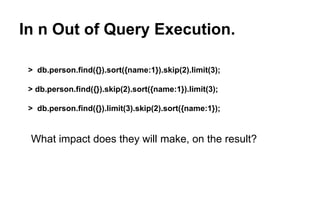
★ In n Out of Query Execution. 
★ Indexes 
★ What is Replication? 
★ What is Sharding ?
About Us 
Amit Thakkar 
Tech Blogger @ 
CodeChutney.in 
JavaScript Lover 
Working on MEAN Stack 
Twitter: @amit_thakkar01 
LinkedIn: linkedin.com/in/amitthakkar01 
Facebook: facebook.com/amit.thakkar01 
Vibhor Kukreja 
JavaScript Ninja 
Working on MEAN Stack 
Twitter: @VibhorKukreja 
Email : vibhor.kukreja@intelligrape.com
MongoDB Recap 
1. No-Sql Database. 
2. Installation. 
3. Basic CRUD operation. 
4. Stores data in JSON. 
5. Schemaless. 
6. Great Performance. 
7. No Joins. 
8. Easily scalable.
MongoDB Recap
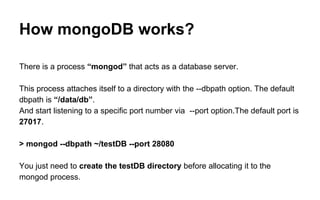
How mongoDB works? 
There is a process “mongod” that acts as a database server. 
This process attaches itself to a directory with the --dbpath option. The default 
dbpath is “/data/db”. 
And start listening to a specific port number via --port option.The default port is 
27017. 
> mongod --dbpath ~/testDB --port 28080 
You just need to create the testDB directory before allocating it to the 
mongod process.
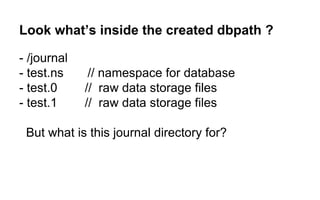
Look what’s inside the created dbpath ? 
- /journal 
- test.ns // namespace for database 
- test.0 // raw data storage files 
- test.1 // raw data storage files 
But what is this journal directory for?
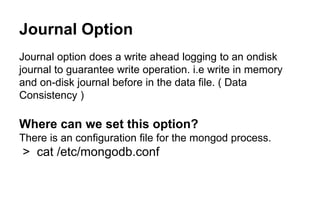
Journal Option 
Journal option does a write ahead logging to an ondisk 
journal to guarantee write operation. i.e write in memory 
and on-disk journal before in the data file. ( Data 
Consistency ) 
Where can we set this option? 
There is an configuration file for the mongod process. 
> cat /etc/mongodb.conf
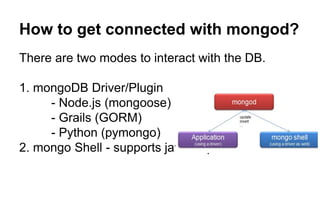
How to get connected with mongod? 
There are two modes to interact with the DB. 
1. mongoDB Driver/Plugin 
- Node.js (mongoose) 
- Grails (GORM) 
- Python (pymongo) 
2. mongo Shell - supports javascript <3
mongo Shell 
To connect a mongo shell process with our mongod process, we just have to 
specify the port number on which the mongod process is listening. 
> mongo --port 28080 
To check the status of our mongo server, for a proper analysis we must start 
the mongostat process to check the server request/response. 
> mongostat --port 28080
Yeah !! Our Single instance Server is 
Up and Running. 
At this point of time , we have just created a single 
mongoDB server along with a mongo shell that 
interacts with this mongoDB server.
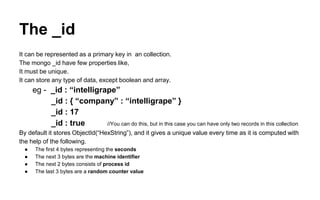
The _id 
It can be represented as a primary key in an collection. 
The mongo _id have few properties like, 
It must be unique. 
It can store any type of data, except boolean and array. 
eg - _id : “intelligrape” 
_id : { “company” : “intelligrape” } 
_id : 17 
_id : true //You can do this, but in this case you can have only two records in this collection 
By default it stores ObjectId(“HexString”), and it gives a unique value every time as it is computed with 
the help of the following. 
● The first 4 bytes representing the seconds 
● The next 3 bytes are the machine identifier 
● The next 2 bytes consists of process id 
● The last 3 bytes are a random counter value
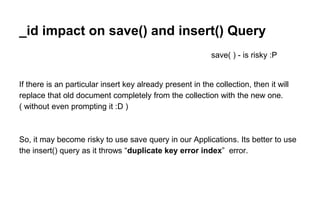
_id impact on save() and insert() Query 
save( ) - is risky :P 
If there is an particular insert key already present in the collection, then it will 
replace that old document completely from the collection with the new one. 
( without even prompting it :D ) 
So, it may become risky to use save query in our Applications. Its better to use 
the insert() query as it throws “duplicate key error index” error.
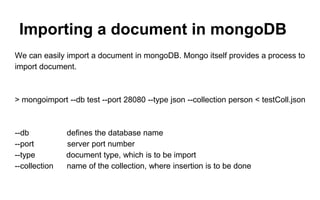
Importing a document in mongoDB 
We can easily import a document in mongoDB. Mongo itself provides a process to 
import document. 
> mongoimport --db test --port 28080 --type json --collection person < testColl.json 
--db defines the database name 
--port server port number 
--type document type, which is to be import 
--collection name of the collection, where insertion is to be done
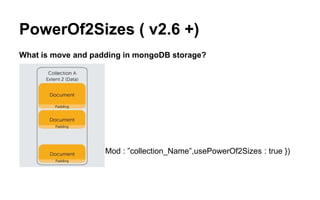
PowerOf2Sizes ( v2.6 +) 
What is move and padding in mongoDB storage? 
> db.runCommand({ collMod : ”collection_Name”,usePowerOf2Sizes : true })
In n Out of Query Execution. 
> db.person.find({}).sort({name:1}).skip(2).limit(3); 
> db.person.find({}).skip(2).sort({name:1}).limit(3); 
> db.person.find({}).limit(3).skip(2).sort({name:1}); 
What impact does they will make, on the result?
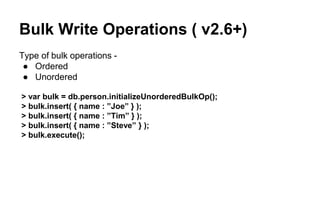
Bulk Write Operations ( v2.6+) 
Type of bulk operations - 
● Ordered 
● Unordered 
> var bulk = db.person.initializeUnorderedBulkOp(); 
> bulk.insert( { name : ”Joe” } ); 
> bulk.insert( { name : ”Tim” } ); 
> bulk.insert( { name : ”Steve” } ); 
> bulk.execute();
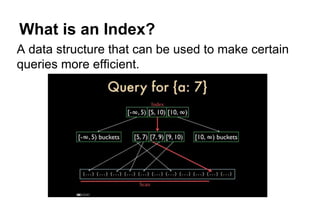
What is an Index? 
A data structure that can be used to make certain 
queries more efficient.
How can we index ? 
An index on _id is automatic. For more, ensureIndex : 
> db.posts.ensureIndex({“name”:1}); 
> db.posts.ensureIndex({name: 1, date: ‐1}); 
> db.posts.ensureIndex({title: 1},{unique: true, sparse:true,dropDups:true}); 
> db.posts.ensureIndex(...,{background: true}); 
> db.posts.ensureIndex({“comments.author”: 1}); 
{“tags”: [“mongodb”, “indexing”], ...} 
> db.posts.ensureIndex({“tags”: 1}); // multikey 
> db.posts.ensureIndex({“location”: “2d”}); //geospatial 
db.post.find({title:”mongo”}).hint({name:1,title:1});
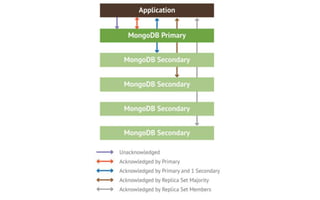
What is Replication? 
● Replication is the process of synchronizing data across 
multiple servers. 
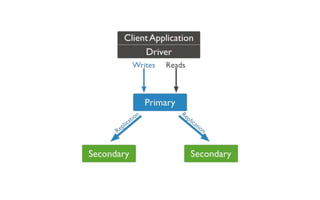
● Mongo achieves Replication through Replica Sets 
● Replica sets are a form of asynchronous master/slave 
replication 
● A replica set consists of two or more nodes that are 
copies of each other. (i.e.: replicas)
Purpose of Replication 
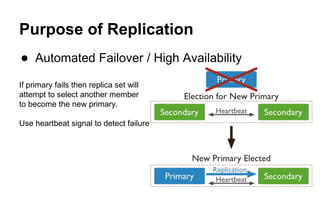
● Automated Failover / High Availability 
If primary fails then replica set will 
attempt to select another member 
to become the new primary. 
Use heartbeat signal to detect failure
● Distributed Read Load/Read Scaling 
By default, the primary node of a replica set is accessed for 
all reads and writes. 
● Disaster Recovery 
So, you have a pool of servers with one primary (the 
master) and N secondaries (slaves). If the primarycrashes 
or disappears, the other servers will hold an election to 
choose a new primary. Arbiter helps to achieve >50 votes 
in case of draw. 
connectionString = (“mongodb://localhost:37017", replicaSet="s0",w=4, 
j=True)
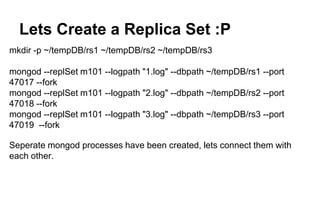
Lets Create a Replica Set :P 
mkdir -p ~/tempDB/rs1 ~/tempDB/rs2 ~/tempDB/rs3 
mongod --replSet m101 --logpath "1.log" --dbpath ~/tempDB/rs1 --port 
47017 --fork 
mongod --replSet m101 --logpath "2.log" --dbpath ~/tempDB/rs2 --port 
47018 --fork 
mongod --replSet m101 --logpath "3.log" --dbpath ~/tempDB/rs3 --port 
47019 --fork 
Seperate mongod processes have been created, lets connect them with 
each other.
Configuring Replica Sets. 
> mongo --port 47017 
config = { _id: "m101", members:[ 
{ _id : 0, host : "localhost:47017"}, 
{ _id : 1, host : "localhost:47018"}, 
{ _id : 2, host : "localhost:47019"} ] 
}; 
rs.initiate(config); 
rs.status();
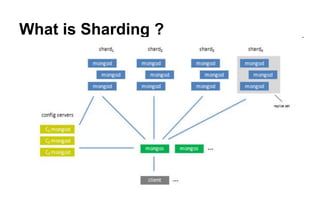
What is Sharding ?
Lets Create Shards :P 
Shard 0 
mkdir -p ~/testDB/shard0/rs0 ~/testDB/shard0/rs1 ~/testDB/shard0/rs2 
mongod --replSet s0 --logpath "testDB/s0-r0.log" --dbpath ~/testDB/shard0/rs0 --port 37017 --fork -- 
shardsvr 
mongod --replSet s0 --logpath "testDB/s0-r1.log" --dbpath ~/testDB/shard0/rs1 --port 37018 --fork -- 
shardsvr 
mongod --replSet s0 --logpath "testDB/s0-r2.log" --dbpath ~/testDB/shard0/rs2 --port 37019 --fork -- 
shardsvr 
mongo --port 37017 
config = { _id: "s0", members:[ 
{ _id : 0, host : "localhost:37017" }, 
{ _id : 1, host : "localhost:37018" }, 
{ _id : 2, host : "localhost:37019" }]}; 
rs.initiate(config);
Shard 1 
mkdir -p ~/testDB/shard1/rs0 ~/testDB/shard1/rs1 ~/testDB/shard1/rs2 
mongod --replSet s1 --logpath "testDB/s1-r0.log" --dbpath ~/testDB/shard1/rs0 --port 47017 --fork -- 
shardsvr 
mongod --replSet s1 --logpath "testDB/s1-r1.log" --dbpath ~/testDB/shard1/rs1 --port 47018 --fork -- 
shardsvr 
mongod --replSet s1 --logpath "testDB/s1-r2.log" --dbpath ~/testDB/shard1/rs2 --port 47019 --fork -- 
shardsvr 
mongo --port 47017 
config = { _id: "s1", members:[ 
{ _id : 0, host : "localhost:47017" }, 
{ _id : 1, host : "localhost:47018" }, 
{ _id : 2, host : "localhost:47019" }]}; 
rs.initiate(config);
Shard 2 
mkdir -p ~/testDB/shard2/rs0 ~/testDB/shard2/rs1 ~/testDB/shard2/rs2 
mongod --replSet s2 --logpath "testDB/s2-r0.log" --dbpath ~/testDB/shard2/rs0 --port 57017 --fork -- 
shardsvr 
mongod --replSet s2 --logpath "testDB/s2-r1.log" --dbpath ~/testDB/shard2/rs1 --port 57018 --fork -- 
shardsvr 
mongod --replSet s2 --logpath "testDB/s2-r2.log" --dbpath ~/testDB/shard2/rs2 --port 57019 --fork -- 
shardsvr 
mongo --port 57017 
config = { _id: "s2", members:[ 
{ _id : 0, host : "localhost:57017" }, 
{ _id : 1, host : "localhost:57018" }, 
{ _id : 2, host : "localhost:57019" }]}; 
rs.initiate(config);
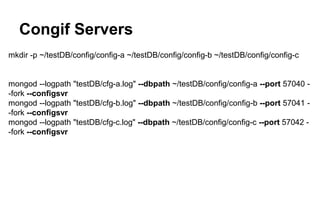
Congif Servers 
mkdir -p ~/testDB/config/config-a ~/testDB/config/config-b ~/testDB/config/config-c 
mongod --logpath "testDB/cfg-a.log" --dbpath ~/testDB/config/config-a --port 57040 - 
-fork --configsvr 
mongod --logpath "testDB/cfg-b.log" --dbpath ~/testDB/config/config-b --port 57041 - 
-fork --configsvr 
mongod --logpath "testDB/cfg-c.log" --dbpath ~/testDB/config/config-c --port 57042 - 
-fork --configsvr
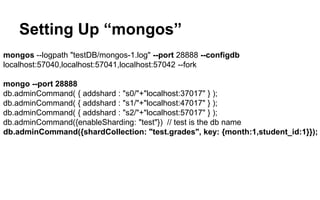
Setting Up “mongos” 
mongos --logpath "testDB/mongos-1.log" --port 28888 --configdb 
localhost:57040,localhost:57041,localhost:57042 --fork 
mongo --port 28888 
db.adminCommand( { addshard : "s0/"+"localhost:37017" } ); 
db.adminCommand( { addshard : "s1/"+"localhost:47017" } ); 
db.adminCommand( { addshard : "s2/"+"localhost:57017" } ); 
db.adminCommand({enableSharding: "test"}) // test is the db name 
db.adminCommand({shardCollection: "test.grades", key: {month:1,student_id:1}});
Exercise Time
Congo !! Your Shard 
environment is up 
and running :)
Question Answer??
Get expertise with mongo db

Get expertise with mongo db

  • 1.
    Get Expertise with MongoDB Design Pattern
  • 2.
    Agenda ★ MongoDBRecap ★ How mongoDB works? ★ The _id ★ In n Out of Query Execution. ★ Indexes ★ What is Replication? ★ What is Sharding ?
  • 3.
    About Us AmitThakkar Tech Blogger @ CodeChutney.in JavaScript Lover Working on MEAN Stack Twitter: @amit_thakkar01 LinkedIn: linkedin.com/in/amitthakkar01 Facebook: facebook.com/amit.thakkar01 Vibhor Kukreja JavaScript Ninja Working on MEAN Stack Twitter: @VibhorKukreja Email : vibhor.kukreja@intelligrape.com
  • 4.
    MongoDB Recap 1.No-Sql Database. 2. Installation. 3. Basic CRUD operation. 4. Stores data in JSON. 5. Schemaless. 6. Great Performance. 7. No Joins. 8. Easily scalable.
  • 5.
  • 6.
    How mongoDB works? There is a process “mongod” that acts as a database server. This process attaches itself to a directory with the --dbpath option. The default dbpath is “/data/db”. And start listening to a specific port number via --port option.The default port is 27017. > mongod --dbpath ~/testDB --port 28080 You just need to create the testDB directory before allocating it to the mongod process.
  • 8.
    Look what’s insidethe created dbpath ? - /journal - test.ns // namespace for database - test.0 // raw data storage files - test.1 // raw data storage files But what is this journal directory for?
  • 9.
    Journal Option Journaloption does a write ahead logging to an ondisk journal to guarantee write operation. i.e write in memory and on-disk journal before in the data file. ( Data Consistency ) Where can we set this option? There is an configuration file for the mongod process. > cat /etc/mongodb.conf
  • 10.
    How to getconnected with mongod? There are two modes to interact with the DB. 1. mongoDB Driver/Plugin - Node.js (mongoose) - Grails (GORM) - Python (pymongo) 2. mongo Shell - supports javascript <3
  • 11.
    mongo Shell Toconnect a mongo shell process with our mongod process, we just have to specify the port number on which the mongod process is listening. > mongo --port 28080 To check the status of our mongo server, for a proper analysis we must start the mongostat process to check the server request/response. > mongostat --port 28080
  • 12.
    Yeah !! OurSingle instance Server is Up and Running. At this point of time , we have just created a single mongoDB server along with a mongo shell that interacts with this mongoDB server.
  • 13.
    The _id Itcan be represented as a primary key in an collection. The mongo _id have few properties like, It must be unique. It can store any type of data, except boolean and array. eg - _id : “intelligrape” _id : { “company” : “intelligrape” } _id : 17 _id : true //You can do this, but in this case you can have only two records in this collection By default it stores ObjectId(“HexString”), and it gives a unique value every time as it is computed with the help of the following. ● The first 4 bytes representing the seconds ● The next 3 bytes are the machine identifier ● The next 2 bytes consists of process id ● The last 3 bytes are a random counter value
  • 14.
    _id impact onsave() and insert() Query save( ) - is risky :P If there is an particular insert key already present in the collection, then it will replace that old document completely from the collection with the new one. ( without even prompting it :D ) So, it may become risky to use save query in our Applications. Its better to use the insert() query as it throws “duplicate key error index” error.
  • 15.
    Importing a documentin mongoDB We can easily import a document in mongoDB. Mongo itself provides a process to import document. > mongoimport --db test --port 28080 --type json --collection person < testColl.json --db defines the database name --port server port number --type document type, which is to be import --collection name of the collection, where insertion is to be done
  • 16.
    PowerOf2Sizes ( v2.6+) What is move and padding in mongoDB storage? > db.runCommand({ collMod : ”collection_Name”,usePowerOf2Sizes : true })
  • 17.
    In n Outof Query Execution. > db.person.find({}).sort({name:1}).skip(2).limit(3); > db.person.find({}).skip(2).sort({name:1}).limit(3); > db.person.find({}).limit(3).skip(2).sort({name:1}); What impact does they will make, on the result?
  • 19.
    Bulk Write Operations( v2.6+) Type of bulk operations - ● Ordered ● Unordered > var bulk = db.person.initializeUnorderedBulkOp(); > bulk.insert( { name : ”Joe” } ); > bulk.insert( { name : ”Tim” } ); > bulk.insert( { name : ”Steve” } ); > bulk.execute();
  • 20.
    What is anIndex? A data structure that can be used to make certain queries more efficient.
  • 22.
    How can weindex ? An index on _id is automatic. For more, ensureIndex : > db.posts.ensureIndex({“name”:1}); > db.posts.ensureIndex({name: 1, date: ‐1}); > db.posts.ensureIndex({title: 1},{unique: true, sparse:true,dropDups:true}); > db.posts.ensureIndex(...,{background: true}); > db.posts.ensureIndex({“comments.author”: 1}); {“tags”: [“mongodb”, “indexing”], ...} > db.posts.ensureIndex({“tags”: 1}); // multikey > db.posts.ensureIndex({“location”: “2d”}); //geospatial db.post.find({title:”mongo”}).hint({name:1,title:1});
  • 23.
    What is Replication? ● Replication is the process of synchronizing data across multiple servers. ● Mongo achieves Replication through Replica Sets ● Replica sets are a form of asynchronous master/slave replication ● A replica set consists of two or more nodes that are copies of each other. (i.e.: replicas)
  • 25.
    Purpose of Replication ● Automated Failover / High Availability If primary fails then replica set will attempt to select another member to become the new primary. Use heartbeat signal to detect failure
  • 26.
    ● Distributed ReadLoad/Read Scaling By default, the primary node of a replica set is accessed for all reads and writes. ● Disaster Recovery So, you have a pool of servers with one primary (the master) and N secondaries (slaves). If the primarycrashes or disappears, the other servers will hold an election to choose a new primary. Arbiter helps to achieve >50 votes in case of draw. connectionString = (“mongodb://localhost:37017", replicaSet="s0",w=4, j=True)
  • 27.
    Lets Create aReplica Set :P mkdir -p ~/tempDB/rs1 ~/tempDB/rs2 ~/tempDB/rs3 mongod --replSet m101 --logpath "1.log" --dbpath ~/tempDB/rs1 --port 47017 --fork mongod --replSet m101 --logpath "2.log" --dbpath ~/tempDB/rs2 --port 47018 --fork mongod --replSet m101 --logpath "3.log" --dbpath ~/tempDB/rs3 --port 47019 --fork Seperate mongod processes have been created, lets connect them with each other.
  • 28.
    Configuring Replica Sets. > mongo --port 47017 config = { _id: "m101", members:[ { _id : 0, host : "localhost:47017"}, { _id : 1, host : "localhost:47018"}, { _id : 2, host : "localhost:47019"} ] }; rs.initiate(config); rs.status();
  • 31.
  • 33.
    Lets Create Shards:P Shard 0 mkdir -p ~/testDB/shard0/rs0 ~/testDB/shard0/rs1 ~/testDB/shard0/rs2 mongod --replSet s0 --logpath "testDB/s0-r0.log" --dbpath ~/testDB/shard0/rs0 --port 37017 --fork -- shardsvr mongod --replSet s0 --logpath "testDB/s0-r1.log" --dbpath ~/testDB/shard0/rs1 --port 37018 --fork -- shardsvr mongod --replSet s0 --logpath "testDB/s0-r2.log" --dbpath ~/testDB/shard0/rs2 --port 37019 --fork -- shardsvr mongo --port 37017 config = { _id: "s0", members:[ { _id : 0, host : "localhost:37017" }, { _id : 1, host : "localhost:37018" }, { _id : 2, host : "localhost:37019" }]}; rs.initiate(config);
  • 34.
    Shard 1 mkdir-p ~/testDB/shard1/rs0 ~/testDB/shard1/rs1 ~/testDB/shard1/rs2 mongod --replSet s1 --logpath "testDB/s1-r0.log" --dbpath ~/testDB/shard1/rs0 --port 47017 --fork -- shardsvr mongod --replSet s1 --logpath "testDB/s1-r1.log" --dbpath ~/testDB/shard1/rs1 --port 47018 --fork -- shardsvr mongod --replSet s1 --logpath "testDB/s1-r2.log" --dbpath ~/testDB/shard1/rs2 --port 47019 --fork -- shardsvr mongo --port 47017 config = { _id: "s1", members:[ { _id : 0, host : "localhost:47017" }, { _id : 1, host : "localhost:47018" }, { _id : 2, host : "localhost:47019" }]}; rs.initiate(config);
  • 35.
    Shard 2 mkdir-p ~/testDB/shard2/rs0 ~/testDB/shard2/rs1 ~/testDB/shard2/rs2 mongod --replSet s2 --logpath "testDB/s2-r0.log" --dbpath ~/testDB/shard2/rs0 --port 57017 --fork -- shardsvr mongod --replSet s2 --logpath "testDB/s2-r1.log" --dbpath ~/testDB/shard2/rs1 --port 57018 --fork -- shardsvr mongod --replSet s2 --logpath "testDB/s2-r2.log" --dbpath ~/testDB/shard2/rs2 --port 57019 --fork -- shardsvr mongo --port 57017 config = { _id: "s2", members:[ { _id : 0, host : "localhost:57017" }, { _id : 1, host : "localhost:57018" }, { _id : 2, host : "localhost:57019" }]}; rs.initiate(config);
  • 36.
    Congif Servers mkdir-p ~/testDB/config/config-a ~/testDB/config/config-b ~/testDB/config/config-c mongod --logpath "testDB/cfg-a.log" --dbpath ~/testDB/config/config-a --port 57040 - -fork --configsvr mongod --logpath "testDB/cfg-b.log" --dbpath ~/testDB/config/config-b --port 57041 - -fork --configsvr mongod --logpath "testDB/cfg-c.log" --dbpath ~/testDB/config/config-c --port 57042 - -fork --configsvr
  • 37.
    Setting Up “mongos” mongos --logpath "testDB/mongos-1.log" --port 28888 --configdb localhost:57040,localhost:57041,localhost:57042 --fork mongo --port 28888 db.adminCommand( { addshard : "s0/"+"localhost:37017" } ); db.adminCommand( { addshard : "s1/"+"localhost:47017" } ); db.adminCommand( { addshard : "s2/"+"localhost:57017" } ); db.adminCommand({enableSharding: "test"}) // test is the db name db.adminCommand({shardCollection: "test.grades", key: {month:1,student_id:1}});
  • 38.
  • 39.
    Congo !! YourShard environment is up and running :)
  • 40.