RECORD KEEPING
FOR A SMALL
BUSINESS
BY DJEUMO EUGENE CYRILLE
& EBANE KOKE ROSETTE
1:30 minutes
QUOTE
<< FAILING TO PLAN IS PLANNING TO FAIL >>
Introduction
By taking this training, you are taking an important
step towards building a better business.
Record keeping important for small
businesses
• Sole proprietor
• Partnership
• Corporation
Objectives
• What record keeping is and
how it’s important
• Record keeping basics –
practices, rules, and tools
• Which records to keep –
tracking, planning, legal, and
taxes
• Benefits of record keeping
• Business software available for
record keeping
• Business software training
Pre - Evaluation
1. Which of the following are reasons for
keeping good records? Select all that applies.
a. Business deal tracking
b. Planning
c. Legal compliance
d. Tax preparation
2. When creating a record keeping system, It’s a
good idea
to____________________________________
a. Wait until enough information is available to get
started.
b. Start simple and refine later.
c. Evaluate your business need.
d. Start after one year of operation.
3. Which of the following should be done before
purchasing business software?
a. Create an information technology (IT)
department.
b. Get a business credit card
c. Evaluate your business needs
d. Consult with the Internal Revenue Service (IRS)
4. Which of the following are records keeping
tools.
a. Manila folder
b. Computer System
c. File hosting system
d. None of the above
e. All of the above
5. For which type of small business is records
keeping a good practice?.
a. Sole proprietor
b. Partnership
c. Corporation
d. None of the above
e. All of the above
6. Record keeping is the orderly and __________
practice of storing business records.
a. Corprate
b. Legal
c. Financial
d. disciplined
Definition
Record keeping refers to the
orderly and disciplined
practice of storing business
records.
Reasons for keeping good Records
• Detail tracking
• Planning
• Legal compliance
• Tax preparation (State & Local)
Detail Tracking
Customers, sales and inventory are very
significant for a startup business owner.
You risk disappointing a customer if you do
not keep their names and contacts. This
means loosing the customer forever.
Staying inform of customers, their orders, and
the inventory to provide for their purchases is
challenging.
Planning
Proper records Keeping helps to plan your
business future. It helps to determined the
business inventory needs for the next three
months in order to anticipate seasonal cycles
such as in clothes business.
Legal Compliance
As a business owner, you will be required to hold
various contracts license and permit. To maintain and
reports employees payrolls for tax Purposes. Three
category of legal compliance include:
• Contracts, leases, and other agreements (Such as copy
right)
• Licenses, insurance and permits
• Payroll and personnel
A well kept record system ensures that you are able
to keep up with tax reporting requirement. You may
like to refer back to contractual obligations from the
original signed copies.
Exercise #1 : Business record Keeping
• What records do you need to keep?
• What area of records keeping needs
your attention?.
Record Retention
Business owners should know how long these
records have to be kept.
Good records retention is at the interest of the
company.
A poor records retention system also poses security
risk .
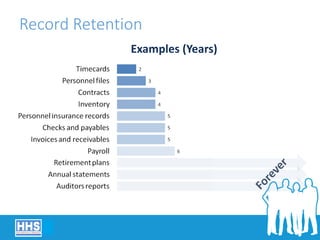
Record Retention
Examples (Years)
Sample Record Retention schedule
Accounting and Fiscal ( Invoices, receivable, checks and payables:
5yrs. Auditors reports and annual Statement: permanent. Inventory: 4yrs)
Personnel (Payroll:6yrs. Contracts and insurance records: 5yrs.
personnel file and timecards: 3yrs. Retirements plans: permanent)
Business and Corporate (Contracts and leases: 7yrs,
correspondants:3yrs. copyright, property records: permanent. sales record,
customers records: specific to business. license, permit and insurance
policy: as required )
Taxation (Employees withholding: 7yrs. Tax returns, Tax bills and
statements, none employees compensations: permanent)
Common Records Keeping Tools
Start your business with a simple record
keeping system and expand to accommodate
more records and increasing complexity as
your business grows. Some of these tools
include:
Common Records Keeping Tools
A. Paper Base
B. Tickler
C. Computer system
D. Cloud Computing
E. CLoud Accounting
A
D
E B
C
Business Software
•Evaluate business needs
•Many software products available
• Spreadsheets
• Email
• Accounting
Business Software
Do research to buy software that matches
your business type and size. Consider factors
such as:
• Point of sales system integration
• Inventory tracking
• Online options
• Manufacturing base options
• E- commerce base option
• Industry specialization options
• Multiple users
Characteristics of software's options
• Inventory: It requires software's programs that will track inventory
purchases and sales. Study the capacity to see if it will meet your needs
now and in the future.
• Online Sales : using internet site like ebay, be sure to investigate if
your software will work with your system for online sales.
• Manufacturing: Investigate to see if your software will work with
your manufacturing processes.
• Specialized: some business have unique needs, for this reason
requires industry specific software. Software's can be customized to fit a
business unique situation. This kind usually cost more and requires
specialized training.
Three common Software's Options
• Email (many email services provides a webmail client as part of their
internet service package)
• Spreadsheet (Is use to track information about client, it is a
computer application that stimulate an a paper accounting worksheet, it
is frequently use for projections.)
• Accounting software (it keeps tracks of business financial
records such as sales, expenses, inventory, and assets.it helps to execute,
manage and track critical financial transactions and related to financial
activities. It duplicates the function of a manual system but reduces
human errors. When purchasing an accounting take note on: memory
volume, inventory sophistication, mobile function, industry specific
reports.)
Exercise #2: Your Accounting System
• Take some time to think about your accounting
system.
• How might your accounting system be improved?
Business Software Training
When you choose a business software be sure
to be train in it use. Training will make you
more efficient and effective in the use of the
software to serve time and money. Take
advantage of training options such as
tutorials, free trials, or online training. Here
are some of the examples
Business Software Training
• Type the name of the software you are using alongside
training on a browser and choose the most reliable. Some
are free.
• Youtube
• Community college
• Score
• Small Business development Centers
• Women Business Centers
• Veterans Business Outreach Centers
• US Export Assistance Centers
• Bookkeepers and consultants
Top Three Key Points to Remember
• As a small business owner you will to track a
significant amount of information, no matter the
type, size, or complexity of your business,
established and maintain a paper record keeping
system suitable to your business needs.
• Regardless of whether you use a computer system,
cloud – based computing or a combination of these
two, you will need to think about business software
products to help you keep records for your
business. E.g. emails, spreadsheet and accounting
• Pick one record keeping system or use a
combination – but start now.
Now
Refine as business grows
Start now with something that works
Further Information
• Federal Deposit Insurance Corporation (FDIC)
• US Small Business Administration (SBA)
• US Financial Literacy and Education Commission.
Conclusion
You learned about:
• What record keeping is and how it’s important
• Record keeping basics – practices, rules, and tools
• Which records to keep – tracking, planning, legal, and taxes
• Benefits of record keeping
• Business software available for record keeping
• Business software training
Summary
• What final questions do you have?
• What have you learned?
• How would you evaluate the training?
Post Test
1. It is important to establish and _________ your
record keeping system.
a. Justify
b. Certify
c. Maintain
d. Discuss
2. Besides being legally required for
some information, there are
additional reasons for keeping good
records.
a. True
b. False
3. How would you characterized a
simple a simple paper file folder as a
record keeping tool?
a. Simple but worthless particularly for a start
–up business.
b. Good but a computer system is better in all
cases, as long as it is affordable.
c. Good, but is better to start the process of
records keeping with cloud computing.
d. Simple, but fine for a start up business
4. Which of the following are factors
to consider when purchasing
accounting software's? Selects all
that apply
a. Reduced errors
b. Better organization
c. Faster calculation
d. None of the Above
5. Generally, it is best to kept all
records for exactly 8 years?
a. True
b. False
6. A(n) ___________________ is
commonly used to track information
about clients such as inventory, sales
and employees timecards.
a. Email programs
b. Spreadsheet
c. File hosting system
d. Payroll system
7. For a new business, what timeframe is
appropriate for starting a record system?
a. Now ( or as soon as possible)
b. Within two quarter of the start – up
c. Within the first year
d. Before the first task filing is due.
THANK YOU
676342030
653314425
What Do You Know? Record Keeping for a
Small Business Instructor: ______________
Date: ____________________
This form will allow you and your instructors
to see what you know about record keeping,
both before and after the training. Please read
each statement below. Circle the number that
shows how much you agree with each
statement.
Record keeping for a small business

Record keeping for a small business

  • 1.
    RECORD KEEPING FOR ASMALL BUSINESS BY DJEUMO EUGENE CYRILLE & EBANE KOKE ROSETTE 1:30 minutes
  • 2.
    QUOTE << FAILING TOPLAN IS PLANNING TO FAIL >>
  • 3.
    Introduction By taking thistraining, you are taking an important step towards building a better business. Record keeping important for small businesses • Sole proprietor • Partnership • Corporation
  • 4.
    Objectives • What recordkeeping is and how it’s important • Record keeping basics – practices, rules, and tools • Which records to keep – tracking, planning, legal, and taxes • Benefits of record keeping • Business software available for record keeping • Business software training
  • 5.
    Pre - Evaluation 1.Which of the following are reasons for keeping good records? Select all that applies. a. Business deal tracking b. Planning c. Legal compliance d. Tax preparation
  • 6.
    2. When creatinga record keeping system, It’s a good idea to____________________________________ a. Wait until enough information is available to get started. b. Start simple and refine later. c. Evaluate your business need. d. Start after one year of operation.
  • 7.
    3. Which ofthe following should be done before purchasing business software? a. Create an information technology (IT) department. b. Get a business credit card c. Evaluate your business needs d. Consult with the Internal Revenue Service (IRS)
  • 8.
    4. Which ofthe following are records keeping tools. a. Manila folder b. Computer System c. File hosting system d. None of the above e. All of the above
  • 9.
    5. For whichtype of small business is records keeping a good practice?. a. Sole proprietor b. Partnership c. Corporation d. None of the above e. All of the above
  • 10.
    6. Record keepingis the orderly and __________ practice of storing business records. a. Corprate b. Legal c. Financial d. disciplined
  • 11.
    Definition Record keeping refersto the orderly and disciplined practice of storing business records.
  • 12.
    Reasons for keepinggood Records • Detail tracking • Planning • Legal compliance • Tax preparation (State & Local)
  • 13.
    Detail Tracking Customers, salesand inventory are very significant for a startup business owner. You risk disappointing a customer if you do not keep their names and contacts. This means loosing the customer forever. Staying inform of customers, their orders, and the inventory to provide for their purchases is challenging.
  • 14.
    Planning Proper records Keepinghelps to plan your business future. It helps to determined the business inventory needs for the next three months in order to anticipate seasonal cycles such as in clothes business.
  • 15.
    Legal Compliance As abusiness owner, you will be required to hold various contracts license and permit. To maintain and reports employees payrolls for tax Purposes. Three category of legal compliance include: • Contracts, leases, and other agreements (Such as copy right) • Licenses, insurance and permits • Payroll and personnel A well kept record system ensures that you are able to keep up with tax reporting requirement. You may like to refer back to contractual obligations from the original signed copies.
  • 16.
    Exercise #1 :Business record Keeping • What records do you need to keep? • What area of records keeping needs your attention?.
  • 17.
    Record Retention Business ownersshould know how long these records have to be kept. Good records retention is at the interest of the company. A poor records retention system also poses security risk .
  • 18.
  • 19.
    Sample Record Retentionschedule Accounting and Fiscal ( Invoices, receivable, checks and payables: 5yrs. Auditors reports and annual Statement: permanent. Inventory: 4yrs) Personnel (Payroll:6yrs. Contracts and insurance records: 5yrs. personnel file and timecards: 3yrs. Retirements plans: permanent) Business and Corporate (Contracts and leases: 7yrs, correspondants:3yrs. copyright, property records: permanent. sales record, customers records: specific to business. license, permit and insurance policy: as required ) Taxation (Employees withholding: 7yrs. Tax returns, Tax bills and statements, none employees compensations: permanent)
  • 20.
    Common Records KeepingTools Start your business with a simple record keeping system and expand to accommodate more records and increasing complexity as your business grows. Some of these tools include:
  • 21.
    Common Records KeepingTools A. Paper Base B. Tickler C. Computer system D. Cloud Computing E. CLoud Accounting A D E B C
  • 22.
    Business Software •Evaluate businessneeds •Many software products available • Spreadsheets • Email • Accounting
  • 23.
    Business Software Do researchto buy software that matches your business type and size. Consider factors such as: • Point of sales system integration • Inventory tracking • Online options • Manufacturing base options • E- commerce base option • Industry specialization options • Multiple users
  • 24.
    Characteristics of software'soptions • Inventory: It requires software's programs that will track inventory purchases and sales. Study the capacity to see if it will meet your needs now and in the future. • Online Sales : using internet site like ebay, be sure to investigate if your software will work with your system for online sales. • Manufacturing: Investigate to see if your software will work with your manufacturing processes. • Specialized: some business have unique needs, for this reason requires industry specific software. Software's can be customized to fit a business unique situation. This kind usually cost more and requires specialized training.
  • 25.
    Three common Software'sOptions • Email (many email services provides a webmail client as part of their internet service package) • Spreadsheet (Is use to track information about client, it is a computer application that stimulate an a paper accounting worksheet, it is frequently use for projections.) • Accounting software (it keeps tracks of business financial records such as sales, expenses, inventory, and assets.it helps to execute, manage and track critical financial transactions and related to financial activities. It duplicates the function of a manual system but reduces human errors. When purchasing an accounting take note on: memory volume, inventory sophistication, mobile function, industry specific reports.)
  • 26.
    Exercise #2: YourAccounting System • Take some time to think about your accounting system. • How might your accounting system be improved?
  • 27.
    Business Software Training Whenyou choose a business software be sure to be train in it use. Training will make you more efficient and effective in the use of the software to serve time and money. Take advantage of training options such as tutorials, free trials, or online training. Here are some of the examples
  • 28.
    Business Software Training •Type the name of the software you are using alongside training on a browser and choose the most reliable. Some are free. • Youtube • Community college • Score • Small Business development Centers • Women Business Centers • Veterans Business Outreach Centers • US Export Assistance Centers • Bookkeepers and consultants
  • 29.
    Top Three KeyPoints to Remember • As a small business owner you will to track a significant amount of information, no matter the type, size, or complexity of your business, established and maintain a paper record keeping system suitable to your business needs. • Regardless of whether you use a computer system, cloud – based computing or a combination of these two, you will need to think about business software products to help you keep records for your business. E.g. emails, spreadsheet and accounting • Pick one record keeping system or use a combination – but start now.
  • 30.
    Now Refine as businessgrows Start now with something that works
  • 31.
    Further Information • FederalDeposit Insurance Corporation (FDIC) • US Small Business Administration (SBA) • US Financial Literacy and Education Commission.
  • 32.
    Conclusion You learned about: •What record keeping is and how it’s important • Record keeping basics – practices, rules, and tools • Which records to keep – tracking, planning, legal, and taxes • Benefits of record keeping • Business software available for record keeping • Business software training
  • 33.
    Summary • What finalquestions do you have? • What have you learned? • How would you evaluate the training?
  • 34.
    Post Test 1. Itis important to establish and _________ your record keeping system. a. Justify b. Certify c. Maintain d. Discuss
  • 35.
    2. Besides beinglegally required for some information, there are additional reasons for keeping good records. a. True b. False
  • 36.
    3. How wouldyou characterized a simple a simple paper file folder as a record keeping tool? a. Simple but worthless particularly for a start –up business. b. Good but a computer system is better in all cases, as long as it is affordable. c. Good, but is better to start the process of records keeping with cloud computing. d. Simple, but fine for a start up business
  • 37.
    4. Which ofthe following are factors to consider when purchasing accounting software's? Selects all that apply a. Reduced errors b. Better organization c. Faster calculation d. None of the Above
  • 38.
    5. Generally, itis best to kept all records for exactly 8 years? a. True b. False
  • 39.
    6. A(n) ___________________is commonly used to track information about clients such as inventory, sales and employees timecards. a. Email programs b. Spreadsheet c. File hosting system d. Payroll system
  • 40.
    7. For anew business, what timeframe is appropriate for starting a record system? a. Now ( or as soon as possible) b. Within two quarter of the start – up c. Within the first year d. Before the first task filing is due.
  • 41.
  • 42.
    What Do YouKnow? Record Keeping for a Small Business Instructor: ______________ Date: ____________________ This form will allow you and your instructors to see what you know about record keeping, both before and after the training. Please read each statement below. Circle the number that shows how much you agree with each statement.