1
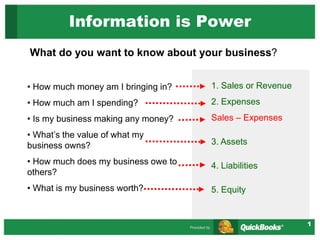
Information is Power
What do you want to know about your business?
• How much money am I bringing in?
• How much am I spending?
• Is my business making any money?
• What’s the value of what my
business owns?
• How much does my business owe to
others?
• What is my business worth?
1. Sales or Revenue
2. Expenses
Sales – Expenses
3. Assets
4. Liabilities
5. Equity
2
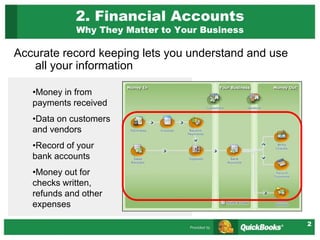
2. Financial Accounts
Why They Matter to Your Business
Accurate record keeping lets you understand and use
all your information
•Money in from
payments received
•Data on customers
and vendors
•Record of your
bank accounts
•Money out for
checks written,
refunds and other
expenses
3
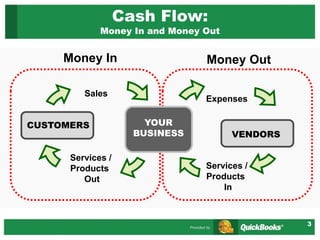
Cash Flow:
Money In and Money Out
CUSTOMERS
Sales
Services /
Products
Out
YOUR
BUSINESS VENDORS
Expenses
Services /
Products
In
Money In Money Out
4
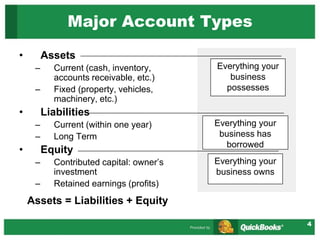
Major Account Types
• Assets
– Current (cash, inventory,
accounts receivable, etc.)
– Fixed (property, vehicles,
machinery, etc.)
• Liabilities
– Current (within one year)
– Long Term
• Equity
– Contributed capital: owner’s
investment
– Retained earnings (profits)
Assets = Liabilities + Equity
Everything your
business
possesses
Everything your
business has
borrowed
Everything your
business owns
5
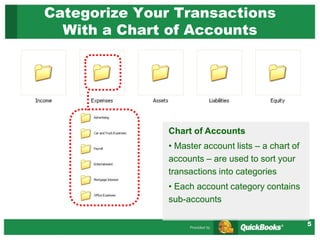
Categorize Your Transactions
With a Chart of Accounts
Chart of Accounts
• Master account lists – a chart of
accounts – are used to sort your
transactions into categories
• Each account category contains
sub-accounts
6
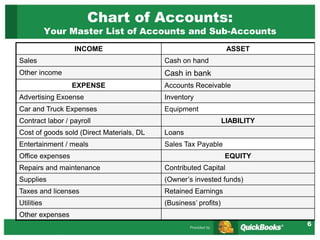
Chart of Accounts:
Your Master List of Accounts and Sub-Accounts
INCOME ASSET
Sales Cash on hand
Other income Cash in bank
EXPENSE Accounts Receivable
Advertising Exoense Inventory
Car and Truck Expenses Equipment
Contract labor / payroll LIABILITY
Cost of goods sold (Direct Materials, DL Loans
Entertainment / meals Sales Tax Payable
Office expenses EQUITY
Repairs and maintenance Contributed Capital
Supplies (Owner’s invested funds)
Taxes and licenses Retained Earnings
Utilities (Business’ profits)
Other expenses
7
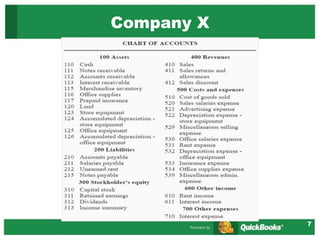
Company X
8
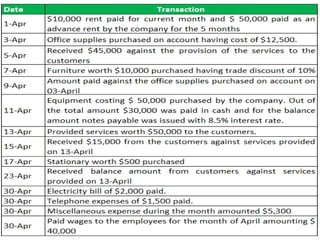
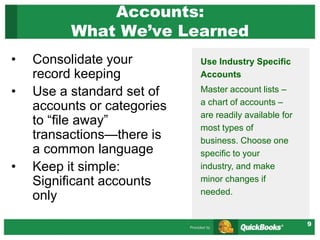
9
Accounts:
What We’ve Learned
• Consolidate your
record keeping
• Use a standard set of
accounts or categories
to “file away”
transactions—there is
a common language
• Keep it simple:
Significant accounts
only
Use Industry Specific
Accounts
Master account lists –
a chart of accounts –
are readily available for
most types of
business. Choose one
specific to your
industry, and make
minor changes if
needed.
10
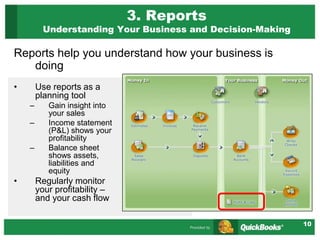
3. Reports
Understanding Your Business and Decision-Making
• Use reports as a
planning tool
– Gain insight into
your sales
– Income statement
(P&L) shows your
profitability
– Balance sheet
shows assets,
liabilities and
equity
• Regularly monitor
your profitability –
and your cash flow
Reports help you understand how your business is
doing
11
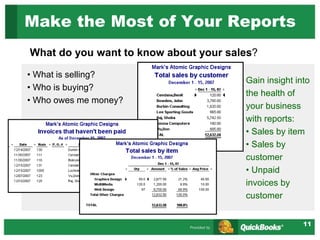
Make the Most of Your Reports
What do you want to know about your sales?
• What is selling?
• Who is buying?
• Who owes me money?
Gain insight into
the health of
your business
with reports:
• Sales by item
• Sales by
customer
• Unpaid
invoices by
customer
12
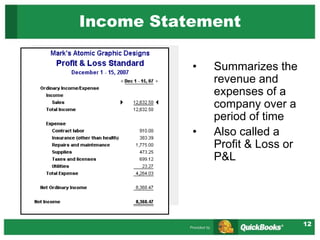
• Summarizes the
revenue and
expenses of a
company over a
period of time
• Also called a
Profit & Loss or
P&L
Income Statement
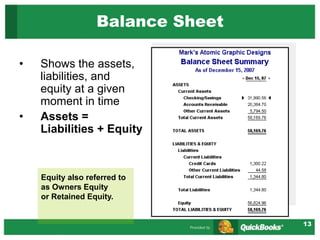
13
• Shows the assets,
liabilities, and
equity at a given
moment in time
• Assets =
Liabilities + Equity
Balance Sheet
Equity also referred to
as Owners Equity
or Retained Equity.
14
4. Manage Essential Tasks
Practice Session: Mark’s Atomic Graphic Designs
Money in
A. Record a sale
B. Invoice a customer
C. Receive a payment
D. Make a deposit
Money Out
E. Write a check / record an
expense
F. Use a credit card / record an
expense
Remember, the better
you understand
your cash flow
situation, the
better you’ll be
prepared to make
the right business
decisions.
15
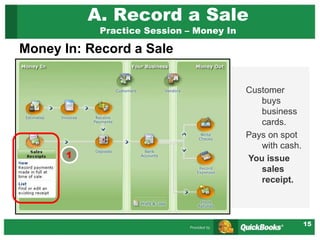
A. Record a Sale
Practice Session – Money In
Money In: Record a Sale
Customer
buys
business
cards.
Pays on spot
with cash.
You issue
sales
receipt.
1
16
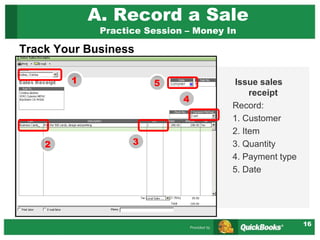
A. Record a Sale
Practice Session – Money In
Issue sales
receipt
Record:
1. Customer
2. Item
3. Quantity
4. Payment type
5. Date
1
2 3
4
Track Your Business
5
17
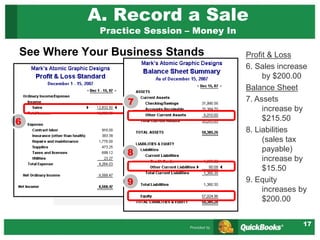
A. Record a Sale
Practice Session – Money In
See Where Your Business Stands Profit & Loss
6. Sales increase
by $200.00
Balance Sheet
7. Assets
increase by
$215.50
8. Liabilities
(sales tax
payable)
increase by
$15.50
9. Equity
increases by
$200.00
6
7
8
9
18
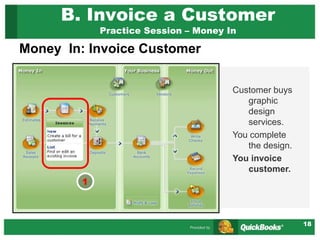
B. Invoice a Customer
Practice Session – Money In
Money In: Invoice Customer
Customer buys
graphic
design
services.
You complete
the design.
You invoice
customer.
1
19
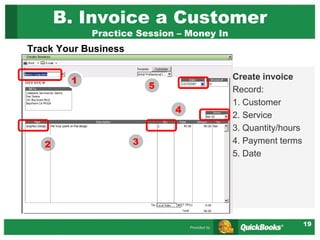
B. Invoice a Customer
Practice Session – Money In
Track Your Business
Create invoice
Record:
1. Customer
2. Service
3. Quantity/hours
4. Payment terms
5. Date
1
2 3
4
5
20
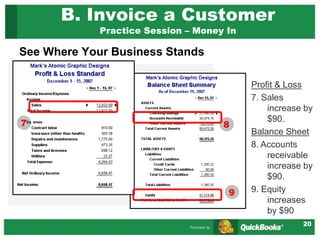
B. Invoice a Customer
Practice Session – Money In
See Where Your Business Stands
Profit & Loss
7. Sales
increase by
$90.
Balance Sheet
8. Accounts
receivable
increase by
$90.
9. Equity
increases
by $90
7 8
9
21
C. Receive a Payment
Practice Session – Money In
Money In: Receive Payment
Customer pays
by check for
business
card design
services
invoice.
Record receipt
of payment.
1
22
C. Receive a Payment
Practice Session – Money In
Track Your Business
Receive
payment
Record:
1. Customer
2. Payment
type
3. Enter
amount
1
2
3
23
C. Receive a Payment
Practice Session – Money In
See Where Your Business Stands
Profit & Loss
4. Unchanged.
Balance Sheet
5. Accounts
receivable
decrease by
$90.
6. Undeposited
funds
increase by
$90.
7. Equity
unchanged.
4
5
6
Undeposited funds
appear in “Other
Current Assets”
7
24
D. Make a Deposit
Practice Session – Money In
Money In: Make a Deposit
Go to bank to
deposit
check for
design
services and
cash for
business
cards.
Make deposit.
1
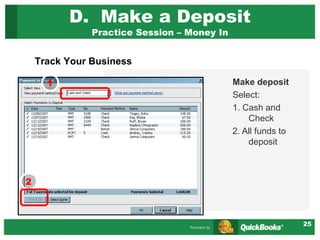
25
D. Make a Deposit
Practice Session – Money In
Track Your Business
Make deposit
Select:
1. Cash and
Check
2. All funds to
deposit
1
2
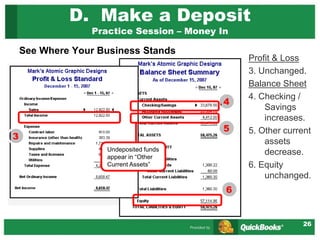
26
D. Make a Deposit
Practice Session – Money In
See Where Your Business Stands
Profit & Loss
3. Unchanged.
Balance Sheet
4. Checking /
Savings
increases.
5. Other current
assets
decrease.
6. Equity
unchanged.
3
5
4
Undeposited funds
appear in “Other
Current Assets”
6
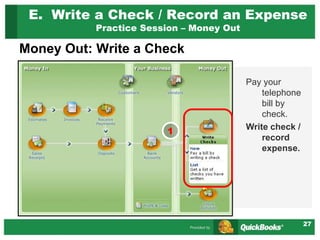
27
E. Write a Check / Record an Expense
Practice Session – Money Out
Money Out: Write a Check
Pay your
telephone
bill by
check.
Write check /
record
expense.
1
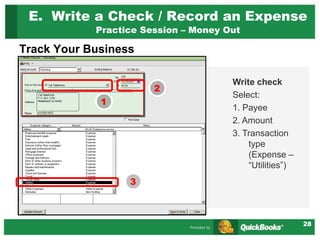
28
Track Your Business
E. Write a Check / Record an Expense
Practice Session – Money Out
Write check
Select:
1. Payee
2. Amount
3. Transaction
type
(Expense –
“Utilities”)
1
3
2
29
E. Write a Check / Record an Expense
Practice Session – Money Out
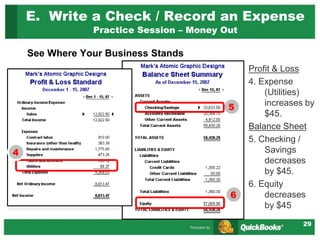
See Where Your Business Stands
Profit & Loss
4. Expense
(Utilities)
increases by
$45.
Balance Sheet
5. Checking /
Savings
decreases
by $45.
6. Equity
decreases
by $45
4
5
6
30
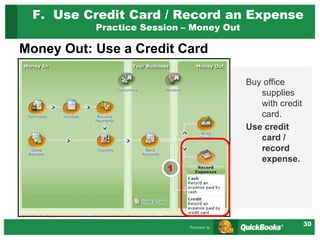
F. Use Credit Card / Record an Expense
Practice Session – Money Out
Money Out: Use a Credit Card
Buy office
supplies
with credit
card.
Use credit
card /
record
expense.
1
31
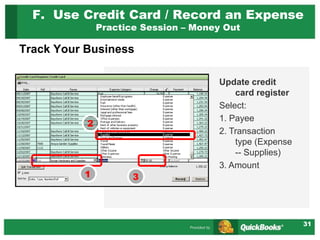
Track Your Business
Update credit
card register
Select:
1. Payee
2. Transaction
type (Expense
-- Supplies)
3. Amount
1 3
2
F. Use Credit Card / Record an Expense
Practice Session – Money Out
32
F. Use Credit Card / Record an Expense
Practice Session – Money Out
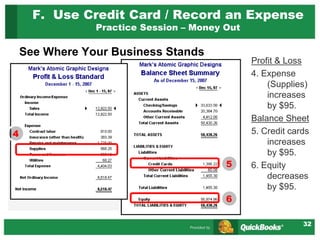
See Where Your Business Stands
Profit & Loss
4. Expense
(Supplies)
increases
by $95.
Balance Sheet
5. Credit cards
increases
by $95.
6. Equity
decreases
by $95.
4
5
6
33
6. Tips and Advice
1. Getting Started
2. Helpful Resources
3. Online Resources
4. Congratulations!
34
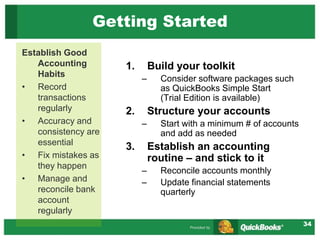
Getting Started
1. Build your toolkit
– Consider software packages such
as QuickBooks Simple Start
(Trial Edition is available)
2. Structure your accounts
– Start with a minimum # of accounts
and add as needed
3. Establish an accounting
routine – and stick to it
– Reconcile accounts monthly
– Update financial statements
quarterly
Establish Good
Accounting
Habits
• Record
transactions
regularly
• Accuracy and
consistency are
essential
• Fix mistakes as
they happen
• Manage and
reconcile bank
account
regularly
35
Helpful Resources
Advance Your Knowledge
• Professional Help
– Accountants
• Look for knowledge of your industry
– QuickBooks ProAdvisors
• Expert set-up can save you time
• Free 1-hour consultation
– Small Business Development Center
(SBDC) counselors
• Training Tools
– Take classes (either online or at local
colleges)
– QuickBooks Learning Solutions (look
under “Training” at www.QuickBooks.com)
Expert help can make
the process of setting-
up and maintaining
your books much
easier. Be sure to look
for a professional with
knowledge of your
industry – and of
course, don’t be afraid
to ask for references.
36
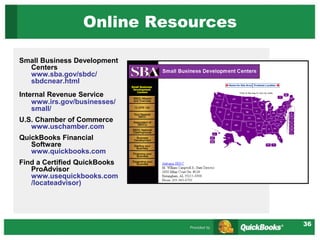
Online Resources
Small Business Development
Centers
www.sba.gov/sbdc/
sbdcnear.html
Internal Revenue Service
www.irs.gov/businesses/
small/
U.S. Chamber of Commerce
www.uschamber.com
QuickBooks Financial
Software
www.quickbooks.com
Find a Certified QuickBooks
ProAdvisor
www.usequickbooks.com
/locateadvisor)
37
Congratulations!
You now know:
• Why financial management is critical to
effectively run a business
• How to set-up and manage your accounts
• The usefulness of financial reports
Time to put your knowledge to
work! Good luck!
Appendix: Additional
Terms and Concepts
A Simple Start to Managing Your
Business Finances
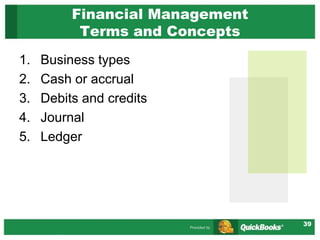
39
1. Business types
2. Cash or accrual
3. Debits and credits
4. Journal
5. Ledger
Financial Management
Terms and Concepts
40
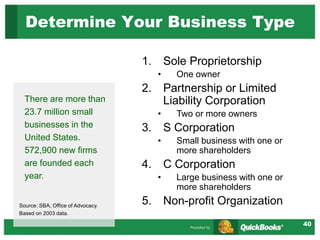
1. Sole Proprietorship
• One owner
2. Partnership or Limited
Liability Corporation
• Two or more owners
3. S Corporation
• Small business with one or
more shareholders
4. C Corporation
• Large business with one or
more shareholders
5. Non-profit Organization
Determine Your Business Type
There are more than
23.7 million small
businesses in the
United States.
572,900 new firms
are founded each
year.
Source: SBA, Office of Advocacy.
Based on 2003 data.
41
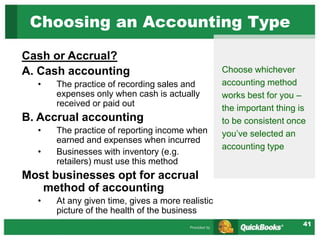
Cash or Accrual?
A. Cash accounting
• The practice of recording sales and
expenses only when cash is actually
received or paid out
B. Accrual accounting
• The practice of reporting income when
earned and expenses when incurred
• Businesses with inventory (e.g.
retailers) must use this method
Most businesses opt for accrual
method of accounting
• At any given time, gives a more realistic
picture of the health of the business
Choosing an Accounting Type
Choose whichever
accounting method
works best for you –
the important thing is
to be consistent once
you’ve selected an
accounting type
42
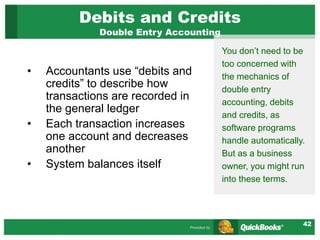
Debits and Credits
Double Entry Accounting
• Accountants use “debits and
credits” to describe how
transactions are recorded in
the general ledger
• Each transaction increases
one account and decreases
another
• System balances itself
You don’t need to be
too concerned with
the mechanics of
double entry
accounting, debits
and credits, as
software programs
handle automatically.
But as a business
owner, you might run
into these terms.
43
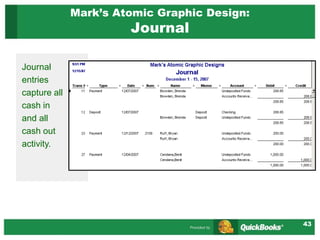
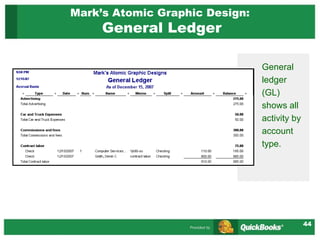
Mark’s Atomic Graphic Design:
Journal
Journal
entries
capture all
cash in
and all
cash out
activity.
44
Mark’s Atomic Graphic Design:
General Ledger
General
ledger
(GL)
shows all
activity by
account
type.

cHART-OF-ACCOUNTS.ppt

  • 1.
    1 Information is Power Whatdo you want to know about your business? • How much money am I bringing in? • How much am I spending? • Is my business making any money? • What’s the value of what my business owns? • How much does my business owe to others? • What is my business worth? 1. Sales or Revenue 2. Expenses Sales – Expenses 3. Assets 4. Liabilities 5. Equity
  • 2.
    2 2. Financial Accounts WhyThey Matter to Your Business Accurate record keeping lets you understand and use all your information •Money in from payments received •Data on customers and vendors •Record of your bank accounts •Money out for checks written, refunds and other expenses
  • 3.
    3 Cash Flow: Money Inand Money Out CUSTOMERS Sales Services / Products Out YOUR BUSINESS VENDORS Expenses Services / Products In Money In Money Out
  • 4.
    4 Major Account Types •Assets – Current (cash, inventory, accounts receivable, etc.) – Fixed (property, vehicles, machinery, etc.) • Liabilities – Current (within one year) – Long Term • Equity – Contributed capital: owner’s investment – Retained earnings (profits) Assets = Liabilities + Equity Everything your business possesses Everything your business has borrowed Everything your business owns
  • 5.
    5 Categorize Your Transactions Witha Chart of Accounts Chart of Accounts • Master account lists – a chart of accounts – are used to sort your transactions into categories • Each account category contains sub-accounts
  • 6.
    6 Chart of Accounts: YourMaster List of Accounts and Sub-Accounts INCOME ASSET Sales Cash on hand Other income Cash in bank EXPENSE Accounts Receivable Advertising Exoense Inventory Car and Truck Expenses Equipment Contract labor / payroll LIABILITY Cost of goods sold (Direct Materials, DL Loans Entertainment / meals Sales Tax Payable Office expenses EQUITY Repairs and maintenance Contributed Capital Supplies (Owner’s invested funds) Taxes and licenses Retained Earnings Utilities (Business’ profits) Other expenses
  • 7.
  • 8.
  • 9.
    9 Accounts: What We’ve Learned •Consolidate your record keeping • Use a standard set of accounts or categories to “file away” transactions—there is a common language • Keep it simple: Significant accounts only Use Industry Specific Accounts Master account lists – a chart of accounts – are readily available for most types of business. Choose one specific to your industry, and make minor changes if needed.
  • 10.
    10 3. Reports Understanding YourBusiness and Decision-Making • Use reports as a planning tool – Gain insight into your sales – Income statement (P&L) shows your profitability – Balance sheet shows assets, liabilities and equity • Regularly monitor your profitability – and your cash flow Reports help you understand how your business is doing
  • 11.
    11 Make the Mostof Your Reports What do you want to know about your sales? • What is selling? • Who is buying? • Who owes me money? Gain insight into the health of your business with reports: • Sales by item • Sales by customer • Unpaid invoices by customer
  • 12.
    12 • Summarizes the revenueand expenses of a company over a period of time • Also called a Profit & Loss or P&L Income Statement
  • 13.
    13 • Shows theassets, liabilities, and equity at a given moment in time • Assets = Liabilities + Equity Balance Sheet Equity also referred to as Owners Equity or Retained Equity.
  • 14.
    14 4. Manage EssentialTasks Practice Session: Mark’s Atomic Graphic Designs Money in A. Record a sale B. Invoice a customer C. Receive a payment D. Make a deposit Money Out E. Write a check / record an expense F. Use a credit card / record an expense Remember, the better you understand your cash flow situation, the better you’ll be prepared to make the right business decisions.
  • 15.
    15 A. Record aSale Practice Session – Money In Money In: Record a Sale Customer buys business cards. Pays on spot with cash. You issue sales receipt. 1
  • 16.
    16 A. Record aSale Practice Session – Money In Issue sales receipt Record: 1. Customer 2. Item 3. Quantity 4. Payment type 5. Date 1 2 3 4 Track Your Business 5
  • 17.
    17 A. Record aSale Practice Session – Money In See Where Your Business Stands Profit & Loss 6. Sales increase by $200.00 Balance Sheet 7. Assets increase by $215.50 8. Liabilities (sales tax payable) increase by $15.50 9. Equity increases by $200.00 6 7 8 9
  • 18.
    18 B. Invoice aCustomer Practice Session – Money In Money In: Invoice Customer Customer buys graphic design services. You complete the design. You invoice customer. 1
  • 19.
    19 B. Invoice aCustomer Practice Session – Money In Track Your Business Create invoice Record: 1. Customer 2. Service 3. Quantity/hours 4. Payment terms 5. Date 1 2 3 4 5
  • 20.
    20 B. Invoice aCustomer Practice Session – Money In See Where Your Business Stands Profit & Loss 7. Sales increase by $90. Balance Sheet 8. Accounts receivable increase by $90. 9. Equity increases by $90 7 8 9
  • 21.
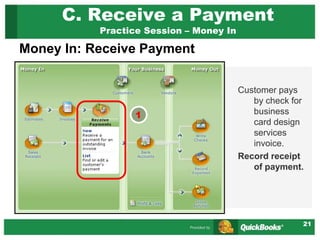
    21 C. Receive aPayment Practice Session – Money In Money In: Receive Payment Customer pays by check for business card design services invoice. Record receipt of payment. 1
  • 22.
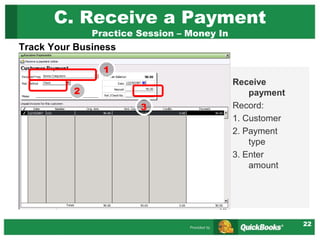
    22 C. Receive aPayment Practice Session – Money In Track Your Business Receive payment Record: 1. Customer 2. Payment type 3. Enter amount 1 2 3
  • 23.
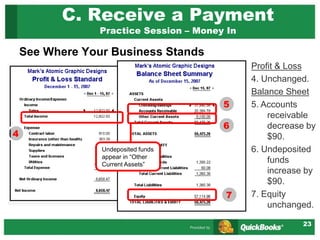
    23 C. Receive aPayment Practice Session – Money In See Where Your Business Stands Profit & Loss 4. Unchanged. Balance Sheet 5. Accounts receivable decrease by $90. 6. Undeposited funds increase by $90. 7. Equity unchanged. 4 5 6 Undeposited funds appear in “Other Current Assets” 7
  • 24.
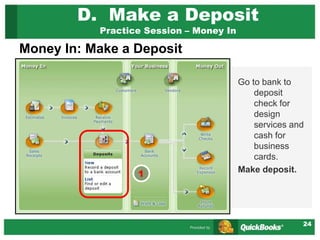
    24 D. Make aDeposit Practice Session – Money In Money In: Make a Deposit Go to bank to deposit check for design services and cash for business cards. Make deposit. 1
  • 25.
    25 D. Make aDeposit Practice Session – Money In Track Your Business Make deposit Select: 1. Cash and Check 2. All funds to deposit 1 2
  • 26.
    26 D. Make aDeposit Practice Session – Money In See Where Your Business Stands Profit & Loss 3. Unchanged. Balance Sheet 4. Checking / Savings increases. 5. Other current assets decrease. 6. Equity unchanged. 3 5 4 Undeposited funds appear in “Other Current Assets” 6
  • 27.
    27 E. Write aCheck / Record an Expense Practice Session – Money Out Money Out: Write a Check Pay your telephone bill by check. Write check / record expense. 1
  • 28.
    28 Track Your Business E.Write a Check / Record an Expense Practice Session – Money Out Write check Select: 1. Payee 2. Amount 3. Transaction type (Expense – “Utilities”) 1 3 2
  • 29.
    29 E. Write aCheck / Record an Expense Practice Session – Money Out See Where Your Business Stands Profit & Loss 4. Expense (Utilities) increases by $45. Balance Sheet 5. Checking / Savings decreases by $45. 6. Equity decreases by $45 4 5 6
  • 30.
    30 F. Use CreditCard / Record an Expense Practice Session – Money Out Money Out: Use a Credit Card Buy office supplies with credit card. Use credit card / record expense. 1
  • 31.
    31 Track Your Business Updatecredit card register Select: 1. Payee 2. Transaction type (Expense -- Supplies) 3. Amount 1 3 2 F. Use Credit Card / Record an Expense Practice Session – Money Out
  • 32.
    32 F. Use CreditCard / Record an Expense Practice Session – Money Out See Where Your Business Stands Profit & Loss 4. Expense (Supplies) increases by $95. Balance Sheet 5. Credit cards increases by $95. 6. Equity decreases by $95. 4 5 6
  • 33.
    33 6. Tips andAdvice 1. Getting Started 2. Helpful Resources 3. Online Resources 4. Congratulations!
  • 34.
    34 Getting Started 1. Buildyour toolkit – Consider software packages such as QuickBooks Simple Start (Trial Edition is available) 2. Structure your accounts – Start with a minimum # of accounts and add as needed 3. Establish an accounting routine – and stick to it – Reconcile accounts monthly – Update financial statements quarterly Establish Good Accounting Habits • Record transactions regularly • Accuracy and consistency are essential • Fix mistakes as they happen • Manage and reconcile bank account regularly
  • 35.
    35 Helpful Resources Advance YourKnowledge • Professional Help – Accountants • Look for knowledge of your industry – QuickBooks ProAdvisors • Expert set-up can save you time • Free 1-hour consultation – Small Business Development Center (SBDC) counselors • Training Tools – Take classes (either online or at local colleges) – QuickBooks Learning Solutions (look under “Training” at www.QuickBooks.com) Expert help can make the process of setting- up and maintaining your books much easier. Be sure to look for a professional with knowledge of your industry – and of course, don’t be afraid to ask for references.
  • 36.
    36 Online Resources Small BusinessDevelopment Centers www.sba.gov/sbdc/ sbdcnear.html Internal Revenue Service www.irs.gov/businesses/ small/ U.S. Chamber of Commerce www.uschamber.com QuickBooks Financial Software www.quickbooks.com Find a Certified QuickBooks ProAdvisor www.usequickbooks.com /locateadvisor)
  • 37.
    37 Congratulations! You now know: •Why financial management is critical to effectively run a business • How to set-up and manage your accounts • The usefulness of financial reports Time to put your knowledge to work! Good luck!
  • 38.
    Appendix: Additional Terms andConcepts A Simple Start to Managing Your Business Finances
  • 39.
    39 1. Business types 2.Cash or accrual 3. Debits and credits 4. Journal 5. Ledger Financial Management Terms and Concepts
  • 40.
    40 1. Sole Proprietorship •One owner 2. Partnership or Limited Liability Corporation • Two or more owners 3. S Corporation • Small business with one or more shareholders 4. C Corporation • Large business with one or more shareholders 5. Non-profit Organization Determine Your Business Type There are more than 23.7 million small businesses in the United States. 572,900 new firms are founded each year. Source: SBA, Office of Advocacy. Based on 2003 data.
  • 41.
    41 Cash or Accrual? A.Cash accounting • The practice of recording sales and expenses only when cash is actually received or paid out B. Accrual accounting • The practice of reporting income when earned and expenses when incurred • Businesses with inventory (e.g. retailers) must use this method Most businesses opt for accrual method of accounting • At any given time, gives a more realistic picture of the health of the business Choosing an Accounting Type Choose whichever accounting method works best for you – the important thing is to be consistent once you’ve selected an accounting type
  • 42.
    42 Debits and Credits DoubleEntry Accounting • Accountants use “debits and credits” to describe how transactions are recorded in the general ledger • Each transaction increases one account and decreases another • System balances itself You don’t need to be too concerned with the mechanics of double entry accounting, debits and credits, as software programs handle automatically. But as a business owner, you might run into these terms.
  • 43.
    43 Mark’s Atomic GraphicDesign: Journal Journal entries capture all cash in and all cash out activity.
  • 44.
    44 Mark’s Atomic GraphicDesign: General Ledger General ledger (GL) shows all activity by account type.