1
Rate limiting with NGINX
and NGINX PLUS
July 2017
2
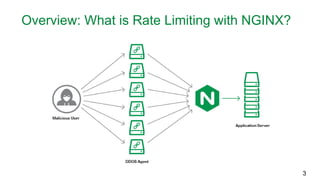
Overview: What is Rate Limiting with NGINX?
3
Agenda
• Basic configurations and concepts
• Useful additional features
• Access logging and error codes
• Advanced configurations and concepts
• LIVE DEMO !
4
01
Basic configurations and concepts
5
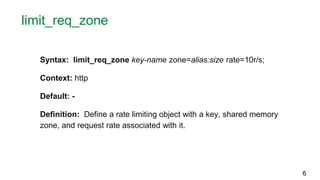
limit_req_zone
Syntax: limit_req_zone key-name zone=alias:size rate=10r/s;
Context: http
Default: -
Definition: Define a rate limiting object with a key, shared memory
zone, and request rate associated with it.
6
limit_req
Syntax: limit_req zone=alias;
Context: http, server, location
Default: -
Definition: Instantiate the rate limiting object defined in the previous
slide using the zone alias.
7
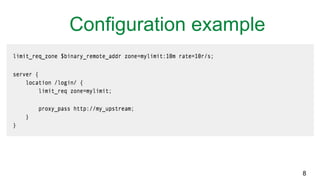
Configuration example
8
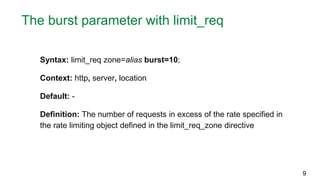
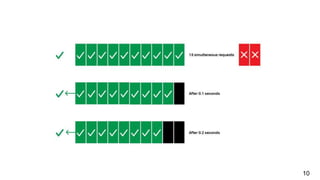
The burst parameter with limit_req
Syntax: limit_req zone=alias burst=10;
Context: http, server, location
Default: -
Definition: The number of requests in excess of the rate specified in
the rate limiting object defined in the limit_req_zone directive
9
10
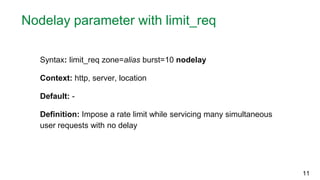
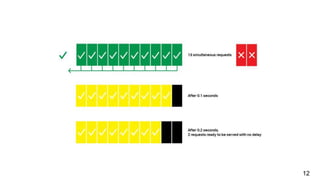
Nodelay parameter with limit_req
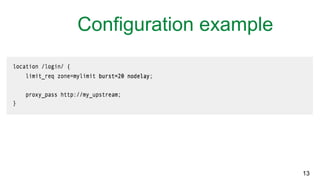
Syntax: limit_req zone=alias burst=10 nodelay
Context: http, server, location
Default: -
Definition: Impose a rate limit while servicing many simultaneous
user requests with no delay
11
12
Configuration example
13
01
Access logging and error statuses
14
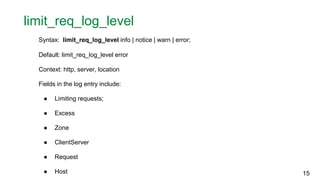
limit_req_log_level
Syntax: limit_req_log_level info | notice | warn | error;
Default: limit_req_log_level error
Context: http, server, location
Fields in the log entry include:
● Limiting requests;
● Excess
● Zone
● ClientServer
● Request
● Host 15
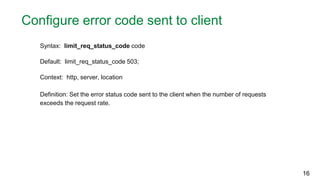
Configure error code sent to client
Syntax: limit_req_status_code code
Default: limit_req_status_code 503;
Context: http, server, location
Definition: Set the error status code sent to the client when the number of requests
exceeds the request rate.
16
01
Advanced configurations and concepts
17
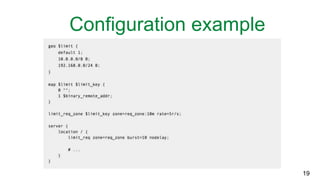
Imposing rate limits on whitelisted users
The geo block helps you create variables depending on the client IP address.
geo $marshaller {
default 0
192.168.56.101/20 1
}
The map block creates a new variable (second parameter) whose value depends on
variable specified in the first parameter.
map $marshaller $limit {
0 “”
1 $binary_remote_addr
}
18
Configuration example
19
01
LIVE DEMO !
20
01
Q&A
21
01
Start a 30 day free trial of NGINX Plus today
22
https://www.nginx.com/free-trial-request/

Rate Limiting with NGINX and NGINX Plus

Editor's Notes

  • #6 Section divider / black
  • #12 Diagram / bullets
  • #14 Pretty straight forward, you append the burst and no delay feature to the limit_req_zone directive.
  • #15 Section divider / black
  • #17 You can change the error status code sent to the client when the number of requests exceed the request rate. The code value must be set between 400 and 599.
  • #18 Section divider / black
  • #20 Explain
  • #21 Commands for demo: docker build -t sportebois/nginx-rate-limit-sandbox-auto . docker run --rm -it -p 80 sportebois/nginx-rate-limit-sandbox-auto Terminal command to show network settings of docker container: docker inspect --format='{{json .NetworkSettings.Networks}}' container-name Look at the default gateway ip address (That is the ip address you want to use when you are whitelisting)
  • #22 What is the point of using geo + map directive, why don’t we just use the geo block ? In a simple use case presented in this blog, you can use the geo block to impose rate limits on http requests. The benefit of using the geo + map block is if you want to create an additional variable that gets mapped to the first parameter in the geo block. For example, say you have the following geo block: geo $country { 192.168.23.10/24 CA 10.10.2.9/18 UK 172.45.67.66/20 US } Say you don’t want to use $country as the request zone key. You want to use $limit_key which can be mapped to $country, while using $country for another use like conditional logic.
  • #23 If you enjoyed what you have just learned in this webinar, start a 30 day trial of NGINX Plus to start using many great exclusive features. NGINX Plus is a complete application delivery controller that offers advanced HTTP, TCP, and UDP load balancing beyond rate limiting such as session persistence, on-the-fly reconfiguration of load-balancing server groups, advanced cache control, and application health checking just to name a few. NGINX Plus also provides detailed live activity monitoring dashboard to increase application visibility and monitoring. Make sure to click the link on the slide and download it for free today, it takes two seconds. So do that right now and I will see you soon.