NGINX Plus R20
NEW FEATURES AND HIGHLIGHTS
Liam Crilly
Director, Product Management
22-Jan-2020
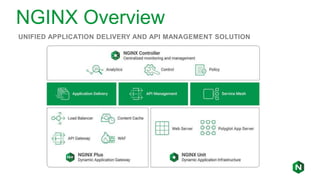
NGINX Overview
UNIFIED APPLICATION DELIVERY AND API MANAGEMENT SOLUTION
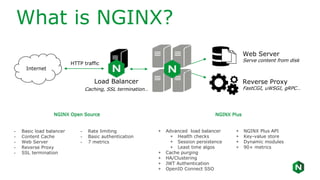
Internet
Web Server
Serve content from disk
Reverse Proxy
FastCGI, uWSGI, gRPC…
Load Balancer
Caching, SSL termination…
HTTP traffic
- Basic load balancer
- Content Cache
- Web Server
- Reverse Proxy
- SSL termination
- Rate limiting
- Basic authentication
- 7 metrics
NGINX Open Source NGINX Plus
+ Advanced load balancer
+ Health checks
+ Session persistence
+ Least time algos
+ Cache purging
+ HA/Clustering
+ JWT Authentication
+ OpenID Connect SSO
+ NGINX Plus API
+ Key-value store
+ Dynamic modules
+ 90+ metrics
What is NGINX?
4
“... when I started NGINX,
I focused on a very specific
problem – how to handle more
customers per a single server.”
- Igor Sysoev, NGINX creator and founder
Introducing NGINX
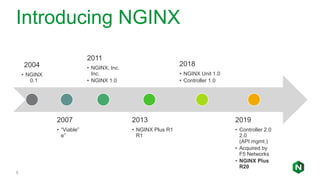
5
2004
• NGINX
0.1
2007
• “Viable”
e”
2011
• NGINX, Inc.
Inc.
• NGINX 1.0
2013
• NGINX Plus R1
R1
2018
• NGINX Unit 1.0
• Controller 1.0
2019
• Controller 2.0
2.0
(API mgmt.)
• Acquired by
F5 Networks
• NGINX Plus
R20
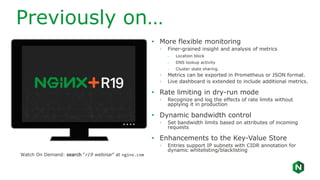
Previously on…
• More flexible monitoring
◦ Finer-grained insight and analysis of metrics
- Location block
- DNS lookup activity
- Cluster state sharing.
◦ Metrics can be exported in Prometheus or JSON format.
◦ Live dashboard is extended to include additional metrics.
• Rate limiting in dry-run mode
◦ Recognize and log the effects of rate limits without
applying it in production
• Dynamic bandwidth control
◦ Set bandwidth limits based on attributes of incoming
requests
• Enhancements to the Key-Value Store
◦ Entries support IP subnets with CIDR annotation for
dynamic whitelisting/blacklisting
Watch On Demand: search “r19 webinar” at nginx.com
NGINX Plus R20 Overview
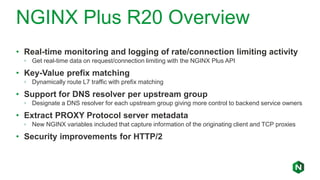
• Real-time monitoring and logging of rate/connection limiting activity
◦ Get real-time data on request/connection limiting with the NGINX Plus API
• Key-Value prefix matching
◦ Dynamically route L7 traffic with prefix matching
• Support for DNS resolver per upstream group
◦ Designate a DNS resolver for each upstream group giving more control to backend service owners
• Extract PROXY Protocol server metadata
◦ New NGINX variables included that capture information of the originating client and TCP proxies
• Security improvements for HTTP/2
Rate limit metrics and logging
8
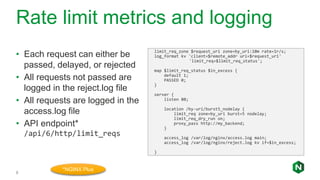
• Each request can either be
passed, delayed, or rejected
• All requests not passed are
logged in the reject.log file
• All requests are logged in the
access.log file
• API endpoint*
/api/6/http/limit_reqs
limit_req_zone $request_uri zone=by_uri:10m rate=1r/s;
log_format kv 'client=$remote_addr uri=$request_uri'
'limit_req=$limit_req_status';
map $limit_req_status $in_excess {
default 1;
PASSED 0;
}
server {
listen 80;
location /by-uri/burst5_nodelay {
limit_req zone=by_uri burst=5 nodelay;
limit_req_dry_run on;
proxy_pass http://my_backend;
}
access_log /var/log/nginx/access.log main;
access_log /var/log/nginx/reject.log kv if=$in_excess;
}
*NGINX Plus
Connection Metrics and Logging
9
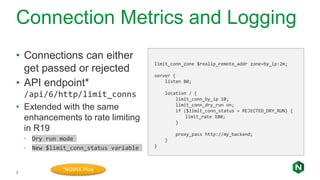
• Connections can either
get passed or rejected
• API endpoint*
/api/6/http/limit_conns
• Extended with the same
enhancements to rate limiting
in R19
◦ Dry run mode
◦ New $limit_conn_status variable
limit_conn_zone $realip_remote_addr zone=by_ip:2m;
server {
listen 80;
location / {
limit_conn_by_ip 10;
limit_conn_dry_run on;
if ($limit_conn_status = REJECTED_DRY_RUN) {
limit_rate 100;
}
proxy_pass http://my_backend;
}
}
*NGINX Plus
Keyval prefix match
11
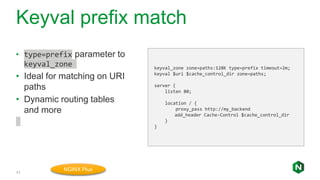
• type=prefix parameter to
keyval_zone
• Ideal for matching on URI
paths
• Dynamic routing tables
and more
keyval_zone zone=paths:128K type=prefix timeout=2m;
keyval $uri $cache_control_dir zone=paths;
server {
listen 80;
location / {
proxy_pass http://my_backend
add_header Cache-Control $cache_control_dir
}
}
NGINX Plus
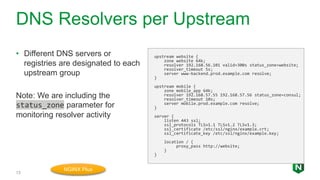
DNS Resolvers per Upstream
13
• Different DNS servers or
registries are designated to each
upstream group
Note: We are including the
status_zone parameter for
monitoring resolver activity
upstream website {
zone website 64k;
resolver 192.168.56.101 valid=300s status_zone=website;
resolver_timeout 5s;
server www-backend.prod.example.com resolve;
}
upstream mobile {
zone mobile_app 64k;
resolver 192.168.57.55 192.168.57.56 status_zone=consul;
resolver_timeout 10s;
server mobile.prod.example.com resolve;
}
server {
listen 443 ssl;
ssl_protocols TLSv1.1 TLSv1.2 TLSv1.3;
ssl_certificate /etc/ssl/nginx/example.crt;
ssl_certificate_key /etc/ssl/nginx/example.key;
location / {
proxy_pass http://website;
}
}
NGINX Plus
Additional Features
• HTTP/2 improvements
• Variables for PROXY Protocol
◦ $proxy_protocol_server_addr – IP address of the proxy server to which
client originally connected to.
◦ $proxy_protocol_server_port – Port of proxy server to which the client
connected to.
• NJS features and improvements added
◦ https://www.nginx.com/blog/introduction-nginscript/
◦ https://www.nginx.com/en/docs/njs/index.html
Summary
• Monitoring and logging rate/connection limiting metrics with the NGINX
Plus API
• Dry-run for connection limiting
• Prefix matching for keyval (type=prefix)
• DNS resolver per upstream group
• Variables capturing metadata of the PROXY protocol
• Security improvements with HTTP/2
• Supporting more JavaScript objects with njs
NGINX Plus R20 Webinar EMEA

NGINX Plus R20 Webinar EMEA

  • 1.
    NGINX Plus R20 NEWFEATURES AND HIGHLIGHTS Liam Crilly Director, Product Management 22-Jan-2020
  • 2.
    NGINX Overview UNIFIED APPLICATIONDELIVERY AND API MANAGEMENT SOLUTION
  • 3.
    Internet Web Server Serve contentfrom disk Reverse Proxy FastCGI, uWSGI, gRPC… Load Balancer Caching, SSL termination… HTTP traffic - Basic load balancer - Content Cache - Web Server - Reverse Proxy - SSL termination - Rate limiting - Basic authentication - 7 metrics NGINX Open Source NGINX Plus + Advanced load balancer + Health checks + Session persistence + Least time algos + Cache purging + HA/Clustering + JWT Authentication + OpenID Connect SSO + NGINX Plus API + Key-value store + Dynamic modules + 90+ metrics What is NGINX?
  • 4.
    4 “... when Istarted NGINX, I focused on a very specific problem – how to handle more customers per a single server.” - Igor Sysoev, NGINX creator and founder
  • 5.
    Introducing NGINX 5 2004 • NGINX 0.1 2007 •“Viable” e” 2011 • NGINX, Inc. Inc. • NGINX 1.0 2013 • NGINX Plus R1 R1 2018 • NGINX Unit 1.0 • Controller 1.0 2019 • Controller 2.0 2.0 (API mgmt.) • Acquired by F5 Networks • NGINX Plus R20
  • 6.
    Previously on… • Moreflexible monitoring ◦ Finer-grained insight and analysis of metrics - Location block - DNS lookup activity - Cluster state sharing. ◦ Metrics can be exported in Prometheus or JSON format. ◦ Live dashboard is extended to include additional metrics. • Rate limiting in dry-run mode ◦ Recognize and log the effects of rate limits without applying it in production • Dynamic bandwidth control ◦ Set bandwidth limits based on attributes of incoming requests • Enhancements to the Key-Value Store ◦ Entries support IP subnets with CIDR annotation for dynamic whitelisting/blacklisting Watch On Demand: search “r19 webinar” at nginx.com
  • 7.
    NGINX Plus R20Overview • Real-time monitoring and logging of rate/connection limiting activity ◦ Get real-time data on request/connection limiting with the NGINX Plus API • Key-Value prefix matching ◦ Dynamically route L7 traffic with prefix matching • Support for DNS resolver per upstream group ◦ Designate a DNS resolver for each upstream group giving more control to backend service owners • Extract PROXY Protocol server metadata ◦ New NGINX variables included that capture information of the originating client and TCP proxies • Security improvements for HTTP/2
  • 8.
    Rate limit metricsand logging 8 • Each request can either be passed, delayed, or rejected • All requests not passed are logged in the reject.log file • All requests are logged in the access.log file • API endpoint* /api/6/http/limit_reqs limit_req_zone $request_uri zone=by_uri:10m rate=1r/s; log_format kv 'client=$remote_addr uri=$request_uri' 'limit_req=$limit_req_status'; map $limit_req_status $in_excess { default 1; PASSED 0; } server { listen 80; location /by-uri/burst5_nodelay { limit_req zone=by_uri burst=5 nodelay; limit_req_dry_run on; proxy_pass http://my_backend; } access_log /var/log/nginx/access.log main; access_log /var/log/nginx/reject.log kv if=$in_excess; } *NGINX Plus
  • 9.
    Connection Metrics andLogging 9 • Connections can either get passed or rejected • API endpoint* /api/6/http/limit_conns • Extended with the same enhancements to rate limiting in R19 ◦ Dry run mode ◦ New $limit_conn_status variable limit_conn_zone $realip_remote_addr zone=by_ip:2m; server { listen 80; location / { limit_conn_by_ip 10; limit_conn_dry_run on; if ($limit_conn_status = REJECTED_DRY_RUN) { limit_rate 100; } proxy_pass http://my_backend; } } *NGINX Plus
  • 11.
    Keyval prefix match 11 •type=prefix parameter to keyval_zone • Ideal for matching on URI paths • Dynamic routing tables and more keyval_zone zone=paths:128K type=prefix timeout=2m; keyval $uri $cache_control_dir zone=paths; server { listen 80; location / { proxy_pass http://my_backend add_header Cache-Control $cache_control_dir } } NGINX Plus
  • 13.
    DNS Resolvers perUpstream 13 • Different DNS servers or registries are designated to each upstream group Note: We are including the status_zone parameter for monitoring resolver activity upstream website { zone website 64k; resolver 192.168.56.101 valid=300s status_zone=website; resolver_timeout 5s; server www-backend.prod.example.com resolve; } upstream mobile { zone mobile_app 64k; resolver 192.168.57.55 192.168.57.56 status_zone=consul; resolver_timeout 10s; server mobile.prod.example.com resolve; } server { listen 443 ssl; ssl_protocols TLSv1.1 TLSv1.2 TLSv1.3; ssl_certificate /etc/ssl/nginx/example.crt; ssl_certificate_key /etc/ssl/nginx/example.key; location / { proxy_pass http://website; } } NGINX Plus
  • 14.
    Additional Features • HTTP/2improvements • Variables for PROXY Protocol ◦ $proxy_protocol_server_addr – IP address of the proxy server to which client originally connected to. ◦ $proxy_protocol_server_port – Port of proxy server to which the client connected to. • NJS features and improvements added ◦ https://www.nginx.com/blog/introduction-nginscript/ ◦ https://www.nginx.com/en/docs/njs/index.html
  • 15.
    Summary • Monitoring andlogging rate/connection limiting metrics with the NGINX Plus API • Dry-run for connection limiting • Prefix matching for keyval (type=prefix) • DNS resolver per upstream group • Variables capturing metadata of the PROXY protocol • Security improvements with HTTP/2 • Supporting more JavaScript objects with njs

Editor's Notes

  • #4 NGINX Plus gives you all the tools you need to deliver your application reliably. Web Server NGINX is a fully featured web server that can directly serve static content. NGINX Plus can scale to handle hundreds of thousands of clients simultaneously, and serve hundreds of thousands of content resources per second. Application Gateway NGINX handles all HTTP traffic, and forwards requests in a smooth, controlled manner to PHP, Ruby, Java, and other application types, using FastCGI, uWSGI, and Linux sockets. Reverse Proxy NGINX is a reverse proxy that you can put in front of your applications. NGINX can cache both static and dynamic content to improve overall performance, as well as load balance traffic enabling you to scale-out.
  • #6 NGINX 1.0 and Unit 1.0 released 12th Apr (International Day of Human Space Flight – Yuri Gagarin)
  • #9 Metrics can be collected per location blocks Allows you to debug complex rewrites Three HTTP zones defined in this configuration Metrics can be viewed from using the NGINX plus API or or in the dashboard.
  • #12 curl -X POST -d ‘{“/images/":”max-age=500"}' http://localhost:8080/api/6/http/keyvals/paths curl -X POST -d ‘{“/reports/":”no-cache"}' http://localhost:8080/api/6/http/keyvals/paths
  • #15 HTTP/2: fixed possible alert about left open socket on shutdown.This could happen when graceful shutdown configured by worker_shutdown_timeout times out and is then followed by another timeout such as proxy_read_timeout. In this case, the HEADERS frame is added to the output queue, but attempt to send it fails (due to c->error forcibly set during graceful shutdown timeout). This triggers request finalization which attempts to close the stream. But the stream cannot be closed because there is a frame in the output queue, and the connection cannot be finalized. This leaves the connection open without any timer events leading to alert.The fix is to post write event when sending output queue fails on c->error. That will finalize the connection. 4:09 AM HTTP/2: avoid segfault with unbuffered request body in error_page.If a final request body part arrived after redirect, request body handler was called one more time. This led to duplicate upstream initialization observed as "http request count is zero" alert and c->log use-after-free.
  • #16 Target release mid-December
  • #17 Sample questions here