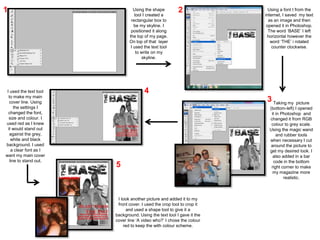
1                                 Using the shape        2                Using a font t from the
                                  tool I created a                      internet, I saved my text
                                rectangular box to                        as an image and then
                                  be my skyline. I                       opened it in Photoshop.
                                positioned it along                       The word ‘BASE’ I left
                               the top of my page.                       horizontal however the
                               On top of that layer                        word ‘THE’ i rotated
                                I used the text tool                        counter clockwise.
                                   to write on my
                                      skyline.


 I used the text tool                  4
  to make my main
   cover line. Using                                                     3 Taking my picture
      the settings I                                                      (bottom-left) I opened
  changed the font,                                                        it in Photoshop and
  size and colour. I                                                      changed it from RGB
used red as I knew                                                         colour to grey scale.
  it would stand out                                                      Using the magic wand
   against the grey,                                                          and rubber tools
    white and black                                                       when necessary I cut
background. I used                                                         around the picture to
    a clear font as I                                                     get my desired look. I
want my main cover                                                          also added in a bar
   line to stand out.                                                       code in the bottom
                        5                                                  right corner to make
                                                                            my magazine more
                                                                                  realistic.


                         I took another picture and added it to my
                         front cover. I used the crop tool to crop it
                             and used a shape tool to give it a
                        background. Using the text tool I gave it the
                        cover line ‘A video who?’ I chose the colour
                            red to keep the with colour scheme.
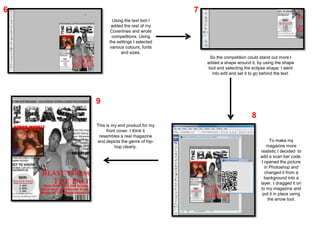
6                                   7
           Using the text tool I
           added the rest of my
          Coverlines and wrote
           competitions. Using
          the settings I selected
          various colours, fonts
                and sizes.
                                          So the competition could stand out more I
                                        added a shape around it, by using the shape
                                         tool and selecting the eclipse shape. I went
                                           into edit and set it to go behind the text.


    9
                                                               8
    This is my end product for my
         front cover. I think it
     resembles a real magazine
    and depicts the genre of hip-                                         To make my
             hop clearly.                                               magazine more
                                                                    realistic I decided to
                                                                    add a scan bar code.
                                                                     I opened the picture
                                                                       in Photoshop and
                                                                       changed it from a
                                                                       background into a
                                                                    layer. I dragged it on
                                                                    to my magazine and
                                                                     put it in place using
                                                                         the arrow tool.

Front cover production log

  • 1.
    1 Using the shape 2 Using a font t from the tool I created a internet, I saved my text rectangular box to as an image and then be my skyline. I opened it in Photoshop. positioned it along The word ‘BASE’ I left the top of my page. horizontal however the On top of that layer word ‘THE’ i rotated I used the text tool counter clockwise. to write on my skyline. I used the text tool 4 to make my main cover line. Using 3 Taking my picture the settings I (bottom-left) I opened changed the font, it in Photoshop and size and colour. I changed it from RGB used red as I knew colour to grey scale. it would stand out Using the magic wand against the grey, and rubber tools white and black when necessary I cut background. I used around the picture to a clear font as I get my desired look. I want my main cover also added in a bar line to stand out. code in the bottom 5 right corner to make my magazine more realistic. I took another picture and added it to my front cover. I used the crop tool to crop it and used a shape tool to give it a background. Using the text tool I gave it the cover line ‘A video who?’ I chose the colour red to keep the with colour scheme.
  • 2.
    6 7 Using the text tool I added the rest of my Coverlines and wrote competitions. Using the settings I selected various colours, fonts and sizes. So the competition could stand out more I added a shape around it, by using the shape tool and selecting the eclipse shape. I went into edit and set it to go behind the text. 9 8 This is my end product for my front cover. I think it resembles a real magazine and depicts the genre of hip- To make my hop clearly. magazine more realistic I decided to add a scan bar code. I opened the picture in Photoshop and changed it from a background into a layer. I dragged it on to my magazine and put it in place using the arrow tool.