IntroductiontoPython
SCMS School of Engineering & Technology
Vidya Nagar, Karukutty
WHY PYTHON ?
• EASY TO READ AND LEARN
• POWERFUL INTERACTIVE INTERPRETER
• SCALABLE, GENERAL PURPOSE
• HIGH LEVEL, MODULAR PROGRAMMING LANGUAGE
• PROCEDURAL, OBJECT ORIENTED
• DYNAMICALLY TYPED
WHY
PYTHON?
Extensive libraries
Rapid Application Development
Cross Platform
Open Source
Vast user community
DOMAINS
WHERE
PYTHONIS
WIDELY
USED
WEB DEVELOPMENT
MACHINE LEARNING
DATA ANALYSIS AND VISUALIZATION
BUILDING GAMES
ROBOTICS AND IOT
EXECUTIONMODES
SUPPORTS TWO MODES
• COMMAND LINE MODE
• SCRIPT MODE
COMMANDLINEMODE
% python
Python 2.6.1 (r261:67515, Feb 11 2010, 00:51:29)
[GCC 4.2.1 (Apple Inc. build 5646)] on darwin
Type "help", "copyright", "credits" or "license" for more
information.
>>>
You can type things directly into a running Python session
>>> 2+3*4
14
>>> name = "Andrew"
>>> name
'Andrew'
>>> print "Hello", name
Hello Andrew
>>>
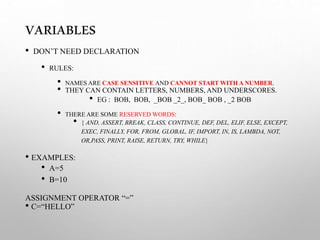
VARIABLES
• DON’T NEED DECLARATION
• RULES:
• NAMES ARE CASE SENSITIVE AND CANNOT START WITH A NUMBER.
• THEY CAN CONTAIN LETTERS, NUMBERS, AND UNDERSCORES.
• EG : BOB, BOB, _BOB _2_, BOB_ BOB , _2 BOB
• THERE ARE SOME RESERVED WORDS:
• { AND, ASSERT, BREAK, CLASS, CONTINUE, DEF, DEL, ELIF, ELSE, EXCEPT,
EXEC, FINALLY, FOR, FROM, GLOBAL, IF, IMPORT, IN, IS, LAMBDA, NOT,
OR,PASS, PRINT, RAISE, RETURN, TRY, WHILE}
• EXAMPLES:
• A=5
• B=10
ASSIGNMENT OPERATOR “=”
• C=“HELLO”
EXCERCISE#1
1. PRINT “HAI PYTHON”
2. GET TWO NUMBERS A&B
3. FIND SUM
4. FIND DIFFERENCE
DATATYPES
• INT
• A=5
• B=10
• FLOAT
• C=6.5
• BOOL
• D=TRUE
• COMPOUND DATA TYPES:
• STRING: ”HELLO”,
• LIST: [1,2,3]
• TUPLE: (1,2)
• DICTIONARIES : {“A”:80}
DATA TYPE
TYPE CONVERSION FUNCTIONS:
• INT()
• FLOAT()
• STRING()
OPERATORS
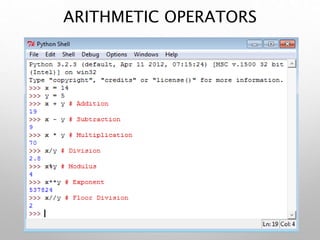
• ARITHMETIC OPERATORS
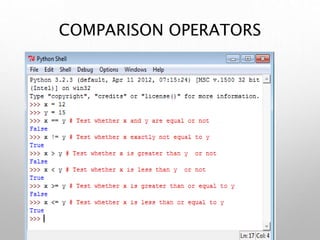
• COMPARISON OPERATORS
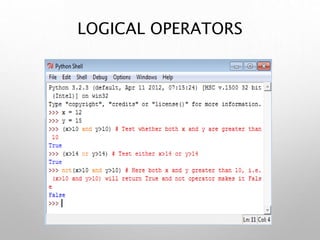
• LOGICAL OPERATORS
• ASSIGNMENT OPERATORS
• BITWISE OPERATORS
• CONDITIONAL OPERATORS
ARITHMETIC OPERATORS
COMPARISON OPERATORS
LOGICAL OPERATORS
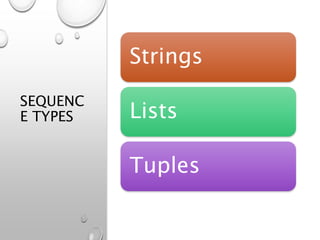
SEQUENC
E TYPES
Strings
Lists
Tuples
STRINGS
• Enclosed in single or double quotes
• EG : “HELLO!”, “3.5”,”A”,’A’
• Sequence of Characters
• MYSTRING=“HELLO WORLD!”
MYSTRING[0] -> “H”
MYSTRING[1] -> “E”
MYSTRING[2] -> “L”
MYSTRING[-1] -> “!”
STRINGS–STRINGOPERATIONS
• "hello"+"world” "helloworld" # concatenation
• "hello"*3 "hellohellohello" # repetition
• "hello"[0 "h" # indexing
• "hello"[-1] "o" # (from end)
• "hello"[1:4] "ell" # slicing
• len("hello") 5 # size
• "hello" < "jello” 1 #
comparison
• "e" in "hello" 1 # search
• "escapes: n etc, 033 etc, if etc"
• 'single quotes' """triple quotes""" r"raw strings"
LISTS
A compound data type:
[0]
[2.3, 4.5]
[5, "Hello", "there", 9.8]
[]
Use len() to get the length of a list
>>> names = [“Ben", “Chen", “Yaqin"]
>>> len(names)
3
>>> names[0]
‘Ben'
>>> names[1]
‘Chen'
>>> names[2]
‘Yaqin'
>>> names[3]
Traceback (most recent call last): File "<stdin>", line 1, in
<module> IndexError: list index out of range
>>> names[-1]
‘Yaqin'
>>> names[-2]
‘Chen'
>>> names[-3]
‘Ben'
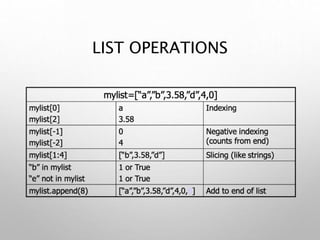
LIST OPERATIONS
LIST OPERATIONS
Same operators as for strings
• a+b, a*3, a[0], a[-1], a[1:], len(a)
•Item and slice assignment
• a[0] = 98
• a[1:2] = ["bottles", "of", "beer"]
-> [98, "bottles", "of", "beer", ["on", "the", "wall"]]
• del a[-1] # -> [98, "bottles", "of", "beer"]
LIST OPERATIONS
MORELISTOPERATIONS
>>> a = range(5) # [0,1,2,3,4]
>>> a.append(5) # [0,1,2,3,4,5]
>>> a.pop() # [0,1,2,3,4]
5
>>> a.insert(0, 42) # [42,0,1,2,3,4]
>>> a.pop(0) # [0,1,2,3,4]
42
>>> a.reverse() # [4,3,2,1,0]
>>> a.sort() # [0,1,2,3,4]
DICTIONARIES
• Hash tables, "associative arrays"
• d = {"duck": "eend", "water": "water"}
• Lookup:
• d["duck"] -> "eend"
• d["back"] # raises KeyError exception
• Delete, insert, overwrite:
• del d["water"] # {"duck": "eend", "back": "rug"}
• d["back"] = "rug" # {"duck": "eend", "back": "rug"}
• d["duck"] = "duik" # {"duck": "duik", "back": "rug"}
MOREDICTIONARYOPS
• Keys, values, items:
• d.keys() -> ["duck", "back"]
• d.values() -> ["duik", "rug"]
• d.items() -> [("duck","duik"), ("back","rug")]
• Presence check:
• d.has_key("duck") -> 1; d.has_key("spam") -> 0
• Values of any type; keys almost any
• {"name":"Guido", "age":43, ("hello","world"):1,
42:"yes", "flag": ["red","white","blue"]}
DICTIONARYDETAILS
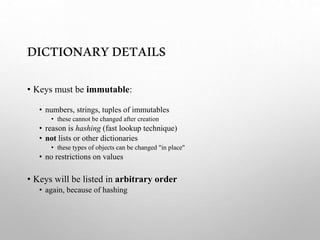
• Keys must be immutable:
• numbers, strings, tuples of immutables
• these cannot be changed after creation
• reason is hashing (fast lookup technique)
• not lists or other dictionaries
• these types of objects can be changed "in place"
• no restrictions on values
• Keys will be listed in arbitrary order
• again, because of hashing
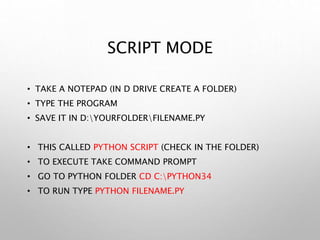
SCRIPT MODE
• TAKE A NOTEPAD (IN D DRIVE CREATE A FOLDER)
• TYPE THE PROGRAM
• SAVE IT IN D:YOURFOLDERFILENAME.PY
• THIS CALLED PYTHON SCRIPT (CHECK IN THE FOLDER)
• TO EXECUTE TAKE COMMAND PROMPT
• GO TO PYTHON FOLDER CD C:PYTHON34
• TO RUN TYPE PYTHON FILENAME.PY
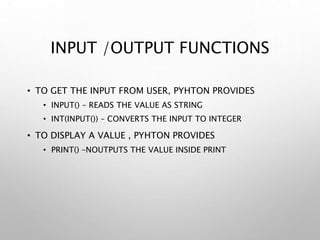
INPUT /OUTPUT FUNCTIONS
• TO GET THE INPUT FROM USER, PYHTON PROVIDES
• INPUT() – READS THE VALUE AS STRING
• INT(INPUT()) – CONVERTS THE INPUT TO INTEGER
• TO DISPLAY A VALUE , PYHTON PROVIDES
• PRINT() –NOUTPUTS THE VALUE INSIDE PRINT
EXCERCISE
1. Program to print address
2. Program to convert degree Celsius to Fahrenheit
3. Program to print Quotient and Remainder
4. Program to find the area of the circle
5. Program to print the sum, product, difference and quotient of 2
numbers.
6. Program to find the distance between two points.
CONDITIONAL EXECUTION
• IF
• IF ELSE
• IF ELIF ELSE
• IF WITHIN IF
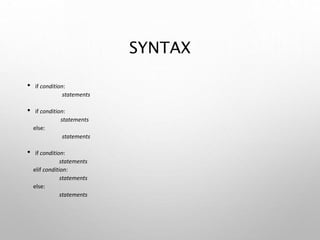
SYNTAX
• if condition:
statements
• if condition:
statements
else:
statements
• if condition:
statements
elif condition:
statements
else:
statements
EXCERCISE
1. Program to check whether a number is positive or negative
2. Program to check whether a number is odd or even
3. Program to find largest of two numbers
4. Program to find largest of three numbers
5. Program to check for leap year or not
CONTROLSTRUCTURES
• While while condition:
statements
• For for var in sequence:
statements
• Break break
• Continue continue
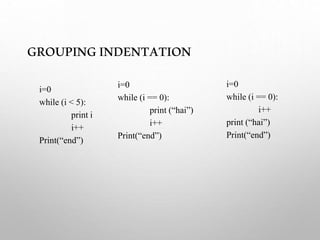
GROUPINGINDENTATION
i=0
while (i < 5):
print i
i++
Print(“end”)
i=0
while (i == 0):
print (“hai”)
i++
Print(“end”)
i=0
while (i == 0):
i++
print (“hai”)
Print(“end”)
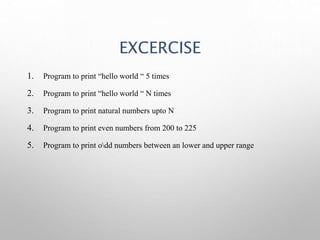
EXCERCISE
1. Program to print “hello world “ 5 times
2. Program to print “hello world “ N times
3. Program to print natural numbers upto N
4. Program to print even numbers from 200 to 225
5. Program to print odd numbers between an lower and upper range
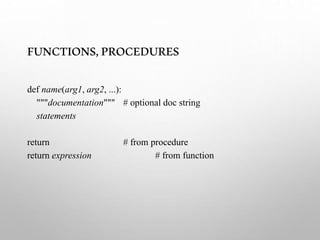
FUNCTIONS,PROCEDURES
def name(arg1, arg2, ...):
"""documentation""" # optional doc string
statements
return # from procedure
return expression # from function
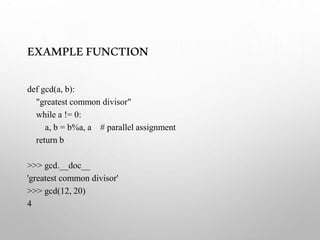
EXAMPLEFUNCTION
def gcd(a, b):
"greatest common divisor"
while a != 0:
a, b = b%a, a # parallel assignment
return b
>>> gcd.__doc__
'greatest common divisor'
>>> gcd(12, 20)
4
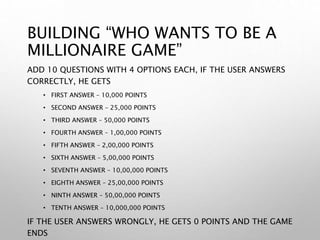
BUILDING “WHO WANTS TO BE A
MILLIONAIRE GAME”
ADD 10 QUESTIONS WITH 4 OPTIONS EACH, IF THE USER ANSWERS
CORRECTLY, HE GETS
• FIRST ANSWER – 10,000 POINTS
• SECOND ANSWER – 25,000 POINTS
• THIRD ANSWER – 50,000 POINTS
• FOURTH ANSWER – 1,00,000 POINTS
• FIFTH ANSWER – 2,00,000 POINTS
• SIXTH ANSWER – 5,00,000 POINTS
• SEVENTH ANSWER – 10,00,000 POINTS
• EIGHTH ANSWER – 25,00,000 POINTS
• NINTH ANSWER – 50,00,000 POINTS
• TENTH ANSWER – 10,000,000 POINTS
IF THE USER ANSWERS WRONGLY, HE GETS 0 POINTS AND THE GAME
ENDS

Python.pptx

  • 1.
    IntroductiontoPython SCMS School ofEngineering & Technology Vidya Nagar, Karukutty
  • 2.
    WHY PYTHON ? •EASY TO READ AND LEARN • POWERFUL INTERACTIVE INTERPRETER • SCALABLE, GENERAL PURPOSE • HIGH LEVEL, MODULAR PROGRAMMING LANGUAGE • PROCEDURAL, OBJECT ORIENTED • DYNAMICALLY TYPED
  • 3.
    WHY PYTHON? Extensive libraries Rapid ApplicationDevelopment Cross Platform Open Source Vast user community
  • 4.
    DOMAINS WHERE PYTHONIS WIDELY USED WEB DEVELOPMENT MACHINE LEARNING DATAANALYSIS AND VISUALIZATION BUILDING GAMES ROBOTICS AND IOT
  • 5.
    EXECUTIONMODES SUPPORTS TWO MODES •COMMAND LINE MODE • SCRIPT MODE
  • 6.
    COMMANDLINEMODE % python Python 2.6.1(r261:67515, Feb 11 2010, 00:51:29) [GCC 4.2.1 (Apple Inc. build 5646)] on darwin Type "help", "copyright", "credits" or "license" for more information. >>> You can type things directly into a running Python session >>> 2+3*4 14 >>> name = "Andrew" >>> name 'Andrew' >>> print "Hello", name Hello Andrew >>>
  • 7.
    VARIABLES • DON’T NEEDDECLARATION • RULES: • NAMES ARE CASE SENSITIVE AND CANNOT START WITH A NUMBER. • THEY CAN CONTAIN LETTERS, NUMBERS, AND UNDERSCORES. • EG : BOB, BOB, _BOB _2_, BOB_ BOB , _2 BOB • THERE ARE SOME RESERVED WORDS: • { AND, ASSERT, BREAK, CLASS, CONTINUE, DEF, DEL, ELIF, ELSE, EXCEPT, EXEC, FINALLY, FOR, FROM, GLOBAL, IF, IMPORT, IN, IS, LAMBDA, NOT, OR,PASS, PRINT, RAISE, RETURN, TRY, WHILE} • EXAMPLES: • A=5 • B=10 ASSIGNMENT OPERATOR “=” • C=“HELLO”
  • 8.
    EXCERCISE#1 1. PRINT “HAIPYTHON” 2. GET TWO NUMBERS A&B 3. FIND SUM 4. FIND DIFFERENCE
  • 9.
    DATATYPES • INT • A=5 •B=10 • FLOAT • C=6.5 • BOOL • D=TRUE • COMPOUND DATA TYPES: • STRING: ”HELLO”, • LIST: [1,2,3] • TUPLE: (1,2) • DICTIONARIES : {“A”:80}
  • 10.
    DATA TYPE TYPE CONVERSIONFUNCTIONS: • INT() • FLOAT() • STRING()
  • 11.
    OPERATORS • ARITHMETIC OPERATORS •COMPARISON OPERATORS • LOGICAL OPERATORS • ASSIGNMENT OPERATORS • BITWISE OPERATORS • CONDITIONAL OPERATORS
  • 12.
  • 13.
  • 14.
  • 15.
  • 16.
    STRINGS • Enclosed insingle or double quotes • EG : “HELLO!”, “3.5”,”A”,’A’ • Sequence of Characters • MYSTRING=“HELLO WORLD!” MYSTRING[0] -> “H” MYSTRING[1] -> “E” MYSTRING[2] -> “L” MYSTRING[-1] -> “!”
  • 17.
    STRINGS–STRINGOPERATIONS • "hello"+"world” "helloworld"# concatenation • "hello"*3 "hellohellohello" # repetition • "hello"[0 "h" # indexing • "hello"[-1] "o" # (from end) • "hello"[1:4] "ell" # slicing • len("hello") 5 # size • "hello" < "jello” 1 # comparison • "e" in "hello" 1 # search • "escapes: n etc, 033 etc, if etc" • 'single quotes' """triple quotes""" r"raw strings"
  • 18.
    LISTS A compound datatype: [0] [2.3, 4.5] [5, "Hello", "there", 9.8] [] Use len() to get the length of a list >>> names = [“Ben", “Chen", “Yaqin"] >>> len(names) 3
  • 19.
    >>> names[0] ‘Ben' >>> names[1] ‘Chen' >>>names[2] ‘Yaqin' >>> names[3] Traceback (most recent call last): File "<stdin>", line 1, in <module> IndexError: list index out of range >>> names[-1] ‘Yaqin' >>> names[-2] ‘Chen' >>> names[-3] ‘Ben' LIST OPERATIONS
  • 20.
  • 21.
    Same operators asfor strings • a+b, a*3, a[0], a[-1], a[1:], len(a) •Item and slice assignment • a[0] = 98 • a[1:2] = ["bottles", "of", "beer"] -> [98, "bottles", "of", "beer", ["on", "the", "wall"]] • del a[-1] # -> [98, "bottles", "of", "beer"] LIST OPERATIONS
  • 22.
    MORELISTOPERATIONS >>> a =range(5) # [0,1,2,3,4] >>> a.append(5) # [0,1,2,3,4,5] >>> a.pop() # [0,1,2,3,4] 5 >>> a.insert(0, 42) # [42,0,1,2,3,4] >>> a.pop(0) # [0,1,2,3,4] 42 >>> a.reverse() # [4,3,2,1,0] >>> a.sort() # [0,1,2,3,4]
  • 23.
    DICTIONARIES • Hash tables,"associative arrays" • d = {"duck": "eend", "water": "water"} • Lookup: • d["duck"] -> "eend" • d["back"] # raises KeyError exception • Delete, insert, overwrite: • del d["water"] # {"duck": "eend", "back": "rug"} • d["back"] = "rug" # {"duck": "eend", "back": "rug"} • d["duck"] = "duik" # {"duck": "duik", "back": "rug"}
  • 24.
    MOREDICTIONARYOPS • Keys, values,items: • d.keys() -> ["duck", "back"] • d.values() -> ["duik", "rug"] • d.items() -> [("duck","duik"), ("back","rug")] • Presence check: • d.has_key("duck") -> 1; d.has_key("spam") -> 0 • Values of any type; keys almost any • {"name":"Guido", "age":43, ("hello","world"):1, 42:"yes", "flag": ["red","white","blue"]}
  • 25.
    DICTIONARYDETAILS • Keys mustbe immutable: • numbers, strings, tuples of immutables • these cannot be changed after creation • reason is hashing (fast lookup technique) • not lists or other dictionaries • these types of objects can be changed "in place" • no restrictions on values • Keys will be listed in arbitrary order • again, because of hashing
  • 26.
    SCRIPT MODE • TAKEA NOTEPAD (IN D DRIVE CREATE A FOLDER) • TYPE THE PROGRAM • SAVE IT IN D:YOURFOLDERFILENAME.PY • THIS CALLED PYTHON SCRIPT (CHECK IN THE FOLDER) • TO EXECUTE TAKE COMMAND PROMPT • GO TO PYTHON FOLDER CD C:PYTHON34 • TO RUN TYPE PYTHON FILENAME.PY
  • 27.
    INPUT /OUTPUT FUNCTIONS •TO GET THE INPUT FROM USER, PYHTON PROVIDES • INPUT() – READS THE VALUE AS STRING • INT(INPUT()) – CONVERTS THE INPUT TO INTEGER • TO DISPLAY A VALUE , PYHTON PROVIDES • PRINT() –NOUTPUTS THE VALUE INSIDE PRINT
  • 28.
    EXCERCISE 1. Program toprint address 2. Program to convert degree Celsius to Fahrenheit 3. Program to print Quotient and Remainder 4. Program to find the area of the circle 5. Program to print the sum, product, difference and quotient of 2 numbers. 6. Program to find the distance between two points.
  • 29.
    CONDITIONAL EXECUTION • IF •IF ELSE • IF ELIF ELSE • IF WITHIN IF
  • 30.
    SYNTAX • if condition: statements •if condition: statements else: statements • if condition: statements elif condition: statements else: statements
  • 31.
    EXCERCISE 1. Program tocheck whether a number is positive or negative 2. Program to check whether a number is odd or even 3. Program to find largest of two numbers 4. Program to find largest of three numbers 5. Program to check for leap year or not
  • 32.
    CONTROLSTRUCTURES • While whilecondition: statements • For for var in sequence: statements • Break break • Continue continue
  • 33.
    GROUPINGINDENTATION i=0 while (i <5): print i i++ Print(“end”) i=0 while (i == 0): print (“hai”) i++ Print(“end”) i=0 while (i == 0): i++ print (“hai”) Print(“end”)
  • 34.
    EXCERCISE 1. Program toprint “hello world “ 5 times 2. Program to print “hello world “ N times 3. Program to print natural numbers upto N 4. Program to print even numbers from 200 to 225 5. Program to print odd numbers between an lower and upper range
  • 35.
    FUNCTIONS,PROCEDURES def name(arg1, arg2,...): """documentation""" # optional doc string statements return # from procedure return expression # from function
  • 36.
    EXAMPLEFUNCTION def gcd(a, b): "greatestcommon divisor" while a != 0: a, b = b%a, a # parallel assignment return b >>> gcd.__doc__ 'greatest common divisor' >>> gcd(12, 20) 4
  • 37.
    BUILDING “WHO WANTSTO BE A MILLIONAIRE GAME” ADD 10 QUESTIONS WITH 4 OPTIONS EACH, IF THE USER ANSWERS CORRECTLY, HE GETS • FIRST ANSWER – 10,000 POINTS • SECOND ANSWER – 25,000 POINTS • THIRD ANSWER – 50,000 POINTS • FOURTH ANSWER – 1,00,000 POINTS • FIFTH ANSWER – 2,00,000 POINTS • SIXTH ANSWER – 5,00,000 POINTS • SEVENTH ANSWER – 10,00,000 POINTS • EIGHTH ANSWER – 25,00,000 POINTS • NINTH ANSWER – 50,00,000 POINTS • TENTH ANSWER – 10,000,000 POINTS IF THE USER ANSWERS WRONGLY, HE GETS 0 POINTS AND THE GAME ENDS