INTRODUCTION TO PANDAS
A LIBRARY THAT IS USED FOR DATA MANIPULATION AND ANALYSIS TOOL
USING POWERFUL DATA STRUCTURES
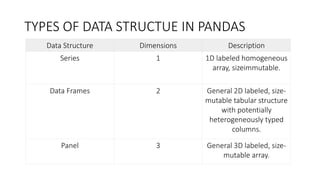
TYPES OF DATA STRUCTUE IN PANDAS
Data Structure Dimensions Description
Series 1 1D labeled homogeneous
array, sizeimmutable.
Data Frames 2 General 2D labeled, size-
mutable tabular structure
with potentially
heterogeneously typed
columns.
Panel 3 General 3D labeled, size-
mutable array.
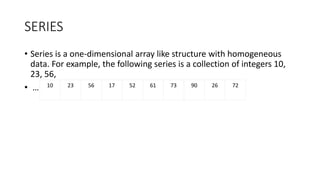
SERIES
• Series is a one-dimensional array like structure with homogeneous
data. For example, the following series is a collection of integers 10,
23, 56,
• … 10 23 56 17 52 61 73 90 26 72
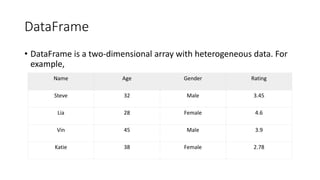
DataFrame
• DataFrame is a two-dimensional array with heterogeneous data. For
example,
Name Age Gender Rating
Steve 32 Male 3.45
Lia 28 Female 4.6
Vin 45 Male 3.9
Katie 38 Female 2.78
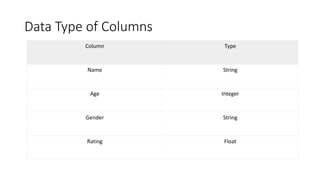
Data Type of Columns
Column Type
Name String
Age Integer
Gender String
Rating Float
PANEL
• Panel is a three-dimensional data structure with heterogeneous data.
It is hard to represent the panel in graphical representation. But a
panel can be illustrated as a container of DataFrame.
DataFrame
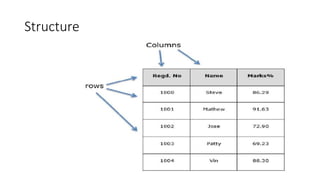
• A Data frame is a two-dimensional data structure, i.e., data is aligned
in a tabular fashion in rows and columns.
• Features of DataFrame
• Potentially columns are of different types
• Size – Mutable
• Labeled axes (rows and columns)
• Can Perform Arithmetic operations on rows and columns
Structure
pandas.DataFrame
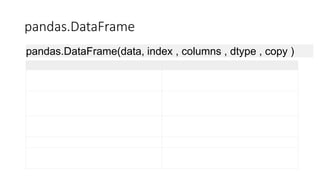
pandas.DataFrame(data, index , columns , dtype , copy )
• data
• data takes various forms like ndarray, series, map, lists, dict, constants and also
another DataFrame.
• index
• For the row labels, the Index to be used for the resulting frame is Optional Default
np.arrange(n) if no index is passed.
• columns
• For column labels, the optional default syntax is - np.arrange(n). This is only true if
no index is passed.
• dtype
• Data type of each column.
• copy
• This command (or whatever it is) is used for copying of data, if the default is False.
• Create DataFrame
• A pandas DataFrame can be created using various inputs like −
• Lists
• dict
• Series
• Numpy ndarrays
• Another DataFrame
Example
• Example
• import pandas as pd
• Data = [_______]
• Df = pd.DataFrame(data)
• Print df
Example 2
Import pandas as pd
Data = {‘Name’ : [‘__’. ‘__’],’Age’: [___]}
Df = pd.DataFrame(data)
print df
Example
• import pandas as pd
• data = [{'a': 1, 'b': 2},{'a': 5, 'b': 10, 'c': 20}]
• df = pd.DataFrame(data)
• print df
• ________________________________________
• import pandas as pd
• data = [{'a': 1, 'b': 2},{'a': 5, 'b': 10, 'c': 20}]
• df = pd.DataFrame(data, index=['first', 'second'])
• print df
• import pandas as pd
• data = [{'a': 1, 'b': 2},{'a': 5, 'b': 10, 'c': 20}]
• #With two column indices, values same as dictionary keys
• df1 = pd.DataFrame(data, index=['first', 'second'], columns=['a', 'b'])
• #With two column indices with one index with other name
• df2 = pd.DataFrame(data, index=['first', 'second'], columns=['a', 'b1'])
• print df1print df2
The following example shows how to create a DataFrame with
a list of dictionaries, row indices, and column indices.
• import pandas as pd
• data = [{'a': 1, 'b': 2},{'a': 5, 'b': 10, 'c': 20}]
• #With two column indices, values same as dictionary keys
• df1 = pd.DataFrame(data, index=['first', 'second'], columns=['a', 'b'])
• #With two column indices with one index with other name
• df2 = pd.DataFrame(data, index=['first', 'second'], columns=['a', 'b1'])
• print df1
• print df2
Create a DataFrame from Dict of Series
• import pandas as pd
• d = {'one' : pd.Series([1, 2, 3], index=['a', 'b', 'c']), 'two' : pd.Series([1,
2, 3, 4], index=['a', 'b', 'c', 'd'])}
• df = pd.DataFrame(d)
• print df
Column Addition
• import pandas as pd
• d = {'one' : pd.Series([1, 2, 3], index=['a', 'b', 'c']), 'two' : pd.Series([1, 2,
3, 4], index=['a', 'b', 'c', 'd'])}
• df = pd.DataFrame(d)
• # Adding a new column to an existing DataFrame object with column label
by passing new series
• print ("Adding a new column by passing as Series:")
• df['three']=pd.Series([10,20,30],index=['a','b','c'])
• print dfprint ("Adding a new column using the existing columns in
DataFrame:")
• df['four']=df['one']+df['three']
• print df
Column Deletion
• # Using the previous DataFrame, we will delete a
column
• # using del function
• import pandas as pd
• d = {'one' : pd.Series([1, 2, 3], index=['a', 'b', 'c']),
'two' : pd.Series([1, 2, 3, 4], index=['a', 'b', 'c', 'd']),
'three' : pd.Series([10,20,30], index=['a','b','c'])}
• df = pd.DataFrame(d)
• print ("Our dataframe is:")
• print df
• # using del function
• print ("Deleting the first column using DEL function:")
• del df['one']
• print df
# using pop function
• print ("Deleting another column using POP function:")
• df.pop('two')
• print df
Slicing in python
•import pandas as pd
d = {'one' : pd.Series([1, 2, 3], index=['a', 'b', 'c']),
'two' : pd.Series([1, 2, 3, 4], index=['a', 'b', 'c',
'd'])}
•df = pd.DataFrame(d)
•print df[2:4]
Addition of rows
• Df2 = pd.DataFrame([[5,6], [7,8]], columns = [‘a’, ‘b’])
• Df = df.append(df2 )
• Print df
Deletion of rows
• Df2 = pd.DataFrame([[5,6], [7,8]], columns = [‘a’, ‘b’])
• Df = df.drop(0)
• Print df
Reindexing
• import pandas as pd
• import numpy as np
df1 =
pd.DataFrame(np.random.randn(10,3),columns=['col1','col2','col3'])
• df2 =
pd.DataFrame(np.random.randn(7,3),columns=['col1','col2','col3'])df1
= df1.reindex_like(df2)print df1
Concatenating objects
• import pandas as pd
• One = pd.DataFrame({ ‘Name’: [‘__’] , ‘subject_id’: [‘__’], ‘marks’:
[‘__’]}, index = [] )
• two= pd.DataFrame({ ‘Name’: [‘__’] , ‘subject_id’: [‘__’], ‘marks’:
[‘__’]}, index = [] )
• Print pd.concat([one, two])
Handling categorical data
• There are many data that are repetitive for example gender , country , and codes are
always repetitive .
• Categorical variables can take on only a limited
• The categorical data type is useful in the following cases −
• A string variable consisting of only a few different values. Converting such a string
variable to a categorical variable will save some memory.
• The lexical order of a variable is not the same as the logical order (“one”, “two”,
“three”). By converting to a categorical and specifying an order on the categories,
sorting and min/max will use the logical order instead of the lexical order.
• As a signal to other python libraries that this column should be treated as a
categorical variable (e.g. to use suitable statistical methods or plot types).
• import pandas as pd
• cat = pd.Categorical(['a', 'b', 'c', 'a', 'b', 'c'])
• print cat
• ____________________________________________
• import pandas as pd
• import numpy as np
• cat = pd.Categorical(["a", "c", "c", np.nan], categories=["b", "a", "c"])
• df = pd.DataFrame({"cat":cat, "s":["a", "c", "c", np.nan]})
• print df.describe()
• print df["cat"].describe()
Introduction to pandas

Introduction to pandas

  • 1.
    INTRODUCTION TO PANDAS ALIBRARY THAT IS USED FOR DATA MANIPULATION AND ANALYSIS TOOL USING POWERFUL DATA STRUCTURES
  • 2.
    TYPES OF DATASTRUCTUE IN PANDAS Data Structure Dimensions Description Series 1 1D labeled homogeneous array, sizeimmutable. Data Frames 2 General 2D labeled, size- mutable tabular structure with potentially heterogeneously typed columns. Panel 3 General 3D labeled, size- mutable array.
  • 3.
    SERIES • Series isa one-dimensional array like structure with homogeneous data. For example, the following series is a collection of integers 10, 23, 56, • … 10 23 56 17 52 61 73 90 26 72
  • 4.
    DataFrame • DataFrame isa two-dimensional array with heterogeneous data. For example, Name Age Gender Rating Steve 32 Male 3.45 Lia 28 Female 4.6 Vin 45 Male 3.9 Katie 38 Female 2.78
  • 5.
    Data Type ofColumns Column Type Name String Age Integer Gender String Rating Float
  • 6.
    PANEL • Panel isa three-dimensional data structure with heterogeneous data. It is hard to represent the panel in graphical representation. But a panel can be illustrated as a container of DataFrame.
  • 7.
    DataFrame • A Dataframe is a two-dimensional data structure, i.e., data is aligned in a tabular fashion in rows and columns. • Features of DataFrame • Potentially columns are of different types • Size – Mutable • Labeled axes (rows and columns) • Can Perform Arithmetic operations on rows and columns
  • 8.
  • 9.
  • 10.
    • data • datatakes various forms like ndarray, series, map, lists, dict, constants and also another DataFrame. • index • For the row labels, the Index to be used for the resulting frame is Optional Default np.arrange(n) if no index is passed. • columns • For column labels, the optional default syntax is - np.arrange(n). This is only true if no index is passed. • dtype • Data type of each column. • copy • This command (or whatever it is) is used for copying of data, if the default is False.
  • 11.
    • Create DataFrame •A pandas DataFrame can be created using various inputs like − • Lists • dict • Series • Numpy ndarrays • Another DataFrame
  • 12.
    Example • Example • importpandas as pd • Data = [_______] • Df = pd.DataFrame(data) • Print df Example 2 Import pandas as pd Data = {‘Name’ : [‘__’. ‘__’],’Age’: [___]} Df = pd.DataFrame(data) print df
  • 13.
    Example • import pandasas pd • data = [{'a': 1, 'b': 2},{'a': 5, 'b': 10, 'c': 20}] • df = pd.DataFrame(data) • print df • ________________________________________ • import pandas as pd • data = [{'a': 1, 'b': 2},{'a': 5, 'b': 10, 'c': 20}] • df = pd.DataFrame(data, index=['first', 'second']) • print df
  • 14.
    • import pandasas pd • data = [{'a': 1, 'b': 2},{'a': 5, 'b': 10, 'c': 20}] • #With two column indices, values same as dictionary keys • df1 = pd.DataFrame(data, index=['first', 'second'], columns=['a', 'b']) • #With two column indices with one index with other name • df2 = pd.DataFrame(data, index=['first', 'second'], columns=['a', 'b1']) • print df1print df2
  • 15.
    The following exampleshows how to create a DataFrame with a list of dictionaries, row indices, and column indices. • import pandas as pd • data = [{'a': 1, 'b': 2},{'a': 5, 'b': 10, 'c': 20}] • #With two column indices, values same as dictionary keys • df1 = pd.DataFrame(data, index=['first', 'second'], columns=['a', 'b']) • #With two column indices with one index with other name • df2 = pd.DataFrame(data, index=['first', 'second'], columns=['a', 'b1']) • print df1 • print df2
  • 16.
    Create a DataFramefrom Dict of Series • import pandas as pd • d = {'one' : pd.Series([1, 2, 3], index=['a', 'b', 'c']), 'two' : pd.Series([1, 2, 3, 4], index=['a', 'b', 'c', 'd'])} • df = pd.DataFrame(d) • print df
  • 17.
    Column Addition • importpandas as pd • d = {'one' : pd.Series([1, 2, 3], index=['a', 'b', 'c']), 'two' : pd.Series([1, 2, 3, 4], index=['a', 'b', 'c', 'd'])} • df = pd.DataFrame(d) • # Adding a new column to an existing DataFrame object with column label by passing new series • print ("Adding a new column by passing as Series:") • df['three']=pd.Series([10,20,30],index=['a','b','c']) • print dfprint ("Adding a new column using the existing columns in DataFrame:") • df['four']=df['one']+df['three'] • print df
  • 18.
    Column Deletion • #Using the previous DataFrame, we will delete a column • # using del function • import pandas as pd • d = {'one' : pd.Series([1, 2, 3], index=['a', 'b', 'c']), 'two' : pd.Series([1, 2, 3, 4], index=['a', 'b', 'c', 'd']), 'three' : pd.Series([10,20,30], index=['a','b','c'])} • df = pd.DataFrame(d)
  • 19.
    • print ("Ourdataframe is:") • print df • # using del function • print ("Deleting the first column using DEL function:") • del df['one'] • print df # using pop function • print ("Deleting another column using POP function:") • df.pop('two') • print df
  • 20.
    Slicing in python •importpandas as pd d = {'one' : pd.Series([1, 2, 3], index=['a', 'b', 'c']), 'two' : pd.Series([1, 2, 3, 4], index=['a', 'b', 'c', 'd'])} •df = pd.DataFrame(d) •print df[2:4]
  • 21.
    Addition of rows •Df2 = pd.DataFrame([[5,6], [7,8]], columns = [‘a’, ‘b’]) • Df = df.append(df2 ) • Print df Deletion of rows • Df2 = pd.DataFrame([[5,6], [7,8]], columns = [‘a’, ‘b’]) • Df = df.drop(0) • Print df
  • 22.
    Reindexing • import pandasas pd • import numpy as np df1 = pd.DataFrame(np.random.randn(10,3),columns=['col1','col2','col3']) • df2 = pd.DataFrame(np.random.randn(7,3),columns=['col1','col2','col3'])df1 = df1.reindex_like(df2)print df1
  • 23.
    Concatenating objects • importpandas as pd • One = pd.DataFrame({ ‘Name’: [‘__’] , ‘subject_id’: [‘__’], ‘marks’: [‘__’]}, index = [] ) • two= pd.DataFrame({ ‘Name’: [‘__’] , ‘subject_id’: [‘__’], ‘marks’: [‘__’]}, index = [] ) • Print pd.concat([one, two])
  • 24.
    Handling categorical data •There are many data that are repetitive for example gender , country , and codes are always repetitive . • Categorical variables can take on only a limited • The categorical data type is useful in the following cases − • A string variable consisting of only a few different values. Converting such a string variable to a categorical variable will save some memory. • The lexical order of a variable is not the same as the logical order (“one”, “two”, “three”). By converting to a categorical and specifying an order on the categories, sorting and min/max will use the logical order instead of the lexical order. • As a signal to other python libraries that this column should be treated as a categorical variable (e.g. to use suitable statistical methods or plot types).
  • 25.
    • import pandasas pd • cat = pd.Categorical(['a', 'b', 'c', 'a', 'b', 'c']) • print cat • ____________________________________________ • import pandas as pd • import numpy as np • cat = pd.Categorical(["a", "c", "c", np.nan], categories=["b", "a", "c"]) • df = pd.DataFrame({"cat":cat, "s":["a", "c", "c", np.nan]}) • print df.describe() • print df["cat"].describe()