1
Presented By
Assem Chelli
<assem.ch@gmail.com>
What is Python?
2
 Python is a programming language
 Python is developed in 1989 and still developing.
 Python is inspired from:
• Characteristics of: Perl, Java,
• Some influences of: C, C++, Scheme, Haskell, Smalltalk,
Ada, Simula, ...
 Official website: http://www.python.org/.
Why Python?
3
 Python is portable
 Python is free
 Python is recommended for :
 Python syntax
• very simple
• very compact
• easy to read
Why Python?
4
 Automatic manipulation of Memory
 There is no explicit pointers.
 Python is – optionally - multi-threaded.
 Python is – optionally - oriented-object.
 There is an efficient system of exceptions
WHY Python?
5
 There are libraries for everything!
• Strings and regular expressions,
• UNIX standard services
 files, pipes, signals, sockets, threads…
• Internet protocols
 Web, News, FTP, CGI, HTML…,
• databases
 Sqlite, MySQL, Postgres…,
• Interface design.
Application Domains?
6
 Learning OOP.
 System administration scripts
 Text files analyses scripts
 Web development:
• CGI scripts,
• Web browsers (chrome) ,
• Search engines (google),
• Smart agents …
 Access to databases
 Interface design
 Math and image processing.
 Scientific domains
 Fast prototyping of applications.
Let’s Use it :Windows
7
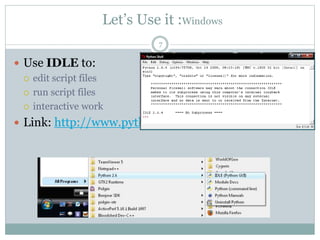
 Use IDLE to:
 edit script files
 run script files
 interactive work
 Link: http://www.python.org/download/
Let’s USE IT: Linux / UbUntu
Use IDLE
- $ apt-get install idle idle-python2.6
- $ yum install
Or, use the shell
- $ python hello.py
- $ python (for interactive work)
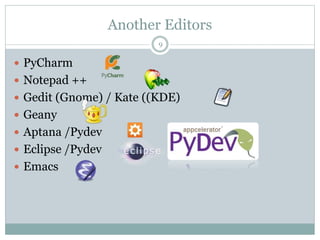
Another Editors
9
 PyCharm
 Notepad ++
 Gedit (Gnome) / Kate ((KDE)
 Geany
 Aptana /Pydev
 Eclipse /Pydev
 Emacs
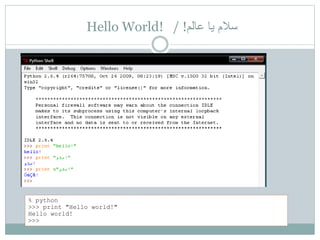
Hello World! / !‫عالم‬ ‫يا‬ ‫سالم‬
% python
>>> print "Hello world!"
Hello world!
>>>
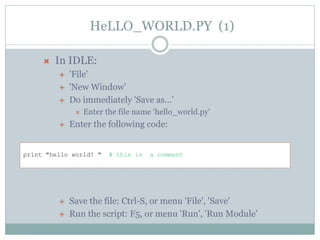
HeLLO_WORLD.PY (1)
 In IDLE:
 'File'
 'New Window'
 Do immediately 'Save as…'
 Enter the file name ‘hello_world.py'
 Enter the following code:
 Save the file: Ctrl-S, or menu 'File', 'Save'
 Run the script: F5, or menu 'Run', 'Run Module'
print "hello world! " # this is a comment
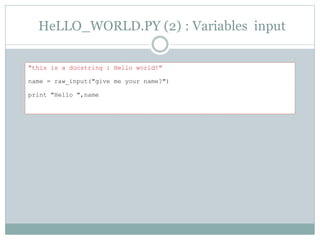
HeLLO_WORLD.PY (2) : Variables input
"this is a docstring : Hello world!"
name = raw_input("give me your name?")
print "Hello ",name
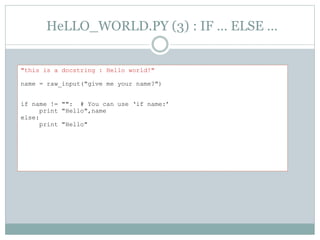
HeLLO_WORLD.PY (3) : IF … ELSE …
"this is a docstring : Hello world!"
name = raw_input("give me your name?")
if name != "": # You can use ‘if name:’
print "Hello",name
else:
print "Hello"
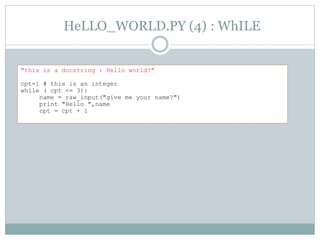
HeLLO_WORLD.PY (4) : WhILE
"this is a docstring : Hello world!"
cpt=1 # this is an integer
while ( cpt <= 3):
name = raw_input("give me your name?")
print "Hello ",name
cpt = cpt + 1
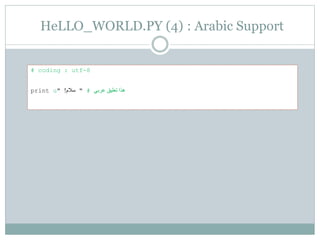
HeLLO_WORLD.PY (4) : Arabic Support
# coding : utf-8
print u" ‫سالم‬! " # ‫عربي‬ ‫تعليق‬ ‫هذا‬
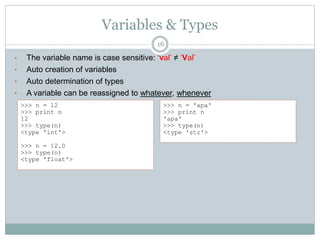
Variables & Types
16
• The variable name is case sensitive: ‘val’ ≠ ‘Val’
• Auto creation of variables
• Auto determination of types
• A variable can be reassigned to whatever, whenever
>>> n = 12
>>> print n
12
>>> type(n)
<type 'int'>
>>> n = 12.0
>>> type(n)
<type 'float'>
>>> n = 'apa'
>>> print n
'apa'
>>> type(n)
<type 'str'>
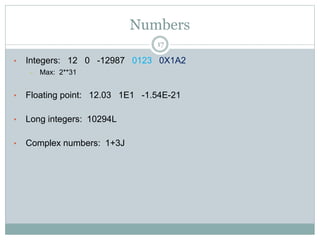
Numbers
17
• Integers: 12 0 -12987 0123 0X1A2
– Max: 2**31
• Floating point: 12.03 1E1 -1.54E-21
• Long integers: 10294L
• Complex numbers: 1+3J
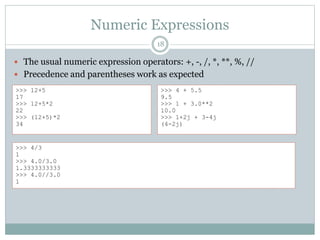
Numeric Expressions
18
 The usual numeric expression operators: +, -, /, *, **, %, //
 Precedence and parentheses work as expected
>>> 12+5
17
>>> 12+5*2
22
>>> (12+5)*2
34
>>> 4 + 5.5
9.5
>>> 1 + 3.0**2
10.0
>>> 1+2j + 3-4j
(4-2j)
>>> 4/3
1
>>> 4.0/3.0
1.3333333333
>>> 4.0//3.0
1
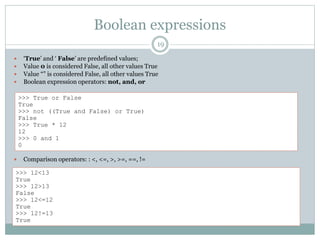
Boolean expressions
19
 ‘True’ and ‘ False’ are predefined values;
 Value 0 is considered False, all other values True
 Value “” is considered False, all other values True
 Boolean expression operators: not, and, or
 Comparison operators: : <, <=, >, >=, ==, !=
>>> True or False
True
>>> not ((True and False) or True)
False
>>> True * 12
12
>>> 0 and 1
0
>>> 12<13
True
>>> 12>13
False
>>> 12<=12
True
>>> 12!=13
True
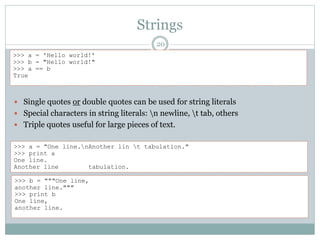
Strings
20
 Single quotes or double quotes can be used for string literals
 Special characters in string literals: n newline, t tab, others
 Triple quotes useful for large pieces of text.
>>> a = 'Hello world!'
>>> b = "Hello world!"
>>> a == b
True
>>> a = "One line.nAnother lin t tabulation."
>>> print a
One line.
Another line tabulation.
>>> b = """One line,
another line."""
>>> print b
One line,
another line.
Strings Operations
21
>>> a = "Part 1"
>>> b = "and part 2"
>>> a + ' ' + b # concatenation, adding strings
'Part 1 and part 2'
>>> s = a * 2 # repeat and concatenate string
>>> print s
Part 1Part 1
>>> s[0] # index: one single character, offset 0 (zero)
'P'
>>> s[0:4:1] # slice: part of string
'Part‘
>>> s[5:] # leave out one boundary: to the end
'1Part 1'
>>> >>> s[6:-1] # negative index counts from the end
'Part '
>>> len(s) # function ‘len’ to get length of string
12
>>> 'P' in s
True
>>> 'Part' in s # also works for substrings (new feature)
True
We can't change Strings! Why?
22
>>> s[0] = 'B'
Traceback (most recent call last):
File "<pyshell#68>", line 1, in -toplevel-
s[0] = 'B'
TypeError: object doesn't support item assignment
 A string cannot be changed in Python! Immutable
 Create new strings from bits and pieces of old
>>> s = 'B' + s[1:]
>>> s
'Bart 1Part 1'
 Recreating strings may use a lot of computing power, so use string
formating (more later)
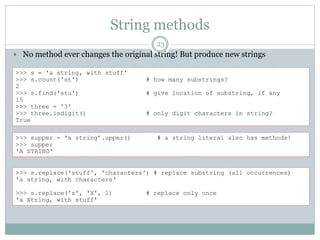
String methods
23
 No method ever changes the original string! But produce new strings
>>> s = 'a string, with stuff'
>>> s.count('st') # how many substrings?
2
>>> s.find('stu') # give location of substring, if any
15
>>> three = '3'
>>> three.isdigit() # only digit characters in string?
True
>>> supper = 'a string’.upper() # a string literal also has methods!
>>> supper
'A STRING‘
>>> s.replace('stuff', 'characters') # replace substring (all occurrences)
'a string, with characters‘
>>> s.replace('s', 'X', 1) # replace only once
'a Xtring, with stuff'
List
 Ordered collection of objects; array
 Heterogeneous; may contain mix of objects of any
type
>>> r = [1, 2.0, 3, 5] # list literal; different types of values
>>> r
[1, 2.0, 3, 5]
>>> type(r)
<type 'list'>
>>> r[1] # access by index; offset 0 (zero)
2.0
>>> r[-1] # negative index counts from end
5
>>> r[1:3] # a slice out of a list; gives another list
[2.0, 3]
>>> w = r + [10, 19] # concatenate lists; gives another list
>>> w
[1, 2.0, 3, 5, 10, 19]
>>> t = [0.0] * 10 # create an initial vector using repetition
>>> t
[0.0, 0.0, 0.0, 0.0, 0.0, 0.0, 0.0, 0.0, 0.0, 0.0]
List operations
 Lists are mutable; can be changed in-place
 Lists are dynamic; size may be changed
>>> r = [1, 2.0, 3, 5]
>>> r[3] = 'word' # replace an item by index
>>> r
[1, 2.0, 3, 'word']
>>> r[0] = [9, 8] # lists can be nested
>>> r
[[9, 8], 2.0, 3, 'word']
>>> r[0:3] = [1, 2, 5, 6] # change a slice of list; may change list length
>>> r
[1, 2, 5, 6, 'word']
>>> r[1:3] = [] # remove items by setting slice to empty list
>>> r
[1, 6, 'word']
>>> len(r) # length of list; number of items
3
>>> 6 in r # membership test
True
>>> r.index(6) # search for position; bombs if item not in list
1
List methods, part 1
 Lists have a set of built-in methods
 Some methods change the list in-place
>>> r = [1, 2.0, 3, 5]
>>> r.append('thing') # add a single item to the end
>>> r
[1, 2.0, 3, 5, 'thing']
>>> r.append(['another', 'list']) # list treated as a single item
>>> r
[1, 2.0, 3, 5, 'thing', ['another', 'list']]
>>> r = [1, 2.0, 3, 5]
>>> r.extend(['item', 'another']) # list items appended one by one
>>> r
[1, 2.0, 3, 5, 'item', 'another']
>>> k = r.pop() # remove last item from list and return
>>> k
'another'
>>> r
[1, 2.0, 3, 5, 'item']
• Methods 'append' and 'pop' can be used to implement a stack
List methods, part 2
 Use the built-in 'sort' method: efficient
 The list is sorted in-place; a new list is not produced!
>>> r = [2, 5, -1, 0, 20]
>>> r.sort()
>>> r
[-1, 0, 2, 5, 20]
>>> w = ['apa', '1', '2', '1234']
>>> w.sort() # strings: lexical sort using ASCII order
>>> w
['1', '1234', '2', 'apa']
>>> w.reverse() # how to flip a list; in-place!
>>> w
['apa', '2', '1234', '1']
>>> v = w[:] # first create a copy of the list
>>> v.reverse() # then reverse the copy
>>> v # use same technique for sort
['1', '1234', '2', 'apa']
>>> w
['apa', '2', '1234', '1']
Converting lists to strings
28
>>> s = ‘gutg' # create a string
>>> w = list(s) # convert into a list of char's
>>> w
[‘g', ‘u', ‘t', ‘g’]
>>> w.reverse()
>>> w
[‘g', ‘t', ‘u', ‘g’]
>>> r = ''.join(w) # join using empty string
>>> r
‘gtug‘
>>> d = '-'.join(w) # join using dash char
>>> d
‘g-t-u-g'
>>> s = 'a few words'
>>> w = s.split() # splits at white-space (blank, newline)
>>> w
['a', 'few', 'words']
>>> ' | '.join(w) # use any string with method 'join'
'a | few | words'
Tuple
 Same as list, except immutable
 Once created, can't be changed
 Some functions return tuples
>>> t = (1, 3, 2)
>>> t[1] # access by index; offset 0 (zero)
3
>>> (a, b, c) = t # tuple assignment (unpacking)
>>> a
1
>>> b
3
>>> a, b, c # actually a tuple expression!
(1, 3, 2)
>>> a, b = b, a # neat trick to swap values
>>> a, b
(3, 1)
>>> r = list(t) # convert tuple to a list
>>> r
[1, 3, 2]
>>> tuple(r) # convert list to a tuple
(1, 3, 2)
Mutable VS Immutable
30
Lists vs Strings
a>>> a = [1, 3, 2]
>>> b = a
>>> c = a[:]
>>> a.append(5)
>>> a , b, c
??
[1, 3, 2]
b
c [1, 3, 2]
Dictionary
 An unordered collection of key/value pairs
 Also called "mapping", "hash table" or "lookup table"
>>> h = {'key': 12, 'nyckel': 'word'}
>>> h['key'] # access by key
12
>>> h.has_key('nyckel')
True
>>> h['Per'] = 'Kraulis' # adding a key/value
>>> h
{'nyckel': 'word', 'Per': 'Kraulis', 'key': 12} # the output order is random
>>> h['Per'] = 'Johansson' # replaces the value
>>> h
{'nyckel': 'word', 'Per': 'Johansson', 'key': 12}
• The key is Usually an integer or a string
– Any key occurs at most once in a dictionary!
• The value may be any object
– Values may occur many times
Dictionary methods, part 1
>>> h = {'key': 12, 'nyckel': 'word'}
>>> 'Per' in h # test if key in dictionary
False
>>> h['Per']
Traceback (most recent call last):
File "<pyshell#192>", line 1, in -toplevel-
h['Per']
KeyError: 'Per'
>>> len(h) # number of keys in dictionary
2
>>> h.keys() # all keys in a list; unordered
['nyckel', 'key']
>>> h.values() # all values in a list; unordered
['word', 12]
>>> h.get('Per', 'unknown') # return value, or default if not found
'unknown'
>>> h.get('key', 'unknown')
12
Dictionary methods, part 2
>>> h['Per'] = 'Johansson'
>>> h
{'nyckel': 'word', 'Per': 'Johansson'}
>>> h.update(g) # add or update all key/value from g
>>> h
{'nyckel': 'word', 'key': 12, 'Per': 'Johansson'}
>>> g = h.copy() # a separate copy of the dictionary
>>> del h['key']
>>> h
{'nyckel': 'word'}
>>> g
{'nyckel': 'word', 'key': 12}
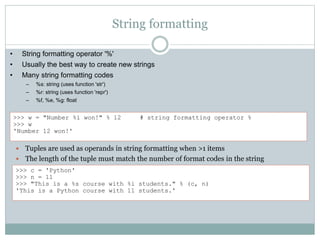
String formatting
 Tuples are used as operands in string formatting when >1 items
 The length of the tuple must match the number of format codes in the string
>>> c = 'Python'
>>> n = 11
>>> "This is a %s course with %i students." % (c, n)
'This is a Python course with 11 students.'
>>> w = "Number %i won!" % 12 # string formatting operator %
>>> w
'Number 12 won!'
• String formatting operator '%'
• Usually the best way to create new strings
• Many string formatting codes
– %s: string (uses function 'str')
– %r: string (uses function 'repr')
– %f, %e, %g: float
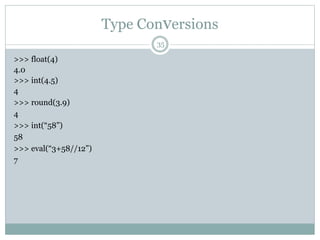
Type Conversions
35
>>> float(4)
4.0
>>> int(4.5)
4
>>> round(3.9)
4
>>> int(“58”)
58
>>> eval(“3+58//12”)
7
Statements
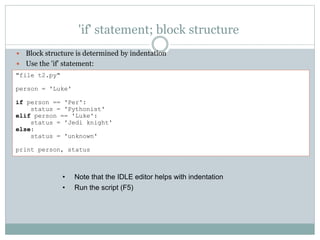
'if' statement; block structure
 Block structure is determined by indentation
 Use the 'if' statement:
• Note that the IDLE editor helps with indentation
• Run the script (F5)
"file t2.py"
person = 'Luke'
if person == 'Per':
status = 'Pythonist'
elif person == 'Luke':
status = 'Jedi knight'
else:
status = 'unknown'
print person, status
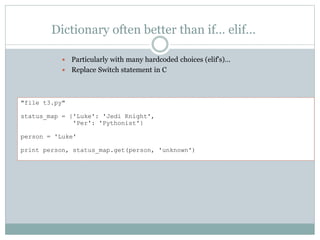
Dictionary often better than if… elif…
 Particularly with many hardcoded choices (elif's)…
 Replace Switch statement in C
"file t3.py"
status_map = {'Luke': 'Jedi Knight',
'Per': 'Pythonist'}
person = 'Luke'
print person, status_map.get(person, 'unknown')
Built-in types and their Boolean interpretations
True-1
True124
True ![False]
False[ ]list
True{'key': 'val'}
False{ }dict
True !"False"
False""str
False0.0float
False0int
• Use function 'bool' to get explicit value
'for' statement
 Iterate through a sequence (list, tuple, string, iterator)
"file t4.py"
s = 0
for i in [0, 1, 2, 3, 4, 5, 6, 7, 8]: # walk through list, assign to i
s = s + i
if s > 10:
break # quit 'for' loop, jump to after it
print "i=%i, s=%i" % (i, s)
"file t5.py"
r = []
for c in 'this is a string with blanks': # walks through string, char by char
if c == ' ': continue # skip rest of block, continue loop
r.append(c)
print ''.join(r)
Built-in functions 'range' and 'xrange'
 Built-in functions 'range' and 'xrange' useful with 'for'
 'range' creates a list
• Warning: may use lots of memory; inefficient!
 'xrange' creates an iterator, which works like a list
• Very memory-efficient!
"file t6.py"
s = 0
for i in xrange(100000):
if i % 19 == 0: # remainder: evenly divisible with 19?
s = s + i
print s
>>> range(9) # start=0, step=1 by default
[0, 1, 2, 3, 4, 5, 6, 7, 8]
>>> range(1, 12, 3) # explicit start, end, step
[1, 4, 7, 10]
>>> range(10**9) # MemoryError!
'while' statement
 Loop until test becomes false, or 'break'
"file t7.py"
r = []
n = 0
last = 20
while n <= last: # any expression interpretable as Boolean
r.append(str(n))
n += 3
print ', '.join(r)
Error handling: ’try’ and ’except’
 Run-time error normally causes execution to bomb
 The error message gives type of error
 Use a ’try’, ’except’ blocks to catch and handle errors
"file t9.py"
numbers = []
not_numbers = []
for s in ['12', '-4.1', '1.0e2', 'e3']:
try:
n = float(s)
numbers.append(s)
except ValueError, msg:
not_numbers.append(str(msg))
print 'numbers:', numbers
print 'not numbers:', not_numbers
numbers: ['12', '-4.1', '1.0e2']
not numbers: ['invalid literal for float(): e3']
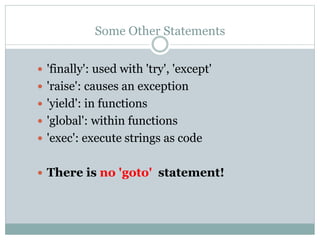
Some Other Statements
 'finally': used with 'try', 'except'
 'raise': causes an exception
 'yield': in functions
 'global': within functions
 'exec': execute strings as code
 There is no 'goto' statement!
Functions
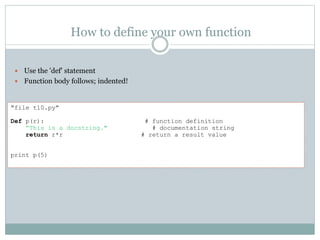
How to define your own function
 Use the 'def' statement
 Function body follows; indented!
"file t10.py"
Def p(r): # function definition
“This is a docstring." # documentation string
return r*r # return a result value
print p(5)
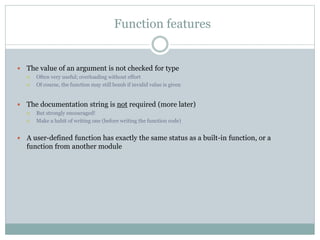
Function features
 The value of an argument is not checked for type
 Often very useful; overloading without effort
 Of course, the function may still bomb if invalid value is given
 The documentation string is not required (more later)
 But strongly encouraged!
 Make a habit of writing one (before writing the function code)
 A user-defined function has exactly the same status as a built-in function, or a
function from another module
Function arguments: fixed, variable, keywords
"file t11.py"
def fixed_args(a, c, b): # note!: order of args
"Format arguments into a string and return.“ # doc string
return "a=%s, b=%s, c=%s" % (a, b, c) # '%s' converts to string
print fixed_args('stuff', 1.2, [2, 1])
"file t12.py"
def unspec_args(a, *args): # name 'args' is a convention
return "a=%s, others=%s" % (a, args) # The ’*’ is the magical part
print unspec_args('bla', 'qwe', 23, False)
a=bla, others=('qwe', 23, False)
"file t14.py"
def keyword_args(a, b='bla', **kwargs):
return "a=%s, b=%s, kwargs=%s" % (a, b, str(kwargs))
print keyword_args('stuff', c='call', b='apa‘)
a=stuff, b=apa, kwargs={'c': 'call‘}
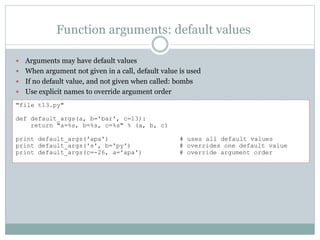
Function arguments: default values
 Arguments may have default values
 When argument not given in a call, default value is used
 If no default value, and not given when called: bombs
 Use explicit names to override argument order
"file t13.py"
def default_args(a, b='bar', c=13):
return "a=%s, b=%s, c=%s" % (a, b, c)
print default_args('apa') # uses all default values
print default_args('s', b='py') # overrides one default value
print default_args(c=-26, a='apa') # override argument order
Function arguments: explicit type checking
 Use the 'assert' statement
 Checks that its Boolean expression is True, else bombs
 Can be used for sanity checks anywhere in code
 Optional explanatory message (or data)
"file t15.py"
def fixed_args(a, c, b):
assert type(a) == type(1), "'a' must be an integer"
return "a=%s, b=%s, c=%s" % (a, b, c)
print fixed_args('a', 1.2, [2, 1])
Traceback (most recent call last):
File "C:Python testst15.py", line 8, in -toplevel-
print fixed_args('a', 1.2, [2, 1])
File "C:Python testst15.py", line 5, in fixed_args
assert type(a) == type(1), "'a' must be an integer"
AssertionError: 'a' must be an integer
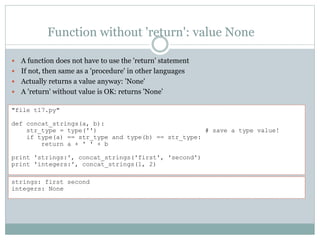
Function without 'return': value None
 A function does not have to use the 'return' statement
 If not, then same as a 'procedure' in other languages
 Actually returns a value anyway: 'None'
 A 'return' without value is OK: returns 'None’
"file t17.py"
def concat_strings(a, b):
str_type = type('') # save a type value!
if type(a) == str_type and type(b) == str_type:
return a + ' ' + b
print 'strings:', concat_strings('first', 'second')
print 'integers:', concat_strings(1, 2)
strings: first second
integers: None
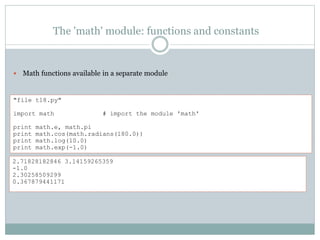
The 'math' module: functions and constants
 Math functions available in a separate module
"file t18.py"
import math # import the module 'math'
print math.e, math.pi
print math.cos(math.radians(180.0))
print math.log(10.0)
print math.exp(-1.0)
2.71828182846 3.14159265359
-1.0
2.30258509299
0.367879441171
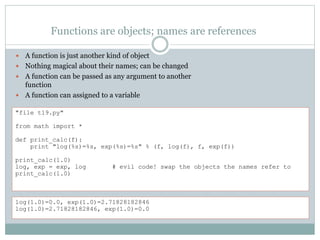
Functions are objects; names are references
 A function is just another kind of object
 Nothing magical about their names; can be changed
 A function can be passed as any argument to another
function
 A function can assigned to a variable
"file t19.py"
from math import *
def print_calc(f):
print "log(%s)=%s, exp(%s)=%s" % (f, log(f), f, exp(f))
print_calc(1.0)
log, exp = exp, log # evil code! swap the objects the names refer to
print_calc(1.0)
log(1.0)=0.0, exp(1.0)=2.71828182846
log(1.0)=2.71828182846, exp(1.0)=0.0
Built-in function ‘map’ , ‘reduce’ , ‘filter’
 Built-in functions that work on a list
 They take a function and a list
• The function must take only one argument, and return one value
• The function is applied to each value of the list
• The resulting values are returned in a list
>>> from math import *
>>> r = [0, 1, 2, 3, 4, 5, 6]
>>> map(cos, r)
[1.0, 0.54030230586813977, -0.41614683654714241, -0.98999249660044542,
-0.65364362086361194, 0.28366218546322625, 0.96017028665036597]
>>> r = [0, 1, 2, 3, 4, 5, 6]
>>> def large(x): return x>3
>>> filter(large, r)
[4, 5, 6]
>>> r = [0, 1, 2, 3, 4, 5, 6]
>>> def sum(x, y): return x+y
>>> reduce(sum, r) # (((((1+2)+3)+4)+5)+6)
21
Files: reading, writing
 A file object is created by the built-in function 'open'
 The file object has a set of methods
 The 'read' methods get data sequentially from the file
• 'read': Get the entire file (or N bytes) and return as a single string
• 'readline': Read a line (up to and including newline)
• 'readlines': Read all lines and return as a list of strings
 The 'write' method simply outputs the given string
 The string does not have to be ASCII; binary contents allowed
>>> f = open('test.txt') # by default: read-only mode
>>> line = f.readline() # read a single line
>>> line
'This is the first line.n'
>>> lines = f.readlines() # read all remaining lines
>>> lines
['This is the second.n', 'And third.n']
>>> w = open('output.txt', 'w') # write mode (text by default)
>>> w.write('stuff') # does *not* add newline automatically
>>> w.write('n')
>>> w.write('moren and even moren')
>>> w.close()
Pydev sur Eclipse
56
1. Download eclipse :
 Windows: http://www.eclipse.org/downloads/
 Debian/ubuntu: sudo apt-get install eclipse
2. Visit pydev.org & get update link
3. Add the link to eclipse & update
Modules
Modules are easy, fun, and powerful
 The module feature is the basis for Python's ability to scale to really large
software systems
 Easy to create: every Python source code file is a module!
 Features to make a module elegant:
• Doc strings
• '__name__' trick
• if __name__ == “__main__” :
• Namespace concept: “import math” , “from math import *”
 Be sure to browse the standard library modules!
• You will find extremely useful stuff there
• You will learn good coding habits
 Packages are directories of several associated modules
Documentation resources
 The Python manual
 ’Start’ > ’Programs’ > ’Python 2.6’ > ’Python Manuals’
 Tutorial
 Language Reference (heavy stuff)
 Global Module Index (very useful)
 The Module Docs (pydoc)
 Actually lists what’s on your system, including any installed 3rd party
packages (if in the module path)
 Uses the __doc__ strings in the module source code
 www.python.org
 Pointers to other sites
 ”Use the source…”
 Sometimes, the source code itself may be very useful
Object-oriented programming,
classes
Classes vs. objects (instances)
 A class is like a
• Prototype
• An object creator
 A class defines potential objects
• What their structure will be
• What they will be able to do
 Objects are instances of a class
• An object is a container of data: attributes
• An object has associated functions: methods
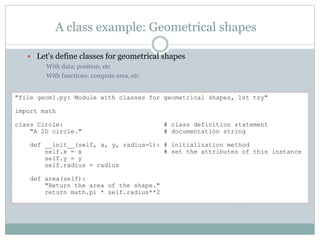
A class example: Geometrical shapes
 Let's define classes for geometrical shapes
• With data; position, etc
• With functions: compute area, etc
"file geom1.py: Module with classes for geometrical shapes, 1st try"
import math
class Circle: # class definition statement
"A 2D circle." # documentation string
def __init__(self, x, y, radius=1): # initialization method
self.x = x # set the attributes of this instance
self.y = y
self.radius = radius
def area(self):
"Return the area of the shape."
return math.pi * self.radius**2
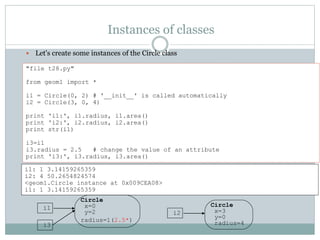
Instances of classes
 Let's create some instances of the Circle class
"file t28.py"
from geom1 import *
i1 = Circle(0, 2) # '__init__' is called automatically
i2 = Circle(3, 0, 4)
print 'i1:', i1.radius, i1.area()
print 'i2:', i2.radius, i2.area()
print str(i1)
i3=i1
i3.radius = 2.5 # change the value of an attribute
print 'i3:', i3.radius, i3.area()
i1: 1 3.14159265359
i2: 4 50.2654824574
<geom1.Circle instance at 0x009CEA08>
i1: 1 3.14159265359
i1
Circle
x=0
y=2
radius=1(2.5*)
i2
Circle
x=3
y=0
radius=4i3
Inspecting objects: dir
 Use the built-in function 'dir' to inspect
objects
 '__doc__': class documentation string
 '__class__': class for the instance
>>> type(i1)
<type 'instance'>
>>> type(Circle)
<type 'classobj'>
>>> type(i1.radius)
<type 'int'>
>>> type(i1.area)
<type 'instancemethod'>
>>> import geom1
>>> i1 = geom1.Circle(0, 0, 2)
>>> dir(i1)
['__doc__', '__init__', '__module__', 'area', 'radius', 'x', 'y']
>>> print i1.__doc__
A 2D circle.
>>> print i1.__class__
geom1.Circle
Equality between objects
 Two kinds of equality:
• Are the two objects similar in value?
• Are the two references actually pointing to the same object?
>>> a = [1, 2]
>>> b = [1, 2]
>>> a == b # test whether values are equal
True
>>> a is b # test whether objects are identical
False
>>> c = a
>>> c is a
True
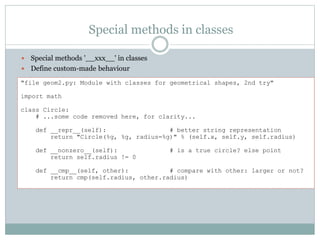
Special methods in classes
 Special methods '__xxx__' in classes
 Define custom-made behaviour
"file geom2.py: Module with classes for geometrical shapes, 2nd try"
import math
class Circle:
# ...some code removed here, for clarity...
def __repr__(self): # better string representation
return "Circle(%g, %g, radius=%g)" % (self.x, self.y, self.radius)
def __nonzero__(self): # is a true circle? else point
return self.radius != 0
def __cmp__(self, other): # compare with other: larger or not?
return cmp(self.radius, other.radius)
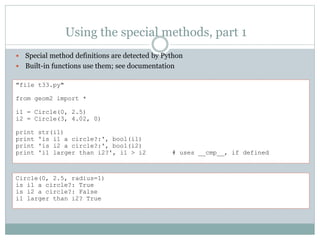
Using the special methods, part 1
 Special method definitions are detected by Python
 Built-in functions use them; see documentation
"file t33.py"
from geom2 import *
i1 = Circle(0, 2.5)
i2 = Circle(3, 4.02, 0)
print str(i1)
print 'is i1 a circle?:', bool(i1)
print 'is i2 a circle?:', bool(i2)
print 'i1 larger than i2?', i1 > i2 # uses __cmp__, if defined
Circle(0, 2.5, radius=1)
is i1 a circle?: True
is i2 a circle?: False
i1 larger than i2? True
Using the special methods, part 2
 Defining special methods may clarify code tremendously
 But: Stay reasonable 'natural'!
"file t34.py"
from geom2 import *
circles = [Circle(1, 3),
Circle(0, 0, 0.2),
Circle(-1, -1, 10.0)]
print circles # this uses 'repr', which calls __repr__
circles.sort() # this uses 'cmp', which calls __cmp__
print circles
[Circle(1, 3, radius=1), Circle(0, 0, radius=0.2), Circle(-1, -1, radius=10)]
[Circle(0, 0, radius=0.2), Circle(1, 3, radius=1), Circle(-1, -1, radius=10)]
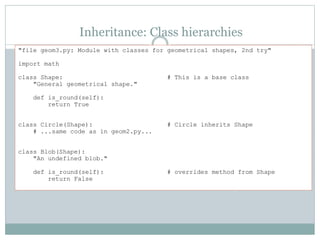
Inheritance: Class hierarchies
"file geom3.py: Module with classes for geometrical shapes, 2nd try"
import math
class Shape: # This is a base class
"General geometrical shape."
def is_round(self):
return True
class Circle(Shape): # Circle inherits Shape
# ...same code as in geom2.py...
class Blob(Shape):
"An undefined blob."
def is_round(self): # overrides method from Shape
return False
Functional programming
70
 Lambda functions
• lambda x: x+1
 Functions:
• Map,Reduce,Filter
 Instructions:
• x = beta if a else b
• [ x+1 for x in range(100)]
Standard library modules
Module 're', part 1
 Define a pattern
• The pattern syntax is very much like Perl or grep
 Apply it to a string
 Process the results
Regular expressions: advanced string patterns
import re
seq = “assem.ch@gmail.com, a_chelli@esi.dz, belouar@gmail.com, z_smahi@esi.dz , "
reg = re.compile(‘[a-z0-9_.]+@esi.dz') # compile regular expression pattern
print reg.findall(seq)
[' a_chelli@esi.dz ' , ' z_smahi@esi.dz ‘]
Module 'sys', part 1
 sys.argv
 List of command-line arguments; sys.argv[0] is script
name
 sys.path
 List of directory names, where modules are searched
for
 sys.platform
 String to identify type of computer system
>>> import sys
>>> sys.platform
'win32‘
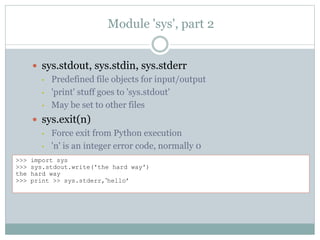
Module 'sys', part 2
 sys.stdout, sys.stdin, sys.stderr
• Predefined file objects for input/output
• 'print' stuff goes to 'sys.stdout'
• May be set to other files
 sys.exit(n)
• Force exit from Python execution
• 'n' is an integer error code, normally 0
>>> import sys
>>> sys.stdout.write('the hard way')
the hard way
>>> print >> sys.stderr,’hello’
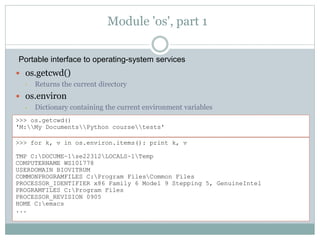
Module 'os', part 1
 os.getcwd()
• Returns the current directory
 os.environ
• Dictionary containing the current environment variables
>>> os.getcwd()
'M:My DocumentsPython coursetests'
>>> for k, v in os.environ.items(): print k, v
TMP C:DOCUME~1se22312LOCALS~1Temp
COMPUTERNAME WS101778
USERDOMAIN BIOVITRUM
COMMONPROGRAMFILES C:Program FilesCommon Files
PROCESSOR_IDENTIFIER x86 Family 6 Model 9 Stepping 5, GenuineIntel
PROGRAMFILES C:Program Files
PROCESSOR_REVISION 0905
HOME C:emacs
...
Portable interface to operating-system services
Module 'os', part 2
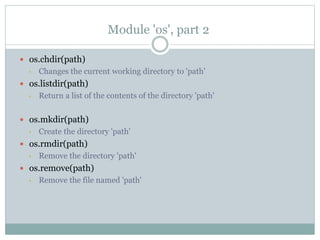
 os.chdir(path)
• Changes the current working directory to 'path'
 os.listdir(path)
• Return a list of the contents of the directory 'path'
 os.mkdir(path)
• Create the directory 'path'
 os.rmdir(path)
• Remove the directory 'path'
 os.remove(path)
• Remove the file named 'path'
Module 'os', part 3
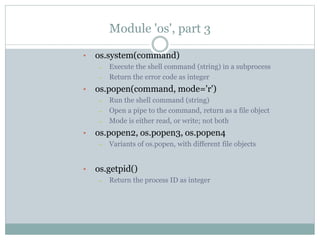
• os.system(command)
– Execute the shell command (string) in a subprocess
– Return the error code as integer
• os.popen(command, mode='r')
– Run the shell command (string)
– Open a pipe to the command, return as a file object
– Mode is either read, or write; not both
• os.popen2, os.popen3, os.popen4
– Variants of os.popen, with different file objects
• os.getpid()
– Return the process ID as integer
Module 'os.path', part 1
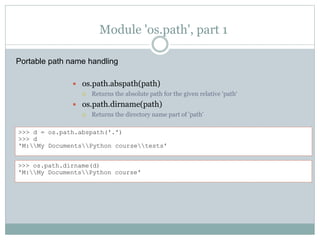
 os.path.abspath(path)
 Returns the absolute path for the given relative 'path‘
 os.path.dirname(path)
 Returns the directory name part of 'path'
>>> d = os.path.abspath('.')
>>> d
'M:My DocumentsPython coursetests'
>>> os.path.dirname(d)
'M:My DocumentsPython course'
Portable path name handling
Module 'os.path', part 2
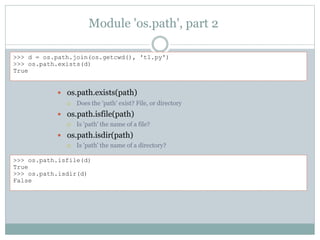
 os.path.exists(path)
 Does the 'path' exist? File, or directory
 os.path.isfile(path)
 Is 'path' the name of a file?
 os.path.isdir(path)
 Is 'path' the name of a directory?
>>> d = os.path.join(os.getcwd(), 't1.py')
>>> os.path.exists(d)
True
>>> os.path.isfile(d)
True
>>> os.path.isdir(d)
False
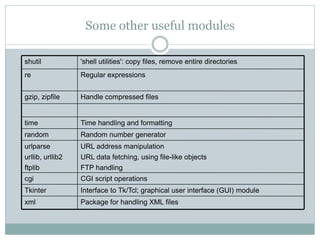
Some other useful modules
CGI script operationscgi
Package for handling XML filesxml
URL address manipulation
URL data fetching, using file-like objects
FTP handling
urlparse
urllib, urllib2
ftplib
Interface to Tk/Tcl; graphical user interface (GUI) moduleTkinter
Random number generatorrandom
Time handling and formattingtime
Handle compressed filesgzip, zipfile
Regular expressionsre
'shell utilities': copy files, remove entire directoriesshutil
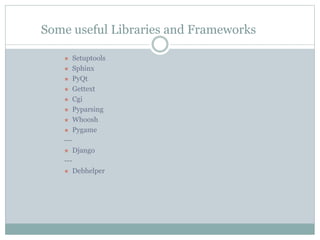
Some useful Libraries and Frameworks
 Setuptools
 Sphinx
 PyQt
 Gettext
 Cgi
 Pyparsing
 Whoosh
 Pygame
---
 Django
---
 Debhelper
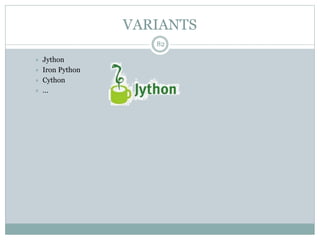
VARIANTS
82
 Jython
 Iron Python
 Cython
 …
Questions?
83
assem.ch@gmail.com
Github: assem-ch
Stackoverflow: bigOTHER
Twitter: assem_ch

Python Workshop

  • 1.
  • 2.
    What is Python? 2 Python is a programming language  Python is developed in 1989 and still developing.  Python is inspired from: • Characteristics of: Perl, Java, • Some influences of: C, C++, Scheme, Haskell, Smalltalk, Ada, Simula, ...  Official website: http://www.python.org/.
  • 3.
    Why Python? 3  Pythonis portable  Python is free  Python is recommended for :  Python syntax • very simple • very compact • easy to read
  • 4.
    Why Python? 4  Automaticmanipulation of Memory  There is no explicit pointers.  Python is – optionally - multi-threaded.  Python is – optionally - oriented-object.  There is an efficient system of exceptions
  • 5.
    WHY Python? 5  Thereare libraries for everything! • Strings and regular expressions, • UNIX standard services  files, pipes, signals, sockets, threads… • Internet protocols  Web, News, FTP, CGI, HTML…, • databases  Sqlite, MySQL, Postgres…, • Interface design.
  • 6.
    Application Domains? 6  LearningOOP.  System administration scripts  Text files analyses scripts  Web development: • CGI scripts, • Web browsers (chrome) , • Search engines (google), • Smart agents …  Access to databases  Interface design  Math and image processing.  Scientific domains  Fast prototyping of applications.
  • 7.
    Let’s Use it:Windows 7  Use IDLE to:  edit script files  run script files  interactive work  Link: http://www.python.org/download/
  • 8.
    Let’s USE IT:Linux / UbUntu Use IDLE - $ apt-get install idle idle-python2.6 - $ yum install Or, use the shell - $ python hello.py - $ python (for interactive work)
  • 9.
    Another Editors 9  PyCharm Notepad ++  Gedit (Gnome) / Kate ((KDE)  Geany  Aptana /Pydev  Eclipse /Pydev  Emacs
  • 10.
    Hello World! /!‫عالم‬ ‫يا‬ ‫سالم‬ % python >>> print "Hello world!" Hello world! >>>
  • 11.
    HeLLO_WORLD.PY (1)  InIDLE:  'File'  'New Window'  Do immediately 'Save as…'  Enter the file name ‘hello_world.py'  Enter the following code:  Save the file: Ctrl-S, or menu 'File', 'Save'  Run the script: F5, or menu 'Run', 'Run Module' print "hello world! " # this is a comment
  • 12.
    HeLLO_WORLD.PY (2) :Variables input "this is a docstring : Hello world!" name = raw_input("give me your name?") print "Hello ",name
  • 13.
    HeLLO_WORLD.PY (3) :IF … ELSE … "this is a docstring : Hello world!" name = raw_input("give me your name?") if name != "": # You can use ‘if name:’ print "Hello",name else: print "Hello"
  • 14.
    HeLLO_WORLD.PY (4) :WhILE "this is a docstring : Hello world!" cpt=1 # this is an integer while ( cpt <= 3): name = raw_input("give me your name?") print "Hello ",name cpt = cpt + 1
  • 15.
    HeLLO_WORLD.PY (4) :Arabic Support # coding : utf-8 print u" ‫سالم‬! " # ‫عربي‬ ‫تعليق‬ ‫هذا‬
  • 16.
    Variables & Types 16 •The variable name is case sensitive: ‘val’ ≠ ‘Val’ • Auto creation of variables • Auto determination of types • A variable can be reassigned to whatever, whenever >>> n = 12 >>> print n 12 >>> type(n) <type 'int'> >>> n = 12.0 >>> type(n) <type 'float'> >>> n = 'apa' >>> print n 'apa' >>> type(n) <type 'str'>
  • 17.
    Numbers 17 • Integers: 120 -12987 0123 0X1A2 – Max: 2**31 • Floating point: 12.03 1E1 -1.54E-21 • Long integers: 10294L • Complex numbers: 1+3J
  • 18.
    Numeric Expressions 18  Theusual numeric expression operators: +, -, /, *, **, %, //  Precedence and parentheses work as expected >>> 12+5 17 >>> 12+5*2 22 >>> (12+5)*2 34 >>> 4 + 5.5 9.5 >>> 1 + 3.0**2 10.0 >>> 1+2j + 3-4j (4-2j) >>> 4/3 1 >>> 4.0/3.0 1.3333333333 >>> 4.0//3.0 1
  • 19.
    Boolean expressions 19  ‘True’and ‘ False’ are predefined values;  Value 0 is considered False, all other values True  Value “” is considered False, all other values True  Boolean expression operators: not, and, or  Comparison operators: : <, <=, >, >=, ==, != >>> True or False True >>> not ((True and False) or True) False >>> True * 12 12 >>> 0 and 1 0 >>> 12<13 True >>> 12>13 False >>> 12<=12 True >>> 12!=13 True
  • 20.
    Strings 20  Single quotesor double quotes can be used for string literals  Special characters in string literals: n newline, t tab, others  Triple quotes useful for large pieces of text. >>> a = 'Hello world!' >>> b = "Hello world!" >>> a == b True >>> a = "One line.nAnother lin t tabulation." >>> print a One line. Another line tabulation. >>> b = """One line, another line.""" >>> print b One line, another line.
  • 21.
    Strings Operations 21 >>> a= "Part 1" >>> b = "and part 2" >>> a + ' ' + b # concatenation, adding strings 'Part 1 and part 2' >>> s = a * 2 # repeat and concatenate string >>> print s Part 1Part 1 >>> s[0] # index: one single character, offset 0 (zero) 'P' >>> s[0:4:1] # slice: part of string 'Part‘ >>> s[5:] # leave out one boundary: to the end '1Part 1' >>> >>> s[6:-1] # negative index counts from the end 'Part ' >>> len(s) # function ‘len’ to get length of string 12 >>> 'P' in s True >>> 'Part' in s # also works for substrings (new feature) True
  • 22.
    We can't changeStrings! Why? 22 >>> s[0] = 'B' Traceback (most recent call last): File "<pyshell#68>", line 1, in -toplevel- s[0] = 'B' TypeError: object doesn't support item assignment  A string cannot be changed in Python! Immutable  Create new strings from bits and pieces of old >>> s = 'B' + s[1:] >>> s 'Bart 1Part 1'  Recreating strings may use a lot of computing power, so use string formating (more later)
  • 23.
    String methods 23  Nomethod ever changes the original string! But produce new strings >>> s = 'a string, with stuff' >>> s.count('st') # how many substrings? 2 >>> s.find('stu') # give location of substring, if any 15 >>> three = '3' >>> three.isdigit() # only digit characters in string? True >>> supper = 'a string’.upper() # a string literal also has methods! >>> supper 'A STRING‘ >>> s.replace('stuff', 'characters') # replace substring (all occurrences) 'a string, with characters‘ >>> s.replace('s', 'X', 1) # replace only once 'a Xtring, with stuff'
  • 24.
    List  Ordered collectionof objects; array  Heterogeneous; may contain mix of objects of any type >>> r = [1, 2.0, 3, 5] # list literal; different types of values >>> r [1, 2.0, 3, 5] >>> type(r) <type 'list'> >>> r[1] # access by index; offset 0 (zero) 2.0 >>> r[-1] # negative index counts from end 5 >>> r[1:3] # a slice out of a list; gives another list [2.0, 3] >>> w = r + [10, 19] # concatenate lists; gives another list >>> w [1, 2.0, 3, 5, 10, 19] >>> t = [0.0] * 10 # create an initial vector using repetition >>> t [0.0, 0.0, 0.0, 0.0, 0.0, 0.0, 0.0, 0.0, 0.0, 0.0]
  • 25.
    List operations  Listsare mutable; can be changed in-place  Lists are dynamic; size may be changed >>> r = [1, 2.0, 3, 5] >>> r[3] = 'word' # replace an item by index >>> r [1, 2.0, 3, 'word'] >>> r[0] = [9, 8] # lists can be nested >>> r [[9, 8], 2.0, 3, 'word'] >>> r[0:3] = [1, 2, 5, 6] # change a slice of list; may change list length >>> r [1, 2, 5, 6, 'word'] >>> r[1:3] = [] # remove items by setting slice to empty list >>> r [1, 6, 'word'] >>> len(r) # length of list; number of items 3 >>> 6 in r # membership test True >>> r.index(6) # search for position; bombs if item not in list 1
  • 26.
    List methods, part1  Lists have a set of built-in methods  Some methods change the list in-place >>> r = [1, 2.0, 3, 5] >>> r.append('thing') # add a single item to the end >>> r [1, 2.0, 3, 5, 'thing'] >>> r.append(['another', 'list']) # list treated as a single item >>> r [1, 2.0, 3, 5, 'thing', ['another', 'list']] >>> r = [1, 2.0, 3, 5] >>> r.extend(['item', 'another']) # list items appended one by one >>> r [1, 2.0, 3, 5, 'item', 'another'] >>> k = r.pop() # remove last item from list and return >>> k 'another' >>> r [1, 2.0, 3, 5, 'item'] • Methods 'append' and 'pop' can be used to implement a stack
  • 27.
    List methods, part2  Use the built-in 'sort' method: efficient  The list is sorted in-place; a new list is not produced! >>> r = [2, 5, -1, 0, 20] >>> r.sort() >>> r [-1, 0, 2, 5, 20] >>> w = ['apa', '1', '2', '1234'] >>> w.sort() # strings: lexical sort using ASCII order >>> w ['1', '1234', '2', 'apa'] >>> w.reverse() # how to flip a list; in-place! >>> w ['apa', '2', '1234', '1'] >>> v = w[:] # first create a copy of the list >>> v.reverse() # then reverse the copy >>> v # use same technique for sort ['1', '1234', '2', 'apa'] >>> w ['apa', '2', '1234', '1']
  • 28.
    Converting lists tostrings 28 >>> s = ‘gutg' # create a string >>> w = list(s) # convert into a list of char's >>> w [‘g', ‘u', ‘t', ‘g’] >>> w.reverse() >>> w [‘g', ‘t', ‘u', ‘g’] >>> r = ''.join(w) # join using empty string >>> r ‘gtug‘ >>> d = '-'.join(w) # join using dash char >>> d ‘g-t-u-g' >>> s = 'a few words' >>> w = s.split() # splits at white-space (blank, newline) >>> w ['a', 'few', 'words'] >>> ' | '.join(w) # use any string with method 'join' 'a | few | words'
  • 29.
    Tuple  Same aslist, except immutable  Once created, can't be changed  Some functions return tuples >>> t = (1, 3, 2) >>> t[1] # access by index; offset 0 (zero) 3 >>> (a, b, c) = t # tuple assignment (unpacking) >>> a 1 >>> b 3 >>> a, b, c # actually a tuple expression! (1, 3, 2) >>> a, b = b, a # neat trick to swap values >>> a, b (3, 1) >>> r = list(t) # convert tuple to a list >>> r [1, 3, 2] >>> tuple(r) # convert list to a tuple (1, 3, 2)
  • 30.
    Mutable VS Immutable 30 Listsvs Strings a>>> a = [1, 3, 2] >>> b = a >>> c = a[:] >>> a.append(5) >>> a , b, c ?? [1, 3, 2] b c [1, 3, 2]
  • 31.
    Dictionary  An unorderedcollection of key/value pairs  Also called "mapping", "hash table" or "lookup table" >>> h = {'key': 12, 'nyckel': 'word'} >>> h['key'] # access by key 12 >>> h.has_key('nyckel') True >>> h['Per'] = 'Kraulis' # adding a key/value >>> h {'nyckel': 'word', 'Per': 'Kraulis', 'key': 12} # the output order is random >>> h['Per'] = 'Johansson' # replaces the value >>> h {'nyckel': 'word', 'Per': 'Johansson', 'key': 12} • The key is Usually an integer or a string – Any key occurs at most once in a dictionary! • The value may be any object – Values may occur many times
  • 32.
    Dictionary methods, part1 >>> h = {'key': 12, 'nyckel': 'word'} >>> 'Per' in h # test if key in dictionary False >>> h['Per'] Traceback (most recent call last): File "<pyshell#192>", line 1, in -toplevel- h['Per'] KeyError: 'Per' >>> len(h) # number of keys in dictionary 2 >>> h.keys() # all keys in a list; unordered ['nyckel', 'key'] >>> h.values() # all values in a list; unordered ['word', 12] >>> h.get('Per', 'unknown') # return value, or default if not found 'unknown' >>> h.get('key', 'unknown') 12
  • 33.
    Dictionary methods, part2 >>> h['Per'] = 'Johansson' >>> h {'nyckel': 'word', 'Per': 'Johansson'} >>> h.update(g) # add or update all key/value from g >>> h {'nyckel': 'word', 'key': 12, 'Per': 'Johansson'} >>> g = h.copy() # a separate copy of the dictionary >>> del h['key'] >>> h {'nyckel': 'word'} >>> g {'nyckel': 'word', 'key': 12}
  • 34.
    String formatting  Tuplesare used as operands in string formatting when >1 items  The length of the tuple must match the number of format codes in the string >>> c = 'Python' >>> n = 11 >>> "This is a %s course with %i students." % (c, n) 'This is a Python course with 11 students.' >>> w = "Number %i won!" % 12 # string formatting operator % >>> w 'Number 12 won!' • String formatting operator '%' • Usually the best way to create new strings • Many string formatting codes – %s: string (uses function 'str') – %r: string (uses function 'repr') – %f, %e, %g: float
  • 35.
    Type Conversions 35 >>> float(4) 4.0 >>>int(4.5) 4 >>> round(3.9) 4 >>> int(“58”) 58 >>> eval(“3+58//12”) 7
  • 36.
  • 37.
    'if' statement; blockstructure  Block structure is determined by indentation  Use the 'if' statement: • Note that the IDLE editor helps with indentation • Run the script (F5) "file t2.py" person = 'Luke' if person == 'Per': status = 'Pythonist' elif person == 'Luke': status = 'Jedi knight' else: status = 'unknown' print person, status
  • 38.
    Dictionary often betterthan if… elif…  Particularly with many hardcoded choices (elif's)…  Replace Switch statement in C "file t3.py" status_map = {'Luke': 'Jedi Knight', 'Per': 'Pythonist'} person = 'Luke' print person, status_map.get(person, 'unknown')
  • 39.
    Built-in types andtheir Boolean interpretations True-1 True124 True ![False] False[ ]list True{'key': 'val'} False{ }dict True !"False" False""str False0.0float False0int • Use function 'bool' to get explicit value
  • 40.
    'for' statement  Iteratethrough a sequence (list, tuple, string, iterator) "file t4.py" s = 0 for i in [0, 1, 2, 3, 4, 5, 6, 7, 8]: # walk through list, assign to i s = s + i if s > 10: break # quit 'for' loop, jump to after it print "i=%i, s=%i" % (i, s) "file t5.py" r = [] for c in 'this is a string with blanks': # walks through string, char by char if c == ' ': continue # skip rest of block, continue loop r.append(c) print ''.join(r)
  • 41.
    Built-in functions 'range'and 'xrange'  Built-in functions 'range' and 'xrange' useful with 'for'  'range' creates a list • Warning: may use lots of memory; inefficient!  'xrange' creates an iterator, which works like a list • Very memory-efficient! "file t6.py" s = 0 for i in xrange(100000): if i % 19 == 0: # remainder: evenly divisible with 19? s = s + i print s >>> range(9) # start=0, step=1 by default [0, 1, 2, 3, 4, 5, 6, 7, 8] >>> range(1, 12, 3) # explicit start, end, step [1, 4, 7, 10] >>> range(10**9) # MemoryError!
  • 42.
    'while' statement  Loopuntil test becomes false, or 'break' "file t7.py" r = [] n = 0 last = 20 while n <= last: # any expression interpretable as Boolean r.append(str(n)) n += 3 print ', '.join(r)
  • 43.
    Error handling: ’try’and ’except’  Run-time error normally causes execution to bomb  The error message gives type of error  Use a ’try’, ’except’ blocks to catch and handle errors "file t9.py" numbers = [] not_numbers = [] for s in ['12', '-4.1', '1.0e2', 'e3']: try: n = float(s) numbers.append(s) except ValueError, msg: not_numbers.append(str(msg)) print 'numbers:', numbers print 'not numbers:', not_numbers numbers: ['12', '-4.1', '1.0e2'] not numbers: ['invalid literal for float(): e3']
  • 44.
    Some Other Statements 'finally': used with 'try', 'except'  'raise': causes an exception  'yield': in functions  'global': within functions  'exec': execute strings as code  There is no 'goto' statement!
  • 45.
  • 46.
    How to defineyour own function  Use the 'def' statement  Function body follows; indented! "file t10.py" Def p(r): # function definition “This is a docstring." # documentation string return r*r # return a result value print p(5)
  • 47.
    Function features  Thevalue of an argument is not checked for type  Often very useful; overloading without effort  Of course, the function may still bomb if invalid value is given  The documentation string is not required (more later)  But strongly encouraged!  Make a habit of writing one (before writing the function code)  A user-defined function has exactly the same status as a built-in function, or a function from another module
  • 48.
    Function arguments: fixed,variable, keywords "file t11.py" def fixed_args(a, c, b): # note!: order of args "Format arguments into a string and return.“ # doc string return "a=%s, b=%s, c=%s" % (a, b, c) # '%s' converts to string print fixed_args('stuff', 1.2, [2, 1]) "file t12.py" def unspec_args(a, *args): # name 'args' is a convention return "a=%s, others=%s" % (a, args) # The ’*’ is the magical part print unspec_args('bla', 'qwe', 23, False) a=bla, others=('qwe', 23, False) "file t14.py" def keyword_args(a, b='bla', **kwargs): return "a=%s, b=%s, kwargs=%s" % (a, b, str(kwargs)) print keyword_args('stuff', c='call', b='apa‘) a=stuff, b=apa, kwargs={'c': 'call‘}
  • 49.
    Function arguments: defaultvalues  Arguments may have default values  When argument not given in a call, default value is used  If no default value, and not given when called: bombs  Use explicit names to override argument order "file t13.py" def default_args(a, b='bar', c=13): return "a=%s, b=%s, c=%s" % (a, b, c) print default_args('apa') # uses all default values print default_args('s', b='py') # overrides one default value print default_args(c=-26, a='apa') # override argument order
  • 50.
    Function arguments: explicittype checking  Use the 'assert' statement  Checks that its Boolean expression is True, else bombs  Can be used for sanity checks anywhere in code  Optional explanatory message (or data) "file t15.py" def fixed_args(a, c, b): assert type(a) == type(1), "'a' must be an integer" return "a=%s, b=%s, c=%s" % (a, b, c) print fixed_args('a', 1.2, [2, 1]) Traceback (most recent call last): File "C:Python testst15.py", line 8, in -toplevel- print fixed_args('a', 1.2, [2, 1]) File "C:Python testst15.py", line 5, in fixed_args assert type(a) == type(1), "'a' must be an integer" AssertionError: 'a' must be an integer
  • 51.
    Function without 'return':value None  A function does not have to use the 'return' statement  If not, then same as a 'procedure' in other languages  Actually returns a value anyway: 'None'  A 'return' without value is OK: returns 'None’ "file t17.py" def concat_strings(a, b): str_type = type('') # save a type value! if type(a) == str_type and type(b) == str_type: return a + ' ' + b print 'strings:', concat_strings('first', 'second') print 'integers:', concat_strings(1, 2) strings: first second integers: None
  • 52.
    The 'math' module:functions and constants  Math functions available in a separate module "file t18.py" import math # import the module 'math' print math.e, math.pi print math.cos(math.radians(180.0)) print math.log(10.0) print math.exp(-1.0) 2.71828182846 3.14159265359 -1.0 2.30258509299 0.367879441171
  • 53.
    Functions are objects;names are references  A function is just another kind of object  Nothing magical about their names; can be changed  A function can be passed as any argument to another function  A function can assigned to a variable "file t19.py" from math import * def print_calc(f): print "log(%s)=%s, exp(%s)=%s" % (f, log(f), f, exp(f)) print_calc(1.0) log, exp = exp, log # evil code! swap the objects the names refer to print_calc(1.0) log(1.0)=0.0, exp(1.0)=2.71828182846 log(1.0)=2.71828182846, exp(1.0)=0.0
  • 54.
    Built-in function ‘map’, ‘reduce’ , ‘filter’  Built-in functions that work on a list  They take a function and a list • The function must take only one argument, and return one value • The function is applied to each value of the list • The resulting values are returned in a list >>> from math import * >>> r = [0, 1, 2, 3, 4, 5, 6] >>> map(cos, r) [1.0, 0.54030230586813977, -0.41614683654714241, -0.98999249660044542, -0.65364362086361194, 0.28366218546322625, 0.96017028665036597] >>> r = [0, 1, 2, 3, 4, 5, 6] >>> def large(x): return x>3 >>> filter(large, r) [4, 5, 6] >>> r = [0, 1, 2, 3, 4, 5, 6] >>> def sum(x, y): return x+y >>> reduce(sum, r) # (((((1+2)+3)+4)+5)+6) 21
  • 55.
    Files: reading, writing A file object is created by the built-in function 'open'  The file object has a set of methods  The 'read' methods get data sequentially from the file • 'read': Get the entire file (or N bytes) and return as a single string • 'readline': Read a line (up to and including newline) • 'readlines': Read all lines and return as a list of strings  The 'write' method simply outputs the given string  The string does not have to be ASCII; binary contents allowed >>> f = open('test.txt') # by default: read-only mode >>> line = f.readline() # read a single line >>> line 'This is the first line.n' >>> lines = f.readlines() # read all remaining lines >>> lines ['This is the second.n', 'And third.n'] >>> w = open('output.txt', 'w') # write mode (text by default) >>> w.write('stuff') # does *not* add newline automatically >>> w.write('n') >>> w.write('moren and even moren') >>> w.close()
  • 56.
    Pydev sur Eclipse 56 1.Download eclipse :  Windows: http://www.eclipse.org/downloads/  Debian/ubuntu: sudo apt-get install eclipse 2. Visit pydev.org & get update link 3. Add the link to eclipse & update
  • 57.
  • 58.
    Modules are easy,fun, and powerful  The module feature is the basis for Python's ability to scale to really large software systems  Easy to create: every Python source code file is a module!  Features to make a module elegant: • Doc strings • '__name__' trick • if __name__ == “__main__” : • Namespace concept: “import math” , “from math import *”  Be sure to browse the standard library modules! • You will find extremely useful stuff there • You will learn good coding habits  Packages are directories of several associated modules
  • 59.
    Documentation resources  ThePython manual  ’Start’ > ’Programs’ > ’Python 2.6’ > ’Python Manuals’  Tutorial  Language Reference (heavy stuff)  Global Module Index (very useful)  The Module Docs (pydoc)  Actually lists what’s on your system, including any installed 3rd party packages (if in the module path)  Uses the __doc__ strings in the module source code  www.python.org  Pointers to other sites  ”Use the source…”  Sometimes, the source code itself may be very useful
  • 60.
  • 61.
    Classes vs. objects(instances)  A class is like a • Prototype • An object creator  A class defines potential objects • What their structure will be • What they will be able to do  Objects are instances of a class • An object is a container of data: attributes • An object has associated functions: methods
  • 62.
    A class example:Geometrical shapes  Let's define classes for geometrical shapes • With data; position, etc • With functions: compute area, etc "file geom1.py: Module with classes for geometrical shapes, 1st try" import math class Circle: # class definition statement "A 2D circle." # documentation string def __init__(self, x, y, radius=1): # initialization method self.x = x # set the attributes of this instance self.y = y self.radius = radius def area(self): "Return the area of the shape." return math.pi * self.radius**2
  • 63.
    Instances of classes Let's create some instances of the Circle class "file t28.py" from geom1 import * i1 = Circle(0, 2) # '__init__' is called automatically i2 = Circle(3, 0, 4) print 'i1:', i1.radius, i1.area() print 'i2:', i2.radius, i2.area() print str(i1) i3=i1 i3.radius = 2.5 # change the value of an attribute print 'i3:', i3.radius, i3.area() i1: 1 3.14159265359 i2: 4 50.2654824574 <geom1.Circle instance at 0x009CEA08> i1: 1 3.14159265359 i1 Circle x=0 y=2 radius=1(2.5*) i2 Circle x=3 y=0 radius=4i3
  • 64.
    Inspecting objects: dir Use the built-in function 'dir' to inspect objects  '__doc__': class documentation string  '__class__': class for the instance >>> type(i1) <type 'instance'> >>> type(Circle) <type 'classobj'> >>> type(i1.radius) <type 'int'> >>> type(i1.area) <type 'instancemethod'> >>> import geom1 >>> i1 = geom1.Circle(0, 0, 2) >>> dir(i1) ['__doc__', '__init__', '__module__', 'area', 'radius', 'x', 'y'] >>> print i1.__doc__ A 2D circle. >>> print i1.__class__ geom1.Circle
  • 65.
    Equality between objects Two kinds of equality: • Are the two objects similar in value? • Are the two references actually pointing to the same object? >>> a = [1, 2] >>> b = [1, 2] >>> a == b # test whether values are equal True >>> a is b # test whether objects are identical False >>> c = a >>> c is a True
  • 66.
    Special methods inclasses  Special methods '__xxx__' in classes  Define custom-made behaviour "file geom2.py: Module with classes for geometrical shapes, 2nd try" import math class Circle: # ...some code removed here, for clarity... def __repr__(self): # better string representation return "Circle(%g, %g, radius=%g)" % (self.x, self.y, self.radius) def __nonzero__(self): # is a true circle? else point return self.radius != 0 def __cmp__(self, other): # compare with other: larger or not? return cmp(self.radius, other.radius)
  • 67.
    Using the specialmethods, part 1  Special method definitions are detected by Python  Built-in functions use them; see documentation "file t33.py" from geom2 import * i1 = Circle(0, 2.5) i2 = Circle(3, 4.02, 0) print str(i1) print 'is i1 a circle?:', bool(i1) print 'is i2 a circle?:', bool(i2) print 'i1 larger than i2?', i1 > i2 # uses __cmp__, if defined Circle(0, 2.5, radius=1) is i1 a circle?: True is i2 a circle?: False i1 larger than i2? True
  • 68.
    Using the specialmethods, part 2  Defining special methods may clarify code tremendously  But: Stay reasonable 'natural'! "file t34.py" from geom2 import * circles = [Circle(1, 3), Circle(0, 0, 0.2), Circle(-1, -1, 10.0)] print circles # this uses 'repr', which calls __repr__ circles.sort() # this uses 'cmp', which calls __cmp__ print circles [Circle(1, 3, radius=1), Circle(0, 0, radius=0.2), Circle(-1, -1, radius=10)] [Circle(0, 0, radius=0.2), Circle(1, 3, radius=1), Circle(-1, -1, radius=10)]
  • 69.
    Inheritance: Class hierarchies "filegeom3.py: Module with classes for geometrical shapes, 2nd try" import math class Shape: # This is a base class "General geometrical shape." def is_round(self): return True class Circle(Shape): # Circle inherits Shape # ...same code as in geom2.py... class Blob(Shape): "An undefined blob." def is_round(self): # overrides method from Shape return False
  • 70.
    Functional programming 70  Lambdafunctions • lambda x: x+1  Functions: • Map,Reduce,Filter  Instructions: • x = beta if a else b • [ x+1 for x in range(100)]
  • 71.
  • 72.
    Module 're', part1  Define a pattern • The pattern syntax is very much like Perl or grep  Apply it to a string  Process the results Regular expressions: advanced string patterns import re seq = “assem.ch@gmail.com, a_chelli@esi.dz, belouar@gmail.com, z_smahi@esi.dz , " reg = re.compile(‘[a-z0-9_.]+@esi.dz') # compile regular expression pattern print reg.findall(seq) [' a_chelli@esi.dz ' , ' z_smahi@esi.dz ‘]
  • 73.
    Module 'sys', part1  sys.argv  List of command-line arguments; sys.argv[0] is script name  sys.path  List of directory names, where modules are searched for  sys.platform  String to identify type of computer system >>> import sys >>> sys.platform 'win32‘
  • 74.
    Module 'sys', part2  sys.stdout, sys.stdin, sys.stderr • Predefined file objects for input/output • 'print' stuff goes to 'sys.stdout' • May be set to other files  sys.exit(n) • Force exit from Python execution • 'n' is an integer error code, normally 0 >>> import sys >>> sys.stdout.write('the hard way') the hard way >>> print >> sys.stderr,’hello’
  • 75.
    Module 'os', part1  os.getcwd() • Returns the current directory  os.environ • Dictionary containing the current environment variables >>> os.getcwd() 'M:My DocumentsPython coursetests' >>> for k, v in os.environ.items(): print k, v TMP C:DOCUME~1se22312LOCALS~1Temp COMPUTERNAME WS101778 USERDOMAIN BIOVITRUM COMMONPROGRAMFILES C:Program FilesCommon Files PROCESSOR_IDENTIFIER x86 Family 6 Model 9 Stepping 5, GenuineIntel PROGRAMFILES C:Program Files PROCESSOR_REVISION 0905 HOME C:emacs ... Portable interface to operating-system services
  • 76.
    Module 'os', part2  os.chdir(path) • Changes the current working directory to 'path'  os.listdir(path) • Return a list of the contents of the directory 'path'  os.mkdir(path) • Create the directory 'path'  os.rmdir(path) • Remove the directory 'path'  os.remove(path) • Remove the file named 'path'
  • 77.
    Module 'os', part3 • os.system(command) – Execute the shell command (string) in a subprocess – Return the error code as integer • os.popen(command, mode='r') – Run the shell command (string) – Open a pipe to the command, return as a file object – Mode is either read, or write; not both • os.popen2, os.popen3, os.popen4 – Variants of os.popen, with different file objects • os.getpid() – Return the process ID as integer
  • 78.
    Module 'os.path', part1  os.path.abspath(path)  Returns the absolute path for the given relative 'path‘  os.path.dirname(path)  Returns the directory name part of 'path' >>> d = os.path.abspath('.') >>> d 'M:My DocumentsPython coursetests' >>> os.path.dirname(d) 'M:My DocumentsPython course' Portable path name handling
  • 79.
    Module 'os.path', part2  os.path.exists(path)  Does the 'path' exist? File, or directory  os.path.isfile(path)  Is 'path' the name of a file?  os.path.isdir(path)  Is 'path' the name of a directory? >>> d = os.path.join(os.getcwd(), 't1.py') >>> os.path.exists(d) True >>> os.path.isfile(d) True >>> os.path.isdir(d) False
  • 80.
    Some other usefulmodules CGI script operationscgi Package for handling XML filesxml URL address manipulation URL data fetching, using file-like objects FTP handling urlparse urllib, urllib2 ftplib Interface to Tk/Tcl; graphical user interface (GUI) moduleTkinter Random number generatorrandom Time handling and formattingtime Handle compressed filesgzip, zipfile Regular expressionsre 'shell utilities': copy files, remove entire directoriesshutil
  • 81.
    Some useful Librariesand Frameworks  Setuptools  Sphinx  PyQt  Gettext  Cgi  Pyparsing  Whoosh  Pygame ---  Django ---  Debhelper
  • 82.
    VARIANTS 82  Jython  IronPython  Cython  …
  • 83.

Editor's Notes

  • #5 Python intègre, comme Java ou les versions récentes de C++, un système d'exceptions, qui permettent de simplifier considérablement la gestion des erreurs.
  • #8 After le Bla bla, you can now open your Computers
  • #84 @Assem Merci pour votre attention… Les questions?