
Created By:
IEEE MIU SB Academic Committee
Arduino Workshop
1
PART 4: PROGRAMING 101
2
Content
 What is Programing?
 What is a Programing Language?
 How do Computers Understand Us?
 Machine Language
 Low Level Languages
 High Level Languages
 Compilation Process
 Integrated Development Environment
(IDE)
 Code::Blocks IDE
 Install Code Blocks & Start First Project
 Variables
 Variable Naming Guidelines
 Data Types
 Variable Declaration & Initialization
 Output Statement
 Input Statement
 if…else Statement
 Nested if statement
 Switch…case
 Prefix VS Postfix
 While Loop
 Program Errors
 Tasks 3
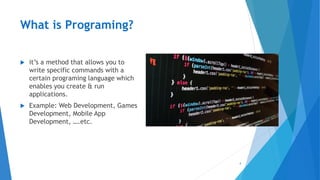
What is Programing?
 it’s a method that allows you to
write specific commands with a
certain programing language which
enables you create & run
applications.
 Example: Web Development, Games
Development, Mobile App
Development, ….etc.
4
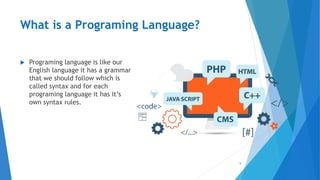
What is a Programing Language?
 Programing language is like our
English language it has a grammar
that we should follow which is
called syntax and for each
programing language it has it’s
own syntax rules.
5
How do Computers Understand Us?
 Computers can not use human languages, and programming in the
binary language of computers is a very difficult.
 Therefore, all programs are written using a programming language
which is then converted to Binary Code for the machine to
understand.
 Due to this revolution; a lot of programing languages were created
each with a different generic purpose in mind.
6
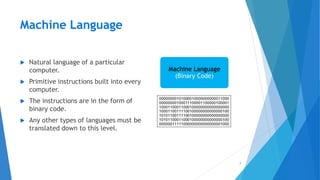
Machine Language
 Natural language of a particular
computer.
 Primitive instructions built into every
computer.
 The instructions are in the form of
binary code.
 Any other types of languages must be
translated down to this level.
7
Machine Language
(Binary Code)
Low Level Languages
 English-like Abbreviations used for operations (Load R1, R8).
 Assembly languages were developed to make programming easier.
8
Low level language
(Assembly Code)
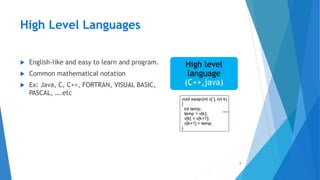
High Level Languages
 English-like and easy to learn and program.
 Common mathematical notation
 Ex: Java, C, C++, FORTRAN, VISUAL BASIC,
PASCAL, ….etc
9
High level
language
(C++,java)
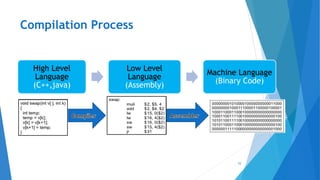
Compilation Process
10
High Level
Language
(C++,java)
Low Level
Language
(Assembly)
Machine Language
(Binary Code)
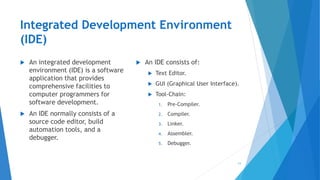
Integrated Development Environment
(IDE)
 An integrated development
environment (IDE) is a software
application that provides
comprehensive facilities to
computer programmers for
software development.
 An IDE normally consists of a
source code editor, build
automation tools, and a
debugger.
 An IDE consists of:
 Text Editor.
 GUI (Graphical User Interface).
 Tool-Chain:
1. Pre-Compiler.
2. Compiler.
3. Linker.
4. Assembler.
5. Debugger.
11
Code::Blocks IDE
 Code::Blocks is a free C, C++ and Fortran IDE built to meet the most
demanding needs of its users.
 It is designed to be very extensible and fully configurable.
12
Install Code::Blocks & Start 1st Project
13
Variables (1/2)
 Variables are used to store information to be referenced and
manipulated in a computer program.
 They provide a way of labeling data with a descriptive name, so our
programs can be understood more clearly by the reader and ourselves.
Their sole purpose is to label and store data in memory. This data can
then be used throughout your program.
14
Variables (2/2)
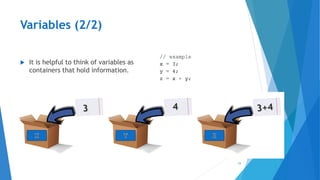
 It is helpful to think of variables as
containers that hold information.
15
Variable Naming Guidelines
16
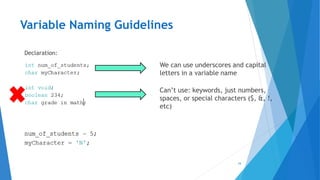
Declaration:
Initialization:
We can use underscores and capital
letters in a variable name
Can’t use: keywords, just numbers,
spaces, or special characters ($, &, !,
etc)
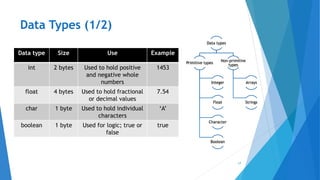
Data Types (1/2)
17
Data types
Primitive types
Integer
Float
Character
Boolean
Non-primitive
types
Arrays
Strings
Data type Size Use Example
int 2 bytes Used to hold positive
and negative whole
numbers
1453
float 4 bytes Used to hold fractional
or decimal values
7.54
char 1 byte Used to hold individual
characters
‘A’
boolean 1 byte Used for logic; true or
false
true
Data Types (2/2)
 Every variable must have two things: a data type and a name.
 Defines the kind of data the variable can hold.
 For example, can this variable hold numbers? Can it hold text?
18
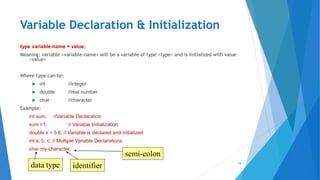
Variable Declaration & Initialization
type variable-name = value;
Meaning: variable <variable-name> will be a variable of type <type> and is initialized with value
<value>
Where type can be:
 int //integer
 double //real number
 char //character
Example:
int sum; //Variable Declaration
sum =1; // Variable Initialization
double x = 5.6; // Variable is declared and initialized
int a, b, c; // Multiple Variable Declarations
char my-character;
19
data type identifier
semi-colon
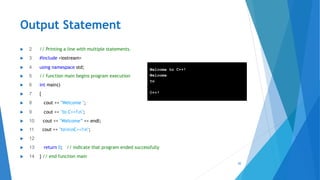
Output Statement
20
 2 // Printing a line with multiple statements.
 3 #include <iostream>
 4 using namespace std;
 5 // function main begins program execution
 6 int main()
 7 {
 8 cout << "Welcome ";
 9 cout << "to C++!n";
 10 cout << "Welcome” << endl;
 11 cout << "tonnC++!n";
 12
 13 return 0; // indicate that program ended successfully
 14 } // end function main
Welcome to C++!
Welcome
to
C++!
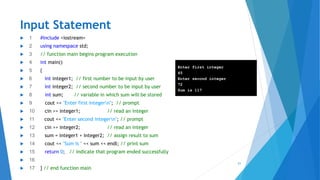
Input Statement
21
 1 #include <iostream>
 2 using namespace std;
 3 // function main begins program execution
 4 int main()
 5 {
 6 int integer1; // first number to be input by user
 7 int integer2; // second number to be input by user
 8 int sum; // variable in which sum will be stored
 9 cout << "Enter first integern"; // prompt
 10 cin >> integer1; // read an integer
 11 cout << "Enter second integern"; // prompt
 12 cin >> integer2; // read an integer
 13 sum = integer1 + integer2; // assign result to sum
 14 cout << "Sum is " << sum << endl; // print sum
 15 return 0; // indicate that program ended successfully
 16
 17 } // end function main
Enter first integer
45
Enter second integer
72
Sum is 117
if…else Statement (1/5)
22
if (Condition) {
S1;
}
else if(Condition){
S2;
}
else{
S3;
}
if…else Statement (2/5)
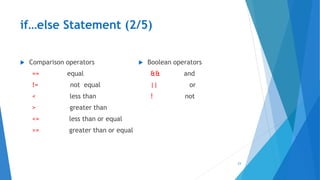
 Comparison operators
== equal
!= not equal
< less than
> greater than
<= less than or equal
>= greater than or equal
 Boolean operators
&& and
|| or
! not
23
if…else Statement (3/5)
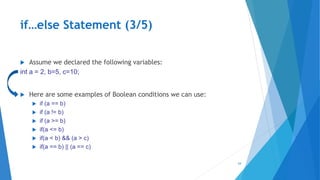
 Assume we declared the following variables:
int a = 2, b=5, c=10;
 Here are some examples of Boolean conditions we can use:
 if (a == b)
 if (a != b)
 if (a >= b)
 if(a <= b)
 if(a < b) && (a > c)
 if(a == b) || (a == c)
24
if…else Statement (4/5)
25
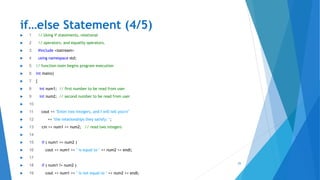
 1 // Using if statements, relational
 2 // operators, and equality operators.
 3 #include <iostream>
 4 using namespace std;
 5 // function main begins program execution
 6 int main()
 7 {
 8 int num1; // first number to be read from user
 9 int num2; // second number to be read from user
 10
 11 cout << "Enter two integers, and I will tell youn"
 12 << "the relationships they satisfy: ";
 13 cin >> num1 >> num2; // read two integers
 14
 15 if ( num1 == num2 )
 16 cout << num1 << " is equal to " << num2 << endl;
 17
 18 if ( num1 != num2 )
 19 cout << num1 << " is not equal to " << num2 << endl;
if…else Statement (5/5)
26
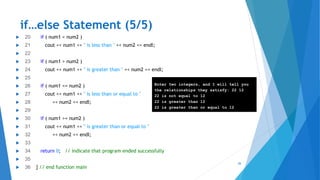
 20 if ( num1 < num2 )
 21 cout << num1 << " is less than " << num2 << endl;
 22
 23 if ( num1 > num2 )
 24 cout << num1 << " is greater than " << num2 << endl;
 25
 26 if ( num1 <= num2 )
 27 cout << num1 << " is less than or equal to "
 28 << num2 << endl;
 29
 30 if ( num1 >= num2 )
 31 cout << num1 << " is greater than or equal to "
 32 << num2 << endl;
 33
 34 return 0; // indicate that program ended successfully
 35
 36 } // end function main
Enter two integers, and I will tell you
the relationships they satisfy: 22 12
22 is not equal to 12
22 is greater than 12
22 is greater than or equal to 12
Nested if Statement
27
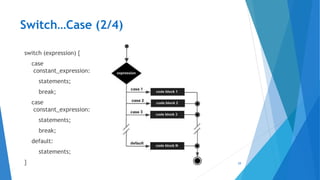
Switch…Case (1/4)
 Often you want to do a series of tests:
 if i==0 … else if i==1 …. else if i==2 … else if i==3 ….
 C++ provides the switch statement to help in this situation
 It allows you to specify a large set of cases you want to be able to match,
yet works efficiently to find and execute the particular case matched.
28
Switch…Case (2/4)
29
switch (expression) {
case
constant_expression:
statements;
break;
case
constant_expression:
statements;
break;
default:
statements;
}
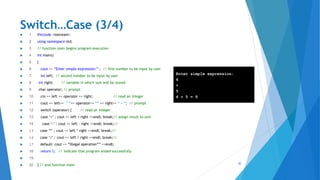
Switch…Case (3/4)
30
 1 #include <iostream>
 2 using namespace std;
 3 // function main begins program execution
 4 int main()
 5 {
 6 cout << “Enter simple expression:” ; // first number to be input by user
 7 int left; // second number to be input by user
 8 int right; // variable in which sum will be stored
 9 char operator; // prompt
 10 cin >> left >> operator >> right; // read an integer
 11 cout << left<< “ “<< operator<< “” << right<< “ = “; // prompt
 12 switch (operator) { // read an integer
 13 case ‘+’ : cout << left + right <<endl; break;// assign result to sum
 14 case ‘-’ : cout << left - right <<endl; break;//
 15 case ‘*’ : cout << left * right <<endl; break;//
 16 case ‘/’ : cout << left / right <<endl; break;//
 17 default: cout << “Illegal operation”” <<endl;
 18 return 0; // indicate that program ended successfully
 19
 20 } // end function main
Enter simple expression:
4
+
5
4 + 5 = 9
Switch…Case (4/4)
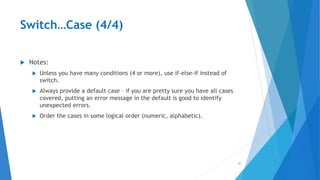
 Notes:
 Unless you have many conditions (4 or more), use if-else-if instead of
switch.
 Always provide a default case – if you are pretty sure you have all cases
covered, putting an error message in the default is good to identify
unexpected errors.
 Order the cases in some logical order (numeric, alphabetic).
31
Prefix VS Postfix
 Increment then use the variable
 Sum = ++count
 Use the variable then increment
 Sum = count++
32
count
10
11
sum
0
11
Before
After
count
10
11
sum
0
10
Before
After
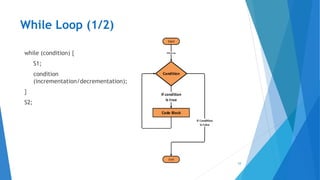
While Loop (1/2)
33
while (condition) {
S1;
condition
(incrementation/decrementation);
}
S2;
While Loop (2/2)
//read 100 numbers from the user and output their sum
#include <iostream.h>
void main() {
int i, sum, x;
sum=0;
i=1;
while (i <= 100) {
cin >> x;
sum = sum + x;
i = i+1;
}
cout << “sum is “ << sum << endl;
}
34
Program Errors
35
 Syntax Errors:
 Errors in grammar of the language.
 Runtime error:
 When there are no syntax errors, but the program can’t complete
execution:
 Divide by zero.
 Invalid input data.
 Logical errors:
 The program completes execution, but delivers incorrect results.
 Incorrect usage of parentheses.
Tasks
 Write a program that takes 3 integer numbers from the user & outputs the
greatest integer number without using any conditional statements.
 Write a program that performs a swapping code without using a temporary
variable.
 Output a pyramid shape of asterisks “*”. (Hint: Use cout + Loops + if
statement)
 Make a Calculator using C++ Code on Code::Blocks.
36

4. programing 101

  • 1.
    Created By: IEEE MIUSB Academic Committee Arduino Workshop 1
  • 2.
  • 3.
    Content  What isPrograming?  What is a Programing Language?  How do Computers Understand Us?  Machine Language  Low Level Languages  High Level Languages  Compilation Process  Integrated Development Environment (IDE)  Code::Blocks IDE  Install Code Blocks & Start First Project  Variables  Variable Naming Guidelines  Data Types  Variable Declaration & Initialization  Output Statement  Input Statement  if…else Statement  Nested if statement  Switch…case  Prefix VS Postfix  While Loop  Program Errors  Tasks 3
  • 4.
    What is Programing? it’s a method that allows you to write specific commands with a certain programing language which enables you create & run applications.  Example: Web Development, Games Development, Mobile App Development, ….etc. 4
  • 5.
    What is aPrograming Language?  Programing language is like our English language it has a grammar that we should follow which is called syntax and for each programing language it has it’s own syntax rules. 5
  • 6.
    How do ComputersUnderstand Us?  Computers can not use human languages, and programming in the binary language of computers is a very difficult.  Therefore, all programs are written using a programming language which is then converted to Binary Code for the machine to understand.  Due to this revolution; a lot of programing languages were created each with a different generic purpose in mind. 6
  • 7.
    Machine Language  Naturallanguage of a particular computer.  Primitive instructions built into every computer.  The instructions are in the form of binary code.  Any other types of languages must be translated down to this level. 7 Machine Language (Binary Code)
  • 8.
    Low Level Languages English-like Abbreviations used for operations (Load R1, R8).  Assembly languages were developed to make programming easier. 8 Low level language (Assembly Code)
  • 9.
    High Level Languages English-like and easy to learn and program.  Common mathematical notation  Ex: Java, C, C++, FORTRAN, VISUAL BASIC, PASCAL, ….etc 9 High level language (C++,java)
  • 10.
    Compilation Process 10 High Level Language (C++,java) LowLevel Language (Assembly) Machine Language (Binary Code)
  • 11.
    Integrated Development Environment (IDE) An integrated development environment (IDE) is a software application that provides comprehensive facilities to computer programmers for software development.  An IDE normally consists of a source code editor, build automation tools, and a debugger.  An IDE consists of:  Text Editor.  GUI (Graphical User Interface).  Tool-Chain: 1. Pre-Compiler. 2. Compiler. 3. Linker. 4. Assembler. 5. Debugger. 11
  • 12.
    Code::Blocks IDE  Code::Blocksis a free C, C++ and Fortran IDE built to meet the most demanding needs of its users.  It is designed to be very extensible and fully configurable. 12
  • 13.
    Install Code::Blocks &Start 1st Project 13
  • 14.
    Variables (1/2)  Variablesare used to store information to be referenced and manipulated in a computer program.  They provide a way of labeling data with a descriptive name, so our programs can be understood more clearly by the reader and ourselves. Their sole purpose is to label and store data in memory. This data can then be used throughout your program. 14
  • 15.
    Variables (2/2)  Itis helpful to think of variables as containers that hold information. 15
  • 16.
    Variable Naming Guidelines 16 Declaration: Initialization: Wecan use underscores and capital letters in a variable name Can’t use: keywords, just numbers, spaces, or special characters ($, &, !, etc)
  • 17.
    Data Types (1/2) 17 Datatypes Primitive types Integer Float Character Boolean Non-primitive types Arrays Strings Data type Size Use Example int 2 bytes Used to hold positive and negative whole numbers 1453 float 4 bytes Used to hold fractional or decimal values 7.54 char 1 byte Used to hold individual characters ‘A’ boolean 1 byte Used for logic; true or false true
  • 18.
    Data Types (2/2) Every variable must have two things: a data type and a name.  Defines the kind of data the variable can hold.  For example, can this variable hold numbers? Can it hold text? 18
  • 19.
    Variable Declaration &Initialization type variable-name = value; Meaning: variable <variable-name> will be a variable of type <type> and is initialized with value <value> Where type can be:  int //integer  double //real number  char //character Example: int sum; //Variable Declaration sum =1; // Variable Initialization double x = 5.6; // Variable is declared and initialized int a, b, c; // Multiple Variable Declarations char my-character; 19 data type identifier semi-colon
  • 20.
    Output Statement 20  2// Printing a line with multiple statements.  3 #include <iostream>  4 using namespace std;  5 // function main begins program execution  6 int main()  7 {  8 cout << "Welcome ";  9 cout << "to C++!n";  10 cout << "Welcome” << endl;  11 cout << "tonnC++!n";  12  13 return 0; // indicate that program ended successfully  14 } // end function main Welcome to C++! Welcome to C++!
  • 21.
    Input Statement 21  1#include <iostream>  2 using namespace std;  3 // function main begins program execution  4 int main()  5 {  6 int integer1; // first number to be input by user  7 int integer2; // second number to be input by user  8 int sum; // variable in which sum will be stored  9 cout << "Enter first integern"; // prompt  10 cin >> integer1; // read an integer  11 cout << "Enter second integern"; // prompt  12 cin >> integer2; // read an integer  13 sum = integer1 + integer2; // assign result to sum  14 cout << "Sum is " << sum << endl; // print sum  15 return 0; // indicate that program ended successfully  16  17 } // end function main Enter first integer 45 Enter second integer 72 Sum is 117
  • 22.
    if…else Statement (1/5) 22 if(Condition) { S1; } else if(Condition){ S2; } else{ S3; }
  • 23.
    if…else Statement (2/5) Comparison operators == equal != not equal < less than > greater than <= less than or equal >= greater than or equal  Boolean operators && and || or ! not 23
  • 24.
    if…else Statement (3/5) Assume we declared the following variables: int a = 2, b=5, c=10;  Here are some examples of Boolean conditions we can use:  if (a == b)  if (a != b)  if (a >= b)  if(a <= b)  if(a < b) && (a > c)  if(a == b) || (a == c) 24
  • 25.
    if…else Statement (4/5) 25 1 // Using if statements, relational  2 // operators, and equality operators.  3 #include <iostream>  4 using namespace std;  5 // function main begins program execution  6 int main()  7 {  8 int num1; // first number to be read from user  9 int num2; // second number to be read from user  10  11 cout << "Enter two integers, and I will tell youn"  12 << "the relationships they satisfy: ";  13 cin >> num1 >> num2; // read two integers  14  15 if ( num1 == num2 )  16 cout << num1 << " is equal to " << num2 << endl;  17  18 if ( num1 != num2 )  19 cout << num1 << " is not equal to " << num2 << endl;
  • 26.
    if…else Statement (5/5) 26 20 if ( num1 < num2 )  21 cout << num1 << " is less than " << num2 << endl;  22  23 if ( num1 > num2 )  24 cout << num1 << " is greater than " << num2 << endl;  25  26 if ( num1 <= num2 )  27 cout << num1 << " is less than or equal to "  28 << num2 << endl;  29  30 if ( num1 >= num2 )  31 cout << num1 << " is greater than or equal to "  32 << num2 << endl;  33  34 return 0; // indicate that program ended successfully  35  36 } // end function main Enter two integers, and I will tell you the relationships they satisfy: 22 12 22 is not equal to 12 22 is greater than 12 22 is greater than or equal to 12
  • 27.
  • 28.
    Switch…Case (1/4)  Oftenyou want to do a series of tests:  if i==0 … else if i==1 …. else if i==2 … else if i==3 ….  C++ provides the switch statement to help in this situation  It allows you to specify a large set of cases you want to be able to match, yet works efficiently to find and execute the particular case matched. 28
  • 29.
    Switch…Case (2/4) 29 switch (expression){ case constant_expression: statements; break; case constant_expression: statements; break; default: statements; }
  • 30.
    Switch…Case (3/4) 30  1#include <iostream>  2 using namespace std;  3 // function main begins program execution  4 int main()  5 {  6 cout << “Enter simple expression:” ; // first number to be input by user  7 int left; // second number to be input by user  8 int right; // variable in which sum will be stored  9 char operator; // prompt  10 cin >> left >> operator >> right; // read an integer  11 cout << left<< “ “<< operator<< “” << right<< “ = “; // prompt  12 switch (operator) { // read an integer  13 case ‘+’ : cout << left + right <<endl; break;// assign result to sum  14 case ‘-’ : cout << left - right <<endl; break;//  15 case ‘*’ : cout << left * right <<endl; break;//  16 case ‘/’ : cout << left / right <<endl; break;//  17 default: cout << “Illegal operation”” <<endl;  18 return 0; // indicate that program ended successfully  19  20 } // end function main Enter simple expression: 4 + 5 4 + 5 = 9
  • 31.
    Switch…Case (4/4)  Notes: Unless you have many conditions (4 or more), use if-else-if instead of switch.  Always provide a default case – if you are pretty sure you have all cases covered, putting an error message in the default is good to identify unexpected errors.  Order the cases in some logical order (numeric, alphabetic). 31
  • 32.
    Prefix VS Postfix Increment then use the variable  Sum = ++count  Use the variable then increment  Sum = count++ 32 count 10 11 sum 0 11 Before After count 10 11 sum 0 10 Before After
  • 33.
    While Loop (1/2) 33 while(condition) { S1; condition (incrementation/decrementation); } S2;
  • 34.
    While Loop (2/2) //read100 numbers from the user and output their sum #include <iostream.h> void main() { int i, sum, x; sum=0; i=1; while (i <= 100) { cin >> x; sum = sum + x; i = i+1; } cout << “sum is “ << sum << endl; } 34
  • 35.
    Program Errors 35  SyntaxErrors:  Errors in grammar of the language.  Runtime error:  When there are no syntax errors, but the program can’t complete execution:  Divide by zero.  Invalid input data.  Logical errors:  The program completes execution, but delivers incorrect results.  Incorrect usage of parentheses.
  • 36.
    Tasks  Write aprogram that takes 3 integer numbers from the user & outputs the greatest integer number without using any conditional statements.  Write a program that performs a swapping code without using a temporary variable.  Output a pyramid shape of asterisks “*”. (Hint: Use cout + Loops + if statement)  Make a Calculator using C++ Code on Code::Blocks. 36