Server Side Scripts
The original Web
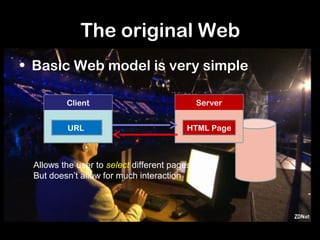
• Basic Web model is very simple

         Client                              Server


         URL                             HTML Page


 Allows the user to select different pages
 But doesn’t allow for much interaction
The interactive Web
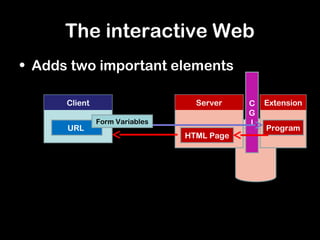
• Adds two important elements

      Client                      Server    C   Extension
                                            G
               Form Variables               I
      URL                                       Program
                                HTML Page
Client Side
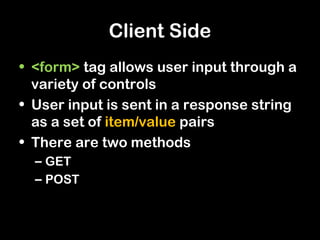
• <form> tag allows user input through a
  variety of controls
• User input is sent in a response string
  as a set of item/value pairs
• There are two methods
  – GET
  – POST
Server side
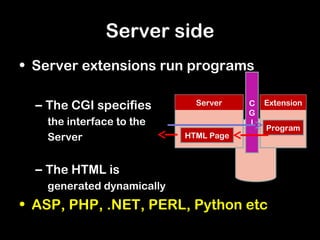
• Server extensions run programs

  – The CGI specifies        Server    C   Extension
                                       G
   the interface to the                I
                                           Program
   Server                  HTML Page


  – The HTML is
   generated dynamically
• ASP, PHP, .NET, PERL, Python etc
Example using GET
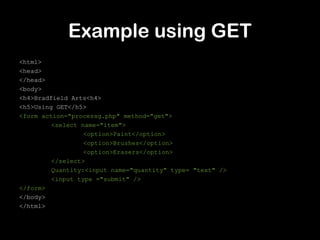
<html>
<head>
</head>
<body>
<h4>Bradfield Arts<h4>
<h5>Using GET</h5>
<form action="processg.php" method="get">
         <select name="item">
                  <option>Paint</option>
                  <option>Brushes</option>
                  <option>Erasers</option>
         </select>
         Quantity:<input name="quantity" type= "text" />
         <input type ="submit" />
</form>
</body>
</html>
Example using GET
<html>
<head>
</head>
<body>
<br>
<?php $quantity = $_GET['quantity'];
$item = $_GET['item'];

echo "You used GET to order ".$quantity." ".$item."<br/>";
echo "Look at the URL!";
echo "Thank you";
?>
</body>
</html>

Server side scripts

  • 1.
  • 2.
    The original Web •Basic Web model is very simple Client Server URL HTML Page Allows the user to select different pages But doesn’t allow for much interaction
  • 3.
    The interactive Web •Adds two important elements Client Server C Extension G Form Variables I URL Program HTML Page
  • 4.
    Client Side • <form>tag allows user input through a variety of controls • User input is sent in a response string as a set of item/value pairs • There are two methods – GET – POST
  • 5.
    Server side • Serverextensions run programs – The CGI specifies Server C Extension G the interface to the I Program Server HTML Page – The HTML is generated dynamically • ASP, PHP, .NET, PERL, Python etc
  • 6.
    Example using GET <html> <head> </head> <body> <h4>BradfieldArts<h4> <h5>Using GET</h5> <form action="processg.php" method="get"> <select name="item"> <option>Paint</option> <option>Brushes</option> <option>Erasers</option> </select> Quantity:<input name="quantity" type= "text" /> <input type ="submit" /> </form> </body> </html>
  • 7.
    Example using GET <html> <head> </head> <body> <br> <?php$quantity = $_GET['quantity']; $item = $_GET['item']; echo "You used GET to order ".$quantity." ".$item."<br/>"; echo "Look at the URL!"; echo "Thank you"; ?> </body> </html>