Proposed Framework for Gamifying
Research Activities
Shigeki Ohira† Saya Sugiura‡ Katashi Nagao‡
†Information Technology Center, Nagoya University
‡Graduate School of Information Science, Nagoya University
E-mail: ohira@nagoya-u.jp
10/7/2015 TEEM2015
Technological Ecosystems for Enhancing Multiculturality (TEEM’15)
Track 4. Gamification Ecosystems
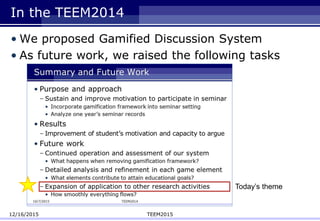
In the TEEM2014
• We proposed Gamified Discussion System
• As future work, we raised the following tasks
12/16/2015 TEEM2015
Today’s theme
Introduction
• Research activities
– Survey, seminar, experiment, writing paper, etc.
– Steady works
– Sometimes going well and other times not so well
– Often continue without immediate visible results
• For students in research laboratory
– Desirable to increase motivation naturally
• Best way is to enjoy research itself
– Difficult to maintain a high level of motivation
• Until research is on track and everyday tasks become more
interesting
12/16/2015 TEEM2015
Purpose and Approach
• Establish comprehensive gamification framework
for general research activities
• Provide a research activity platform
– Carefully recording, organizing and visualizing activities
by attaching reciprocal relations
• Organizing issues and tasks arising in discussion
• Visualizing results when issues & tasks transition to real actions
• Introduce a gamification framework for activities
– Break down research into detailed activities
– Help maintain the cycle of research activity
12/16/2015 TEEM2015
Study Assumptions
• Gamification is not a panacea for motivation
• What is important for primary research activities
– Discussion within research group
– Setting appropriate issues and tasks on students’ own
• Focus on discussion
– Clarify what must be done in everyday research activity
– Organize issues and tasks based on opinions and advice
12/16/2015 TEEM2015
Gamification Framework for Research Activity
• Classify various actions in research activity
• Apply gamification to give appropriate feedback
for each action
• Define gamification framework
– Eight game design elements:
• Goals: Step-by-step goal setting
• Visualization: Show student’s changing status and progress
• Rules: Enable users in research laboratory to evaluate one another
• Design: Provide rewards for using system
• Social: Promote competition and cooperation among users
• Tutorial: Familiarize novices with how to use system
• Difficulty adjustment: Adjust degree of difficulty and complexity of goals
• Play cycle: Perpetuate cycle from goal setting, to action, to accomplishment
Research Activities and Actions
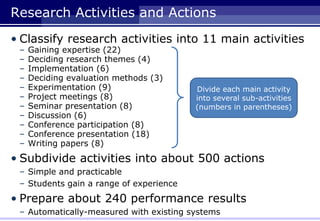
• Classify research activities into 11 main activities
– Gaining expertise (22)
– Deciding research themes (4)
– Implementation (6)
– Deciding evaluation methods (3)
– Experimentation (9)
– Project meetings (8)
– Seminar presentation (8)
– Discussion (6)
– Conference participation (8)
– Conference presentation (18)
– Writing papers (8)
• Subdivide activities into about 500 actions
– Simple and practicable
– Students gain a range of experience
• Prepare about 240 performance results
– Automatically-measured with existing systems
Divide each main activity
into several sub-activities
(numbers in parentheses)
Research Activity Map:
Activity Tree and Action-Result Graphs
Gaining expertiseConference presentation
Deciding
Research
themes
Implementation
Deciding
Evaluation
methods
Experimentation
Project meetings
Seminar presentation
Discussion
Conference participation
Writing papers
e.g.) Discussion (main activity)
Main activity
Sub-activities
Actions
Results
• [Discussion]→[Ask question at seminar]
– Actions: Ask <*> questions
– Results: Asked <*> questions,
Cumulative question number has topped <**> times
Discussion
e.g.) Programming
Actions
Results
Implementation
Main activity
Sub-activities
Programming
• [Gaining expertise],[Implementation]→[Programming]
– Actions: Write server/client program, Write I/O process of DB
– Results: Committed <*> times, Wrote <**> lines of code,
Cumulative total of code has topped <***> lines, …
Gaining expertise
(sub-activity of Gaining expertise
and Implementation)
Research Activity Concierge (prototype)
• Three basic tools
– Research Activity Organizer/Visualizer/Watchdog
• RAO
– Organizing issues and tasks
based on
seminar content
• RAV
– Visualizing research
activity based on
performance of
issues and tasks
• RAW
– Monitoring
information I/O
from RAO and RAV
– Give information feedback
Research Activity Concierge
RAO
Research Activity Map
Setting actions
Users
RAVRAW
External tools and systems
(proprietary and commercial software)
Research Activities
Contents
server Selecting
statements
Organizing statements
Seminar
contents
Storing data
Changing status
and visualization
Notifying stats and
recommendation
Collecting of
activity log
Running actions
Mutual
evaluation
User’s process
System process
Check
progress
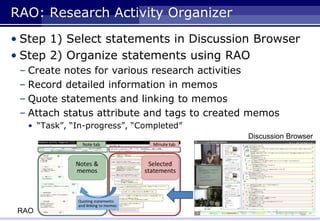
RAO: Research Activity Organizer
• Step 1) Select statements in Discussion Browser
• Step 2) Organize statements using RAO
– Create notes for various research activities
– Record detailed information in memos
– Quote statements and linking to memos
– Attach status attribute and tags to created memos
• “Task”, “In-progress”, “Completed”
Discussion Browser
RAO
RAV: Research Activity Visualizer
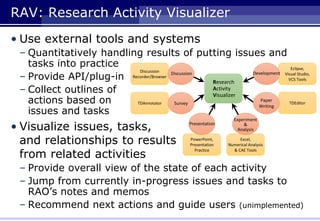
• Use external tools and systems
– Quantitatively handling results of putting issues and
tasks into practice
– Provide API/plug-in
– Collect outlines of
actions based on
issues and tasks
• Visualize issues, tasks,
and relationships to results
from related activities
– Provide overall view of the state of each activity
– Jump from currently in-progress issues and tasks to
RAO’s notes and memos
– Recommend next actions and guide users (unimplemented)
TDAnnotator TDEditor
Eclipse,
Visual Studio,
VCS Tools
Discussion
Recorder/Browser
Research
Activity
Visualizer
Paper
Writing
Survey
Excel,
Numerical Analysis
& CAE Tools
PowerPoint,
Presentation
Practice
Development
Presentation
Discussion
Experiment
&
Analysis
RAW: Research Activity Watchdog
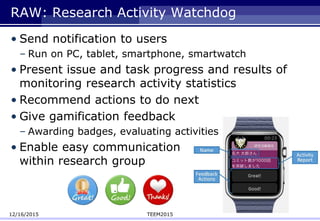
• Send notification to users
– Run on PC, tablet, smartphone, smartwatch
• Present issue and task progress and results of
monitoring research activity statistics
• Recommend actions to do next
• Give gamification feedback
– Awarding badges, evaluating activities
• Enable easy communication
within research group
12/16/2015 TEEM2015
RAC MyPage
Use Case and Ongoing Data Collection
You should create API
for paper writing.
[Note]
“Development tasks”
[Memo]
Editor hook
RAV
Run action
“Create script”
Summarize work,
describe memo,
make self-assessment
RAW
Send notification
Evaluate results
of activity
Feedback
Organize statements
Create note/memo
Discussion
User
Others
Commit to server
・ Seminar content
・ Notes, memos
・ Source code
・ Logs
- Action
- Evaluation
- UI operation
Select action
“Write server program”
Check stats/badges,
use items
Check progress
and feedback
RAO
RAO
Summary and Future Work
• Summary
– Introduction of comprehensive gamification framework
for general research activity
– Development of prototype system
“Research Activity Concierge”
• Future task
– Verify effectiveness of proposed gamification framework
through practical use
• Compare the amount of activity with/without system use
• Verify the cost and effectiveness of mutual evaluation
※ Now under test operation.
Plan to start operation in Oct. 2015 (2nd semester beginning in Japan)
12/16/2015 TEEM2015
Obrigado pela sua atenção
THANK YOU FOR YOUR ATTENTION
Preliminary Slides SLIDES
12/16/2015 TEEM2015
Evaluation of Action as Goal Setting
• Three types
– Self-assessment
• Five points
• Sweet tendency
– Mutual evaluation
• Not required (in good faith)
• Quantitatively and Qualitatively
– Automatic evaluation
• Using external tools and systems
• Quantitatively
12/16/2015 TEEM2014
DRIP Cycle
• A cycle of four phases representing knowledge
activities focused on discussion
12/16/2015 TEEM2015
Investigation
Recording new knowledge
based on past discussion
Preparation
Creating of presentation
materials using records
Reflection
Arranging of
discussion content
Discussion
Creating of reusable
discussion content

Proposed framework for Gamifying Research Activities

  • 1.
    Proposed Framework forGamifying Research Activities Shigeki Ohira† Saya Sugiura‡ Katashi Nagao‡ †Information Technology Center, Nagoya University ‡Graduate School of Information Science, Nagoya University E-mail: ohira@nagoya-u.jp 10/7/2015 TEEM2015 Technological Ecosystems for Enhancing Multiculturality (TEEM’15) Track 4. Gamification Ecosystems
  • 2.
    In the TEEM2014 •We proposed Gamified Discussion System • As future work, we raised the following tasks 12/16/2015 TEEM2015 Today’s theme
  • 3.
    Introduction • Research activities –Survey, seminar, experiment, writing paper, etc. – Steady works – Sometimes going well and other times not so well – Often continue without immediate visible results • For students in research laboratory – Desirable to increase motivation naturally • Best way is to enjoy research itself – Difficult to maintain a high level of motivation • Until research is on track and everyday tasks become more interesting 12/16/2015 TEEM2015
  • 4.
    Purpose and Approach •Establish comprehensive gamification framework for general research activities • Provide a research activity platform – Carefully recording, organizing and visualizing activities by attaching reciprocal relations • Organizing issues and tasks arising in discussion • Visualizing results when issues & tasks transition to real actions • Introduce a gamification framework for activities – Break down research into detailed activities – Help maintain the cycle of research activity 12/16/2015 TEEM2015
  • 5.
    Study Assumptions • Gamificationis not a panacea for motivation • What is important for primary research activities – Discussion within research group – Setting appropriate issues and tasks on students’ own • Focus on discussion – Clarify what must be done in everyday research activity – Organize issues and tasks based on opinions and advice 12/16/2015 TEEM2015
  • 6.
    Gamification Framework forResearch Activity • Classify various actions in research activity • Apply gamification to give appropriate feedback for each action • Define gamification framework – Eight game design elements: • Goals: Step-by-step goal setting • Visualization: Show student’s changing status and progress • Rules: Enable users in research laboratory to evaluate one another • Design: Provide rewards for using system • Social: Promote competition and cooperation among users • Tutorial: Familiarize novices with how to use system • Difficulty adjustment: Adjust degree of difficulty and complexity of goals • Play cycle: Perpetuate cycle from goal setting, to action, to accomplishment
  • 7.
    Research Activities andActions • Classify research activities into 11 main activities – Gaining expertise (22) – Deciding research themes (4) – Implementation (6) – Deciding evaluation methods (3) – Experimentation (9) – Project meetings (8) – Seminar presentation (8) – Discussion (6) – Conference participation (8) – Conference presentation (18) – Writing papers (8) • Subdivide activities into about 500 actions – Simple and practicable – Students gain a range of experience • Prepare about 240 performance results – Automatically-measured with existing systems Divide each main activity into several sub-activities (numbers in parentheses)
  • 8.
    Research Activity Map: ActivityTree and Action-Result Graphs Gaining expertiseConference presentation Deciding Research themes Implementation Deciding Evaluation methods Experimentation Project meetings Seminar presentation Discussion Conference participation Writing papers
  • 9.
    e.g.) Discussion (mainactivity) Main activity Sub-activities Actions Results • [Discussion]→[Ask question at seminar] – Actions: Ask <*> questions – Results: Asked <*> questions, Cumulative question number has topped <**> times Discussion
  • 10.
    e.g.) Programming Actions Results Implementation Main activity Sub-activities Programming •[Gaining expertise],[Implementation]→[Programming] – Actions: Write server/client program, Write I/O process of DB – Results: Committed <*> times, Wrote <**> lines of code, Cumulative total of code has topped <***> lines, … Gaining expertise (sub-activity of Gaining expertise and Implementation)
  • 11.
    Research Activity Concierge(prototype) • Three basic tools – Research Activity Organizer/Visualizer/Watchdog • RAO – Organizing issues and tasks based on seminar content • RAV – Visualizing research activity based on performance of issues and tasks • RAW – Monitoring information I/O from RAO and RAV – Give information feedback Research Activity Concierge RAO Research Activity Map Setting actions Users RAVRAW External tools and systems (proprietary and commercial software) Research Activities Contents server Selecting statements Organizing statements Seminar contents Storing data Changing status and visualization Notifying stats and recommendation Collecting of activity log Running actions Mutual evaluation User’s process System process Check progress
  • 12.
    RAO: Research ActivityOrganizer • Step 1) Select statements in Discussion Browser • Step 2) Organize statements using RAO – Create notes for various research activities – Record detailed information in memos – Quote statements and linking to memos – Attach status attribute and tags to created memos • “Task”, “In-progress”, “Completed” Discussion Browser RAO
  • 13.
    RAV: Research ActivityVisualizer • Use external tools and systems – Quantitatively handling results of putting issues and tasks into practice – Provide API/plug-in – Collect outlines of actions based on issues and tasks • Visualize issues, tasks, and relationships to results from related activities – Provide overall view of the state of each activity – Jump from currently in-progress issues and tasks to RAO’s notes and memos – Recommend next actions and guide users (unimplemented) TDAnnotator TDEditor Eclipse, Visual Studio, VCS Tools Discussion Recorder/Browser Research Activity Visualizer Paper Writing Survey Excel, Numerical Analysis & CAE Tools PowerPoint, Presentation Practice Development Presentation Discussion Experiment & Analysis
  • 14.
    RAW: Research ActivityWatchdog • Send notification to users – Run on PC, tablet, smartphone, smartwatch • Present issue and task progress and results of monitoring research activity statistics • Recommend actions to do next • Give gamification feedback – Awarding badges, evaluating activities • Enable easy communication within research group 12/16/2015 TEEM2015
  • 15.
    RAC MyPage Use Caseand Ongoing Data Collection You should create API for paper writing. [Note] “Development tasks” [Memo] Editor hook RAV Run action “Create script” Summarize work, describe memo, make self-assessment RAW Send notification Evaluate results of activity Feedback Organize statements Create note/memo Discussion User Others Commit to server ・ Seminar content ・ Notes, memos ・ Source code ・ Logs - Action - Evaluation - UI operation Select action “Write server program” Check stats/badges, use items Check progress and feedback RAO RAO
  • 16.
    Summary and FutureWork • Summary – Introduction of comprehensive gamification framework for general research activity – Development of prototype system “Research Activity Concierge” • Future task – Verify effectiveness of proposed gamification framework through practical use • Compare the amount of activity with/without system use • Verify the cost and effectiveness of mutual evaluation ※ Now under test operation. Plan to start operation in Oct. 2015 (2nd semester beginning in Japan) 12/16/2015 TEEM2015
  • 17.
    Obrigado pela suaatenção THANK YOU FOR YOUR ATTENTION
  • 18.
  • 19.
    Evaluation of Actionas Goal Setting • Three types – Self-assessment • Five points • Sweet tendency – Mutual evaluation • Not required (in good faith) • Quantitatively and Qualitatively – Automatic evaluation • Using external tools and systems • Quantitatively 12/16/2015 TEEM2014
  • 20.
    DRIP Cycle • Acycle of four phases representing knowledge activities focused on discussion 12/16/2015 TEEM2015 Investigation Recording new knowledge based on past discussion Preparation Creating of presentation materials using records Reflection Arranging of discussion content Discussion Creating of reusable discussion content

Editor's Notes

  • #16 “You should create API for paper writing.” On RAO, create note “Future necessary development” and memo “editor hook” On RAV, select action “Write server program” Run action. Create script for editor hook and commit to server. On RAO, summarize work, describe memo, and make self-assessment. RAW send notification to other person. Other person evaluate results of activity. On RAV, check progress and evaluation. On RAC mypage, check stats and badges, and use items.