During my research f
film reviews I decided
on the basic frame I
wanted to follow
whilst making my
own.
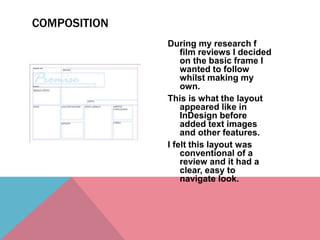
This is what the layout
appeared like in
InDesign before
added text images
and other features.
I felt this layout was
conventional of a
review and it had a
clear, easy to
navigate look.
COMPOSITION
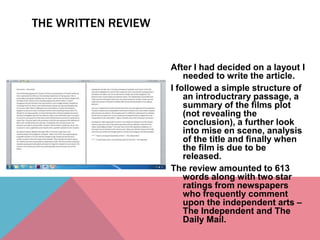
After I had decided on a layout I
needed to write the article.
I followed a simple structure of
an introductrary passage, a
summary of the films plot
(not revealing the
conclusion), a further look
into mise en scene, analysis
of the title and finally when
the film is due to be
released.
The review amounted to 613
words along with two star
ratings from newspapers
who frequently comment
upon the independent arts –
The Independent and The
Daily Mail.
THE WRITTEN REVIEW
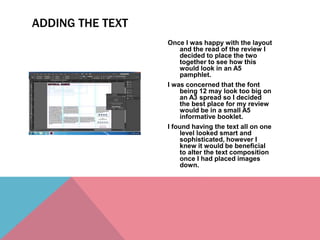
Once I was happy with the layout
and the read of the review I
decided to place the two
together to see how this
would look in an A5
pamphlet.
I was concerned that the font
being 12 may look too big on
an A3 spread so I decided
the best place for my review
would be in a small A5
informative booklet.
I found having the text all on one
level looked smart and
sophisticated, however I
knew it would be beneficial
to alter the text composition
once I had placed images
down.
ADDING THE TEXT
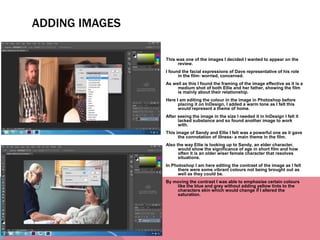
This was one of the images I decided I wanted to appear on the
review.
I found the facial expressions of Dave representative of his role
in the film- worried, concerned.
As well as this I found the framing of the image effective as it is a
medium shot of both Ellie and her father, showing the film
is mainly about their relationship.
Here I am editing the colour in the image in Photoshop before
placing it on InDesign, I added a warm tone as I felt this
would represent a theme of home.
After seeing the image in the size I needed it in InDesign I felt it
lacked substance and so found another image to work
with.
This image of Sandy and Ellie I felt was a powerful one as it gave
the connotation of illness- a main theme in the film.
Also the way Ellie is looking up to Sandy, an elder character,
would show the significance of age in short film and how
often it is an older wiser female character that resolves
situations.
In Photoshop I am here editing the contrast of the image as I felt
there were some vibrant colours not being brought out as
well as they could be.
By moving the contrast I was able to emphasise certain colours
like the blue and grey without adding yellow tints to the
characters skin which would change if I altered the
saturation.
ADDING IMAGES
Now with the text and images in
place I decided to add a pull
quote.
A pull quote is a small quote from a
large piece of text that draws
the audience in by its opinion or
information.
I created a new text box and typed
in my quote, then by making it
two sizes larger It made the
quote stand out above the
smaller text, finally I added a
blue lining around the text
which was the same colour as
the title of the film.
Then I used this tool to wrap the
surrounding text around the
new text box to create a pull
quote effect.
PULL QUOTES
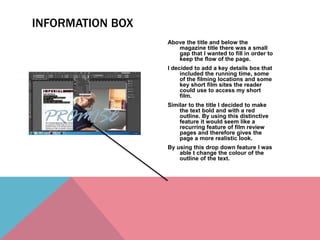
Above the title and below the
magazine title there was a small
gap that I wanted to fill in order to
keep the flow of the page.
I decided to add a key details box that
included the running time, some
of the filming locations and some
key short film sites the reader
could use to access my short
film.
Similar to the title I decided to make
the text bold and with a red
outline. By using this distinctive
feature it would seem like a
recurring feature of film review
pages and therefore gives the
page a more realistic look.
By using this drop down feature I was
able t change the colour of the
outline of the text.
INFORMATION BOX
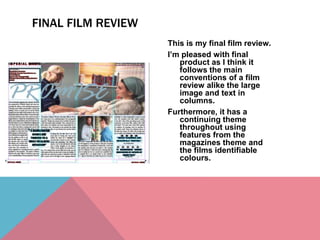
This is my final film review.
I’m pleased with final
product as I think it
follows the main
conventions of a film
review alike the large
image and text in
columns.
Furthermore, it has a
continuing theme
throughout using
features from the
magazines theme and
the films identifiable
colours.
FINAL FILM REVIEW

Producing a film review

  • 2.
    During my researchf film reviews I decided on the basic frame I wanted to follow whilst making my own. This is what the layout appeared like in InDesign before added text images and other features. I felt this layout was conventional of a review and it had a clear, easy to navigate look. COMPOSITION
  • 3.
    After I haddecided on a layout I needed to write the article. I followed a simple structure of an introductrary passage, a summary of the films plot (not revealing the conclusion), a further look into mise en scene, analysis of the title and finally when the film is due to be released. The review amounted to 613 words along with two star ratings from newspapers who frequently comment upon the independent arts – The Independent and The Daily Mail. THE WRITTEN REVIEW
  • 4.
    Once I washappy with the layout and the read of the review I decided to place the two together to see how this would look in an A5 pamphlet. I was concerned that the font being 12 may look too big on an A3 spread so I decided the best place for my review would be in a small A5 informative booklet. I found having the text all on one level looked smart and sophisticated, however I knew it would be beneficial to alter the text composition once I had placed images down. ADDING THE TEXT
  • 5.
    This was oneof the images I decided I wanted to appear on the review. I found the facial expressions of Dave representative of his role in the film- worried, concerned. As well as this I found the framing of the image effective as it is a medium shot of both Ellie and her father, showing the film is mainly about their relationship. Here I am editing the colour in the image in Photoshop before placing it on InDesign, I added a warm tone as I felt this would represent a theme of home. After seeing the image in the size I needed it in InDesign I felt it lacked substance and so found another image to work with. This image of Sandy and Ellie I felt was a powerful one as it gave the connotation of illness- a main theme in the film. Also the way Ellie is looking up to Sandy, an elder character, would show the significance of age in short film and how often it is an older wiser female character that resolves situations. In Photoshop I am here editing the contrast of the image as I felt there were some vibrant colours not being brought out as well as they could be. By moving the contrast I was able to emphasise certain colours like the blue and grey without adding yellow tints to the characters skin which would change if I altered the saturation. ADDING IMAGES
  • 6.
    Now with thetext and images in place I decided to add a pull quote. A pull quote is a small quote from a large piece of text that draws the audience in by its opinion or information. I created a new text box and typed in my quote, then by making it two sizes larger It made the quote stand out above the smaller text, finally I added a blue lining around the text which was the same colour as the title of the film. Then I used this tool to wrap the surrounding text around the new text box to create a pull quote effect. PULL QUOTES
  • 7.
    Above the titleand below the magazine title there was a small gap that I wanted to fill in order to keep the flow of the page. I decided to add a key details box that included the running time, some of the filming locations and some key short film sites the reader could use to access my short film. Similar to the title I decided to make the text bold and with a red outline. By using this distinctive feature it would seem like a recurring feature of film review pages and therefore gives the page a more realistic look. By using this drop down feature I was able t change the colour of the outline of the text. INFORMATION BOX
  • 8.
    This is myfinal film review. I’m pleased with final product as I think it follows the main conventions of a film review alike the large image and text in columns. Furthermore, it has a continuing theme throughout using features from the magazines theme and the films identifiable colours. FINAL FILM REVIEW