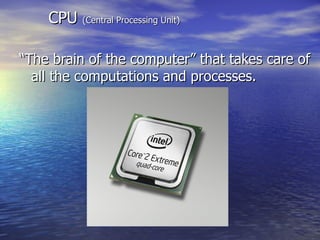
“The brain of the computer” that takes care of all the computations and processes. CPU  (Central Processing Unit)
The component of CPU include, CU:  Control Unit Directs and manages the activities of the processor. ALU:  Arithmetic and Logic Unit. Performs Arithmetic and Logical operations.(+, -, x, /, >,<, =) FPU:  Floating Point Unit. Performs division and large decimal operations. Cache Memory : Predicts and anticipates the data that the processor needs. I/O Unit:  Input Output unit. The gateway for the processor. Register : Which hold temporary data for a specific purpose of function. Architecture
Basic  Architecture Control Unit ALU Cache IO Unit Register FPU CPU Bus Internal Busses
Processing In this chapter, we will focus on the  central processing unit  (CPU) in more detail. Input Processing Output Secondary Storage
The CPU The  CPU  interacts(affects) closely with  memory  (primary storage). CPU Memory Memory, however, is not part of the CPU.
Parts of the CPU The CPU consists of a variety of parts including:33 Control unit Arithmetic/logic unit (ALU) Registers Control Unit ALU Registers
The Control Unit… directs  the other parts of the computer system to execute(perform) stored program instructions. The control unit communicates with the ALU and memory. Control Unit
The Arithmetic/Logic Unit (ALU)… performs  mathematical  operations as well as  logical  operations. ALU
Mathematical Operations The ALU can perform four kinds of mathematical calculations: addition subtraction multiplication division
Logical Operations The ALU can perform logical operations. Logical operations can test for these conditions(position): Equal-to (=) Less-than (<) Greater-than (>)
Registers… are temporary storage areas for data or instructions. Data held temporarily in registers can be  accessed at greater speeds  than data stored in memory. Registers
Memory (Primary Storage) Memory is the part of the computer that stores data and program instructions for processing. CPU Memory
Memory… is also referred to as  RAM  (random-access memory). CPU Memory RAM is  temporary ,  finite , and more  expensive  than secondary storage.
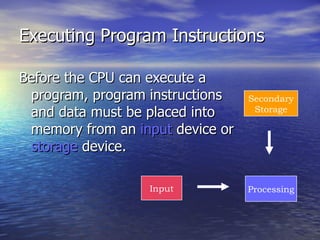
Executing Program Instructions Before the CPU can execute a program, program instructions and data must be placed into memory from an  input  device or  storage  device. Input Processing Secondary Storage
Executing Program Instructions Once the necessary data and instructions are in memory, the CPU performs the following steps for each instruction: Fetching Decoding Executing Storing CPU Memory
Fetching Instructions The control unit  fetches  (gets) the instruction from memory. Memory Control Unit ALU Registers
Decoding(solve) Instructions The control unit decodes the instruction and directs that the necessary data be moved from memory to the ALU. Memory Control Unit ALU Registers
Executing Arithmetic/Logic Operations The ALU performs the arithmetic or logical operation on the data. Memory Control Unit ALU Registers
Storing Results The ALU stores the result of its operation on the data in memory or in a register. Memory Control Unit ALU Registers
Executing Program Instructions Eventually, the control unit sends the results in memory to an ou t put device or secondary storage. Output Secondary Storage Control Unit ALU Registers Memory
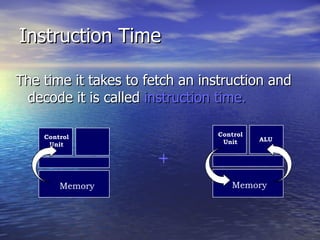
Instruction Time The time it takes to fetch an instruction and decode it is called  instruction time. + Memory Control Unit Memory Control Unit ALU
Execution Time The time it takes to execute an ALU operation and then store the result is called  execution(perform) time. + ALU Memory ALU Registers
Memory Locations and Addresses The control unit can find data and instructions because each location in memory has an  address . Control Unit Memory
Storage Locations Each location in memory is identified by an  address . Memory Each location has a unique address.
Data Representation The system in which all computer data is represented(colled) and manipulated(used) is called the  binary system.
Binary System The binary system has only  two digits  to represent all values. This corresponds to the  two states  of a computer’s electrical system —on and off.
Off/On Switches The computer can represent data by constructing combinations of  off  or  on  switches. off on or
Zero or One? The binary system can also be represented by the digits  zero  and  one . 0 1 or Zero (off) and one (on) make up the two digits in the binary system.
The Bit Each 0 or 1 in the binary system is called a  bit . one bit two bits three bits
The Byte A group of 8 bits   is called a  byte .  0 0 0 0 0 1 1 1
One Character of Data Each byte represents  one character of data  (a letter, digit, or special character). J = 0 0 0 0 0 1 1 1
Storing Bytes Storage and memory capacity is expressed in the  number of bytes  they can hold: 1  kilo byte = 2 10  or 1024 bytes 1  mega byte = 2 20  or 1,048,576 bytes 1  giga byte = 2 30  or 1,073,741,824 bytes
Computer Word A computer word   is defined as the number of bits that constitute a common unit of data.
Computer Word Length Word length  varies by computer. For example: 8 bits = 1 byte = one word length 64 bits = 8 bytes = one word length
Coding the Computer A code for determining which group of bits represent which characters on a keyboard is called  ASCII .  ( American Standard Code for Information Interchange )
ASCII ASCII has been adopted, as the standard, by the U.S. government and is found in a variety of computers. J = ASCII-8 code Keyboard character 0 0 0 0 0 1 1 1
Computer Speed and Power Speed and power are determined by: Microprocessor speed Bus lines Cache
Microprocessor Speeds Microprocessor speeds can be measured in a variety of ways: Megahertz MIPS Megaflops
Megahertz One measure of microprocessor speed is  megahertz  (MHz) which is one million machine cycles per second. gigahertz (billions of cycles per second).
MIPS Another measure of microprocessor speed is  MIPS  which is one million instructions per second.
Megaflops Megaflops,  or one million floating-point operations per second, is still another measure of microprocessor speed.
Bus Lines A bus line is a set of parallel electrical paths. A bus is like a mode of transportation for data. Bus width  (Wide) =  the number of wires in the bus over which data can travel +--
Bus Width(wide) The amount of data that can be carried at one time is bus width (wider = more data).
Two types:   Socket type Slot type. Pin arrangement in the Socket type processor is known as  Pin Grid Array  (PGA).  Slot type processor is also known as  Single Edged Contact Cartridge  (SECC). Processor Types
Types of Processors SECC PGA
8085-8bit 8086-16bit 80186-32bit 80286-32bit 80386(SX/DX)-32 bit 80486(SX/DX)-32bit Intel Scalar Processors
2 ALU Pentium –first super scalar processor Pentium family uses super scalar technology P4 also uses Hyper Threading(HT) Super Scalar Processors
FPU-Floating Point Unit (carry out operations on  floating point  numbers. ) BPU-Buffer Processing Unit ( A temporary  storage  area, usually in  RAM )
Processor Manufacturers Intel ( Inte grated  El ectronics) AMD (Advanced Micro Devices) VIA  technologies Cyrix
Brands of Intel Pentium I Pentium Pro Pentium MMX Pentium II Pentium III Pentium IV Pentium D Celeron Centrino M Core 2 Duo  Core 2 Extreme Core 2 Quad
Brands of AMD Athlon  Duron Sempron Turion
273/296 pins PGA arrangement Socket 4,5 or 7 Speed:60 to 200 MHz L1 cache-16 KB L2-256 to 512 KB Power supply- 3.3 to 5 v Transistors:3.1 to 3.3 million Features:1 st  super scalar processor,64 bit registers Pentium (1993)
242 contacts SEC/SECC Slot 1 233-333 MHz 32 KB L1 512KB L2 3.3v power supply 7.5 million transistors First SEC processor Pentium II (1997)
242 contacts/370 pins SEPP/SECC/PGA PGA370/slot 1 450 MHz to 1.13 GHz 32 KB L1 256 KB to 512 KB L2 2v power supply 9.1 to 9.3 million transistors Streaming SIMDA (single instr. multiple data access) Pentium III (1999)
423/478 pins SPGA(  staggered pin grid array)   PGA 423/PGA 478(PGA2) 1.3 to 3.2 GHz 8 KB L1 256 KB to 512 KB L2 1.44 to 1.75v power supply Billion transistors Net burst architecture Technology HT (Hyper Threading)  (above 2.4 GHz) Pentium  4  (2000)
A technology developed by Intel that enables multithreaded (current of data)  software applications to execute threads in parallel on a single processor instead of processing threads in a linear fashion. Older systems took advantage of dual-processing threading in software by splitting (dividing)  instructions into multiple streams so that more than one processor could act upon  (on) them at once.  Hyper threading
Why multicore? New modern processors are launched How to make a use of new technologies? Dual-core  CPU Quad-core CPU
Intel Core 2 models Desktop CPU Introduced on July 27, 2006 Number of Transistors 291 Million on 4 MB Models Number of Transistors 167 Million on 2 MB Models Variants  Core 2 Duo E6700 - 2.67 GHz (4 MB L2, 1066 MHz FSB)  Core 2 Duo E6600 - 2.40 GHz (4 MB L2, 1066 MHz FSB)  Core 2 Duo E6400 - 2.13 GHz (2 MB L2, 1066 MHz FSB)  Core 2 Duo E6300 - 1.86 GHz (2 MB L2, 1066 MHz FSB)  Core 2 Duo E4200 - 1.60 GHz (2 MB L2, 800 MHz FSB)  6 / 37
What is L1 and L2? Level-1 and Level-2 caches The cache memories in a computer Much faster than RAM L1 is built on the microprocessor chip itself. L2 is a seperate chip L2 cache is much larger than L1 cache 19 / 37
Core  processor Dual core Core 2 duo Quad core
Dual core processor Desktop processor Released in 2006. for laptop 2007  two cores (e.g. AMD Phenom II X2,) Cache No of pins 478/956/988 No of transistor=233 million  transistors   Voltage rate=
Core 2 duo The  Core 2  brand was introduced on July 27, 2006  2 core 2-4 MB /2 MB/ Core 2 Solo U2xxx 1 MB it can better multi-task, play games and multimedia espn videos.  Use less power (  0.85–1.5 V ) Clock speed min=1.8 GHz  max=3.2 GHz
Intel’s Core i3,i5,i7
i3 Core i3Sep 2009 4 threads 3-4 MB cache medium clock speed=3.06 GHz  transistor=177/382 million million Voltage range=0.6500V-1.4000V  DDR3-1066/1333 No of pins: LGA 1156/PGA 989  Hyperthyroid technology( adv) No turbo boost technology(Intel Turbo Boost Technology 2.0 has multiple algorithms operating in parallel to manage current, power, and temperature to maximize performance and energy efficiency ) disadvantage
i5 Core i5 Aug 2009 2-4 threads 3-8 MB cache higher clock speed than i3=3.6 GHz  Voltage range (0.6500V-1.4000V ) Transistors 177 million/382 million  No of Pins: LGA 1156(desktop) /BGA 1288 / µPGA-989(for laptop)  DDR3-1066/1333  Advantage=Hyper thread technology disadvantage=thermal monitoring technology( Temperature  monitoring)
i7 Core i7 Nov 2009 8 threads 4-8 MB cache Hyper thread technology 4 cores  No of Transistors :382 million  No of Pins:1366  pins )  Produce less heat DDR3-800  Advantage: Hyper threading  technology, thermal monitoring technologies, turbo boost technology
BGA-Ball Grid Array PGA-Pin Grid Array LGA-Land Grid Array
Land Grid Array PGA Ball Grid Array
Tank for your time and patience

Processor2

  • 1.
    “The brain ofthe computer” that takes care of all the computations and processes. CPU (Central Processing Unit)
  • 2.
    The component ofCPU include, CU: Control Unit Directs and manages the activities of the processor. ALU: Arithmetic and Logic Unit. Performs Arithmetic and Logical operations.(+, -, x, /, >,<, =) FPU: Floating Point Unit. Performs division and large decimal operations. Cache Memory : Predicts and anticipates the data that the processor needs. I/O Unit: Input Output unit. The gateway for the processor. Register : Which hold temporary data for a specific purpose of function. Architecture
  • 3.
    Basic ArchitectureControl Unit ALU Cache IO Unit Register FPU CPU Bus Internal Busses
  • 4.
    Processing In thischapter, we will focus on the central processing unit (CPU) in more detail. Input Processing Output Secondary Storage
  • 5.
    The CPU The CPU interacts(affects) closely with memory (primary storage). CPU Memory Memory, however, is not part of the CPU.
  • 6.
    Parts of theCPU The CPU consists of a variety of parts including:33 Control unit Arithmetic/logic unit (ALU) Registers Control Unit ALU Registers
  • 7.
    The Control Unit…directs the other parts of the computer system to execute(perform) stored program instructions. The control unit communicates with the ALU and memory. Control Unit
  • 8.
    The Arithmetic/Logic Unit(ALU)… performs mathematical operations as well as logical operations. ALU
  • 9.
    Mathematical Operations TheALU can perform four kinds of mathematical calculations: addition subtraction multiplication division
  • 10.
    Logical Operations TheALU can perform logical operations. Logical operations can test for these conditions(position): Equal-to (=) Less-than (<) Greater-than (>)
  • 11.
    Registers… are temporarystorage areas for data or instructions. Data held temporarily in registers can be accessed at greater speeds than data stored in memory. Registers
  • 12.
    Memory (Primary Storage)Memory is the part of the computer that stores data and program instructions for processing. CPU Memory
  • 13.
    Memory… is alsoreferred to as RAM (random-access memory). CPU Memory RAM is temporary , finite , and more expensive than secondary storage.
  • 14.
    Executing Program InstructionsBefore the CPU can execute a program, program instructions and data must be placed into memory from an input device or storage device. Input Processing Secondary Storage
  • 15.
    Executing Program InstructionsOnce the necessary data and instructions are in memory, the CPU performs the following steps for each instruction: Fetching Decoding Executing Storing CPU Memory
  • 16.
    Fetching Instructions Thecontrol unit fetches (gets) the instruction from memory. Memory Control Unit ALU Registers
  • 17.
    Decoding(solve) Instructions Thecontrol unit decodes the instruction and directs that the necessary data be moved from memory to the ALU. Memory Control Unit ALU Registers
  • 18.
    Executing Arithmetic/Logic OperationsThe ALU performs the arithmetic or logical operation on the data. Memory Control Unit ALU Registers
  • 19.
    Storing Results TheALU stores the result of its operation on the data in memory or in a register. Memory Control Unit ALU Registers
  • 20.
    Executing Program InstructionsEventually, the control unit sends the results in memory to an ou t put device or secondary storage. Output Secondary Storage Control Unit ALU Registers Memory
  • 21.
    Instruction Time Thetime it takes to fetch an instruction and decode it is called instruction time. + Memory Control Unit Memory Control Unit ALU
  • 22.
    Execution Time Thetime it takes to execute an ALU operation and then store the result is called execution(perform) time. + ALU Memory ALU Registers
  • 23.
    Memory Locations andAddresses The control unit can find data and instructions because each location in memory has an address . Control Unit Memory
  • 24.
    Storage Locations Eachlocation in memory is identified by an address . Memory Each location has a unique address.
  • 25.
    Data Representation Thesystem in which all computer data is represented(colled) and manipulated(used) is called the binary system.
  • 26.
    Binary System Thebinary system has only two digits to represent all values. This corresponds to the two states of a computer’s electrical system —on and off.
  • 27.
    Off/On Switches Thecomputer can represent data by constructing combinations of off or on switches. off on or
  • 28.
    Zero or One?The binary system can also be represented by the digits zero and one . 0 1 or Zero (off) and one (on) make up the two digits in the binary system.
  • 29.
    The Bit Each0 or 1 in the binary system is called a bit . one bit two bits three bits
  • 30.
    The Byte Agroup of 8 bits is called a byte . 0 0 0 0 0 1 1 1
  • 31.
    One Character ofData Each byte represents one character of data (a letter, digit, or special character). J = 0 0 0 0 0 1 1 1
  • 32.
    Storing Bytes Storageand memory capacity is expressed in the number of bytes they can hold: 1 kilo byte = 2 10 or 1024 bytes 1 mega byte = 2 20 or 1,048,576 bytes 1 giga byte = 2 30 or 1,073,741,824 bytes
  • 33.
    Computer Word Acomputer word is defined as the number of bits that constitute a common unit of data.
  • 34.
    Computer Word LengthWord length varies by computer. For example: 8 bits = 1 byte = one word length 64 bits = 8 bytes = one word length
  • 35.
    Coding the ComputerA code for determining which group of bits represent which characters on a keyboard is called ASCII . ( American Standard Code for Information Interchange )
  • 36.
    ASCII ASCII hasbeen adopted, as the standard, by the U.S. government and is found in a variety of computers. J = ASCII-8 code Keyboard character 0 0 0 0 0 1 1 1
  • 37.
    Computer Speed andPower Speed and power are determined by: Microprocessor speed Bus lines Cache
  • 38.
    Microprocessor Speeds Microprocessorspeeds can be measured in a variety of ways: Megahertz MIPS Megaflops
  • 39.
    Megahertz One measureof microprocessor speed is megahertz (MHz) which is one million machine cycles per second. gigahertz (billions of cycles per second).
  • 40.
    MIPS Another measureof microprocessor speed is MIPS which is one million instructions per second.
  • 41.
    Megaflops Megaflops, or one million floating-point operations per second, is still another measure of microprocessor speed.
  • 42.
    Bus Lines Abus line is a set of parallel electrical paths. A bus is like a mode of transportation for data. Bus width (Wide) = the number of wires in the bus over which data can travel +--
  • 43.
    Bus Width(wide) Theamount of data that can be carried at one time is bus width (wider = more data).
  • 44.
    Two types: Socket type Slot type. Pin arrangement in the Socket type processor is known as Pin Grid Array (PGA). Slot type processor is also known as Single Edged Contact Cartridge (SECC). Processor Types
  • 45.
  • 46.
    8085-8bit 8086-16bit 80186-32bit80286-32bit 80386(SX/DX)-32 bit 80486(SX/DX)-32bit Intel Scalar Processors
  • 47.
    2 ALU Pentium–first super scalar processor Pentium family uses super scalar technology P4 also uses Hyper Threading(HT) Super Scalar Processors
  • 48.
    FPU-Floating Point Unit(carry out operations on floating point numbers. ) BPU-Buffer Processing Unit ( A temporary storage area, usually in RAM )
  • 49.
    Processor Manufacturers Intel( Inte grated El ectronics) AMD (Advanced Micro Devices) VIA technologies Cyrix
  • 50.
    Brands of IntelPentium I Pentium Pro Pentium MMX Pentium II Pentium III Pentium IV Pentium D Celeron Centrino M Core 2 Duo Core 2 Extreme Core 2 Quad
  • 51.
    Brands of AMDAthlon Duron Sempron Turion
  • 52.
    273/296 pins PGAarrangement Socket 4,5 or 7 Speed:60 to 200 MHz L1 cache-16 KB L2-256 to 512 KB Power supply- 3.3 to 5 v Transistors:3.1 to 3.3 million Features:1 st super scalar processor,64 bit registers Pentium (1993)
  • 53.
    242 contacts SEC/SECCSlot 1 233-333 MHz 32 KB L1 512KB L2 3.3v power supply 7.5 million transistors First SEC processor Pentium II (1997)
  • 54.
    242 contacts/370 pinsSEPP/SECC/PGA PGA370/slot 1 450 MHz to 1.13 GHz 32 KB L1 256 KB to 512 KB L2 2v power supply 9.1 to 9.3 million transistors Streaming SIMDA (single instr. multiple data access) Pentium III (1999)
  • 55.
    423/478 pins SPGA( staggered pin grid array) PGA 423/PGA 478(PGA2) 1.3 to 3.2 GHz 8 KB L1 256 KB to 512 KB L2 1.44 to 1.75v power supply Billion transistors Net burst architecture Technology HT (Hyper Threading) (above 2.4 GHz) Pentium 4 (2000)
  • 56.
    A technology developedby Intel that enables multithreaded (current of data) software applications to execute threads in parallel on a single processor instead of processing threads in a linear fashion. Older systems took advantage of dual-processing threading in software by splitting (dividing) instructions into multiple streams so that more than one processor could act upon (on) them at once. Hyper threading
  • 57.
    Why multicore? Newmodern processors are launched How to make a use of new technologies? Dual-core CPU Quad-core CPU
  • 58.
    Intel Core 2models Desktop CPU Introduced on July 27, 2006 Number of Transistors 291 Million on 4 MB Models Number of Transistors 167 Million on 2 MB Models Variants Core 2 Duo E6700 - 2.67 GHz (4 MB L2, 1066 MHz FSB) Core 2 Duo E6600 - 2.40 GHz (4 MB L2, 1066 MHz FSB) Core 2 Duo E6400 - 2.13 GHz (2 MB L2, 1066 MHz FSB) Core 2 Duo E6300 - 1.86 GHz (2 MB L2, 1066 MHz FSB) Core 2 Duo E4200 - 1.60 GHz (2 MB L2, 800 MHz FSB) 6 / 37
  • 59.
    What is L1and L2? Level-1 and Level-2 caches The cache memories in a computer Much faster than RAM L1 is built on the microprocessor chip itself. L2 is a seperate chip L2 cache is much larger than L1 cache 19 / 37
  • 60.
    Core processorDual core Core 2 duo Quad core
  • 61.
    Dual core processorDesktop processor Released in 2006. for laptop 2007 two cores (e.g. AMD Phenom II X2,) Cache No of pins 478/956/988 No of transistor=233 million transistors Voltage rate=
  • 62.
    Core 2 duoThe Core 2 brand was introduced on July 27, 2006 2 core 2-4 MB /2 MB/ Core 2 Solo U2xxx 1 MB it can better multi-task, play games and multimedia espn videos. Use less power ( 0.85–1.5 V ) Clock speed min=1.8 GHz max=3.2 GHz
  • 63.
  • 64.
    i3 Core i3Sep2009 4 threads 3-4 MB cache medium clock speed=3.06 GHz transistor=177/382 million million Voltage range=0.6500V-1.4000V DDR3-1066/1333 No of pins: LGA 1156/PGA 989 Hyperthyroid technology( adv) No turbo boost technology(Intel Turbo Boost Technology 2.0 has multiple algorithms operating in parallel to manage current, power, and temperature to maximize performance and energy efficiency ) disadvantage
  • 65.
    i5 Core i5Aug 2009 2-4 threads 3-8 MB cache higher clock speed than i3=3.6 GHz Voltage range (0.6500V-1.4000V ) Transistors 177 million/382 million No of Pins: LGA 1156(desktop) /BGA 1288 / µPGA-989(for laptop) DDR3-1066/1333 Advantage=Hyper thread technology disadvantage=thermal monitoring technology( Temperature monitoring)
  • 66.
    i7 Core i7Nov 2009 8 threads 4-8 MB cache Hyper thread technology 4 cores No of Transistors :382 million No of Pins:1366 pins ) Produce less heat DDR3-800 Advantage: Hyper threading technology, thermal monitoring technologies, turbo boost technology
  • 67.
    BGA-Ball Grid ArrayPGA-Pin Grid Array LGA-Land Grid Array
  • 68.
    Land Grid ArrayPGA Ball Grid Array
  • 69.
    Tank for yourtime and patience