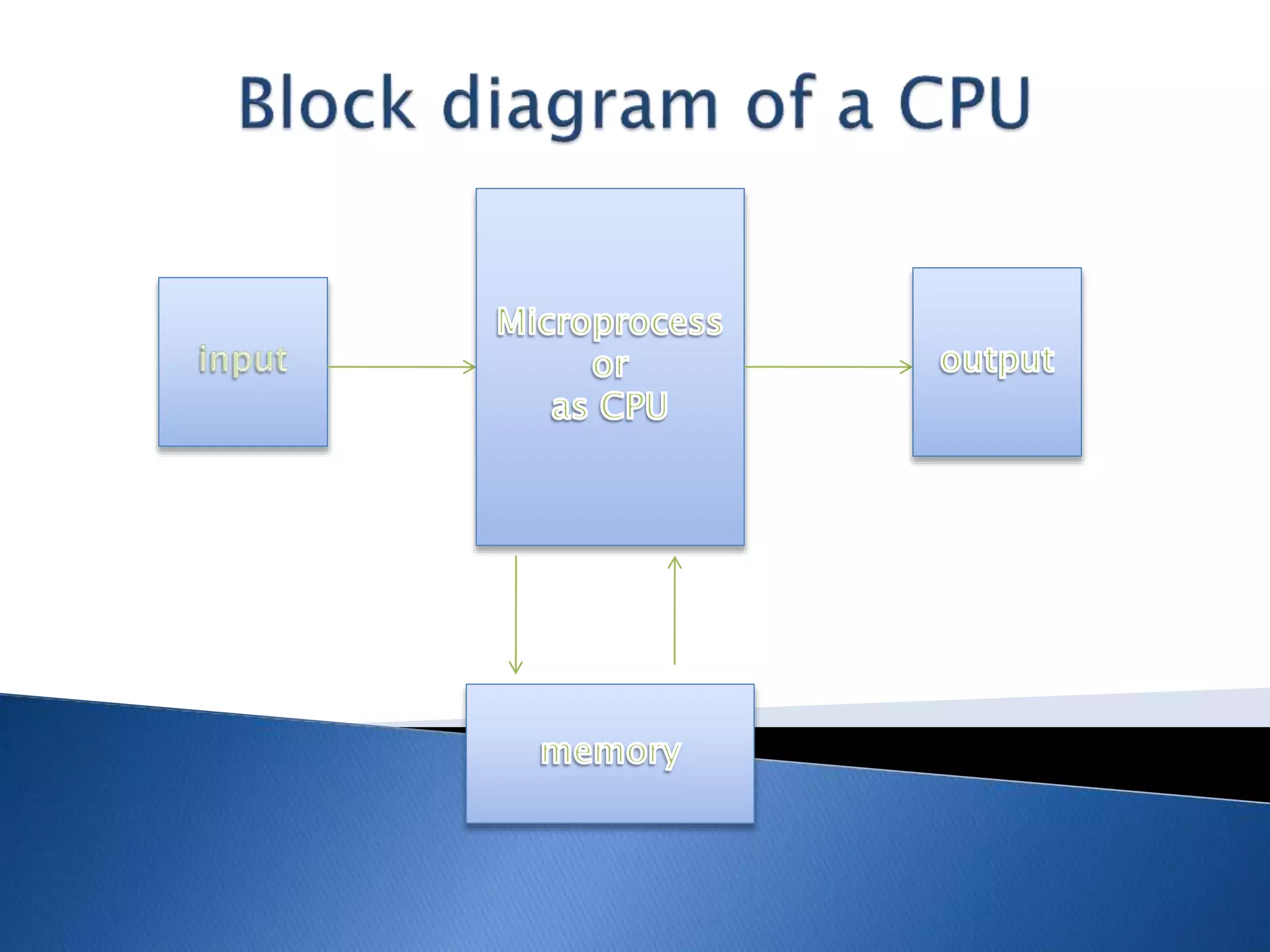
Microprocessor is a multipurpose
programmable logic device.
Microprocessor is like brain of the
system
Microprocessor accepts binary data
as input (from input device like
keyboard, mouse), processes data
according to those instructions and
provides results as output (to output
device like monitor, mouse)
The microprocessor requires information to process
the data. It retrieves the information from the
external memory such as RAM. They are some types
of microprocessor:
1. Clock speed
2. FSB
3. L2Cache
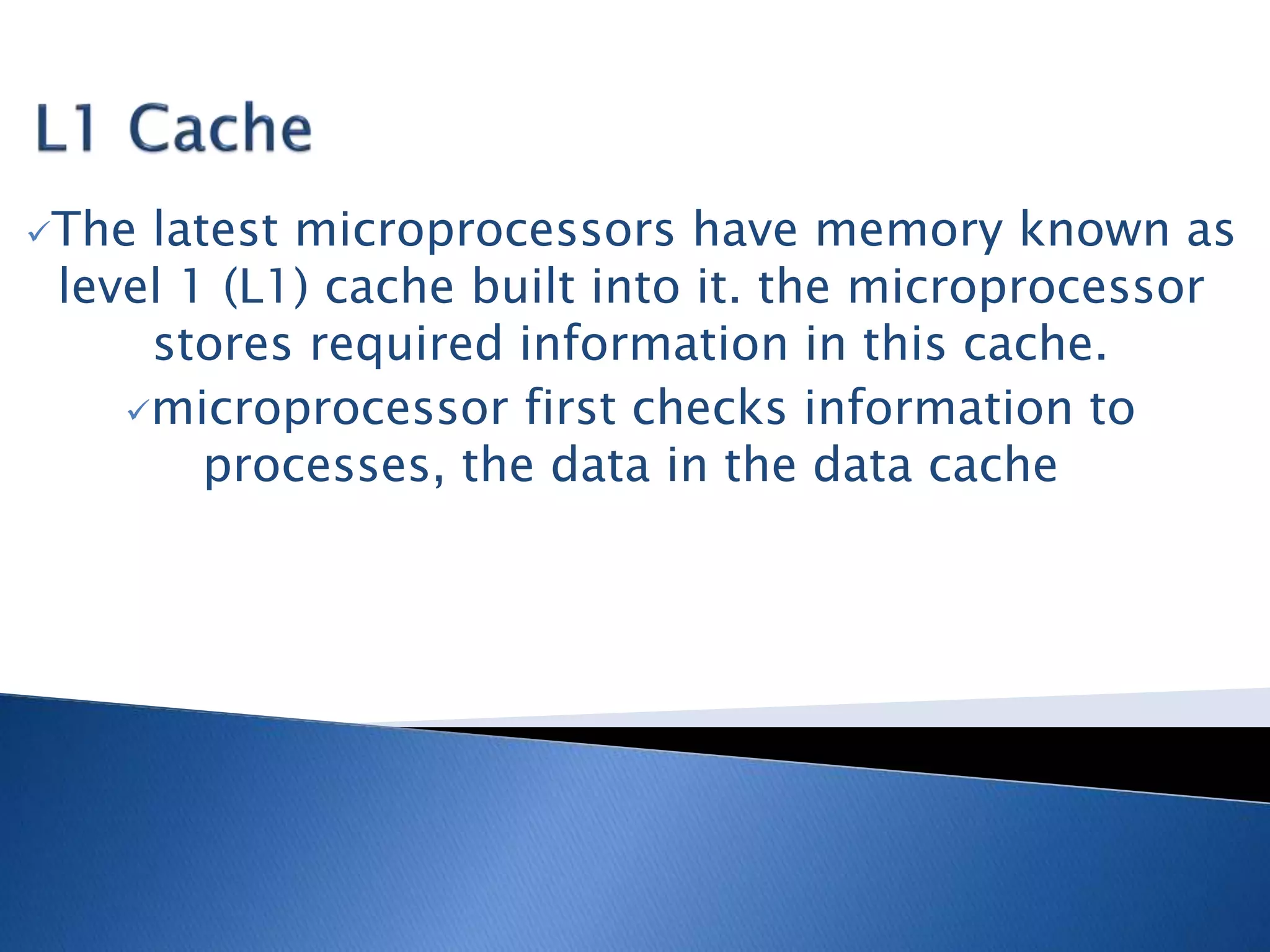
The latest microprocessors have memory known as
level 1 (L1) cache built into it. the microprocessor
stores required information in this cache.
microprocessor first checks information to
processes, the data in the data cache
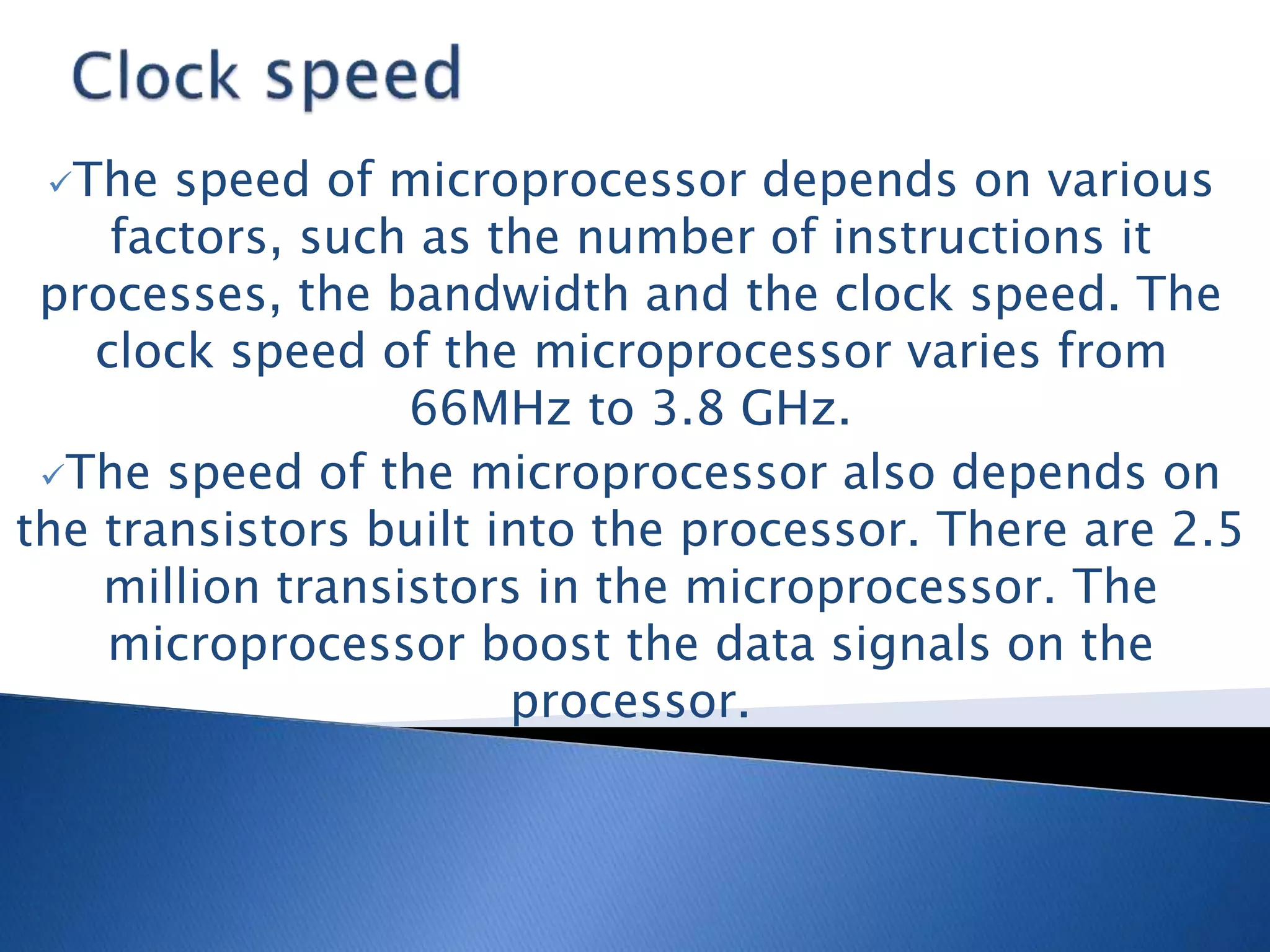
The speed of microprocessor depends on various
factors, such as the number of instructions it
processes, the bandwidth and the clock speed. The
clock speed of the microprocessor varies from
66MHz to 3.8 GHz.
The speed of the microprocessor also depends on
the transistors built into the processor. There are 2.5
million transistors in the microprocessor. The
microprocessor boost the data signals on the
processor.
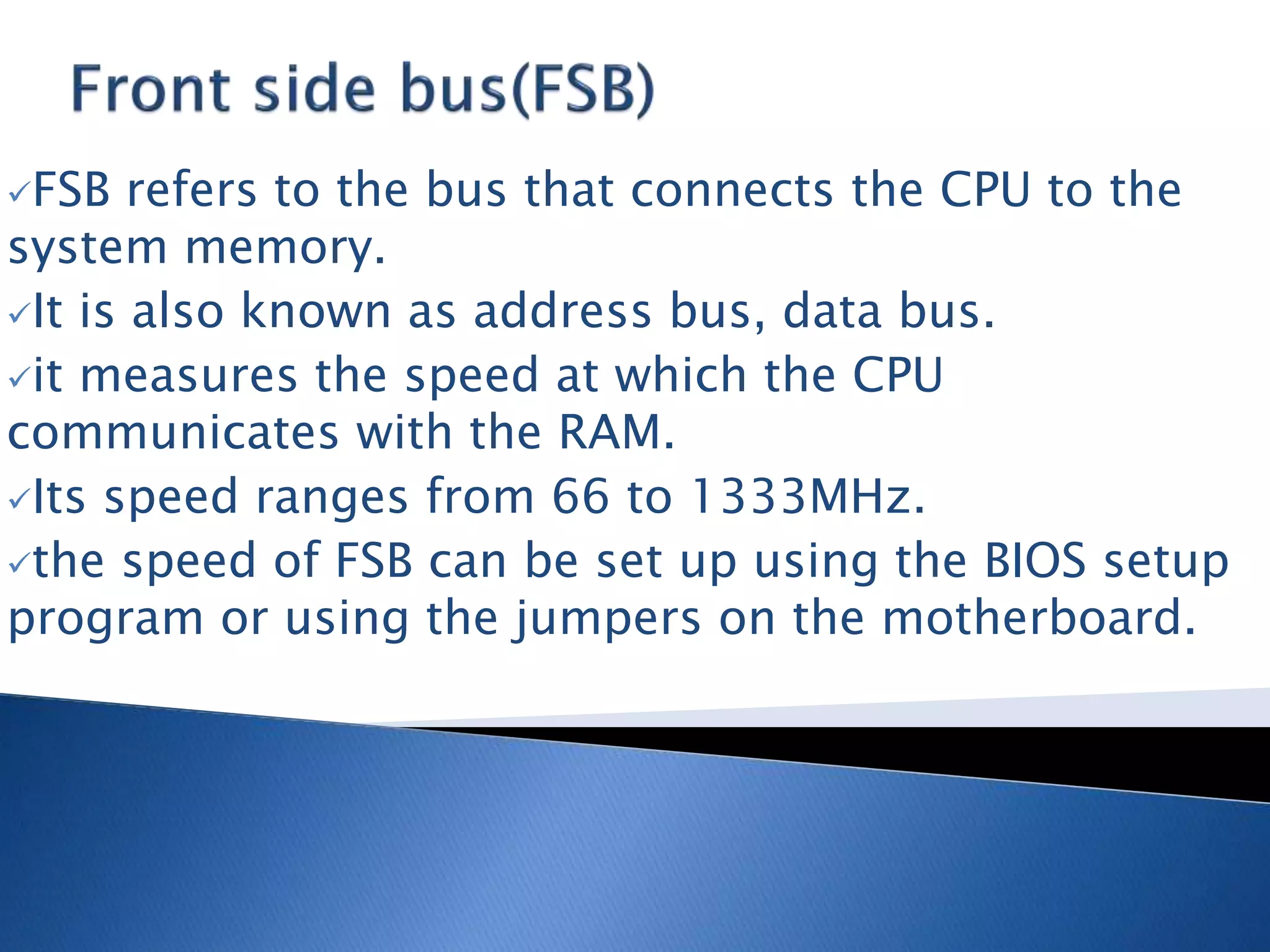
FSB refers to the bus that connects the CPU to the
system memory.
It is also known as address bus, data bus.
it measures the speed at which the CPU
communicates with the RAM.
Its speed ranges from 66 to 1333MHz.
the speed of FSB can be set up using the BIOS setup
program or using the jumpers on the motherboard.
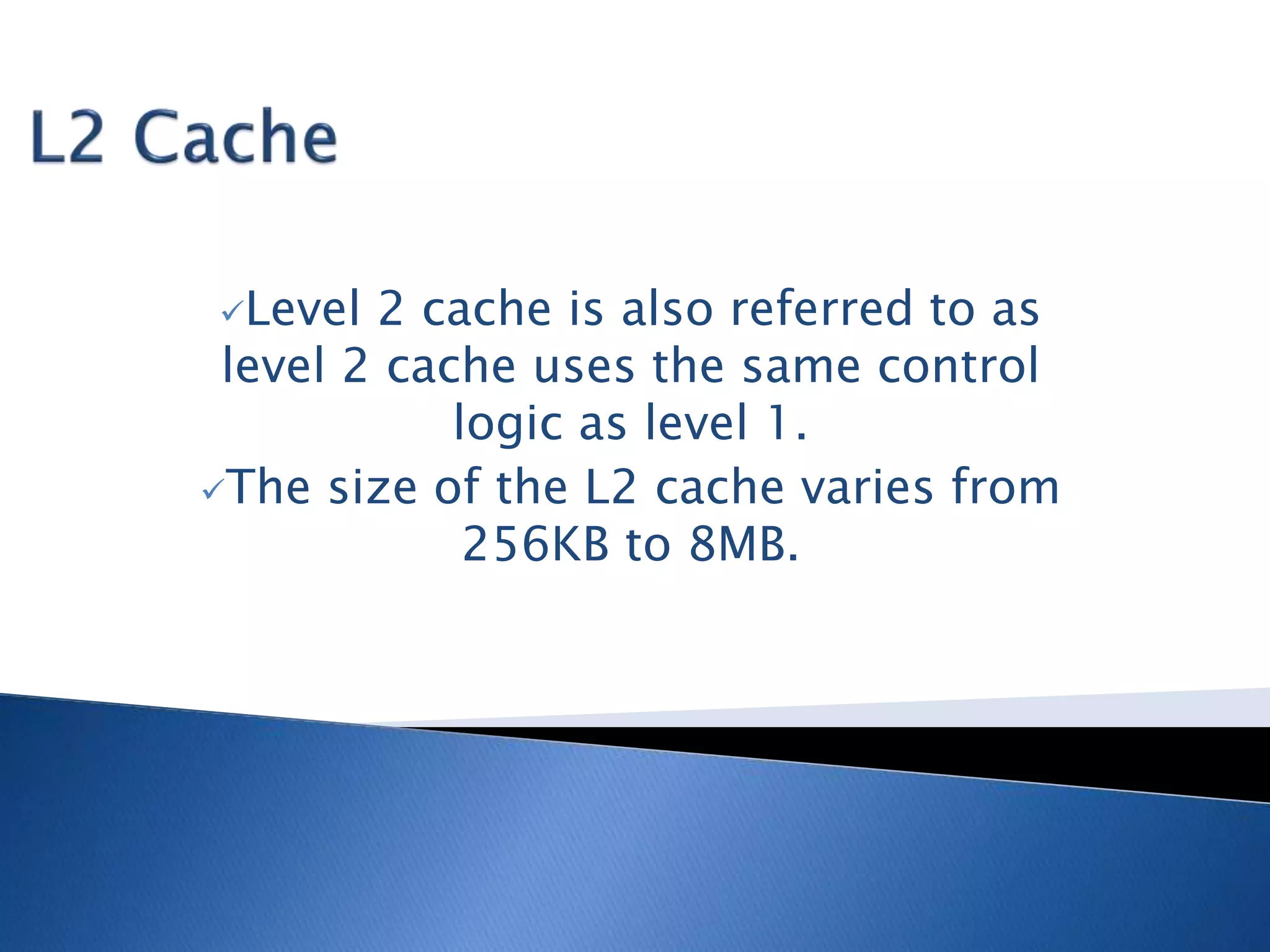
Level 2 cache is also referred to as
level 2 cache uses the same control
logic as level 1.
The size of the L2 cache varies from
256KB to 8MB.
There are two companies of microprocessor:
1. Intel and
2. Amd (advanced micro device)
1st processor introduced by Intel company and there
are so many types of processors.
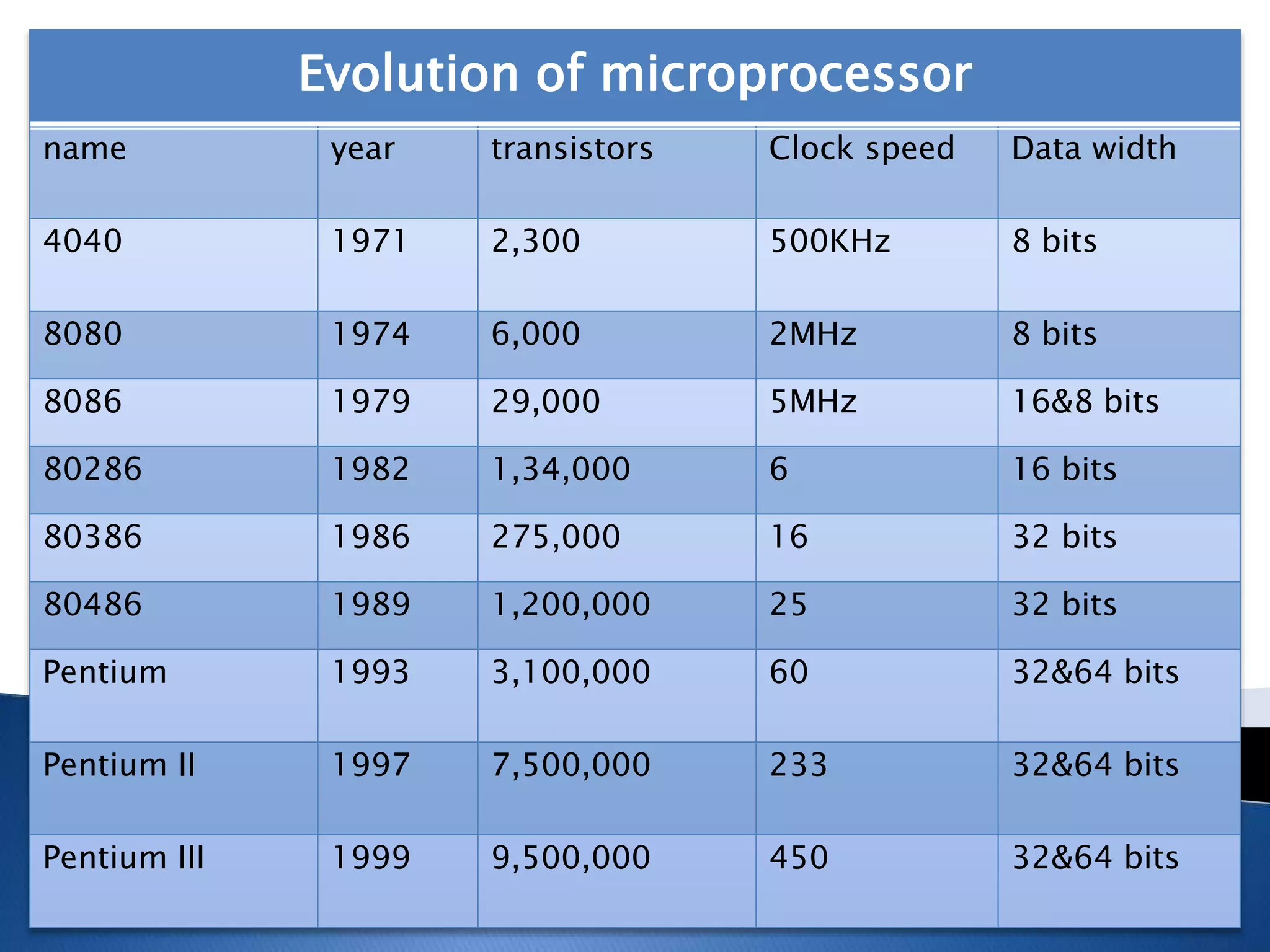
Evolution of microprocessor
name year transistors Clock speed Data width
4040 1971 2,300 500KHz 8 bits
8080 1974 6,000 2MHz 8 bits
8086 1979 29,000 5MHz 16&8 bits
80286 1982 1,34,000 6 16 bits
80386 1986 275,000 16 32 bits
80486 1989 1,200,000 25 32 bits
Pentium 1993 3,100,000 60 32&64 bits
Pentium II 1997 7,500,000 233 32&64 bits
Pentium III 1999 9,500,000 450 32&64 bits
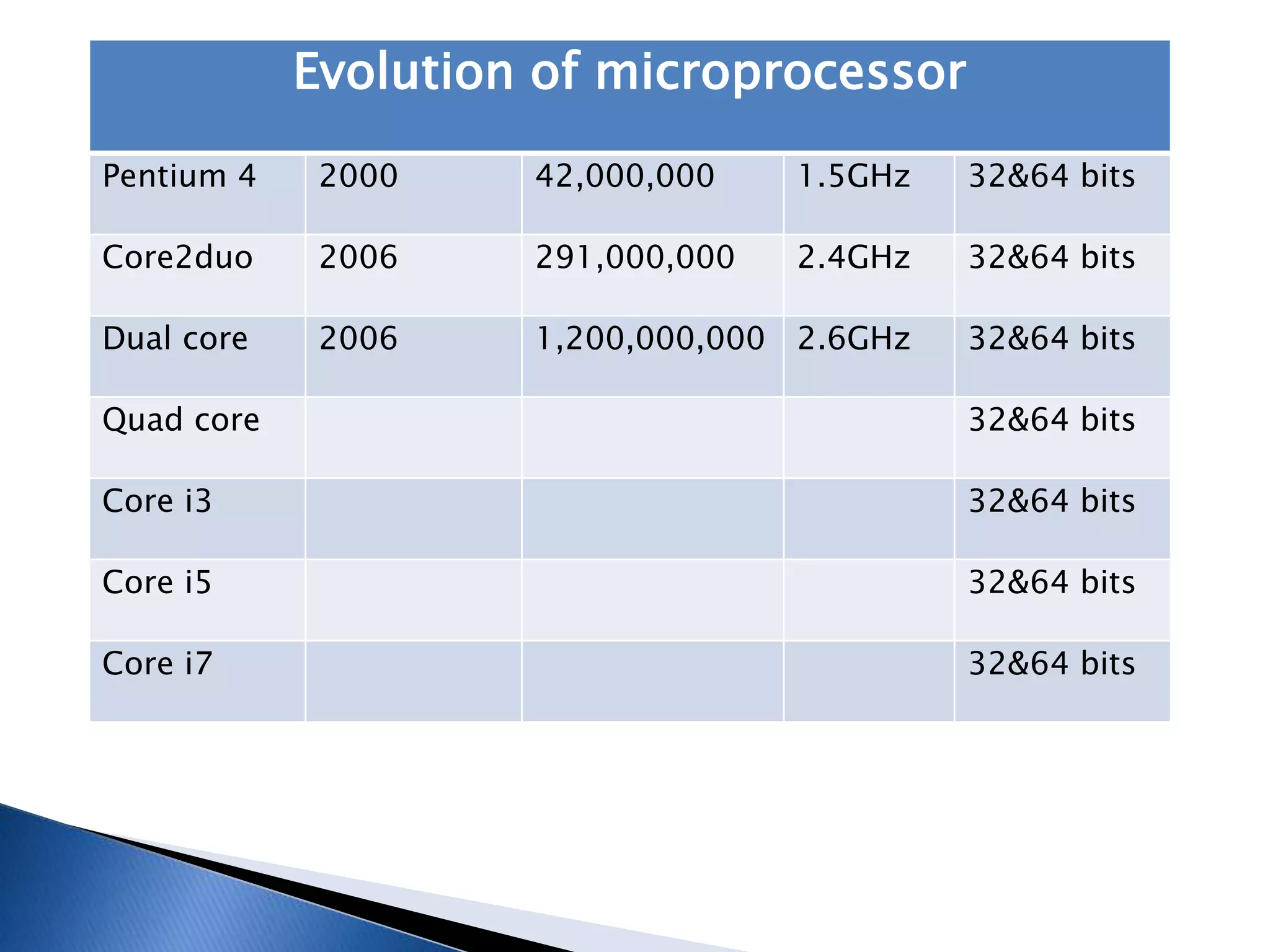
Evolution of microprocessor
Pentium 4 2000 42,000,000 1.5GHz 32&64 bits
Core2duo 2006 291,000,000 2.4GHz 32&64 bits
Dual core 2006 1,200,000,000 2.6GHz 32&64 bits
Quad core 32&64 bits
Core i3 32&64 bits
Core i5 32&64 bits
Core i7 32&64 bits
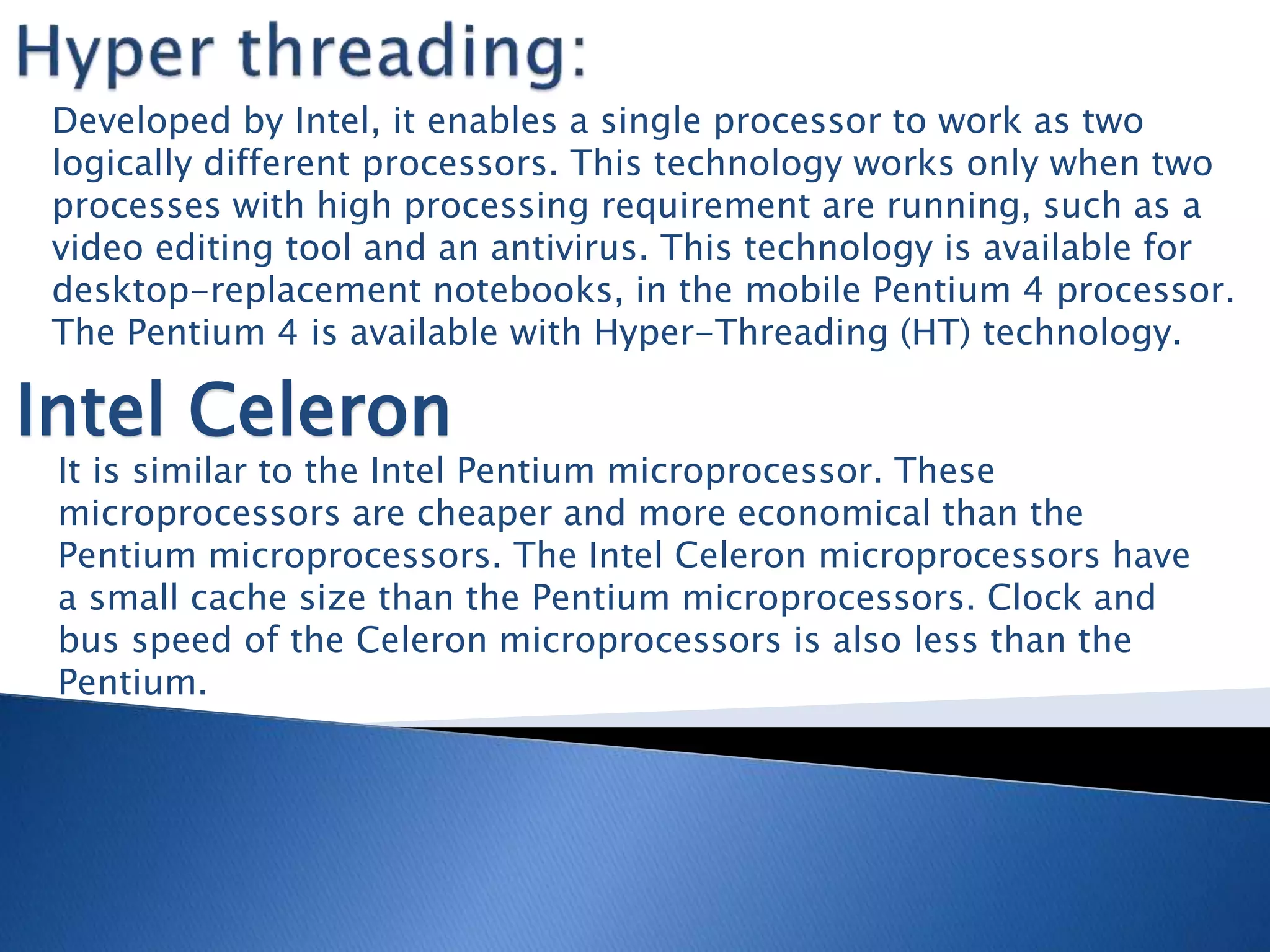
Developed by Intel, it enables a single processor to work as two
logically different processors. This technology works only when two
processes with high processing requirement are running, such as a
video editing tool and an antivirus. This technology is available for
desktop-replacement notebooks, in the mobile Pentium 4 processor.
The Pentium 4 is available with Hyper-Threading (HT) technology.
Intel Celeron
It is similar to the Intel Pentium microprocessor. These
microprocessors are cheaper and more economical than the
Pentium microprocessors. The Intel Celeron microprocessors have
a small cache size than the Pentium microprocessors. Clock and
bus speed of the Celeron microprocessors is also less than the
Pentium.
This processor delivers faster performance
greater energy efficiency, n more responsible
multitasking. This processor provides better
processing speed n advanced power saving
feathers.
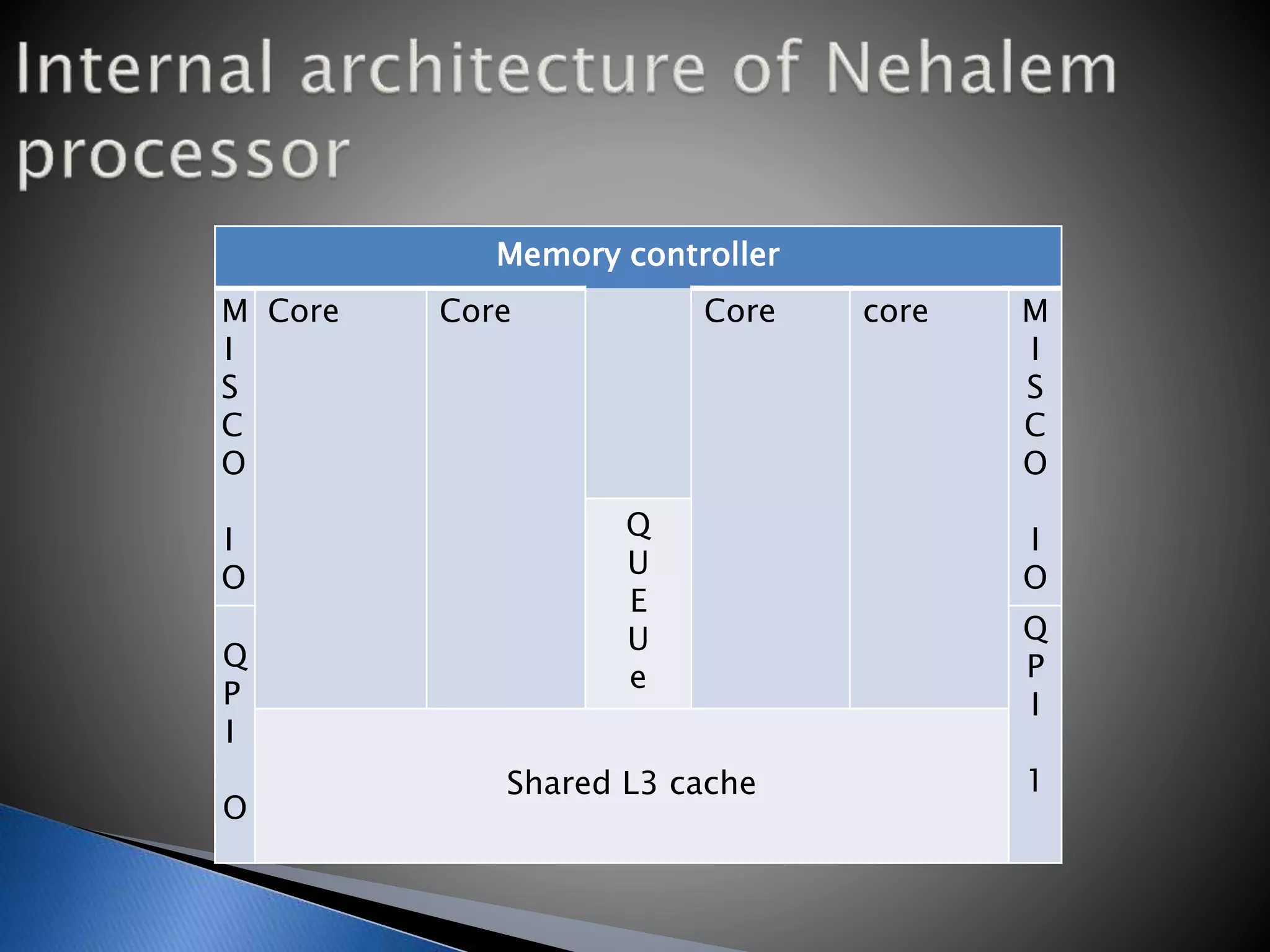
Memory controller
M
I
S
C
O
I
O
Core Core Core core M
I
S
C
O
I
O
Q
U
E
U
e
Q
P
I
O
Q
P
I
1Shared L3 cache
This processor supports hyper threading
technology. Core i3 models include models
for desktop processor. They are i3-530, i3-
540, i3-550 and i3-560.These models Speed
range starts from 2.93GHz to 3.33GHz.
This processor includes turbo boost
technology. Speed of i5 processor models
range starts from 2.8 GHz to 3.66 Ghz it
includes 4 to 8 MB smart cache models of i5
processors are i5-650, i5-655, i5-660, i5-
661, i5-670, i5-750 n i5-750s, these
different models have different frequency,
range, cache.
This processor mostly used in servers. It’s
features are higher than the i3 and i5
processor
Features:
 Quick path interconnect: It’s a point to
point processor interconnects used to
connect corei7 processor to the controller
hub.
 HD Boost: high definition boost.
The sockets of the motherboard connects the
microprocessor to the motherboard.
microprocessor or socket has some pins that
allow the processor to communicate with the
motherboard.
Examples:
1. Socket PGA370:it contains 370 pins.it
supports Celeron 2 n Pentium III.
2. Socket PGA478:It contains 478 pins. It
supports Pentium 4 microprocessor.
3. Socket LGA775: It’s developed by intel. It
is used with the latest processor such as
Pentium 4, Pentium.it contains 775 pins.
Microprocessor

Microprocessor

  • 2.
    Microprocessor is amultipurpose programmable logic device. Microprocessor is like brain of the system Microprocessor accepts binary data as input (from input device like keyboard, mouse), processes data according to those instructions and provides results as output (to output device like monitor, mouse)
  • 4.
    The microprocessor requiresinformation to process the data. It retrieves the information from the external memory such as RAM. They are some types of microprocessor: 1. Clock speed 2. FSB 3. L2Cache
  • 5.
    The latest microprocessorshave memory known as level 1 (L1) cache built into it. the microprocessor stores required information in this cache. microprocessor first checks information to processes, the data in the data cache
  • 6.
    The speed ofmicroprocessor depends on various factors, such as the number of instructions it processes, the bandwidth and the clock speed. The clock speed of the microprocessor varies from 66MHz to 3.8 GHz. The speed of the microprocessor also depends on the transistors built into the processor. There are 2.5 million transistors in the microprocessor. The microprocessor boost the data signals on the processor.
  • 7.
    FSB refers tothe bus that connects the CPU to the system memory. It is also known as address bus, data bus. it measures the speed at which the CPU communicates with the RAM. Its speed ranges from 66 to 1333MHz. the speed of FSB can be set up using the BIOS setup program or using the jumpers on the motherboard.
  • 8.
    Level 2 cacheis also referred to as level 2 cache uses the same control logic as level 1. The size of the L2 cache varies from 256KB to 8MB.
  • 9.
    There are twocompanies of microprocessor: 1. Intel and 2. Amd (advanced micro device) 1st processor introduced by Intel company and there are so many types of processors.
  • 10.
    Evolution of microprocessor nameyear transistors Clock speed Data width 4040 1971 2,300 500KHz 8 bits 8080 1974 6,000 2MHz 8 bits 8086 1979 29,000 5MHz 16&8 bits 80286 1982 1,34,000 6 16 bits 80386 1986 275,000 16 32 bits 80486 1989 1,200,000 25 32 bits Pentium 1993 3,100,000 60 32&64 bits Pentium II 1997 7,500,000 233 32&64 bits Pentium III 1999 9,500,000 450 32&64 bits
  • 11.
    Evolution of microprocessor Pentium4 2000 42,000,000 1.5GHz 32&64 bits Core2duo 2006 291,000,000 2.4GHz 32&64 bits Dual core 2006 1,200,000,000 2.6GHz 32&64 bits Quad core 32&64 bits Core i3 32&64 bits Core i5 32&64 bits Core i7 32&64 bits
  • 12.
    Developed by Intel,it enables a single processor to work as two logically different processors. This technology works only when two processes with high processing requirement are running, such as a video editing tool and an antivirus. This technology is available for desktop-replacement notebooks, in the mobile Pentium 4 processor. The Pentium 4 is available with Hyper-Threading (HT) technology. Intel Celeron It is similar to the Intel Pentium microprocessor. These microprocessors are cheaper and more economical than the Pentium microprocessors. The Intel Celeron microprocessors have a small cache size than the Pentium microprocessors. Clock and bus speed of the Celeron microprocessors is also less than the Pentium.
  • 13.
    This processor deliversfaster performance greater energy efficiency, n more responsible multitasking. This processor provides better processing speed n advanced power saving feathers.
  • 14.
    Memory controller M I S C O I O Core CoreCore core M I S C O I O Q U E U e Q P I O Q P I 1Shared L3 cache
  • 15.
    This processor supportshyper threading technology. Core i3 models include models for desktop processor. They are i3-530, i3- 540, i3-550 and i3-560.These models Speed range starts from 2.93GHz to 3.33GHz.
  • 16.
    This processor includesturbo boost technology. Speed of i5 processor models range starts from 2.8 GHz to 3.66 Ghz it includes 4 to 8 MB smart cache models of i5 processors are i5-650, i5-655, i5-660, i5- 661, i5-670, i5-750 n i5-750s, these different models have different frequency, range, cache.
  • 17.
    This processor mostlyused in servers. It’s features are higher than the i3 and i5 processor Features:  Quick path interconnect: It’s a point to point processor interconnects used to connect corei7 processor to the controller hub.  HD Boost: high definition boost.
  • 18.
    The sockets ofthe motherboard connects the microprocessor to the motherboard. microprocessor or socket has some pins that allow the processor to communicate with the motherboard.
  • 19.
    Examples: 1. Socket PGA370:itcontains 370 pins.it supports Celeron 2 n Pentium III. 2. Socket PGA478:It contains 478 pins. It supports Pentium 4 microprocessor. 3. Socket LGA775: It’s developed by intel. It is used with the latest processor such as Pentium 4, Pentium.it contains 775 pins.