Computers Are
Your Future
Week 4
Slide 2
Computers Are Your Future
CPU, Memory, and Hard Disk
Slide 3
What You Will Learn . . .
List the components on the motherboard
How a CPU processes data
The types and purpose of memory in a computer
system
The difference between memory and storage
The categories of storage devices
The performance characteristics of hard drives
Slide 4
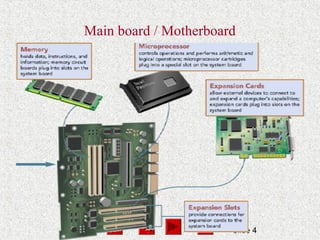
Main board / Motherboard
Slide 5
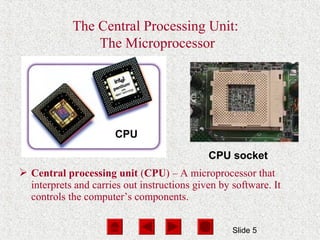
The Central Processing Unit:
The Microprocessor
CPU
CPU socket
 Central processing unit (CPU) – A microprocessor that
interprets and carries out instructions given by software. It
controls the computer’s components.
Slide 6
Central Processing Unit
http://www97.intel.com/en/TheJourneyInside/ExploreTheC
CPU found in all kinds of electronic and mechanical
devices.
Plugs into a computer motherboard.
Covered by heat sink + cooling fan
Latest cpu include their own built-in refrigeration system
Slide 7
Instruction set
processor can perform several operations
Each operation has a unique instruction number
called in instruction.
Instruction set: processor’s list of instructions.
Different processors have different instruction set
e.g. program written for Apple Macintosh computer
will run on IBM PC
Slide 8
Components of the CPU
(1) Control unit – Coordinates and controls all parts of
the computer system
(2) Arithmetic-logic unit – Performs arithmetic or
logical operations
 Registers – Temporarily store the most frequently
used instructions and data
Slide 9
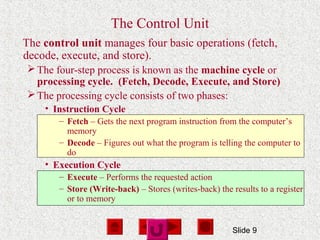
The Control Unit
The control unit manages four basic operations (fetch,
decode, execute, and store).
The four-step process is known as the machine cycle or
processing cycle. (Fetch, Decode, Execute, and Store)
The processing cycle consists of two phases:
• Instruction Cycle
– Fetch – Gets the next program instruction from the computer’s
memory
– Decode – Figures out what the program is telling the computer to
do
• Execution Cycle
– Execute – Performs the requested action
– Store (Write-back) – Stores (writes-back) the results to a register
or to memory
Slide 10
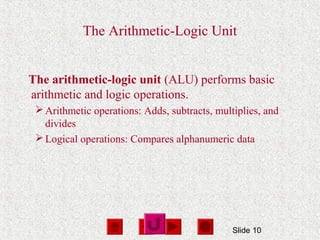
The Arithmetic-Logic Unit
The arithmetic-logic unit (ALU) performs basic
arithmetic and logic operations.
Arithmetic operations: Adds, subtracts, multiplies, and
divides
Logical operations: Compares alphanumeric data
Slide 11
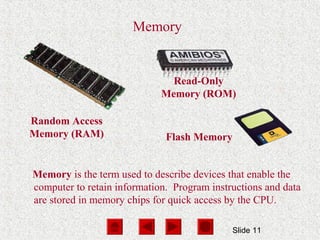
Memory
Random Access
Memory (RAM)
Memory is the term used to describe devices that enable the
computer to retain information. Program instructions and data
are stored in memory chips for quick access by the CPU.
Read-Only
Memory (ROM)
Flash Memory
Slide 12
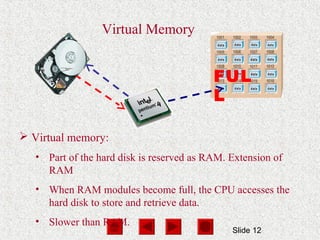
 Virtual memory:
• Part of the hard disk is reserved as RAM. Extension of
RAM
• When RAM modules become full, the CPU accesses the
hard disk to store and retrieve data.
• Slower than RAM.
FUL
L
Virtual Memory
Slide 13
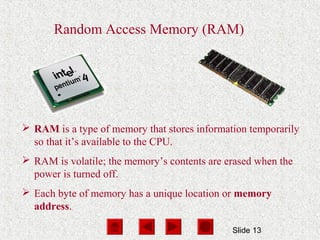
Random Access Memory (RAM)
 RAM is a type of memory that stores information temporarily
so that it’s available to the CPU.
 RAM is volatile; the memory’s contents are erased when the
power is turned off.
 Each byte of memory has a unique location or memory
address.
Slide 14
Types of RAM
Dynamic RAM (DRAM) – A memory chip that needs to
be refreshed periodically or it will lose its data
Synchronous DRAM (SDRAM) is synchronized with the
computer’s system clock.
Rambus DRAM (RDRAM) uses a fast bus to send and
receive data within one clock cycle. It is faster than
SDRAM.
Double data rate SDRAM (DDR SDRAM) is a type of
SDRAM that can send and receive data within one clock
cycle.
Slide 15
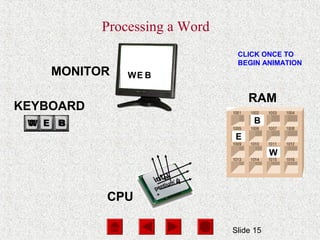
KEYBOARD
CPU
RAM
MONITOR
CLICK ONCE TO
BEGIN ANIMATION
Processing a Word
W
E
B
W
W
EW
E
E
B
B
B
Slide 16
Read Only Memory (ROM)
Type of memory which store prerecorded instructions
Only allow this instructions to be read
Instructions cant be erased
Slide 17
Cache Memory
A small unit of ultrafast memory built in the
processor that stores frequently or recently accessed
program instructions and data.
Faster than RAM but more expensive
Slide 18
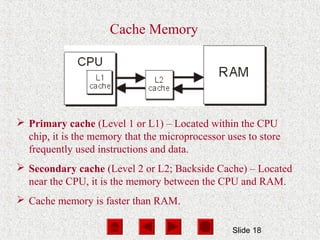
Cache Memory
 Primary cache (Level 1 or L1) – Located within the CPU
chip, it is the memory that the microprocessor uses to store
frequently used instructions and data.
 Secondary cache (Level 2 or L2; Backside Cache) – Located
near the CPU, it is the memory between the CPU and RAM.
 Cache memory is faster than RAM.
Slide 19
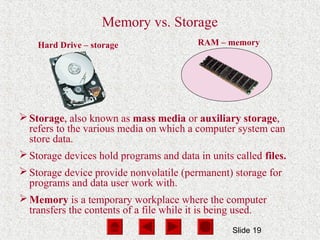
Hard Drive – storage RAM – memory
Memory vs. Storage
Storage, also known as mass media or auxiliary storage,
refers to the various media on which a computer system can
store data.
Storage devices hold programs and data in units called files.
Storage device provide nonvolatile (permanent) storage for
programs and data user work with.
Memory is a temporary workplace where the computer
transfers the contents of a file while it is being used.
Slide 20
Why Is Storage Necessary?
 Storage devices:
•Retain data when the computer is turned off
•Are cheaper than memory
•Play an important role during startup
•Are needed for output
Slide 21
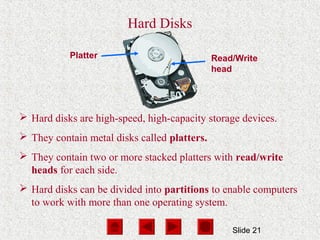
Platter Read/Write
head
Hard Disks
 Hard disks are high-speed, high-capacity storage devices.
 They contain metal disks called platters.
 They contain two or more stacked platters with read/write
heads for each side.
 Hard disks can be divided into partitions to enable computers
to work with more than one operating system.
Slide 22
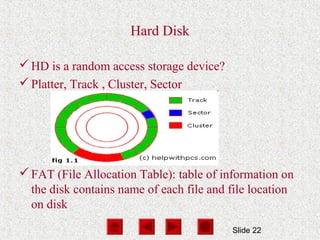
Hard Disk
HD is a random access storage device?
Platter, Track , Cluster, Sector
FAT (File Allocation Table): table of information on
the disk contains name of each file and file location
on disk
Slide 23
Hard Disk
HD Partition
A section of disk set aside as if it were a physical separate
disk
One partition hold one OS
HD Controller
Is an electronic circuit board that provides an interface
between CPU and HD
Slide 24
More Hard Drives
 Removable Hard Disks
• Platter is enclosed in a cartridge
• Can be inserted into a drive bay
• Secondary storage – storage that isn’t directly available
 Internet Hard Drives
• Storage space on a server
• Subscription service

Processing

  • 1.
  • 2.
    Slide 2 Computers AreYour Future CPU, Memory, and Hard Disk
  • 3.
    Slide 3 What YouWill Learn . . . List the components on the motherboard How a CPU processes data The types and purpose of memory in a computer system The difference between memory and storage The categories of storage devices The performance characteristics of hard drives
  • 4.
    Slide 4 Main board/ Motherboard
  • 5.
    Slide 5 The CentralProcessing Unit: The Microprocessor CPU CPU socket  Central processing unit (CPU) – A microprocessor that interprets and carries out instructions given by software. It controls the computer’s components.
  • 6.
    Slide 6 Central ProcessingUnit http://www97.intel.com/en/TheJourneyInside/ExploreTheC CPU found in all kinds of electronic and mechanical devices. Plugs into a computer motherboard. Covered by heat sink + cooling fan Latest cpu include their own built-in refrigeration system
  • 7.
    Slide 7 Instruction set processorcan perform several operations Each operation has a unique instruction number called in instruction. Instruction set: processor’s list of instructions. Different processors have different instruction set e.g. program written for Apple Macintosh computer will run on IBM PC
  • 8.
    Slide 8 Components ofthe CPU (1) Control unit – Coordinates and controls all parts of the computer system (2) Arithmetic-logic unit – Performs arithmetic or logical operations  Registers – Temporarily store the most frequently used instructions and data
  • 9.
    Slide 9 The ControlUnit The control unit manages four basic operations (fetch, decode, execute, and store). The four-step process is known as the machine cycle or processing cycle. (Fetch, Decode, Execute, and Store) The processing cycle consists of two phases: • Instruction Cycle – Fetch – Gets the next program instruction from the computer’s memory – Decode – Figures out what the program is telling the computer to do • Execution Cycle – Execute – Performs the requested action – Store (Write-back) – Stores (writes-back) the results to a register or to memory
  • 10.
    Slide 10 The Arithmetic-LogicUnit The arithmetic-logic unit (ALU) performs basic arithmetic and logic operations. Arithmetic operations: Adds, subtracts, multiplies, and divides Logical operations: Compares alphanumeric data
  • 11.
    Slide 11 Memory Random Access Memory(RAM) Memory is the term used to describe devices that enable the computer to retain information. Program instructions and data are stored in memory chips for quick access by the CPU. Read-Only Memory (ROM) Flash Memory
  • 12.
    Slide 12  Virtualmemory: • Part of the hard disk is reserved as RAM. Extension of RAM • When RAM modules become full, the CPU accesses the hard disk to store and retrieve data. • Slower than RAM. FUL L Virtual Memory
  • 13.
    Slide 13 Random AccessMemory (RAM)  RAM is a type of memory that stores information temporarily so that it’s available to the CPU.  RAM is volatile; the memory’s contents are erased when the power is turned off.  Each byte of memory has a unique location or memory address.
  • 14.
    Slide 14 Types ofRAM Dynamic RAM (DRAM) – A memory chip that needs to be refreshed periodically or it will lose its data Synchronous DRAM (SDRAM) is synchronized with the computer’s system clock. Rambus DRAM (RDRAM) uses a fast bus to send and receive data within one clock cycle. It is faster than SDRAM. Double data rate SDRAM (DDR SDRAM) is a type of SDRAM that can send and receive data within one clock cycle.
  • 15.
    Slide 15 KEYBOARD CPU RAM MONITOR CLICK ONCETO BEGIN ANIMATION Processing a Word W E B W W EW E E B B B
  • 16.
    Slide 16 Read OnlyMemory (ROM) Type of memory which store prerecorded instructions Only allow this instructions to be read Instructions cant be erased
  • 17.
    Slide 17 Cache Memory Asmall unit of ultrafast memory built in the processor that stores frequently or recently accessed program instructions and data. Faster than RAM but more expensive
  • 18.
    Slide 18 Cache Memory Primary cache (Level 1 or L1) – Located within the CPU chip, it is the memory that the microprocessor uses to store frequently used instructions and data.  Secondary cache (Level 2 or L2; Backside Cache) – Located near the CPU, it is the memory between the CPU and RAM.  Cache memory is faster than RAM.
  • 19.
    Slide 19 Hard Drive– storage RAM – memory Memory vs. Storage Storage, also known as mass media or auxiliary storage, refers to the various media on which a computer system can store data. Storage devices hold programs and data in units called files. Storage device provide nonvolatile (permanent) storage for programs and data user work with. Memory is a temporary workplace where the computer transfers the contents of a file while it is being used.
  • 20.
    Slide 20 Why IsStorage Necessary?  Storage devices: •Retain data when the computer is turned off •Are cheaper than memory •Play an important role during startup •Are needed for output
  • 21.
    Slide 21 Platter Read/Write head HardDisks  Hard disks are high-speed, high-capacity storage devices.  They contain metal disks called platters.  They contain two or more stacked platters with read/write heads for each side.  Hard disks can be divided into partitions to enable computers to work with more than one operating system.
  • 22.
    Slide 22 Hard Disk HDis a random access storage device? Platter, Track , Cluster, Sector FAT (File Allocation Table): table of information on the disk contains name of each file and file location on disk
  • 23.
    Slide 23 Hard Disk HDPartition A section of disk set aside as if it were a physical separate disk One partition hold one OS HD Controller Is an electronic circuit board that provides an interface between CPU and HD
  • 24.
    Slide 24 More HardDrives  Removable Hard Disks • Platter is enclosed in a cartridge • Can be inserted into a drive bay • Secondary storage – storage that isn’t directly available  Internet Hard Drives • Storage space on a server • Subscription service