PPrroocceessss MMooddeellss 
((UUnniitt 22)) 
Preeti Mishra 
Course Incharge
The Details
Process Model 
• A software process model is a standardised 
format for: 
• planning 
• organising, and 
• Running 
developing a project 
• Definition: A (software/system) process model 
is a description of the sequence of activities 
carried out in an SE project, and the relative 
order of these activities.
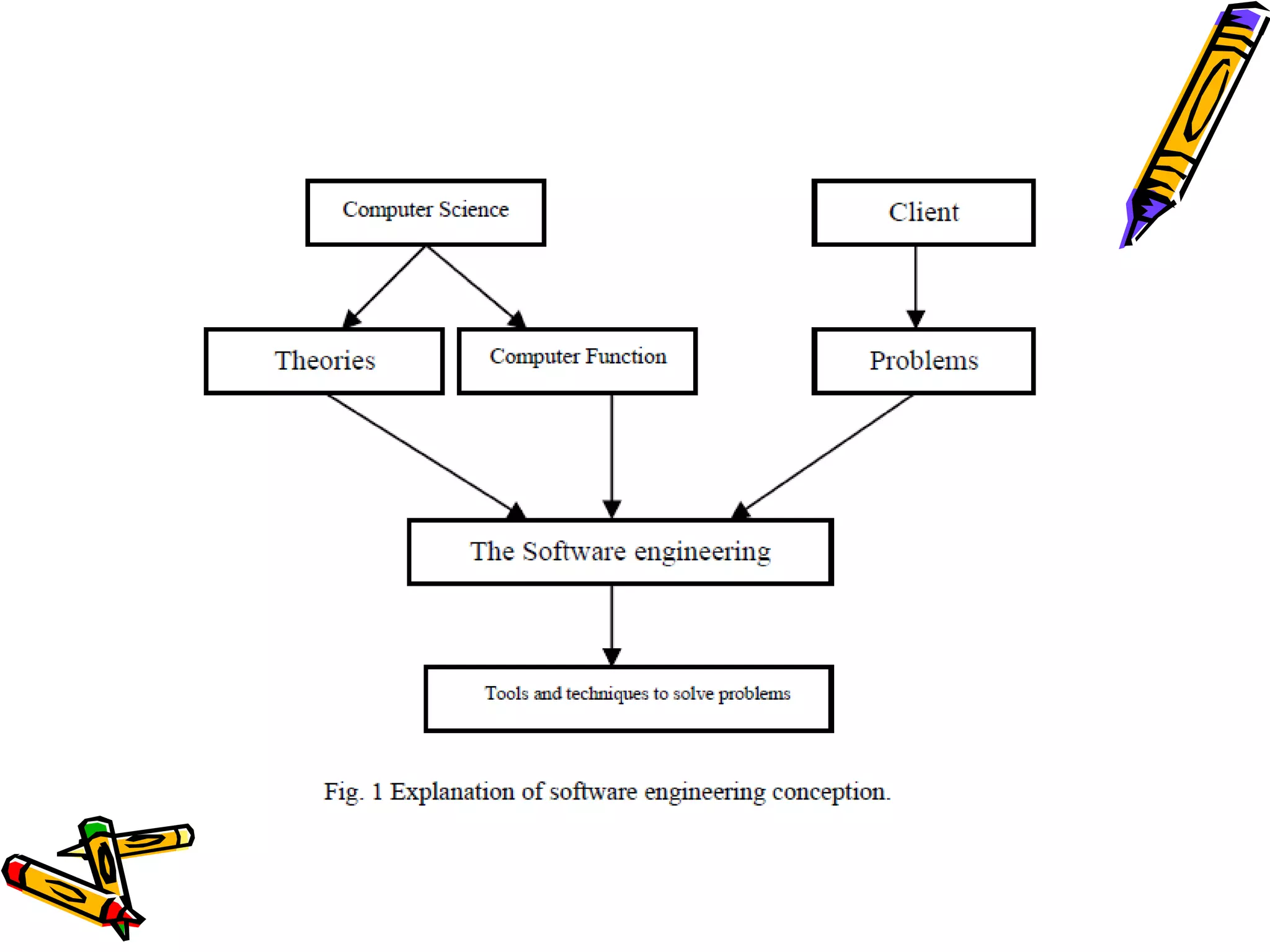
Project Plan 
• project plan = 
process model + project parameters 
• Project specific parameters will include: 
• Size, (person-years) 
• Budget, 
• Duration
Hence.. 
• A process model covers the entire lifetime of a 
product 
• From birth of a commercial idea to final de-installation 
of last release 
• The three main phases: 
– design, 
– build, 
– maintain. (50% of IT activity goes here!)
Process Models 
• Several models exist to streamline the 
development process. 
• Each one has its pros and cons 
• It is up to the development team to adopt 
the most appropriate one for the project. 
• Sometimes a combination of the models may 
be more suitable.
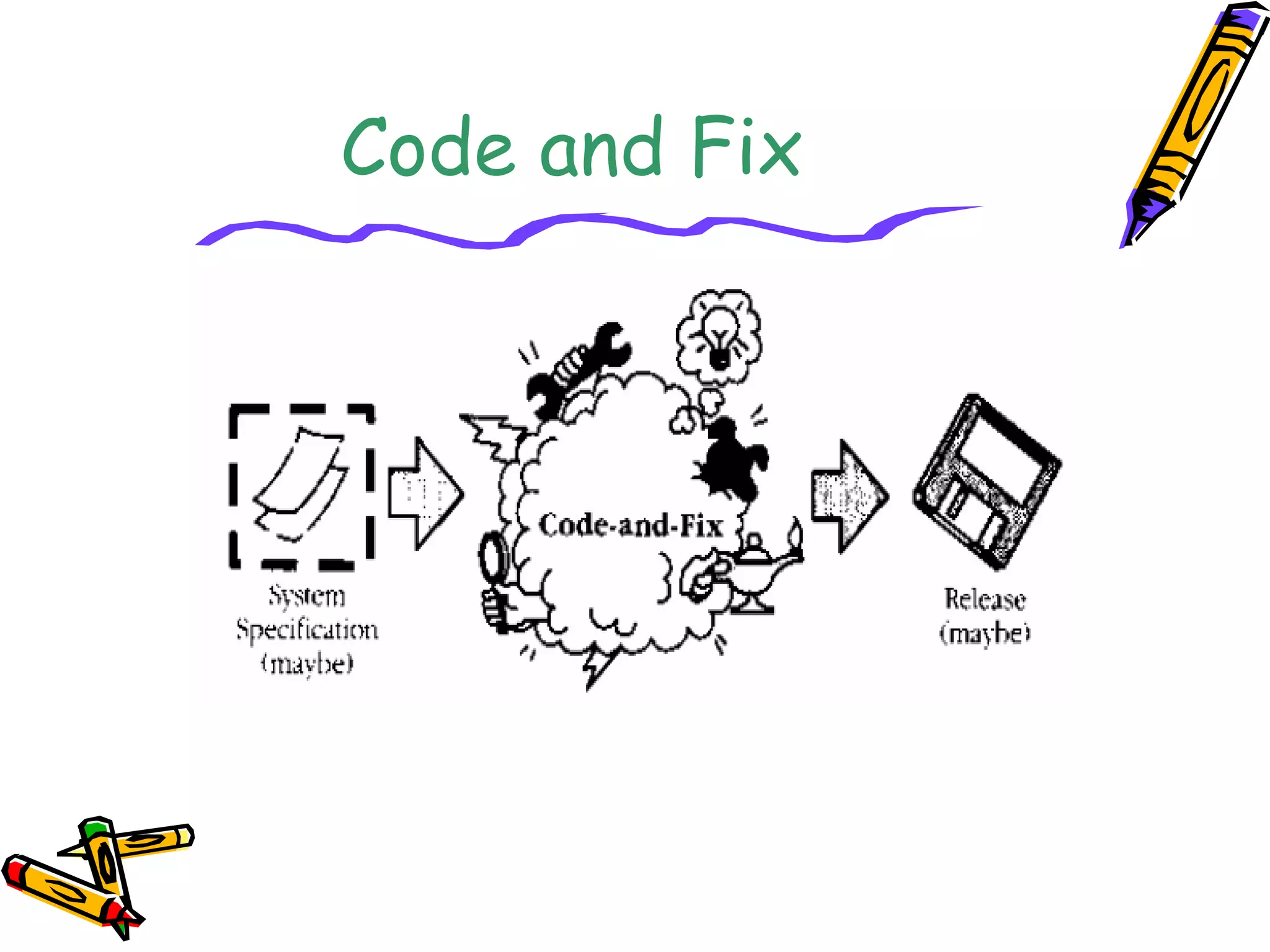
Code and Fix
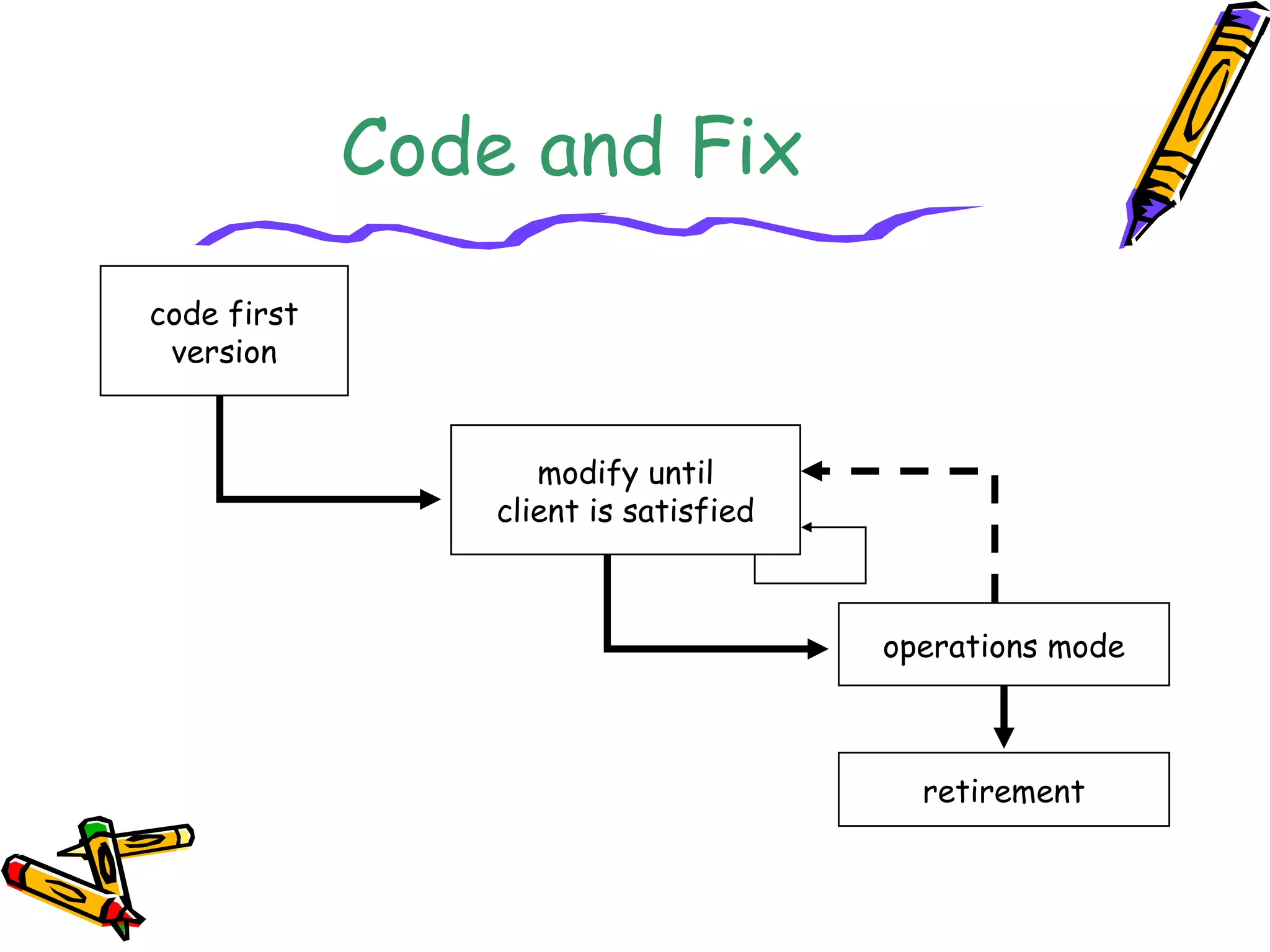
Code and Fix 
code first 
version 
operations mode 
retirement 
modify until 
client is satisfied
Advantages 
• No planning whatsoever; little 
management overhead 
• Applicable for very small projects 
and short-lived prototypes 
• Signs of progress early 
• Low expertise- anyone can use it
Disadvantages 
• Dangerous! 
• No visibility/control 
• No resource Planning 
• No Deadline 
• Mistakes hard to detect and correct 
• Code becomes expensive to fix (bugs are not 
found until late in the process) 
• Code didn't match user's needs (no 
requirements!) 
• Code was not planned for modification, not 
flexible
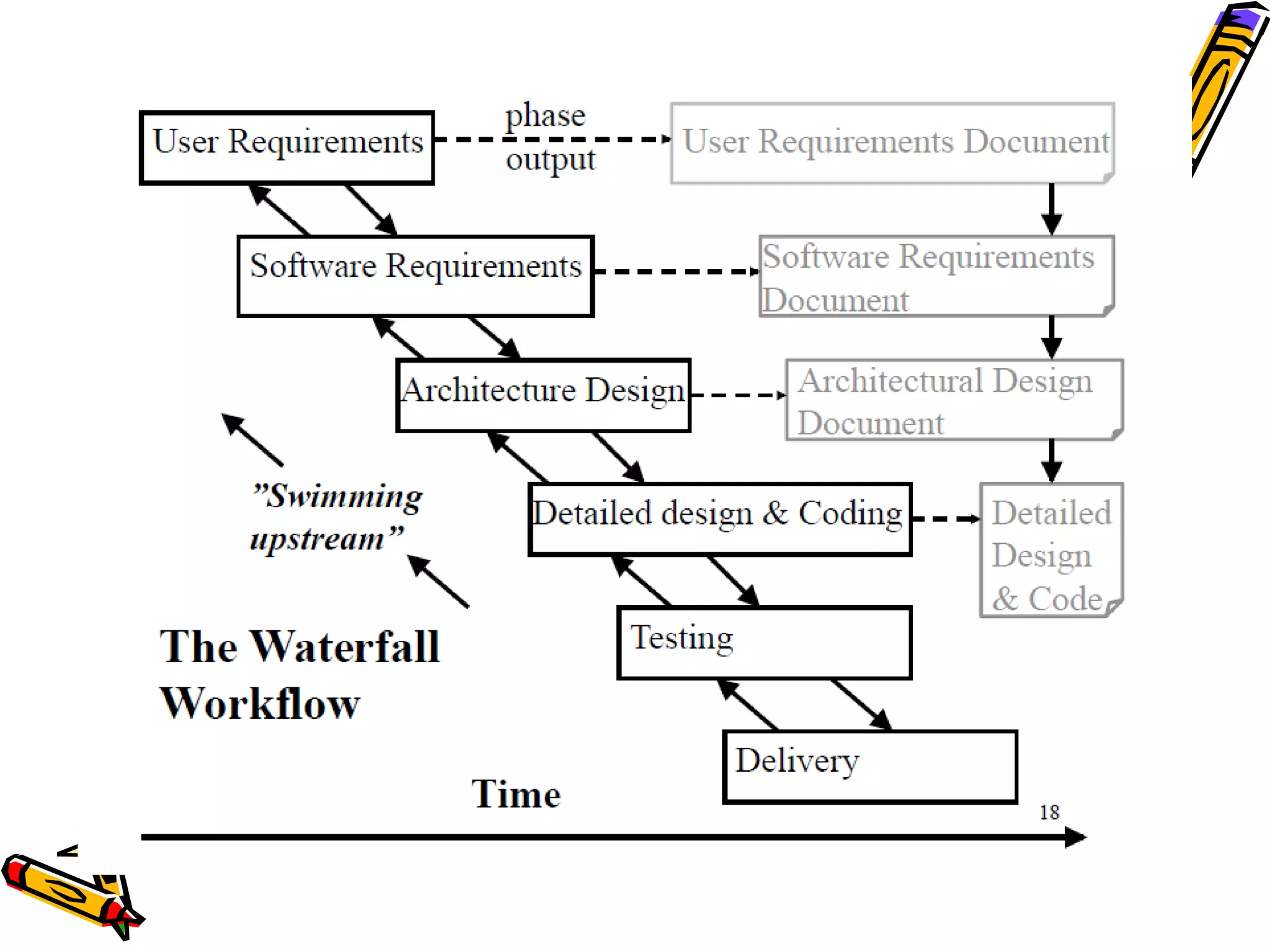
The Waterfall Model 
• The waterfall model is sequential design process, 
used in software development processes, in which 
progress is seen as flowing steadily downwards 
(like a waterfall) through the phases of 
• Conception 
• Initiation 
• Analysis 
• Design 
• Construction 
• Testing 
• Production/Implementation 
• Maintenance
Advantages 
• This model is simple and easy to understand and 
use. 
• It is easy to manage 
• In this model phases are processed and 
completed one at a time. Phases do not overlap. 
• Waterfall model works well for smaller 
projects where requirements are very well 
understood.
Disadvantages 
• Once an application is in the testing stage, it is 
very difficult to go back and change something 
that was not well-thought out in the concept 
stage. 
• No working software is produced until late 
during the life cycle. 
• High amounts of risk and uncertainty.
Disadvantages.. 
• Not a good model for complex and 
object-oriented projects. 
• Poor model for long and ongoing projects. 
• Not suitable for the projects where 
requirements are at a moderate to high 
risk of changing.
When to use Waterfall Model 
• This model is used only when the requirements 
are very well known, clear and fixed. 
• Product definition is stable. 
• Technology is understood. 
• There are no ambiguous requirements 
• Ample resources with required expertise are 
available freely 
• The project is short.
Incremental and Iterative 
Development models
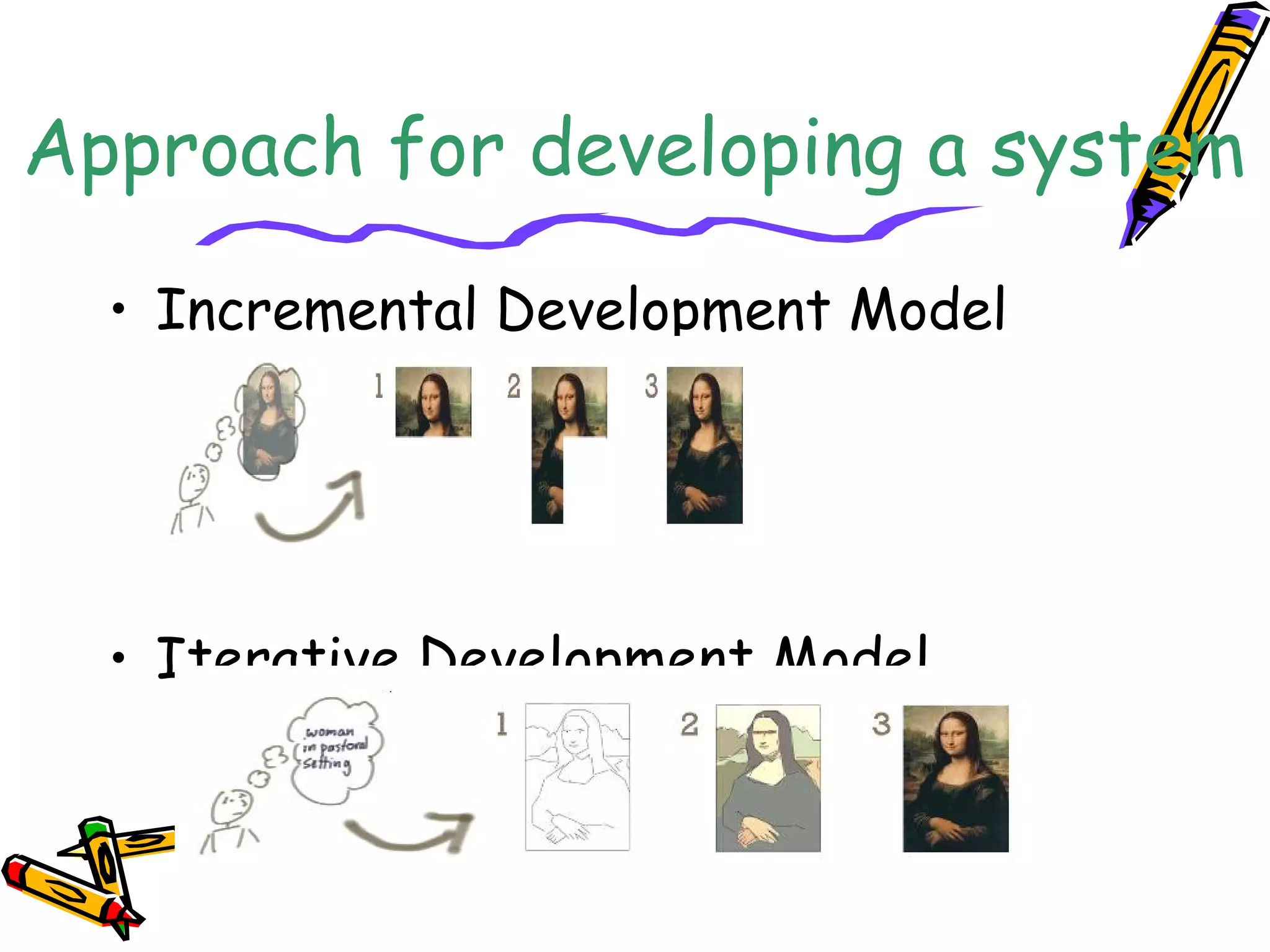
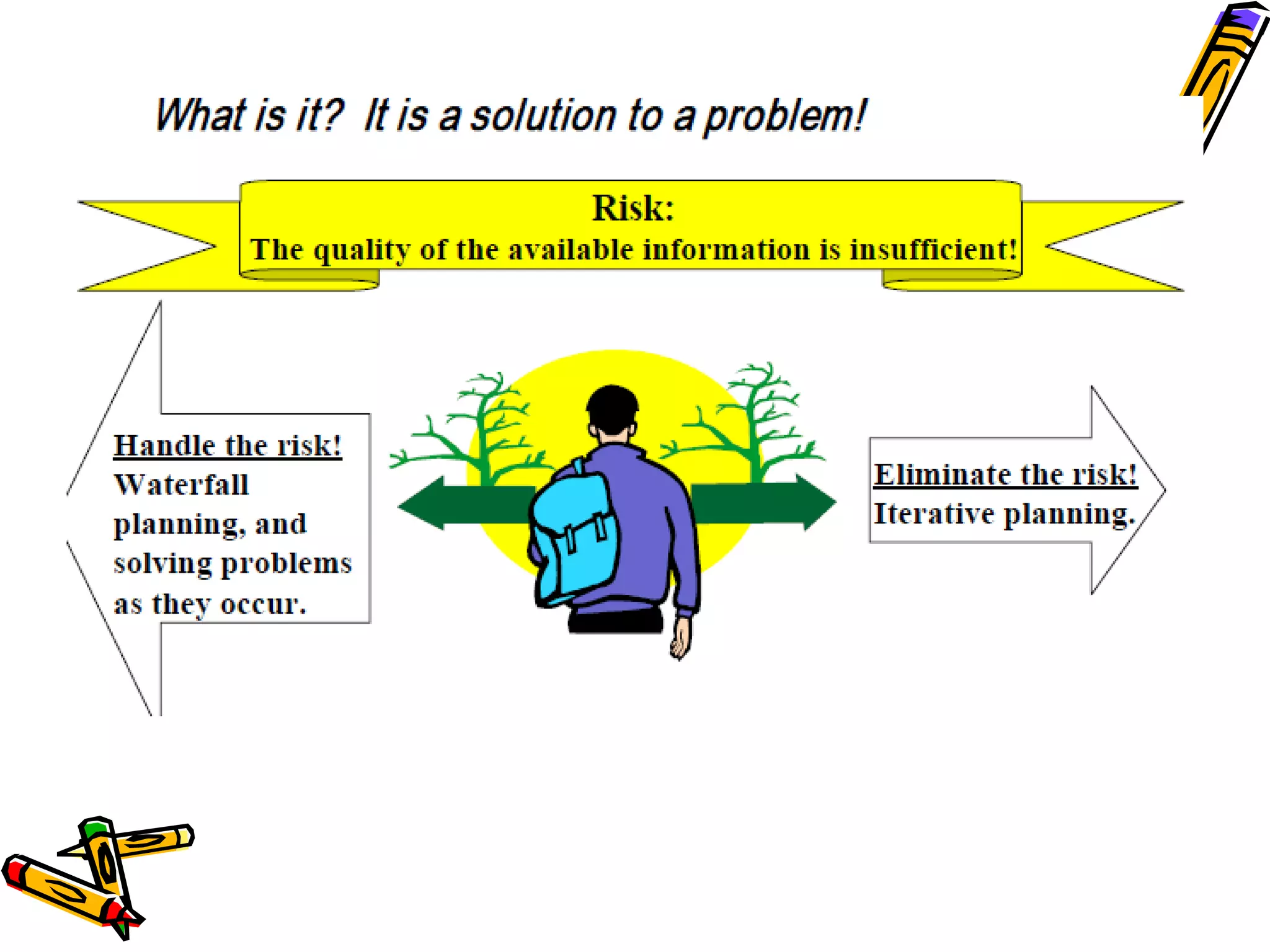
Approach for developing a system 
• Incremental Development Model 
• Iterative Development Model
Incremental Development-staging 
and scheduling strategy 
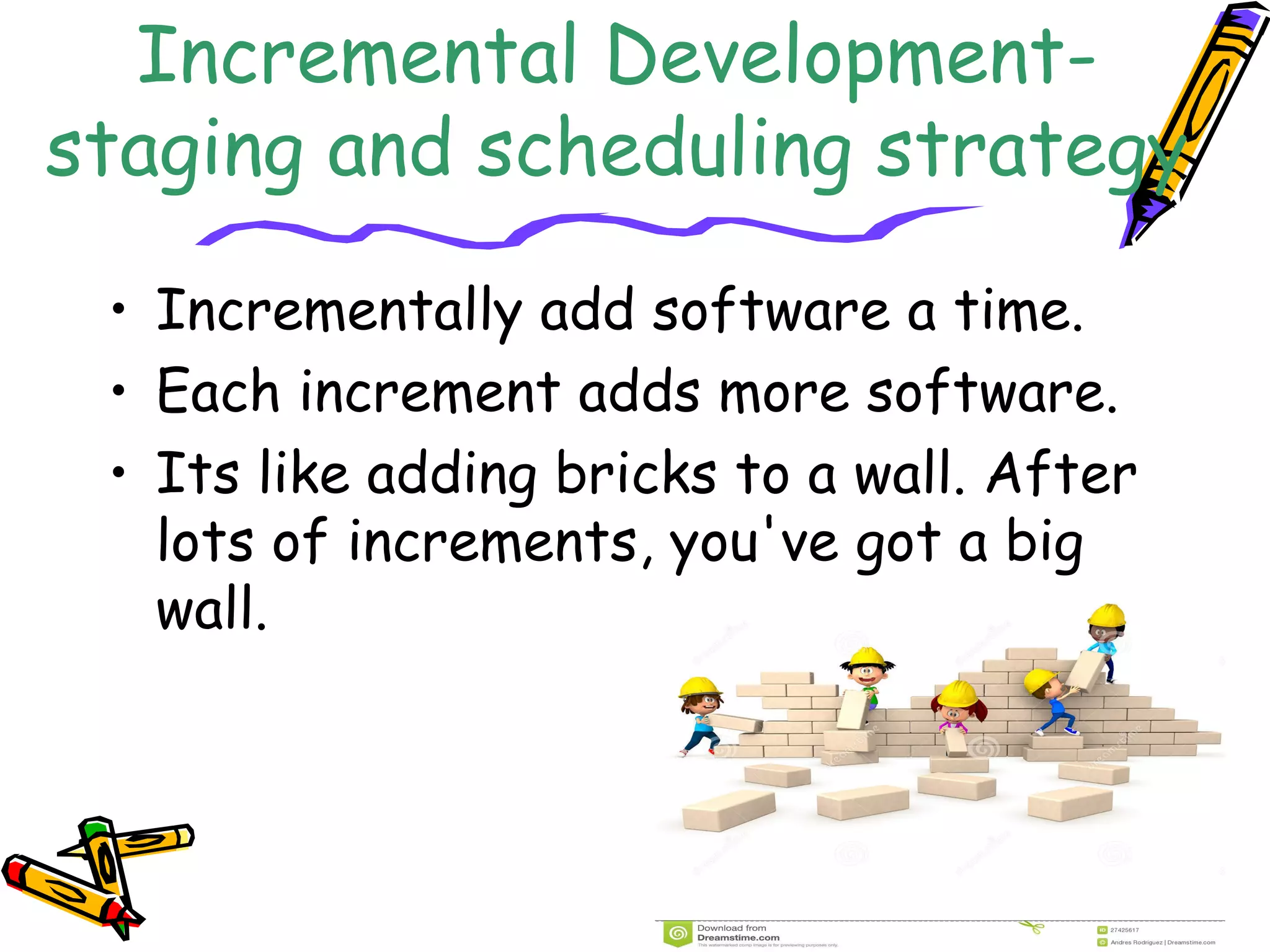
• Incrementally add software a time. 
• Each increment adds more software. 
• Its like adding bricks to a wall. After 
lots of increments, you've got a big 
wall.
Incremental 
Development 
• Various parts of the system are developed 
at different times or rates, and integrated 
as they are completed 
• Develop the entire system with a “big 
bang” integration.”
Iterative Development-rework 
scheduling strategy 
• We build something, then evaluate whether 
it'll work for us, then we make changes to it. 
• We are expecting to change it. 
• We never expected it to be right. If it was, 
it's a happy accident 
• Iterative” development helps you improve 
your product. Each time around the process 
you get to change and improve the product 
itself
Remember.. 
• Incremental fundamentally means add onto. 
– Incremental development helps you improve 
your process. 
• 
Iterative fundamentally means re-do. 
– Iterative development helps you improve 
your product.
SSppiirraall MMooddeell 
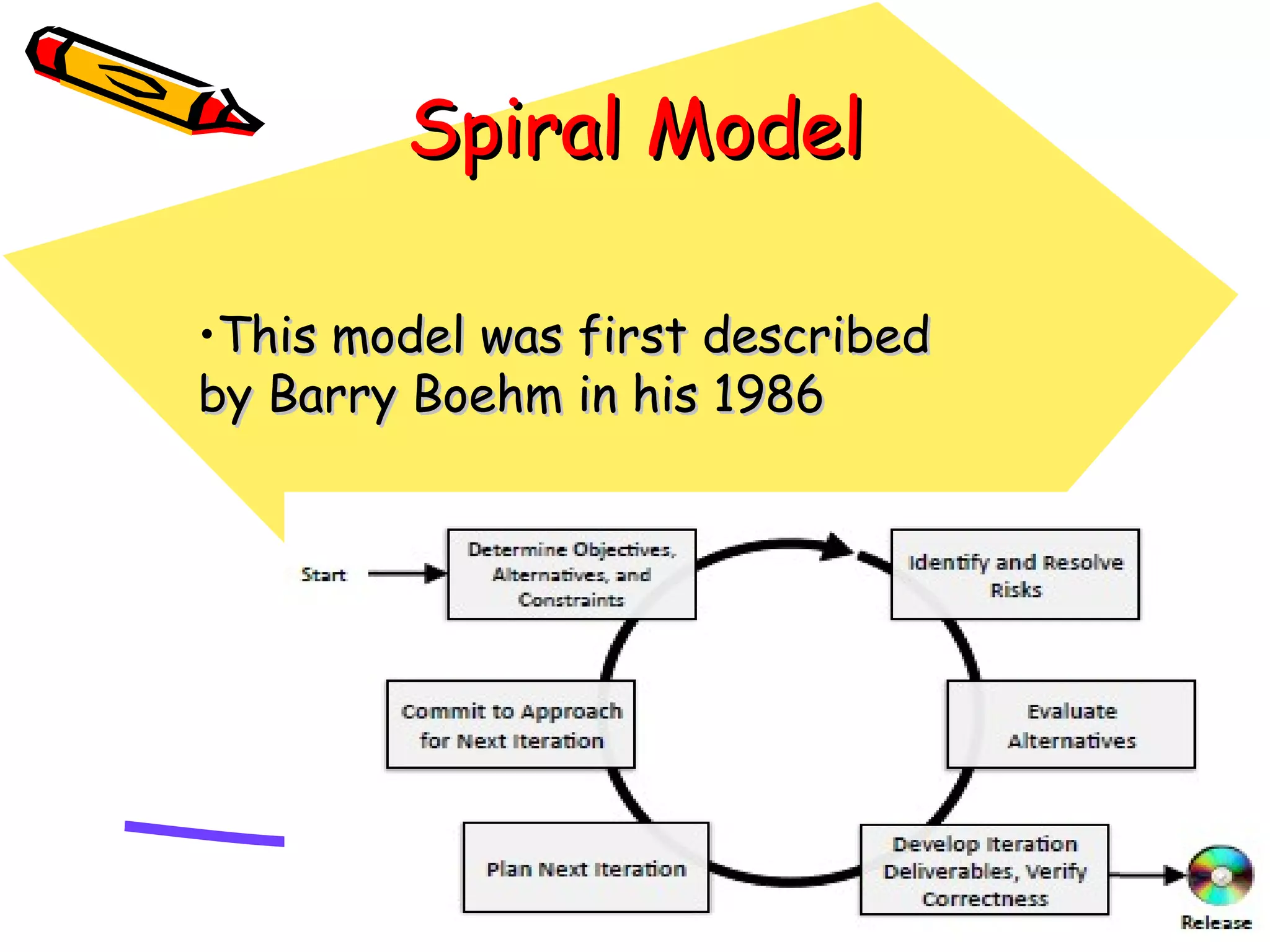
•TThhiiss mmooddeell wwaass ffiirrsstt ddeessccrriibbeedd 
bbyy BBaarrrryy BBooeehhmm iinn hhiiss 1199886
Spiral Model 
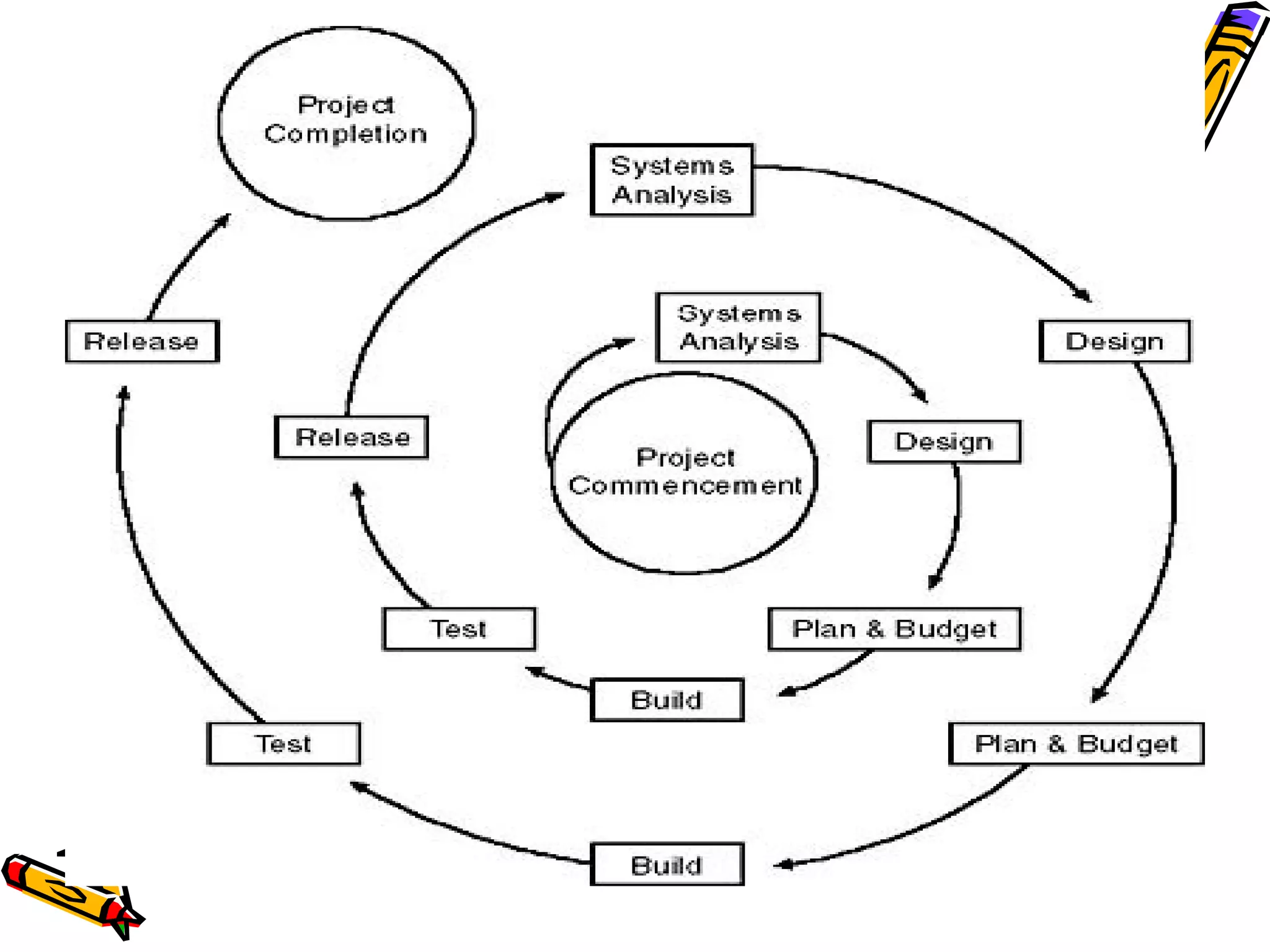
• The spiral is simply a sequence of 
waterfall increments; 
• All project activities follow a single spiral 
sequence; and 
• Every activity in the diagram must be 
performed
Phases of Spiral 
Development 
• Planning Phase 
• Risk Analysis Phase 
• Engineering Phase 
• Coding and Implementation Phase 
• Evaluation Phase
Perform 4 basic 
activities in every cycle 
– Consider the win conditions of all success-critical 
stakeholders. 
– Identify and evaluate alternative approaches 
for satisfying the win conditions. 
– Identify and resolve risks that stem from the 
selected approach(es). 
– Obtain approval from all success-critical 
stakeholders, plus commitment to pursue the 
next cycle.
Hence 
• Thus, the incremental, waterfall, 
prototyping, and other process models are 
special cases of the spiral model that fit the 
risk patterns of certain projects.
Advantages 
• High amount of risk analysis hence, avoidance of 
Risk is enhanced. 
• Good for large and mission-critical projects. 
• Strong approval and documentation control. 
• Additional Functionality can be added at a later 
date. 
• Software is produced early in the software life 
cycle. 
• .
Disadvantages 
• Management is more complex. 
• Can be a costly model to use. 
• Risk analysis requires highly specific expertise. 
• Project’s success is highly dependent on the risk 
analysis phase. 
• Doesn’t work well for smaller projects.
When to use Spiral Model 
• When costs and risk evaluation is important 
• For medium to high-risk projects 
• Long-term project commitment unwise because of potential 
changes to economic priorities 
• Users are unsure of their needs 
• Requirements are complex 
• New product line 
• Significant changes are expected (research and exploration)
Rapid Application Development 
(RAD) Model 
– Starting with the ideas of Barry Boehm and 
others, James Martin developed the rapid 
application development approach during the 
1980s at IBM and finally formalized it by 
publishing a book in 1991
Rapid Application Development 
(RAD) Model 
• RAD approaches to software development 
put less emphasis on planning tasks and more 
emphasis on development. 
• knowledge gained from the development 
process itself can feed back to the 
requirements and design of the solution
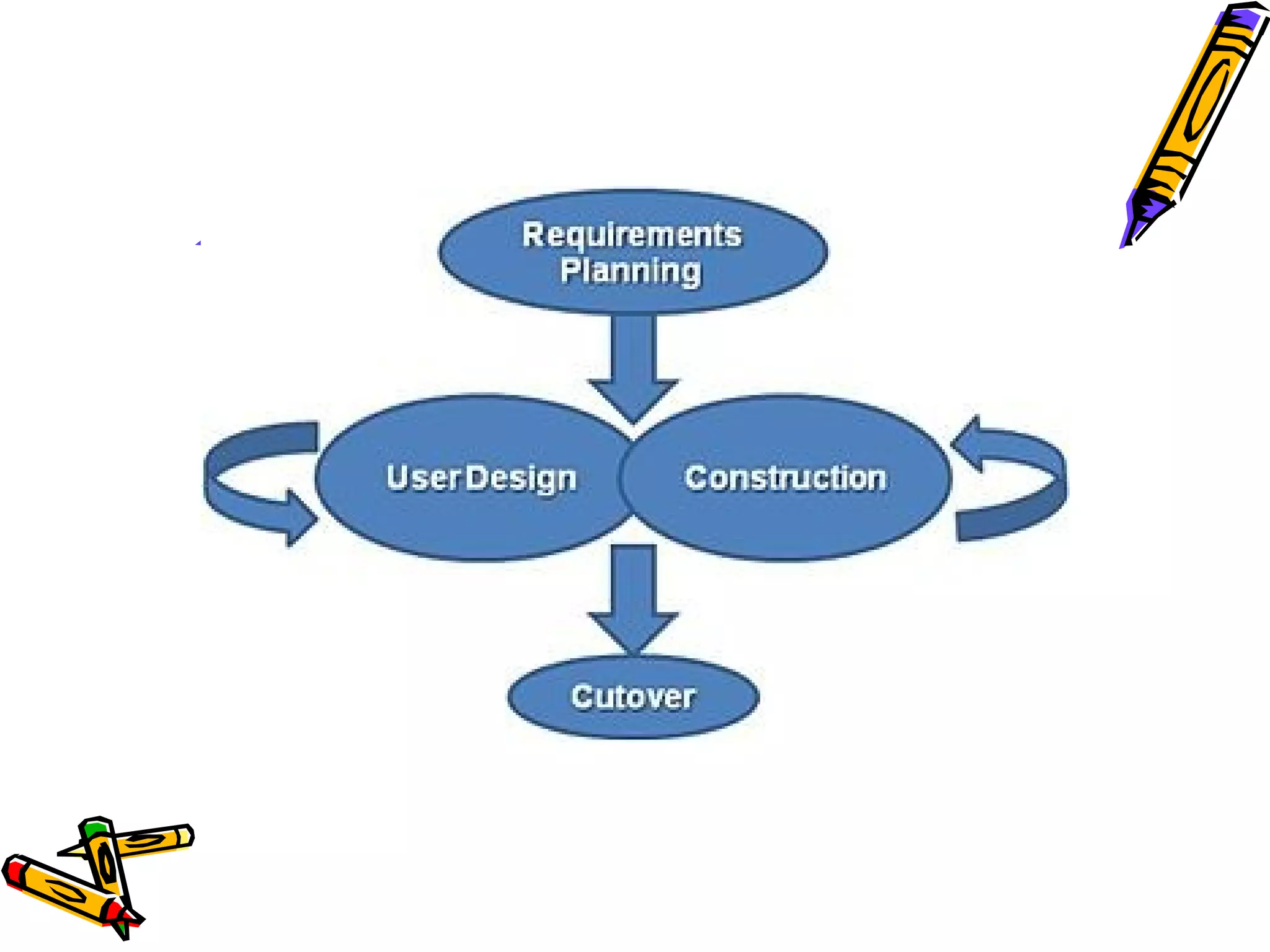
Phases 
– The James Martin approach to RAD 
divides the process into four distinct 
phases: 
• Requirements Planning phase 
• User design phase 
• Construction phase 
• Cutover phase
Requirements Planning Phase 
– combines elements of the system planning and 
systems analysis phases 
– Users, managers, and IT staff members discuss 
and agree on: 
• business needs, 
• project scope, 
• constraints, 
• system requirements. 
– It ends when the team agrees on the key issues 
and obtains management authorization to 
continue.
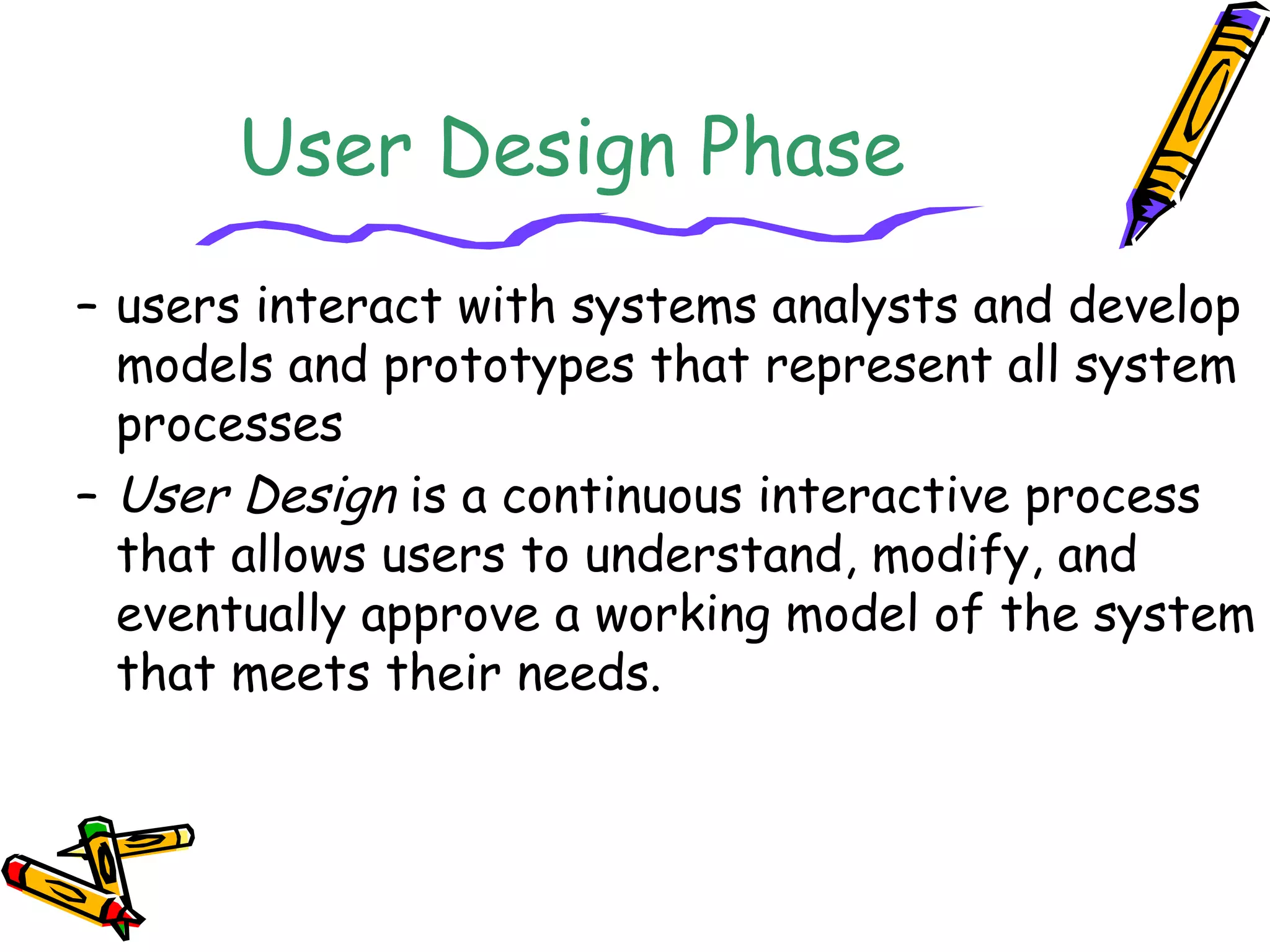
User Design Phase 
– users interact with systems analysts and develop 
models and prototypes that represent all system 
processes 
– User Design is a continuous interactive process 
that allows users to understand, modify, and 
eventually approve a working model of the system 
that meets their needs.
Construction Phase 
– focuses on program and application development 
– users continue to participate and can still 
suggest changes or improvements as actual 
screens or reports are developed. 
– Its tasks are programming and application 
development, coding, unit-integration and system 
testing.
Cutover Phase 
– testing, changeover to the new system, and 
user training. 
– the entire process is compressed. As a result, 
the new system is built, delivered, and placed 
in operation much sooner.
Advantages 
• Risk reduction. A prototype could test some of the 
most difficult potential parts of the system early on in 
the life-cycle. 
• users give much more useful feedback when they can 
experience a prototype of the running system rather 
than abstractly define what that system should be. 
• users could get useful business functionality much 
earlier in the process. 
• More projects completed on time and within budget
Limitations 
• The risk of a new approach-developers 
not willing to accept this 
• Requires time of scarce resources. 
– Less control- due to flexibility of design 
• Poor design- as we are incorporating 
changes many times 
• Very large systems could not be 
handled
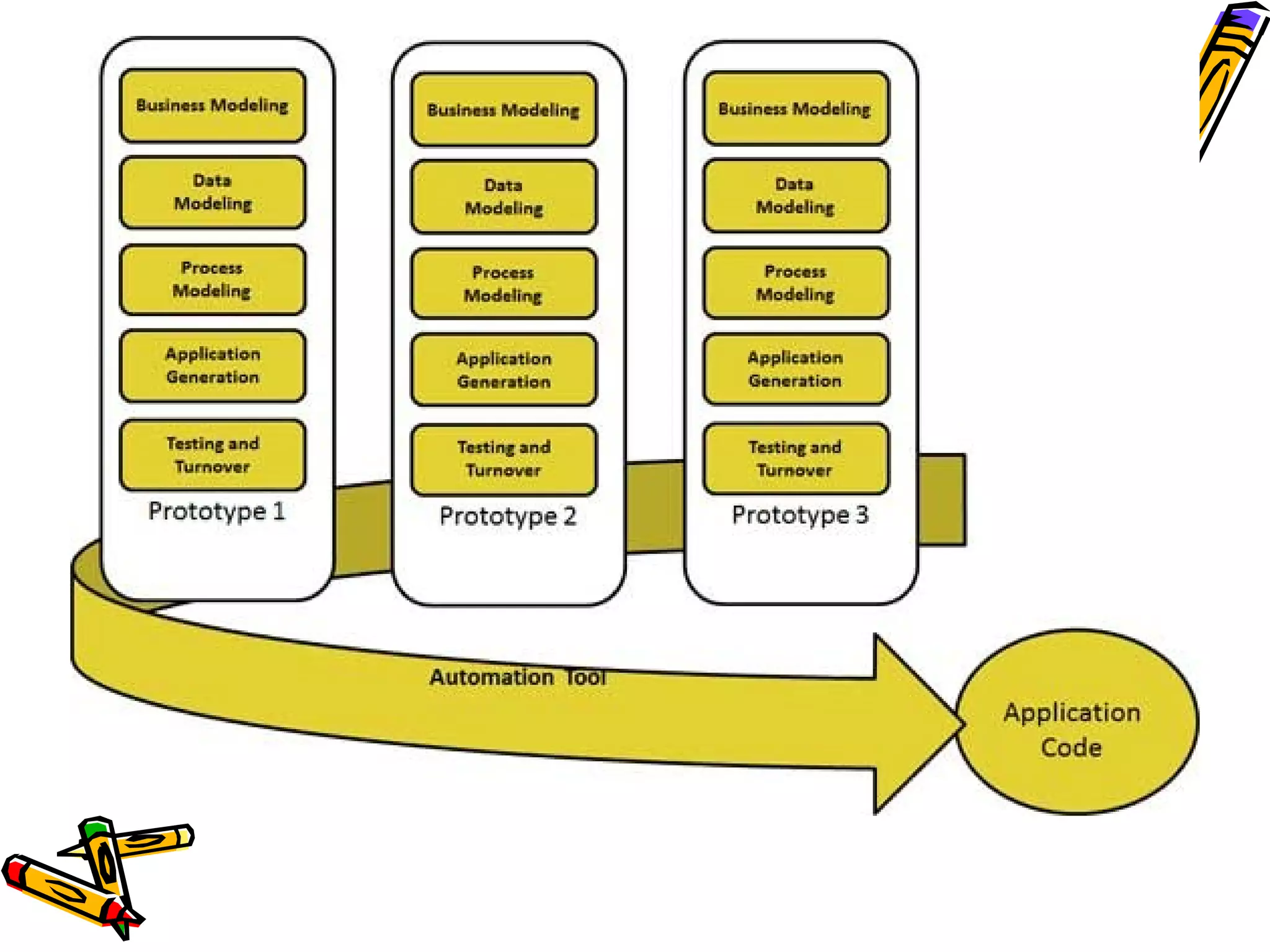
Where to use RAD 
• RAD should be used only when a system can be 
modularized to be delivered in incremental manner. 
• It should be used if there's high availability of 
designers for modeling. 
• It should be used only if the budget permits use of 
automated code generating tools. 
• Should be used where the requirements change during 
the course of the project and working prototypes are 
to be presented to customer in small iterations of 2-3 
months.
Concurrent Development Model 
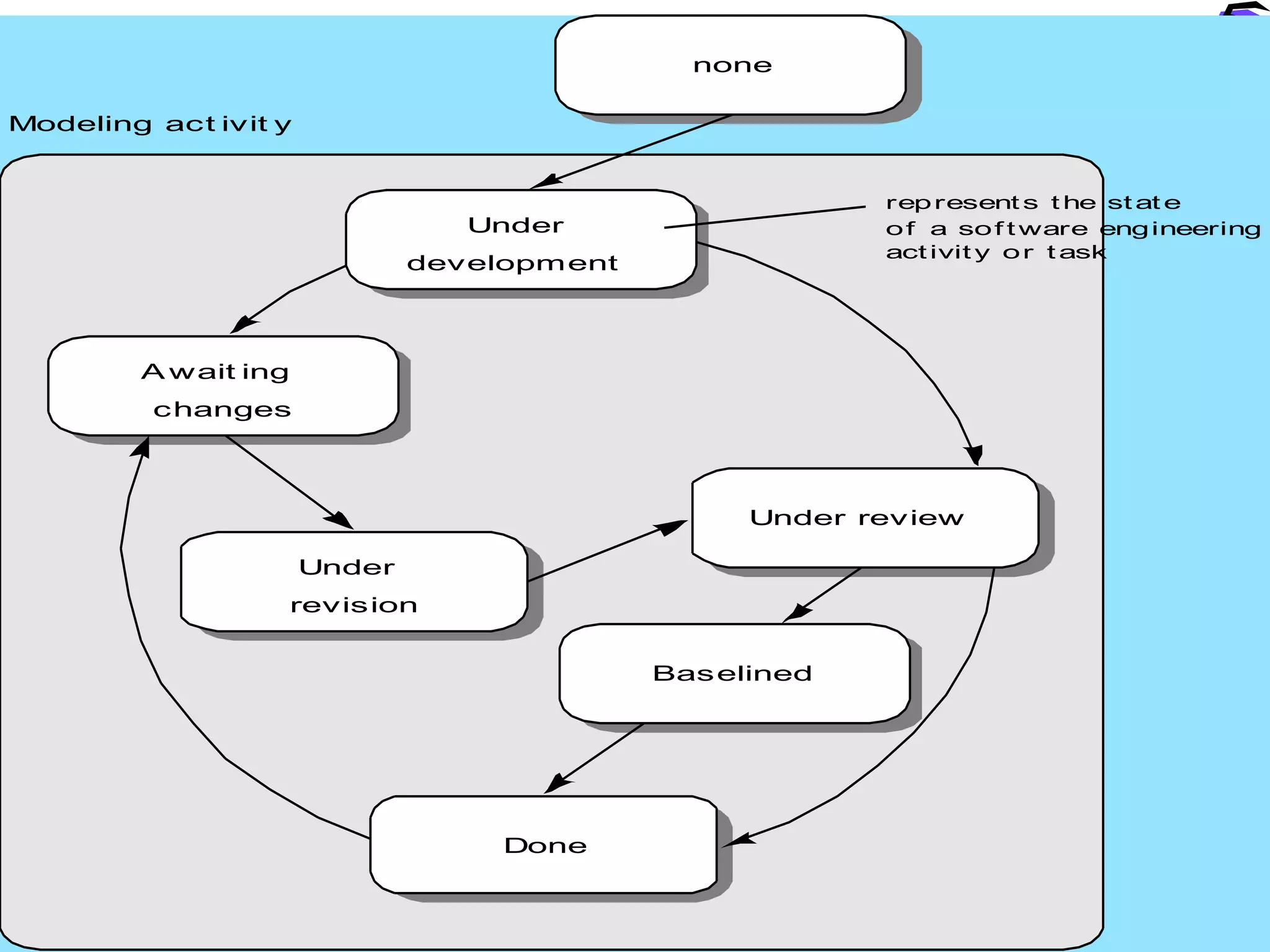
– The activity – modeling- may be in any one of the 
states noted at any given time. 
– All activities exist concurrently but reside in 
different states. 
– The concurrent process model defines a series 
of events that will trigger transitions from state 
to state for each of the Software engineering 
activities, actions, or tasks.
Under review 
Baselined 
Done 
Await ing 
changes 
Under 
revision 
Under 
development 
none 
Modeling act ivit y 
represents the state 
of a sof tware engineering 
act ivity or task
• It defines s/w engg as network of activities each in different 
state, each dependent on one another and each going on 
concurrently 
• Awaiting changes state- after completion of the 1st iteration 
• None state- while initial communication is carried out 
• Underdevelopment state- after communication is completed 
• Awaiting changes state- if any changes in the requirements 
must be made
Concurrency is achieved 
in two ways 
• system and component activities occur 
simultaneously and can be modeled using the 
state-oriented approach described 
previously; 
• a typical client/server application is 
implemented with many components, each of 
which can be designed and realized 
concurrently.
Disadvantages 
– Movement of a process among states inside 
activity is confusing sometimes. 
– Besides it requires more Resource (intellectual).
Process models

Process models

  • 1.
    PPrroocceessss MMooddeellss ((UUnniitt22)) Preeti Mishra Course Incharge
  • 2.
  • 3.
    Process Model •A software process model is a standardised format for: • planning • organising, and • Running developing a project • Definition: A (software/system) process model is a description of the sequence of activities carried out in an SE project, and the relative order of these activities.
  • 4.
    Project Plan •project plan = process model + project parameters • Project specific parameters will include: • Size, (person-years) • Budget, • Duration
  • 5.
    Hence.. • Aprocess model covers the entire lifetime of a product • From birth of a commercial idea to final de-installation of last release • The three main phases: – design, – build, – maintain. (50% of IT activity goes here!)
  • 6.
    Process Models •Several models exist to streamline the development process. • Each one has its pros and cons • It is up to the development team to adopt the most appropriate one for the project. • Sometimes a combination of the models may be more suitable.
  • 7.
  • 8.
    Code and Fix code first version operations mode retirement modify until client is satisfied
  • 9.
    Advantages • Noplanning whatsoever; little management overhead • Applicable for very small projects and short-lived prototypes • Signs of progress early • Low expertise- anyone can use it
  • 10.
    Disadvantages • Dangerous! • No visibility/control • No resource Planning • No Deadline • Mistakes hard to detect and correct • Code becomes expensive to fix (bugs are not found until late in the process) • Code didn't match user's needs (no requirements!) • Code was not planned for modification, not flexible
  • 11.
    The Waterfall Model • The waterfall model is sequential design process, used in software development processes, in which progress is seen as flowing steadily downwards (like a waterfall) through the phases of • Conception • Initiation • Analysis • Design • Construction • Testing • Production/Implementation • Maintenance
  • 13.
    Advantages • Thismodel is simple and easy to understand and use. • It is easy to manage • In this model phases are processed and completed one at a time. Phases do not overlap. • Waterfall model works well for smaller projects where requirements are very well understood.
  • 14.
    Disadvantages • Oncean application is in the testing stage, it is very difficult to go back and change something that was not well-thought out in the concept stage. • No working software is produced until late during the life cycle. • High amounts of risk and uncertainty.
  • 15.
    Disadvantages.. • Nota good model for complex and object-oriented projects. • Poor model for long and ongoing projects. • Not suitable for the projects where requirements are at a moderate to high risk of changing.
  • 16.
    When to useWaterfall Model • This model is used only when the requirements are very well known, clear and fixed. • Product definition is stable. • Technology is understood. • There are no ambiguous requirements • Ample resources with required expertise are available freely • The project is short.
  • 17.
    Incremental and Iterative Development models
  • 18.
    Approach for developinga system • Incremental Development Model • Iterative Development Model
  • 19.
    Incremental Development-staging andscheduling strategy • Incrementally add software a time. • Each increment adds more software. • Its like adding bricks to a wall. After lots of increments, you've got a big wall.
  • 20.
    Incremental Development •Various parts of the system are developed at different times or rates, and integrated as they are completed • Develop the entire system with a “big bang” integration.”
  • 21.
    Iterative Development-rework schedulingstrategy • We build something, then evaluate whether it'll work for us, then we make changes to it. • We are expecting to change it. • We never expected it to be right. If it was, it's a happy accident • Iterative” development helps you improve your product. Each time around the process you get to change and improve the product itself
  • 22.
    Remember.. • Incrementalfundamentally means add onto. – Incremental development helps you improve your process. • Iterative fundamentally means re-do. – Iterative development helps you improve your product.
  • 24.
    SSppiirraall MMooddeell •TThhiissmmooddeell wwaass ffiirrsstt ddeessccrriibbeedd bbyy BBaarrrryy BBooeehhmm iinn hhiiss 1199886
  • 25.
    Spiral Model •The spiral is simply a sequence of waterfall increments; • All project activities follow a single spiral sequence; and • Every activity in the diagram must be performed
  • 26.
    Phases of Spiral Development • Planning Phase • Risk Analysis Phase • Engineering Phase • Coding and Implementation Phase • Evaluation Phase
  • 27.
    Perform 4 basic activities in every cycle – Consider the win conditions of all success-critical stakeholders. – Identify and evaluate alternative approaches for satisfying the win conditions. – Identify and resolve risks that stem from the selected approach(es). – Obtain approval from all success-critical stakeholders, plus commitment to pursue the next cycle.
  • 29.
    Hence • Thus,the incremental, waterfall, prototyping, and other process models are special cases of the spiral model that fit the risk patterns of certain projects.
  • 30.
    Advantages • Highamount of risk analysis hence, avoidance of Risk is enhanced. • Good for large and mission-critical projects. • Strong approval and documentation control. • Additional Functionality can be added at a later date. • Software is produced early in the software life cycle. • .
  • 31.
    Disadvantages • Managementis more complex. • Can be a costly model to use. • Risk analysis requires highly specific expertise. • Project’s success is highly dependent on the risk analysis phase. • Doesn’t work well for smaller projects.
  • 32.
    When to useSpiral Model • When costs and risk evaluation is important • For medium to high-risk projects • Long-term project commitment unwise because of potential changes to economic priorities • Users are unsure of their needs • Requirements are complex • New product line • Significant changes are expected (research and exploration)
  • 33.
    Rapid Application Development (RAD) Model – Starting with the ideas of Barry Boehm and others, James Martin developed the rapid application development approach during the 1980s at IBM and finally formalized it by publishing a book in 1991
  • 34.
    Rapid Application Development (RAD) Model • RAD approaches to software development put less emphasis on planning tasks and more emphasis on development. • knowledge gained from the development process itself can feed back to the requirements and design of the solution
  • 35.
    Phases – TheJames Martin approach to RAD divides the process into four distinct phases: • Requirements Planning phase • User design phase • Construction phase • Cutover phase
  • 36.
    Requirements Planning Phase – combines elements of the system planning and systems analysis phases – Users, managers, and IT staff members discuss and agree on: • business needs, • project scope, • constraints, • system requirements. – It ends when the team agrees on the key issues and obtains management authorization to continue.
  • 37.
    User Design Phase – users interact with systems analysts and develop models and prototypes that represent all system processes – User Design is a continuous interactive process that allows users to understand, modify, and eventually approve a working model of the system that meets their needs.
  • 38.
    Construction Phase –focuses on program and application development – users continue to participate and can still suggest changes or improvements as actual screens or reports are developed. – Its tasks are programming and application development, coding, unit-integration and system testing.
  • 39.
    Cutover Phase –testing, changeover to the new system, and user training. – the entire process is compressed. As a result, the new system is built, delivered, and placed in operation much sooner.
  • 41.
    Advantages • Riskreduction. A prototype could test some of the most difficult potential parts of the system early on in the life-cycle. • users give much more useful feedback when they can experience a prototype of the running system rather than abstractly define what that system should be. • users could get useful business functionality much earlier in the process. • More projects completed on time and within budget
  • 42.
    Limitations • Therisk of a new approach-developers not willing to accept this • Requires time of scarce resources. – Less control- due to flexibility of design • Poor design- as we are incorporating changes many times • Very large systems could not be handled
  • 44.
    Where to useRAD • RAD should be used only when a system can be modularized to be delivered in incremental manner. • It should be used if there's high availability of designers for modeling. • It should be used only if the budget permits use of automated code generating tools. • Should be used where the requirements change during the course of the project and working prototypes are to be presented to customer in small iterations of 2-3 months.
  • 45.
    Concurrent Development Model – The activity – modeling- may be in any one of the states noted at any given time. – All activities exist concurrently but reside in different states. – The concurrent process model defines a series of events that will trigger transitions from state to state for each of the Software engineering activities, actions, or tasks.
  • 46.
    Under review Baselined Done Await ing changes Under revision Under development none Modeling act ivit y represents the state of a sof tware engineering act ivity or task
  • 47.
    • It definess/w engg as network of activities each in different state, each dependent on one another and each going on concurrently • Awaiting changes state- after completion of the 1st iteration • None state- while initial communication is carried out • Underdevelopment state- after communication is completed • Awaiting changes state- if any changes in the requirements must be made
  • 48.
    Concurrency is achieved in two ways • system and component activities occur simultaneously and can be modeled using the state-oriented approach described previously; • a typical client/server application is implemented with many components, each of which can be designed and realized concurrently.
  • 49.
    Disadvantages – Movementof a process among states inside activity is confusing sometimes. – Besides it requires more Resource (intellectual).