Chapter 2


            1
Objectives

• What we mean by a “process”?

• Software development products, processes, and
 resources
• Several models of the software development process
• Tools and techniques for process modeling


                                                       2
2.1 The Meaning of Process

   A process: a series of steps involving
    activities, constraints, and resources that
    produce an intended output of some kind

   A process involves a set of tools and
    techniques


                                                  3
Process Characteristics
   Process prescribes all of the major process activities
    Input:
    ◦ Uses resources (e.g., customer input, specifications),
    ◦ Subject to set of constraints (such as schedule, platform reqts)
   Output:
    ◦ Produces intermediate and final products (e.g., models)
   Structure:
    ◦ – May be composed of sub processes with hierarchy or links
   Properties:
    ◦ – Each process activity has entry and exit criteria
    ◦ – Activities are organized in sequence, so timing is clear
    ◦ – Each process guiding principles, including goals of each activity
    ◦ – Constraints may apply to an activity, resource or product


                                                                            4
   When process involves the building the
    product – referred as Life Cycle

   Software Development Process is
    sometimes called Software Life Cycle.


                                             5
The Importance of Processes

   Process impose consistency and structure on a set of
    activities

   Process is a collection of procedures, organized to build
    a product that satisfy goals or standard

   Process guides us to understand, control, examine, and
    improve the activities

   Process enable us to capture our experiences and pass
    them along

                                                                6
Software Development Stages
   Requirement Analysis and Definition
   System Design
   Program Design
   Program Implementation
   Unit Testing
   Integration Testing
   System Testing
   System Delivery
   Maintenance

   Each stage itself a Process that can be described as a set of activities.
   Each activity involves constraints, outputs, and resources


                                                                                7
2.2 Software Process Models

 Prescriptions – way the s/w dev. should progress
 Descriptions – way s/w dev. Is done in actuality


      Reasons for Modeling a Process
 To form a common understanding
 To find inconsistencies, redundancies, omissions
 To find and evaluate appropriate activities for
  reaching process goals
 To tailor a general process for a particular situation
  in which it will be used
                                                       8
Software Life Cycle

   When a process involves building software,
    the process may be referred to as software
    life cycle
    ◦   Requirements analysis and definition
    ◦   System (architecture) design
    ◦   Program (detailed/procedural) design
    ◦   Writing programs (coding/implementation)
    ◦   Testing: unit, integration, system
    ◦   System delivery (deployment)
    ◦   Maintenance
                                                   9
Software Development Process Models

   Waterfall model
   V model
   Prototyping model
   Operational specification
   Transformational model
   Phased development:
    ◦ Increments
    ◦ Iteration
   Spiral model
   Agile methods


                                          10
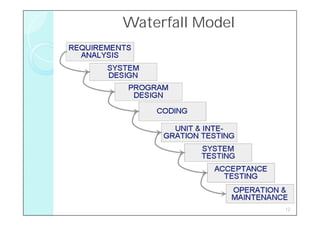
Waterfall Model ( Royce)
   One of the first process development models proposed
   Works for well understood problems with minimal or no
    changes in the requirements
   Simple and easy to explain to customers
   It presents
     ◦ – A very high-level view of the development process
     ◦ – Sequence of process activities
   Each major phase is marked by milestones and deliverables
    (artifacts)
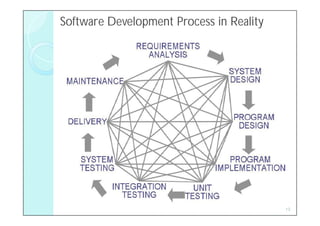
   There is no iteration in waterfall model
   Most software developments apply a great many iterations

                                                            11
Waterfall Model


                  12
Software Development Process in Reality


                                          13
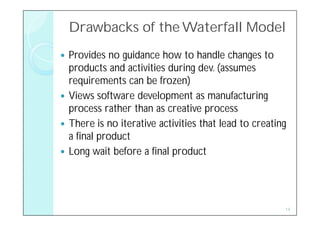
Drawbacks of the Waterfall Model
 Provides no guidance how to handle changes to
  products and activities during dev. (assumes
  requirements can be frozen)
 Views software development as manufacturing
  process rather than as creative process
 There is no iterative activities that lead to creating
  a final product
 Long wait before a final product


                                                       14
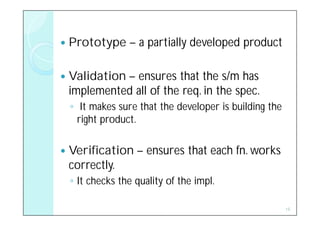
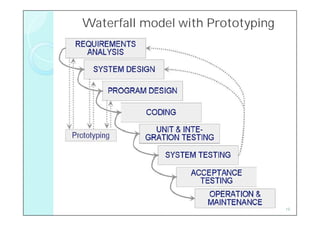
   Prototype – a partially developed product

   Validation – ensures that the s/m has
    implemented all of the req. in the spec.
    ◦ It makes sure that the developer is building the
      right product.

   Verification – ensures that each fn. works
    correctly.
    ◦ It checks the quality of the impl.

                                                         15
Waterfall model with Prototyping


                                   16
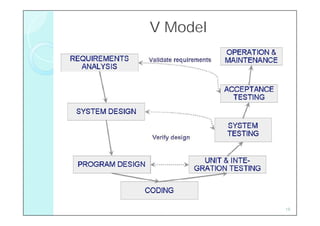
V Model ( German Ministry of Defense)
   It is a variation of Water fall model that demonstrates how
    the testing activities are related to analysis and design.
   V - coding forms the point
     ◦ Analysis and Design - left
     ◦ Testing and Maintenance – right
   This model used to verify pgm. design
   Acceptance testing done by customers rather than
    developers
   Waterfall model focus on documents and artifacts whereas
    V model focus on activity and correctness


                                                              17
V Model


          18
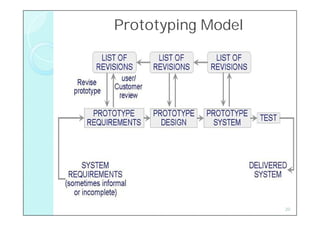
Prototyping Model
 This model allows all or part of a s/m to be
  constructed quickly to understand or clarify issues.
 Allows repeated investigation of the requirements or
  design
  ◦ to ensure user, customer, developer has the
    common understanding of both what is needed
    and what is proposed

   Overall goal : Reduces risk and uncertainty in the
    development

                                                         19
Prototyping Model


                    20
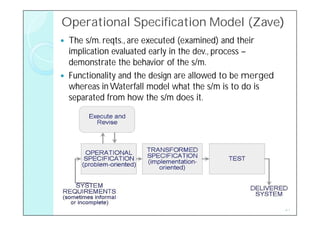
Operational Specification Model (Zave)
                                (Zave)
   The s/m. reqts., are executed (examined) and their
    implication evaluated early in the dev., process –
    demonstrate the behavior of the s/m.
   Functionality and the design are allowed to be merged
    whereas in Waterfall model what the s/m is to do is
    separated from how the s/m does it.


                                                            21
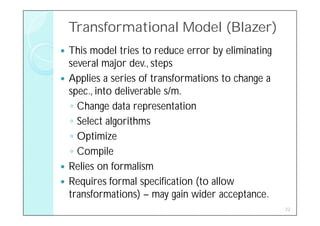
Transformational Model (Blazer)
 This model tries to reduce error by eliminating
  several major dev., steps
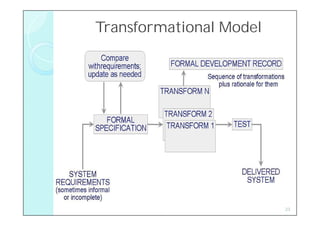
 Applies a series of transformations to change a
  spec., into deliverable s/m.
  ◦ Change data representation
  ◦ Select algorithms
  ◦ Optimize
  ◦ Compile
 Relies on formalism
 Requires formal specification (to allow
  transformations) – may gain wider acceptance.
                                                    22
Transformational Model


                         23
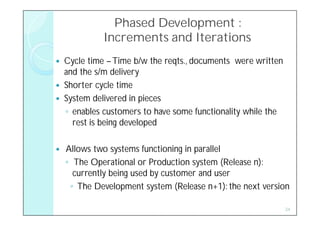
Phased Development :
              Increments and Iterations
   Cycle time – Time b/w the reqts., documents were written
    and the s/m delivery
   Shorter cycle time
   System delivered in pieces
    ◦ enables customers to have some functionality while the
      rest is being developed

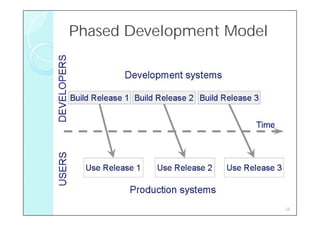
   Allows two systems functioning in parallel
    ◦ The Operational or Production system (Release n):
      currently being used by customer and user
     ◦ The Development system (Release n+1): the next version

                                                               24
Phased Development Model


                           25
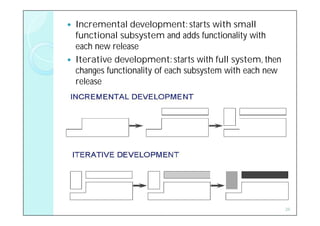
   Incremental development: starts with small
    functional subsystem and adds functionality with
    each new release
   Iterative development: starts with full system, then
    changes functionality of each subsystem with each new
    release


                                                            26
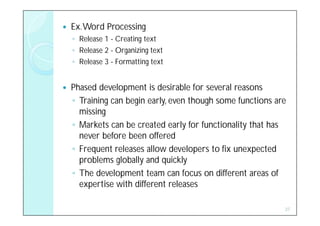
   Ex. Word Processing
    ◦ Release 1 - Creating text
    ◦ Release 2 - Organizing text
    ◦ Release 3 - Formatting text


   Phased development is desirable for several reasons
    ◦ Training can begin early, even though some functions are
      missing
    ◦ Markets can be created early for functionality that has
      never before been offered
    ◦ Frequent releases allow developers to fix unexpected
      problems globally and quickly
    ◦ The development team can focus on different areas of
      expertise with different releases

                                                             27
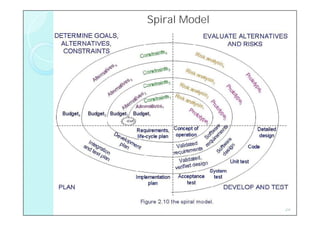
Spiral Model (Boehm )
   Suggested by Barry Boehm (1988)
   Combines development activities with risk management to
    minimize and control risks
   The model is presented as a spiral in which each iteration
    is represented by a circuit around four major activities
     ◦ Plan
     ◦ Determine goals, alternatives and constraints
     ◦ Evaluate alternatives and risks
     ◦ Develop and test
   With each iteration, the risk analysis weighs
     ◦ diffn. alternatives in light of reqts., and constraint
     ◦ prototyping verifies feasibility before particular altn. is
       chosen
                                                                 28
Spiral Model


               29
Agile Methods
   Emphasis on flexibility in producing software quickly and capably

   Agile manifesto that focuses on 4 tenets – abt., s/w dev.,
    ( Agile Alliance 2001)
    ◦ Value individuals and interactions over process and tools
    ◦ Prefer to invest time in producing working software rather than
       in producing comprehensive documentation
    ◦ Focus on customer collaboration rather than contract
       negotiation
    ◦ Concentrate on responding to change rather than on creating a
       plan and then following it

   The overall goal of agile dev., is to satisfy the cust., by “early &
    continuous delivery of valuable s/w”
                                                                           30
Agile Methods: Examples of Agile Process
   Extreme programming (XP): a set of techniques for leveraging the
    creativity of developers & minimizing the amount of administrative
    overhead
   Crystal (Cockburn 2002) : a collection of approaches based on the
    notion that every project needs a unique set of policies, conventions and
    methodologies.
   Scrum(Schwaber & Beedle 2002) : iterative dev.,
    ◦ each 30-day iterations is called sprint;
    ◦ multiple self-organizing & autonomous teams impl., product in parallel;
    ◦ daily “scrum” (as in rugby) coordination
   Adaptive S/w Dev., (ASD) : a mission acts as guideline, sets the
    destination but not prescribing how to get there.
    ◦ Iteration is important
    ◦ Change is embraced
    ◦ Fixed delivery times
    ◦ Risk is embraced
                                                                            31
Agile Methods: Extreme Programming

   Emphasis on four characteristics of agility
    ◦ Communication: continual interchange between
      customers and developers
    ◦ Simplicity: select the simplest design or implementation
    ◦ Courage: commitment to delivering functionality early
      and often
    ◦ Feedback: loops built into the various activities during
      the development process


                                                             32
Agile Methods:Twelve Facets of XP
   The planning game (customer defines Value)
   Small release (Phase dev., approach – Functions decomposed into small
    parts)
   Metaphor (Common vision, common names, common way)
   Simple design
   Writing tests first
    ◦ 1. Fnal., test - dev by cust., & executed by developer & user
    ◦ 2. Unit test - written & done by developer
   Refactoring (Revisiting the rqts., & design , reformulating them to match
    new & existing needs)
   Pair programming
   Collective ownership
   Continuous integration (small increments)
   Sustainable pace (40 hours/week)
   On-site customer
   Coding standard

                                                                                33
When Extreme is Too Extreme?

   Extreme programming's practices are interdependent, a
    vulnerability if one of them is modified
   In XP , rqts., expressed as a set of test cases must be passed
    by the software
    The System passes all the tests but is not what the customer
    is paying for
   Refactoring issue - it is difficult to rework a system without
    degrading its architecture


                                                                34
Tools & Techniques for Process Modeling
   Your choice of notation depends on what they want to
    capture in your process model
    ◦ Textual - processes as fns.,
    ◦ Graphical – processes as hierarchy of boxes & arrows
    ◦ Combination of picture & text

   Types of model
    ◦ Static Model – depicts the process, showing that i/ps are transformed
      into o/ps.
    ◦ Dynamic Model – enacts the process, so the user can see how
      intermediate & final products are transformed over time.


                                                                         35
Static Modeling – Lai Notation
   Lai developed a comprehensive process notation
   The model shows the rlnship., among roles, activities, and
    artifacts and state tables show information abt., completeness
    of each artifact at a given time.

   Elements of a process are viewed in 7 types:
    ◦   Activity        -   something that will happen in process
    ◦   Sequence        -   order of activities
    ◦   Process model   -   view of interest abt., the s/m
    ◦   Resource        -   necessary item, tool, or person
    ◦   Control         -   external influence over process enactment
    ◦   Policy          -   guiding principle
    ◦   Organization    -   hierarchical structure of process agents ,
                            with physical grouping to logical grouping and
                            related roles                                    36
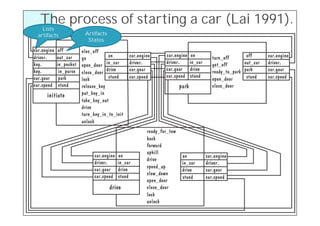
The process of starting a car (Lai 1991).
  Lists
artifacts   Artifacts
             States


                                       37
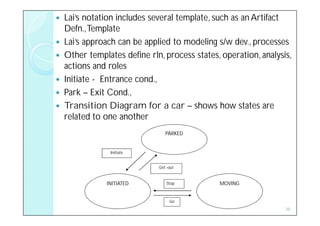
   Lai’s notation includes several template, such as an Artifact
    Defn., Template
   Lai’s approach can be applied to modeling s/w dev., processes
   Other templates define rln, process states, operation, analysis,
    actions and roles
   Initiate - Entrance cond.,
   Park – Exit Cond.,
   Transition Diagram for a car – shows how states are
    related to one another
                                 PARKED


                 Initiate


                              Get -out


               INITIATED          Stop         MOVING


                                   Go
                                                                  38
Dynamic Modeling – S/m Dynamics
   Dynamic process view – enables us to simulate the process and make
    changes before resources are actually expended
   This model decide
    ◦ How many testers we need
    ◦ When we must initiate testing
    ◦ We can include or exclude activities to see their effects on efforts and
      schedule.
   The s/m dynamics approach (Forrester 1950) - simulating diverse
    processes.
   Abdel-Hamid & Madnick - - applied s/m dynamics to s/w dev., enabling proj.,
    managers to ‘test out ‘ their process choices before imposing them on
    developers.

   We can build a descriptive model of various activities
    ◦ Involve in developers’ time and how changes in model increase or
      decrease the time it takes to design, write, and test the code.
                                                                            39
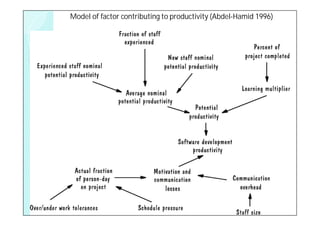
Model of factor contributing to productivity (Abdel-Hamid 1996)


                                                                  40
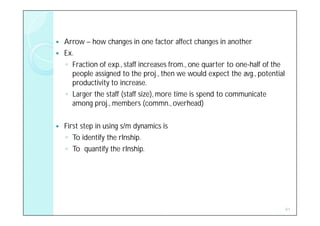
   Arrow – how changes in one factor affect changes in another
   Ex.
    ◦ Fraction of exp., staff increases from., one quarter to one-half of the
      people assigned to the proj., then we would expect the avg., potential
      productivity to increase.
    ◦ Larger the staff (staff size), more time is spend to communicate
      among proj., members (commn., overhead)

   First step in using s/m dynamics is
    ◦ To identify the rlnship.
    ◦ To quantify the rlnship.


                                                                                41
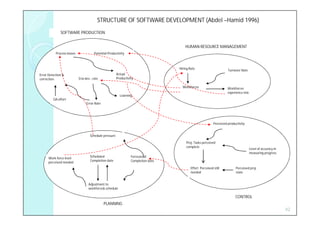
STRUCTURE OF SOFTWARE DEVELOPMENT (Abdel –Hamid 1996)
              SOFTWARE PRODUCTION


                                                                                        HUMAN RESOURCE MANAGEMENT
           Process losses              Potential Productivity


                                                                                    Hiring Rate
                                                                                                                       Turnover Rate
Error Detection &                                       Actual
correction                  S/w dev., rate              Productivity

                                                                                      Workforces                       Workforces
                                                                                                                       experience mix
                                                          Learning
         QA effort
                                 Error Rate


                                                                                                             Perceived productivity


                                    Schedule pressure

                                                                                        Proj. Tasks perceived
                                                                                        complete
                                                                                                                                        Level of accuracy in
                                                                                                                                        measuring progress
                                    Scheduled                     Forecasted
      Work force level
                                    Completion date               Completion date
      perceived needed
                                                                                            Effort Perceived still          Perceived proj.
                                                                                            needed                          state


                                   Adjustment to
                                   workforce& schedule

                                                                                                                            CONTROL
                                              PLANNING
                                                                                                                                                               42
   S/m dynamics model
    ◦ Expensive and complex
    ◦ 4 major areas that affect productivity
        1.   S/w production
        2.   HRM
        3.   Planning
        4.   Control


     The power of s/m dynamics – impressive but it should
      be used with caution


                                                             43
Process Programming (PP)
   If process is well understood , we should be able to write a pgm., to
    describe the process and then run pgm to enact the process.
   The goal of Process pgmming.,
     o To eliminate uncertainty
     o To have enough understanding to write s/w
     o Turning process into a deterministic soln., to the pbm.

    o Possibilities of PP
      o Mgmt visibility into all process activities
      o Automate all activities
      o Coordinate
      o Change all activities with ease


                                                                            44
Practical Process Modeling
   It offers great benefits for understanding process &
    revealing inconsistencies
   Ex.
     ◦ Barghouti, Rosenblum, Belanger & Alliegro (1995) –
       conducted 2 case studies
   Marvel Case Studies
    ◦ used Marvel Specification Language to define the process
    ◦ and then generate a Marvel process enactment environment.
   MSL uses three main constructs.
    ◦ a rule-based specification of process behavior.
    ◦ an object-oriented definition of the model’s information process
    ◦ a set of envelopes to interface between Marvel and external
      software tools used to execute the process.

                                                                         45
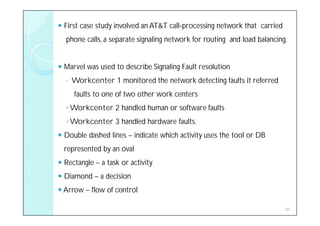
 First case study involved an AT&T call-processing network that carried
  phone calls, a separate signaling network for routing and load balancing.


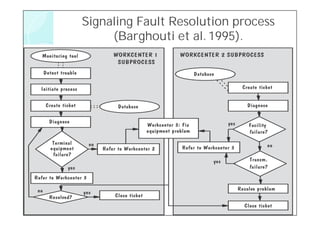
 Marvel was used to describe Signaling Fault resolution
  ◦   Workcenter 1 monitored the network detecting faults it referred
      faults to one of two other work centers
  ◦ Workcenter 2 handled human or software faults
  ◦ Workcenter 3 handled hardware faults.
 Double dashed lines – indicate which activity uses the tool or DB
  represented by an oval
 Rectangle – a task or activity
 Diamond – a decision
 Arrow – flow of control

                                                                           46
Signaling Fault Resolution process
     (Barghouti et al. 1995).


                                     47
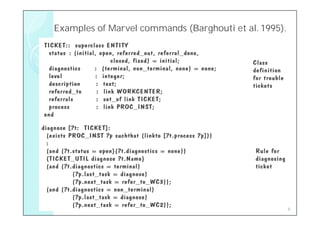
Examples of Marvel commands (Barghouti et al. 1995).
                            (Barghouti


                                                   48
Desirable Properties of Process Modeling Tools and
Techniques – Identified by Curtis, Kellner & Over (1992)

  Facilitates human understanding and communication: depicts the process
  in a form that most customers and developers can understand.
  Supports process improvement: identify the essential components of a dev.,
  or maintenance process , allow reuse of process.
  Supports process management: allow process to proj., specific, developers
  and customers should be able to reason about attributes of software creation and
  evolution.
  Provides automated guidance in performing the process: should define all
  or part of the process development environment.
  Supports automated process execution: should automate all or part of the
  process,


                                                                                49
Exercises – Chapter 1
1.   What is software engineering and how does it fit into computer
     science?

2.   What is the difference between technical and business quality?
     Explain why each is important.

3.   Give two or three examples of failures you have encountered while
     using software. Describe how these failures affected the quality of
     the software product.

4.   Examine failures that have occurred in software that you have
     written. Identify and list the faults and errors that caused each
     failure.


                                                                           50
Exercises – Chapter 2
1.   Describe the process you use to get to ready for class or work in the
     morning. Draw a diagram to capture the process.

2.   Describe three software development life-cycle models. For each, name
     the main activities performed, and the inputs and outputs of each
     activity. For each give an example of the kind of software development
     project where the life-cycle model would be well-suited, and an example
     of where the life-cycle model would be inappropriate; explain why.

3.   What is the difference between static and dynamic modeling? Explain
     how each type of modeling is useful.

4.   Explain the difference between prescriptive and descriptive process
     models. What is the purpose for each? When is it appropriate to use
     each?
                                                                           51

Ch 2

  • 1.
  • 2.
    Objectives • What wemean by a “process”? • Software development products, processes, and resources • Several models of the software development process • Tools and techniques for process modeling 2
  • 3.
    2.1 The Meaningof Process  A process: a series of steps involving activities, constraints, and resources that produce an intended output of some kind  A process involves a set of tools and techniques 3
  • 4.
    Process Characteristics  Process prescribes all of the major process activities  Input: ◦ Uses resources (e.g., customer input, specifications), ◦ Subject to set of constraints (such as schedule, platform reqts)  Output: ◦ Produces intermediate and final products (e.g., models)  Structure: ◦ – May be composed of sub processes with hierarchy or links  Properties: ◦ – Each process activity has entry and exit criteria ◦ – Activities are organized in sequence, so timing is clear ◦ – Each process guiding principles, including goals of each activity ◦ – Constraints may apply to an activity, resource or product 4
  • 5.
    When process involves the building the product – referred as Life Cycle  Software Development Process is sometimes called Software Life Cycle. 5
  • 6.
    The Importance ofProcesses  Process impose consistency and structure on a set of activities  Process is a collection of procedures, organized to build a product that satisfy goals or standard  Process guides us to understand, control, examine, and improve the activities  Process enable us to capture our experiences and pass them along 6
  • 7.
    Software Development Stages  Requirement Analysis and Definition  System Design  Program Design  Program Implementation  Unit Testing  Integration Testing  System Testing  System Delivery  Maintenance  Each stage itself a Process that can be described as a set of activities.  Each activity involves constraints, outputs, and resources 7
  • 8.
    2.2 Software ProcessModels  Prescriptions – way the s/w dev. should progress  Descriptions – way s/w dev. Is done in actuality Reasons for Modeling a Process  To form a common understanding  To find inconsistencies, redundancies, omissions  To find and evaluate appropriate activities for reaching process goals  To tailor a general process for a particular situation in which it will be used 8
  • 9.
    Software Life Cycle  When a process involves building software, the process may be referred to as software life cycle ◦ Requirements analysis and definition ◦ System (architecture) design ◦ Program (detailed/procedural) design ◦ Writing programs (coding/implementation) ◦ Testing: unit, integration, system ◦ System delivery (deployment) ◦ Maintenance 9
  • 10.
    Software Development ProcessModels  Waterfall model  V model  Prototyping model  Operational specification  Transformational model  Phased development: ◦ Increments ◦ Iteration  Spiral model  Agile methods 10
  • 11.
    Waterfall Model (Royce)  One of the first process development models proposed  Works for well understood problems with minimal or no changes in the requirements  Simple and easy to explain to customers  It presents ◦ – A very high-level view of the development process ◦ – Sequence of process activities  Each major phase is marked by milestones and deliverables (artifacts)  There is no iteration in waterfall model  Most software developments apply a great many iterations 11
  • 12.
  • 13.
  • 14.
    Drawbacks of theWaterfall Model  Provides no guidance how to handle changes to products and activities during dev. (assumes requirements can be frozen)  Views software development as manufacturing process rather than as creative process  There is no iterative activities that lead to creating a final product  Long wait before a final product 14
  • 15.
    Prototype – a partially developed product  Validation – ensures that the s/m has implemented all of the req. in the spec. ◦ It makes sure that the developer is building the right product.  Verification – ensures that each fn. works correctly. ◦ It checks the quality of the impl. 15
  • 16.
    Waterfall model withPrototyping 16
  • 17.
    V Model (German Ministry of Defense)  It is a variation of Water fall model that demonstrates how the testing activities are related to analysis and design.  V - coding forms the point ◦ Analysis and Design - left ◦ Testing and Maintenance – right  This model used to verify pgm. design  Acceptance testing done by customers rather than developers  Waterfall model focus on documents and artifacts whereas V model focus on activity and correctness 17
  • 18.
  • 19.
    Prototyping Model  Thismodel allows all or part of a s/m to be constructed quickly to understand or clarify issues.  Allows repeated investigation of the requirements or design ◦ to ensure user, customer, developer has the common understanding of both what is needed and what is proposed  Overall goal : Reduces risk and uncertainty in the development 19
  • 20.
  • 21.
    Operational Specification Model(Zave) (Zave)  The s/m. reqts., are executed (examined) and their implication evaluated early in the dev., process – demonstrate the behavior of the s/m.  Functionality and the design are allowed to be merged whereas in Waterfall model what the s/m is to do is separated from how the s/m does it. 21
  • 22.
    Transformational Model (Blazer) This model tries to reduce error by eliminating several major dev., steps  Applies a series of transformations to change a spec., into deliverable s/m. ◦ Change data representation ◦ Select algorithms ◦ Optimize ◦ Compile  Relies on formalism  Requires formal specification (to allow transformations) – may gain wider acceptance. 22
  • 23.
  • 24.
    Phased Development : Increments and Iterations  Cycle time – Time b/w the reqts., documents were written and the s/m delivery  Shorter cycle time  System delivered in pieces ◦ enables customers to have some functionality while the rest is being developed  Allows two systems functioning in parallel ◦ The Operational or Production system (Release n): currently being used by customer and user ◦ The Development system (Release n+1): the next version 24
  • 25.
  • 26.
    Incremental development: starts with small functional subsystem and adds functionality with each new release  Iterative development: starts with full system, then changes functionality of each subsystem with each new release 26
  • 27.
    Ex. Word Processing ◦ Release 1 - Creating text ◦ Release 2 - Organizing text ◦ Release 3 - Formatting text  Phased development is desirable for several reasons ◦ Training can begin early, even though some functions are missing ◦ Markets can be created early for functionality that has never before been offered ◦ Frequent releases allow developers to fix unexpected problems globally and quickly ◦ The development team can focus on different areas of expertise with different releases 27
  • 28.
    Spiral Model (Boehm)  Suggested by Barry Boehm (1988)  Combines development activities with risk management to minimize and control risks  The model is presented as a spiral in which each iteration is represented by a circuit around four major activities ◦ Plan ◦ Determine goals, alternatives and constraints ◦ Evaluate alternatives and risks ◦ Develop and test  With each iteration, the risk analysis weighs ◦ diffn. alternatives in light of reqts., and constraint ◦ prototyping verifies feasibility before particular altn. is chosen 28
  • 29.
  • 30.
    Agile Methods  Emphasis on flexibility in producing software quickly and capably  Agile manifesto that focuses on 4 tenets – abt., s/w dev., ( Agile Alliance 2001) ◦ Value individuals and interactions over process and tools ◦ Prefer to invest time in producing working software rather than in producing comprehensive documentation ◦ Focus on customer collaboration rather than contract negotiation ◦ Concentrate on responding to change rather than on creating a plan and then following it  The overall goal of agile dev., is to satisfy the cust., by “early & continuous delivery of valuable s/w” 30
  • 31.
    Agile Methods: Examplesof Agile Process  Extreme programming (XP): a set of techniques for leveraging the creativity of developers & minimizing the amount of administrative overhead  Crystal (Cockburn 2002) : a collection of approaches based on the notion that every project needs a unique set of policies, conventions and methodologies.  Scrum(Schwaber & Beedle 2002) : iterative dev., ◦ each 30-day iterations is called sprint; ◦ multiple self-organizing & autonomous teams impl., product in parallel; ◦ daily “scrum” (as in rugby) coordination  Adaptive S/w Dev., (ASD) : a mission acts as guideline, sets the destination but not prescribing how to get there. ◦ Iteration is important ◦ Change is embraced ◦ Fixed delivery times ◦ Risk is embraced 31
  • 32.
    Agile Methods: ExtremeProgramming  Emphasis on four characteristics of agility ◦ Communication: continual interchange between customers and developers ◦ Simplicity: select the simplest design or implementation ◦ Courage: commitment to delivering functionality early and often ◦ Feedback: loops built into the various activities during the development process 32
  • 33.
    Agile Methods:Twelve Facetsof XP  The planning game (customer defines Value)  Small release (Phase dev., approach – Functions decomposed into small parts)  Metaphor (Common vision, common names, common way)  Simple design  Writing tests first ◦ 1. Fnal., test - dev by cust., & executed by developer & user ◦ 2. Unit test - written & done by developer  Refactoring (Revisiting the rqts., & design , reformulating them to match new & existing needs)  Pair programming  Collective ownership  Continuous integration (small increments)  Sustainable pace (40 hours/week)  On-site customer  Coding standard 33
  • 34.
    When Extreme isToo Extreme?  Extreme programming's practices are interdependent, a vulnerability if one of them is modified  In XP , rqts., expressed as a set of test cases must be passed by the software  The System passes all the tests but is not what the customer is paying for  Refactoring issue - it is difficult to rework a system without degrading its architecture 34
  • 35.
    Tools & Techniquesfor Process Modeling  Your choice of notation depends on what they want to capture in your process model ◦ Textual - processes as fns., ◦ Graphical – processes as hierarchy of boxes & arrows ◦ Combination of picture & text  Types of model ◦ Static Model – depicts the process, showing that i/ps are transformed into o/ps. ◦ Dynamic Model – enacts the process, so the user can see how intermediate & final products are transformed over time. 35
  • 36.
    Static Modeling –Lai Notation  Lai developed a comprehensive process notation  The model shows the rlnship., among roles, activities, and artifacts and state tables show information abt., completeness of each artifact at a given time.  Elements of a process are viewed in 7 types: ◦ Activity - something that will happen in process ◦ Sequence - order of activities ◦ Process model - view of interest abt., the s/m ◦ Resource - necessary item, tool, or person ◦ Control - external influence over process enactment ◦ Policy - guiding principle ◦ Organization - hierarchical structure of process agents , with physical grouping to logical grouping and related roles 36
  • 37.
    The process ofstarting a car (Lai 1991). Lists artifacts Artifacts States 37
  • 38.
    Lai’s notation includes several template, such as an Artifact Defn., Template  Lai’s approach can be applied to modeling s/w dev., processes  Other templates define rln, process states, operation, analysis, actions and roles  Initiate - Entrance cond.,  Park – Exit Cond.,  Transition Diagram for a car – shows how states are related to one another PARKED Initiate Get -out INITIATED Stop MOVING Go 38
  • 39.
    Dynamic Modeling –S/m Dynamics  Dynamic process view – enables us to simulate the process and make changes before resources are actually expended  This model decide ◦ How many testers we need ◦ When we must initiate testing ◦ We can include or exclude activities to see their effects on efforts and schedule.  The s/m dynamics approach (Forrester 1950) - simulating diverse processes.  Abdel-Hamid & Madnick - - applied s/m dynamics to s/w dev., enabling proj., managers to ‘test out ‘ their process choices before imposing them on developers.  We can build a descriptive model of various activities ◦ Involve in developers’ time and how changes in model increase or decrease the time it takes to design, write, and test the code. 39
  • 40.
    Model of factorcontributing to productivity (Abdel-Hamid 1996) 40
  • 41.
    Arrow – how changes in one factor affect changes in another  Ex. ◦ Fraction of exp., staff increases from., one quarter to one-half of the people assigned to the proj., then we would expect the avg., potential productivity to increase. ◦ Larger the staff (staff size), more time is spend to communicate among proj., members (commn., overhead)  First step in using s/m dynamics is ◦ To identify the rlnship. ◦ To quantify the rlnship. 41
  • 42.
    STRUCTURE OF SOFTWAREDEVELOPMENT (Abdel –Hamid 1996) SOFTWARE PRODUCTION HUMAN RESOURCE MANAGEMENT Process losses Potential Productivity Hiring Rate Turnover Rate Error Detection & Actual correction S/w dev., rate Productivity Workforces Workforces experience mix Learning QA effort Error Rate Perceived productivity Schedule pressure Proj. Tasks perceived complete Level of accuracy in measuring progress Scheduled Forecasted Work force level Completion date Completion date perceived needed Effort Perceived still Perceived proj. needed state Adjustment to workforce& schedule CONTROL PLANNING 42
  • 43.
    S/m dynamics model ◦ Expensive and complex ◦ 4 major areas that affect productivity 1. S/w production 2. HRM 3. Planning 4. Control  The power of s/m dynamics – impressive but it should be used with caution 43
  • 44.
    Process Programming (PP)  If process is well understood , we should be able to write a pgm., to describe the process and then run pgm to enact the process.  The goal of Process pgmming., o To eliminate uncertainty o To have enough understanding to write s/w o Turning process into a deterministic soln., to the pbm. o Possibilities of PP o Mgmt visibility into all process activities o Automate all activities o Coordinate o Change all activities with ease 44
  • 45.
    Practical Process Modeling  It offers great benefits for understanding process & revealing inconsistencies  Ex. ◦ Barghouti, Rosenblum, Belanger & Alliegro (1995) – conducted 2 case studies  Marvel Case Studies ◦ used Marvel Specification Language to define the process ◦ and then generate a Marvel process enactment environment.  MSL uses three main constructs. ◦ a rule-based specification of process behavior. ◦ an object-oriented definition of the model’s information process ◦ a set of envelopes to interface between Marvel and external software tools used to execute the process. 45
  • 46.
     First casestudy involved an AT&T call-processing network that carried phone calls, a separate signaling network for routing and load balancing.  Marvel was used to describe Signaling Fault resolution ◦ Workcenter 1 monitored the network detecting faults it referred faults to one of two other work centers ◦ Workcenter 2 handled human or software faults ◦ Workcenter 3 handled hardware faults.  Double dashed lines – indicate which activity uses the tool or DB represented by an oval  Rectangle – a task or activity  Diamond – a decision  Arrow – flow of control 46
  • 47.
    Signaling Fault Resolutionprocess (Barghouti et al. 1995). 47
  • 48.
    Examples of Marvelcommands (Barghouti et al. 1995). (Barghouti 48
  • 49.
    Desirable Properties ofProcess Modeling Tools and Techniques – Identified by Curtis, Kellner & Over (1992)  Facilitates human understanding and communication: depicts the process in a form that most customers and developers can understand.  Supports process improvement: identify the essential components of a dev., or maintenance process , allow reuse of process.  Supports process management: allow process to proj., specific, developers and customers should be able to reason about attributes of software creation and evolution.  Provides automated guidance in performing the process: should define all or part of the process development environment.  Supports automated process execution: should automate all or part of the process, 49
  • 50.
    Exercises – Chapter1 1. What is software engineering and how does it fit into computer science? 2. What is the difference between technical and business quality? Explain why each is important. 3. Give two or three examples of failures you have encountered while using software. Describe how these failures affected the quality of the software product. 4. Examine failures that have occurred in software that you have written. Identify and list the faults and errors that caused each failure. 50
  • 51.
    Exercises – Chapter2 1. Describe the process you use to get to ready for class or work in the morning. Draw a diagram to capture the process. 2. Describe three software development life-cycle models. For each, name the main activities performed, and the inputs and outputs of each activity. For each give an example of the kind of software development project where the life-cycle model would be well-suited, and an example of where the life-cycle model would be inappropriate; explain why. 3. What is the difference between static and dynamic modeling? Explain how each type of modeling is useful. 4. Explain the difference between prescriptive and descriptive process models. What is the purpose for each? When is it appropriate to use each? 51