STUDY OF PROMODEL
SYSTEM MODELLING AND SIMULATION


Assignment No 3
Submitted on 02-11-09
S7 INDUSTRIAL


   KAILAS SREE CHANDRAN
    • 432

   VYAS K S
    • 430

   BINOY K M
    • 431

   KRISHNAKUMAR R
    • 433
CONTENTS
1. OVERVIEW OF PROMODEL
2. MODELING ELEMENTS
        2.1 Locations
        2.2 Entities (or parts)
        2.3 Path Networks
        2.4 Resources
        2.5 Processing (or routing)
        2.6 Arrivals (or production schedule)
        2.7 Shifts (or work schedules)
3. ADDITIONAL MODELING ELEMENTS
        3.1 Attributes
        3.2 Variables
        3.3 Arrays
        3.4 Macros
        3.5 Subroutines
        3.6 Arrival Cycles, Table Functions and User Defined Distributions
        3.7 External File
4. COSTING
5. GRAPHICS
6. SCENARIOS AND RUNTIME INTERFACE
7. RUNNING THE SIMULATION & ANIMATION
8. OUTPUT REPORTS
9. OPTIONS
10.OPTIMIZATION
11.SUPPLY CHAIN APPLICATIONS
        11.1 Fleet Sizing
        11.2 Inventory reduction
        11.3 Shutdowns and outages
12.CONCLUSIONS
PROMODEL

   1. OVERVIEW OF PROMODEL
        ProModel is a simulation and animation tool designed to                quickly yet
accurately model manufacturing systems of all types, particularly supply
chain      systems.     Engineers and managers find the manufacturing oriented
modeling elements and rule-based decision logic extremely easy to learn and use.
Users are particularly delighted when they discover that ProModel is capable
of modeling their most complex systems. Because it provides such an
intuitive and straightforward approach to modeling, it is also attractive to
professors in engineering and business programs who are interested in
teaching      modeling and analysis        concepts    without        having     to     teach
computer programming.

        While most systems can be modeled by selecting from ProModel's complete
set of modeling elements (e.g. resources, downtimes, etc.) and modifying the
appropriate parameters, complete programming capability is also provided if
needed for modeling special situations. Built-in language features include if-then-
else logic, Boolean expressions, variables, attributes, arrays and even access to
external spreadsheet and text files. For    those     who    prefer     coding        complex
logic    using   a programming       language   such    as    C,      Pascal     or    Basic,
external subroutines may be dynamically linked to the model and called from
anywhere inside the model at runtime. In this way, ProModel allows systems
analysts and simulation experts to use the tools they are most comfortable
with to provide total flexibility.

        ProModel also provides several built-in distribution functions          which,     in
conjunction      with    streams,    return random values according to a statistical
                                                                                                1


distribution. To aid the user in selecting an appropriate distribution for a data
                                                                                                Page


                                           COLLEGE OF ENGINEERING THIRUVANANTHAPURAM
PROMODEL

set, Stat::Fit is included with ProModel.       Stat::Fit is a curve fitting software that
fits analytical distributions to user data.

       Model development is completely graphical and object-oriented. To the
extent possible, all input is provided graphically         with     information        being
grouped by object type and presented in a "spreadsheet-like" format for
quick and intuitive access. For example, when you define a machine you can define
its icon, capacity, downtime characteristics, input and output rules, desired
output statistics, etc. ProModel complies with GUI standards, which means that
individuals familiar with other standard Windows         programs     such     as      word
processing        or spreadsheets will have no trouble learning how to use
ProModel. This data input approach minimizes the learning                      curve     for
beginners      and     maximizes      the efficiency for modifying large and complex
models.

       A unique feature in ProModel is the ability to bring up a pop-up menu
depending on the current context that prompts the user in defining any statement or
expression. This enables any expression or statement to be entered using only
the mouse.       It also eliminates the need to remember variable or other element
names that you wish to reference by allowing you to select them from a list
box.

       Quick     and     convenient    online     documentation      is available through
ProModel's integrated Help system and online tutorials. The Help system uses the
Windows Help system that allows maximum flexibility for looking up                anything
from    command        syntax   to    descriptions    of model      building      modules.
ProModel       also    provides tutorials that contain quick lessons on how to
                                                                                               2


build models, how to run models and access output reports and how to model
                                                                                               Page


                                              COLLEGE OF ENGINEERING THIRUVANANTHAPURAM
PROMODEL

various applications with the software.

      To further reduce model development time, ProModel provides                           model
merging capabilities to allow several individuals to be working separately on
different sections of a large model. Additionally, frequently defined cells or
even commonly used decision logic may be stored as sub model templates
which eliminate the need to "re- invent the wheel" with every model. These
templates can even have specially designated parameters that may be changed by
the user.
      Animation development is integrated with the model definition. A major
drawback of many simulation soft- ware               products        is       that    animation
development is independent     from simulation model development. This makes
it time consuming and inconvenient for engineers to use animation                       as      a
validation/verification   tool. ProModel          integrates    system         definition     and
animation development into one function.             While defining routing locations,
conveyors, AGV paths, etc., you essentially develop the animation layout. The
layout screen is a virtual screen that can be scaled to an actual factory layout.

      Simulation     results   are      informative       and        may        be displayed in
tabular or graphical form. Many simulation software products require special
commands to generate statistics      that   are     difficult   to        interpret   for    non-
simulationists. ProModel allows quick and convenient selection of reports and
provides automatic tabular and graphical reports on all system performance
measures. Output reports from several simulation runs can even be compared on
the same graph.

      ProModel runs on any standard 486 computer with Windows 3.x,
                                                                                                    3


Windows NT or Windows 95 operating systems. Most engineers, managers,
                                                                                                    Page


                                            COLLEGE OF ENGINEERING THIRUVANANTHAPURAM
PROMODEL

and professors have easy access to IBM or compatible computers with VGA
graphics capabilities.   ProModel does not require any special graphics cards or
special monitors.    This makes it convenient    and        cost    effective     for
companies         and academic institutions that have standard microcomputers.
ProModel also runs on LANs (Local Area Networks).

   2. MODELING ELEMENTS

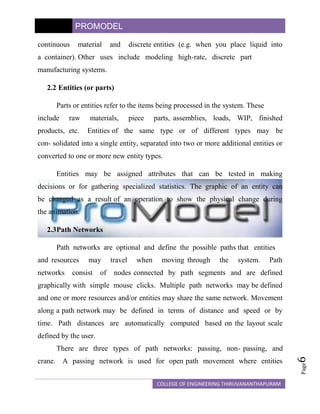
   The modeling elements of ProModel provide the building blocks for
representing the physical and logical components       of     the   system      being
modeled. Physical elements of the system such as parts, machines, or
resources may be referenced either graphically or by name.               Names of
modeling elements may be any word containing up to 80 alphanumeric
characters. Following is a brief description of each of these elements
(see Figure 1).


                                                                                        4
                                                                                        Page


                     Figure 1: ProModel's Modeling Elements

                                       COLLEGE OF ENGINEERING THIRUVANANTHAPURAM
PROMODEL

   2.1 Locations

        Routing locations are fixed places in the system (e.g. machines,
queues, storage areas, work stations, tanks, etc.) to where parts or entities
are routed for processing, storage or simply to make some decision about
further routing.       Routing locations may be either single unit locations
(e.g. a single machine) or multi-unit locations (e.g. a group of similar
machines performing the same operation in parallel).

        Routing locations may have a capacity greater than one and may have
periodic downtimes as a function of clock time (e.g. shift changes), usage
time (e.g. tool wear), usage frequency (e.g. change a dispenser after every n
cycles), change of material (e.g. machine setup) or based on some user
defined condition. Routing locations may be assigned input and output rules.
Input rules are used for selecting what entity to process next while output
rules    are    used    for    ranking   entities   (i.e. FIFO, LIFO, user-defined) in a
multi-capacity location.

        Two special types of locations that provide movement as               well    as
performing holding and operation functions are queues and conveyors. A queue
mimics the behavior of waiting lines, including the movement of entities
through the line. Conveyors are accumulating or non- accumulating                    and
have     a     particular     speed   and   load spacing.     Conveyors      may     be
configured together to provide conveyor networks.

        New to ProModel 4.0 is the ability to model the continuous flow
of liquids and other substances into and out of tanks or similar vessels.
Also, when combined with discrete-event simulation, ProModel's continuous
                                                                                           5
                                                                                           Page


modeling capability makes it possible to model the exchange                    between
                                             COLLEGE OF ENGINEERING THIRUVANANTHAPURAM
PROMODEL

continuous    material      and      discrete entities (e.g. when you place liquid into
a container). Other uses include modeling high-rate, discrete part
manufacturing systems.

   2.2 Entities (or parts)

      Parts or entities refer to the items being processed in the system. These
include    raw     materials,        piece    parts, assemblies, loads, WIP, finished
products, etc.    Entities of the same type or of different types may be
con- solidated into a single entity, separated into two or more additional entities or
converted to one or more new entity types.

      Entities may be assigned attributes that can be tested in making
decisions or for gathering specialized statistics. The graphic of an entity can
be changed as a result of an operation to show the physical change during
the animation.

   2.3Path Networks

      Path networks are optional and define the possible paths that entities
and resources     may       travel     when     moving through    the   system.    Path
networks     consist   of    nodes connected by path segments and are defined
graphically with simple mouse clicks. Multiple path networks may be defined
and one or more resources and/or entities may share the same network. Movement
along a path network may be defined in terms of distance and speed or by
time. Path distances are automatically computed based on the layout scale
defined by the user.
      There are three types of path networks: passing, non- passing, and
                                                                                          6


crane. A passing network is used for open path movement where entities
                                                                                          Page


                                              COLLEGE OF ENGINEERING THIRUVANANTHAPURAM
PROMODEL

and resources are free to overtake one another.                           Non-passing networks
consist of single-file tracks or guide paths such as those used for AGVs
where        vehicles      are   not     able    to      pass. Crane networks            define   the
operating envelope and interface points for bridge cranes.
     2.4 Resources

           A resource may be a person, tool, vehicle or other object that may be used
     to:

• Transport material between routing locations.
• Perform an operation on material at a location
• Perform maintenance on a location or other resource that is down.

           Resources may be either static or assigned to a path network                           for
dynamic movement. A special type of dynamic resource is a crane. Built-
in    decision     rules     can be      used    for     allocation    of     resources     and   for
prioritization of part pick-up and delivery. Motion characteristics of resources
such as empty and full speeds, acceleration, deceleration,                           pickup       and
delivery time can also be specified.

     2.5 Processing (or routing)

           This element defines the processing sequence and flow logic of entities
between routing locations. The operation or                  service        times   at     locations,
resource requirements, processing               logic,     input/output       relationship, routing
conditions,      and move        times    or    requirements      can       be described using the
Processing element.

           Operation times can be defined by constants, distributions, functions,
                                                                                                        7
                                                                                                        Page


attributes, subroutines, etc. or an expression containing any combination of

                                                  COLLEGE OF ENGINEERING THIRUVANANTHAPURAM
PROMODEL

these.     Operation logic can include IF-THEN-ELSE statements, loops, nested
statement blocks and subroutine calls. Resource related statements such as
GET, USE, and JOINTLY GET              with   Boolean    expressions   and   built-in
operation statements such as ACCUM, JOIN, and GROUP greatly simplify
otherwise     complex    logic   in   describing   the processing      requirements.
Built-in      and     user-defined routing rules provide flexibility for modeling all
types of routing conditions.

   2.6 Arrivals (or production schedule)

         Deterministic, conditional, or stochastic arrivals can be modeled using
this element. External files including production schedules or arrival data
can be read into ProModel in the Arrivals element. Built-in or user defined
distributions or spreadsheet created data can be used to define inter arrival
times and quantities.

   2.7 Shifts (or work schedules)

         A powerful feature is the ability to define custom work and break
schedules through ProModel's Shifts module. Work and break schedules are
defined graphically by time of day and day of the week. Resources or locations
are then assigned to a specific shift schedule.              In addition, you can
define shift and break logic that controls location and resource behavior
when they go off-line and what happens once they are off-line.

   3. ADDITIONAL MODELING ELEMENTS

         ProModel provides additional modeling elements used in statements and
expressions to define special decision and operating logic in a model. These
                                                                                        8
                                                                                        Page


elements include variables, attributes, functions, user-defined distributions, and

                                          COLLEGE OF ENGINEERING THIRUVANANTHAPURAM
PROMODEL

costing.
       There are several types of logic elements that may be defined by the
user. Like model elements, names given to these elements may be up to 80
characters in length. Figure 2 shows the menu for accessing these additional
elements. Some of these elements will be discussed in this section.


                          Figure 2: More Elements Menu

   3.1 Attributes

       Attributes for entities and locations can be defined. They may contain real
or integer values.    Location, resource and entity names may also be assigned to
                                                                                     9


attributes.
                                                                                     Page


                                         COLLEGE OF ENGINEERING THIRUVANANTHAPURAM
PROMODEL

   3.2 Variables

      Variables are used for decision making and statistical reporting. The
value of a variable may be monitored over time and displayed at the end of the
simulation as a time series plot or histogram. Variables may hold integer or
real values. Local variables may also be used for quick convenience when
defining logic.
   3.3 Arrays
      An array is a matrix of variables representing multiple values. An
array may be one dimensional or multi- dimensional.

   3.4 Macros

   A macro is a complex expression or set of expressions that can be
defined once and used multiple times as part of             a   logic   statement      (i.e.
processing,       scheduling, downtime    logic).    Macros      can    be   helpful     in
situations where the same bit of logic is repeated in many places in the model.

   3.5 Subroutines

      A subroutine is a user-defined block of statements that can be passed
values when called and optionally return values when completed. Subroutines
may be referenced in the place of any value or logic. A complex operation
performed         several   places   in     a       model       may     be appropriately
defined by a single subroutine.

    3.6 Arrival Cycles, Table Functions and User Defined
        Distributions.
                                                                                               10


      Arrival patterns, table functions or user distributions may be defined. For
                                                                                               Page


example, a user defined distribution which returns an operation time of 5
                                          COLLEGE OF ENGINEERING THIRUVANANTHAPURAM
PROMODEL

minutes 30 percent of the time and an operation time of 8 minutes 70 percent of
the time can be expressed in the User Distributions element.

     3.7 External Files

      One of the powerful features of ProModel is the ability to read data
from external text or spreadsheet files or write data to external files. For
example, operation times (even       in   the   form    of   expressions)   from   an
EXCEL spreadsheet file can be read into ProModel using this element.

   4. COSTING

   With ProModel's new Costing feature, you can now make decisions
about your system on a cost basis. New dialogs allow you to monitor
costs associated with locations, entities, and resources during a model run.
In addition, the General Statistics Report now includes Costing statistics,
automatically generated at runtime. For locations, you can find the cost
of operating a location. For resources, the total cost includes the usage cost as
well as the cost of not using the resource.              For entities, the total cost
includes the costs incurred at all locations the entity passed through, the costs
incurred by use of resources, and the initial cost of the entity.

   5. GRAPHICS

      Graphics in ProModel are realistic and easy to create. Visually realistic
animation helps simulation to become an effective communication vehicle
between engineers and managers. ProModel comes with an extensive library of
graphics with provision to create and add other graphics to the library.
                                                                                        11


ProModel's Graphic Editor comes with a complete set of drawing tools and
                                                                                        Page


a full spectrum of color selections. Scaling, rotating, copying and many other
                                           COLLEGE OF ENGINEERING THIRUVANANTHAPURAM
PROMODEL

editing features are available. You can even import drawings from other
graphics packages. With little effort you can develop quick and simple 2D
layouts, or, with little extra effort, 3D perspective layouts. CAD layout
drawings (e.g. AutoCAD) can also be brought in to use as the model
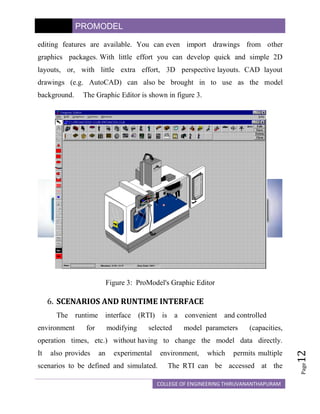
background.    The Graphic Editor is shown in figure 3.


                           Figure 3: ProModel's Graphic Editor

     6. SCENARIOS AND RUNTIME INTERFACE
       The runtime     interface (RTI) is a convenient and controlled
environment     for        modifying    selected    model parameters      (capacities,
operation times, etc.) without having to change the model data directly.
                                                                                         12


It   also provides    an     experimental    environment,   which    permits multiple
                                                                                         Page


scenarios to be defined and simulated.         The RTI can be accessed at the

                                            COLLEGE OF ENGINEERING THIRUVANANTHAPURAM
PROMODEL

beginning of a simulation run for making modifications for a single run
or    for    saving alternative modifications as scenarios for doing multiple
scenario analysis.

     7. RUNNING THE SIMULATION & ANIMATION

       Models can be run for specified lengths of time or until all entities
have been processed.            Multiple replications may also be specified. Models
may be run with or without animation. The animation is very smooth and
it maintains great resolution at any zoom factor.

       The Views feature allows you to define and then quickly and
easily access specific areas of the model layout. Selecting a view scrolls the
layout window and adjusts the zoom so you see a specific region of the
layout regardless of the layout window's size.                 Once a view is defined,
you    can     select    it     while   running     the simulation or change the view from
within the logic.

       During the simulation, you can query the status of resources or the
current value of any logic element. Source level debugging allows you to
trace each action with the option to display the actual source statement that
triggered the action. Trace statements may be confined to a single area of a
model.       Status lights for locations change colors to help you see various
states such as busy, idle, down, etc.

       The animation screen is a virtual screen that means the animation layout is
limited only by memory in your computer. By turning off the animation,
you can speed up the simulation, run for a while and turn the animation back on.
                                                                                              13


The simulation          clock     resolution      can   be expressed in terms of hours,
                                                                                              Page


                                                  COLLEGE OF ENGINEERING THIRUVANANTHAPURAM
PROMODEL

minutes, or seconds with a clock resolution of .00001 a second.

   8. OUTPUT REPORTS

      By     choosing     the    statistics    for        resources,   locations, entities,
variables, etc., users can customize the output reports. The statistics are
written to a results database which           can    be     exported   to   spreadsheets.
Additionally, graphical reports of the outputs can be displayed, printed or
plotted.   These     graphs     can    be     individual       or comparative pie charts,
histograms, time-series plots, etc. See Figure 4 for a sample location state graph.


                                                                                              14


                         Figure 4: A Location State Graph
                                                                                              Page


                                            COLLEGE OF ENGINEERING THIRUVANANTHAPURAM
PROMODEL

   9. OPTIONS

      One of the most accommodating features of ProModel is the provision for
customizing the modeling environment to suit the preferences of the user. Under
the View menu, you can zoom in or out, display a grid, refresh the
screen, set default directories for model files, icon library files, or model output
files. You can set and save default settings (i.e. window sizes, appearance).
      ProModel      also     allows   you     to   choose         editing preferences for
model development. Default fonts and sizes for text and a choice of long or
abbreviated menu lengths are available.       Prompts and added explanations can
also be activated which may assist the novice user. The expert user can
benefit from choosing options that streamline the editing process.

   10.       OPTIMISATION
      SimRunner Optimization is an add-on capability for ProModel
simulation software.      SimRunner turns your simulation model into an answer
machine by giving you the best answer possible while saving you the most time.
The optimization process takes an existing ProModel simulation model
and performs sophisticated "what-if" analysis and optimization automatically.

      For each optimization project, you tell SimRunner which model to
analyze/optimize, which input factors to change,        and        how    you   measure
system    simulation performance.     You can run two types of projects in
SimRunner: Stage One Optimization Analysis, and Stage Two Simulation
Optimization.

      A    Stage    One     Optimization    Analysis    is    a     factorial design   of
                                                                                            15


experiments that tells you whether or not changing a given input factor
                                                                                            Page


                                           COLLEGE OF ENGINEERING THIRUVANANTHAPURAM
PROMODEL

is affecting the objective function, and the significance of the effects.                             A
Stage Two          Simulation         Optimization        is     a     multi-variable optimization
that tries various combinations of input factors to arrive at the combination
that provides the best objective function value.
         The SimRunner Output report generates three types of data and reporting for
you:
     1. Data reports - for import into spreadsheets
     2. Analysis reports - for text and word processing reports
     3. Charts - for graphical display of results.
     Each of these can be printed or exported to other applications using
common clipboard functions.

     11.        SUPPLY CHAIN APPLICATIONS

         Simulation models have had extreme value in many companies,
being used as decision making and planning tools                              by        managers      in
supply       chain    related    areas. ProModel          is     successful        in   providing    an
accurate representation         for     many       players     involved       in    a   single product
line.        The     players    may      consist     of   suppliers, warehouses,            customers,
retailers,    and     transportation vehicles.            Such       issues    facing     the    players
of      the organization are fleet sizing, inventory reduction, and shutdowns and
outages. ProModel allows you to create a model, which addresses these issues
in a single model.

     11.1       Fleet Sizing

         In the effort to correctly size various types of fleets (rail car, truck,
                                                                                                           16


ISO, etc.), models may incorporate variability in transportation times.                         Seasonal
                                                                                                           Page


peaks and dives are easily             modeled       in   addition       to    vessel     maintenance
                                                    COLLEGE OF ENGINEERING THIRUVANANTHAPURAM
PROMODEL

outages. Rail switching issues involving stoppages and congestion can also
be investigated.      Demand increases may be used in a current state model to
determine the need for more vessels and/or how to meet the need with
existing resources.     ProModel has been used to meet special seasonal orders
without additional resources, reduce current fleet sizes, and manage the
current transportation resources more effectively.

   11.2      Inventory reduction

      Especially challenging issues in supply chain applications include
capturing the behavior of continuous flow systems with stochastic conditions. On-
screen variables and output statistics modules provide guidance to make decisions
on tank sizing, capacity analysis and impact of variability of supply on
manufacturing units. Benefits include the ability to analyze complex systems with
a holistic perspective, reducing inventory levels by modeling continuous flow
systems at both manufacturing and consumer sites and determining the needs of
campaigning of differing products on the same unit.

  11.3 Shutdowns and outages

      The long and short-term impacts of planned outages have been a problem for
managers. Unplanned and random outages are much worse. Outage issues not
only include manufacturing or customer outages and their various impacts, but also
involve shipping and supply outages. ProModel allows you to determine the impact
of planned shutdowns on remote customer sites as well as the possibility of
shutting down production because of poorly planned, customer interfaced outages.
Models provide flexibility on testing alternate scenarios, moving and shifting the
                                                                                     17


timing of outages as well as the durations.
                                                                                     Page


                                         COLLEGE OF ENGINEERING THIRUVANANTHAPURAM
PROMODEL

   12.       CONCLUSIONS
      Until recently, manufacturing companies have not fully benefited                  from
simulation    in      making     continuous improvements because of the time,
programming        expertise,   and    cost    involved    in      getting   useful   results.
ProModel is designed for manufacturing companies to fully achieve the
benefits of simulation technology at an affordable price. ProModel is directed
toward making simulation         a    standard    tool    in the     hands   of   engineers,
managers and systems analysts just as spreadsheet software is in the hands
of accountants and financial analysts.


                                                                                                 18
                                                                                                 Page


                                              COLLEGE OF ENGINEERING THIRUVANANTHAPURAM

Pro Model

  • 1.
    STUDY OF PROMODEL SYSTEMMODELLING AND SIMULATION Assignment No 3 Submitted on 02-11-09 S7 INDUSTRIAL KAILAS SREE CHANDRAN • 432 VYAS K S • 430 BINOY K M • 431 KRISHNAKUMAR R • 433
  • 2.
    CONTENTS 1. OVERVIEW OFPROMODEL 2. MODELING ELEMENTS 2.1 Locations 2.2 Entities (or parts) 2.3 Path Networks 2.4 Resources 2.5 Processing (or routing) 2.6 Arrivals (or production schedule) 2.7 Shifts (or work schedules) 3. ADDITIONAL MODELING ELEMENTS 3.1 Attributes 3.2 Variables 3.3 Arrays 3.4 Macros 3.5 Subroutines 3.6 Arrival Cycles, Table Functions and User Defined Distributions 3.7 External File 4. COSTING 5. GRAPHICS 6. SCENARIOS AND RUNTIME INTERFACE 7. RUNNING THE SIMULATION & ANIMATION 8. OUTPUT REPORTS 9. OPTIONS 10.OPTIMIZATION 11.SUPPLY CHAIN APPLICATIONS 11.1 Fleet Sizing 11.2 Inventory reduction 11.3 Shutdowns and outages 12.CONCLUSIONS
  • 3.
    PROMODEL 1. OVERVIEW OF PROMODEL ProModel is a simulation and animation tool designed to quickly yet accurately model manufacturing systems of all types, particularly supply chain systems. Engineers and managers find the manufacturing oriented modeling elements and rule-based decision logic extremely easy to learn and use. Users are particularly delighted when they discover that ProModel is capable of modeling their most complex systems. Because it provides such an intuitive and straightforward approach to modeling, it is also attractive to professors in engineering and business programs who are interested in teaching modeling and analysis concepts without having to teach computer programming. While most systems can be modeled by selecting from ProModel's complete set of modeling elements (e.g. resources, downtimes, etc.) and modifying the appropriate parameters, complete programming capability is also provided if needed for modeling special situations. Built-in language features include if-then- else logic, Boolean expressions, variables, attributes, arrays and even access to external spreadsheet and text files. For those who prefer coding complex logic using a programming language such as C, Pascal or Basic, external subroutines may be dynamically linked to the model and called from anywhere inside the model at runtime. In this way, ProModel allows systems analysts and simulation experts to use the tools they are most comfortable with to provide total flexibility. ProModel also provides several built-in distribution functions which, in conjunction with streams, return random values according to a statistical 1 distribution. To aid the user in selecting an appropriate distribution for a data Page COLLEGE OF ENGINEERING THIRUVANANTHAPURAM
  • 4.
    PROMODEL set, Stat::Fit isincluded with ProModel. Stat::Fit is a curve fitting software that fits analytical distributions to user data. Model development is completely graphical and object-oriented. To the extent possible, all input is provided graphically with information being grouped by object type and presented in a "spreadsheet-like" format for quick and intuitive access. For example, when you define a machine you can define its icon, capacity, downtime characteristics, input and output rules, desired output statistics, etc. ProModel complies with GUI standards, which means that individuals familiar with other standard Windows programs such as word processing or spreadsheets will have no trouble learning how to use ProModel. This data input approach minimizes the learning curve for beginners and maximizes the efficiency for modifying large and complex models. A unique feature in ProModel is the ability to bring up a pop-up menu depending on the current context that prompts the user in defining any statement or expression. This enables any expression or statement to be entered using only the mouse. It also eliminates the need to remember variable or other element names that you wish to reference by allowing you to select them from a list box. Quick and convenient online documentation is available through ProModel's integrated Help system and online tutorials. The Help system uses the Windows Help system that allows maximum flexibility for looking up anything from command syntax to descriptions of model building modules. ProModel also provides tutorials that contain quick lessons on how to 2 build models, how to run models and access output reports and how to model Page COLLEGE OF ENGINEERING THIRUVANANTHAPURAM
  • 5.
    PROMODEL various applications withthe software. To further reduce model development time, ProModel provides model merging capabilities to allow several individuals to be working separately on different sections of a large model. Additionally, frequently defined cells or even commonly used decision logic may be stored as sub model templates which eliminate the need to "re- invent the wheel" with every model. These templates can even have specially designated parameters that may be changed by the user. Animation development is integrated with the model definition. A major drawback of many simulation soft- ware products is that animation development is independent from simulation model development. This makes it time consuming and inconvenient for engineers to use animation as a validation/verification tool. ProModel integrates system definition and animation development into one function. While defining routing locations, conveyors, AGV paths, etc., you essentially develop the animation layout. The layout screen is a virtual screen that can be scaled to an actual factory layout. Simulation results are informative and may be displayed in tabular or graphical form. Many simulation software products require special commands to generate statistics that are difficult to interpret for non- simulationists. ProModel allows quick and convenient selection of reports and provides automatic tabular and graphical reports on all system performance measures. Output reports from several simulation runs can even be compared on the same graph. ProModel runs on any standard 486 computer with Windows 3.x, 3 Windows NT or Windows 95 operating systems. Most engineers, managers, Page COLLEGE OF ENGINEERING THIRUVANANTHAPURAM
  • 6.
    PROMODEL and professors haveeasy access to IBM or compatible computers with VGA graphics capabilities. ProModel does not require any special graphics cards or special monitors. This makes it convenient and cost effective for companies and academic institutions that have standard microcomputers. ProModel also runs on LANs (Local Area Networks). 2. MODELING ELEMENTS The modeling elements of ProModel provide the building blocks for representing the physical and logical components of the system being modeled. Physical elements of the system such as parts, machines, or resources may be referenced either graphically or by name. Names of modeling elements may be any word containing up to 80 alphanumeric characters. Following is a brief description of each of these elements (see Figure 1). 4 Page Figure 1: ProModel's Modeling Elements COLLEGE OF ENGINEERING THIRUVANANTHAPURAM
  • 7.
    PROMODEL 2.1 Locations Routing locations are fixed places in the system (e.g. machines, queues, storage areas, work stations, tanks, etc.) to where parts or entities are routed for processing, storage or simply to make some decision about further routing. Routing locations may be either single unit locations (e.g. a single machine) or multi-unit locations (e.g. a group of similar machines performing the same operation in parallel). Routing locations may have a capacity greater than one and may have periodic downtimes as a function of clock time (e.g. shift changes), usage time (e.g. tool wear), usage frequency (e.g. change a dispenser after every n cycles), change of material (e.g. machine setup) or based on some user defined condition. Routing locations may be assigned input and output rules. Input rules are used for selecting what entity to process next while output rules are used for ranking entities (i.e. FIFO, LIFO, user-defined) in a multi-capacity location. Two special types of locations that provide movement as well as performing holding and operation functions are queues and conveyors. A queue mimics the behavior of waiting lines, including the movement of entities through the line. Conveyors are accumulating or non- accumulating and have a particular speed and load spacing. Conveyors may be configured together to provide conveyor networks. New to ProModel 4.0 is the ability to model the continuous flow of liquids and other substances into and out of tanks or similar vessels. Also, when combined with discrete-event simulation, ProModel's continuous 5 Page modeling capability makes it possible to model the exchange between COLLEGE OF ENGINEERING THIRUVANANTHAPURAM
  • 8.
    PROMODEL continuous material and discrete entities (e.g. when you place liquid into a container). Other uses include modeling high-rate, discrete part manufacturing systems. 2.2 Entities (or parts) Parts or entities refer to the items being processed in the system. These include raw materials, piece parts, assemblies, loads, WIP, finished products, etc. Entities of the same type or of different types may be con- solidated into a single entity, separated into two or more additional entities or converted to one or more new entity types. Entities may be assigned attributes that can be tested in making decisions or for gathering specialized statistics. The graphic of an entity can be changed as a result of an operation to show the physical change during the animation. 2.3Path Networks Path networks are optional and define the possible paths that entities and resources may travel when moving through the system. Path networks consist of nodes connected by path segments and are defined graphically with simple mouse clicks. Multiple path networks may be defined and one or more resources and/or entities may share the same network. Movement along a path network may be defined in terms of distance and speed or by time. Path distances are automatically computed based on the layout scale defined by the user. There are three types of path networks: passing, non- passing, and 6 crane. A passing network is used for open path movement where entities Page COLLEGE OF ENGINEERING THIRUVANANTHAPURAM
  • 9.
    PROMODEL and resources arefree to overtake one another. Non-passing networks consist of single-file tracks or guide paths such as those used for AGVs where vehicles are not able to pass. Crane networks define the operating envelope and interface points for bridge cranes. 2.4 Resources A resource may be a person, tool, vehicle or other object that may be used to: • Transport material between routing locations. • Perform an operation on material at a location • Perform maintenance on a location or other resource that is down. Resources may be either static or assigned to a path network for dynamic movement. A special type of dynamic resource is a crane. Built- in decision rules can be used for allocation of resources and for prioritization of part pick-up and delivery. Motion characteristics of resources such as empty and full speeds, acceleration, deceleration, pickup and delivery time can also be specified. 2.5 Processing (or routing) This element defines the processing sequence and flow logic of entities between routing locations. The operation or service times at locations, resource requirements, processing logic, input/output relationship, routing conditions, and move times or requirements can be described using the Processing element. Operation times can be defined by constants, distributions, functions, 7 Page attributes, subroutines, etc. or an expression containing any combination of COLLEGE OF ENGINEERING THIRUVANANTHAPURAM
  • 10.
    PROMODEL these. Operation logic can include IF-THEN-ELSE statements, loops, nested statement blocks and subroutine calls. Resource related statements such as GET, USE, and JOINTLY GET with Boolean expressions and built-in operation statements such as ACCUM, JOIN, and GROUP greatly simplify otherwise complex logic in describing the processing requirements. Built-in and user-defined routing rules provide flexibility for modeling all types of routing conditions. 2.6 Arrivals (or production schedule) Deterministic, conditional, or stochastic arrivals can be modeled using this element. External files including production schedules or arrival data can be read into ProModel in the Arrivals element. Built-in or user defined distributions or spreadsheet created data can be used to define inter arrival times and quantities. 2.7 Shifts (or work schedules) A powerful feature is the ability to define custom work and break schedules through ProModel's Shifts module. Work and break schedules are defined graphically by time of day and day of the week. Resources or locations are then assigned to a specific shift schedule. In addition, you can define shift and break logic that controls location and resource behavior when they go off-line and what happens once they are off-line. 3. ADDITIONAL MODELING ELEMENTS ProModel provides additional modeling elements used in statements and expressions to define special decision and operating logic in a model. These 8 Page elements include variables, attributes, functions, user-defined distributions, and COLLEGE OF ENGINEERING THIRUVANANTHAPURAM
  • 11.
    PROMODEL costing. There are several types of logic elements that may be defined by the user. Like model elements, names given to these elements may be up to 80 characters in length. Figure 2 shows the menu for accessing these additional elements. Some of these elements will be discussed in this section. Figure 2: More Elements Menu 3.1 Attributes Attributes for entities and locations can be defined. They may contain real or integer values. Location, resource and entity names may also be assigned to 9 attributes. Page COLLEGE OF ENGINEERING THIRUVANANTHAPURAM
  • 12.
    PROMODEL 3.2 Variables Variables are used for decision making and statistical reporting. The value of a variable may be monitored over time and displayed at the end of the simulation as a time series plot or histogram. Variables may hold integer or real values. Local variables may also be used for quick convenience when defining logic. 3.3 Arrays An array is a matrix of variables representing multiple values. An array may be one dimensional or multi- dimensional. 3.4 Macros A macro is a complex expression or set of expressions that can be defined once and used multiple times as part of a logic statement (i.e. processing, scheduling, downtime logic). Macros can be helpful in situations where the same bit of logic is repeated in many places in the model. 3.5 Subroutines A subroutine is a user-defined block of statements that can be passed values when called and optionally return values when completed. Subroutines may be referenced in the place of any value or logic. A complex operation performed several places in a model may be appropriately defined by a single subroutine. 3.6 Arrival Cycles, Table Functions and User Defined Distributions. 10 Arrival patterns, table functions or user distributions may be defined. For Page example, a user defined distribution which returns an operation time of 5 COLLEGE OF ENGINEERING THIRUVANANTHAPURAM
  • 13.
    PROMODEL minutes 30 percentof the time and an operation time of 8 minutes 70 percent of the time can be expressed in the User Distributions element. 3.7 External Files One of the powerful features of ProModel is the ability to read data from external text or spreadsheet files or write data to external files. For example, operation times (even in the form of expressions) from an EXCEL spreadsheet file can be read into ProModel using this element. 4. COSTING With ProModel's new Costing feature, you can now make decisions about your system on a cost basis. New dialogs allow you to monitor costs associated with locations, entities, and resources during a model run. In addition, the General Statistics Report now includes Costing statistics, automatically generated at runtime. For locations, you can find the cost of operating a location. For resources, the total cost includes the usage cost as well as the cost of not using the resource. For entities, the total cost includes the costs incurred at all locations the entity passed through, the costs incurred by use of resources, and the initial cost of the entity. 5. GRAPHICS Graphics in ProModel are realistic and easy to create. Visually realistic animation helps simulation to become an effective communication vehicle between engineers and managers. ProModel comes with an extensive library of graphics with provision to create and add other graphics to the library. 11 ProModel's Graphic Editor comes with a complete set of drawing tools and Page a full spectrum of color selections. Scaling, rotating, copying and many other COLLEGE OF ENGINEERING THIRUVANANTHAPURAM
  • 14.
    PROMODEL editing features areavailable. You can even import drawings from other graphics packages. With little effort you can develop quick and simple 2D layouts, or, with little extra effort, 3D perspective layouts. CAD layout drawings (e.g. AutoCAD) can also be brought in to use as the model background. The Graphic Editor is shown in figure 3. Figure 3: ProModel's Graphic Editor 6. SCENARIOS AND RUNTIME INTERFACE The runtime interface (RTI) is a convenient and controlled environment for modifying selected model parameters (capacities, operation times, etc.) without having to change the model data directly. 12 It also provides an experimental environment, which permits multiple Page scenarios to be defined and simulated. The RTI can be accessed at the COLLEGE OF ENGINEERING THIRUVANANTHAPURAM
  • 15.
    PROMODEL beginning of asimulation run for making modifications for a single run or for saving alternative modifications as scenarios for doing multiple scenario analysis. 7. RUNNING THE SIMULATION & ANIMATION Models can be run for specified lengths of time or until all entities have been processed. Multiple replications may also be specified. Models may be run with or without animation. The animation is very smooth and it maintains great resolution at any zoom factor. The Views feature allows you to define and then quickly and easily access specific areas of the model layout. Selecting a view scrolls the layout window and adjusts the zoom so you see a specific region of the layout regardless of the layout window's size. Once a view is defined, you can select it while running the simulation or change the view from within the logic. During the simulation, you can query the status of resources or the current value of any logic element. Source level debugging allows you to trace each action with the option to display the actual source statement that triggered the action. Trace statements may be confined to a single area of a model. Status lights for locations change colors to help you see various states such as busy, idle, down, etc. The animation screen is a virtual screen that means the animation layout is limited only by memory in your computer. By turning off the animation, you can speed up the simulation, run for a while and turn the animation back on. 13 The simulation clock resolution can be expressed in terms of hours, Page COLLEGE OF ENGINEERING THIRUVANANTHAPURAM
  • 16.
    PROMODEL minutes, or secondswith a clock resolution of .00001 a second. 8. OUTPUT REPORTS By choosing the statistics for resources, locations, entities, variables, etc., users can customize the output reports. The statistics are written to a results database which can be exported to spreadsheets. Additionally, graphical reports of the outputs can be displayed, printed or plotted. These graphs can be individual or comparative pie charts, histograms, time-series plots, etc. See Figure 4 for a sample location state graph. 14 Figure 4: A Location State Graph Page COLLEGE OF ENGINEERING THIRUVANANTHAPURAM
  • 17.
    PROMODEL 9. OPTIONS One of the most accommodating features of ProModel is the provision for customizing the modeling environment to suit the preferences of the user. Under the View menu, you can zoom in or out, display a grid, refresh the screen, set default directories for model files, icon library files, or model output files. You can set and save default settings (i.e. window sizes, appearance). ProModel also allows you to choose editing preferences for model development. Default fonts and sizes for text and a choice of long or abbreviated menu lengths are available. Prompts and added explanations can also be activated which may assist the novice user. The expert user can benefit from choosing options that streamline the editing process. 10. OPTIMISATION SimRunner Optimization is an add-on capability for ProModel simulation software. SimRunner turns your simulation model into an answer machine by giving you the best answer possible while saving you the most time. The optimization process takes an existing ProModel simulation model and performs sophisticated "what-if" analysis and optimization automatically. For each optimization project, you tell SimRunner which model to analyze/optimize, which input factors to change, and how you measure system simulation performance. You can run two types of projects in SimRunner: Stage One Optimization Analysis, and Stage Two Simulation Optimization. A Stage One Optimization Analysis is a factorial design of 15 experiments that tells you whether or not changing a given input factor Page COLLEGE OF ENGINEERING THIRUVANANTHAPURAM
  • 18.
    PROMODEL is affecting theobjective function, and the significance of the effects. A Stage Two Simulation Optimization is a multi-variable optimization that tries various combinations of input factors to arrive at the combination that provides the best objective function value. The SimRunner Output report generates three types of data and reporting for you: 1. Data reports - for import into spreadsheets 2. Analysis reports - for text and word processing reports 3. Charts - for graphical display of results. Each of these can be printed or exported to other applications using common clipboard functions. 11. SUPPLY CHAIN APPLICATIONS Simulation models have had extreme value in many companies, being used as decision making and planning tools by managers in supply chain related areas. ProModel is successful in providing an accurate representation for many players involved in a single product line. The players may consist of suppliers, warehouses, customers, retailers, and transportation vehicles. Such issues facing the players of the organization are fleet sizing, inventory reduction, and shutdowns and outages. ProModel allows you to create a model, which addresses these issues in a single model. 11.1 Fleet Sizing In the effort to correctly size various types of fleets (rail car, truck, 16 ISO, etc.), models may incorporate variability in transportation times. Seasonal Page peaks and dives are easily modeled in addition to vessel maintenance COLLEGE OF ENGINEERING THIRUVANANTHAPURAM
  • 19.
    PROMODEL outages. Rail switchingissues involving stoppages and congestion can also be investigated. Demand increases may be used in a current state model to determine the need for more vessels and/or how to meet the need with existing resources. ProModel has been used to meet special seasonal orders without additional resources, reduce current fleet sizes, and manage the current transportation resources more effectively. 11.2 Inventory reduction Especially challenging issues in supply chain applications include capturing the behavior of continuous flow systems with stochastic conditions. On- screen variables and output statistics modules provide guidance to make decisions on tank sizing, capacity analysis and impact of variability of supply on manufacturing units. Benefits include the ability to analyze complex systems with a holistic perspective, reducing inventory levels by modeling continuous flow systems at both manufacturing and consumer sites and determining the needs of campaigning of differing products on the same unit. 11.3 Shutdowns and outages The long and short-term impacts of planned outages have been a problem for managers. Unplanned and random outages are much worse. Outage issues not only include manufacturing or customer outages and their various impacts, but also involve shipping and supply outages. ProModel allows you to determine the impact of planned shutdowns on remote customer sites as well as the possibility of shutting down production because of poorly planned, customer interfaced outages. Models provide flexibility on testing alternate scenarios, moving and shifting the 17 timing of outages as well as the durations. Page COLLEGE OF ENGINEERING THIRUVANANTHAPURAM
  • 20.
    PROMODEL 12. CONCLUSIONS Until recently, manufacturing companies have not fully benefited from simulation in making continuous improvements because of the time, programming expertise, and cost involved in getting useful results. ProModel is designed for manufacturing companies to fully achieve the benefits of simulation technology at an affordable price. ProModel is directed toward making simulation a standard tool in the hands of engineers, managers and systems analysts just as spreadsheet software is in the hands of accountants and financial analysts. 18 Page COLLEGE OF ENGINEERING THIRUVANANTHAPURAM